audio TOYOTA YARIS HATCHBACK 2009 Owner's Guide
[x] Cancel search | Manufacturer: TOYOTA, Model Year: 2009, Model line: YARIS HATCHBACK, Model: TOYOTA YARIS HATCHBACK 2009Pages: 402, PDF Size: 7.61 MB
Page 221 of 402
209
3-2. Using the audio system
3
Interior features
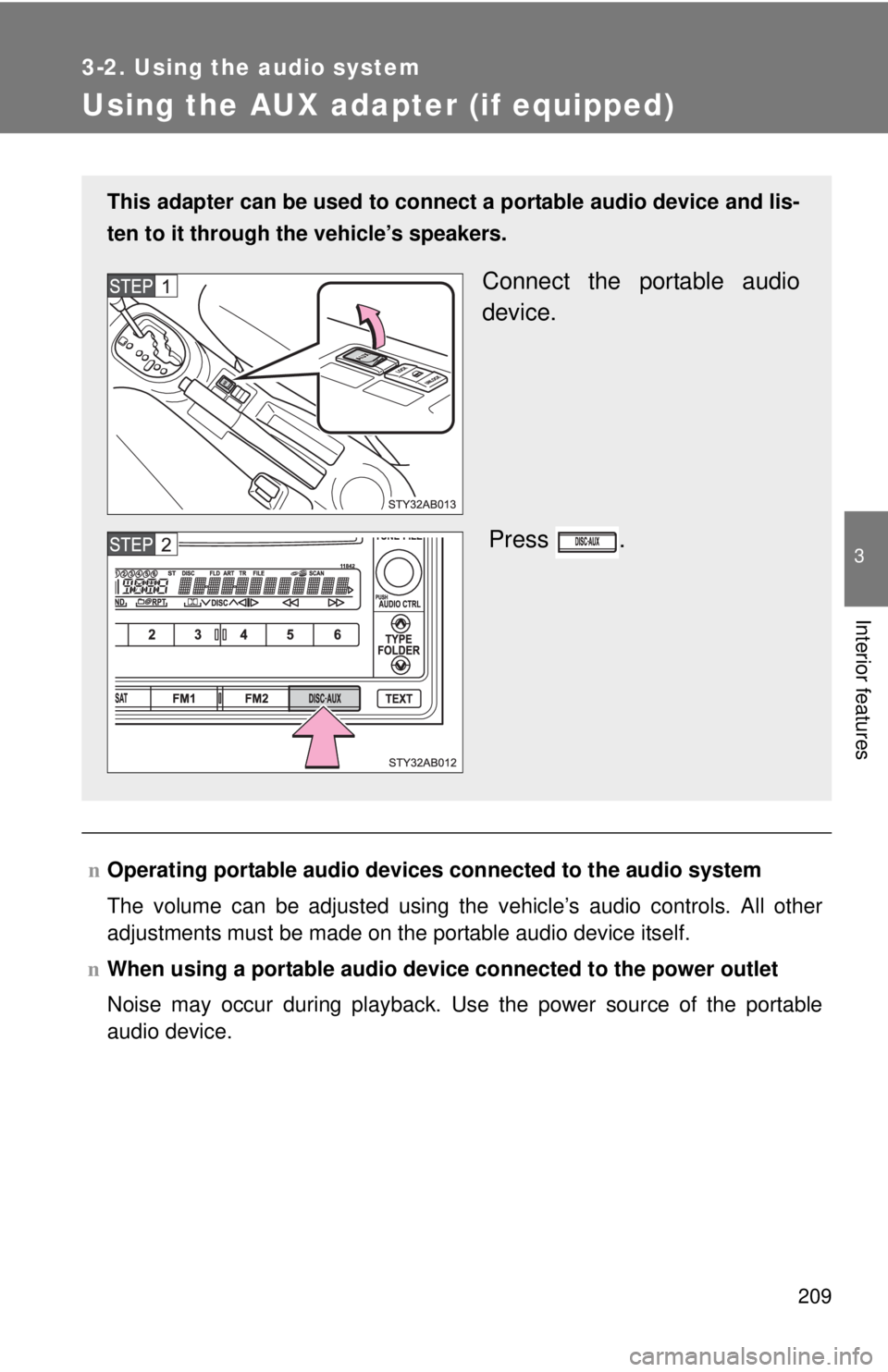
Using the AUX adapter (if equipped)
nOperating portable audio devices connected to the audio system
The volume can be adjusted using the vehicle’s audio controls. All other
adjustment
s must be made on the portable audio device itself.
n When
using a portable audio devi ce connected to the power outlet
Noise may occur during playback. Use the power source of the portable
audio device.
This adapter can be used to connect a portable audio device and lis-
ten to it through the vehicle’
s speakers.
Connect the portable audio
device.
Press .
Page 243 of 402

232 4-1. Maintenance and care
NOTICE
nCleaning detergents
Do not use organic substances such as benzene or gasoline, acidic or alka-
line solutions, dye, bleach or other detergent. Doing so may discolor the
vehicle interior or cause streaks or damage to painted surfaces.
n Preventing damage to leather surfaces
Observe the following precautions to avoid damage to and deterioration o\
f
leather surfaces.
lRemove any dust or dirt on leather surfaces immediately.
l Do not expose the vehicle to direct sunlight for extended periods of time.
Park the vehicle in the shade, especially during summer.
l Do not place items made of vinyl, plastic, or that contain wax on the uphol-
stery, as they may stick to the leather surface if the vehicle interior heats
up significantly.
n Water on the floor
Do not wash the vehicle floor with water.
Vehicle systems such as the audio system may be damaged if water comes
into contact with electrical components under the floor of the vehicle, and
may also cause the body to rust.
n Cleaning the inside of the rear window
Be careful not to scratch or damage the heater wires.
Page 291 of 402
280 4-3. Do-it-yourself maintenance
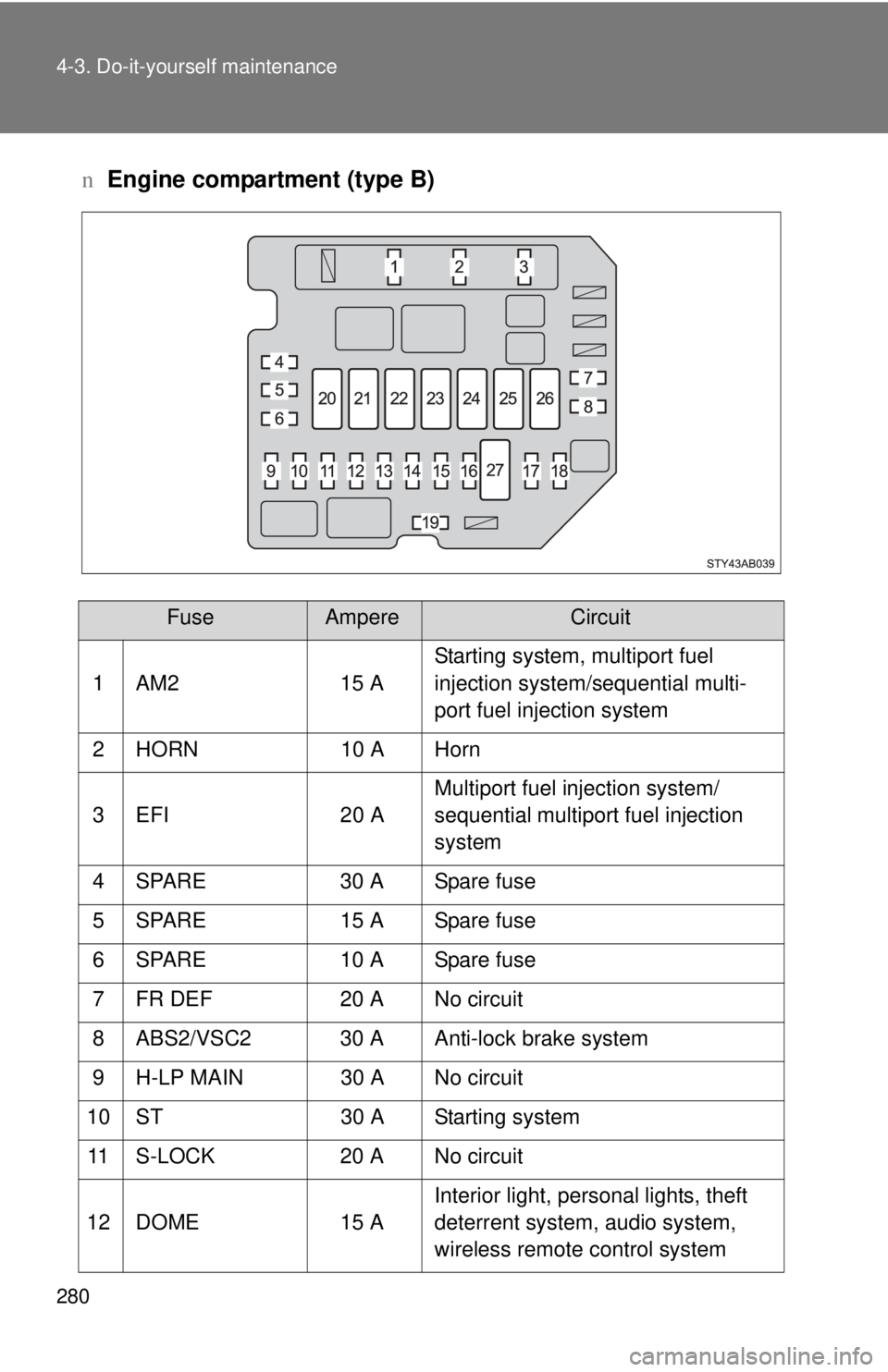
nEngine compartment (type B)
FuseAmpereCircuit
1 AM2 15 A Starting system, multiport fuel
injection system/sequential multi-
port fuel injection system
2 HORN 10 A Horn
3 EFI 20 A Multiport fuel injection system/
sequential multiport fuel injection
system
4 SPARE 30 A Spare fuse
5 SPARE 15 A Spare fuse
6 SPARE 10 A Spare fuse
7 FR DEF 20 A No circuit
8 ABS2/VSC2 30 A Anti-lock brake system
9 H-LP MAIN 30 A No circuit
10 ST 30 A Starting system 11 S-LOCK 20 A No circuit
12 DOME 15 A Interior light, personal lights, theft
deterrent system, audio system,
wireless remote control system
Page 294 of 402
283
4-3. Do-it-yourself maintenance
4
Maintenance and care
n
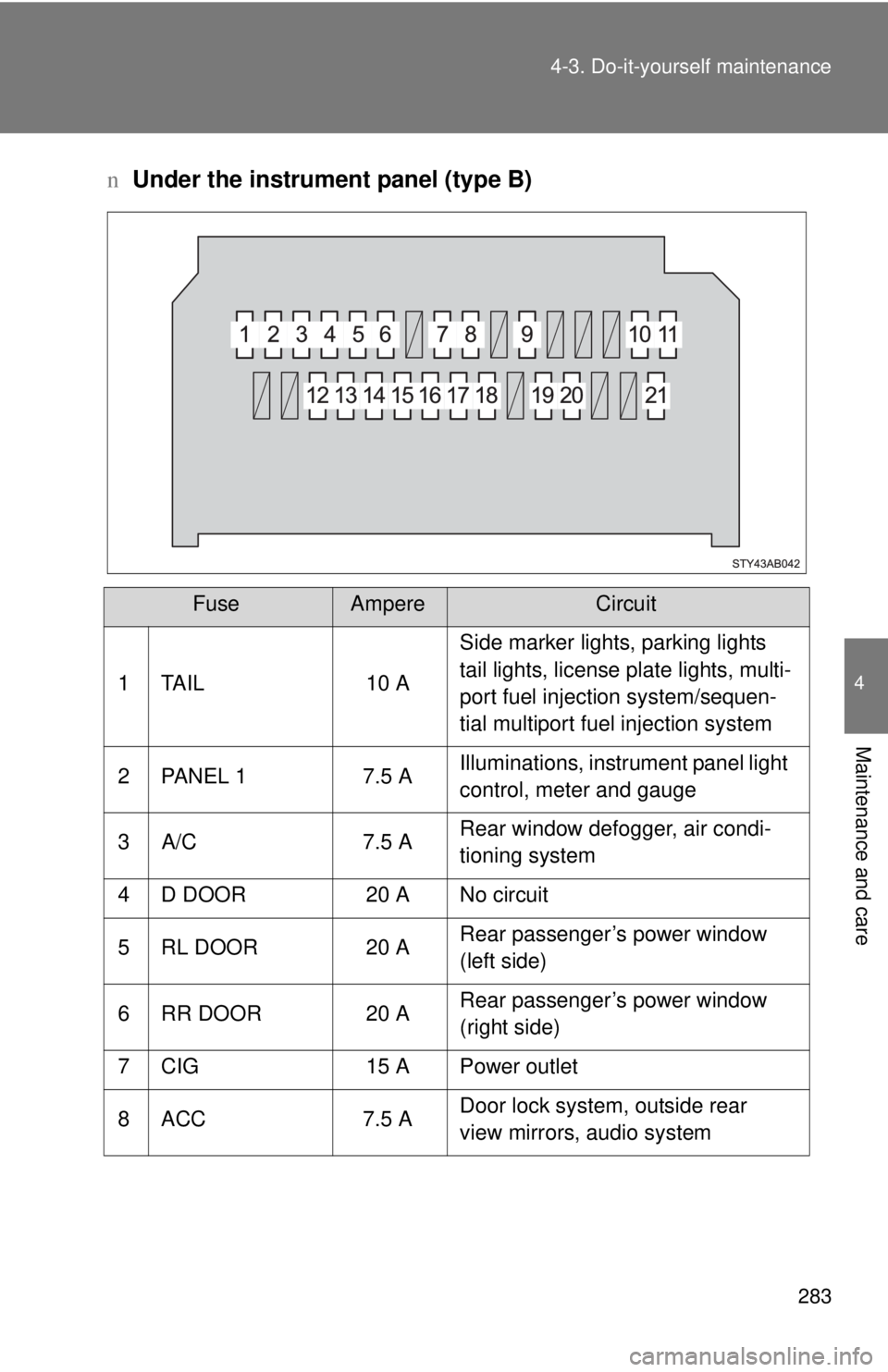
Under the instrument panel (type B)
FuseAmpereCircuit
1 TAIL 10 A Side marker lights, parking lights
tail lights, license plate lights, multi-
port fuel injection system/sequen-
tial multiport fuel injection system
2 PANEL 1 7.5 A Illuminations, instrument panel light
control, meter and gauge
3 A/C 7.5 A Rear window defogger, air condi-
tioning system
4 D DOOR 20 A No circuit
5 RL DOOR 20 A Rear passenger’s power window
(left side)
6 RR DOOR 20 A Rear passenger’s power window
(right side)
7 CIG 15 A Power outlet
8 ACC 7.5 A Door lock system, outside rear
view mirrors, audio system
Page 345 of 402
5
When trouble arises
335
5-2. Steps to take in an emergency
n
Starting the engine when the battery is discharged (vehicles with an
automatic transmission)
The engine cannot be started by push-starting.
n A
voiding a discharged battery
lT
urn off the headlights and the audio system while the engine is turned
off.
l T
urn off any unnecessary electrical components when the vehicle is run -
ning at a low speed for an extended period, such as in heavy traffic, etc.
CAUTION
nAvoiding battery fires or explosions
Observe the following precautions to prevent accidentally igniting the flam-
mable gas that may be emitted from the battery.
lMake sure the jumper cable is connected to the correct terminal and that it
is not unintentionally in contact with any part other than the intended termi-
nal.
l Do not allow the jumper cables to come into contact with the “+” and “-” ter-
minals.
l Do not smoke, use matches, cigarette lighters or allow open flame near
the battery.
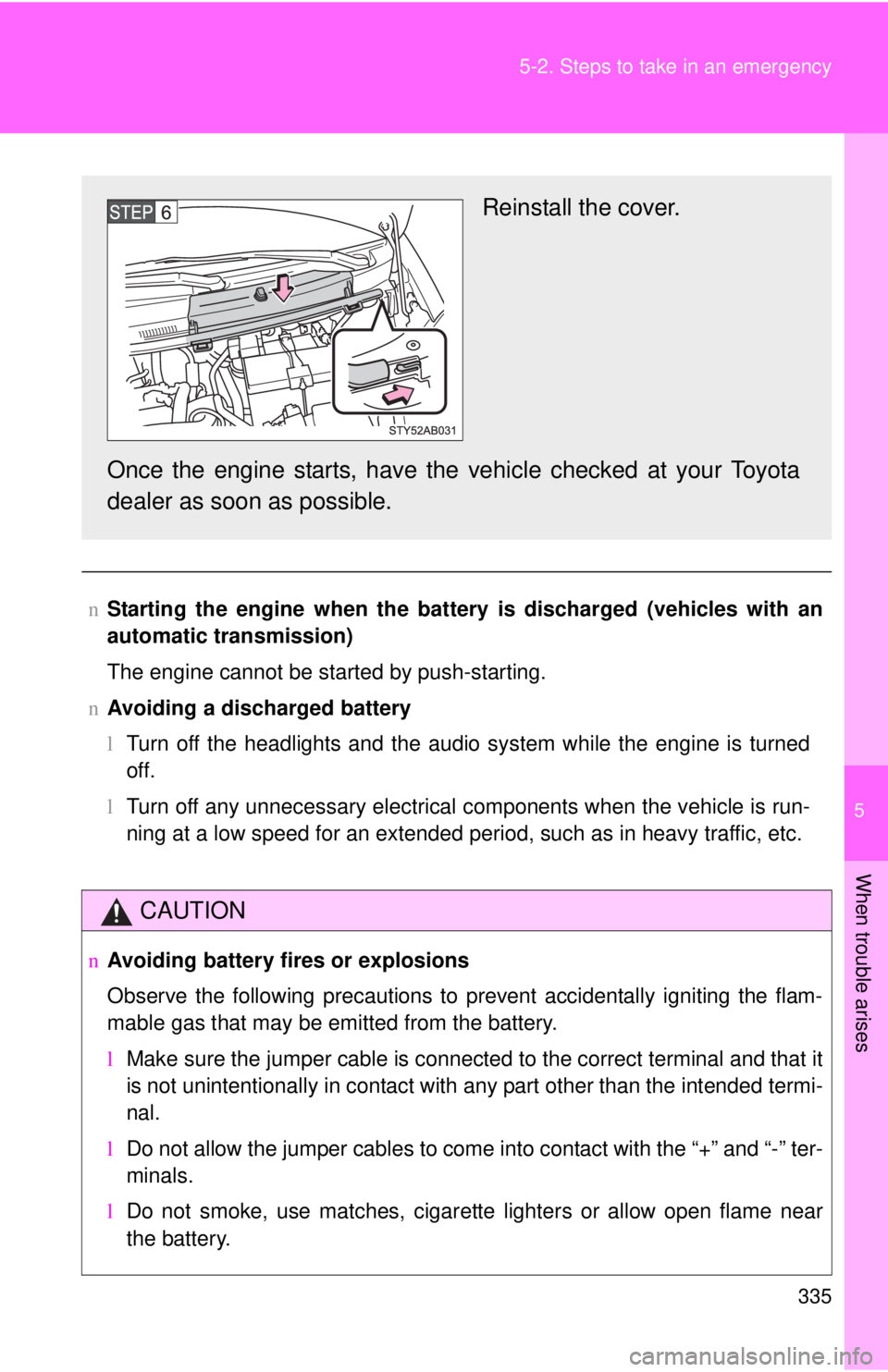
Reinstall the cover.
Once the engine starts, have the vehicle checked at your Toyota
dealer as soon as possible.
Page 387 of 402
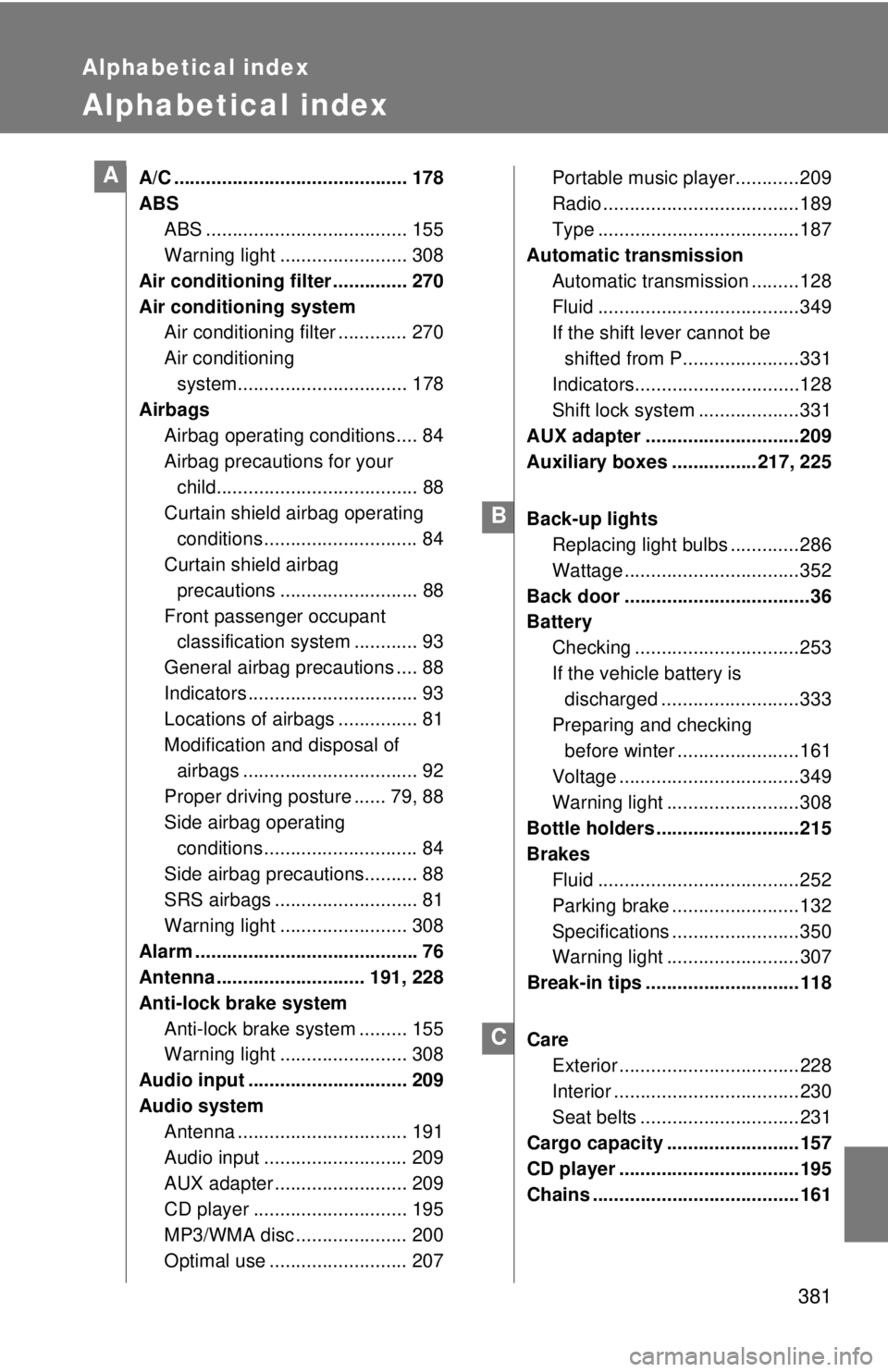
381
Alphabetical index
Alphabetical index
A/C ............................................178
ABS ABS ...................................... 155
Warning light ........................ 308
Air conditioning filter .............. 270
Air conditioning system Air conditioning filter ............. 270
Air conditioning
system................................ 178
Airbags
Airbag operating conditions .... 84
Airbag precautions for your
child...................................... 88
Curtain shield airbag operating
conditions ............................. 84
Curtain shield airbag
precautions .......................... 88
Front passenger occupant classification system ............ 93
General airbag precautions .... 88
Indicators ................................ 93
Locations of airbags ............... 81
Modification and disposal of
airbags ................................. 92
Proper driving posture ...... 79, 88
Side airbag operating
conditions ............................. 84
Side airbag precautions.......... 88
SRS airbags ........................... 81
Warning light ........................ 308
Alarm .......................................... 76
Antenna ............................ 191, 228
Anti-lock brake system Anti-lock brake system ......... 155
Warning light ........................ 308
Audio input .............................. 209
Audio system Antenna ................................ 191
Audio input ........................... 209
AUX adapter ......................... 209
CD player ............................. 195
MP3/WMA disc ..................... 200
Optimal use .......................... 207Portable music player............
209
Radio ..................................... 189
Type ...................................... 187
Automatic transmission
Automatic transmission ......... 128
Fluid ...................................... 349
If the shift lever cannot be
shifted from P......................331
Indicators............................... 128
Shift lock system .. .................331
AUX adapter ............................. 209
Auxiliary boxes ................ 217, 225
Back-up lights Replacing light bulbs ............. 286
Wattage ................................. 352
Back door ................................... 36
Battery
Checking ............................... 253
If the vehicle battery is
discharged ..........................333
Preparing and checking before winter .......................161
Voltage .................................. 349
Warning light ......................... 308
Bottle holders ........................... 215
Brakes
Fluid ...................................... 252
Parking brake ........................ 132
Specifications ........................ 350
Warning light .........................307
Break-in tips ............................. 118
Care Exterior .................................. 228
Interior ................................... 230
Seat belts .............................. 231
Cargo capacity ......................... 157
CD player .................................. 195
Chains ....................................... 161
A
B
C
Page 400 of 402

1
2
3
4
5
6
7
3
2-4. Using other driving
systems
Cruise control ...................... 152
Driving assist systems ........ 155
2-5. Driving information Cargo and luggage ............. 157
Vehicle load limits ............... 160
Winter driving tips ............... 161
Trailer towing (except
Canada) ............................ 164
Trailer towing (Canada) ...... 165
Dinghy towing (vehicles with an automatic
transmission) .................... 173
Dinghy towing (vehicles with a manual
transmission) .................... 174
3-1. Using the air conditioning
system and defogger
Air conditioning system ....... 178
Rear window and outside
rear view mirror
defoggers .......................... 185
3-2. Using the audio system Audio system type............... 187
Using the radio .................... 189
Using the CD player ............ 195
Playing back MP3 and
WMA discs ........................ 200
Optimal use of the audio
system .............................. 207
Using the AUX adapter ....... 209 3-3. Using the interior lights
Interior lights list ................. 210
•Interior light ...................... 211
• Personal lights................... 211
3-4. Using the storage features List of storage features
....... 212
• Glove boxes ..................... 212
• Cup holders ...................... 214
• Bottle holders ................... 215
• Auxiliary boxes ................. 217
3-5. Other interior features
Sun visors........................... 219
Vanity mirrors ..................... 220
Clock .................................. 221
Power outlet ....................... 223
Floor mat ............................ 224
Luggage compartment features ............................ 225
4-1. Maintenance and care Cleaning and protecting
the vehicle exterior ........... 228
Cleaning and protecting
the vehicle interior ............ 230
4-2. Maintenance Maintenance
requirements .................... 233
General maintenance ......... 235
Emission inspection and
maintenance (I/M)
programs .......................... 238
3Interior features
4Maintenance and care