lock TOYOTA YARIS HATCHBACK 2009 Repair Manual
[x] Cancel search | Manufacturer: TOYOTA, Model Year: 2009, Model line: YARIS HATCHBACK, Model: TOYOTA YARIS HATCHBACK 2009Pages: 402, PDF Size: 7.61 MB
Page 184 of 402
171
2-5. Driving information
2
When driving
l
In order to maintain engine braki ng efficiency, do not use the trans -
mission in D (automatic transmiss ion
) or 5 (manual transmission).
l Du
e to the added load of the trailer, your vehicle’s engine may
overheat on hot days (at temperatures over 85°F [30°C]) when
driving up a long or steep grade. If the engine coolant temperature
gauge indicates overheating, immedi ately turn off the air condition-
ing (if in use), pull your vehicle off the road and stop in a safe spot.
( → P. 3 3 7 )
l Alw
ays place wheel blocks under both the vehicle and the trailer
wheels when parking. Apply the parking brake firmly, and put the
transmission in P (automatic transmission) or in 1 or R (manual
transmission). Avoid parking on a slope, but if unavoidable, do so
only after performing the following:
Apply the brakes and keep them applied.
Have someone place wheel blocks un
der both the vehicle and
trailer wheels.
When the wheel blocks are in pl ace, re
lease the brakes slowly
until the blocks absorb the load.
Apply the parking brake firmly.
Shift into 1 or R (manual transmission) or P (automatic trans -
mission) and turn off the engine.
l Whe
n restarting after parking on a slope:
With the transmission in P (automatic transmission) or the
clutch pedal (manual transmission) depressed, start the
eng
ine. On vehicles with an au tomatic transmission, be sure
to keep the brake pedal pressed.
Shift into a forward gear. If reversing, shift into R.
Release the parking brake (also b
rake pedal on vehicles with
an automatic transmission), and sl o
wly pull or back away from
the wheel blocks. Stop and apply the brakes.
Have someone retrieve the blocks.
Page 188 of 402
175
2-5. Driving information
2
When driving
NOTICE
n
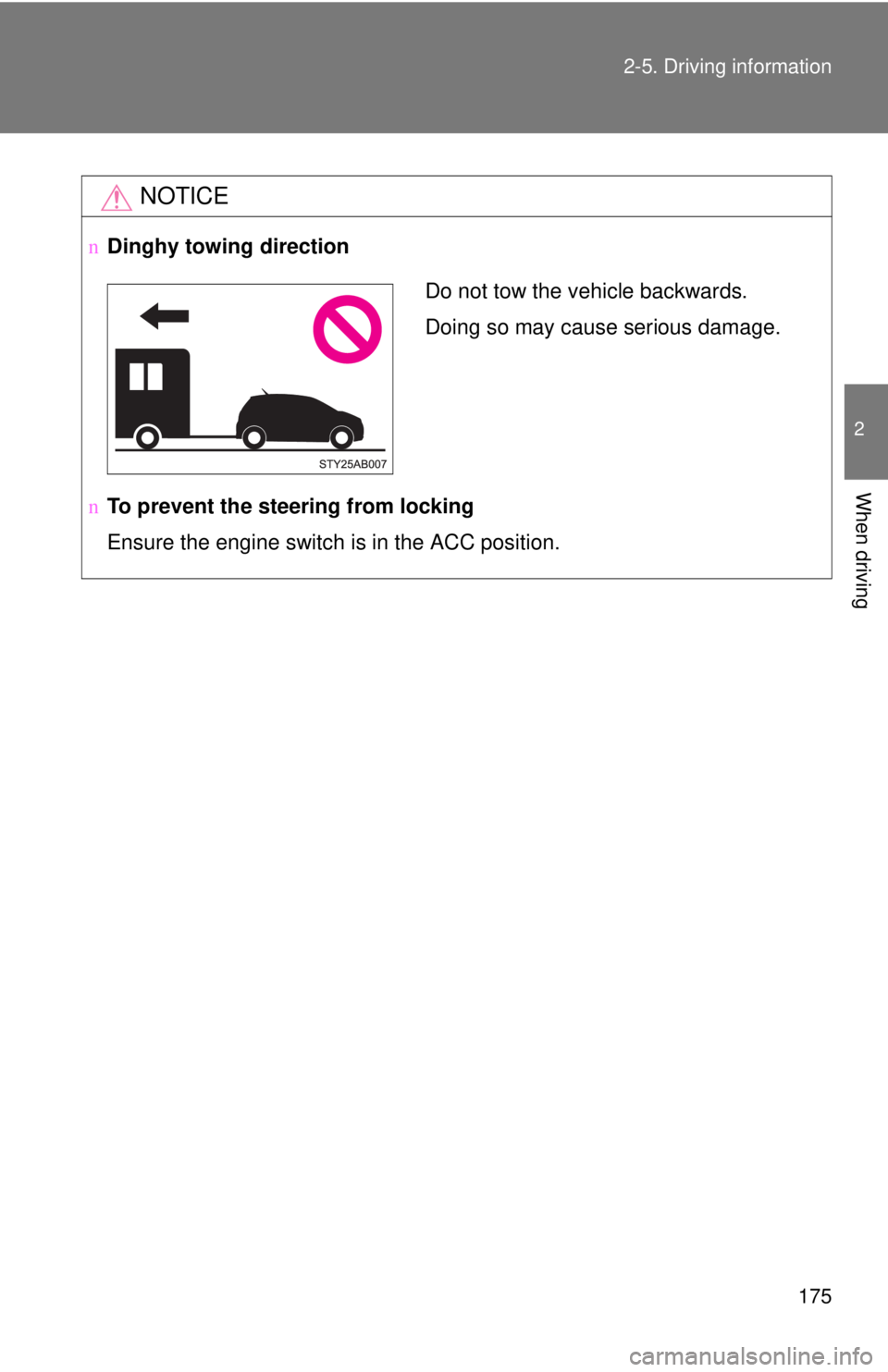
Dinghy towing direction
n To prevent the steering from locking
Ensure the engine switch is in the ACC position.
Do not tow the vehicle backwards.
Doing so may cause serious damage.
Page 190 of 402
178
3-1. Using the air conditioning system and defogger
Air conditioning system
Adjusting the settings
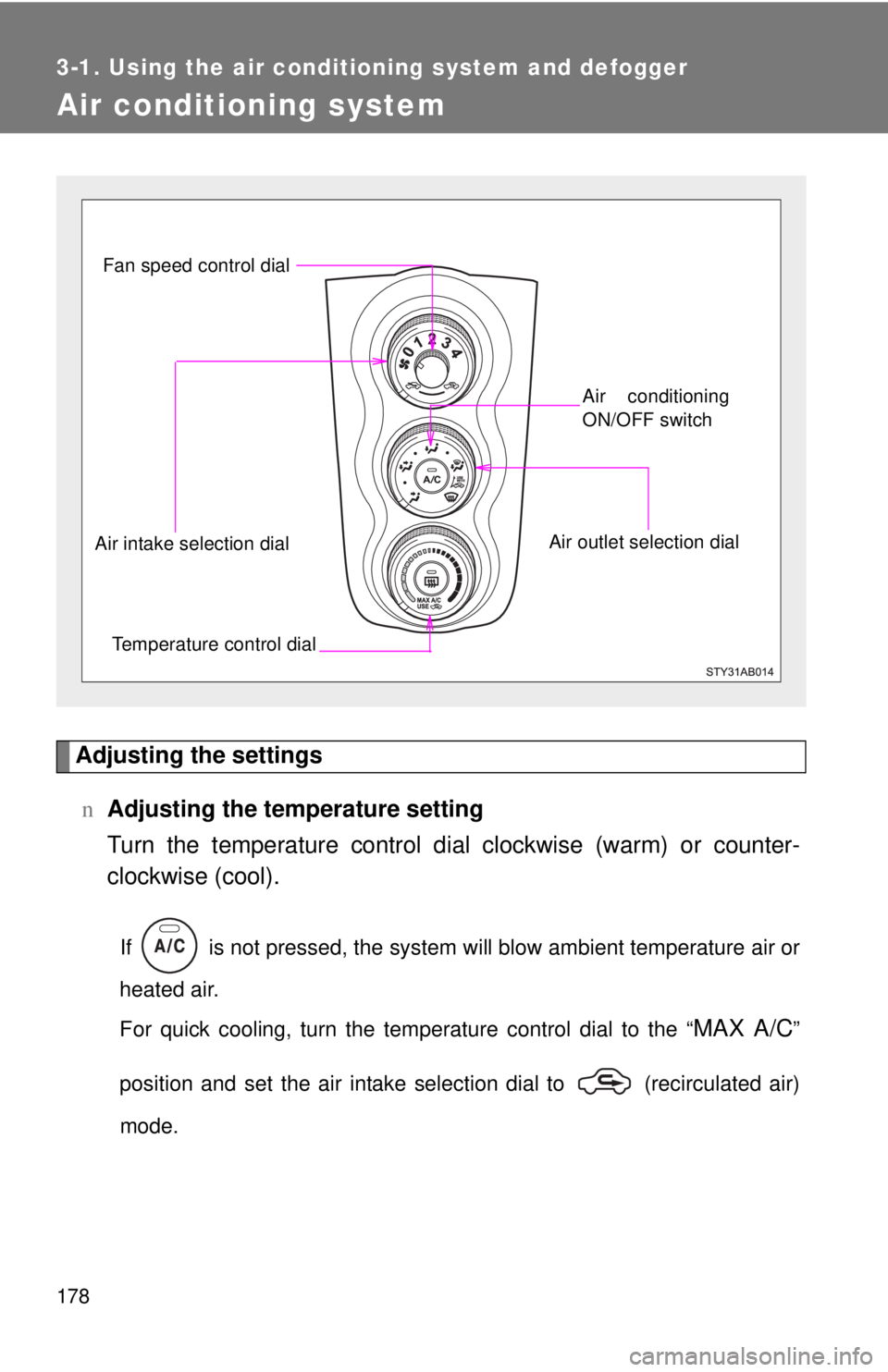
nAdjusting the temperature setting
Turn the temperature control di a
l clockwise (warm) or counter-
clockwise (cool).
If is not pressed, the system will blow ambient temperature air or
heated air.
For quick cooling, turn the temperature control dial to the “
MAX A/C”
position and set the air intake selection dial to (recirculated air)
mode.
Fan speed control dial
Air outlet selection dialAir conditioning
ON/OFF switch
Temperature control dial
Air intake selection dial
Page 191 of 402
179
3-1. Using the air conditioning system
and defogger
3
Interior features
nAdjusting the fan speed
Turn the fan speed control dial clockwise (
increase) or counter-
clockwise (decrease).
Set the dial to “0” to turn the fan off.
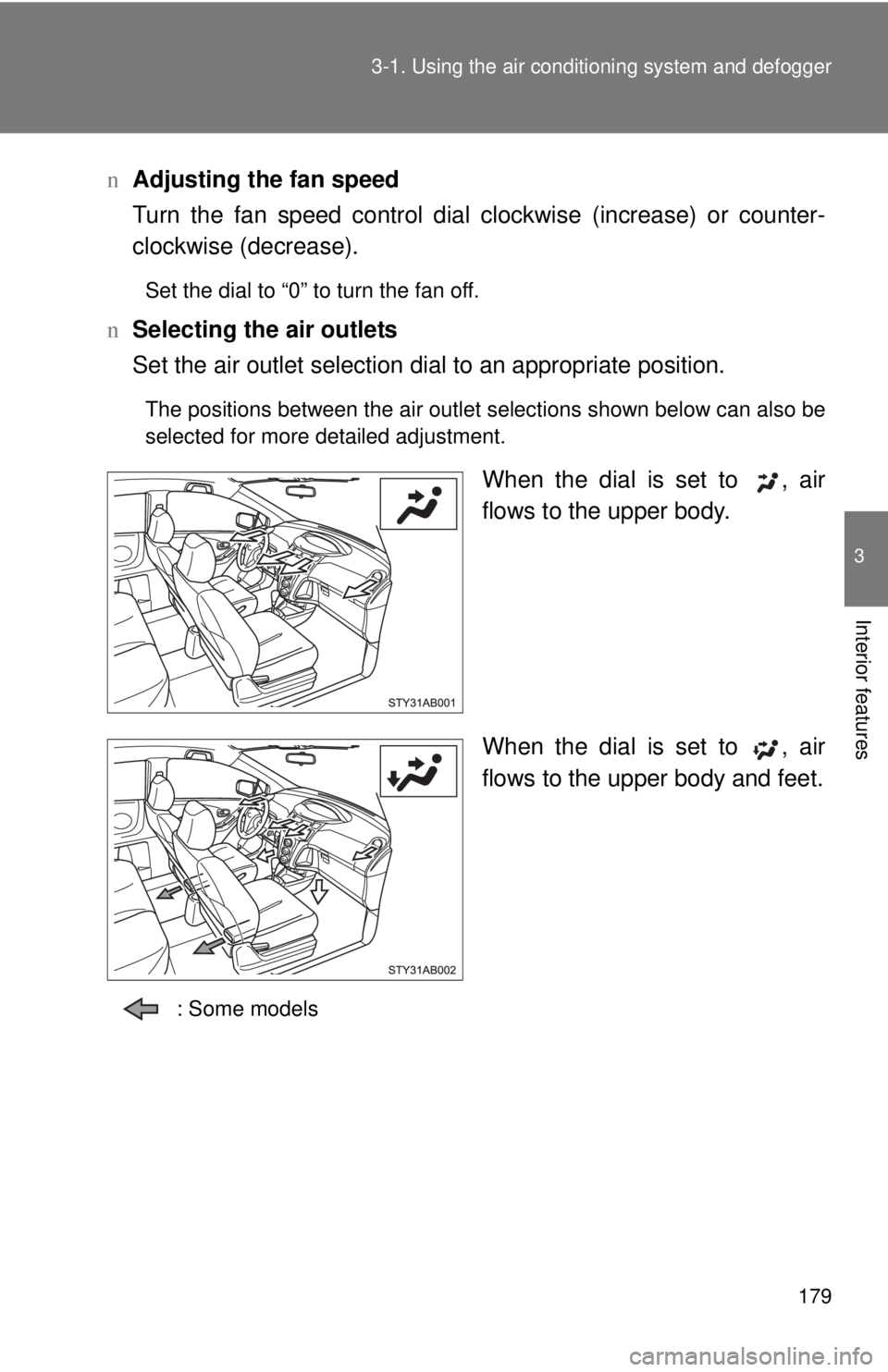
n Selecting the air outlets
Set the air outlet selection di al to
an appropriate position.
The positions between the air outlet selections shown below can also be
selected for more detailed adjustment.
When the dial is set to , air
flows to the upper body.
When the dial is set to , air
flows to the upper body and feet.
: Some models
Page 195 of 402
183
3-1. Using the air conditioning system
and defogger
3
Interior features
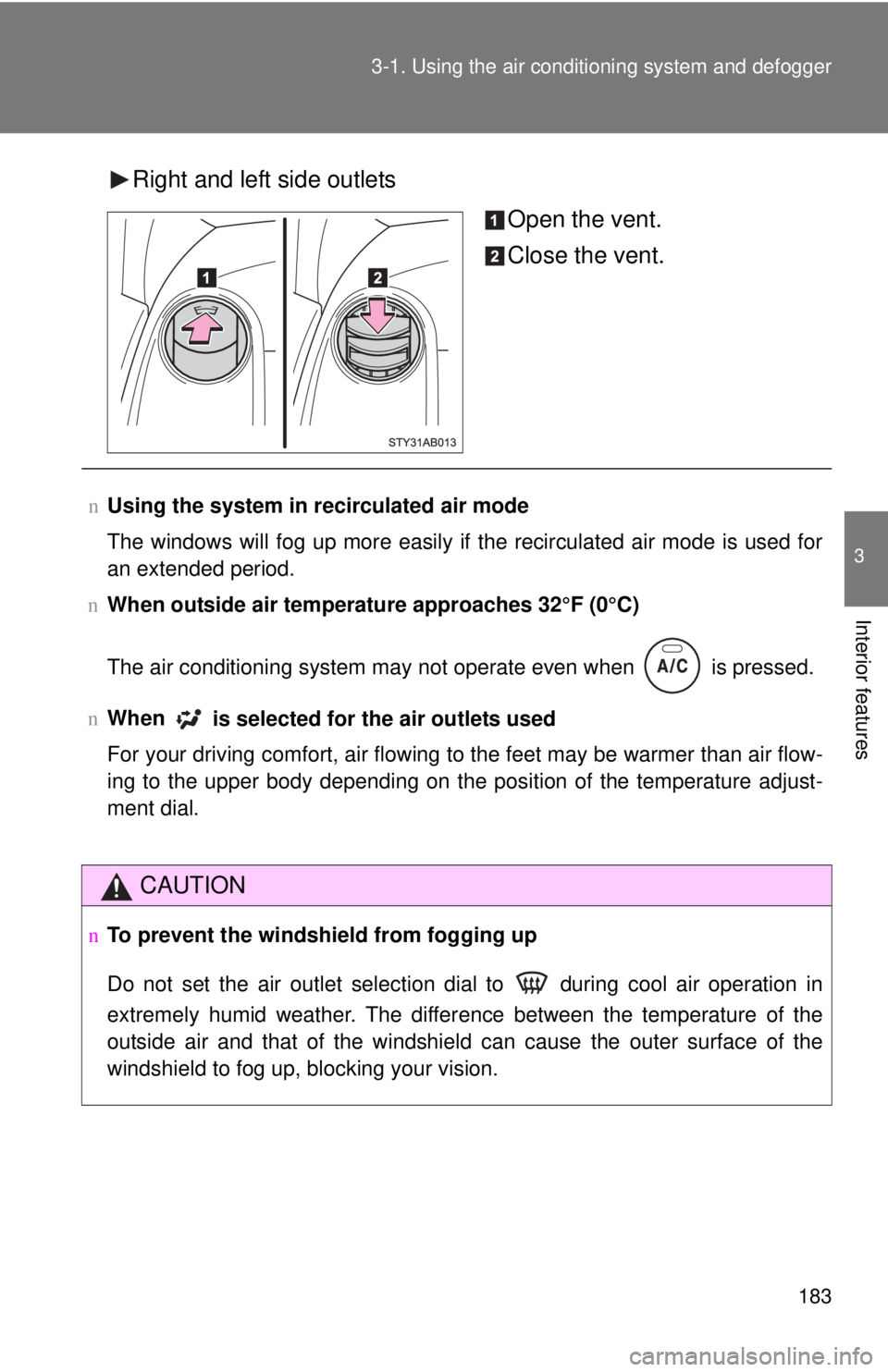
Right and left side outlets
Open the vent.
Close the vent.
nUsing the system in recirculated air mode
The windows will fog up more easily if the recirculated air mode is used for
an extended pe
riod.
n When
outside air temperature approaches 32°F (0°C)
The air conditioning system may not operate even when
is pressed.
n When
is selected for the air outlets used
For your driving comfort, air flowing to the feet may be warmer than air flow-
ing to the upper body depending on the position of the temperature adjust -
ment dial.
CAUTION
nTo prevent the windshield from fogging up
Do not set the air outlet selection dial to during cool air operation in
extremely humid weather. The difference between the temperature of the
outside air and that of the windshield can cause the outer surface of the
windshield to fog up, blocking your vision.
Page 222 of 402
210
3-3. Using the interior lights
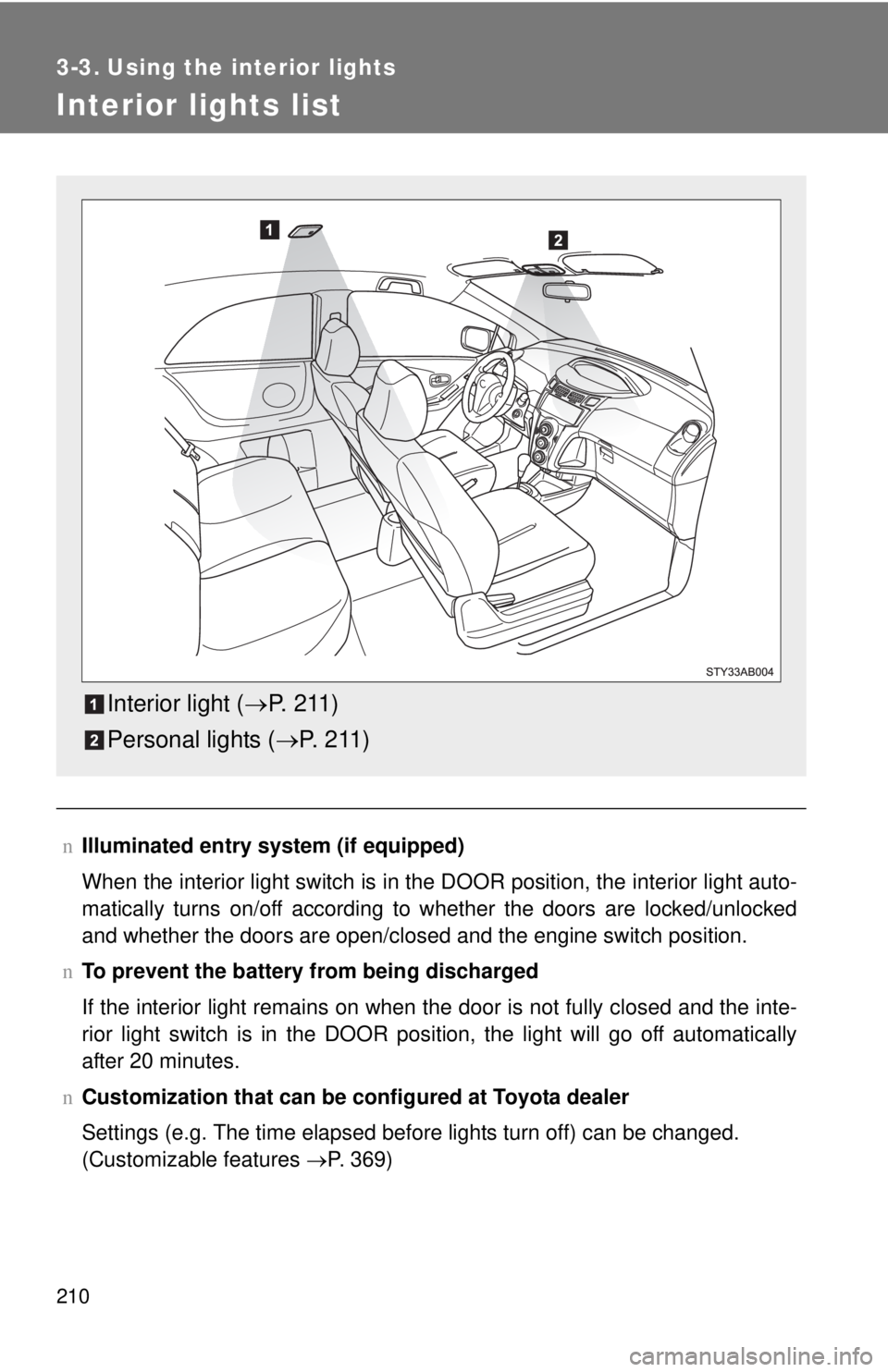
Interior lights list
nIlluminated entry system (if equipped)
When the interior light switch is in the DOOR position, the interior light auto -
matically turns on/off according to whether the doors are locked/unlocked
and whether the doors are
open/closed and the engine switch position.
n T
o prevent the battery from being discharged
If the interior light remains on when the door is not fully closed and the inte -
rior light switch is in the DOOR position, the light will go off automatically
af
ter 20 minutes.
n Customization that can be co nfigure
d at Toyota dealer
Settings (e.g. The time elapsed before lights turn off) can be changed.
(Customizable features →P. 369)
Interior light (→P. 2 11 )
Personal lights ( →P. 2 1 1 )
Page 233 of 402
221
3-5. Other interior features
3
Interior features
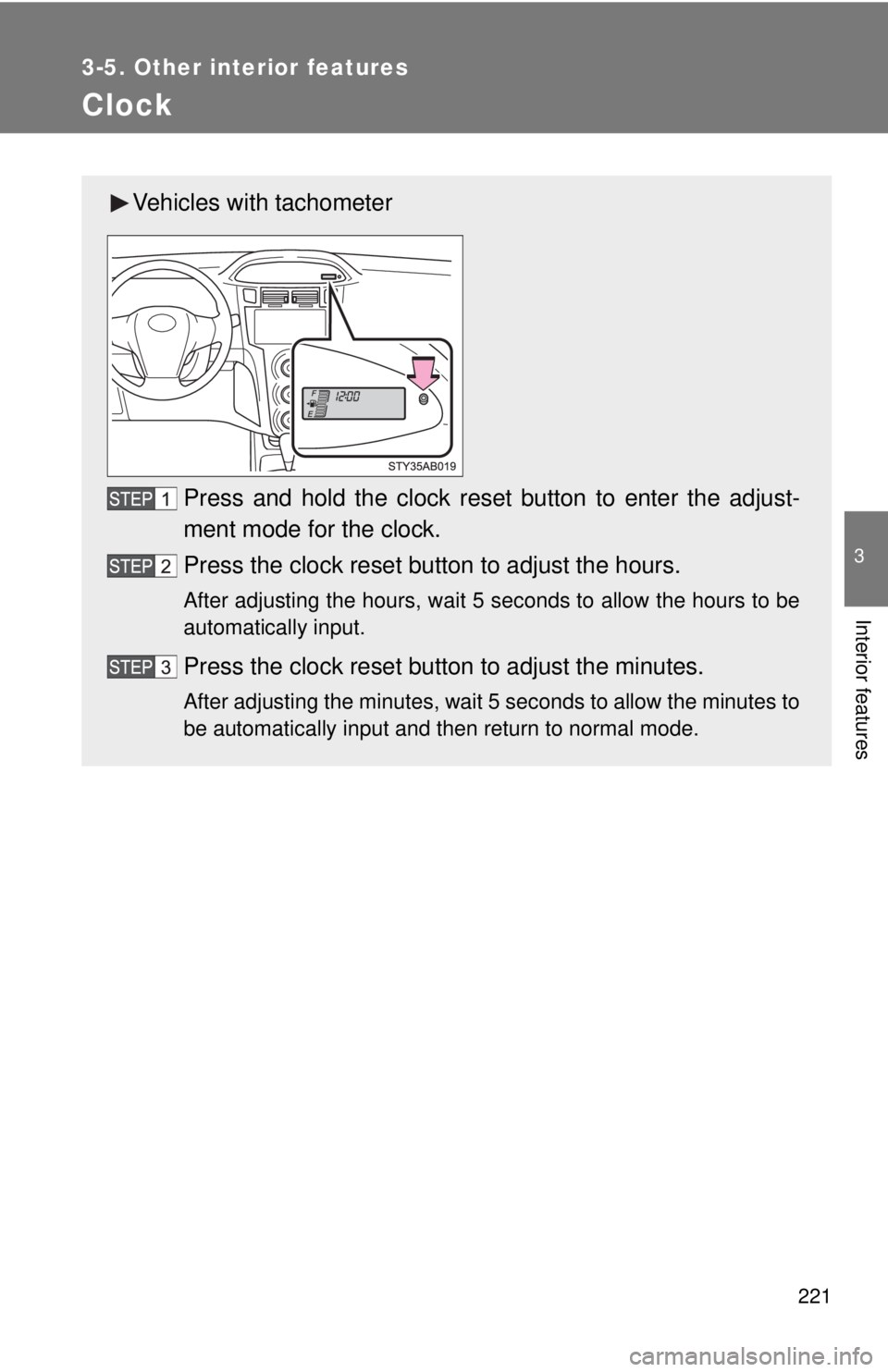
Clock
Vehicles with tachometer
Press and hold the clock reset button to enter the adjust-
ment mode for the clock.
Press the clock reset button to adjust the hours.
After adjusting the hours, wait 5 seconds to allow the hours to be
automatically input.
Press the clock reset button to adjust the minutes.
After adjusting the minutes, wait 5 seconds to allow the minutes to
be automatically input and then return to normal mode.
Page 234 of 402
222 3-5. Other interior features
nThe clock is displayed when
The engine switch is in the ON position.
n When disconnecting and reco nnecting battery termi
nals
The time display will automatically be set to 1:00.
n Adjusting to a full hour (vehic
les without tachometer)
If you press the clock reset button, the minute values will be rounded to the
neares
t hour. So, minute values from “:00” to “:29” are rounded down, and
values from “:30” to “:59” are rounded up.*
*: e.g.
1:00 to 1:29 → 1:0
0
1:30 to 1:59 → 2:0
0
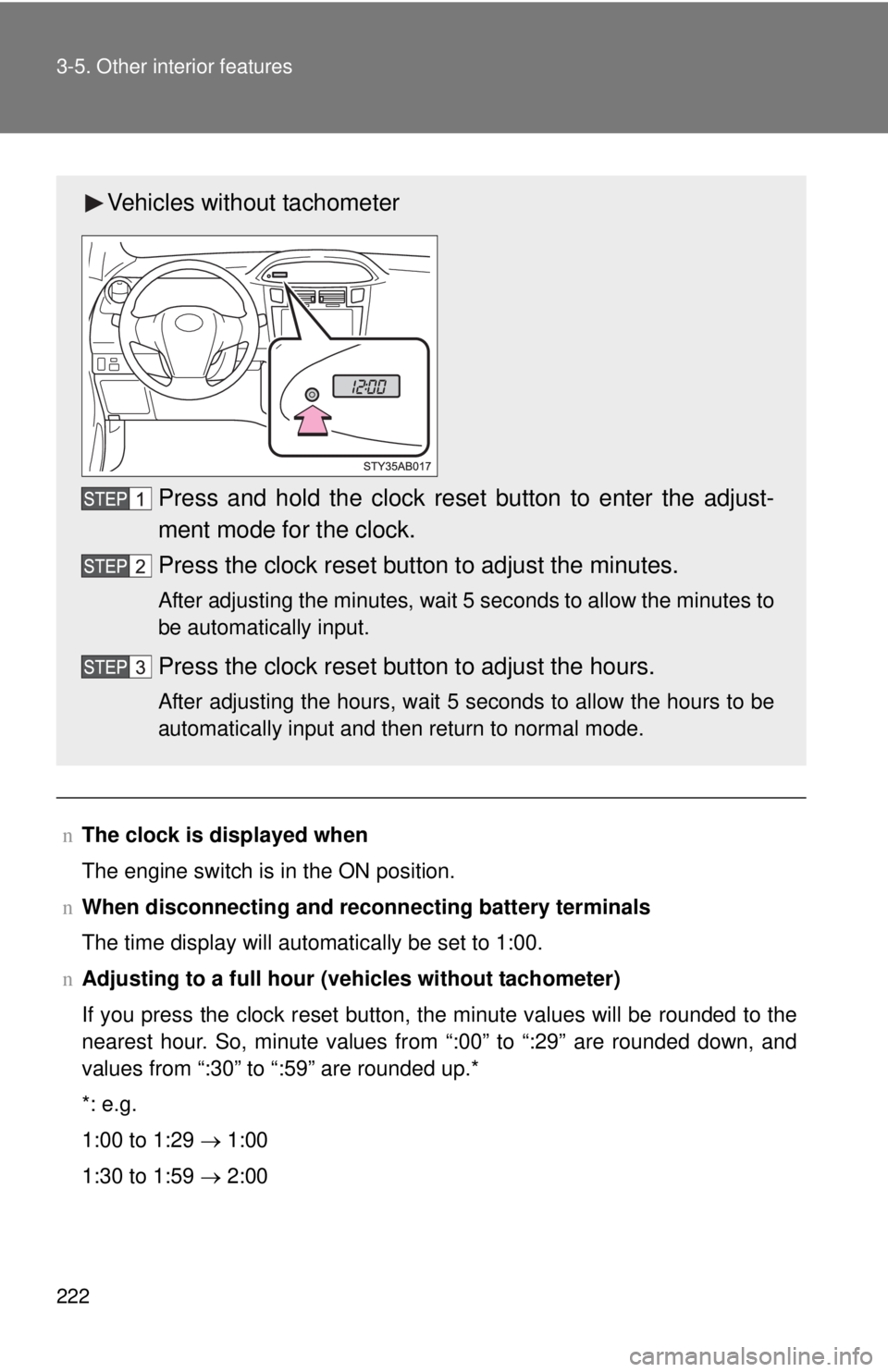
Vehicles without tachometer
Press and hold the clock reset button to enter the adjust-
ment mode for the clock.
Press the clock reset button to adjust the minutes.
After adjusting the minutes, wait 5 seconds to allow the minutes to
be automatically input.
Press the clock reset button to adjust the hours.
After adjusting the hours, wait 5 seconds to allow the hours to be
automatically input and then return to normal mode.
Page 237 of 402
225
3-5. Other interior features
3
Interior features
Luggage compartment features
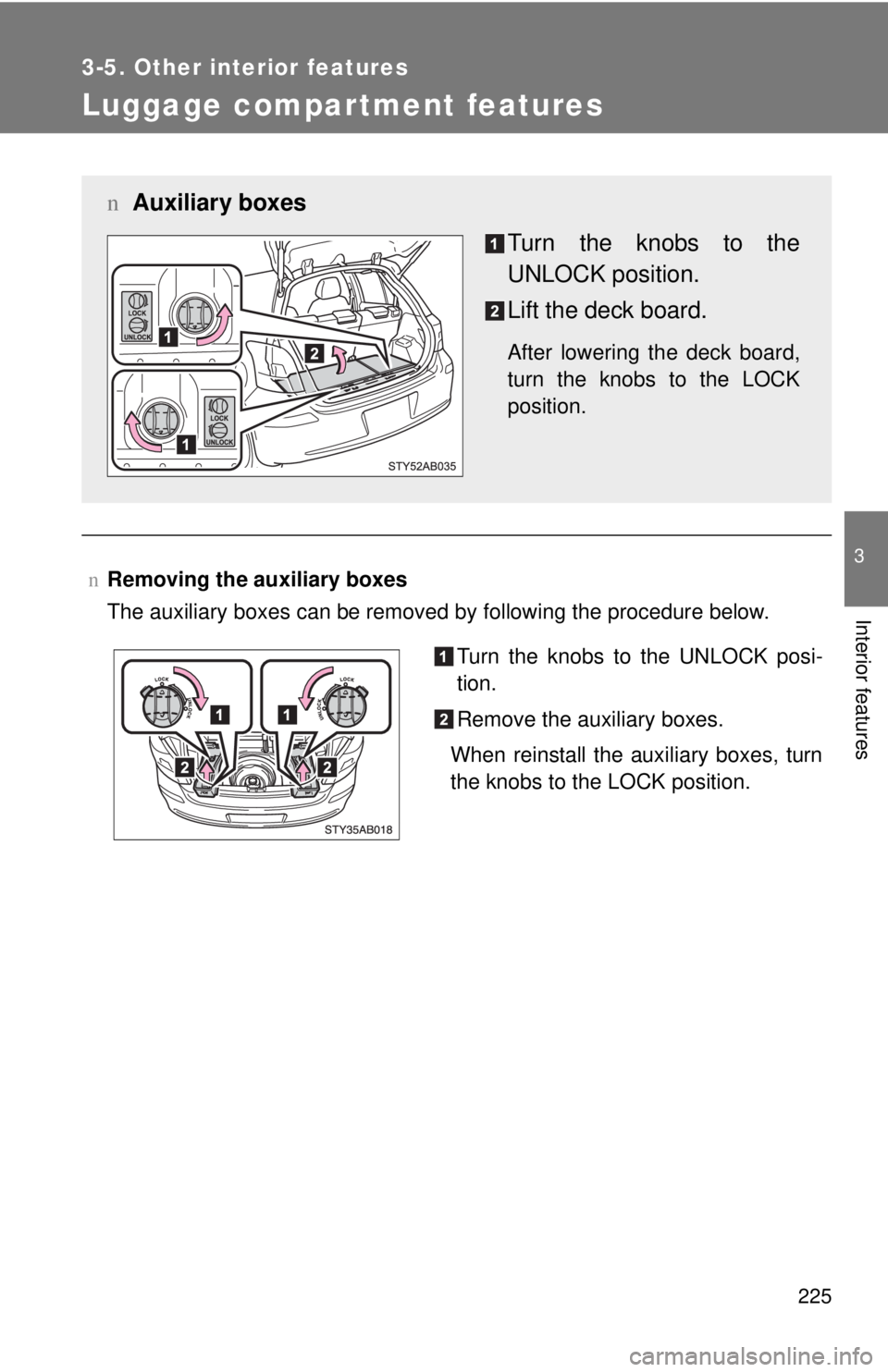
nRemoving the auxiliary boxes
The auxiliary boxes can be removed by following the procedure below.
n Auxiliary boxes
Turn the knobs to the
UNLOCK position.
Lift the deck board.
After lowering the deck board,
turn the knobs to the LOCK
position.
Turn the knobs to the UNLOCK posi-
tion.
Remove the auxiliary boxes.
When reinstall the auxiliary boxes, turn
the knobs to the LOCK position.
Page 238 of 402
226 3-5. Other interior features
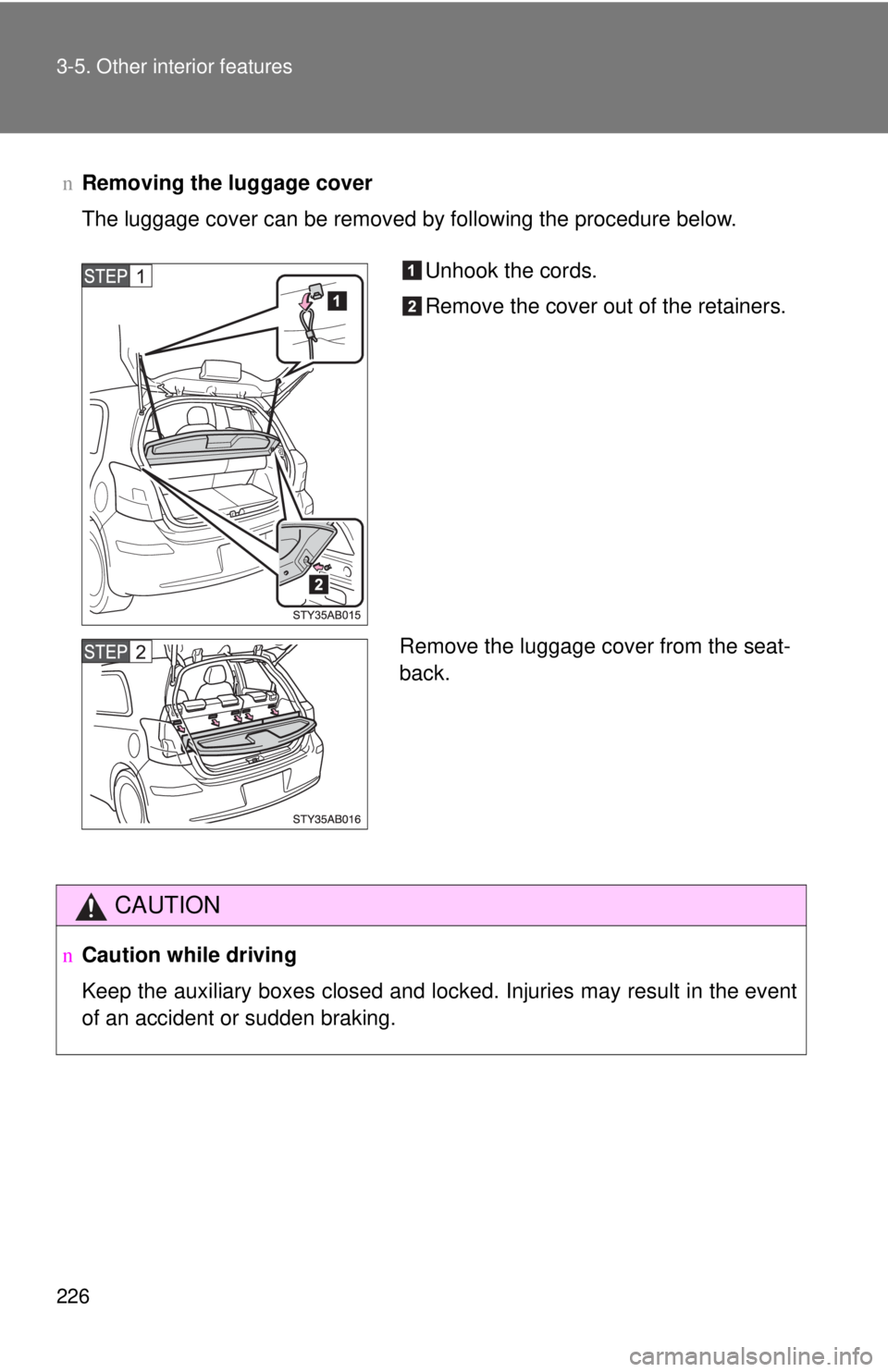
nRemoving the luggage cover
The luggage cover can be removed by following the procedure below.
CAUTION
nCaution while driving
Keep the auxiliary boxes closed and locked. Injuries may result in the event
of an accident or sudden braking.
Unhook the cords.
Remove the cover out of the retainers.
Remove the luggage cover from the seat-
back.