steering TOYOTA YARIS HATCHBACK 2011 Workshop Manual
[x] Cancel search | Manufacturer: TOYOTA, Model Year: 2011, Model line: YARIS HATCHBACK, Model: TOYOTA YARIS HATCHBACK 2011Pages: 428, PDF Size: 9.61 MB
Page 144 of 428
131
2-1. Driving procedures
2
When driving
n
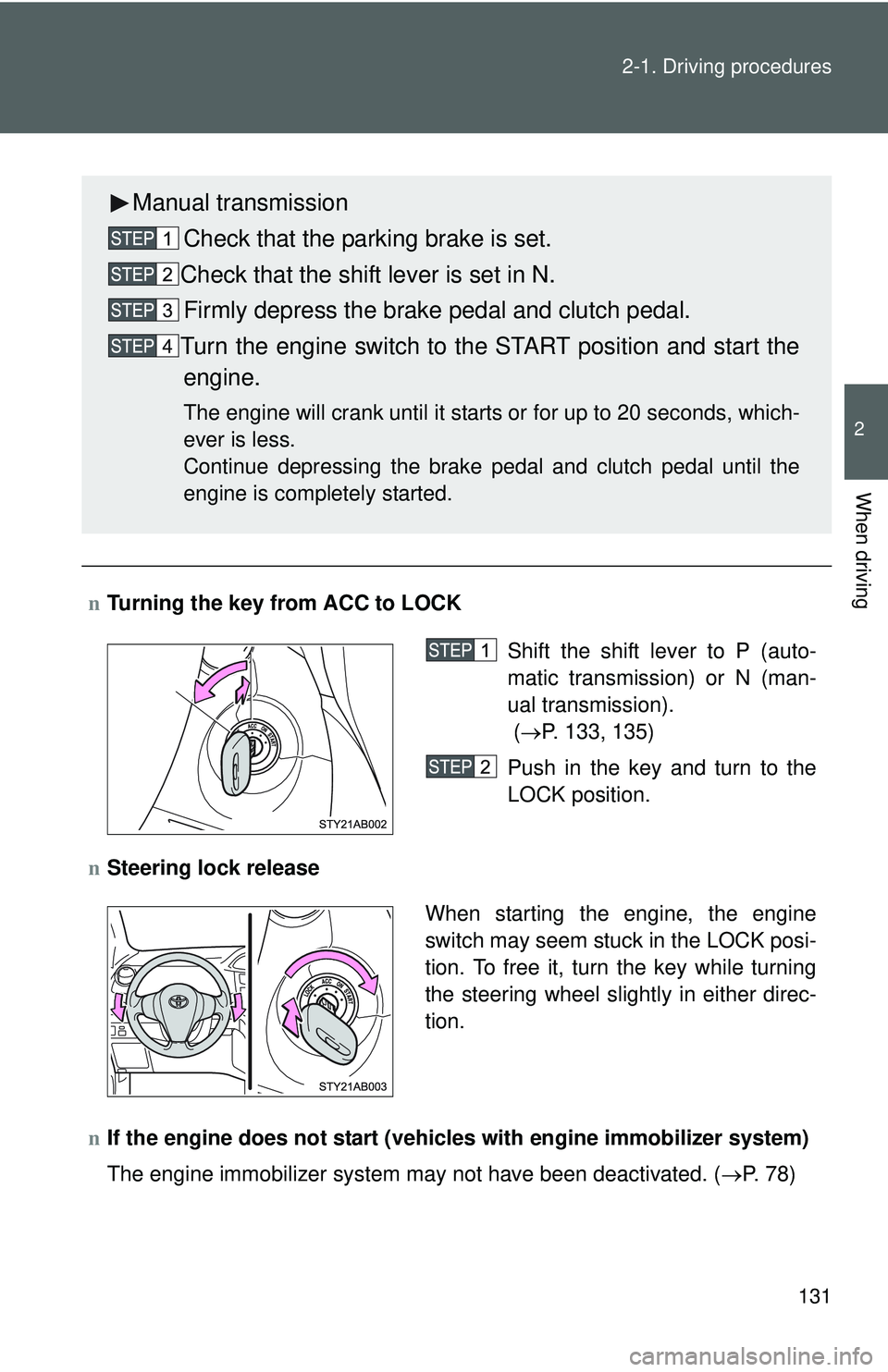
Turning the key from ACC to LOCK
n Steering lock release
n If the engine does not start (vehic les with engine immobilizer system)
The engine immobilizer system may not have been deactivated. ( →P. 78)
Manual transmission
Check that the parking brake is set.
Check that the shift lever is set in N. Firmly depress the brake pedal and clutch pedal.
Turn the engine switch to the START position and start the engine.
The engine will crank until it starts or for up to 20 seconds, which-
ever is less.
Continue depressing the brake pedal and clutch pedal until the
engine is completely started.
Shift the shift lever to P (auto-
matic transmission) or N (man-
ual transmission).
( → P. 133, 135)
Push in the key and turn to the
LOCK position.
When starting the engine, the engine
switch may seem stuck in the LOCK posi-
tion. To free it, turn the key while turning
the steering wheel slightly in either direc-
tion.
Page 152 of 428
139
2-1. Driving procedures
2
When driving
Hor n
nAfter adjusting the steering wheel
Make sure that the steering wheel is securely locked.
The horn may not sound if the steering wheel is not securely locked.
(→ P. 65)
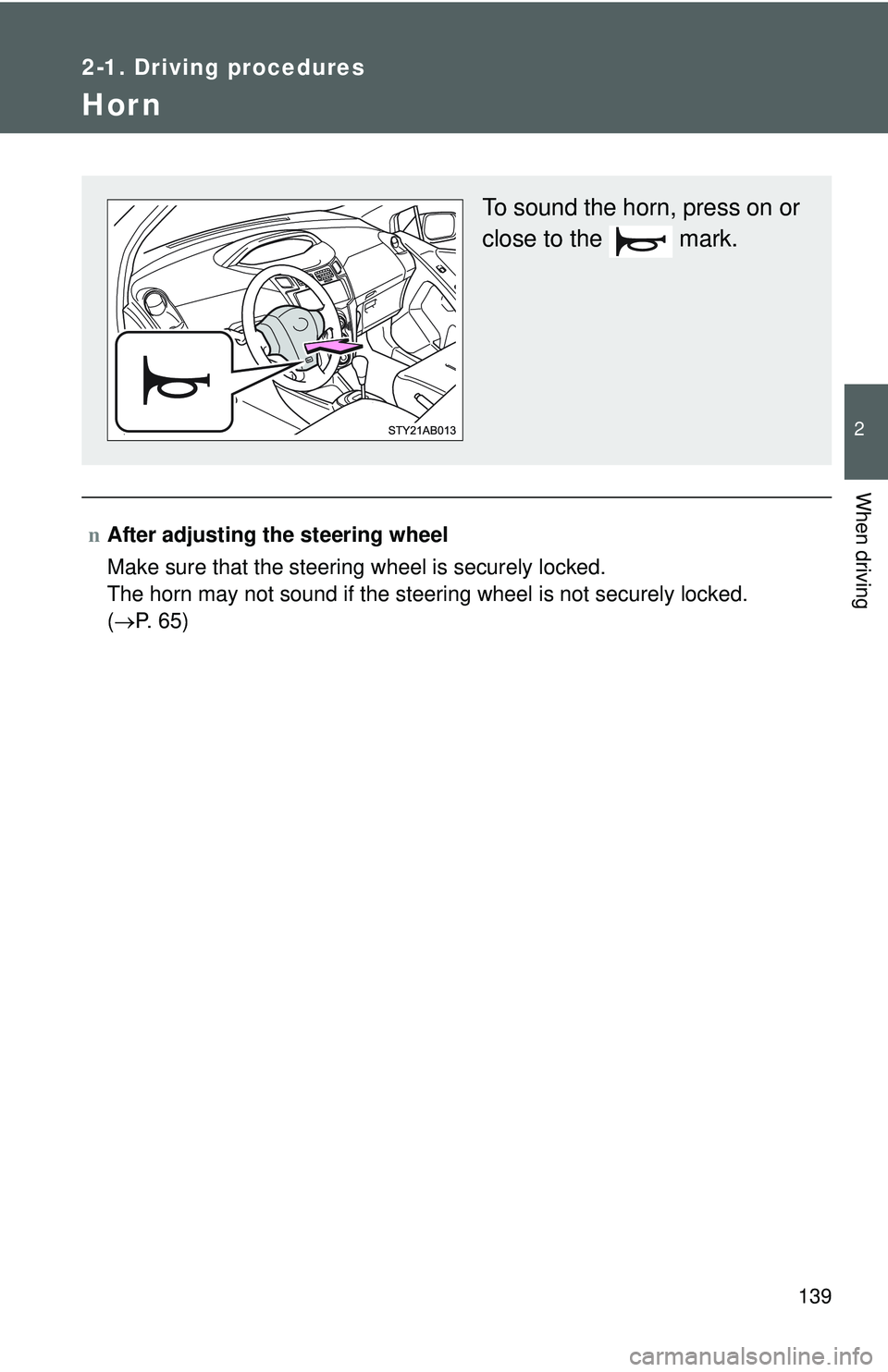
To sound the horn, press on or
close to the mark.
Page 175 of 428
160
2-4. Using other driving systems
Driving assist systems
To help enhance driving safety and performance, the following sys-
tems operate automatically in res ponse to various driving situations.
Be aware, however, that these systems are supplementary and
should not be relied upon too h eavily when operating the vehicle.
nABS (Anti-lock Brake System) (if equipped)
Helps to prevent wheel lock when the brakes are applied suddenly, or if
the brakes are applied while driving on a slippery road surface.
nBrake Assist (if equipped)
Generates an increased level of braking force after the brake pedal is
depressed, when the system detects a panic stop situation.
nVSC (Vehicle Stability Control) (if equipped)
Helps the driver to control skidding when swerving suddenly or turning
on slippery road surfaces.
nTRAC (Traction Control) (if equipped)
Maintains drive power and prevents the front wheels from spinning
when starting the vehicle or accelerating on slippery roads.
nEPS (Electric Power Steering)
Employs an electric motor to reduce the amount of effort needed to turn
the steering wheel.
Page 177 of 428
162 2-4. Using other driving systems
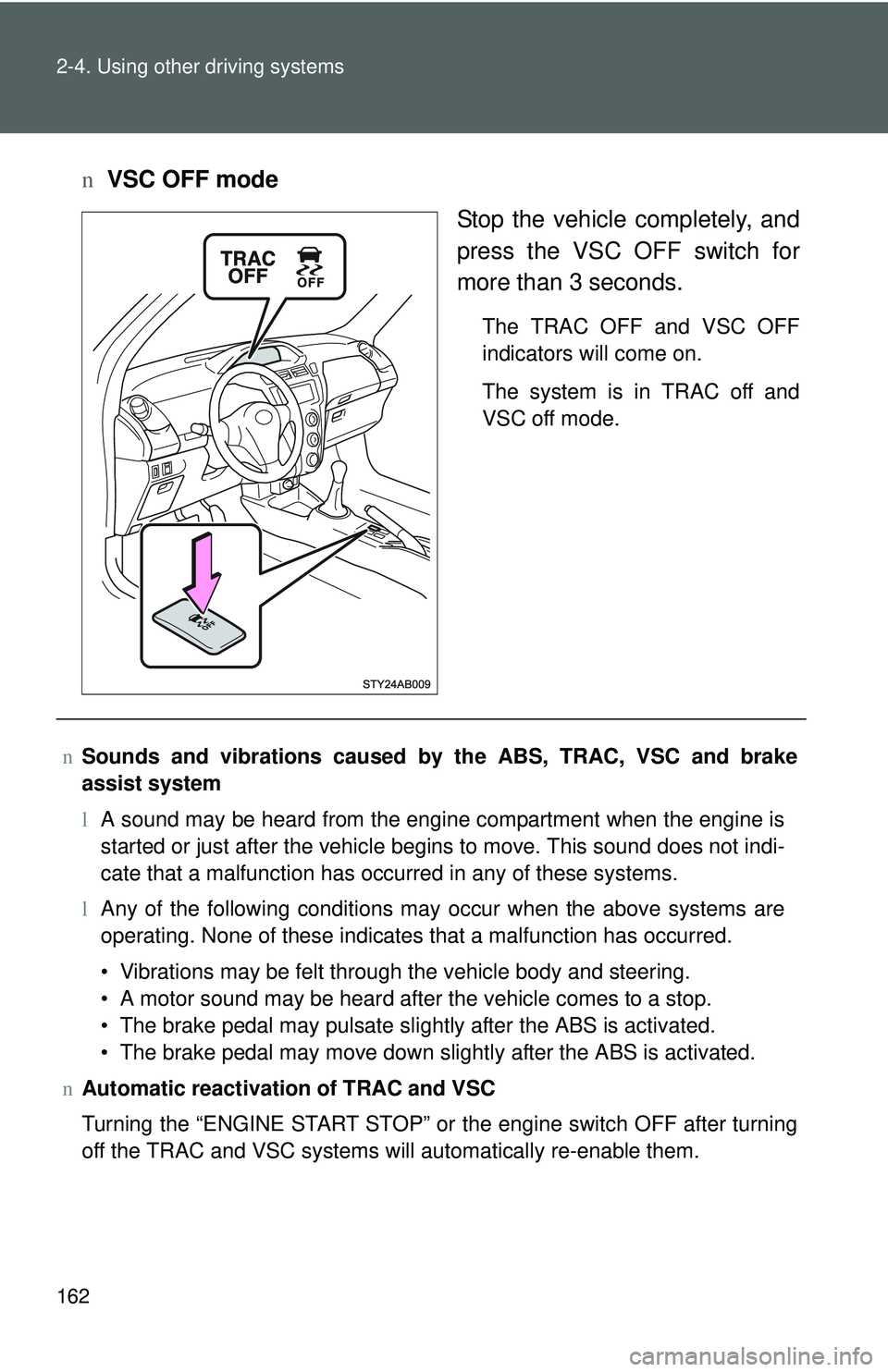
nVSC OFF mode
Stop the vehicle completely, and
press the VSC OFF switch for
more than 3 seconds.
The TRAC OFF and VSC OFF
indicators will come on.
The system is in TRAC off and
VSC off mode.
nSounds and vibrations caused by the ABS, TRAC, VSC and brake
assist system
lA sound may be heard from the engine compartment when the engine is
started or just after the vehicle begins to move. This sound does not indi-
cate that a malfunction has occurred in any of these systems.
l Any of the following conditions may occur when the above systems are
operating. None of these indicates that a malfunction has occurred.
• Vibrations may be felt through the vehicle body and steering.
• A motor sound may be heard after the vehicle comes to a stop.
• The brake pedal may pulsate slightly after the ABS is activated.
• The brake pedal may move down slightly after the ABS is activated.
n Automatic reactivation of TRAC and VSC
Turning the “ENGINE START STOP” or the engine switch OFF after turning
off the TRAC and VSC systems will automatically re-enable them.
Page 178 of 428
163
2-4. Using other
driving systems
2
When driving
nAutomatic TRAC reactivation
If only the TRAC system is turned off, the TRAC system will turn on when
vehicle speed increases.
n Automatic TRAC and VSC reactivation
If the TRAC and VSC systems are turned off, the systems will not turn on
even when vehicle speed increases.
n If the slip indicator lights up
There is a malfunction in the TRAC and VSC systems. Contact your Toyota
dealer and have your Toyota inspected.
n If the brake system overheats
TRAC will cease operation and a buzzer will sound to alert the driver. Stop
the vehicle in a safe place. (There is no problem with continuing normal driv-
ing.)
n EPS operation sound
When the steering wheel operates, a motor sound (whirring sound) may be
heard.
This does not indicate a malfunction.
n Reduced effectiveness of EPS
The effectiveness of EPS is reduced to prevent the system from overheating
when there is frequent steering input over an extended period of time. The
steering wheel may feel heavy as a result. Should this occur, refrain from
excessive steering input or stop the vehicle and turn the engine off. The sys-
tem should return to normal within 10 minutes.
CAUTION
nThe ABS does not opera te effectively when
l Tires with inadequate gripping ability are used (such as excessively worn
tires on a snow covered road).
l The vehicle hydroplanes while driving at high speed on the wet or slick
road.
Page 183 of 428
168
2-5. Driving information
Vehicle load limits
nTotal load capacity and seating capacity
These details are also described on the tire and loading information
label.(→P. 275)
CAUTION
nOverloading the vehicle
Do not overload the vehicle.
It may not only cause damage to the ti res, but also degrade steering and
braking ability, resulting in an accident.
Vehicle load limits include total load capacity, seating capacity,
towing capacity and cargo capacity.
n Total load capacity: 845 lb. (383 kg)
Total load capacity means the combined weight of occupants,
cargo and luggage.
n Seating capacity: 5 occupants (Front 2, Rear 3)
Seating capacity means the ma ximum number of occupants
whose estimated average weight is 150 lb. (68 kg) per person.
Even if the number of occupants are within the seating capacity,
do not exceed the total load capacity.
n Towing capacity (Canada): 700 lb. (318 kg)
Towing capacity means the maximum gross trailer weight (trailer
weight plus its cargo weight) that your vehicle is able to tow.
n Towing capacity (except Canada)
Toyota does not recommend towing a trailer with your vehicle.
n Cargo capacity
Cargo capacity may increase or decrease depending on the
weight and the number of occupants.
Page 193 of 428
178 2-5. Driving information
lReversing with a trailer attached is difficult and requires practice.
Grip the bottom of the steering wheel and move your hand to the
left to move the trailer to the left. Move your hand to the right to
move the trailer to the right. (This is generally opposite to reversing
without a trailer attached.) Avoid sharp or prolonged turning. Have
someone guide you when reversing to reduce the risk of an acci-
dent.
l As stopping distance is increased when towing a trailer, vehicle-to-
vehicle distance should be increased. For each 10 mph (16 km/h)
of speed, allow at least o ne vehicle and trailer length.
l Avoid sudden braking as you may skid, resulting in jackknifing and
loss of control. This is especiall y true on wet or slippery surfaces.
l Avoid jerky starts or sudden acceleration. Vehicles with a manual
transmission, prevent excessive cl utch slippage by keeping engine
rpm low and not racing the engine. Always start out in first gear.
l Avoid jerky steering and sharp turns, and slow down before mak-
ing a turn.
l Note that when making a turn, th e trailer wheels will be closer than
the vehicle wheels to the inside of the turn. Compensate by making
a larger than normal turning radius.
l Crosswinds and rough roads will adversely affect handling of your
vehicle and trailer, causing sway . Periodically check the rear to
prepare for being passed by large trucks or buses, which may
cause your vehicle and trailer to sway. If swaying occurs, firmly grip
the steering wheel, reduce speed immediately but gradually, and
steer straight ahead. Never increase speed. If you make no
extreme correction with the stee ring or brakes, your vehicle and
trailer will stabilize.
l Take care when passing other v ehicles. Passing requires consider-
able distance. After passing a vehi cle, do not forget the length of
your trailer, and be sure you hav e plenty of room before changing
lanes.
Page 198 of 428
183
2-5. Driving information
2
When driving
NOTICE
n
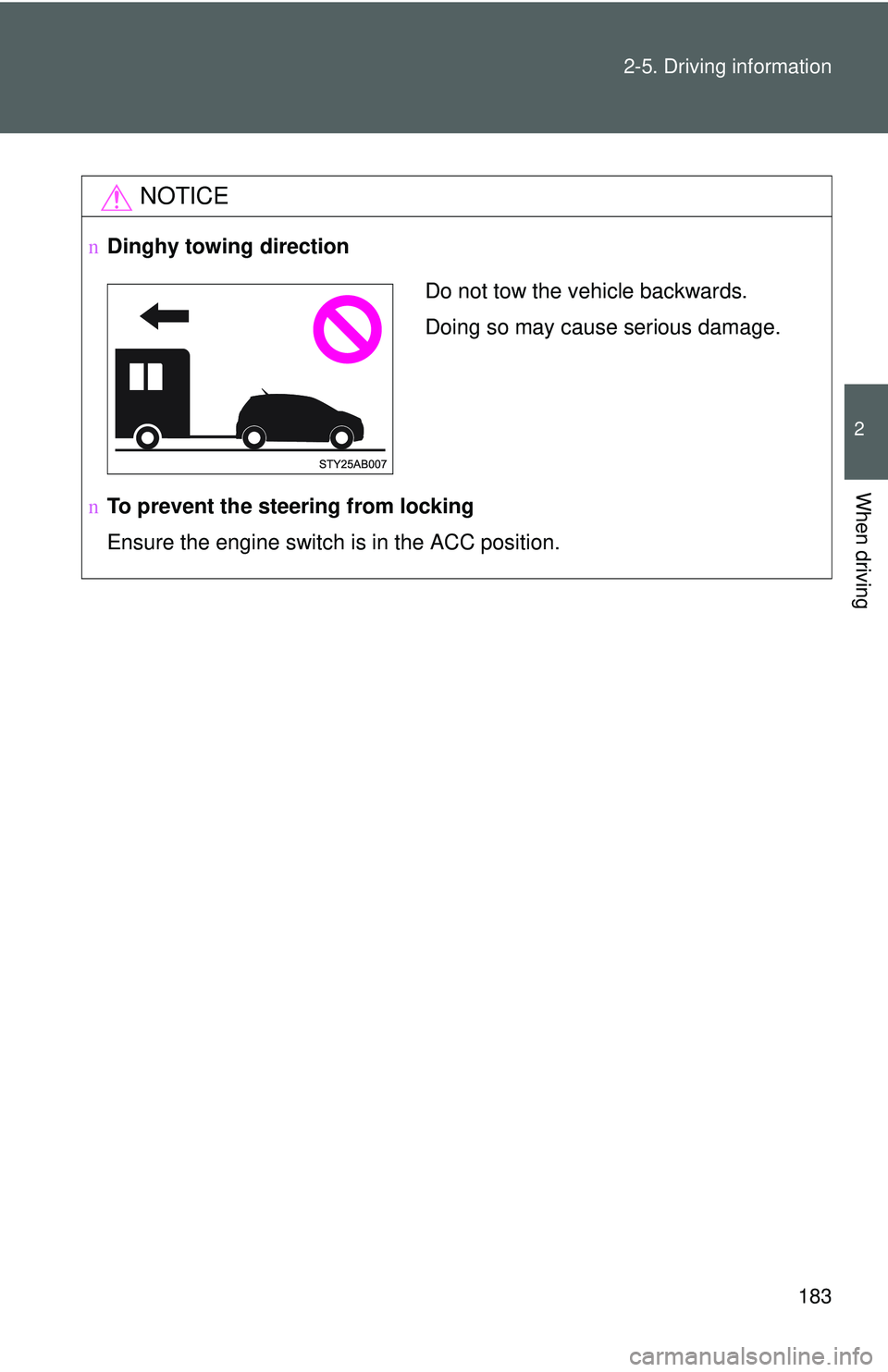
Dinghy towing direction
n To prevent the steering from locking
Ensure the engine switch is in the ACC position.
Do not tow the vehicle backwards.
Doing so may cause serious damage.
Page 261 of 428
248 4-2. Maintenance
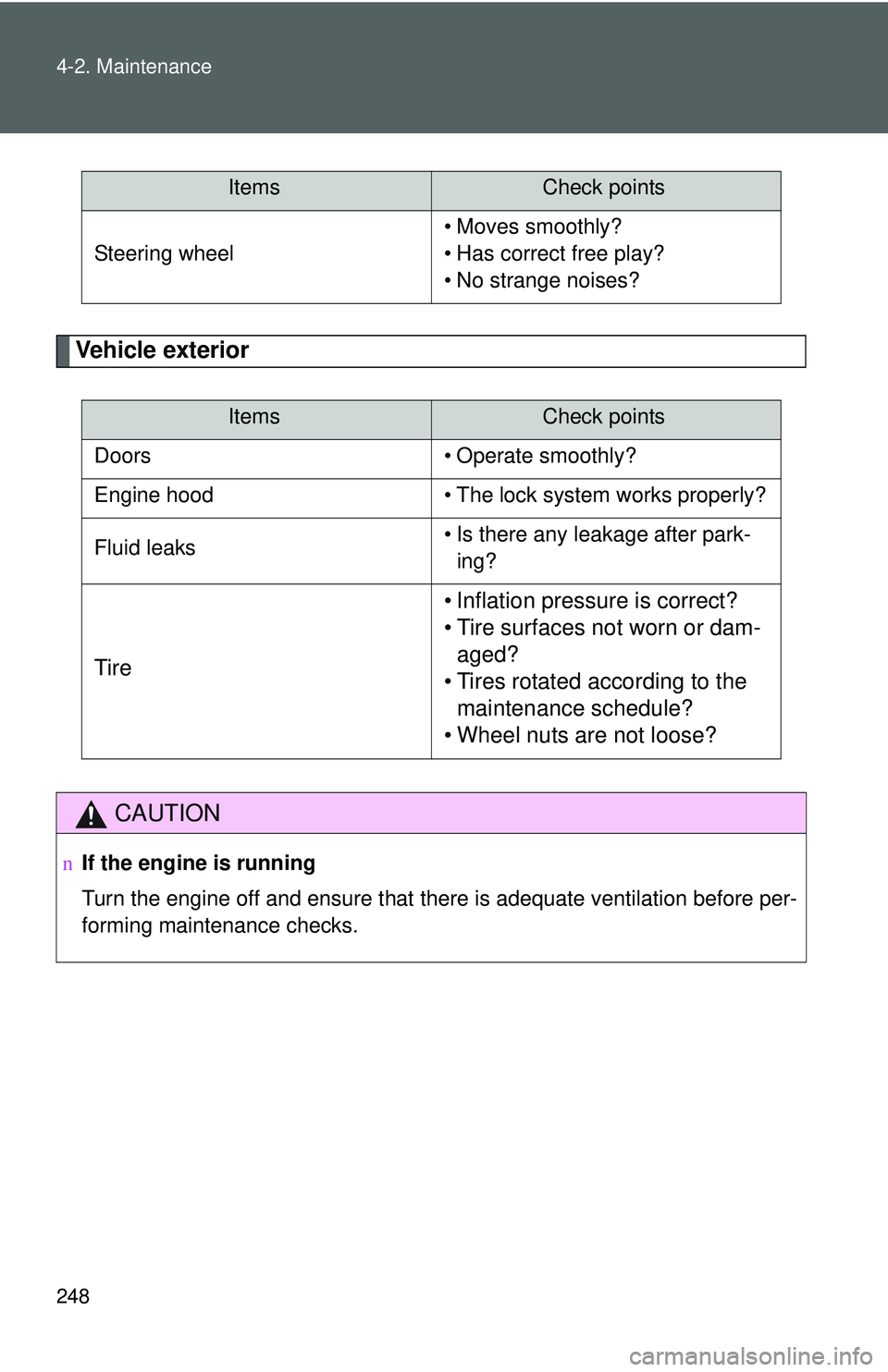
Vehicle exterior
Steering wheel• Moves smoothly?
• Has correct free play?
• No strange noises?
ItemsCheck points
Doors • Operate smoothly?
Engine hood • The lock system works properly?
Fluid leaks • Is there any leakage after park-
ing?
Tire • Inflation pressure is correct?
• Tire surfaces not worn or dam-
aged?
• Tires rotated according to the maintenance schedule?
• Wheel nuts are not loose?
CAUTION
n If the engine is running
Turn the engine off and ensure that there is adequate ventilation before per-
forming maintenance checks.
ItemsCheck points
Page 305 of 428
292 4-3. Do-it-yourself maintenance
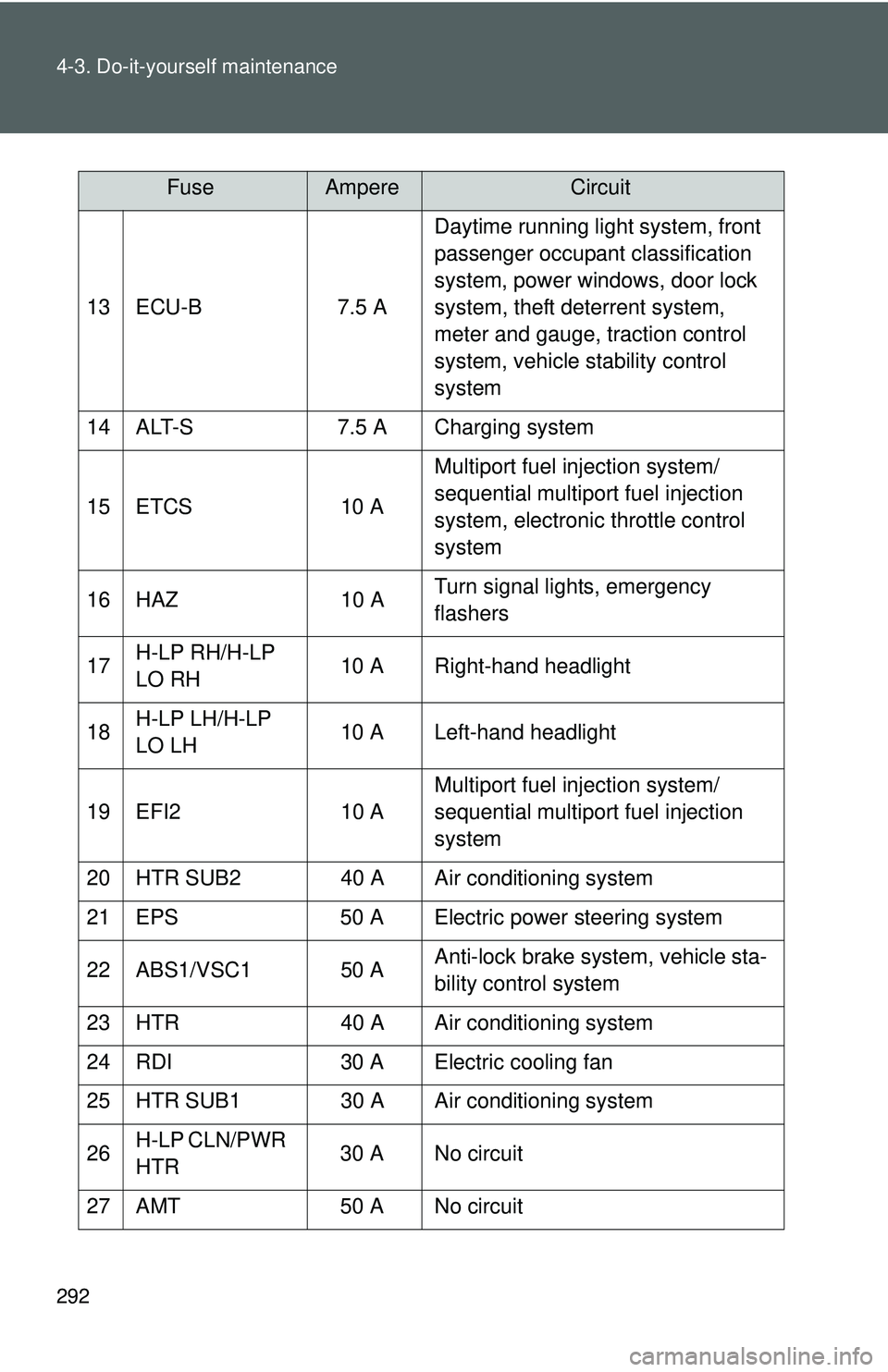
13 ECU-B7.5 ADaytime running light system, front
passenger occupant classification
system, power windows, door lock
system, theft deterrent system,
meter and gauge, traction control
system, vehicle stability control
system
14 ALT-S 7.5 A Charging system
15 ETCS 10 AMultiport fuel injection system/
sequential multiport fuel injection
system, electronic throttle control
system
16 HAZ 10 ATurn signal lights, emergency
flashers
17 H-LP RH/H-LP
LO RH 10 A Right-hand headlight
18 H-LP LH/H-LP
LO LH 10 A Left-hand headlight
19 EFI2 10 AMultiport fuel injection system/
sequential multiport fuel injection
system
20 HTR SUB2 40 A Air conditioning system
21 EPS 50 A Electric power steering system
22 ABS1/VSC1 50 A Anti-lock brake system, vehicle sta-
bility control system
23 HTR 40 A Air conditioning system
24 RDI 30 A Electric cooling fan
25 HTR SUB1 30 A Air conditioning system
26 H-LP CLN/PWR
HTR 30 A No circuit
27 AMT 50 A No circuit
FuseAmpereCircuit