lock TOYOTA YARIS HATCHBACK 2015 Owner's Manual
[x] Cancel search | Manufacturer: TOYOTA, Model Year: 2015, Model line: YARIS HATCHBACK, Model: TOYOTA YARIS HATCHBACK 2015Pages: 540, PDF Size: 34.12 MB
Page 81 of 540
81
1
1-2. Theft deterrent system
For safety and security
YARIS_F_WE_52G04E
Double locking system
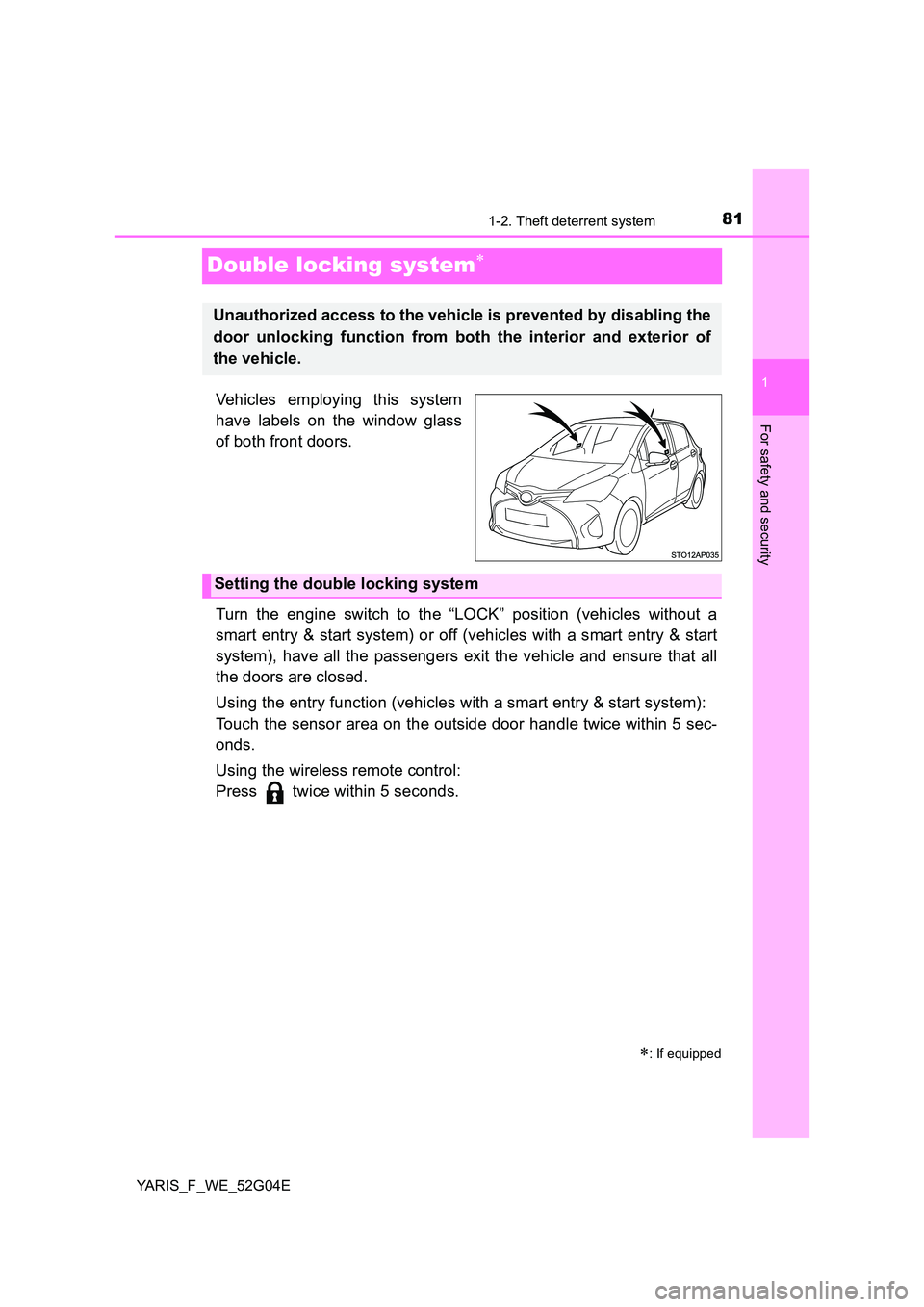
Vehicles employing this system
have labels on the window glass
of both front doors.
Turn the engine switch to the “LOCK” position (vehicles without a
smart entry & start system) or off (vehicles with a smart entry & start
system), have all the passengers exit the vehicle and ensure that all
the doors are closed.
Using the entry function (vehicles with a smart entry & start system):
Touch the sensor area on the outside door handle twice within 5 sec-
onds.
Using the wireless remote control:
Press twice within 5 seconds.
: If equipped
Unauthorized access to the vehicle is prevented by disabling the
door unlocking function from both the interior and exterior of
the vehicle.
Setting the double locking system
Page 82 of 540
821-2. Theft deterrent system
YARIS_F_WE_52G04E
Using the entry function (vehicles with a smart entry & start system):
Hold either front outside door handle or push up the back door opener
switch.
Using the wireless remote control:
Press .
Canceling the double locking system
WARNING
■ Double locking system precaution
Never activate the double locking system when there are people in the vehi-
cle because all the doors cannot be opened from inside the vehicle.
Page 86 of 540
862. Instrument cluster
YARIS_F_WE_52G04E
*1: These lights turn on when the engine switch is turned to the “ON” position
(vehicles without a smart entry & start system) or IGNITION ON mode
(vehicles with a smart entry & start system) to indicate that a system check
is being performed. They will turn off after the engine is started, or after a
few seconds. There may be a malfunction in a system if a light does not
come on, or if the lights do not turn off. Have the vehicle inspected by any
authorized Toyota dealer or repairer, or another duly qualified and
equipped professional.
*2: If equipped
*3: The light flashes in yellow to indicate a malfunction. The light flashes
quickly in green to indicate that the steering lock has not been released.
*4: The light turns on to indicate a malfunction.
*5: The light flashes to indicate a malfunction.
*6: Diesel engine
*7: The light illuminate on the center panel.
*8: These lights turn on when the engine switch is turned to the “ON” position
(vehicles without a smart entry & start system) or IGNITION ON mode
(vehicles with a smart entry & start system) to indicate that a system check
is being performed. They will turn off after the engine is started, or after a
few seconds.
*9: The lights turn on with LDA indicator to indicate a malfunction.
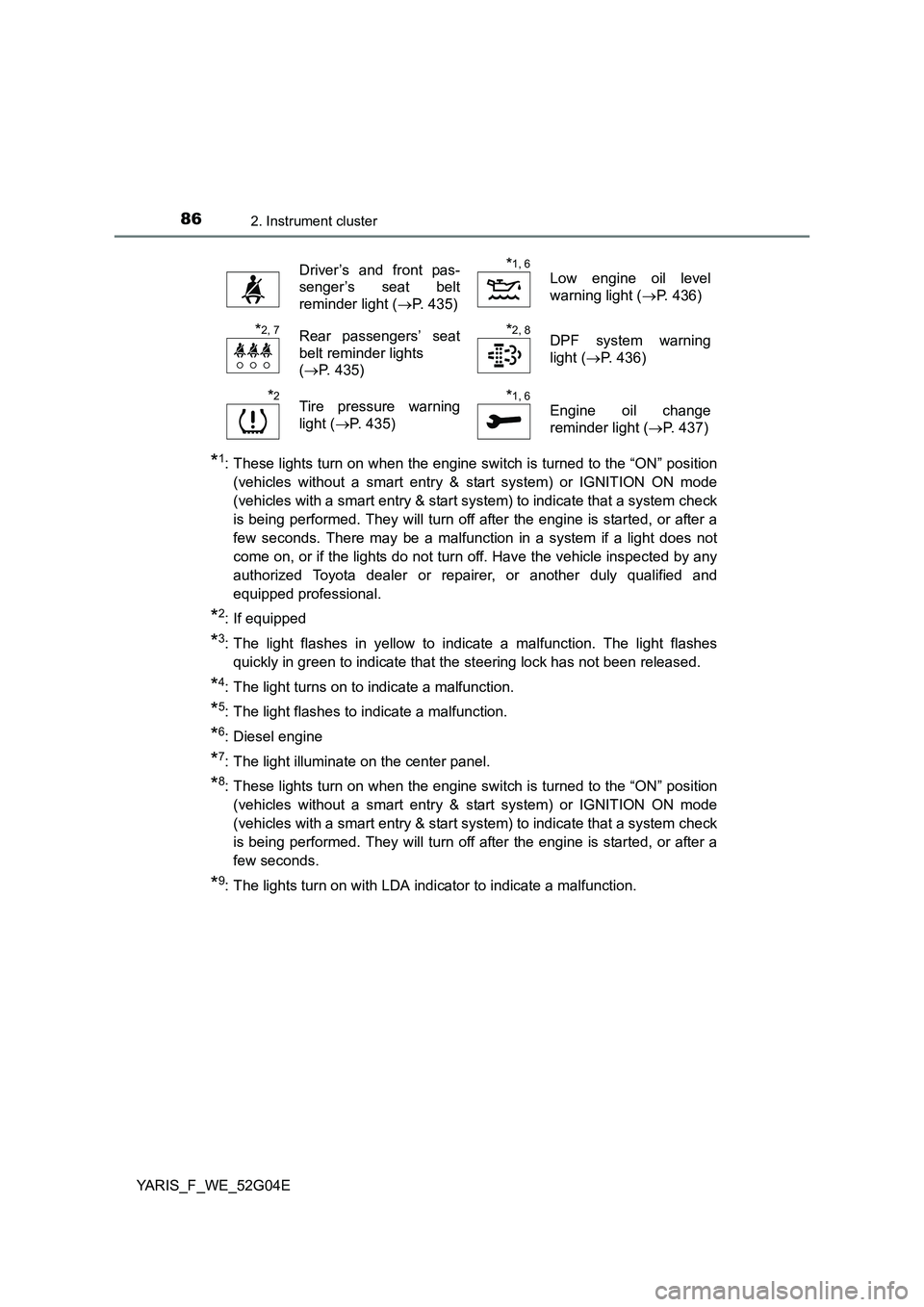
Driver’s and front pas-
senger’s seat belt
reminder light ( P. 435)
*1, 6
Low engine oil level
warning light ( P. 436)
*2, 7Rear passengers’ seat
belt reminder lights
( P. 435)
*2, 8DPF system warning
light ( P. 436)
*2Tire pressure warning
light ( P. 435)
*1, 6
Engine oil change
reminder light ( P. 437)
Page 90 of 540
902. Instrument cluster
YARIS_F_WE_52G04E
Gauges and meters
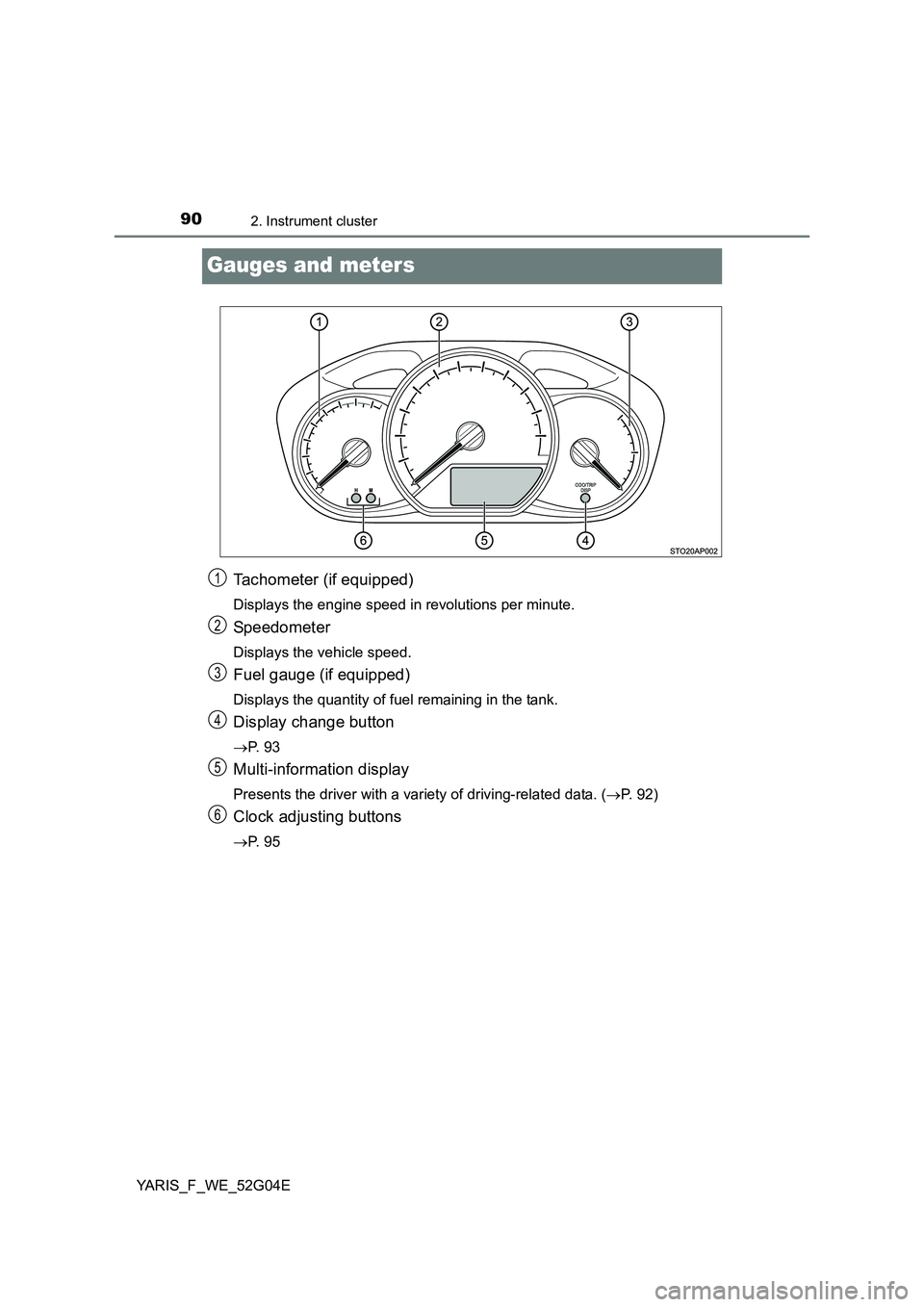
Tachometer (if equipped)
Displays the engine speed in revolutions per minute.
Speedometer
Displays the vehicle speed.
Fuel gauge (if equipped)
Displays the quantity of fuel remaining in the tank.
Display change button
P. 9 3
Multi-information display
Presents the driver with a variety of driving-related data. (P. 92)
Clock adjusting buttons
P. 9 5
1
2
3
4
5
6
Page 92 of 540
922. Instrument cluster
YARIS_F_WE_52G04E
Multi-information display
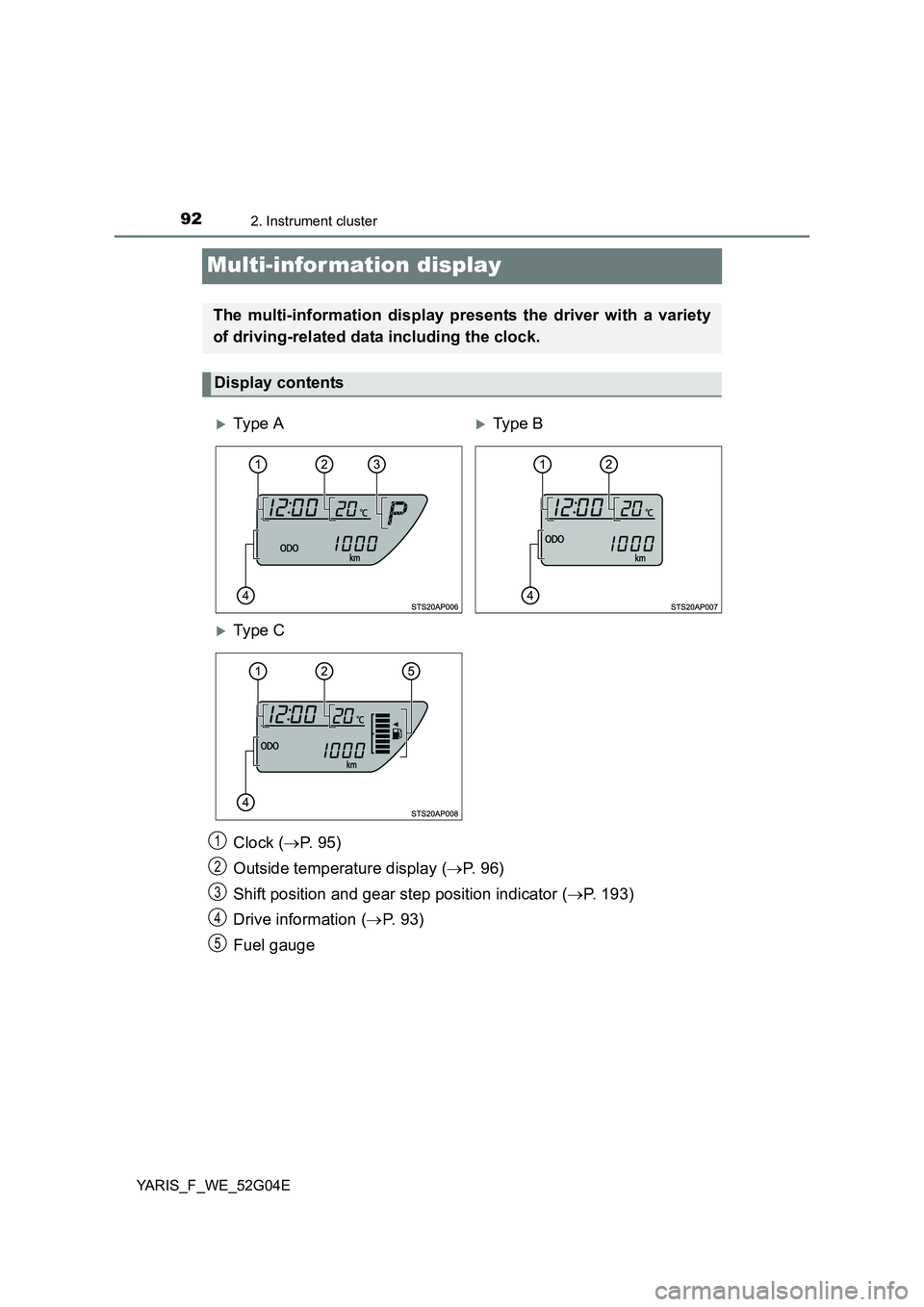
Clock (P. 9 5 )
Outside temperature display ( P. 9 6 )
Shift position and gear step position indicator ( P. 193)
Drive information ( P. 9 3 )
Fuel gauge
The multi-information display presents the driver with a variety
of driving-related data including the clock.
Display contents
Ty pe ATy pe B
Ty pe C
1
2
3
4
5
Page 93 of 540
932. Instrument cluster
2
Instrument cluster
YARIS_F_WE_52G04E
.
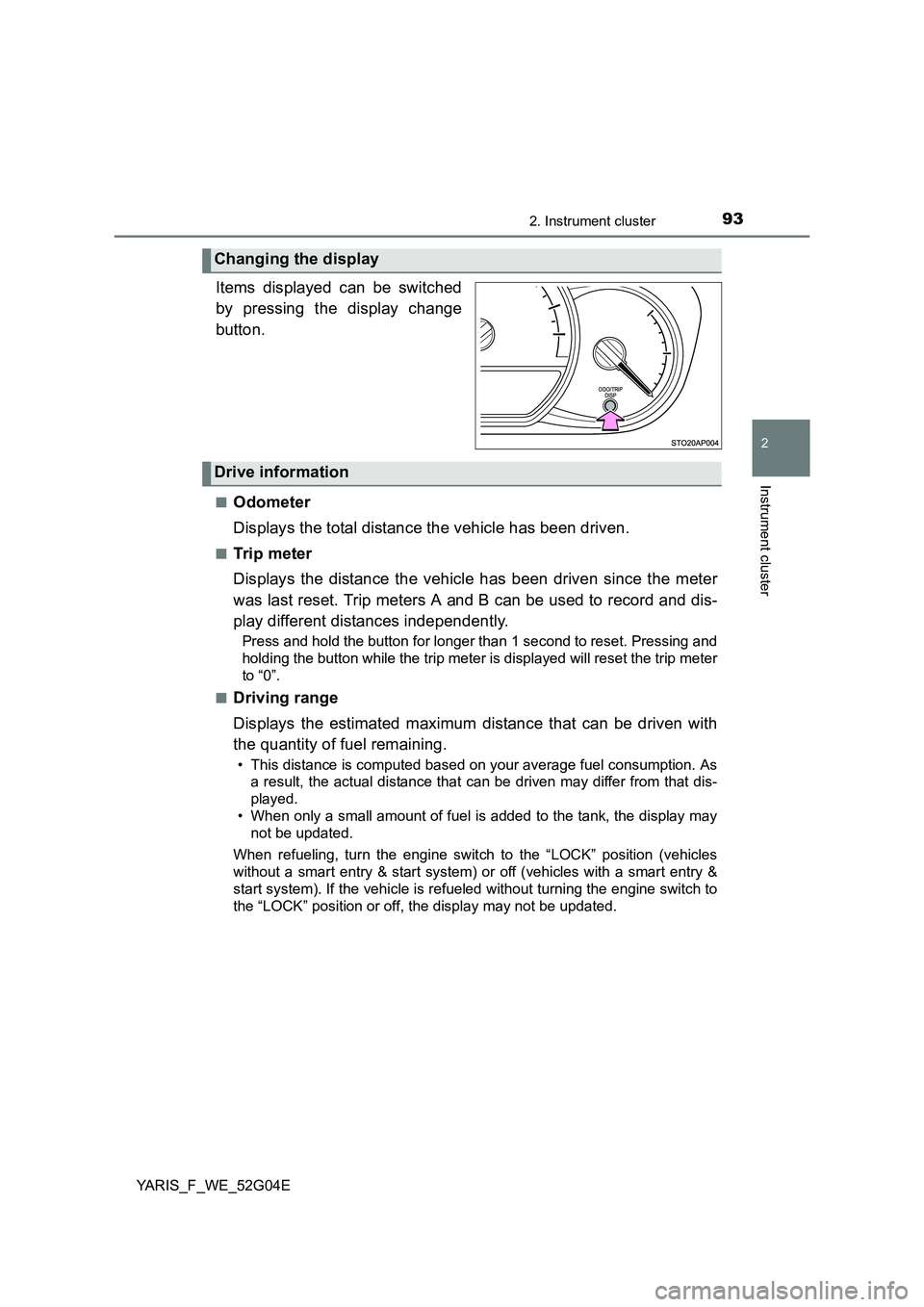
Items displayed can be switched
by pressing the display change
button.
■Odometer
Displays the total distance the vehicle has been driven.
■Trip meter
Displays the distance the vehicle has been driven since the meter
was last reset. Trip meters A and B can be used to record and dis-
play different distances independently.
Press and hold the button for longer than 1 second to reset. Pressing and
holding the button while the trip meter is displayed will reset the trip meter
to “0”.
■Driving range
Displays the estimated maximum distance that can be driven with
the quantity of fuel remaining.
• This distance is computed based on your average fuel consumption. As
a result, the actual distance that can be driven may differ from that dis-
played.
• When only a small amount of fuel is added to the tank, the display may
not be updated.
When refueling, turn the engine switch to the “LOCK” position (vehicles
without a smart entry & start system) or off (vehicles with a smart entry &
start system). If the vehicle is refueled without turning the engine switch to
the “LOCK” position or off, the display may not be updated.
Changing the display
Drive information
Page 94 of 540
942. Instrument cluster
YARIS_F_WE_52G04E
■Average fuel consumption
Displays the average rate of fuel consumption.
• The function can be reset by pressing the button for longer than 1 sec-
ond when the average fuel consumption is displayed.
• Use the displayed average fuel consumption as a reference.
■Instantaneous fuel consumption
Displays the instantaneous of fuel consumption.
Use the displayed instantaneous fuel consumption as a reference.
■Average vehicle speed
Displays the average vehicle speed since the engine was last
started.
■Stop & Start system operation time (if equipped)
Displays the amount of time the engine was stopped due to opera-
tion of the Stop & Start system during the current trip.
Vehicles without a smart entry & start system:
From the engine switch in the “ON” position to the engine switch in
the “LOCK” position.
Vehicles with a smart entry & start system:
From the engine switch in IGNITION ON mode to the engine switch
off.
■Stop & Start system total operation time (if equipped)
Displays the total amount of time that the engine has been stopped
due to operation of the Stop & Start system since the system was
last reset.
Press and hold the button to reset.
Page 95 of 540
952. Instrument cluster
2
Instrument cluster
YARIS_F_WE_52G04E
Eco Driving Indicator Light can be activated or deactivated by press-
ing the display change button when the Eco Driving Indicator Light
customization display is displayed.
To change the Eco Driving Indicator Light customization display, display the
odometer and press and hold the display change button until the display
changes.
After customization, press the display change button for more than 2 sec-
onds to return to the odometer.
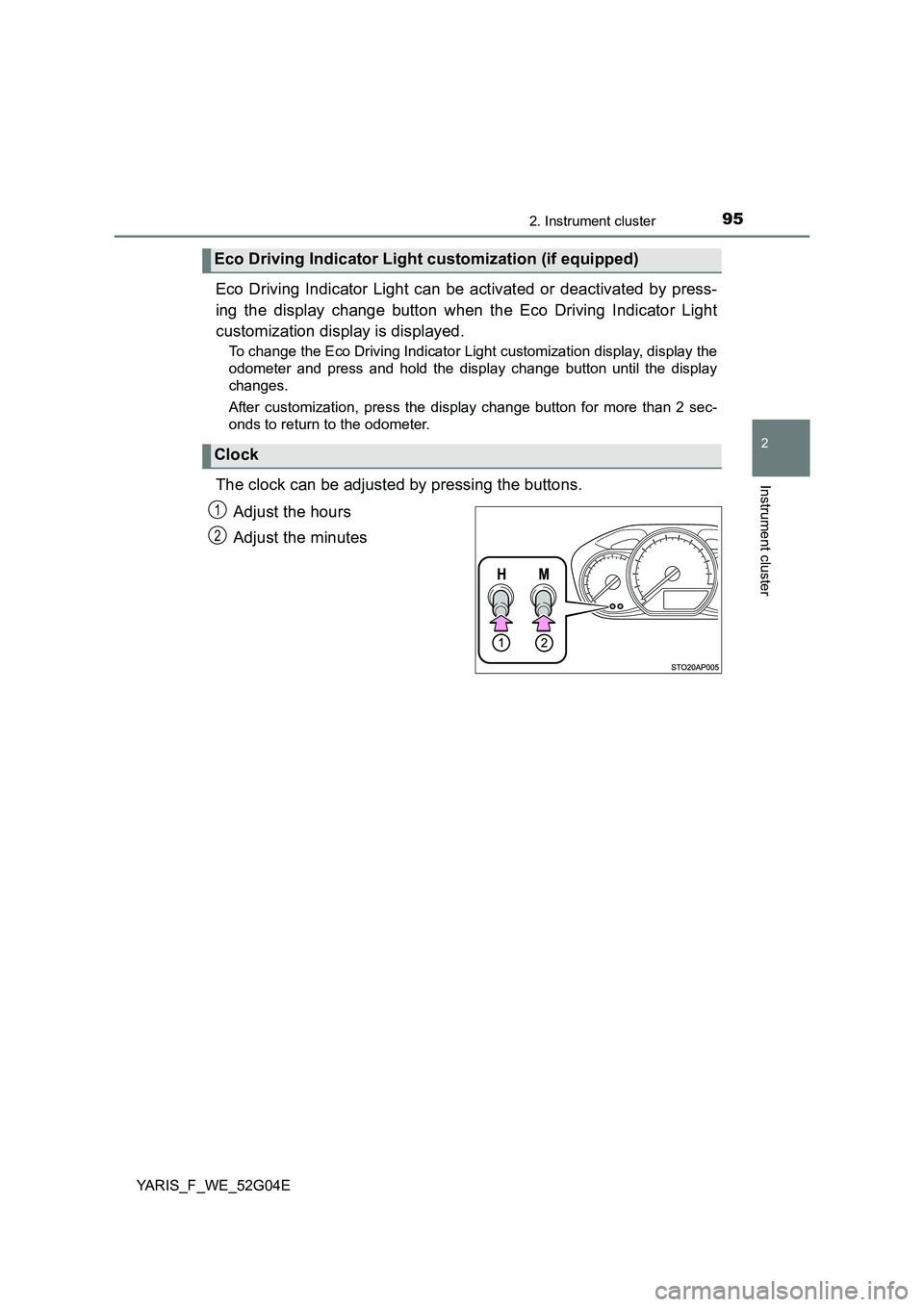
The clock can be adjusted by pressing the buttons.
Adjust the hours
Adjust the minutes
Eco Driving Indicator Light customization (if equipped)
Clock
1
2
Page 96 of 540
962. Instrument cluster
YARIS_F_WE_52G04E
The temperature display shows temperatures within the range of
-40°C (-40°F) and 50°C (122°F).
■Display
In the following situations, the correct outside temperature may not
be displayed, or the display may take longer than normal to change:
● When the vehicle is stopped, or moving at low speeds (less than
25 km/h [16 mph])
● When the outside temperature has changed suddenly (at the
entrance/exit of a garage, tunnel, etc.)
■When “ ” or “E” is displayed
The system may be malfunctioning. Take your vehicle to any autho-
rized Toyota dealer or repairer, or another duly qualified and
equipped professional.
■ When disconnecting and reconnecting battery terminals
The following information data will be reset:
● Driving range
● Average fuel consumption
● Stop & Start system total operation time (if equipped)
● Average vehicle speed
● Clock data
■ Liquid crystal display
Small spots or light spots may appear on the display. This phenomenon is
characteristic of liquid crystal display, and there is no problem continuing to
use the display.
■ Changing the pre-crash warning timing
P. 228
Outside temperature display
Page 103 of 540
103
3
Operation of
each component
YARIS_F_WE_52G04E
3-1. Key information
Keys ................................... 104
3-2. Opening, closing
and locking the doors
Side doors.......................... 116
Back door........................... 123
Smart entry &
start system ..................... 129
3-3. Adjusting the seats
Front seats ......................... 140
Rear seats ......................... 143
Head restraints .................. 146
3-4. Adjusting the steering
wheel and mirrors
Steering wheel ................... 148
Inside rear view mirror ....... 150
Outside rear view mirrors... 153
3-5. Opening and closing
the windows
Power windows .................. 156