battery TOYOTA YARIS HATCHBACK 2018 User Guide
[x] Cancel search | Manufacturer: TOYOTA, Model Year: 2018, Model line: YARIS HATCHBACK, Model: TOYOTA YARIS HATCHBACK 2018Pages: 520, PDF Size: 8.69 MB
Page 276 of 520
2765-8. Bluetooth® audio
Listening to Bluetooth® audio
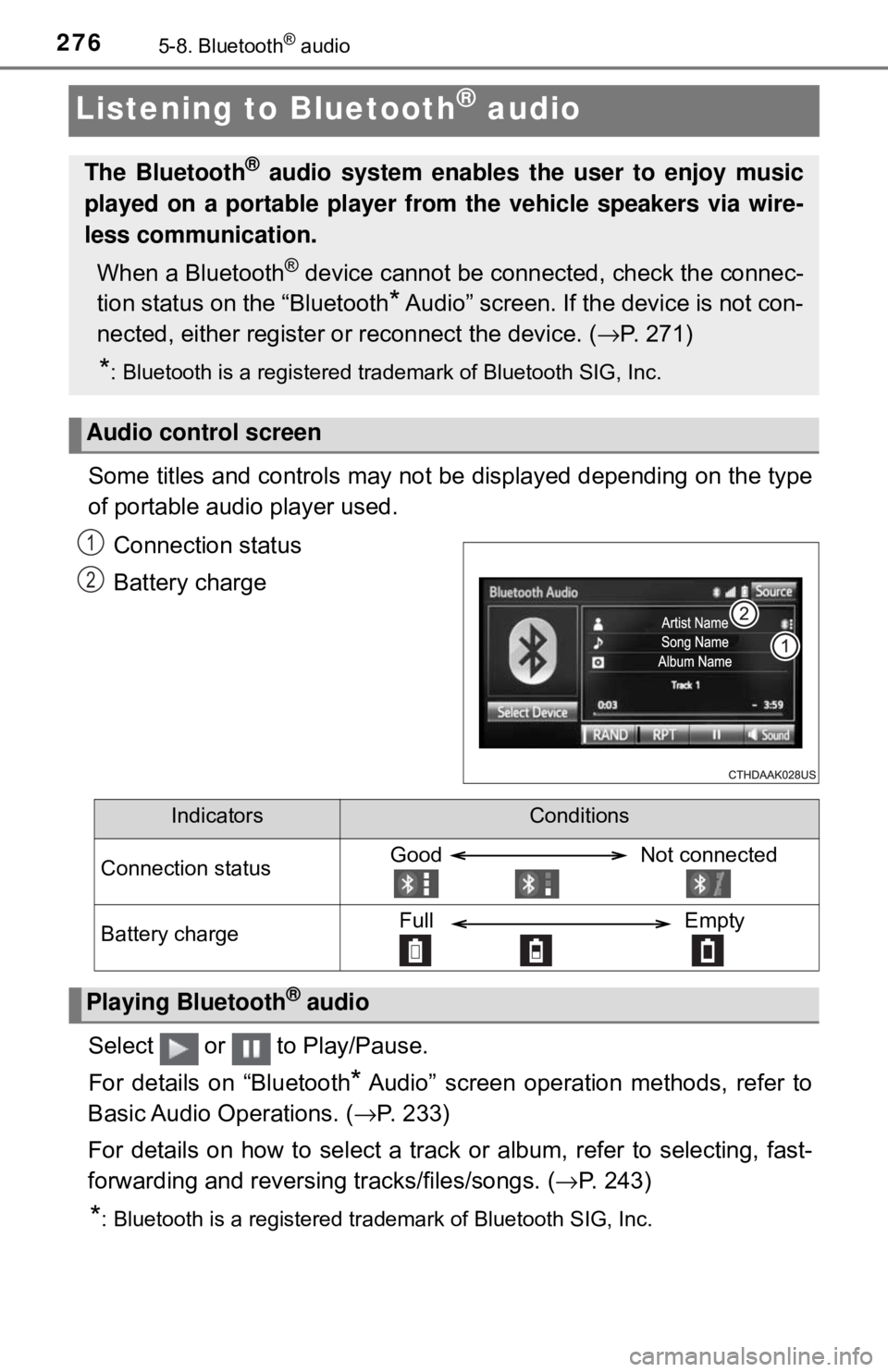
Some titles and controls may not be displayed depending on the type
of portable audio player used.Connection status
Battery charge
Select or to Play/Pause.
For details on “Bluetooth
* Audio” screen operation methods, refer to
Basic Audio Operations. ( →P. 233)
For details on how to select a track or album, refer to selecting, fast-
forwarding and reversing tracks/files/songs. ( →P. 243)
*: Bluetooth is a registered trademark of Bluetooth SIG, Inc.
The Bluetooth® audio system enables the user to enjoy music
played on a portable player from the vehicle speakers via wire-
less communication.
When a Bluetooth
® device cannot be connected, check the connec-
tion status on the “Bluetooth
* Audio” screen. If the device is not con-
nected, either register or reconnect the device. (→ P. 271)
*: Bluetooth is a registered trademark of Bluetooth SIG, Inc.
Audio control screen
1
2
IndicatorsConditions
Connection statusGood Not connected
Battery chargeFull Empty
Playing Bluetooth® audio
Page 277 of 520
2775-9. Bluetooth® phone
5
Multimedia system
Using a Bluetooth® phone
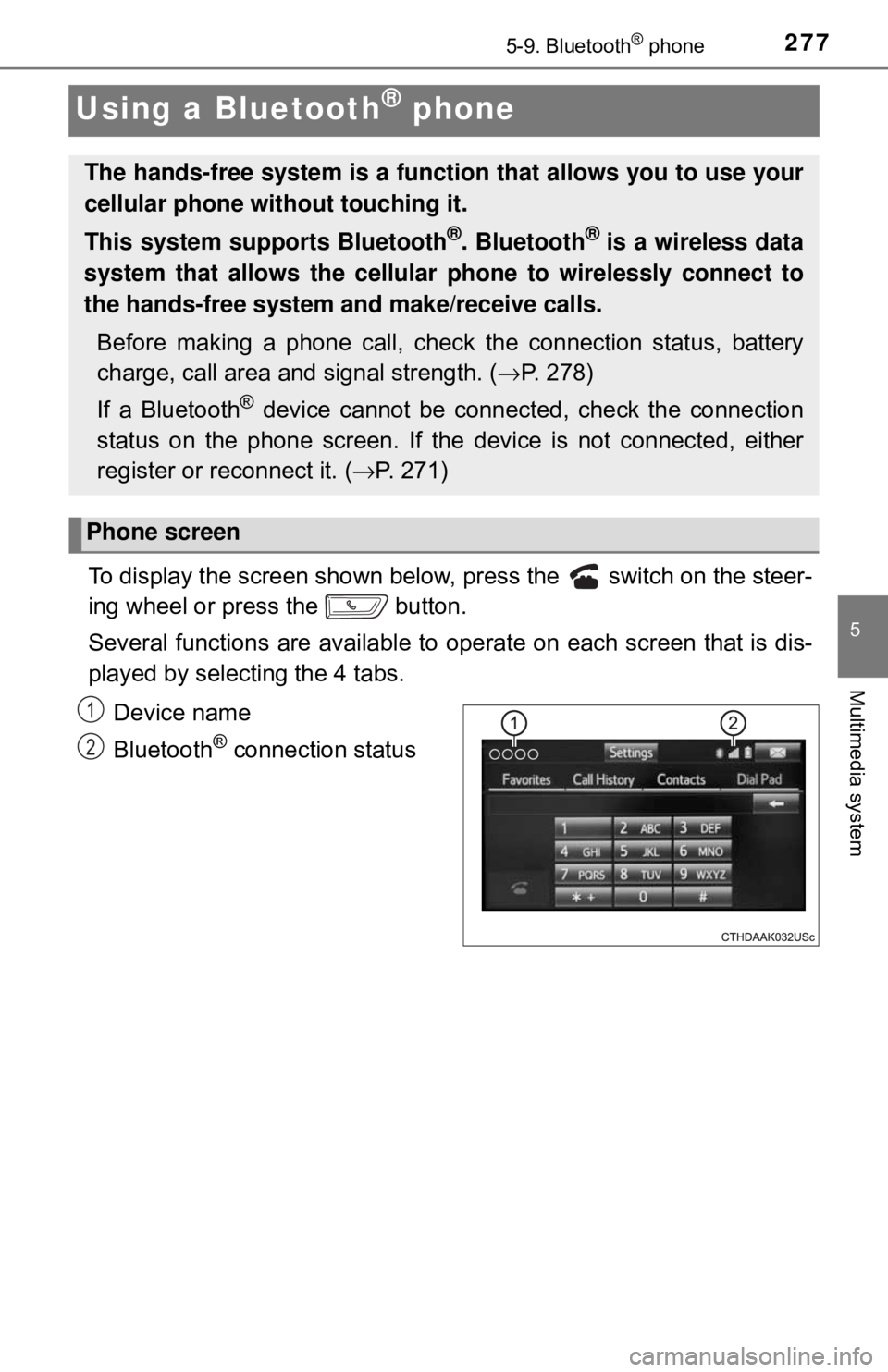
To display the screen shown below, press the switch on the steer-
ing wheel or press the button.
Several functions are available to operate on each screen that is dis-
played by selecting the 4 tabs.
Device name
Bluetooth
® connection status
The hands-free system is a function that allows you to use your
cellular phone without touching it.
This system supports Bluetooth
®. Bluetooth® is a wireless data
system that allows the cellular phone to wirelessly connect to
the hands-free system and make/receive calls.
Before making a phone call, check the connection status, battery
charge, call area and signal strength. ( →P. 278)
If a Bluetooth
® device cannot be connected, check the connection
status on the phone screen. If th e device is not connected, either
register or reconnect it. ( →P. 271)
Phone screen
1
2
Page 278 of 520
2785-9. Bluetooth® phone
■Telephone switch (→P. 290)
■Microphone
The vehicle’s built in micro-
phone is used when talking on
the phone.
The person you are speaking to
can be heard from the front
speakers.
To use the hands-free system, you must register your Bluetooth
®
phone in the system. (→P. 269)
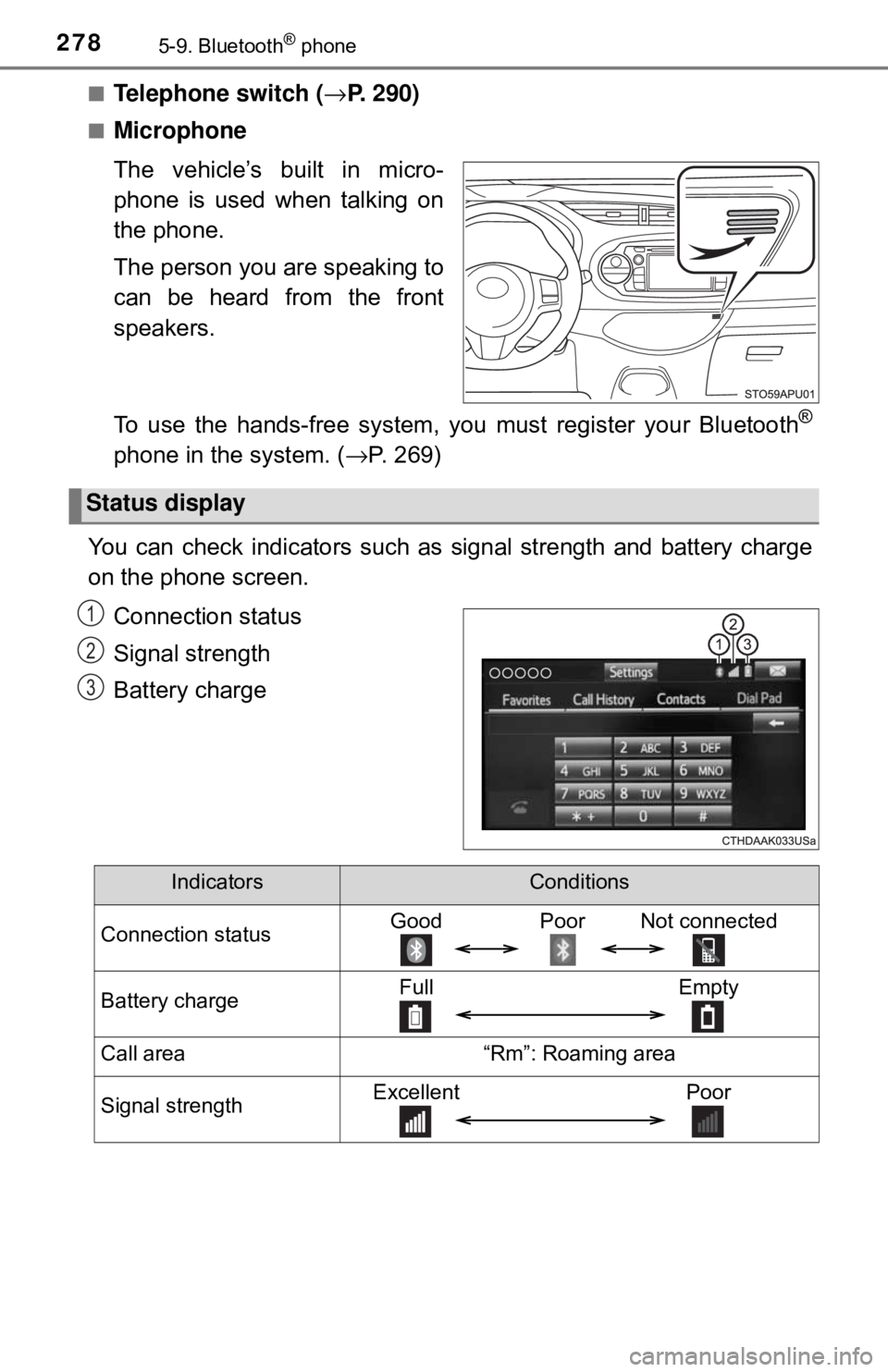
You can check indicators such as signal strength and battery charge
on the phone screen.
Connection status
Signal strength
Battery charge
Status display
1
2
3
IndicatorsConditions
Connection statusGood Poor Not connected
Battery chargeFull Empty
Call area“Rm”: Roaming area
Signal strengthExcellent Poor
Page 306 of 520
3065-9. Bluetooth® phone
When using the Bluetooth® message function
In other situations
Messages cannot be viewed.
Message transfer is not enabled on the cellular phone.
→Enable message transfer on the cellular phone (approve message
transfer on the phone).
Automatic transfer function on this system is set to off.
→ Set automatic transfer functi on on this system to on. (→P. 301)
New message notifications are not displayed.
Notification of SMS/MMS/E-mail reception on this system is set to off.
→Set notification of SMS/MMS/E-mail reception on this system to on.
(→ P. 301)
Automatic message transfer function is not enabled on the cellular phone.
→ Enable automatic transfer fu nction on the cellular phone.
Even though all conceivable measures have been taken, the symptom sta-
tus does not change.
The cellular phone is not close enough to this system.
→Bring the cellular phone closer to this system.
The cellular phone is the most likely cause of the symptom.
→Turn the cellular phone off, remo ve and reinstall the battery pack,
and then restart the cellular phone.
→ Enable the cellular phone’s Bluetooth
® connection.
→ Stop the cellular phone’s security software and close all applica-
tions.
→ Before using an appli cation installed on the cellular phone, care-
fully check its source and how its operation might affect this sys-
tem.
Page 307 of 520
3075-10. Bluetooth®
5
Multimedia system
Bluetooth®
■When using the Bluetooth® audio system
● In the following conditions, the system may not function.
• If the portable audio player is turned off
• If the portable audio player is not connected
• If the portable audio player’s battery is low
● There may be a delay if a cellular phone connection is made during
Bluetooth
® audio play.
● Depending on the type of portable audio player that is connected to the \
sys-
tem, operation may differ slightly and certain functions may not be available.
■ When using the hands-free system
●The multimedia system is muted when making a call.
● If both parties speak at the same time, it may be difficult to hear.
● If the received call volume is overly loud, an echo may be heard.
If the Bluetooth
® phone is too close to the system, quality of the sound may
deteriorate and connection status may deteriorate.
● In the following circumstances, it may be difficult to hear the other party:
• When driving on unpaved roads
• When driving at high speeds
• If a roof or window is open
• If the air conditioning is blowing directly on the microphone
• If there is interference from the network of the cellular phone
■ Conditions under which the system will not operate
● If using a cellular phone that does not support Bluetooth
®
●If the cellular phone is turned off
● If you are outside of cellular phone service coverage
● If the cellular phone is not connected
● If the cellular phone’s battery is low
● When outgoing calls are controlled, due to heavy traffic on telephone lines,
etc.
● When the cellular phone itself cannot be used
● When transferring contact data from the cellular phone
Page 308 of 520

3085-10. Bluetooth®
■Bluetooth® antenna
The antenna is built into the display.
If the portable audio player is behind the seat or in the glove box or console
box, or is touching or covered by metal objects, the connection status may
deteriorate.
If the cellular phone is behind the seat or in the console box, or touching or
covered by metal objects, the connection status may deteriorate.
■ Battery charge/signal status
●This display may not correspond exactly with the portable audio player or
cellular phone itself.
● This system does not have a charging function.
● The portable audio player or cellular phone battery will be depleted quickly
when the device is connected to Bluetooth
®.
■ When using the Bluetooth
® audio and hands-free system at the same
time
The following problems may occur.
● The Bluetooth
® audio connection may be interrupted.
● Noise may be heard during Bluetooth
® audio playback.
■ About the contact in this system
The following data is stored for every registered cellular phone. When
another phone is connecting, you cannot read the registered data.
●Contact data
● Call history
● Favorite
● Message
When removing a Bluetooth
® phone from the system, the above-mentioned
data is also deleted.
Page 325 of 520
3256-1. Using the air conditioning system and defogger
6
Interior features
■Air conditioning filter
→P. 385
WARNING
■To prevent the windshield from fogging up
● Do not set the air outlet selector dial to
during cool air operation in
extremely humid weather. The difference between the temperature of the
outside air and that of the windshield can cause the outer surface of the
windshield to fog up, blocking your vision.
■ To prevent burns (vehicles with outs ide rear view mirror defoggers)
Do not touch the rear view mirror surf aces when the outside rear view mirror
defoggers are on.
NOTICE
■ To prevent battery discharge
Do not leave the air conditioning system on longer than necessary when the
engine is stopped.
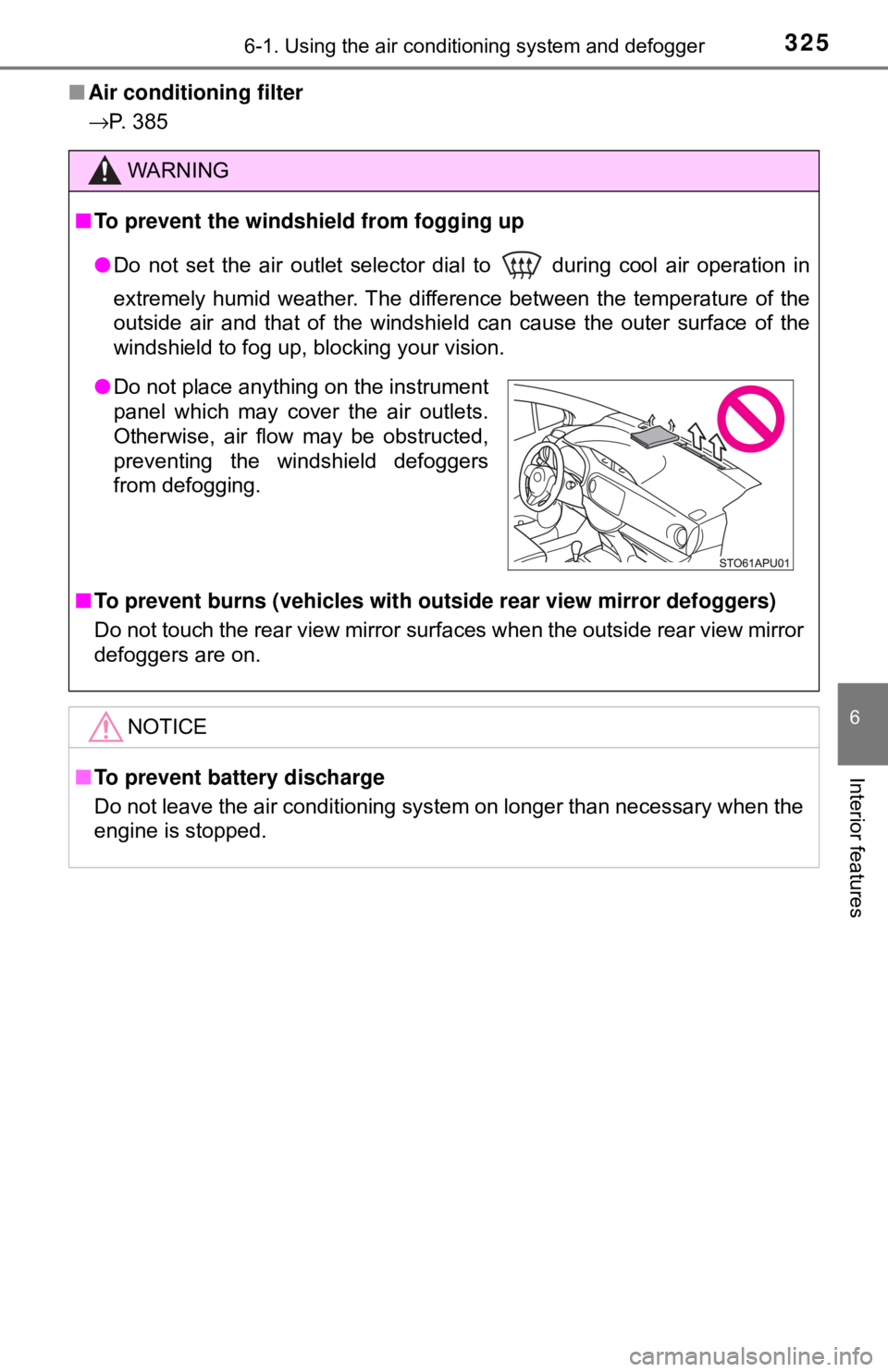
● Do not place anything on the instrument
panel which may cover the air outlets.
Otherwise, air flow may be obstructed,
preventing the windshield defoggers
from defogging.
Page 326 of 520
3266-1. Using the air conditioning system and defogger
Seat heaters∗
∗: If equipped
WARNING
■Burns
● Use caution when seating the following persons in a seat with the seat
heater on to avoid the possibility of burns:
• Babies, small children, the elderly, the sick and the physically chal-
lenged
• Persons with sensitive skin
• Persons who are fatigued
• Persons who have taken alcohol or drugs that induce sleep (sleeping drugs, cold remedies, etc.)
● Do not cover the seat with anything when using the seat heater.
Using the seat heater with a blanket or cushion increases the temperature
of the seat and may lead to overheating.
● Do not use the seat heater more than necessary. Doing so may cause
minor burns or overheating.
NOTICE
■To prevent seat heater damage
Do not put heavy objects that have an uneven surface on the seat and do
not stick sharp objects (needles, nails, etc.) into the seat.
■ To prevent battery discharge
Turn the seat heaters off when the engine is not running.
Page 329 of 520
3296-2. Using the interior lights
6
Interior features
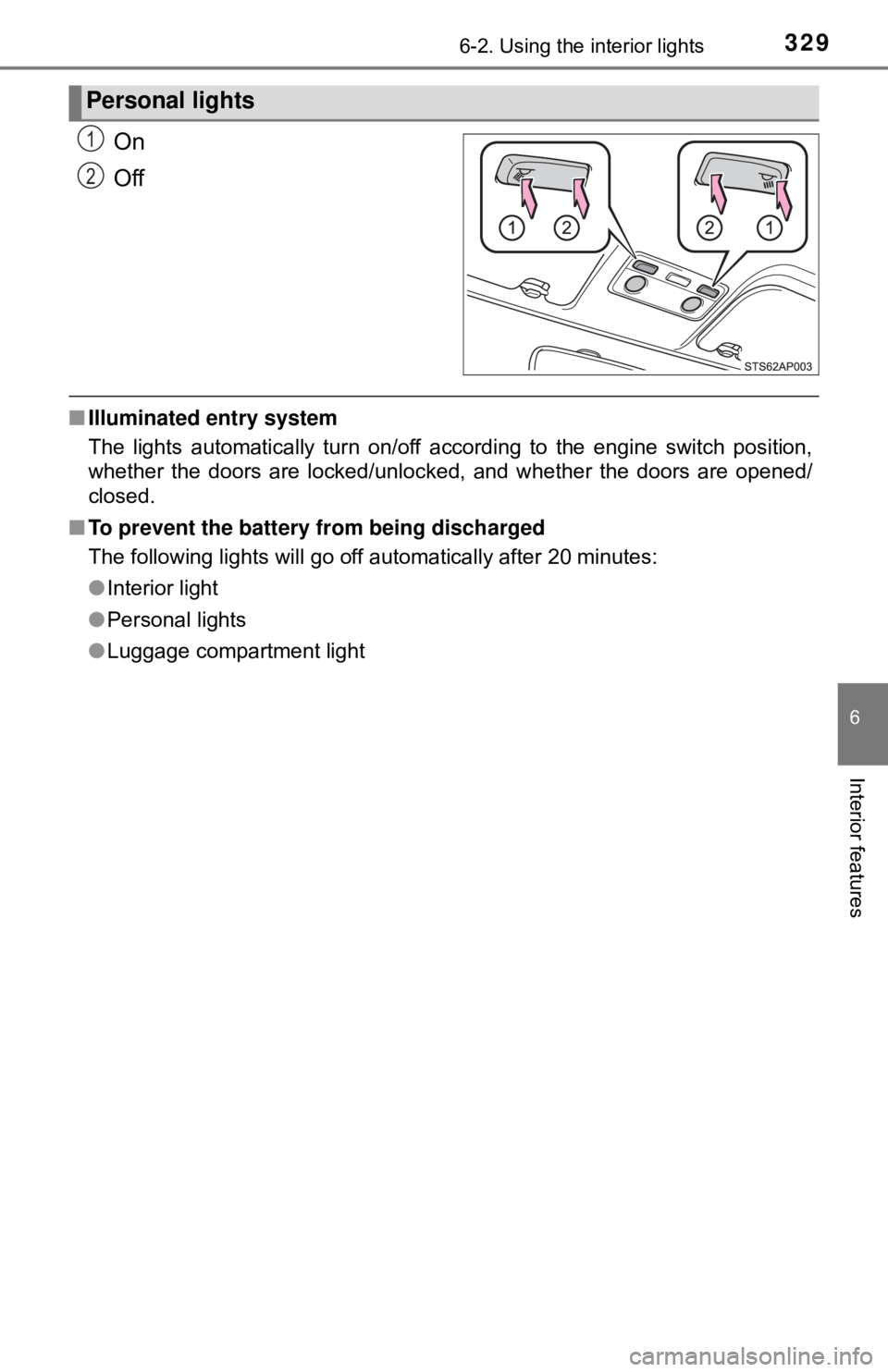
On
Off
■Illuminated entry system
The lights automatically turn on/off according to the engine switch position,
whether the doors are locked/unlocked, and whether the doors are opened/
closed.
■ To prevent the battery from being discharged
The following lights will go off automatically after 20 minutes:
●Interior light
● Personal lights
● Luggage compartment light
Personal lights
1
2
Page 337 of 520
3376-4. Using the other interior features
6
Interior features
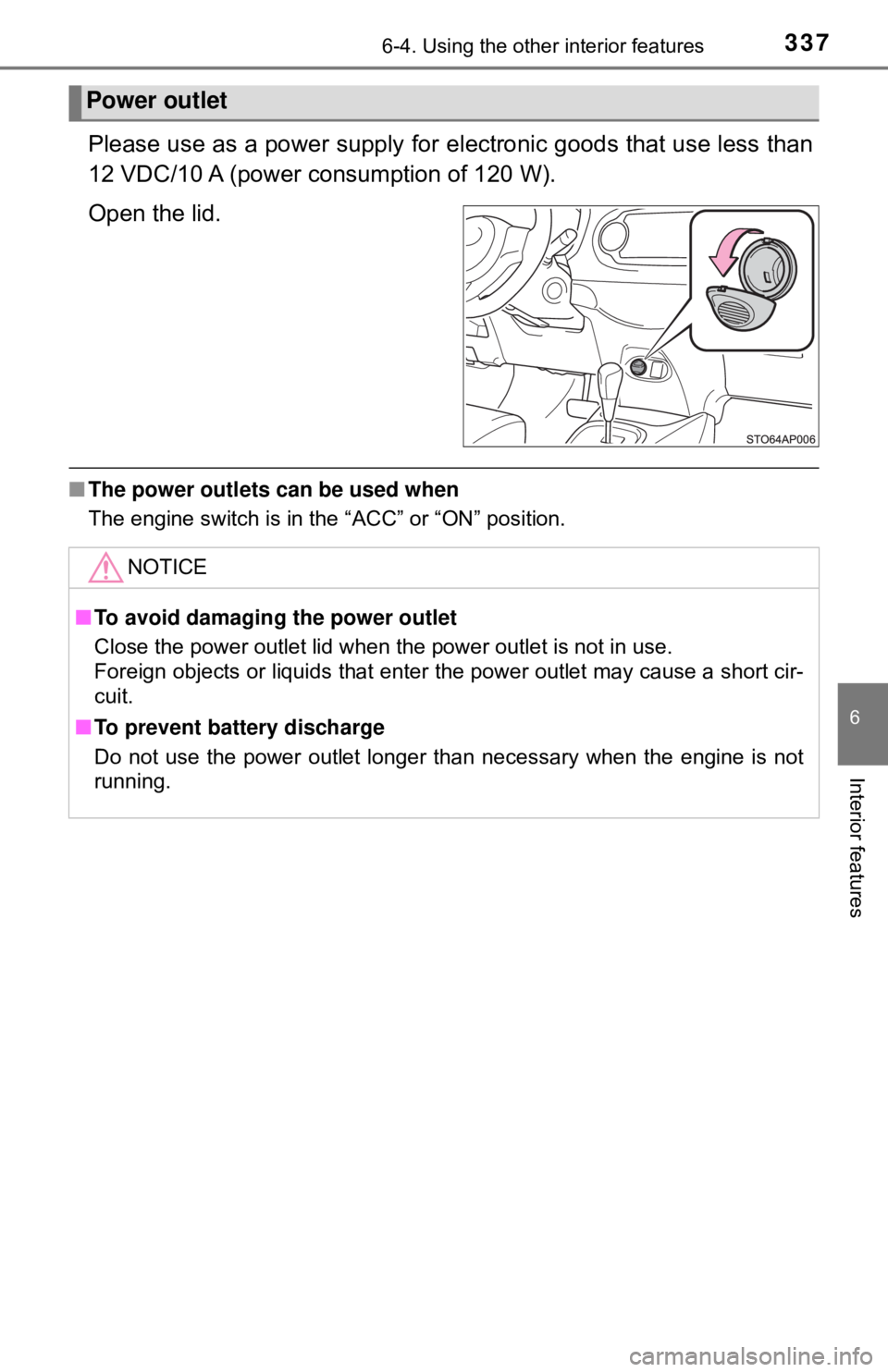
Please use as a power supply for electronic goods that use less than
12 VDC/10 A (power consumption of 120 W).
Open the lid.
■ The power outlets can be used when
The engine switch is in the “ACC” or “ON” position.
Power outlet
NOTICE
■To avoid damaging the power outlet
Close the power outlet lid when the power outlet is not in use.
Foreign objects or liquids that enter the power outlet may cause a short cir-
cuit.
■ To prevent battery discharge
Do not use the power outlet longer than necessary when the engine is not
running.