stop start TOYOTA YARIS HATCHBACK 2019 User Guide
[x] Cancel search | Manufacturer: TOYOTA, Model Year: 2019, Model line: YARIS HATCHBACK, Model: TOYOTA YARIS HATCHBACK 2019Pages: 692, PDF Size: 68.71 MB
Page 123 of 692
1232. Instrument cluster
2
Instrument cluster
YARIS_F_OM_Europe_OM52A54E.
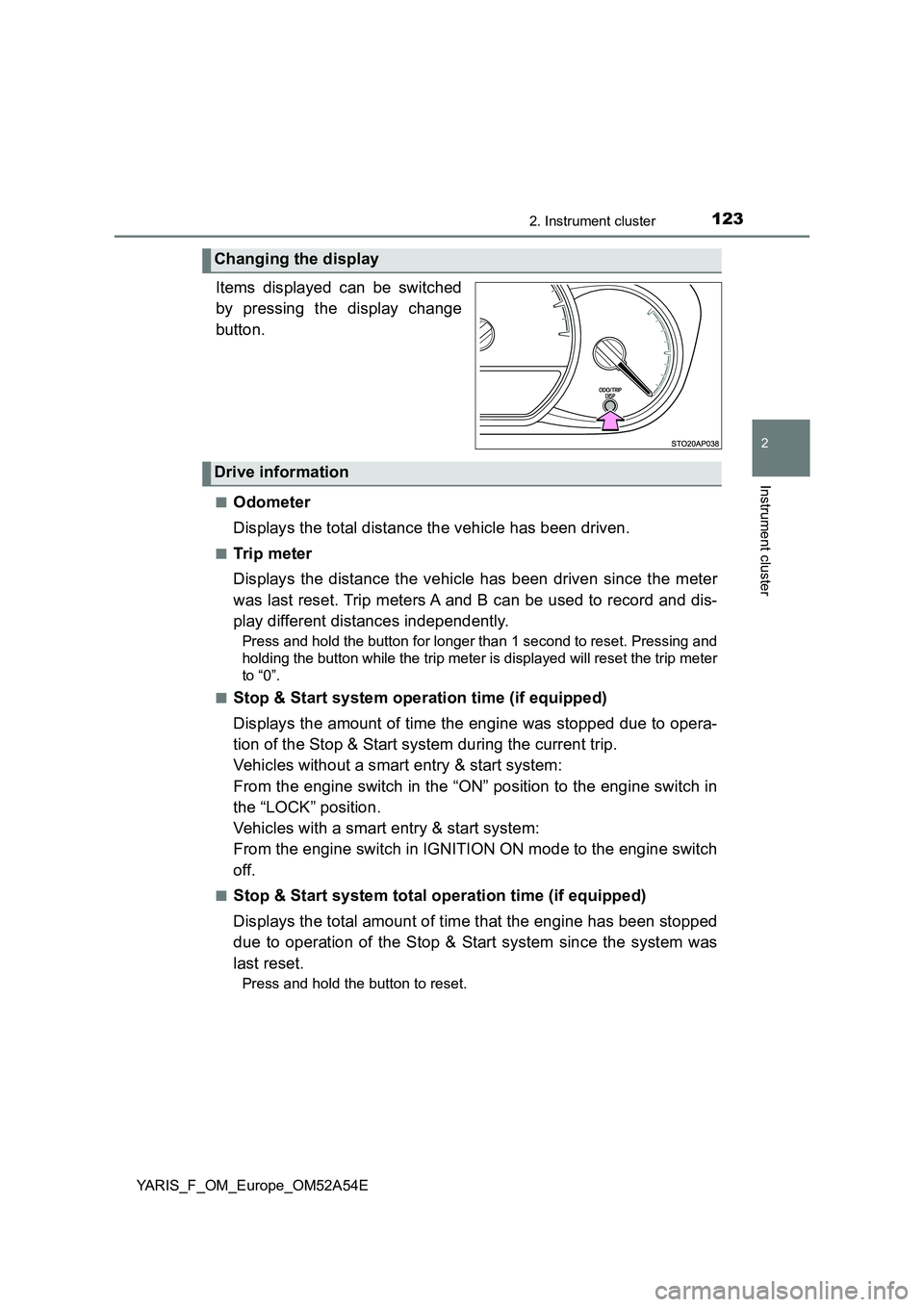
Items displayed can be switched
by pressing the display change
button.
■Odometer
Displays the total distance the vehicle has been driven.
■Trip meter
Displays the distance the vehicle has been driven since the meter
was last reset. Trip meters A and B can be used to record and dis-
play different distances independently.
Press and hold the button for longer than 1 second to reset. Pressing and
holding the button while the trip meter is displayed will reset the trip meter
to “0”.
■
Stop & Start system operation time (if equipped)
Displays the amount of time the engine was stopped due to opera-
tion of the Stop & Start system during the current trip.
Vehicles without a smart entry & start system:
From the engine switch in the “ON” position to the engine switch in
the “LOCK” position.
Vehicles with a smart entry & start system:
From the engine switch in IGNITION ON mode to the engine switch
off.
■Stop & Start system total operation time (if equipped)
Displays the total amount of time that the engine has been stopped
due to operation of the Stop & Start system since the system was
last reset.
Press and hold the button to reset.
Changing the display
Drive information
Page 126 of 692
1262. Instrument cluster
YARIS_F_OM_Europe_OM52A54E
■When disconnecting and reconnecting battery terminals
The following information data will be reset:
● Stop & Start system total operation time (if equipped)
● Average fuel consumption
● Driving range
● Average vehicle speed
● Clock data
■ Liquid crystal display
Small spots or light spots may appear on the display. This phenomenon is
characteristic of liquid crystal display, and there is no problem continuing to
use the display.
■ Changing the pre-crash warning timing
P. 294
WARNING
■The information display at low temperatures
Allow the interior of the vehicle to warm up before using the liquid crystal
information display. At extremely low temperatures, the display monitor may
respond slowly, and display changes may be delayed.
For example, there is a lag between the driver’s shifting and the new gear
number appearing on the display. This lag could cause the driver to down-
shift again, causing rapid and exce ssive engine braking and possibly an
accident resulting in death or injury.
■ Cautions during setting up the display
As the engine needs to be running during setting up the display, ensure that
the vehicle is parked in a place with adequate ventilation. In a closed area
such as a garage, exhaust gases including harmful carbon monoxide (CO)
may collect and enter the vehicle. This may lead to death or a serious
health hazard.
Page 128 of 692
1282. Instrument cluster
YARIS_F_OM_Europe_OM52A54E
Stop & Start System Information (if equipped)
Select to display the operational status of the Stop & Start system.
(P. 130)
Warning message display
Select to display warning messages and measures to be taken if a
malfunction is detected. (P. 592)
Settings display
Select to change the meter display settings and the operation set-
tings of some vehicle functions. (P. 131)
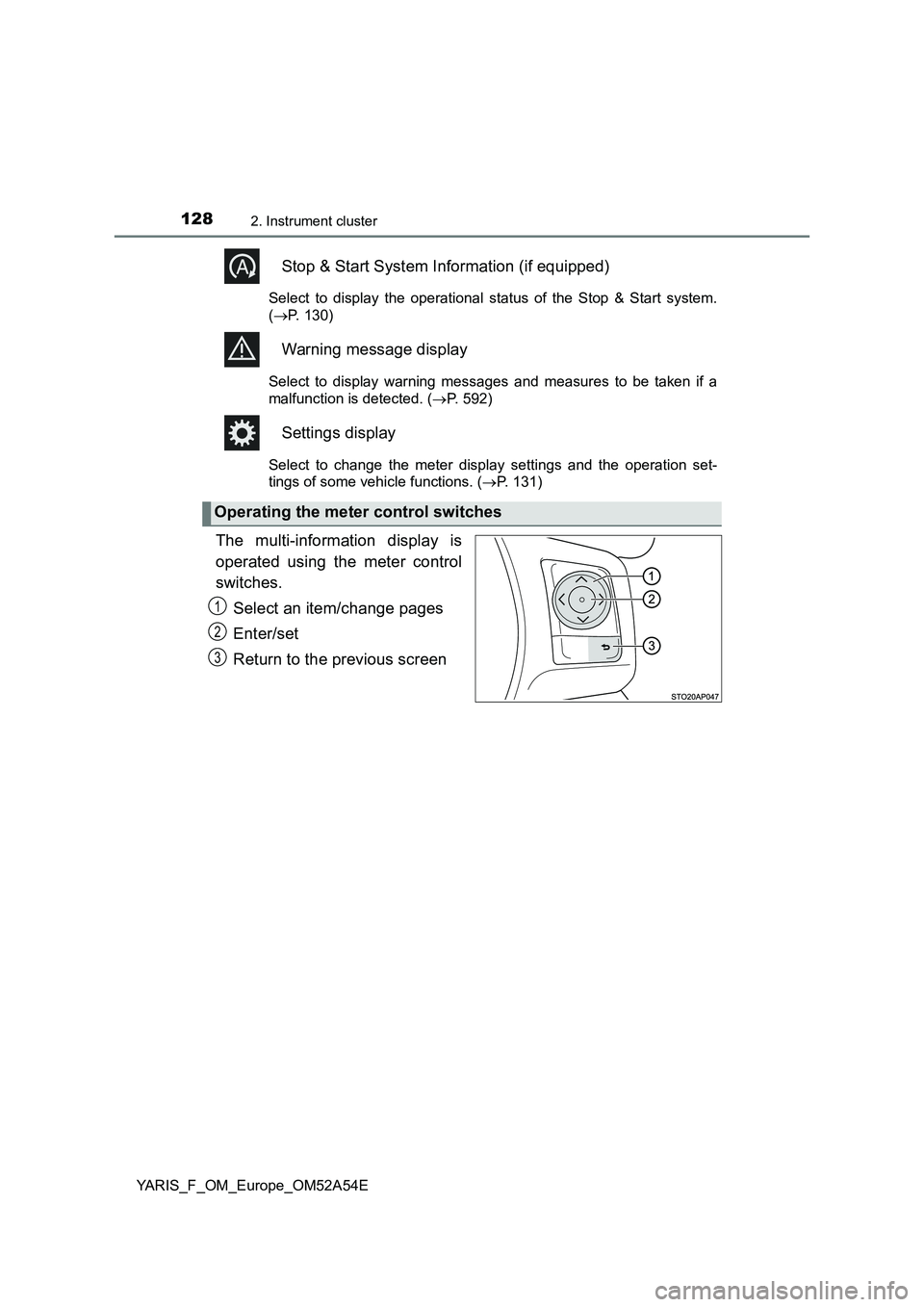
The multi-information display is
operated using the meter control
switches.
Select an item/change pages
Enter/set
Return to the previous screen
Operating the meter control switches
1
2
3
Page 130 of 692
1302. Instrument cluster
YARIS_F_OM_Europe_OM52A54E■
Current idling stop time
Displays the current idling stop time (engine stop time due to the
Stop & Start system)
■Total idling stop time (after reset*/after start)
Displays the total idling stop time (engine stop time via the Stop &
Start system) after resetting and engine startup.
■Idling stop time fuel savings (after reset*/after start)
Displays the fuel savings (reference) during idling stop time after
resetting and engine startup.
■Reason of Stop & Start system operation cancel
Displays the reason for the Stop & Start system being canceled in
the meter display.
*: The function can be reset by pressing and holding the of the meter
control switches when the reset item is displayed.
Stop & Start system information (if equipped)
Page 132 of 692
1322. Instrument cluster
YARIS_F_OM_Europe_OM52A54E
●Settings
Select the menu to set up the following items.
• Language
Select to change the language on the display.
•Units
Select to change the unit of measure for the multi-information display.
• (Eco Driving Indicator Light) setup*1
Select to activate/deactivate the Eco Driving Indicator Light
• Drive information
Select to select up to 2 items that will be displayed on a Drive informa-
tion screen.
• Pop-up display
Select to set the pop-up displays*2, which may appear in some situa-
tions, on/off.
• Default settings
Registered or changed meter settings will be deleted or returned to their
default setting.
*1: If equipped
*2: Stop & Start system operation time display (if equipped), Stop & Start sys-
tem status display (if equipped) and incoming call display of the hands-
free phone system (if equipped).
Page 135 of 692
1352. Instrument cluster
2
Instrument cluster
YARIS_F_OM_Europe_OM52A54E■Stop & Start system information pop-up display (if equipped)
In some situations the following Stop & Start system information will be tem-
porarily displayed on the multi-information display:
●Current Stop & Start system operation time
●Stop & Start operational status messages (P. 350)
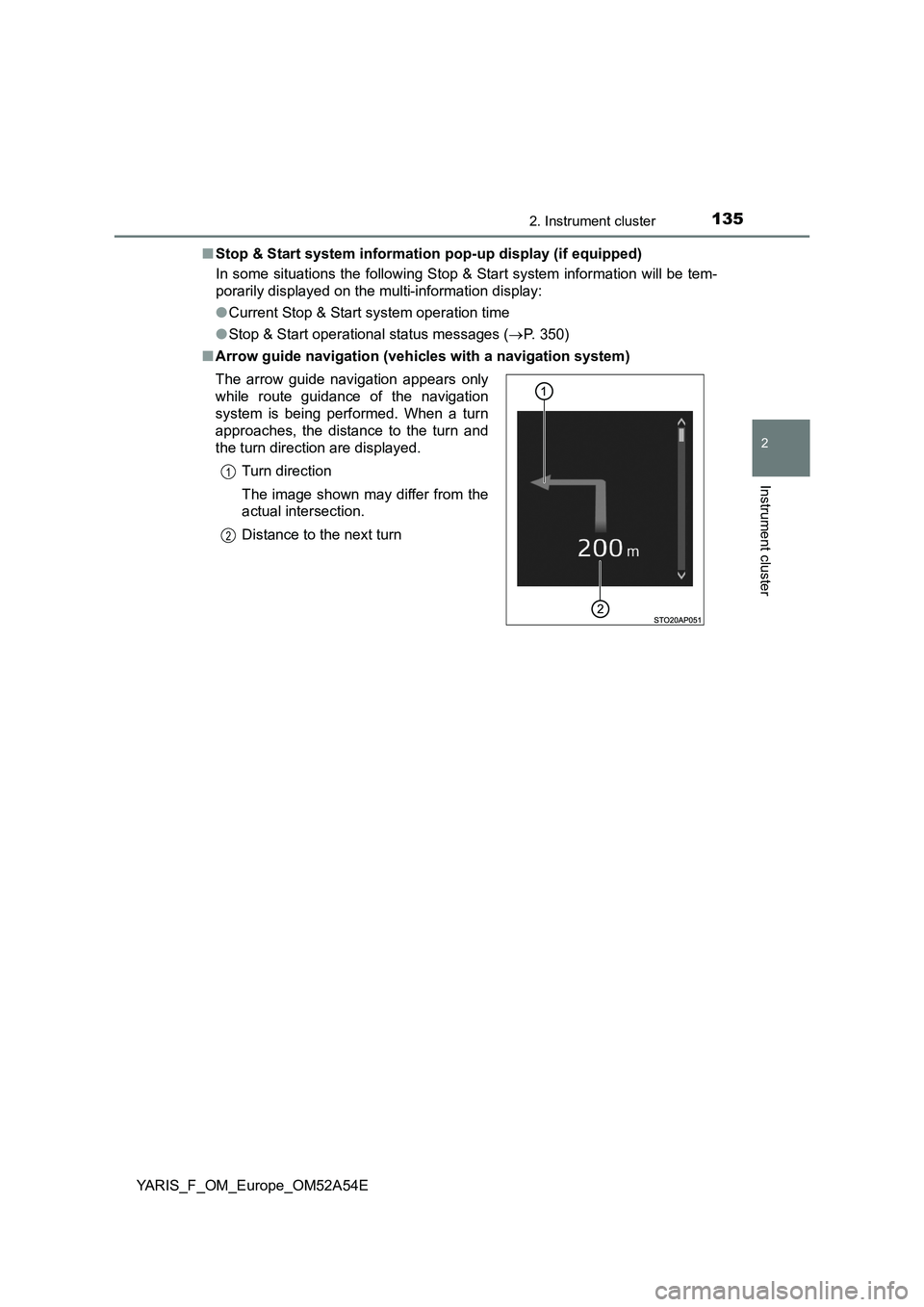
■Arrow guide navigation (vehicles with a navigation system)
The arrow guide navigation appears only
while route guidance of the navigation
system is being performed. When a turn
approaches, the distance to the turn and
the turn direction are displayed.
Turn direction
The image shown may differ from the
actual intersection.
Distance to the next turn
1
2
Page 146 of 692
1463-1. Key information
YARIS_F_OM_Europe_OM52A54E■Key battery depletion
Vehicles without a smart entry & start system
If the wireless remote control function does not operate, the battery may be
depleted. Replace the battery when necessary. (P. 537)
Vehicles with a smart entry & start system
●The standard battery life is 1 to 2 years.
●If the battery becomes low, an alarm will sound in the cabin when the engine
stops. (P. 591)
●As the electronic key always receives radio waves, the battery will become
depleted even if the electronic key is not used. The following symptoms indi-
cate that the electronic key battery may be depleted. Replace the battery
when necessary. (P. 537)
• The smart entry & start system or the wireless remote control does not
operate.
• The detection area becomes smaller.
• The LED indicator on the key surface does not turn on.
●To avoid serious deterioration, do not leave the electronic key within 1 m
(3 ft.) of the following electrical appliances that produce a magnetic field:
•TVs
• Personal computers
• Cellular phones, cordless phones and battery chargers
• Recharging cellular phones or cordless phones
• Induction cookers
• Table lamps
■Replacing the battery
P. 537
■Confirmation of the registered key number (vehicles with a smart entry &
start system)
The number of keys already registered to the vehicle can be confirmed. Ask
any authorized Toyota retailer or Toyota authorized repairer, or any reliable
repairer for details.
■If a wrong key is used
On some models, the key cylinder rotates freely to isolate inside mechanism.
■Customization
Settings (e.g. wireless remote control system) can be changed.
(Customizable features: P. 669)
Page 157 of 692
1573-2. Opening, closing and locking the doors
3
Operation of each component
YARIS_F_OM_Europe_OM52A54E
■Operation signals (vehicles with an entry function or wireless remote
control)
The emergency flashers flash to indicate that the doors have been locked/
unlocked. (Locked: once; Unlocked: twice)
■Security feature (wireless remote control)
Vehicles without a smart entry & start system
If a door is not opened within approximately 30 seconds after the vehicle is
unlocked, the security feature automatically locks the vehicle again.
Vehicles with a smart entry & start system
If a door is not opened within approximately 30 seconds after the vehicle is
unlocked, the security feature automatically locks the vehicle again. (How-
ever, depending on the location of the electronic key, the key may be
detected as being in the vehicle. In this case, vehicle may be unlocked.)
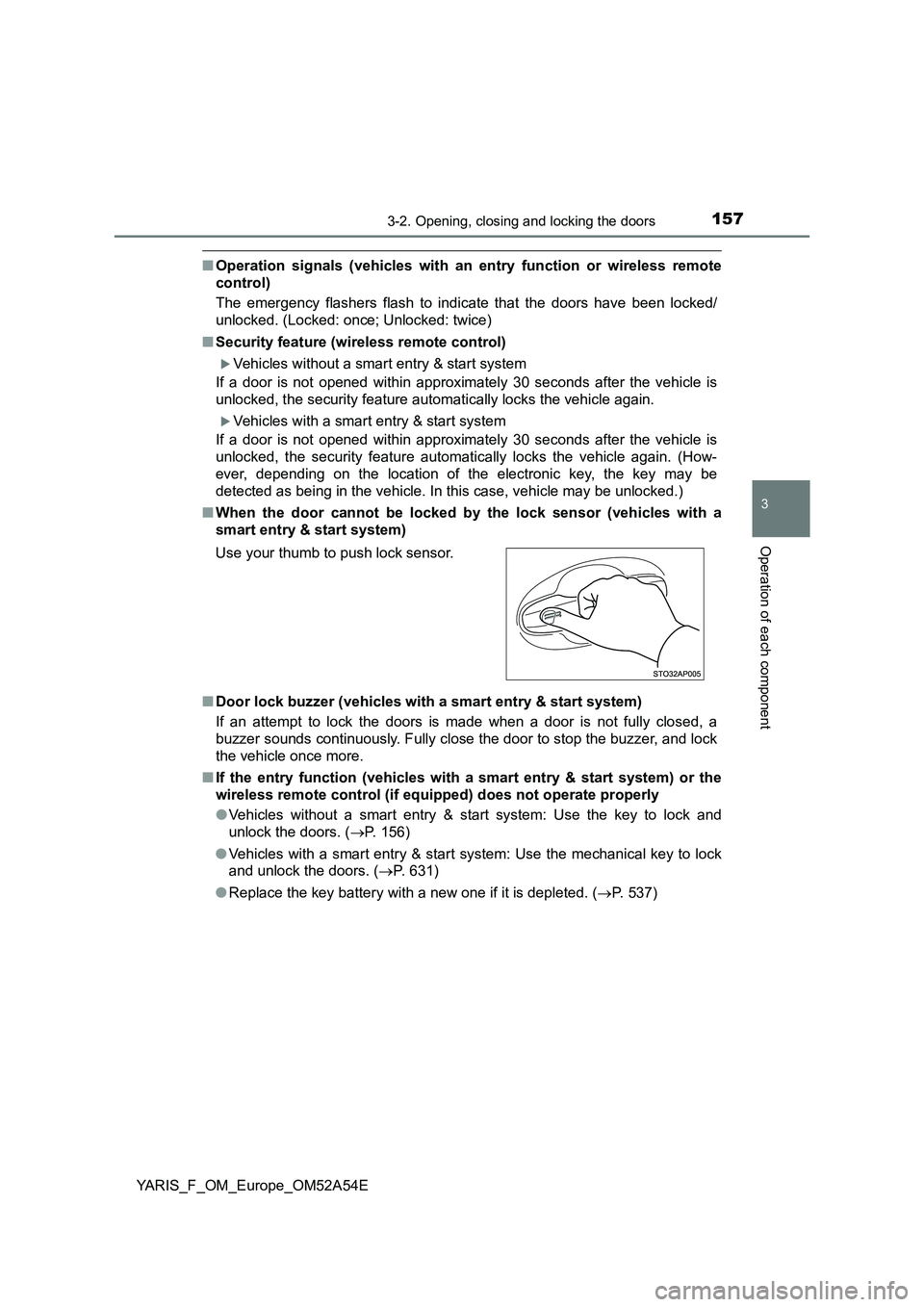
■When the door cannot be locked by the lock sensor (vehicles with a
smart entry & start system)
■Door lock buzzer (vehicles with a smart entry & start system)
If an attempt to lock the doors is made when a door is not fully closed, a
buzzer sounds continuously. Fully close the door to stop the buzzer, and lock
the vehicle once more.
■If the entry function (vehicles with a smart entry & start system) or the
wireless remote control (if equipped) does not operate properly
●Vehicles without a smart entry & start system: Use the key to lock and
unlock the doors. (P. 156)
●Vehicles with a smart entry & start system: Use the mechanical key to lock
and unlock the doors. (P. 631)
●Replace the key battery with a new one if it is depleted. (P. 537) Use your thumb to push lock sensor.
Page 170 of 692
1703-2. Opening, closing and locking the doors
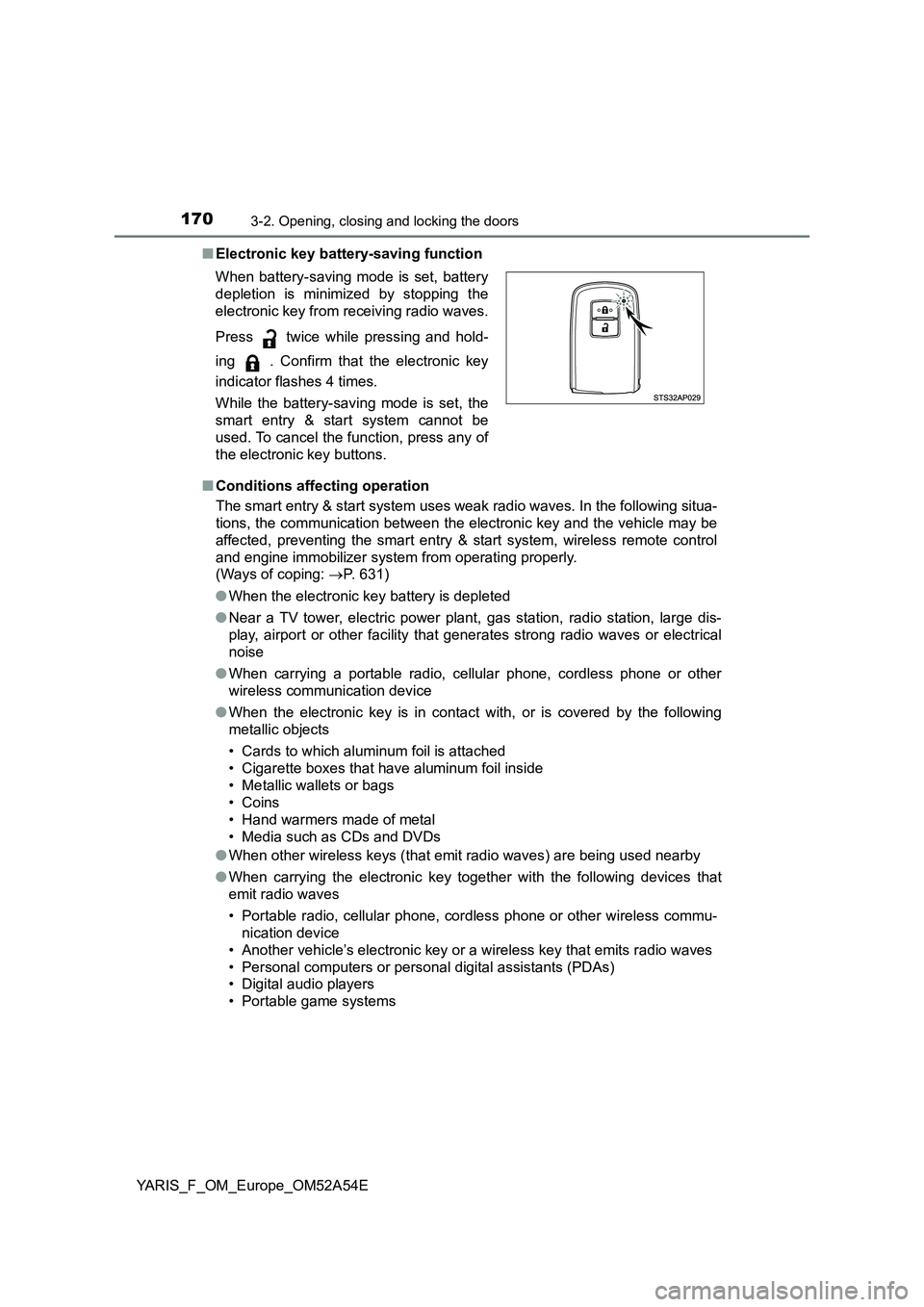
YARIS_F_OM_Europe_OM52A54E■Electronic key battery-saving function
■Conditions affecting operation
The smart entry & start system uses weak radio waves. In the following situa-
tions, the communication between the electronic key and the vehicle may be
affected, preventing the smart entry & start system, wireless remote control
and engine immobilizer system from operating properly.
(Ways of coping: P. 631)
●When the electronic key battery is depleted
●Near a TV tower, electric power plant, gas station, radio station, large dis-
play, airport or other facility that generates strong radio waves or electrical
noise
●When carrying a portable radio, cellular phone, cordless phone or other
wireless communication device
●When the electronic key is in contact with, or is covered by the following
metallic objects
• Cards to which aluminum foil is attached
• Cigarette boxes that have aluminum foil inside
• Metallic wallets or bags
• Coins
• Hand warmers made of metal
• Media such as CDs and DVDs
●When other wireless keys (that emit radio waves) are being used nearby
●When carrying the electronic key together with the following devices that
emit radio waves
• Portable radio, cellular phone, cordless phone or other wireless commu-
nication device
• Another vehicle’s electronic key or a wireless key that emits radio waves
• Personal computers or personal digital assistants (PDAs)
• Digital audio players
• Portable game systems When battery-saving mode is set, battery
depletion is minimized by stopping the
electronic key from receiving radio waves.
Press twice while pressing and hold-
ing . Confirm that the electronic key
indicator flashes 4 times.
While the battery-saving mode is set, the
smart entry & start system cannot be
used. To cancel the function, press any of
the electronic key buttons.
Page 173 of 692
1733-2. Opening, closing and locking the doors
3
Operation of each component
YARIS_F_OM_Europe_OM52A54E■To operate the system properly
Make sure to carry the electronic key when operating the system. Do not get
the electronic key too close to the vehicle when operating the system from the
outside of the vehicle.
Depending on the position and holding condition of the electronic key, the key
may not be detected correctly and the system may not operate properly. (The
alarm may go off accidentally, or the door lock prevention function may not
operate.)
■If the smart entry & start system does not operate properly
●Locking and unlocking the doors: Use the mechanical key. (P. 631)
●Starting the engine: P. 631
■Customization
Settings (e. g. smart entry & start system) can be changed.
(Customizable features: P. 666)
■If the smart entry & start system has been deactivated in a customized
setting
●Locking and unlocking the doors:
Use the wireless remote control or mechanical key. (P. 155, 631)
●Starting the engine and changing engine switch modes: P. 631
●Stopping the engine: P. 245