light TOYOTA YARIS HATCHBACK 2019 Owner's Guide
[x] Cancel search | Manufacturer: TOYOTA, Model Year: 2019, Model line: YARIS HATCHBACK, Model: TOYOTA YARIS HATCHBACK 2019Pages: 692, PDF Size: 68.71 MB
Page 113 of 692
1132. Instrument cluster
2
Instrument cluster
YARIS_F_OM_Europe_OM52A54E
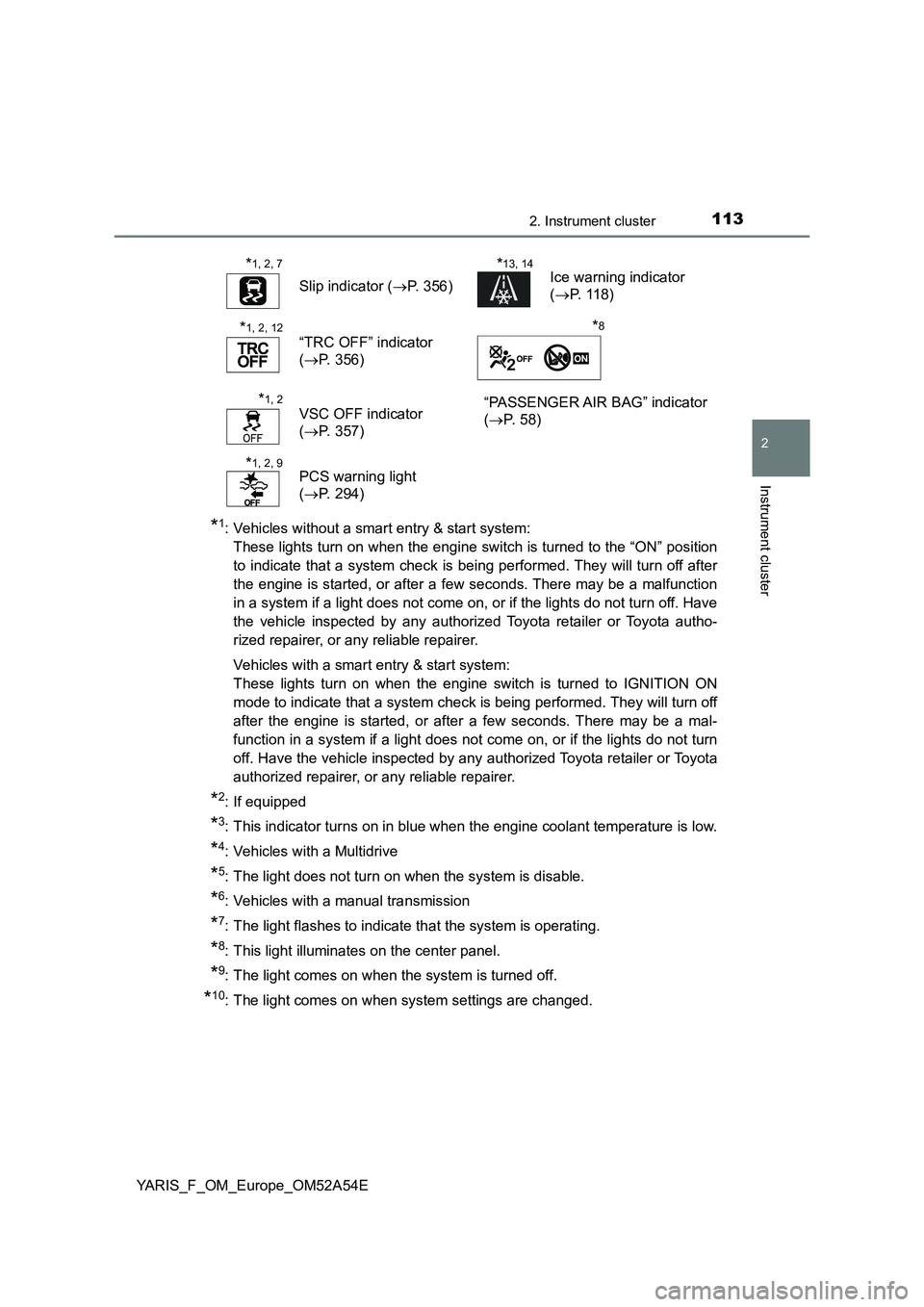
*1: Vehicles without a smart entry & start system:
These lights turn on when the engine switch is turned to the “ON” position
to indicate that a system check is being performed. They will turn off after
the engine is started, or after a few seconds. There may be a malfunction
in a system if a light does not come on, or if the lights do not turn off. Have
the vehicle inspected by any authorized Toyota retailer or Toyota autho-
rized repairer, or any reliable repairer.
Vehicles with a smart entry & start system:
These lights turn on when the engine switch is turned to IGNITION ON
mode to indicate that a system check is being performed. They will turn off
after the engine is started, or after a few seconds. There may be a mal-
function in a system if a light does not come on, or if the lights do not turn
off. Have the vehicle inspected by any authorized Toyota retailer or Toyota
authorized repairer, or any reliable repairer.
*2: If equipped
*3: This indicator turns on in blue when the engine coolant temperature is low.
*4: Vehicles with a Multidrive
*5: The light does not turn on when the system is disable.
*6: Vehicles with a manual transmission
*7: The light flashes to indicate that the system is operating.
*8: This light illuminates on the center panel.
*9: The light comes on when the system is turned off.
*10: The light comes on when system settings are changed.
*1, 2, 7
Slip indicator ( P. 356)
*13, 14Ice warning indicator
( P. 118)
*1, 2, 12
“TRC OFF” indicator
( P. 356)
*8
*1, 2
VSC OFF indicator
( P. 357)
“PASSENGER AIR BAG” indicator
( P. 5 8 )
*1, 2, 9PCS warning light
( P. 294)
Page 114 of 692
1142. Instrument cluster
YARIS_F_OM_Europe_OM52A54E
*11: The light flashes in yellow to indicate that the vehicle is deviating from the
lane.
*12: Vehicles with monochrome display.
*13: Vehicles with color display.
*14: When the outside temperature is approximately 3°C (37°F) or lower, the
indicator will flash for approximately 10 seconds, then stay on.
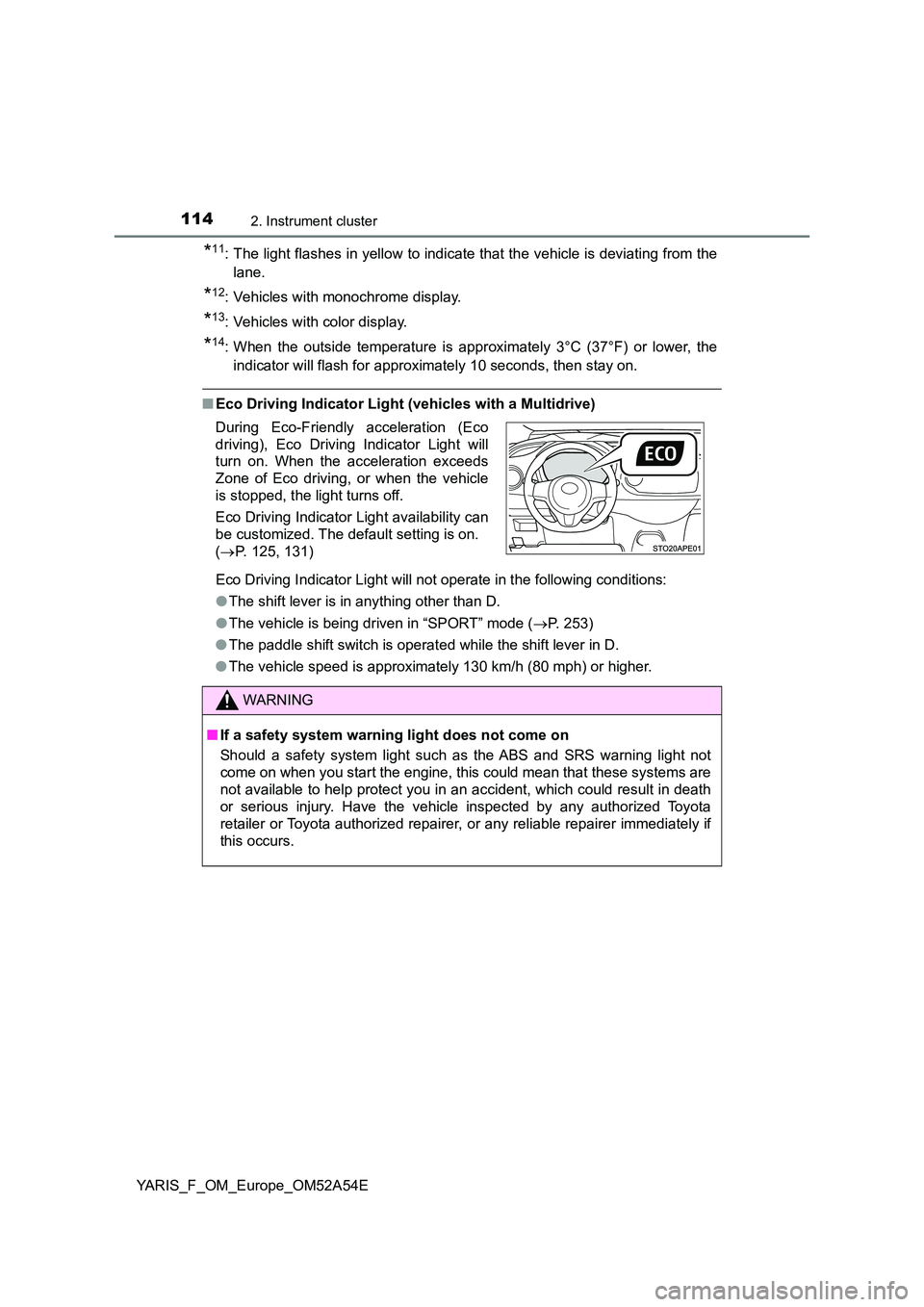
■ Eco Driving Indicator Light (vehicles with a Multidrive)
Eco Driving Indicator Light will not operate in the following conditions:
● The shift lever is in anything other than D.
● The vehicle is being driven in “SPORT” mode (P. 253)
● The paddle shift switch is operated while the shift lever in D.
● The vehicle speed is approximately 130 km/h (80 mph) or higher.
During Eco-Friendly acceleration (Eco
driving), Eco Driving Indicator Light will
turn on. When the acceleration exceeds
Zone of Eco driving, or when the vehicle
is stopped, the light turns off.
Eco Driving Indicator Light availability can
be customized. The default setting is on.
( P. 125, 131)
WARNING
■If a safety system warning light does not come on
Should a safety system light such as the ABS and SRS warning light not
come on when you start the engine, this could mean that these systems are
not available to help protect you in an accident, which could result in death
or serious injury. Have the vehicle inspected by any authorized Toyota
retailer or Toyota authorized repairer, or any reliable repairer immediately if
this occurs.
Page 116 of 692
1162. Instrument cluster
YARIS_F_OM_Europe_OM52A54E
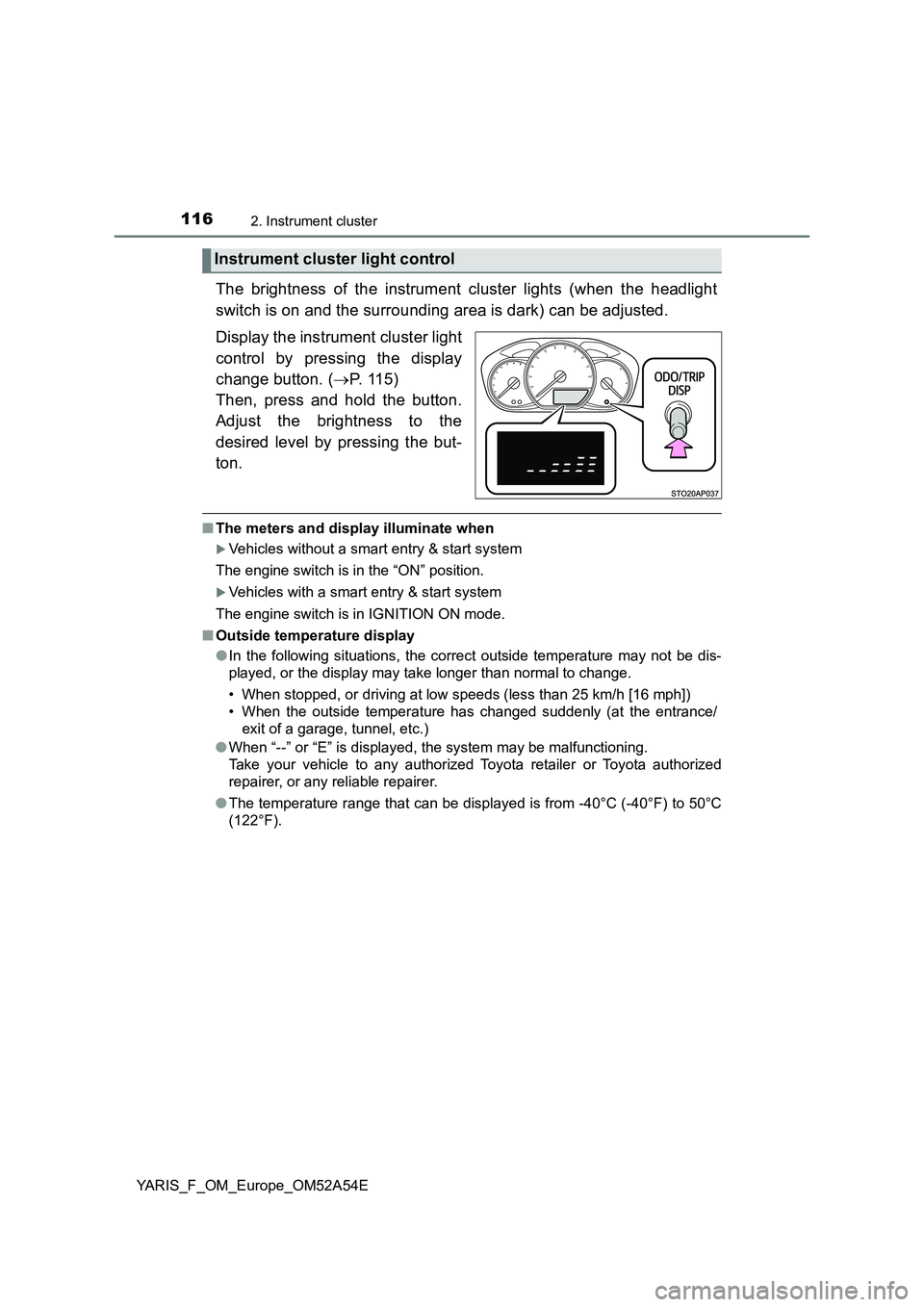
The brightness of the instrument cluster lights (when the headlight
switch is on and the surrounding area is dark) can be adjusted.
Display the instrument cluster light
control by pressing the display
change button. (P. 115)
Then, press and hold the button.
Adjust the brightness to the
desired level by pressing the but-
ton.
■The meters and display illuminate when
Vehicles without a smart entry & start system
The engine switch is in the “ON” position.
Vehicles with a smart entry & start system
The engine switch is in IGNITION ON mode.
■Outside temperature display
●In the following situations, the correct outside temperature may not be dis-
played, or the display may take longer than normal to change.
• When stopped, or driving at low speeds (less than 25 km/h [16 mph])
• When the outside temperature has changed suddenly (at the entrance/
exit of a garage, tunnel, etc.)
●When “--” or “E” is displayed, the system may be malfunctioning.
Take your vehicle to any authorized Toyota retailer or Toyota authorized
repairer, or any reliable repairer.
●The temperature range that can be displayed is from -40°C (-40°F) to 50°C
(122°F).
Instrument cluster light control
Page 117 of 692
1172. Instrument cluster
2
Instrument cluster
YARIS_F_OM_Europe_OM52A54E
NOTICE
■To prevent damage to the engine and its components
● Vehicles with a tachometer: Do not let the indicator needle of the tachome-
ter enter the red zone, which indicates the maximum engine speed.
● The engine may be overheating if the high engine coolant temperature
warning light flashes or comes on. In this case, immediately stop the vehi-
cle in a safe place, and check the engine after it has cooled completely.
( P. 639)
Page 120 of 692
1202. Instrument cluster
YARIS_F_OM_Europe_OM52A54E
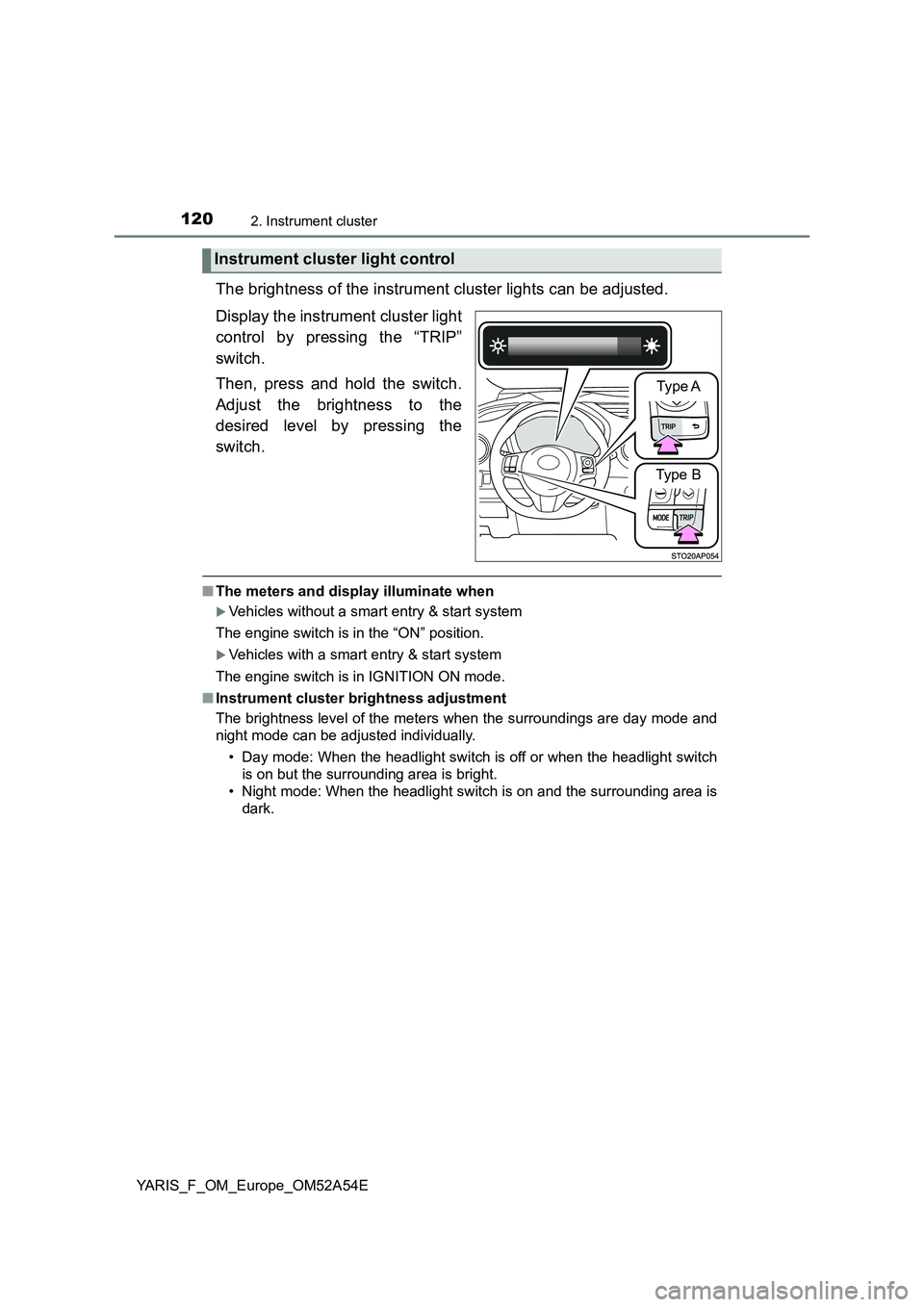
The brightness of the instrument cluster lights can be adjusted.
Display the instrument cluster light
control by pressing the “TRIP”
switch.
Then, press and hold the switch.
Adjust the brightness to the
desired level by pressing the
switch.
■The meters and display illuminate when
Vehicles without a smart entry & start system
The engine switch is in the “ON” position.
Vehicles with a smart entry & start system
The engine switch is in IGNITION ON mode.
■Instrument cluster brightness adjustment
The brightness level of the meters when the surroundings are day mode and
night mode can be adjusted individually.
• Day mode: When the headlight switch is off or when the headlight switch
is on but the surrounding area is bright.
• Night mode: When the headlight switch is on and the surrounding area is
dark.
Instrument cluster light control
Type A
Type B
Page 125 of 692
1252. Instrument cluster
2
Instrument cluster
YARIS_F_OM_Europe_OM52A54E
Eco Driving Indicator Light can be activated or deactivated by press-
ing the display change button when the Eco Driving Indicator Light
customization display is displayed.
To change the Eco Driving Indicator Light customization display, display the
odometer and press and hold the display change button until the display
changes.
After customization, press the display change button for more than 2 sec-
onds to return to the odometer.
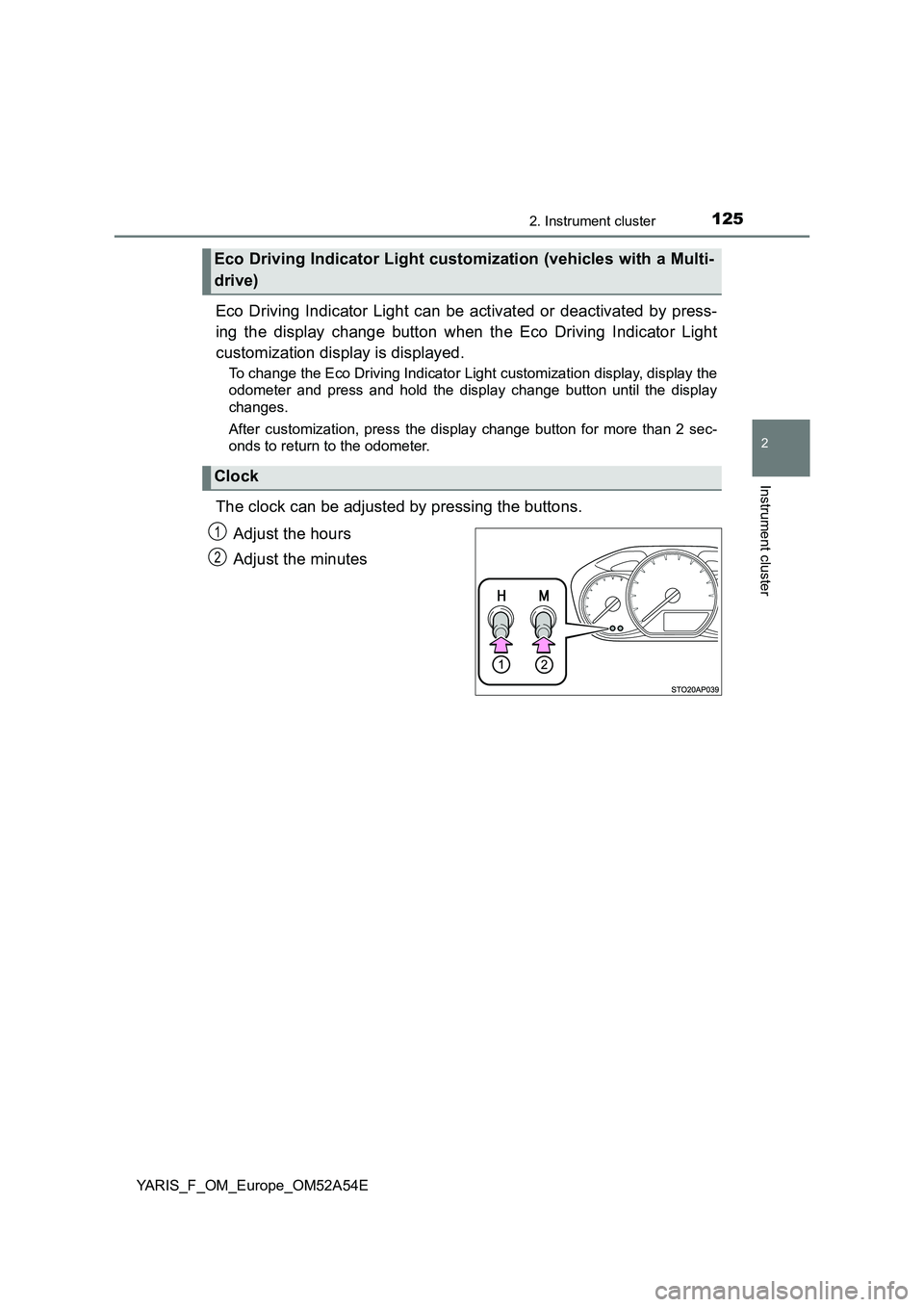
The clock can be adjusted by pressing the buttons.
Adjust the hours
Adjust the minutes
Eco Driving Indicator Light customization (vehicles with a Multi-
drive)
Clock
1
2
Page 126 of 692
1262. Instrument cluster
YARIS_F_OM_Europe_OM52A54E
■When disconnecting and reconnecting battery terminals
The following information data will be reset:
● Stop & Start system total operation time (if equipped)
● Average fuel consumption
● Driving range
● Average vehicle speed
● Clock data
■ Liquid crystal display
Small spots or light spots may appear on the display. This phenomenon is
characteristic of liquid crystal display, and there is no problem continuing to
use the display.
■ Changing the pre-crash warning timing
P. 294
WARNING
■The information display at low temperatures
Allow the interior of the vehicle to warm up before using the liquid crystal
information display. At extremely low temperatures, the display monitor may
respond slowly, and display changes may be delayed.
For example, there is a lag between the driver’s shifting and the new gear
number appearing on the display. This lag could cause the driver to down-
shift again, causing rapid and exce ssive engine braking and possibly an
accident resulting in death or injury.
■ Cautions during setting up the display
As the engine needs to be running during setting up the display, ensure that
the vehicle is parked in a place with adequate ventilation. In a closed area
such as a garage, exhaust gases including harmful carbon monoxide (CO)
may collect and enter the vehicle. This may lead to death or a serious
health hazard.
Page 132 of 692
1322. Instrument cluster
YARIS_F_OM_Europe_OM52A54E
●Settings
Select the menu to set up the following items.
• Language
Select to change the language on the display.
•Units
Select to change the unit of measure for the multi-information display.
• (Eco Driving Indicator Light) setup*1
Select to activate/deactivate the Eco Driving Indicator Light
• Drive information
Select to select up to 2 items that will be displayed on a Drive informa-
tion screen.
• Pop-up display
Select to set the pop-up displays*2, which may appear in some situa-
tions, on/off.
• Default settings
Registered or changed meter settings will be deleted or returned to their
default setting.
*1: If equipped
*2: Stop & Start system operation time display (if equipped), Stop & Start sys-
tem status display (if equipped) and incoming call display of the hands-
free phone system (if equipped).
Page 134 of 692
1342. Instrument cluster
YARIS_F_OM_Europe_OM52A54E
■Pop-up display
In some situations, such as when a switch operation is performed, a pop-up
display will be temporarily displayed on the multi-information display.
The pop-up display function can be set on/off.
■Setting display automatic cancelation
“Settings” item in settings display is not selectable during driving and cannot
be operated. Also, the settings screen is temporarily canceled in the following
situations.
●A warning message is displayed.
●The vehicle starts off.
■Liquid crystal display
Small spots or light spots may appear on the display. This phenomenon is
characteristic of liquid crystal displays, and there is no problem continuing to
use the display.
■When disconnecting and reconnecting battery terminals
The drive information and clock data will be reset.
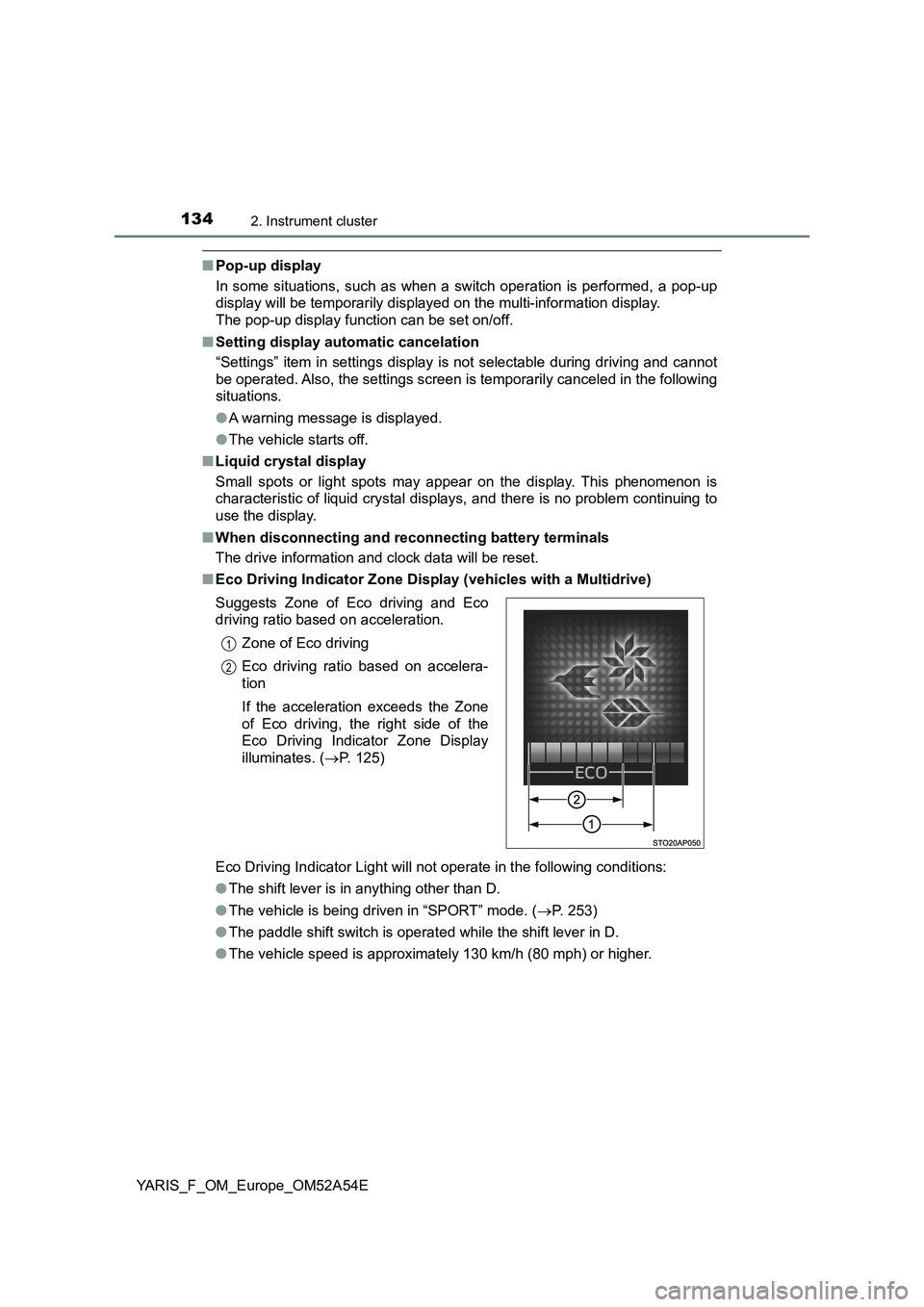
■Eco Driving Indicator Zone Display (vehicles with a Multidrive)
Eco Driving Indicator Light will not operate in the following conditions:
●The shift lever is in anything other than D.
●The vehicle is being driven in “SPORT” mode. (P. 253)
●The paddle shift switch is operated while the shift lever in D.
●The vehicle speed is approximately 130 km/h (80 mph) or higher. Suggests Zone of Eco driving and Eco
driving ratio based on acceleration.
Zone of Eco driving
Eco driving ratio based on accelera-
tion
If the acceleration exceeds the Zone
of Eco driving, the right side of the
Eco Driving Indicator Zone Display
illuminates. (P. 125)
1
2
Page 163 of 692
1633-2. Opening, closing and locking the doors
3
Operation of each component
YARIS_F_OM_Europe_OM52A54E
■Operation signals (vehicles with an entry function or wireless remote
control)
The emergency flashers flash to indicate that the doors have been locked/
unlocked. (Locked: once; Unlocked: twice)
■Open door warning buzzer
If a door or the back door is not fully closed, a buzzer will sound when the
vehicle speed reaches 5 km/h (3 mph).
Vehicles with color display only: The open door(s) or back door is indicated
on the multi-information display.
■Luggage compartment light
The luggage compartment lights turn on when the back door is opened.