lock TOYOTA YARIS HYBRID 2016 Owner's Manual
[x] Cancel search | Manufacturer: TOYOTA, Model Year: 2016, Model line: YARIS HYBRID, Model: TOYOTA YARIS HYBRID 2016Pages: 492, PDF Size: 31.95 MB
Page 80 of 492
801-2. Hybrid system
YARIS_HV_EE_OM52G10E
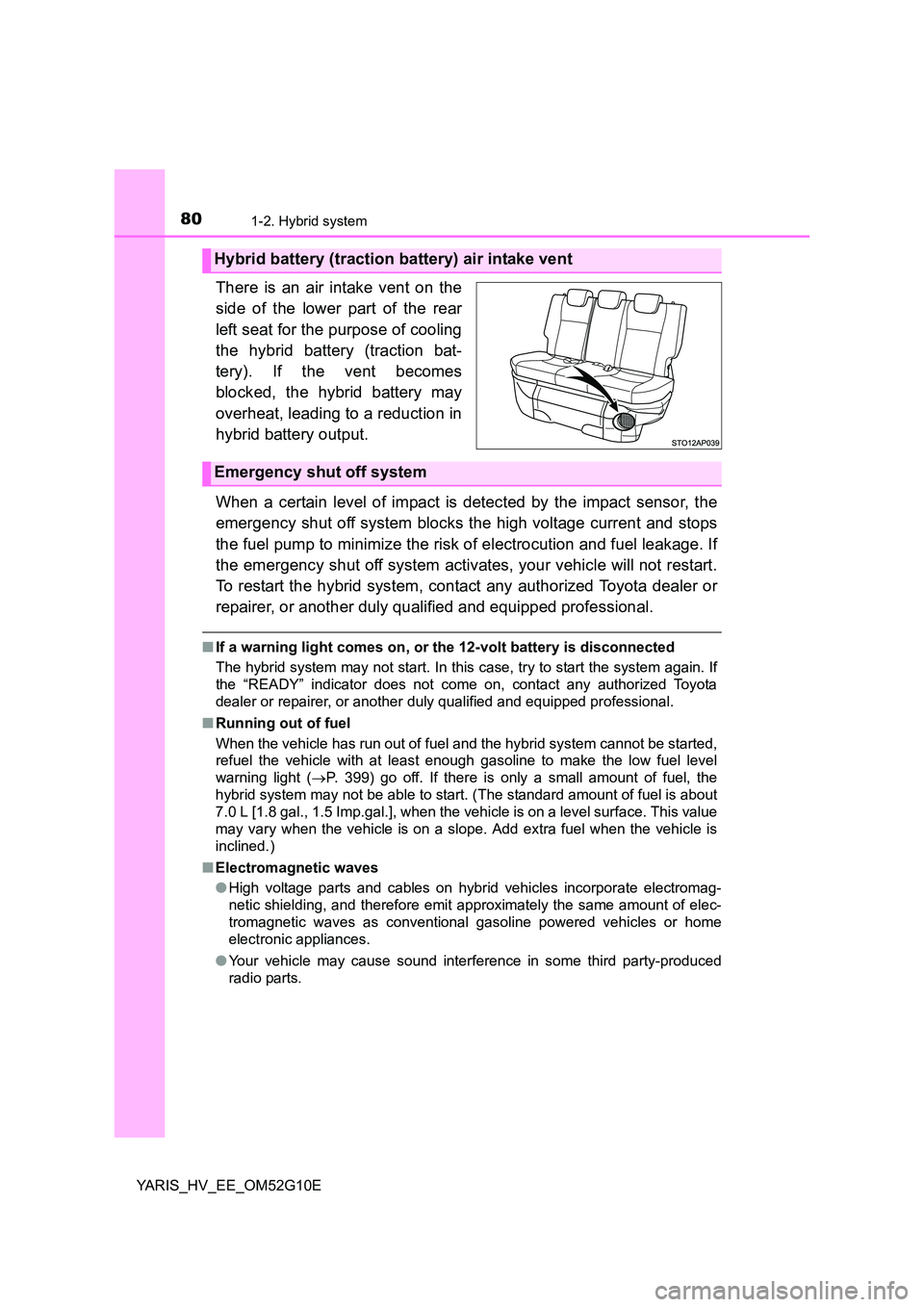
There is an air intake vent on the
side of the lower part of the rear
left seat for the purpose of cooling
the hybrid battery (traction bat-
tery). If the vent becomes
blocked, the hybrid battery may
overheat, leading to a reduction in
hybrid battery output.
When a certain level of impact is detected by the impact sensor, the
emergency shut off system blocks the high voltage current and stops
the fuel pump to minimize the risk of electrocution and fuel leakage. If
the emergency shut off system activates, your vehicle will not restart.
To restart the hybrid system, contact any authorized Toyota dealer or
repairer, or another duly qualified and equipped professional.
■ If a warning light comes on, or the 12-volt battery is disconnected
The hybrid system may not start. In this case, try to start the system again. If
the “READY” indicator does not come on, contact any authorized Toyota
dealer or repairer, or another duly qualified and equipped professional.
■ Running out of fuel
When the vehicle has run out of fuel and the hybrid system cannot be started,
refuel the vehicle with at least enough gasoline to make the low fuel level
warning light ( P. 399) go off. If there is only a small amount of fuel, the
hybrid system may not be able to start. (The standard amount of fuel is about
7.0 L [1.8 gal., 1.5 Imp.gal.], when the vehicle is on a level surface. This value
may vary when the vehicle is on a slope. Add extra fuel when the vehicle is
inclined.)
■ Electromagnetic waves
● High voltage parts and cables on hybrid vehicles incorporate electromag-
netic shielding, and therefore emit approximately the same amount of elec-
tromagnetic waves as conventional gasoline powered vehicles or home
electronic appliances.
● Your vehicle may cause sound interference in some third party-produced
radio parts.
Hybrid battery (traction battery) air intake vent
Emergency shut off system
Page 83 of 492
831-2. Hybrid system
1
For safety and security
YARIS_HV_EE_OM52G10E
NOTICE
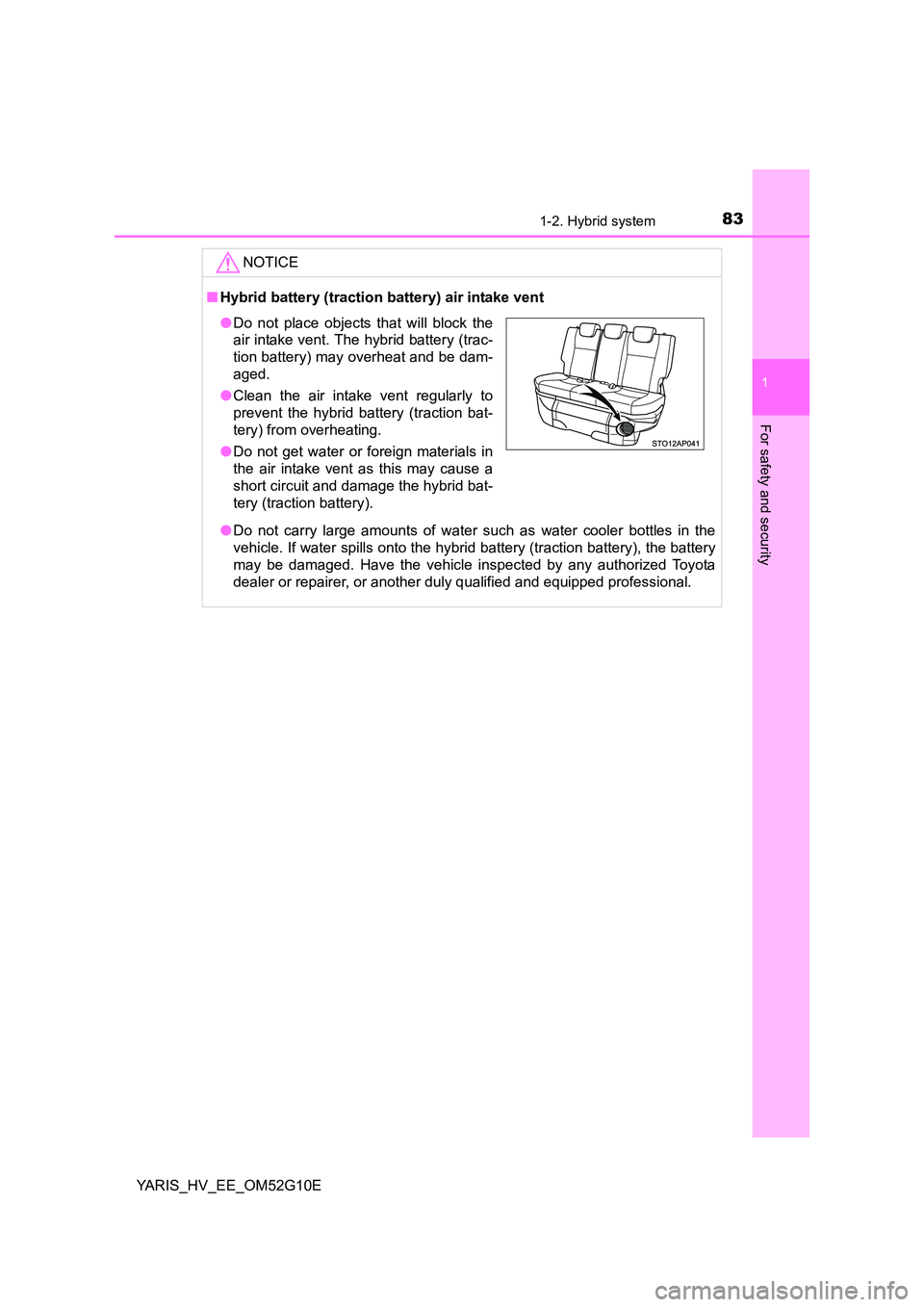
■Hybrid battery (traction battery) air intake vent
● Do not carry large amounts of water such as water cooler bottles in the
vehicle. If water spills onto the hybrid battery (traction battery), the battery
may be damaged. Have the vehicle inspected by any authorized Toyota
dealer or repairer, or another dul y qualified and equipped professional.
●Do not place objects that will block the
air intake vent. The hybrid battery (trac-
tion battery) may overheat and be dam-
aged.
● Clean the air intake vent regularly to
prevent the hybrid battery (traction bat-
tery) from overheating.
● Do not get water or foreign materials in
the air intake vent as this may cause a
short circuit and damage the hybrid bat-
tery (traction battery).
Page 89 of 492
89
1
1-3. Theft deterrent system
For safety and security
YARIS_HV_EE_OM52G10E
Double locking system
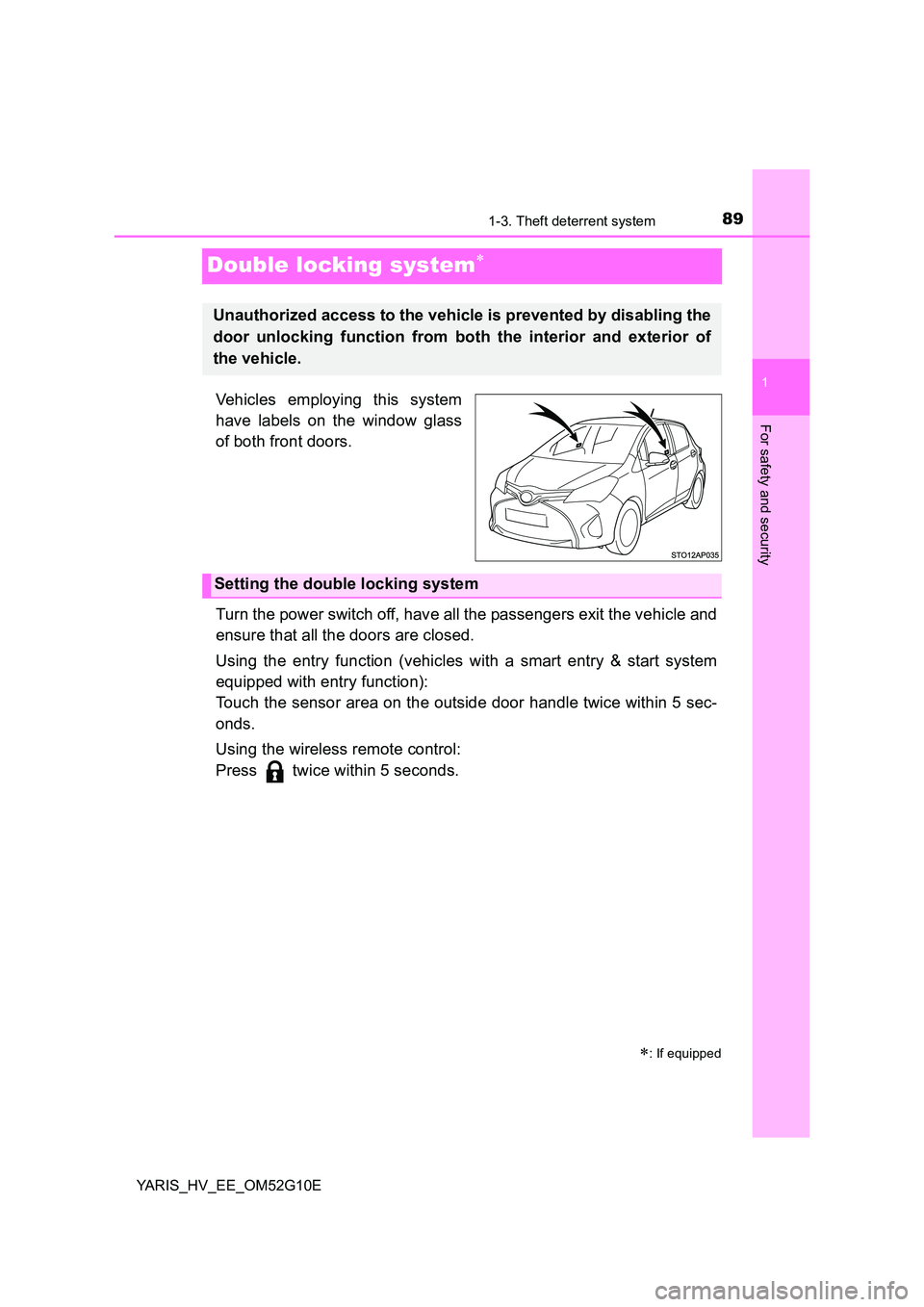
Vehicles employing this system
have labels on the window glass
of both front doors.
Turn the power switch off, have all the passengers exit the vehicle and
ensure that all the doors are closed.
Using the entry function (vehicles with a smart entry & start system
equipped with entry function):
Touch the sensor area on the outside door handle twice within 5 sec-
onds.
Using the wireless remote control:
Press twice within 5 seconds.
: If equipped
Unauthorized access to the vehicle is prevented by disabling the
door unlocking function from both the interior and exterior of
the vehicle.
Setting the double locking system
Page 90 of 492
901-3. Theft deterrent system
YARIS_HV_EE_OM52G10E
Using the entry function (vehicles with a smart entry & start system
equipped with entry function):
Hold either front outside door handle or push up the back door opener
switch.
Using the wireless remote control:
Press .
Canceling the double locking system
WARNING
■ Double locking system precaution
Never activate the double locking system when there are people in the vehi-
cle because all the doors cannot be opened from inside the vehicle.
Page 94 of 492
942. Instrument cluster
YARIS_HV_EE_OM52G10E
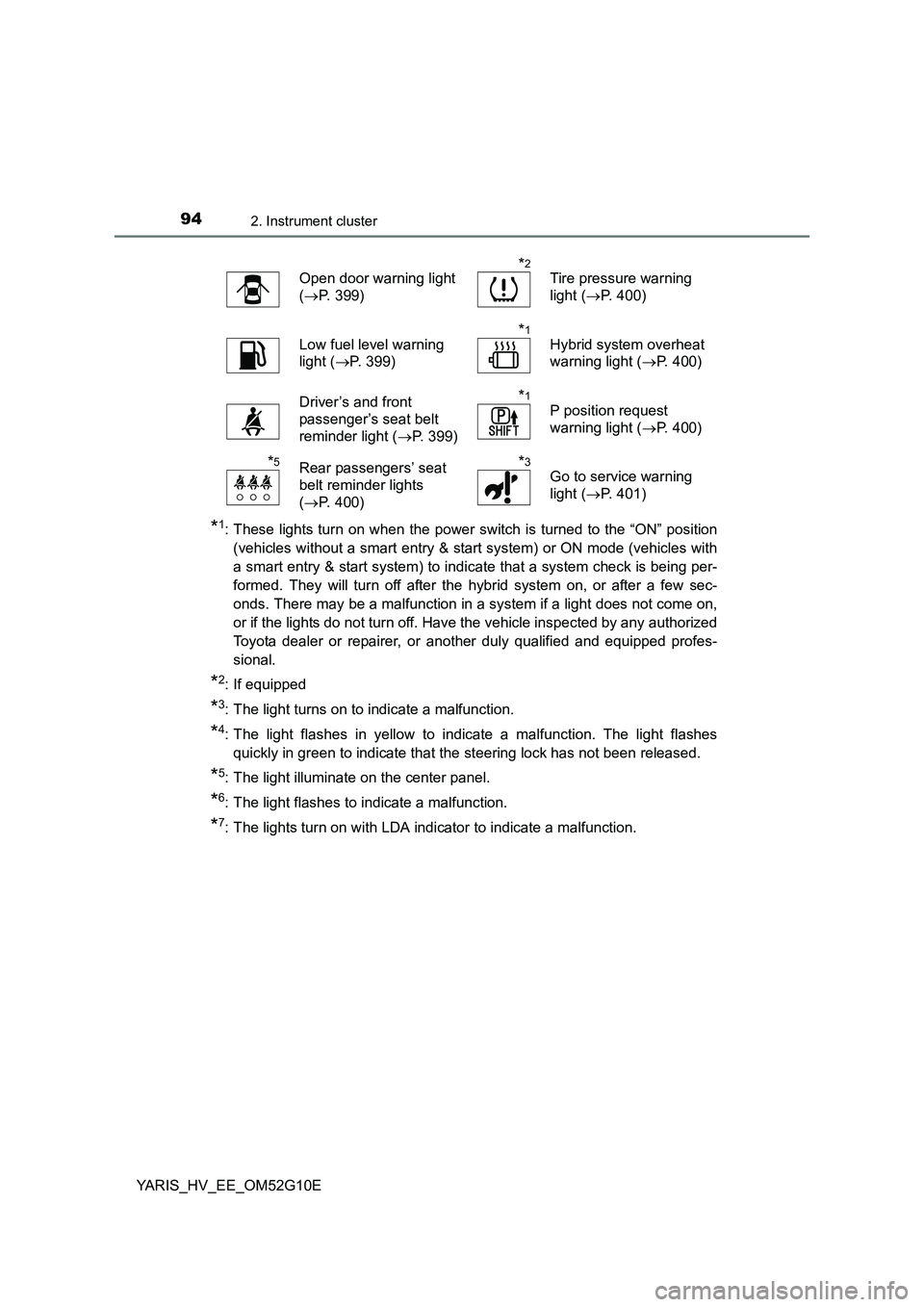
*1: These lights turn on when the power switch is turned to the “ON” position
(vehicles without a smart entry & star t system) or ON mode (vehicles with
a smart entry & start system) to indicate that a system check is being per-
formed. They will turn off after the hybrid system on, or after a few sec-
onds. There may be a malfunction in a system if a light does not come on,
or if the lights do not turn off. Have the vehicle inspected by any authorized
Toyota dealer or repairer, or another duly qualified and equipped profes-
sional.
*2: If equipped
*3: The light turns on to indicate a malfunction.
*4: The light flashes in yellow to indicate a malfunction. The light flashes
quickly in green to indicate that the steering lock has not been released.
*5: The light illuminate on the center panel.
*6: The light flashes to indicate a malfunction.
*7: The lights turn on with LDA indicator to indicate a malfunction.
Open door warning light
( P. 399)
*2
Tire pressure warning
light ( P. 400)
Low fuel level warning
light ( P. 399)
*1
Hybrid system overheat
warning light ( P. 400)
Driver’s and front
passenger’s seat belt
reminder light ( P. 399)
*1
P position request
warning light ( P. 400)
*5Rear passengers’ seat
belt reminder lights
( P. 400)
*3
Go to service warning
light ( P. 401)
Page 97 of 492
97
2
2. Instrument cluster
Instrument cluster
YARIS_HV_EE_OM52G10E
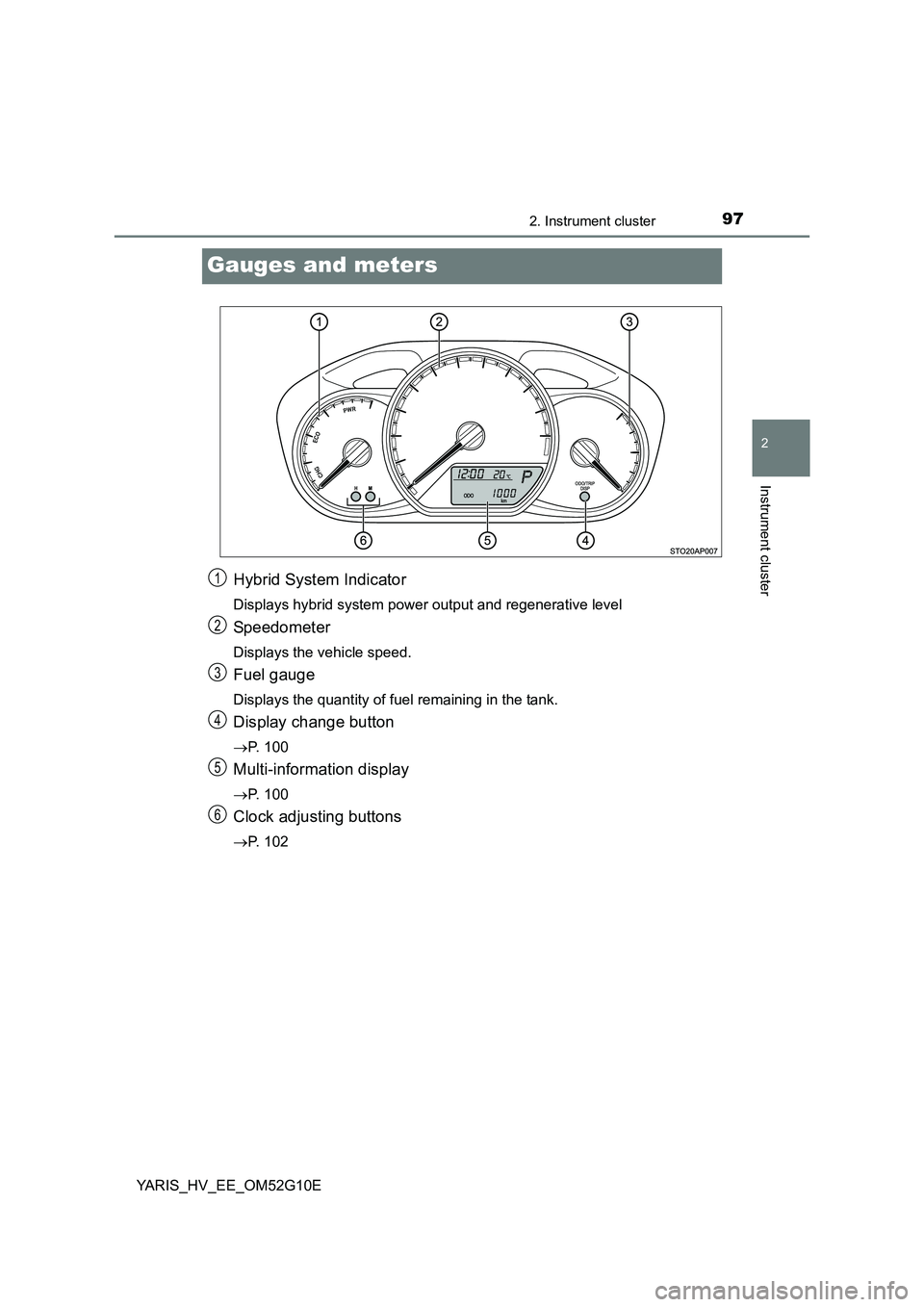
Gauges and meters
Hybrid System Indicator
Displays hybrid system power output and regenerative level
Speedometer
Displays the vehicle speed.
Fuel gauge
Displays the quantity of fuel remaining in the tank.
Display change button
P. 100
Multi-information display
P. 100
Clock adjusting buttons
P. 102
1
2
3
4
5
6
Page 100 of 492
1002. Instrument cluster
YARIS_HV_EE_OM52G10E
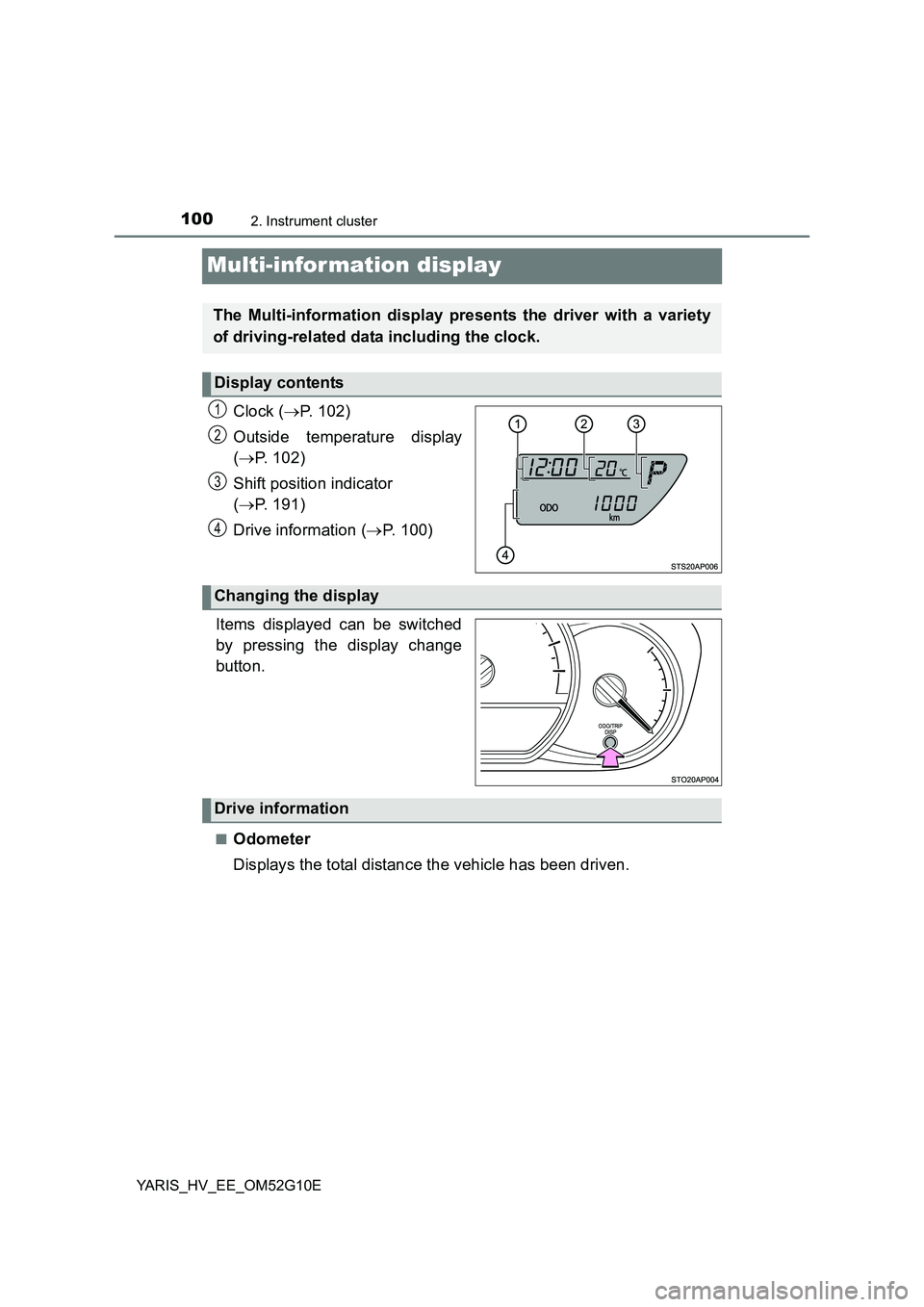
Multi-information display
Clock (P. 102)
Outside temperature display
( P. 102)
Shift position indicator
( P. 191)
Drive information ( P. 100)
.
Items displayed can be switched
by pressing the display change
button.
■Odometer
Displays the total distance the vehicle has been driven.
The Multi-information display presents the driver with a variety
of driving-related data including the clock.
Display contents
1
2
3
4
Changing the display
Drive information
Page 101 of 492
1012. Instrument cluster
2
Instrument cluster
YARIS_HV_EE_OM52G10E
■Trip meter
Displays the distance the vehicle has been driven since the meter
was last reset. Trip meters A and B can be used to record and dis-
play different distances independently.
Press and hold the button for longer than 1 second to reset. Pressing and
holding the button while the trip meter is displayed will reset the trip meter
to “0”.
■Instantaneous fuel consumption
Displays the instantaneous of fuel consumption.
• The function can be reset by pressing the button for longer than 1 sec-
ond when the instantaneous fuel consumption is displayed.
• Use the displayed instantaneous fuel consumption as a reference.
■Average fuel consumption
Displays the average rate of fuel consumption.
• The function can be reset by pressing the button for longer than 1 sec-
ond when the average fuel consumption is displayed.
• Use the displayed average fuel consumption as a reference.
■Driving range
Displays the estimated maximum distance that can be driven with
the quantity of fuel remaining.
• This distance is computed based on your average fuel consumption. As
a result, the actual distance that can be driven may differ from that dis-
played.
• When only a small amount of fuel is added to the tank, the display may
not be updated.
When refueling, turn the power switch to the “LOCK” position (vehicles
without a smart entry & start system) or off (vehicles with a smart entry &
start system). If the vehicle is refueled without turning the power switch to
the “LOCK” position or off, the display may not be updated.
■Average vehicle speed
Displays the average vehicle speed since the hybrid system was
last started or the function was reset.
The function can be reset by pressing the button for longer than 1 second
when the average vehicle speed is displayed.
Page 102 of 492
1022. Instrument cluster
YARIS_HV_EE_OM52G10E
EV indicator can be activated or deactivated by pressing the display
change button when the EV indicator customization display is dis-
played.
To change the EV indicator customization display, display the odometer
and press and hold the display change button until the display changes.
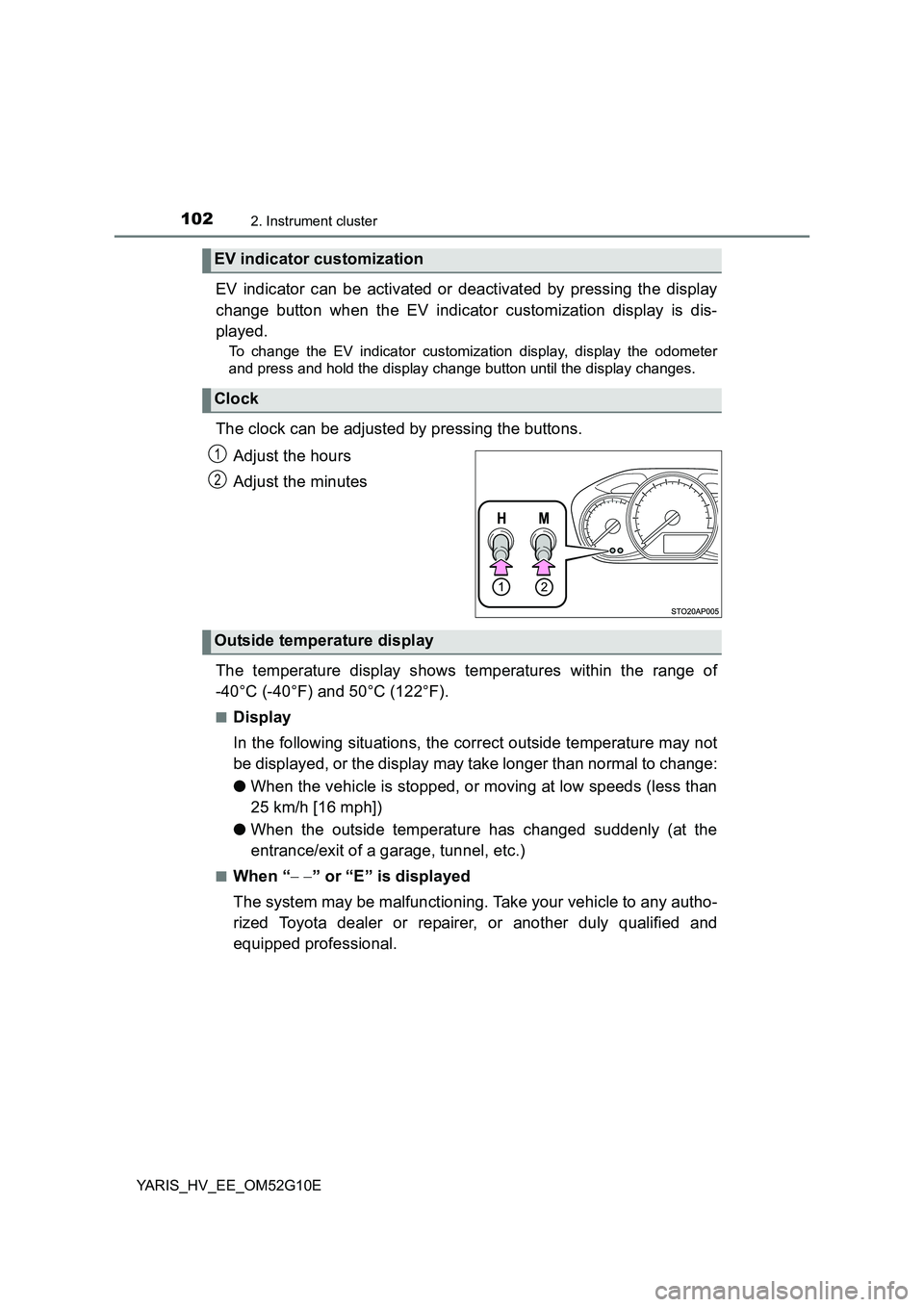
The clock can be adjusted by pressing the buttons.
Adjust the hours
Adjust the minutes
The temperature display shows temperatures within the range of
-40°C (-40°F) and 50°C (122°F).
■Display
In the following situations, the correct outside temperature may not
be displayed, or the display may take longer than normal to change:
● When the vehicle is stopped, or moving at low speeds (less than
25 km/h [16 mph])
● When the outside temperature has changed suddenly (at the
entrance/exit of a garage, tunnel, etc.)
■When “ ” or “E” is displayed
The system may be malfunctioning. Take your vehicle to any autho-
rized Toyota dealer or repairer, or another duly qualified and
equipped professional.
EV indicator customization
Clock
1
2
Outside temperature display
Page 103 of 492
1032. Instrument cluster
2
Instrument cluster
YARIS_HV_EE_OM52G10E
■When disconnecting and reconnecting battery terminals
The following information data will be reset.
● Average fuel consumption
● Driving range
● Average vehicle speed
● Clock data
■ Liquid crystal display
Small spots or light spots may appear on the display. This phenomenon is
characteristic of liquid crystal display, and there is no problem continuing to
use the display.
■ Changing the pre-crash warning timing
P. 217
WARNING
■Cautions during setting up the display
As the engine needs to be running during setting up the display, ensure that
the vehicle is parked in a place with adequate ventilation. In a closed area
such as a garage, exhaust gases including harmful carbon monoxide (CO)
may collect and enter the vehicle. This may lead to death or a serious
health hazard.
NOTICE
■ The Multi-information display at low temperatures
Allow the interior of the vehicle to warm up before using the liquid crystal
information display. At extremely low temperatures, the display monitor may
respond slowly, and display changes may be delayed.