key TOYOTA YARIS iA 2018 Accessories, Audio & Navigation (in English)
[x] Cancel search | Manufacturer: TOYOTA, Model Year: 2018, Model line: YARIS iA, Model: TOYOTA YARIS iA 2018Pages: 91, PDF Size: 1.64 MB
Page 1 of 91

2Yaris iA_Navi_OM99Q50z_(U)
Table of contents
1 Warnings and Safety inform ation................................. 4
2 Getting started ..................... ........................................... 6
2.1 Before using the navigation system .................................................. 6
2.2 Navigation menu ................................................................................ 8
2.3 Buttons and other controls on the screen ...................................... 10
2.3.1 Using keyboards .................................................................................. 10
2.3.2 Press and Hold ..................................................................................... 11
2.4 Map screen........................................................................................ 12
2.4.1 Navigating on the map ......................................................................... 12
2.4.2 Position markers .................................................................................. 13
2.4.2.1 Selected map locat ion (Cursor) and selected map object ........ 13
2.4.3 Objects on the map .............................................................................. 13 2.4.3.1 Streets and roads...................................................................... 13
2.4.3.2 Turn preview and Next street .................................................. 14
2.4.3.3 Lane information and Signposts .............................................. 16
2.4.3.4 Junction view........................................................................... 17
2.4.3.5 Highway/Freeway exit services............................................... 17
2.4.3.6 Elements of the active route .................................................... 19
2.4.4 Manipulating the map .......................................................................... 20
2.4.5 Checking the details of the current position (Where Am I?) ............... 23
2.5 Voice Recognition............................................................................. 24
2.5.1 Voice command list ............................................................................. 24
3 On-road navigation ................ ...................................... 26
3.1 Selecting the destination of a route................................................. 26
3.1.1 Entering an address or a part of the address ........................................ 27
3.1.1.1 Entering an address ................................................................. 27
3.1.1.2 Entering the midpoint of a street as the destinat ion ................ 32
3.1.1.3 Selecting an intersection as th e destination ............................. 35
3.1.1.4 Selecting a city cen ter as the destination ................................. 38
3.1.2 Selecting the destinati on from the POI (point of interest) ................... 40
3.1.2.1 Quick search for a POI (point of interest) ............................... 40
3.1.2.2 Searching for Help nearby....................................................... 43
3.1.2.3 Searching for a POI (point of interest) by category ................ 46
3.1.2.4 Searching for a POI (point of interest) by name ..................... 50
Page 9 of 91
10Yaris iA_Navi_OM99Q50z_(U)
2.3 Buttons and other controls on the screen
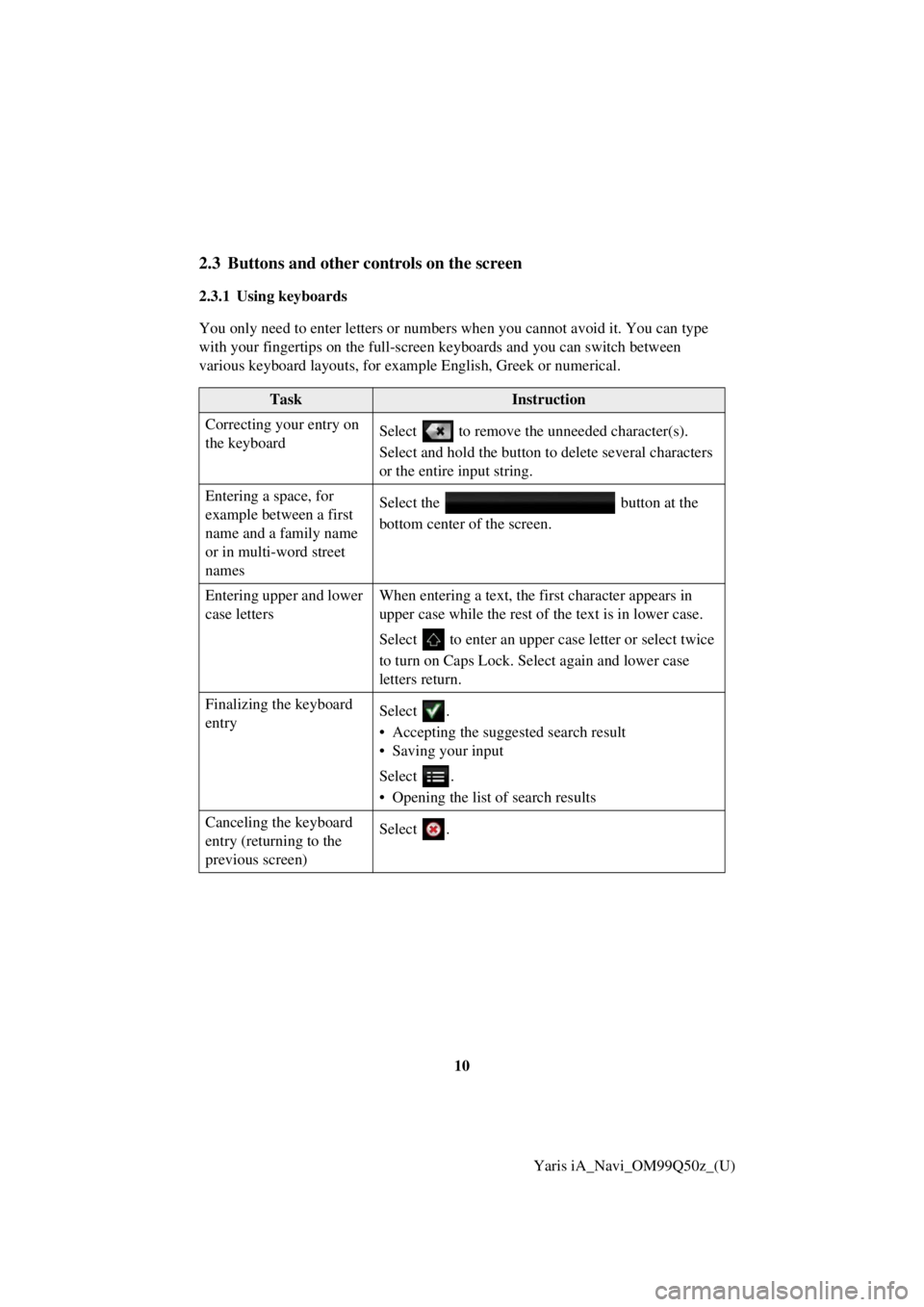
2.3.1 Using keyboards
You only need to enter letters or numbers when you cannot avoid it. You can type
with your fingertips on the full-screen keyboards and you can switch between
various keyboard layouts, for example English, Greek or numerical.
TaskInstruction
Correcting your entry on
the keyboard Select to remove the unneeded character(s).
Select and hold the button to delete several characters
or the entire input string.
Entering a space, for
example between a first
name and a family name
or in multi-word street
names Select the button at the
bottom center of the screen.
Entering upper and lower
case letters When entering a text, the fi
rst character appears in
upper case while the rest of the text is in lower case.
Select to enter an upper case letter or select twice
to turn on Caps Lock. Se lect again and lower case
letters return.
Finalizing the keyboard
entry Select .
• Accepting the suggested search result
• Saving your input
Select .
• Opening the list of search results
Canceling the keyboard
entry (returning to the
previous screen) Select .
Page 10 of 91
11
1
2
3
4
5
6
Yaris iA_Navi_OM99Q50z_(U)
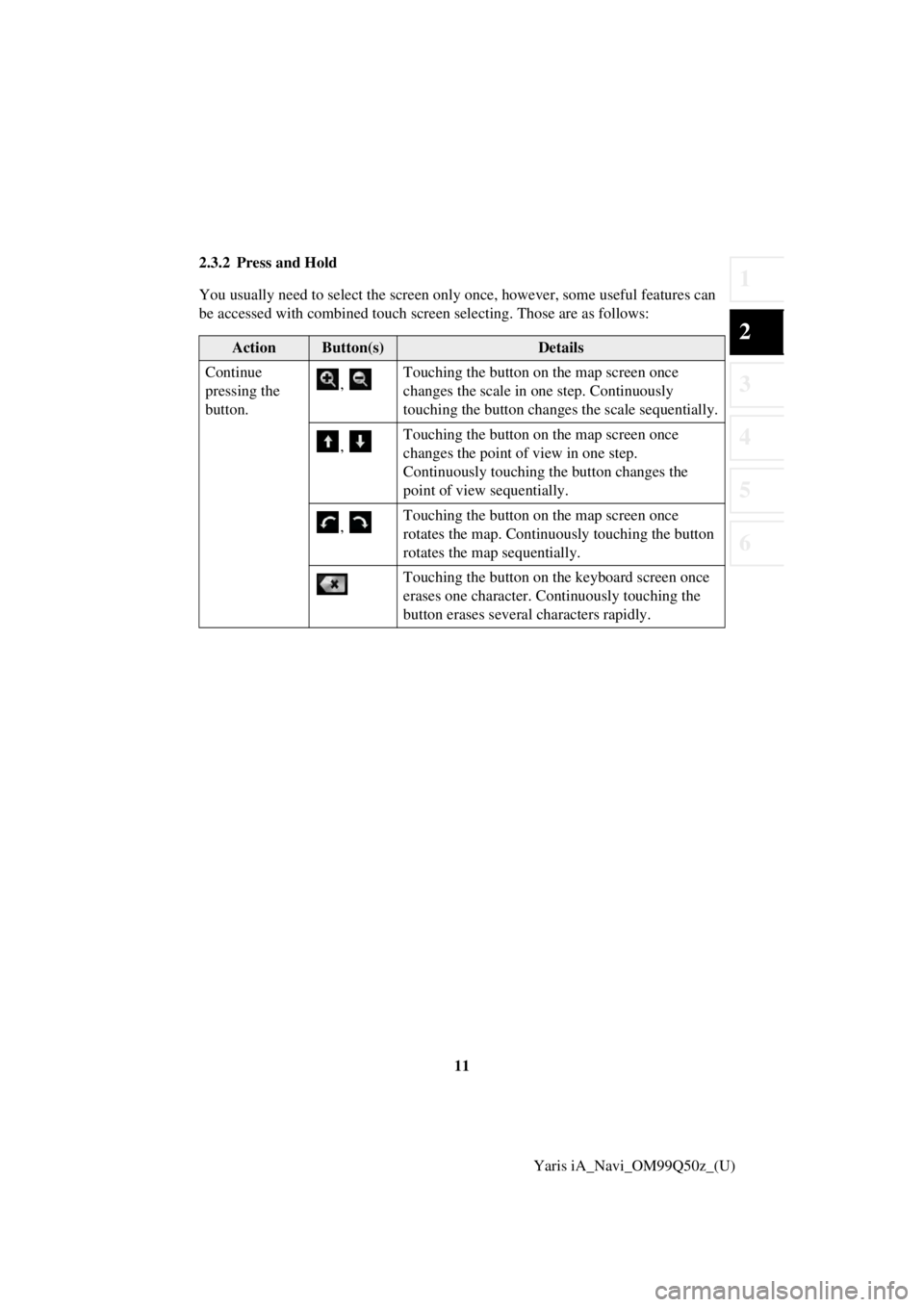
2.3.2 Press and Hold
You usually need to select
the screen only once, however , some useful features can
be accessed with combined touch screen selecting. Those are as follows:
ActionButton(s)Details
Continue
pressing the
button. ,
Touching the button on the map screen once
changes the scale in one step. Continuously
touching the button changes the scale sequentially.
, Touching the button on the map screen once
changes the point of view in one step.
Continuously touching the button changes the
point of view sequentially.
, Touching the button on the map screen once
rotates the map. Continuously touching the button
rotates the map sequentially.
Touching the button on the keyboard screen once
erases one character. Continuously touching the
button erases several characters rapidly.
Page 23 of 91

24Yaris iA_Navi_OM99Q50z_(U)
2.5 Voice Recognition
Some items can be operated by voice using the vehicle’s microphone.1. Press the talk button on the steering switch.
2. After “Say a command” is output from the speaker and the beep sound is
h eard, say your commands.
screen). 1) Press the talk button on the steering switch.
2) After “Say a command” is output from the speaker and the beep sound is
heard, say, “New Destination”.
3) After “Which type of destination would you like?” is output from th e speaker
and the beep sound is heard, say, “Gas station”.
4) After “Gas station, say the desired line number. You can also say: Try again”
is output from the speaker and the b eep sound is heard, say, “Number one”
(Desti nation is gas station on the first row).
5) After “To begin navigation, say start” is output from the speaker and the b eep
so und is heard, say, “Start” to start route guidance.
2.5.1 Voice command list
If you have seven or more candidates, say the command, “Page down” to move the
list.
Function operationVoice command
Switches to the screen where
new destinations can be selected. New Destination
Displays the route to your home. Take me home
Specifies the de stination using
the address. Navigate to an address
Displays the history of the
recently specified destinations. Navigate to a recent destination
Displays the current location. Where am I?
Reads out the previous guidance
again. Repeat instruction
Adds a route using keywords. Add way Point ~
Zooms in/out of the map screen. Zoom in/Zoom out
Adds the route using the address. Add way point address/Travel via address
Page 26 of 91
27
1
2
3
4
5
6
Yaris iA_Navi_OM99Q50z_(U)
3.1.1 Entering an address or a part of the address
If you know at least a part of the addres
s, it is the quickest way to select the
destination of the route.
Using the same screen, you can find an address by entering:
• Destination address
• The center of a city
• An intersection
• The midpoint of a street
3.1.1.1 Entering an address
To enter an address as the destination, do as follows:
1. Select
after selectin g on the MAP screen.
2. Select .
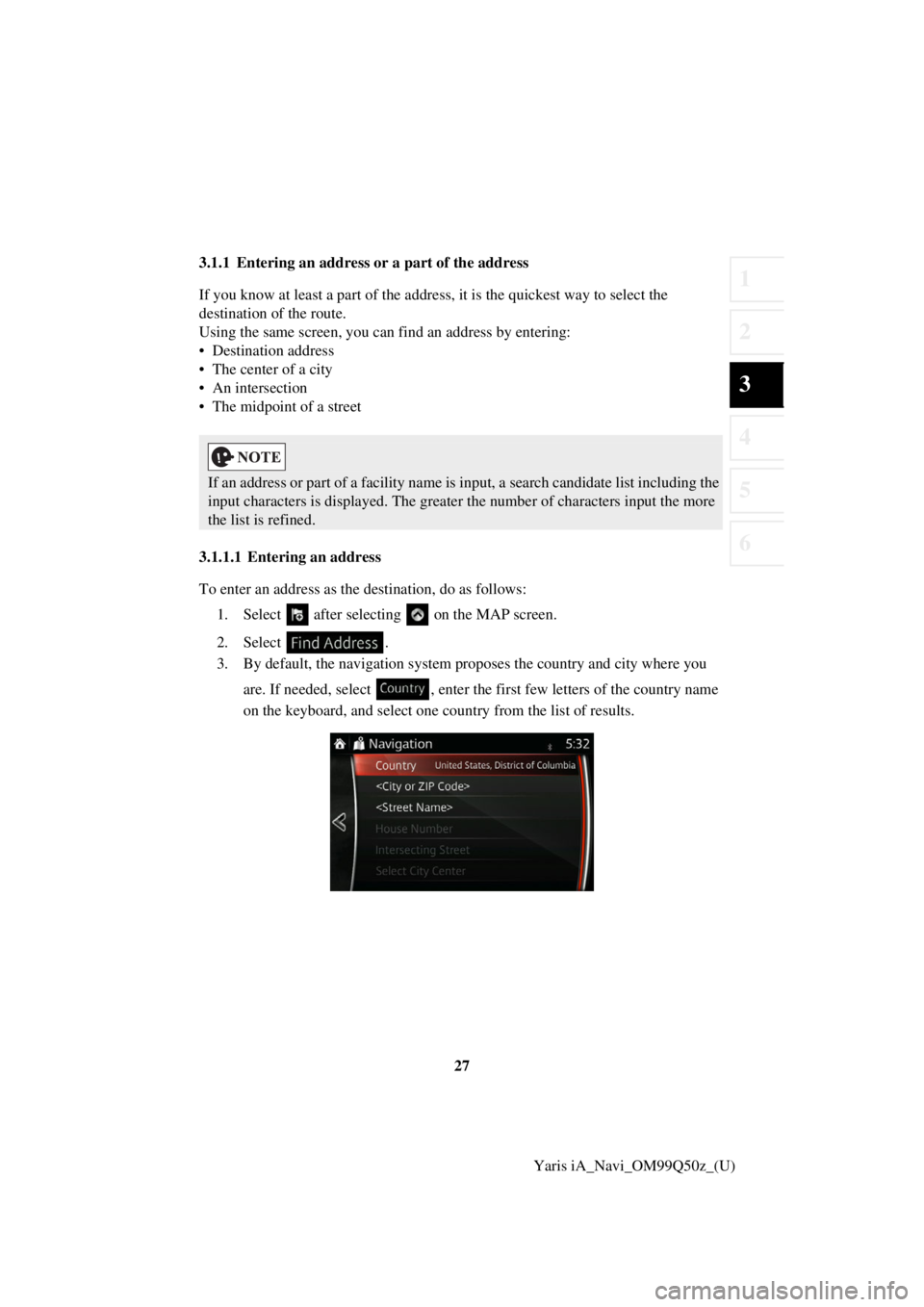
3. By default, the navigation system pr oposes the country and city where you
are. If needed, select , enter the first few letters of the country name
on the keyboard, and select one country from the list of results.
If an address or part of a facility name is input, a search candidate list including the
input characters is displayed. The greater the number of characters input the more
the list is refined.
Page 27 of 91
28Yaris iA_Navi_OM99Q50z_(U)
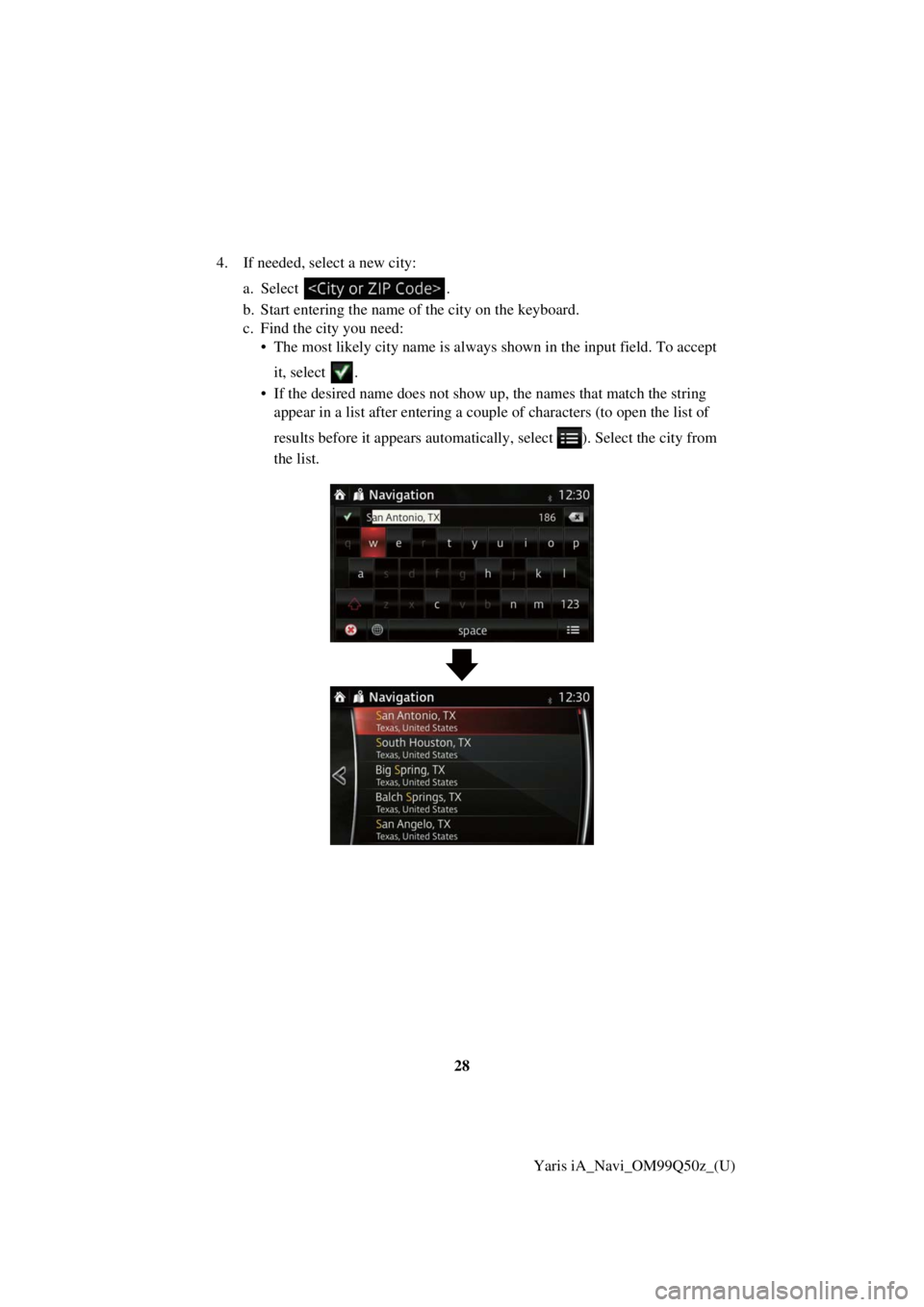
4. If needed, select a new city:
a.Select .
b . Start entering the name of the city on the keyboard.
c. Find the city you need: • The most likely city na me is always shown in the input field. To accept
it, select .
• If the desired name does not show up, the names that match the stri ng
appear in a list after entering a couple of characters (to open the li st of
resu lts before it appears automatically , select ). Select the city from
th e list.
Page 28 of 91
29
1
2
3
4
5
6
Yaris iA_Navi_OM99Q50z_(U)
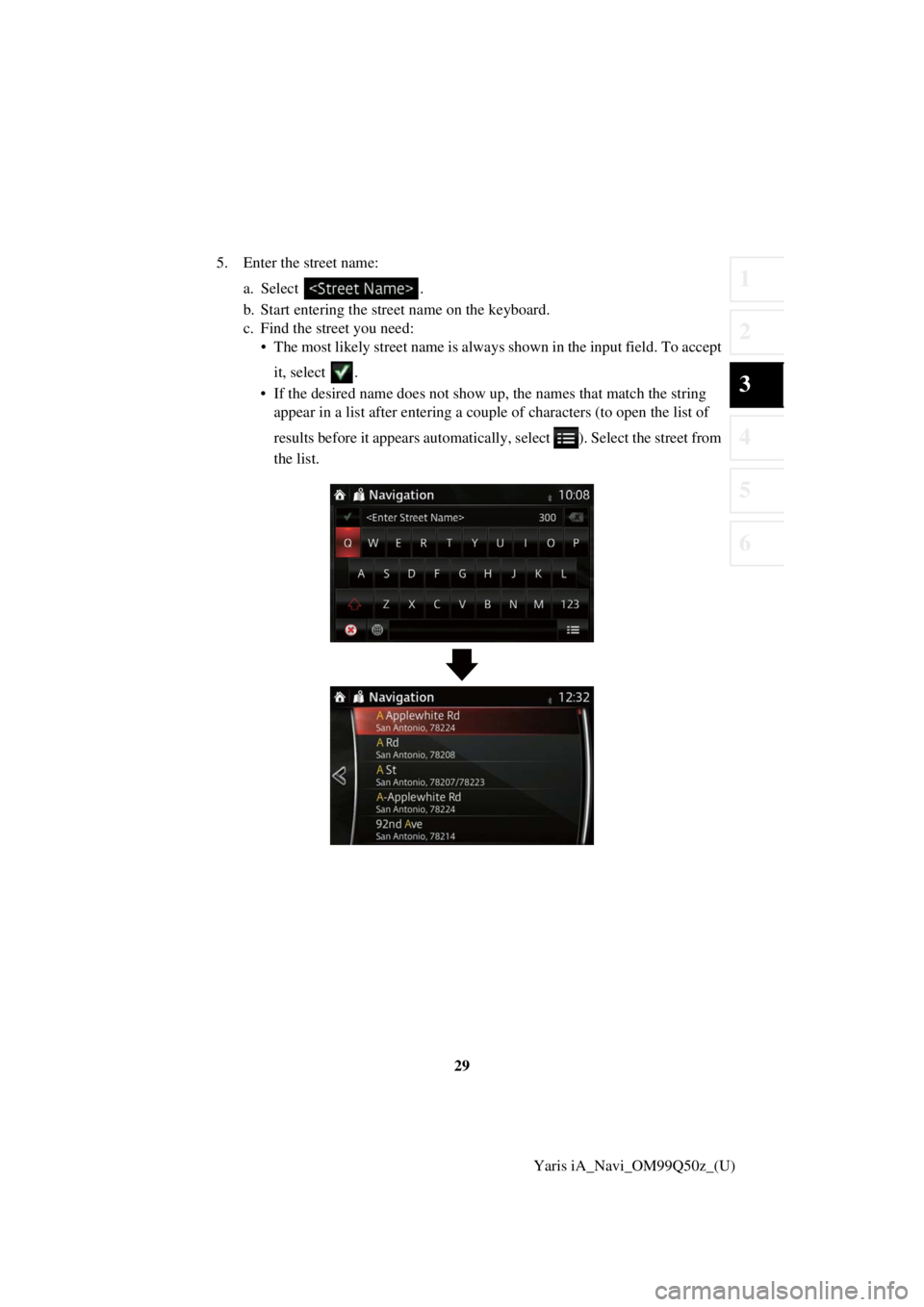
5. Enter the street name:
a. Select .
b. Start entering the street name on the keyboard.
c. Find the street you need: • The most likely street name is always shown in the input field. To accep t
it, select .
• If the desired name does not show up, the names that match the stri ng
appear in a list after entering a coup le of characters (to open the list of
resu lts before it appears automatically , select ). Select the street from
th e list.
Page 29 of 91
30Yaris iA_Navi_OM99Q50z_(U)
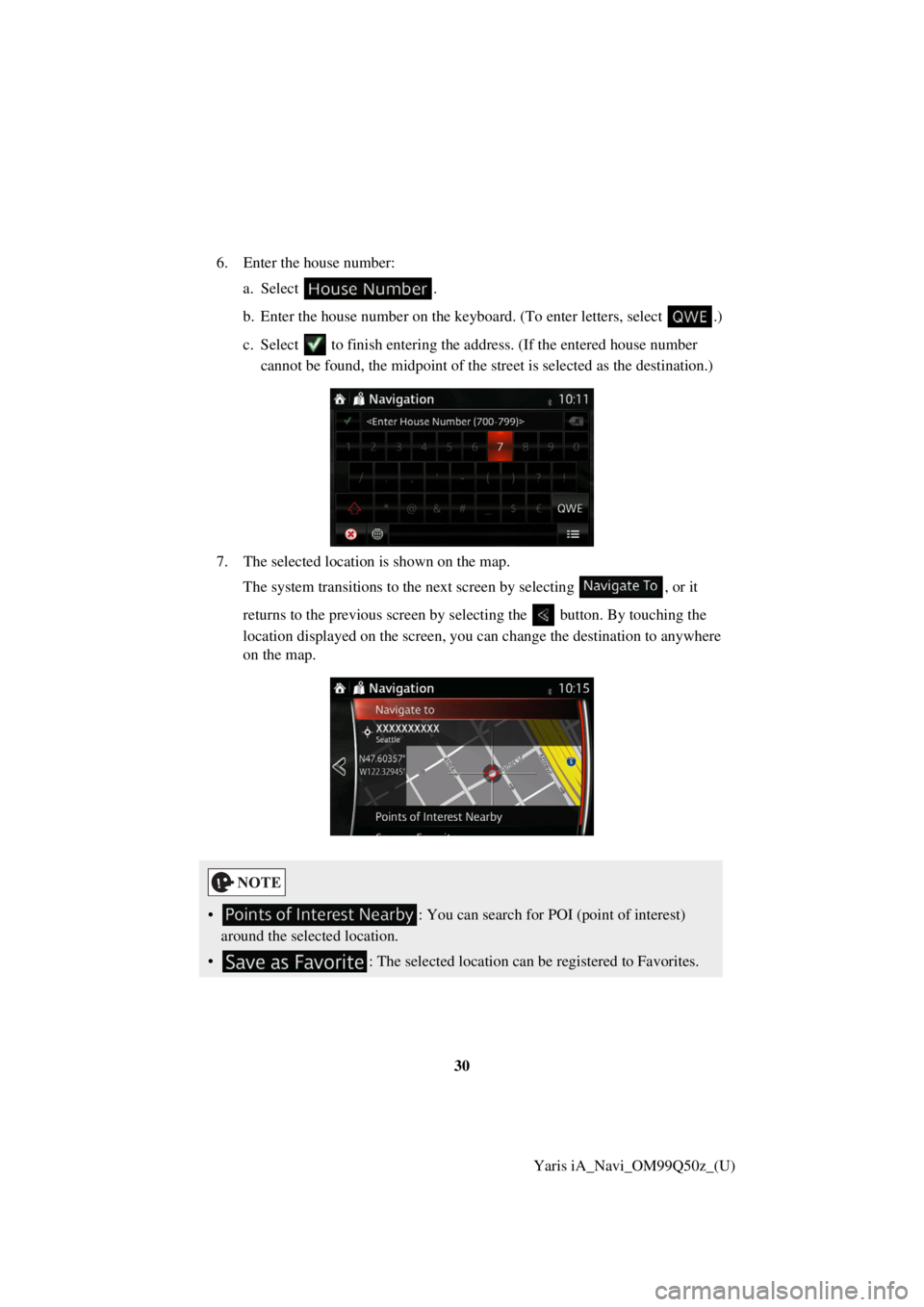
6. Enter the house number:
a.Select .
b . Enter the house number on the keyboard. (To enter le tters, select.)
c. Select to finish entering the ad dress. (If the entered house number
can not be found, the midpoint of the street is selected as the destination.)
7. The selected location is shown on the map. The system transitions to the next screen by selectin g
, or it
returns to the previous screen by selectin g the button. By touching the
location displayed on the screen, you can change the destination to anyw here
on the map.
• : You can search for POI (point of interest)
around the selected location.
• : The selected location can be registered to Favorites.
Page 31 of 91
32Yaris iA_Navi_OM99Q50z_(U)
3.1.1.2 Entering the midpoint of
a street as the destination
You can navigate to the midpoint of a street if the house number is not available: 1. Select after selectin g on the MAP screen.
2. Select .
3. If necessary, modify the country and city as described earlier (page 27).
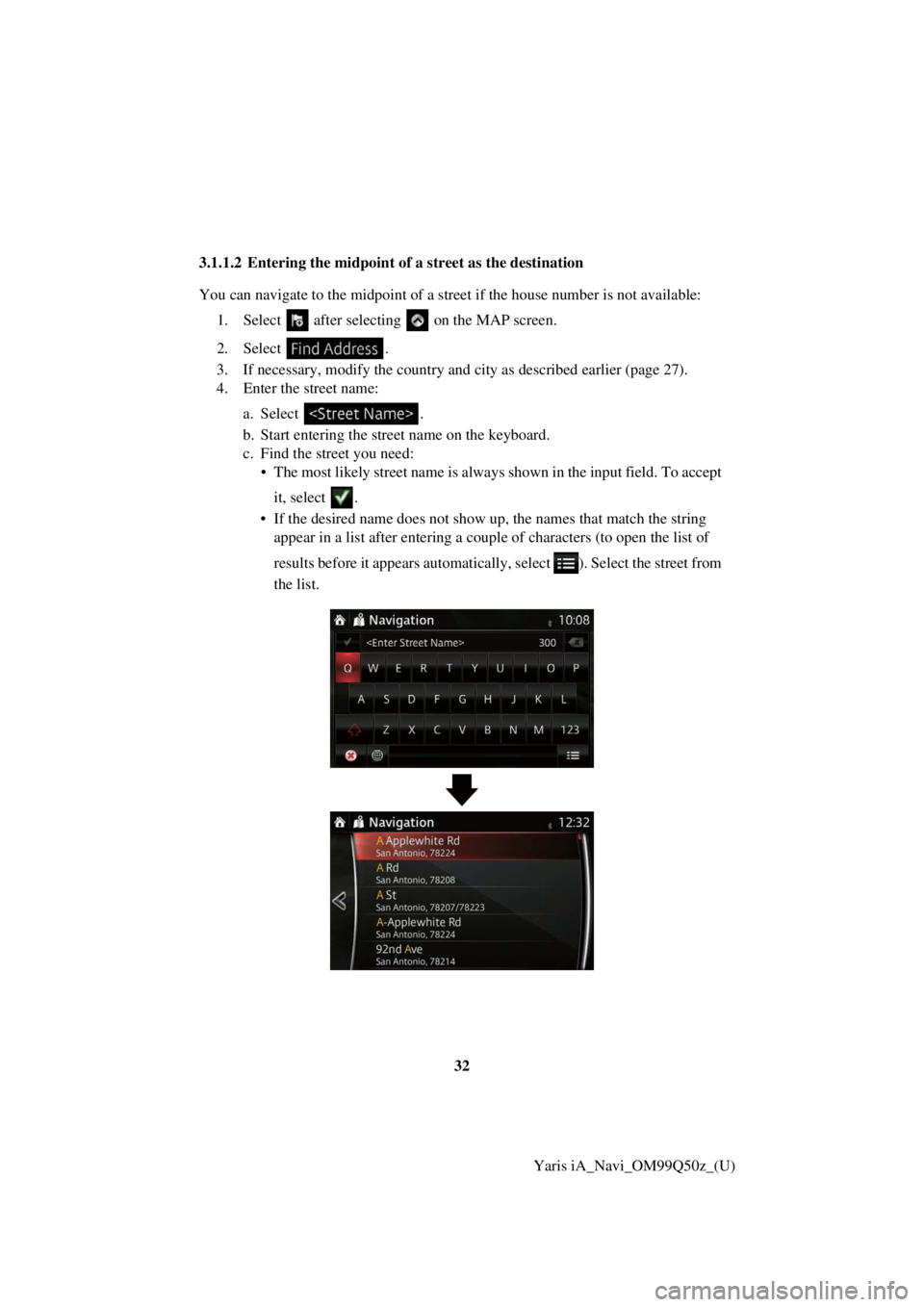
4. Enter the street name:
a.Select
.
b. Start entering the street name on the keyboard.
c. Find the street you need: • The most likely street name is always shown in the input field. To accep t
it, select .
• If the desired name does not show up, the names that match the stri ng
appear in a list after entering a couple of characters (to open the li st of
resu lts before it appears automatically , select ). Select the street from
th e list.
Page 34 of 91
35
1
2
3
4
5
6
Yaris iA_Navi_OM99Q50z_(U)
3.1.1.3 Selecting an intersec
tion as the destination
To enter an address as the destination, do as follows: 1. Select after selectin g on the MAP screen.
2. Select .
3. If necessary, modify the country and city as described earlier (page 27).
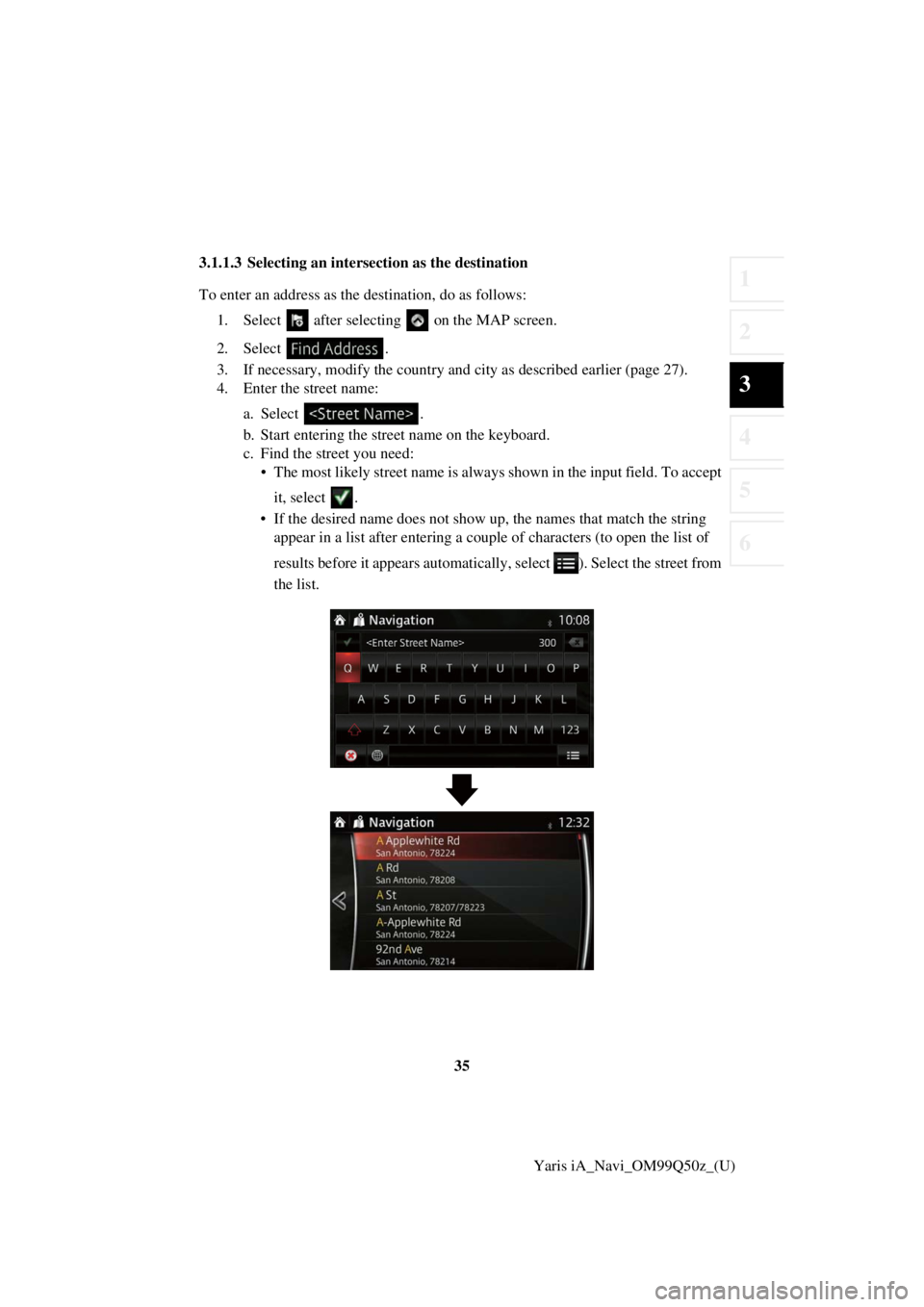
4. Enter the street name:
a.Select
.
b. Start entering the street name on the keyboard.
c. Find the street you need: • The most likely street name is always shown in the input field. To accep t
it, select .
• If the desired name does not show up, the names that match the stri ng
appear in a list after entering a couple of characters (to open the li st of
resu lts before it appears automatically , select ). Select the street from
th e list.