engine TOYOTA YARIS iA 2018 (in English) Repair Manual
[x] Cancel search | Manufacturer: TOYOTA, Model Year: 2018, Model line: YARIS iA, Model: TOYOTA YARIS iA 2018Pages: 576, PDF Size: 5.5 MB
Page 299 of 576
YARIS iA_OM_OM99Q46z_(U)
2994-2. Audio System
4
Interior Features
●Type B only:
The SD card slot is for the navigation system. For vehicles with the naviga-
tion system, the SD card (Toyota genuine) with stored map data is inserted
into the SD card slot and used.
● This mode may not be usable depending on the portable audio device to be
connected.
● Before using the auxiliary jack/USB port, refer to the instruction manual for
the portable audio device.
● Use a commercially-available, non-impedance (3.5 ∅) stereo mini plug for
connecting the portable audio unit to the auxiliary jack. Before using the
auxiliary jack, read the manufacturer’s instructions for connecting a portable
audio unit to the auxiliary jack.
● To prevent discharging of the battery, do not use the auxiliary input for long
periods with the engine off or idling.
● When connecting a device to the auxiliary jack or USB port, noise may
occur depending on the connected device. If the device is connected to the
vehicle’s accessory socket, the noise can be reduced by unplugging it from
the accessory socket.
WARNING
■Do not adjust the portable audio unit or a similar product while driving
the vehicle
Adjusting the portable audio unit or a similar product while driving the vehi-
cle is dangerous as it could distract your attention from the vehicle opera-
tion which could lead to a serious accident. Always adjust the portable
audio unit or a similar product while the vehicle is stopped.
NOTICE
Depending on the portable audio device, noise may occur when the device
is connected to the vehicle accessory socket. (If noise occurs, do not use
the accessory socket.)
Page 396 of 576
396
YARIS iA_OM_OM99Q46z_(U)
4-3. Bluetooth®
*1: Setting which detects the existence of a device external to the Bluetooth®
unit
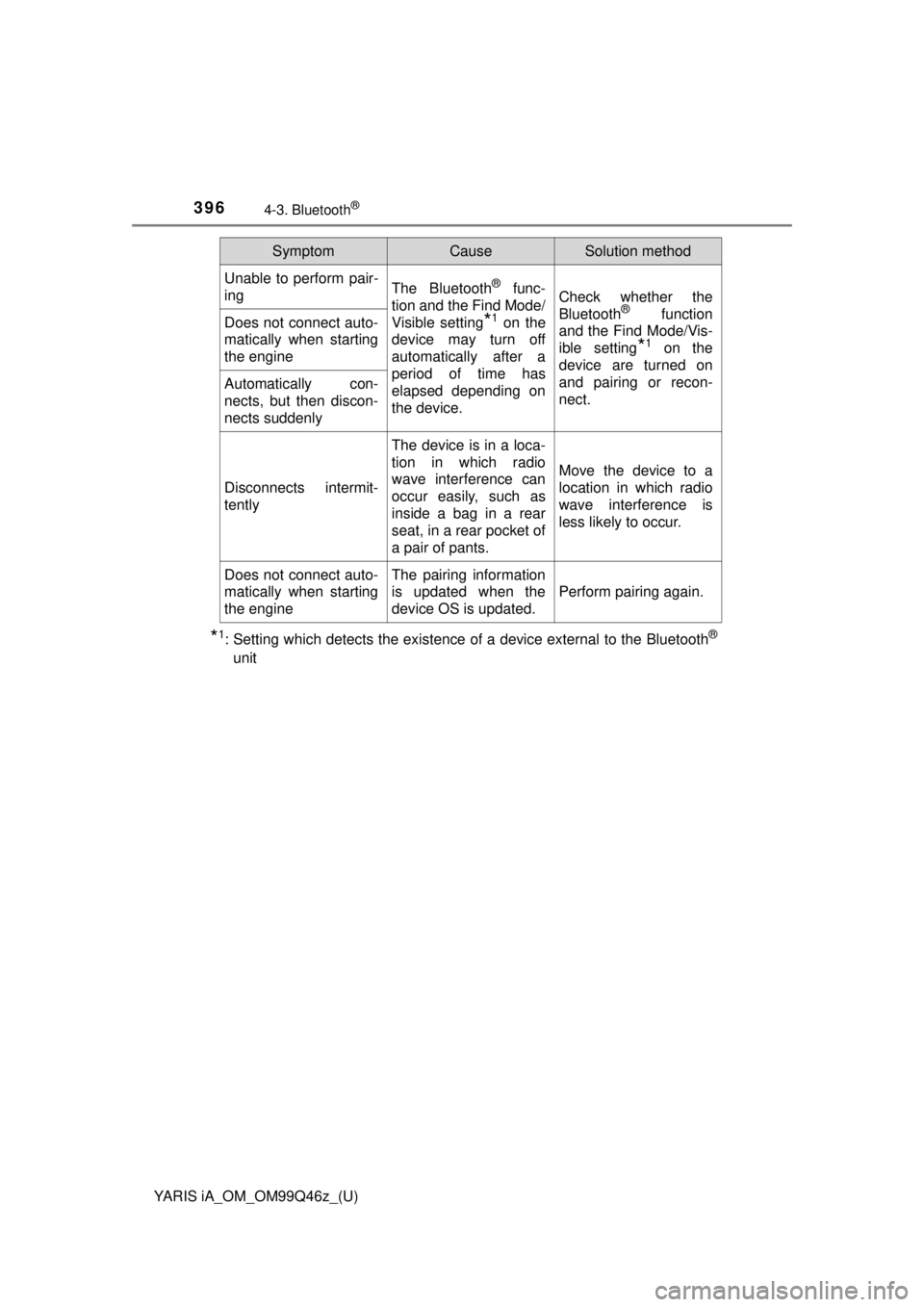
Unable to perform pair-
ingThe Bluetooth® func-
tion and the Find Mode/
Visible setting
*1 on the
device may turn off
automatically after a
period of time has
elapsed depending on
the device.
Check whether the
Bluetooth® function
and the Find Mode/Vis-
ible setting
*1 on the
device are turned on
and pairing or recon-
nect.
Does not connect auto-
matically when starting
the engine
Automatically con-
nects, but then discon-
nects suddenly
Disconnects intermit-
tently
The device is in a loca-
tion in which radio
wave interference can
occur easily, such as
inside a bag in a rear
seat, in a rear pocket of
a pair of pants.
Move the device to a
location in which radio
wave interference is
less likely to occur.
Does not connect auto-
matically when starting
the engineThe pairing information
is updated when the
device OS is updated.
Perform pairing again.
SymptomCauseSolution method
Page 398 of 576
398
YARIS iA_OM_OM99Q46z_(U)
4-3. Bluetooth®
■Regarding problems with calls
■Other problems
When operating the
audio, a song name is
not recognizedSong names cannot be
recognized by voice.-
You want to skip guid-
ance-
Guidance can be
skipped by quickly
pressing and releasing
the Talk button.
SymptomCauseSolution method
SymptomCauseSolution method
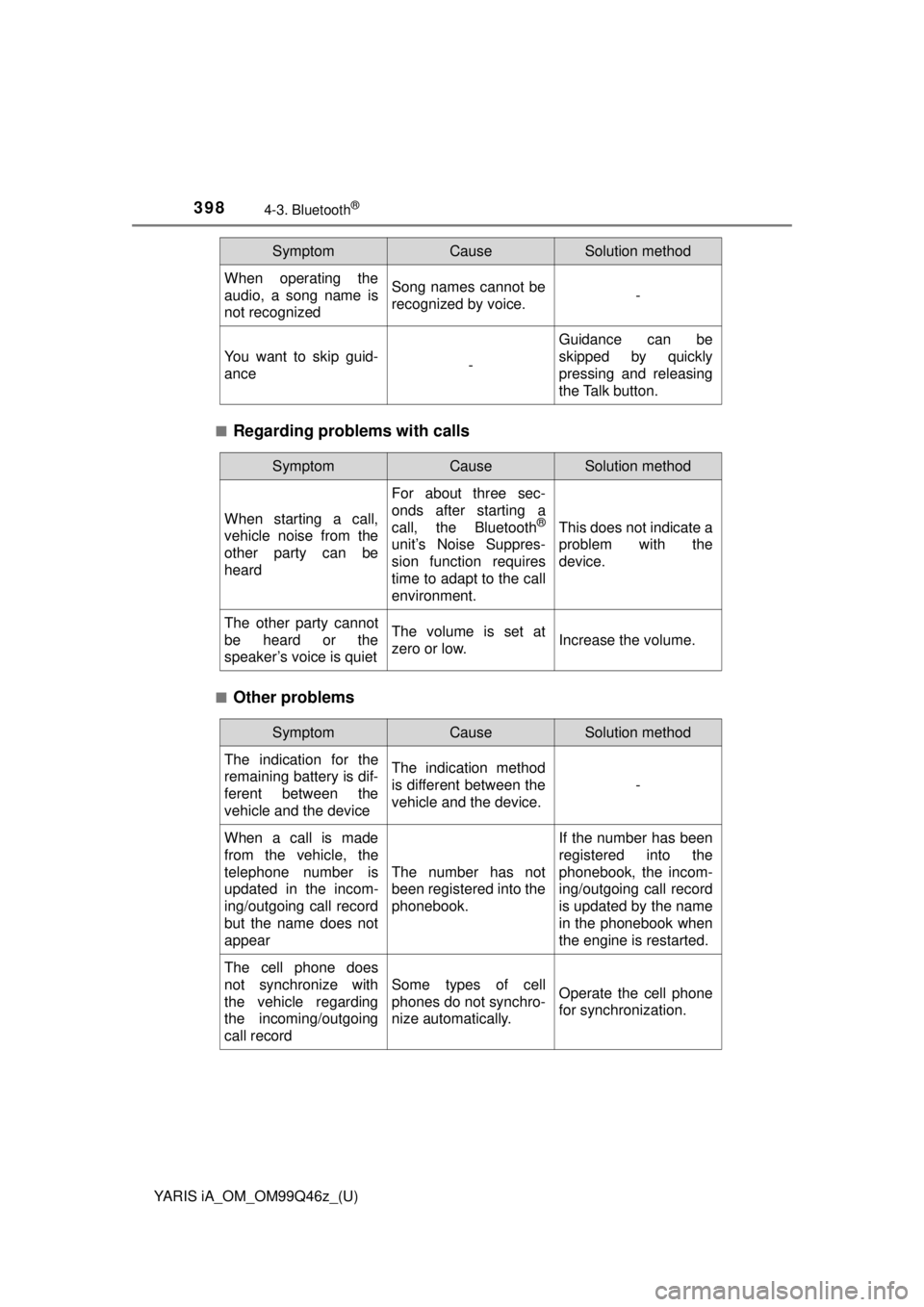
When starting a call,
vehicle noise from the
other party can be
heard
For about three sec-
onds after starting a
call, the Bluetooth
®
unit’s Noise Suppres-
sion function requires
time to adapt to the call
environment.
This does not indicate a
problem with the
device.
The other party cannot
be heard or the
speaker’s voice is quietThe volume is set at
zero or low.Increase the volume.
SymptomCauseSolution method
The indication for the
remaining battery is dif-
ferent between the
vehicle and the deviceThe indication method
is different between the
vehicle and the device.
-
When a call is made
from the vehicle, the
telephone number is
updated in the incom-
ing/outgoing call record
but the name does not
appear
The number has not
been registered into the
phonebook.
If the number has been
registered into the
phonebook, the incom-
ing/outgoing call record
is updated by the name
in the phonebook when
the engine is restarted.
The cell phone does
not synchronize with
the vehicle regarding
the incoming/outgoing
call record
Some types of cell
phones do not synchro-
nize automatically.Operate the cell phone
for synchronization.
Page 402 of 576
402
YARIS iA_OM_OM99Q46z_(U)
4-4. Interior Equipment
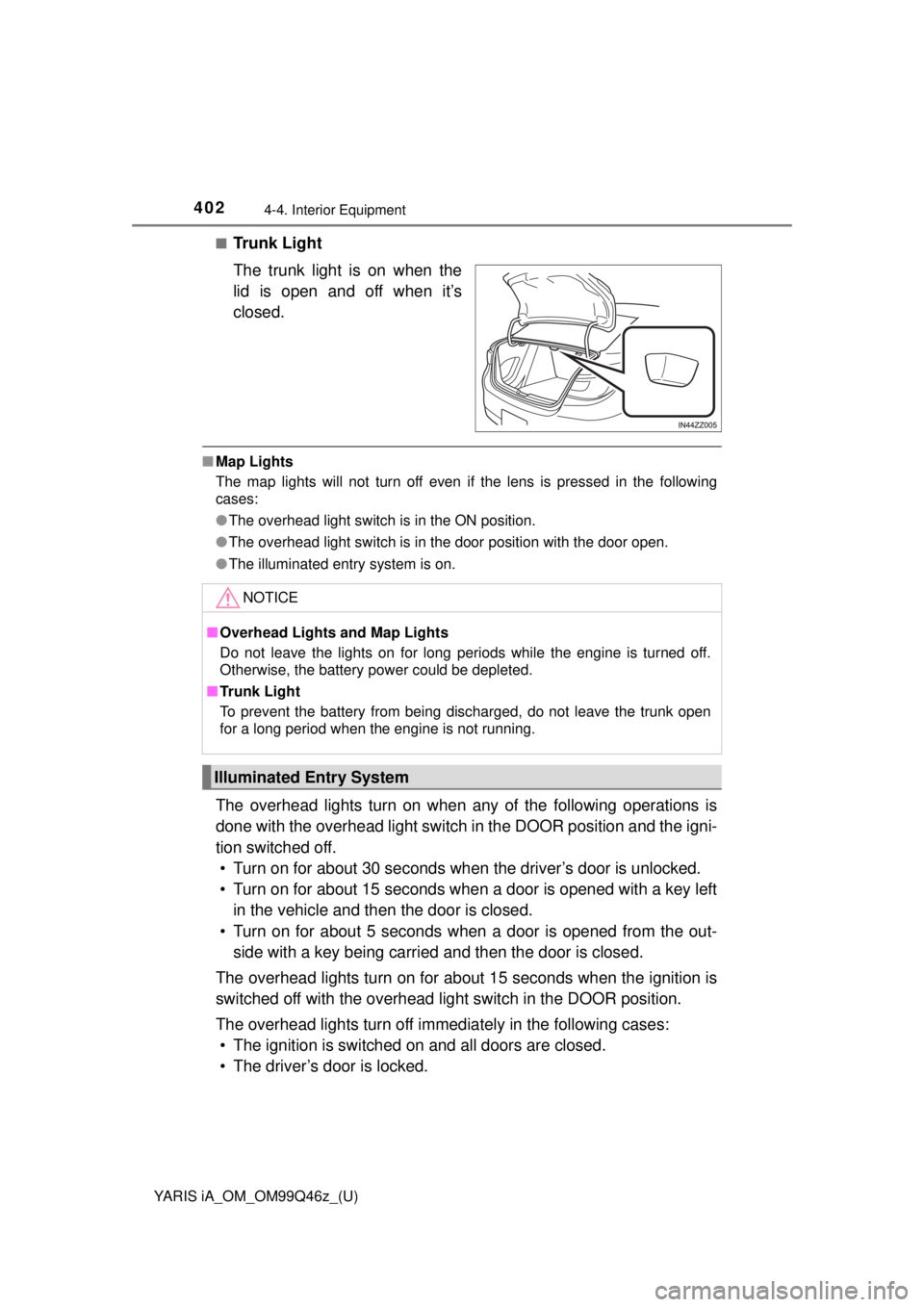
■Trunk Light
The trunk light is on when the
lid is open and off when it’s
closed.
■Map Lights
The map lights will not turn off even if the lens is pressed in the following
cases:
●The overhead light switch is in the ON position.
● The overhead light switch is in the door position with the door open.
● The illuminated entry system is on.
The overhead lights turn on when any of the following operations is
done with the overhead light switch in the DOOR position and the igni-
tion switched off. • Turn on for about 30 seconds when the driver’s door is unlocked.
• Turn on for about 15 seconds when a door is opened with a key left in the vehicle and then the door is closed.
• Turn on for about 5 seconds when a door is opened from the out- side with a key being carried and then the door is closed.
The overhead lights turn on for about 15 seconds when the ignition is
switched off with the overhead light switch in the DOOR position.
The overhead lights turn off immediately in the following cases: • The ignition is switched on and all doors are closed.
• The driver’s door is locked.
NOTICE
■ Overhead Lights and Map Lights
Do not leave the lights on for long periods while the engine is turned off.
Otherwise, the battery power could be depleted.
■ Trunk Light
To prevent the battery from being discharged, do not leave the trunk open
for a long period when the engine is not running.
Illuminated Entry System
Page 404 of 576
404
YARIS iA_OM_OM99Q46z_(U)
4-4. Interior Equipment
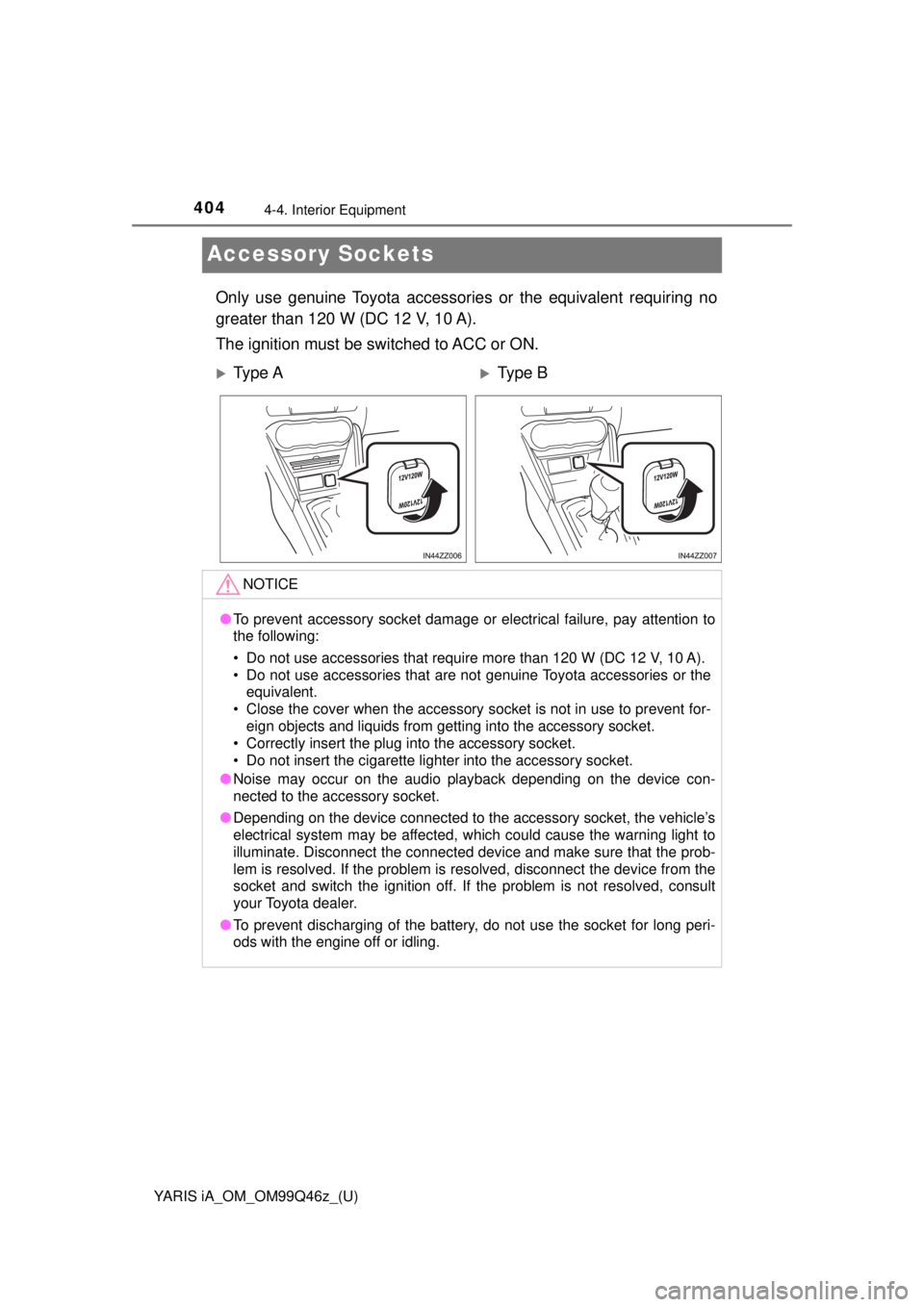
Accessory Sockets
Only use genuine Toyota accessories or the equivalent requiring no
greater than 120 W (DC 12 V, 10 A).
The ignition must be switched to ACC or ON.
Ty p e AType B
NOTICE
● To prevent accessory socket damage or electrical failure, pay attention t\
o
the following:
• Do not use accessories that require more than 120 W (DC 12 V, 10 A).
• Do not use accessories that are not genuine Toyota accessories or the
equivalent.
• Close the cover when the accessory socket is not in use to prevent for- eign objects and liquids from getting into the accessory socket.
• Correctly insert the plug into the accessory socket.
• Do not insert the cigarette lighter into the accessory socket.
● Noise may occur on the audio playback depending on the device con-
nected to the accessory socket.
● Depending on the device connected to the accessory socket, the vehicle’s
electrical system may be affected, which could cause the warning light to
illuminate. Disconnect the connected device and make sure that the prob-
lem is resolved. If the problem is resolved, disconnect the device from the
socket and switch the ignition off. If the problem is not resolved, consult
your Toyota dealer.
● To prevent discharging of the battery, do not use the socket for long peri-
ods with the engine off or idling.
Page 411 of 576
411
YARIS iA_OM_OM99Q46z_(U)
5Maintenance and Care
5-1. Essential InformationIntroduction ....................... 412
5-2. Scheduled Maintenance Maintenance Monitor ........ 414
5-3. Owner Maintenance Owner Maintenance Precautions ..................... 417
Hood ................................. 419
Engine Compartment Overview ......................... 421
Engine Oil ......................... 422
Engine Coolant ................. 425
Brake/Clutch Fluid............. 428
Window Washer Fluid ....... 429
Body Lubrication ............... 430
Wiper Blades..................... 431
Battery............................... 434
Key Battery Replacement ................... 436
Tires .................................. 439
Light Bulbs ........................ 445
Fuses ................................ 455
5-4. Appearance Care Exterior Care ..................... 462
Interior Care ...................... 470
Page 414 of 576
414
YARIS iA_OM_OM99Q46z_(U)
5-2. Scheduled Maintenance
Maintenance Monitor
Based on the engine operating conditions, the onboard computer in
your vehicle calculates the remaining oil life in the United States and
Puerto Rico. The wrench indicator light in the instrument cluster will
be illuminated when remaining oil life becomes less than 600 miles
(1000 km), or remaining days are less than 15 (whichever comes
first). The system must be rese t whenever replacing the engine oil.
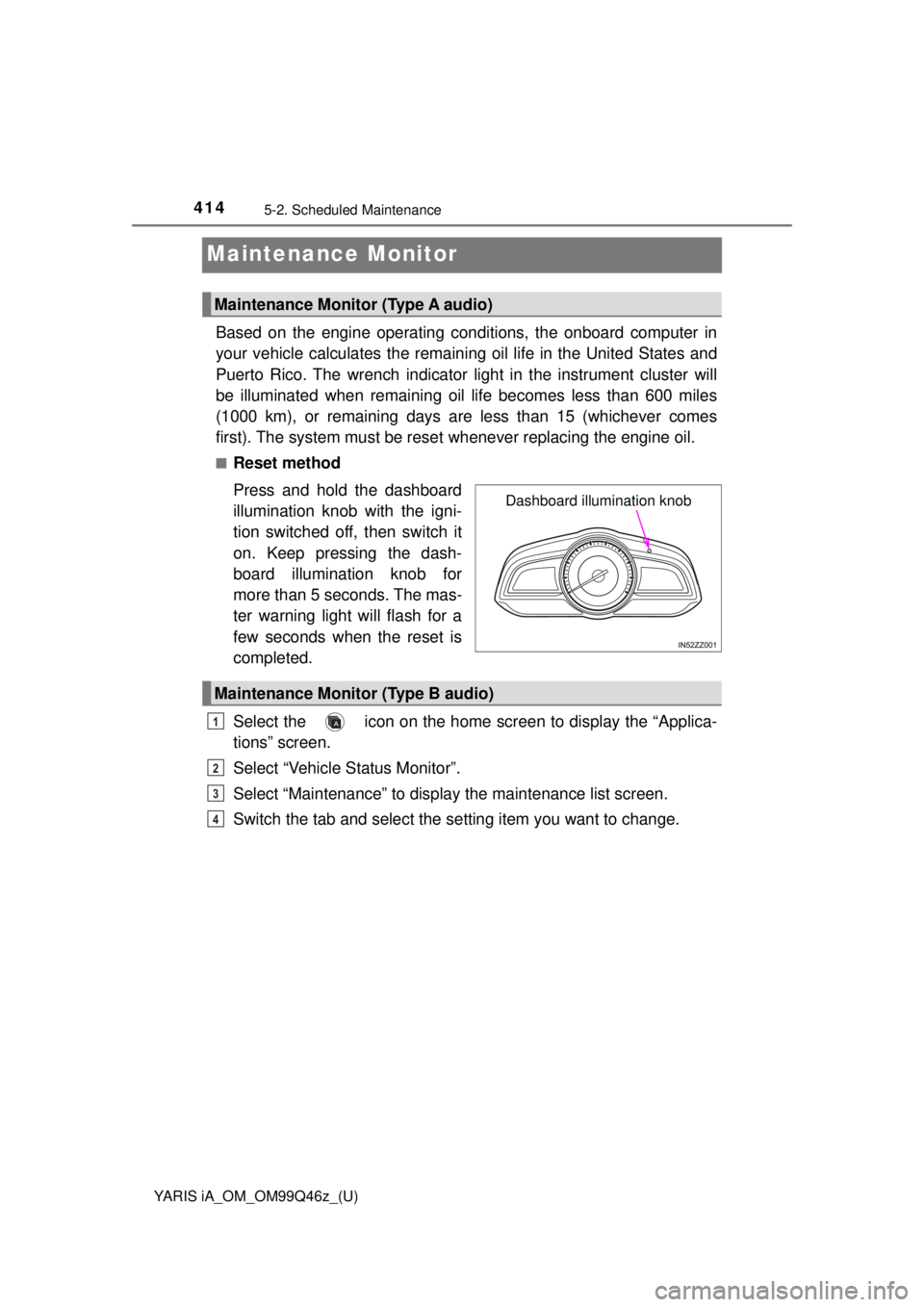
■Reset method
Press and hold the dashboard
illumination knob with the igni-
tion switched off, then switch it
on. Keep pressing the dash-
board illumination knob for
more than 5 seconds. The mas-
ter warning light will flash for a
few seconds when the reset is
completed.
Select the icon on the home screen to display the “Applica-
tions” screen.
Select “Vehicle Status Monitor”.
Select “Maintenance” to display the maintenance list screen.
Switch the tab and select the se tting item you want to change.
Maintenance Monitor (Type A audio)
Dashboard illumination knob
Maintenance Monitor (Type B audio)
1
2
3
4
Page 416 of 576
4165-2. Scheduled Maintenance
YARIS iA_OM_OM99Q46z_(U)
Oil Change
Setting Inter-
val
Oil replacement period can be selected
from the flexible setting or fixed setting,
or it can be set to non-display.
The flexible setting is available only in the
United States and Puerto Rico. Once
engine oil flexible maintenance is
selected, the vehicle calculates the
remaining oil life based on the engine
operating conditions. The vehicle lets you
know when an oil change is due by illumi-
nating the wrench indicator light in the
instrument cluster.
Distance (mile
or km)
Displays the distance until the oil replace-
ment is due.
Select this item to set the oil replacement
distance.
The wrench indication/indicator light in
the instrument cluster will be illuminated
when the remaining distance is less than
600 miles or 1000 km.
Reset
Resets the remaining distance until oil
replacement is due to the initial value.
Once the system turns on, it needs to be
reset whenever replacing the engine oil.
Ta bItemExplanation
Page 417 of 576
417
YARIS iA_OM_OM99Q46z_(U)
5-3. Owner Maintenance
5
Maintenance and Care
Owner Maintenance Precautions
The owner or a qualified service technician should make these vehicle
inspections at the indicated inte rvals to ensure safe and dependable
operation.
Bring any problem to the attention of your Toyota dealer or qualified
service technician as soon as possible.
■When Refueling • Brake and clutch fluid level ( →P. 428)
• Engine coolant level ( →P. 425)
• Engine oil level ( →P. 424)
• Washer fluid level ( →P. 429)
■At Least Monthly
• Tire inflation pressures ( →P. 439)
■At Least Twice a Year (For Example, Every Spring and Fall)
You can do the following scheduled maintenance items if you have
some mechanical ability and a few basic tools and if you closely fol-
low the directions in this manual.
• Engine coolant ( →P. 425)
• Engine oil ( →P. 422)
Improper or incomplete service may result in problems. This section
gives instructions only for items that are easy to perform.
As explained in the Introduction ( →P. 412), several procedures can be
done only by a qualified service technician with special tools.
Improper owner maintenance during the warranty period may affect
warranty coverage. Refer to Introduction ( →P. 412) for owner’s
responsibility in protecting your in vestment. For details, read the sep-
arate Toyota Warranty and Mainten ance Guide provided with the vehi-
cle. If you are unsure about any se rvicing or maintenance procedure,
have it done by your Toyota dealer.
There are strict environmental laws regarding the disposal of waste oil
and fluids. Please dispose of your waste properly and with due regard
to the environment.
We recommend that you entrust the oil and fluid changes of your vehi-
cle to your Toyota dealer.
Page 418 of 576
4185-3. Owner Maintenance
YARIS iA_OM_OM99Q46z_(U)
WARNING
■Do not perform ma intenance work if you l ack sufficient knowledge and
experience or the proper tools an d equipment to do the work. Have
maintenance work done by a qualified technician
Performing maintenance work on a vehicle is dangerous if not done prop-
erly. You can be seriously injured while performing some maintenance pro-
cedures.
■ If you must run the engine while working under the hood, make certain
that you remove all jewelry (especially rings, bracelets, watches, and
necklaces) and all neckties, scarves, and similar loose clothing before
getting near the engine or coolin g fan which may turn on unexpectedly
Working under the hood with the engine running is dangerous. It becomes
even more dangerous when you wear jewelry or loose clothing.
Either can become entangled in moving parts and result in injury.
■ Switch the ignition to off and make sure the fan is not running
before attempting to work near the cooling fan
Working near the cooling fan when it is running is dangerous. The fan could
continue running indefinitely even if the engine has stopped and the engine
compartment temperature is high. You could be hit by the fan and seriously
injured.
■ Do not leave items in th e engine compartment
After you have finished checking or doing servicing in the engine compart-
ment, do not forget and leave items such as tools or rags in the engine com-
partment.
Tools or other items left in the engine compartment could cause engine
damage or a fire leading to an unexpected accident.