AUX TOYOTA YARIS iA 2018 Owners Manual (in English)
[x] Cancel search | Manufacturer: TOYOTA, Model Year: 2018, Model line: YARIS iA, Model: TOYOTA YARIS iA 2018Pages: 576, PDF Size: 5.5 MB
Page 4 of 576

TABLE OF CONTENTS4
YARIS iA_OM_OM99Q46z_(U)3-6. ABS/TCS/DSC
Antilock Brake System (ABS) .............................. 193
Traction Control System (TCS) .............................. 194
Dynamic Stability Control (DSC) .............................. 196
3-7. Fuel Economy Monitor Fuel Economy Monitor ...... 199
3-8. Drive Selection Drive Selection (Automatic Transaxle) ..... 201
3-9. Power Steering Power Steering.................. 203
3-10. Active Safety System Active Safety System ........ 204
Smart City Brake Support (SCBS) ............................ 205
Laser Sensor ..................... 211
3-11. Cruise Control Cruise Control ................... 213
3-12. Tire Pressure Monitoring System
Tire Pressure Monitoring System ............................ 218
3-13. Rear View Monitor Rear View Monitor............. 222 4-1. Climate Control System
Operating Tips ................... 234
Vent Operation .................. 235
Manual Type ...................... 237
4-2. Audio System Antenna ............................. 244
Operating Tips for Audio System ............................ 245
Audio Set (Type A [non-touchscreen]) .......... 258
Audio Set (Type B [touchscreen]).................. 274
Audio Control Switch Operation......................... 295
AUX/USB mode ................. 298
4-3. Bluetooth
®
Bluetooth®......................... 319
Bluetooth® Hands-Free
(Type A)........................... 354
Bluetooth
® Hands-Free
(Type B)........................... 365
Bluetooth
® Audio
(Type A)........................... 378
Bluetooth
® Audio
(Type B)........................... 382
Troubleshooting ................. 395
4-4. Interior Equipment Sunvisors ........................... 400
Interior Lights ..................... 401
Accessory Sockets ............ 404
Cup Holder ........................ 405
Bottle Holder ...................... 406
Storage Compartments ..... 407
4Interior Features
Page 86 of 576
86
YARIS iA_OM_OM99Q46z_(U)
2-1. Keys
Keys
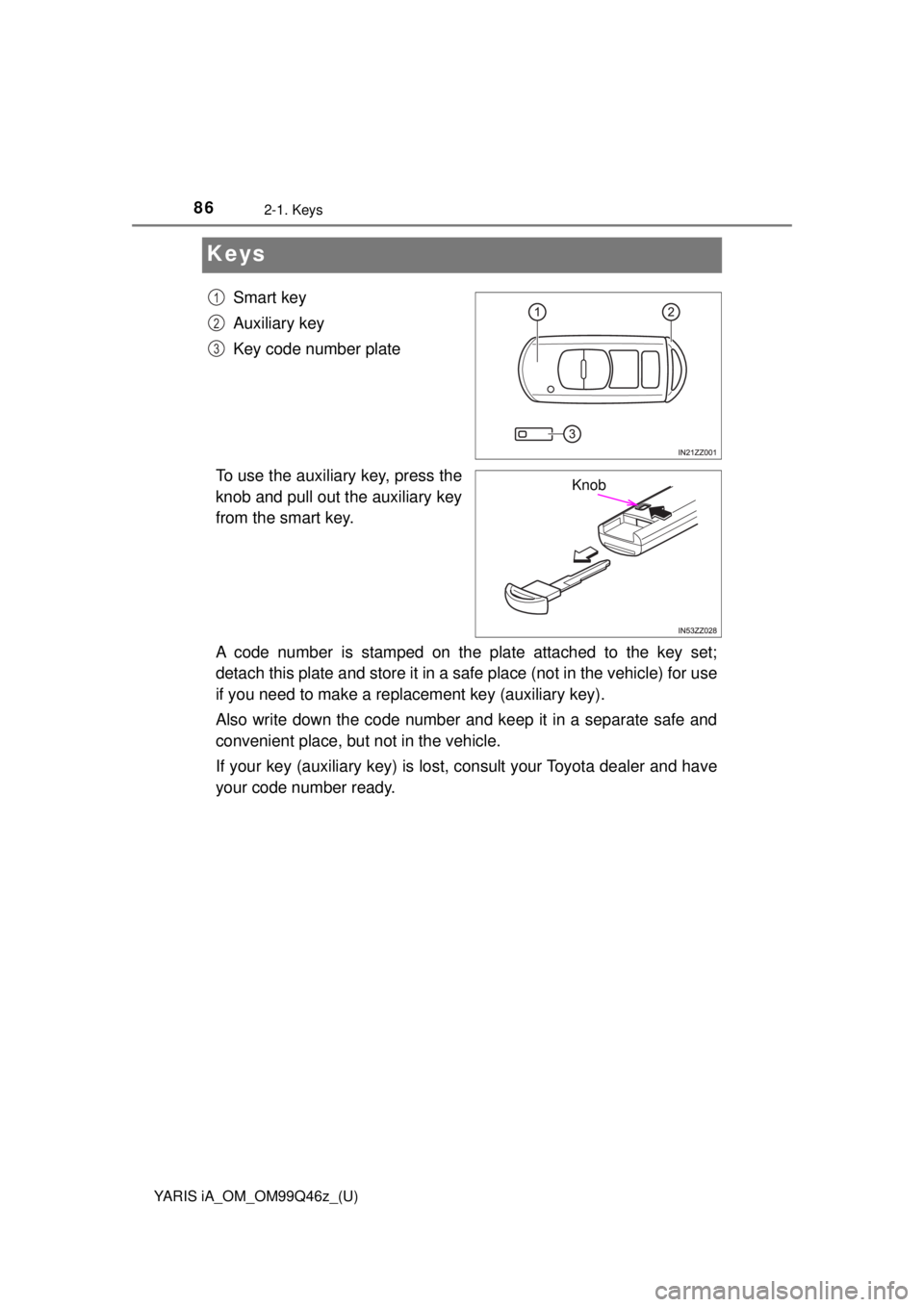
Smart key
Auxiliary key
Key code number plate
To use the auxiliary key, press the
knob and pull out the auxiliary key
from the smart key.
A code number is stamped on the plate attached to the key set;
detach this plate and store it in a sa fe place (not in the vehicle) for use
if you need to make a repl acement key (auxiliary key).
Also write down the code number and keep it in a separate safe and
convenient place, but not in the vehicle.
If your key (auxiliary ke y) is lost, consult your Toyota dealer and have
your code number ready.1
2
3
Knob
Page 123 of 576
YARIS iA_OM_OM99Q46z_(U)
1232-7. Security System
2
Before Driving
Close the windows securely.
Switch the ignition OFF.
Make sure the hood, the doors, and the trunk lid are closed.
Press the lock button on the smart key or lock the driver’s door from
the outside with the auxiliary key.
The hazard warning lights will flash once.
The following method will also arm the theft deterrent system:
Press the door-lock switch “ ” while any door is open and then
close all of the doors.
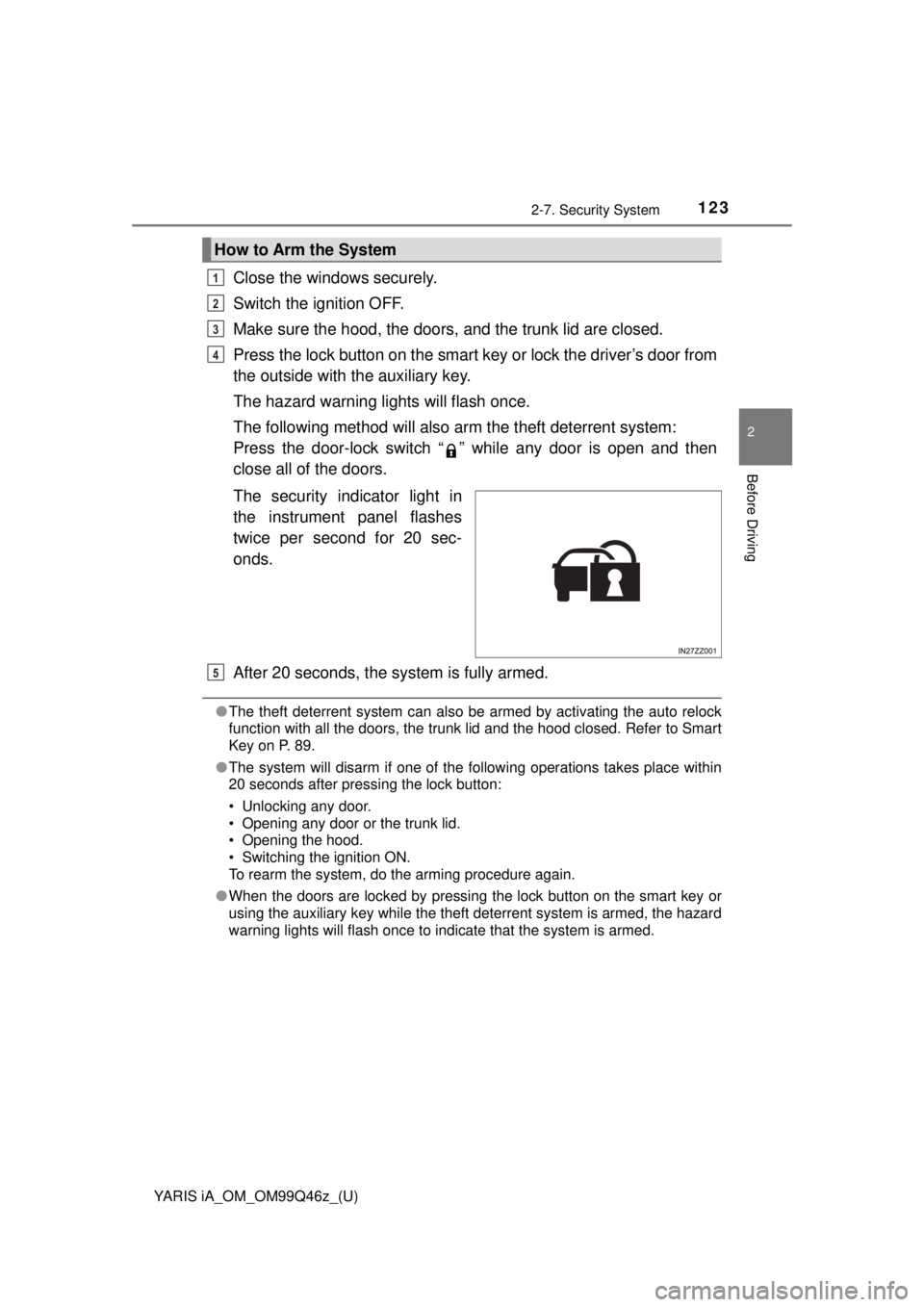
The security indicator light in
the instrument panel flashes
twice per second for 20 sec-
onds.
After 20 seconds, the system is fully armed.
● The theft deterrent system can also be armed by activating the auto relock
function with all the doors, the trunk lid and the hood closed. Refer to Smart
Key on P. 89.
● The system will disarm if one of the following operations takes place within
20 seconds after pressing the lock button:
• Unlocking any door.
• Opening any door or the trunk lid.
• Opening the hood.
• Switching the ignition ON.
To rearm the system, do the arming procedure again.
● When the doors are locked by pressing the lock button on the smart key or
using the auxiliary key while the theft deterrent system is armed, the hazard
warning lights will flash once to indicate that the system is armed.
How to Arm the System
1
2
3
4
5
Page 192 of 576

192
YARIS iA_OM_OM99Q46z_(U)
3-5. Brake
WARNING
■Do not rely completely on Hill Launch Assist (HLA)
Hill Launch Assist (HLA) is an auxiliary device for accelerating from a stop
on a slope. The system only operates for about two seconds and therefore,
relying only on the system, when accelerating from a stop is dangerous
because the vehicle may move (roll) unexpectedly and cause an accident.
The vehicle could roll depending on the vehicle’s load or if it is towing some-
thing. In addition, for vehicles with a manual transaxle, the vehicle could sti\
ll
roll depending on how the clutch pedal or the accelerator pedal is operated.
Always confirm the safety around the vehicle before starting to drive the
vehicle.
Page 233 of 576
233
YARIS iA_OM_OM99Q46z_(U)
4Interior Features
4-1. Climate Control SystemOperating Tips .................. 234
Vent Operation .................. 235
Manual Type ..................... 237
4-2. Audio System Antenna ............................. 244
Operating Tips for Audio System ............................ 245
Audio Set (Type A [non-touchscreen]) .......... 258
Audio Set (Type B [touchscreen]) ................. 274
Audio Control Switch Operation ........................ 295
AUX/USB mode ................ 298 4-3. Bluetooth®
Bluetooth®......................... 319
Bluetooth® Hands-Free
(Type A) .......................... 354
Bluetooth
® Hands-Free
(Type B) .......................... 365
Bluetooth
® Audio
(Type A) .......................... 378
Bluetooth
® Audio
(Type B) .......................... 382
Troubleshooting ................ 395
4-4. Interior Equipment Sunvisors .......................... 400
Interior Lights .................... 401
Accessory Sockets............ 404
Cup Holder ........................ 405
Bottle Holder ..................... 406
Storage Compartments ..... 407
Page 258 of 576
![TOYOTA YARIS iA 2018 Owners Manual (in English) 258
YARIS iA_OM_OM99Q46z_(U)
4-2. Audio System
Audio Set (Type A [non-touchscreen])∗
●Power/Volume/Sound Controls ( →P. 259)
● Clock ( →P. 262)
● Operating the Radio ( →P. 263)
● Opera](/img/14/43168/w960_43168-257.png "TOYOTA YARIS iA 2018 Owners Manual (in English) 258
YARIS iA_OM_OM99Q46z_(U)
4-2. Audio System
Audio Set (Type A [non-touchscreen])∗
●Power/Volume/Sound Controls ( →P. 259)
● Clock ( →P. 262)
● Operating the Radio ( →P. 263)
● Opera")
258
YARIS iA_OM_OM99Q46z_(U)
4-2. Audio System
Audio Set (Type A [non-touchscreen])∗
●Power/Volume/Sound Controls ( →P. 259)
● Clock ( →P. 262)
● Operating the Radio ( →P. 263)
● Operating the Compact Disc (CD) Player ( →P. 266)
● How to use Auxiliary jack/USB port ( →P. 273)
● Error Indications ( →P. 273)
∗: If equipped
Page 273 of 576
YARIS iA_OM_OM99Q46z_(U)
2734-2. Audio System
4
Interior Features
Audio can be heard from the vehicle’s speakers by connecting a com-
mercially-available portable audi o unit to the auxiliary jack.
Use a commercially-available, non-impedance (3.5 ∅) stereo mini plug
cable. Contact your Toyota dealer for details.
In addition, audio can be played from the vehicle audio device by con-
necting a USB device to the USB port.
Refer to AUX/USB mode on P. 298.
If you see an error indication on the audio display, find the cause in
the chart. If you cannot clear the error indication, take the vehicle to
your Toyota dealer.
How to use Auxiliary jack/USB port
Error Indications
IndicationCauseSolution
CHECK CD
CD is inserted
upside downInsert the CD properly. If the error indica-
tion continues to display, consult your
Toyota dealer.
CD is defec-
tiveInsert another CD properly. If the error
indication continues to display, consult
your Toyota dealer.
Page 291 of 576
YARIS iA_OM_OM99Q46z_(U)
2914-2. Audio System
4
Interior Features
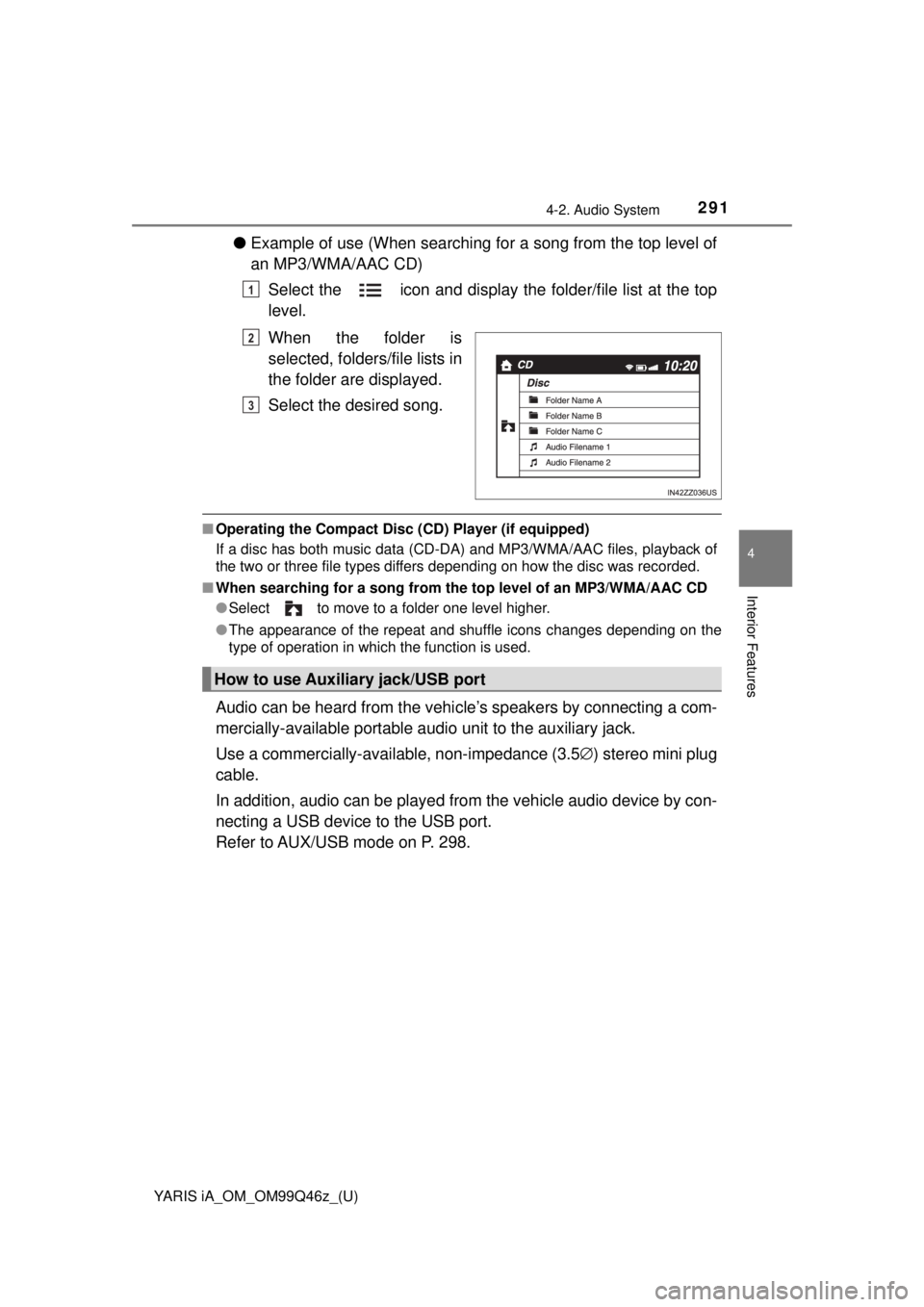
●Example of use (When searching for a song from the top level of
an MP3/WMA/AAC CD)
Select the icon and display the folder/file list at the top
level.
When the folder is
selected, folders/file lists in
the folder are displayed.
Select the desired song.
■Operating the Compact Disc ( CD) Player (if equipped)
If a disc has both music data (CD-DA) and MP3/WMA/AAC files, playback of
the two or three file types differs depending on how the disc was recorded.
■ When searching for a so ng from the top level of an MP3/WMA/AAC CD
● Select to move to a folder one level higher.
● The appearance of the repeat and shuffle icons changes depending on the
type of operation in which the function is used.
Audio can be heard from the vehi cle’s speakers by connecting a com-
mercially-available portable audi o unit to the auxiliary jack.
Use a commercially-available, non-impedance (3.5 ∅) stereo mini plug
cable.
In addition, audio can be played from the vehicle audio device by con-
necting a USB device to the USB port.
Refer to AUX/USB mode on P. 298.
1
2
3
How to use Auxiliary jack/USB port
Page 298 of 576
298
YARIS iA_OM_OM99Q46z_(U)
4-2. Audio System
AUX/USB mode
●How to use AUX mode (Type A) ( →P. 301)
● How to use USB mode (Type A) ( →P. 302)
● How to use iPod mode (Type A) ( →P. 307)
● How to use AUX mode (Type B) ( →P. 312)
● How to use USB mode (Type B) ( →P. 312)
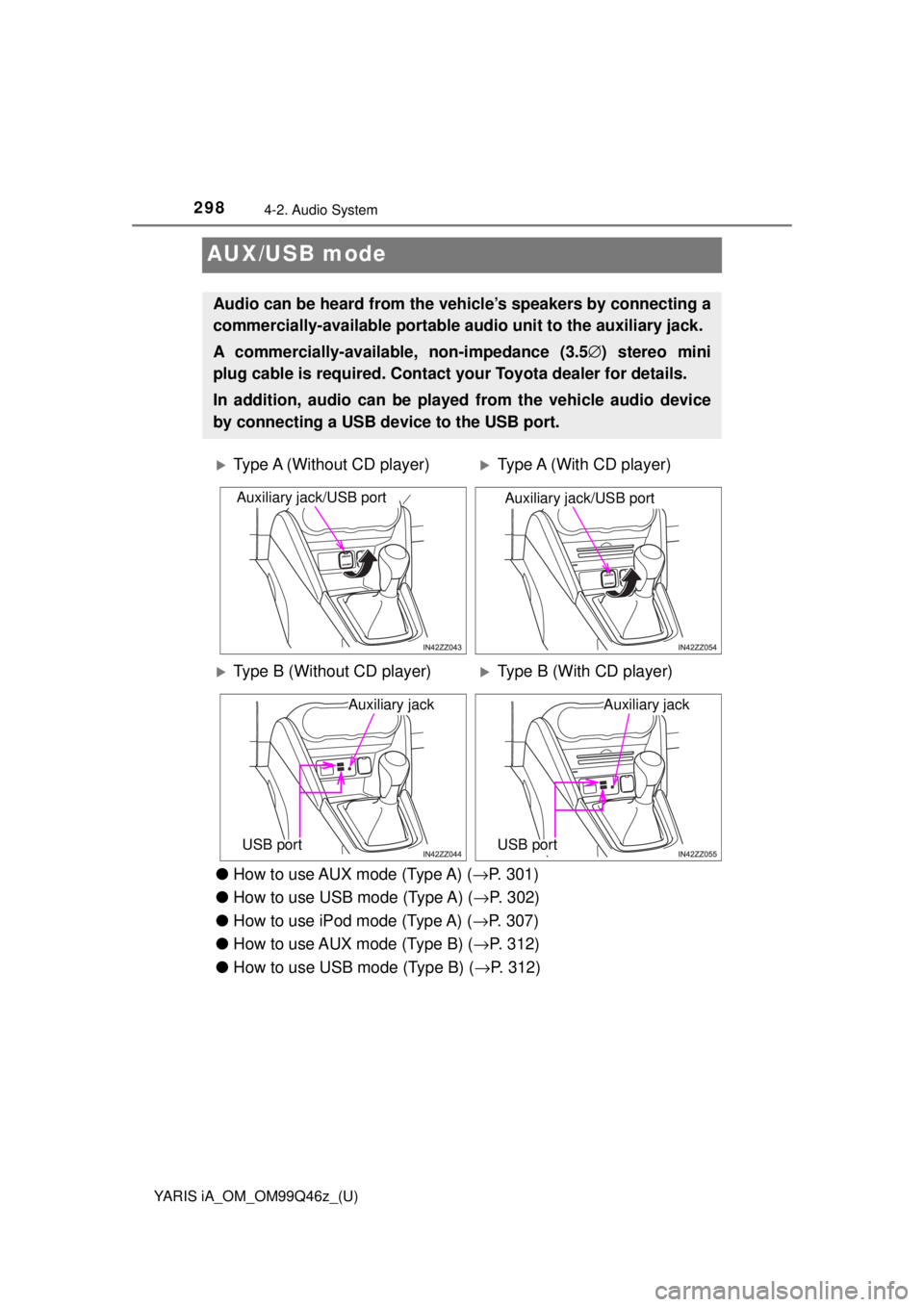
Audio can be heard from the veh icle’s speakers by connecting a
commercially-available portable a udio unit to the auxiliary jack.
A commercially-availab le, non-impedance (3.5 ∅) stereo mini
plug cable is required. Contact your Toyota dealer for details.
In addition, audio can be played from the vehicle audio device
by connecting a USB device to the USB port.
Type A (Without CD player)Type A (With CD player)
Type B (Without CD player)Type B (With CD player)
Auxiliary jack/USB portAuxiliary jack/USB port
Auxiliary jack
USB port
Auxiliary jack
USB port
Page 299 of 576
YARIS iA_OM_OM99Q46z_(U)
2994-2. Audio System
4
Interior Features
●Type B only:
The SD card slot is for the navigation system. For vehicles with the naviga-
tion system, the SD card (Toyota genuine) with stored map data is inserted
into the SD card slot and used.
● This mode may not be usable depending on the portable audio device to be
connected.
● Before using the auxiliary jack/USB port, refer to the instruction manual for
the portable audio device.
● Use a commercially-available, non-impedance (3.5 ∅) stereo mini plug for
connecting the portable audio unit to the auxiliary jack. Before using the
auxiliary jack, read the manufacturer’s instructions for connecting a portable
audio unit to the auxiliary jack.
● To prevent discharging of the battery, do not use the auxiliary input for long
periods with the engine off or idling.
● When connecting a device to the auxiliary jack or USB port, noise may
occur depending on the connected device. If the device is connected to the
vehicle’s accessory socket, the noise can be reduced by unplugging it from
the accessory socket.
WARNING
■Do not adjust the portable audio unit or a similar product while driving
the vehicle
Adjusting the portable audio unit or a similar product while driving the vehi-
cle is dangerous as it could distract your attention from the vehicle opera-
tion which could lead to a serious accident. Always adjust the portable
audio unit or a similar product while the vehicle is stopped.
NOTICE
Depending on the portable audio device, noise may occur when the device
is connected to the vehicle accessory socket. (If noise occurs, do not use
the accessory socket.)