battery cable TOYOTA YARIS iA 2018 Owners Manual (in English)
[x] Cancel search | Manufacturer: TOYOTA, Model Year: 2018, Model line: YARIS iA, Model: TOYOTA YARIS iA 2018Pages: 576, PDF Size: 5.5 MB
Page 130 of 576
130
YARIS iA_OM_OM99Q46z_(U)
2-8. Driving Tips
Winter Driving
Carry emergency gear, including tire chains, window scraper, flares, a
small shovel, jumper cables, a nd a small bag of sand or salt.
Ask your Toyota dealer to check the following: • Have the proper ratio of antifreeze in the radiator. Refer to Engine Coolant on P. 425.
• Inspect the battery and its cables . Cold reduces battery capacity.
• Use an engine oil appropriate for the lowest ambient temperatures that the vehicle will be driven in ( →P. 422).
• Inspect the ignition sy stem for damage and loose connections.
• Use washer fluid made with antifreeze ⎯but do not use engine cool-
ant antifreeze for washer fluid ( →P. 429).
●Do not use the parking brake in freezing weather as it may freeze. Instead,
shift to 1 or R with a manual transaxle and to P with an automatic transaxle.
Block the rear wheels.
● Remove snow before driving. Snow left on the windshield is dangerous as it
could obstruct vision.
● Do not apply excessive force to a window scraper when removing ice or fro-
zen snow on the mirror glass and windshield.
● Never use warm or hot water for removing snow or ice from windows and
mirrors as it could result in the glass cracking.
● Drive slowly. Braking performance can be adversely affected if snow or ice
adheres to the brake components. If this situation occurs, drive the vehicle
slowly, releasing the accelerator pedal and lightly applying the brakes sev-
eral times until the brake performance returns to normal.
Page 155 of 576
YARIS iA_OM_OM99Q46z_(U)
1553-2. Combination Meter and Display
3
When Driving
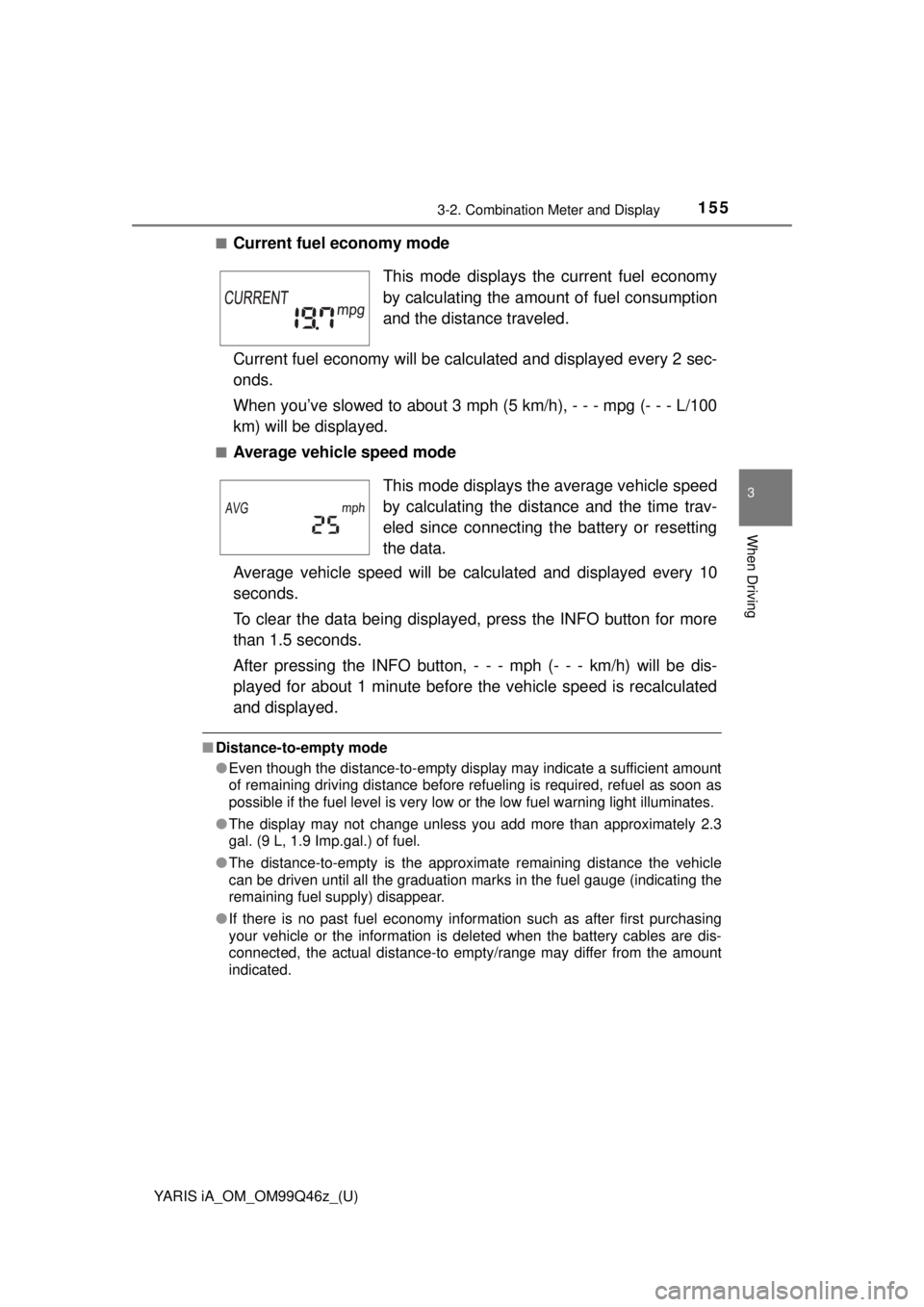
■Current fuel economy mode
Current fuel economy will be calculated and displayed every 2 sec-
onds.
When you’ve slowed to about 3 mph (5 km/h), - - - mpg (- - - L/100
km) will be displayed.
■Average vehicle speed mode
Average vehicle speed will be calculated and displayed every 10
seconds.
To clear the data being displayed, press the INFO button for more
than 1.5 seconds.
After pressing the INFO button, - - - mph (- - - km/h) will be dis-
played for about 1 minute before the vehicle speed is recalculated
and displayed.
■ Distance-to-empty mode
●Even though the distance-to-empty display may indicate a sufficient amount
of remaining driving distance before refueling is required, refuel as soon as
possible if the fuel level is very low or the low fuel warning light illuminates.
● The display may not change unless you add more than approximately 2.3
gal. (9 L, 1.9 Imp.gal.) of fuel.
● The distance-to-empty is the approximate remaining distance the vehicle
can be driven until all the graduation marks in the fuel gauge (indicating the
remaining fuel supply) disappear.
● If there is no past fuel economy information such as after first purchasing
your vehicle or the information is deleted when the battery cables are dis-
connected, the actual distance-to empty/range may differ from the amount
indicated.
This mode displays the current fuel economy
by calculating the amount of fuel consumption
and the distance traveled.
This mode displays th e average vehicle speed
by calculating the distance and the time trav-
eled since connecting the battery or resetting
the data.
Page 378 of 576
378
YARIS iA_OM_OM99Q46z_(U)
4-3. Bluetooth®
Bluetooth® Audio (Type A)
●Applicable Bluetooth® specification (Recommended)
Ve r. 2 . 0
● Response profile
• A2DP (Advanced Audio Distribut ion Profile) Ver. 1.0/1.2
• AVRCP (Audio/Video Remote Control Profile) Ver. 1.0/1.3
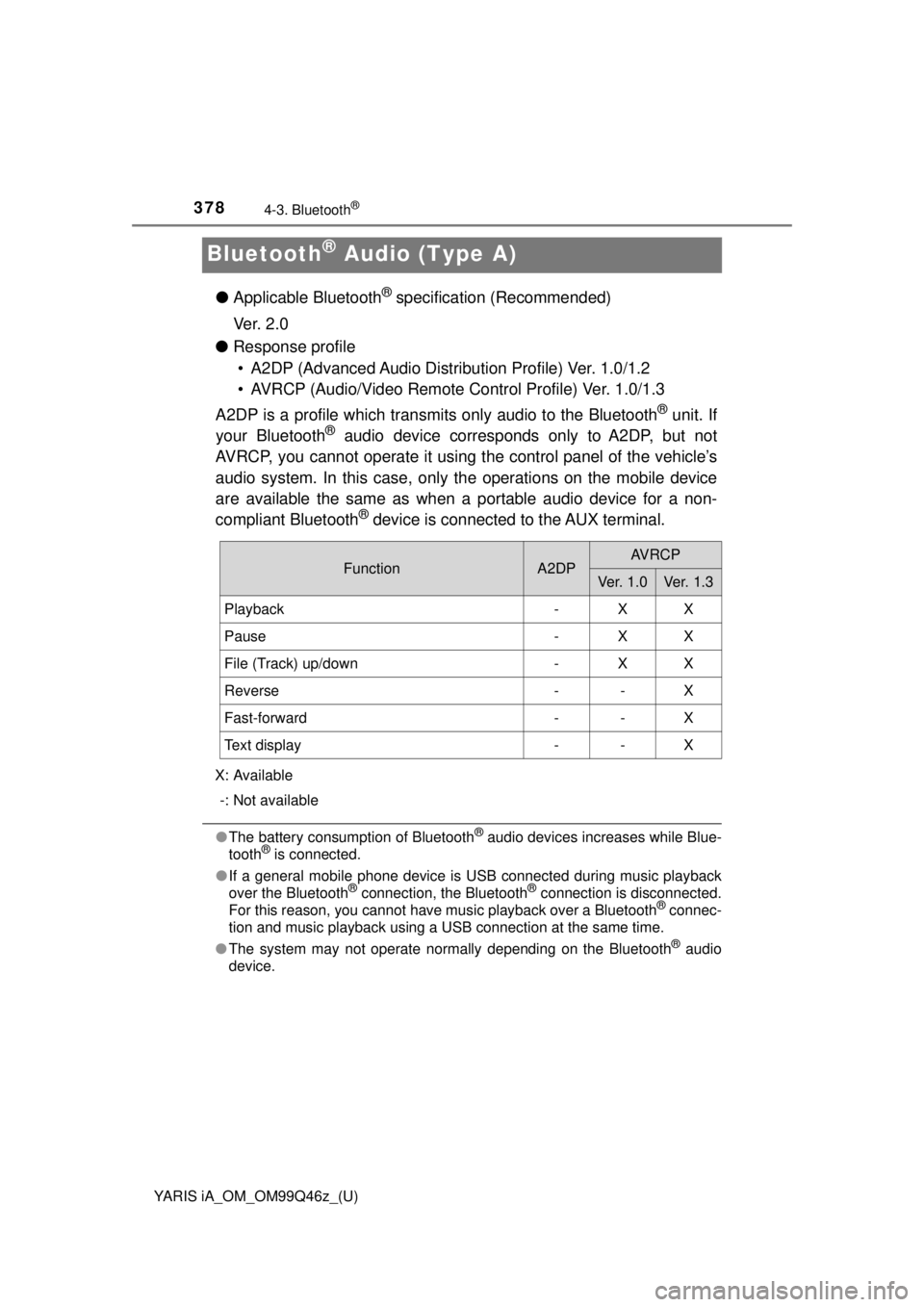
A2DP is a profile which transmits only audio to the Bluetooth
® unit. If
your Bluetooth® audio device corresponds only to A2DP, but not
AVRCP, you cannot operate it using the control panel of the vehicle’s
audio system. In this case, only the operations on the mobile device
are available the same as when a portable audio device for a non-
compliant Bluetooth
® device is connected to the AUX terminal.
X: Available
-: Not available
● The battery consumption of Bluetooth® audio devices increases while Blue-
tooth® is connected.
● If a general mobile phone device is USB connected during music playback
over the Bluetooth
® connection, the Bluetooth® connection is disconnected.
For this reason, you cannot have music playback over a Bluetooth® connec-
tion and music playback using a USB connection at the same time.
● The system may not operate normally depending on the Bluetooth
® audio
device.
FunctionA2DPAV R C P
Ve r. 1 . 0Ve r. 1. 3
Playback-XX
Pause-XX
File (Track) up/down-XX
Reverse--X
Fast-forward--X
Text display--X
Page 435 of 576
YARIS iA_OM_OM99Q46z_(U)
4355-3. Owner Maintenance
5
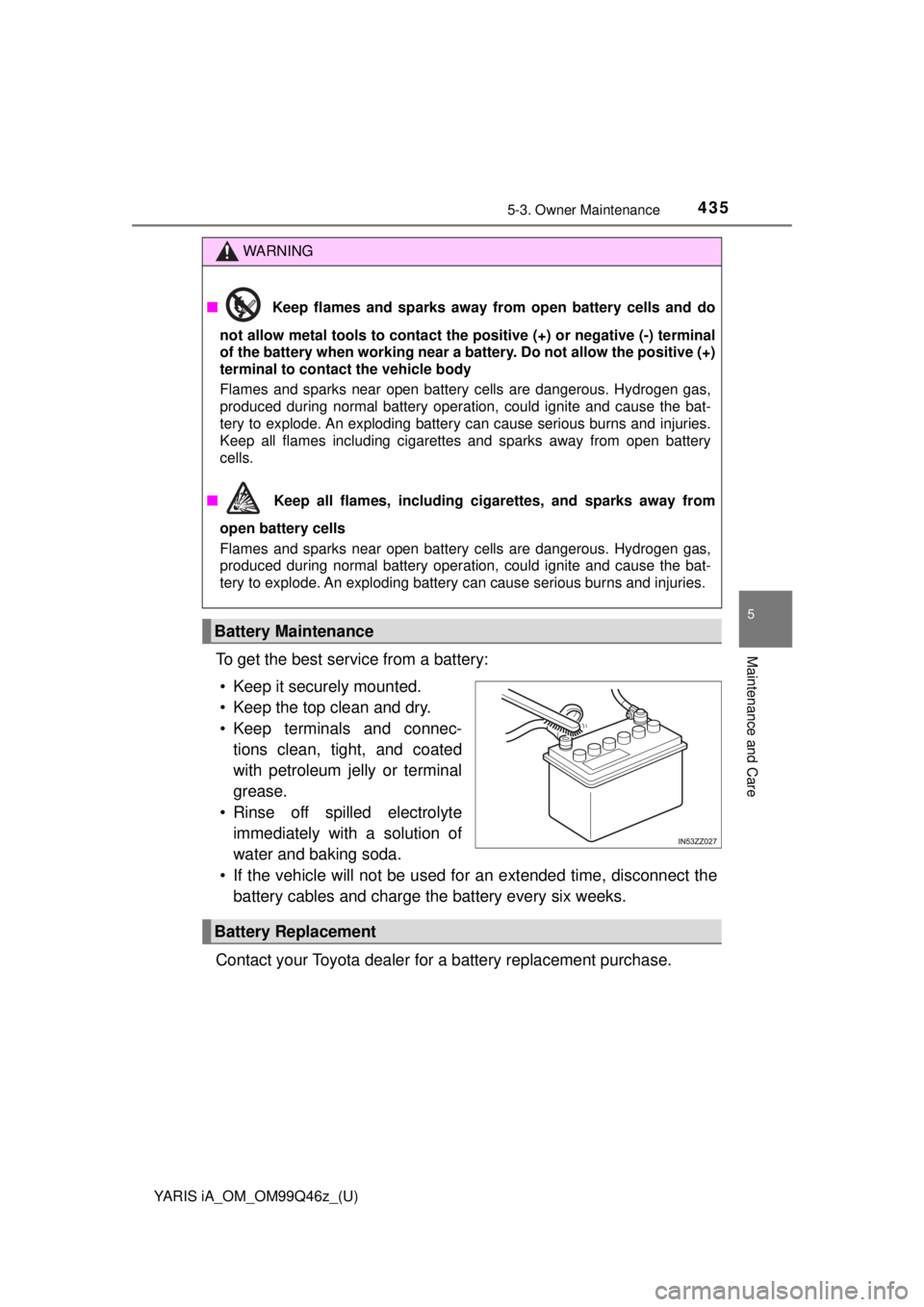
Maintenance and CareTo get the best service from a battery:• Keep it securely mounted.
• Keep the top clean and dry.
• Keep terminals and connec- tions clean, tight, and coated
with petroleum jelly or terminal
grease.
• Rinse off spilled electrolyte immediately with a solution of
water and baking soda.
• If the vehicle will not be used for an extended time, disconnect the
battery cables and charge the battery every six weeks.
Contact your Toyota dealer for a battery replacement purchase.
WARNING
■ Keep flames and sparks away from open battery cells and do
not allow metal tools to contact the positive (+) or negative (-) terminal
of the battery when working near a ba ttery. Do not allow the positive (+)
terminal to contact the vehicle body
Flames and sparks near open battery cells are dangerous. Hydrogen gas,
produced during normal battery operation, could ignite and cause the bat-
tery to explode. An exploding battery can cause serious burns and injuries.
Keep all flames including cigarettes and sparks away from open battery
cells.
■ Keep all flames, including cigarettes, and sparks away from
open battery cells
Flames and sparks near open battery cells are dangerous. Hydrogen gas,
produced during normal battery operation, could ignite and cause the bat-
tery to explode. An exploding battery can cause serious burns and injuries.
Battery Maintenance
Battery Replacement
Page 492 of 576
4926-3. Battery Runs Out
YARIS iA_OM_OM99Q46z_(U)
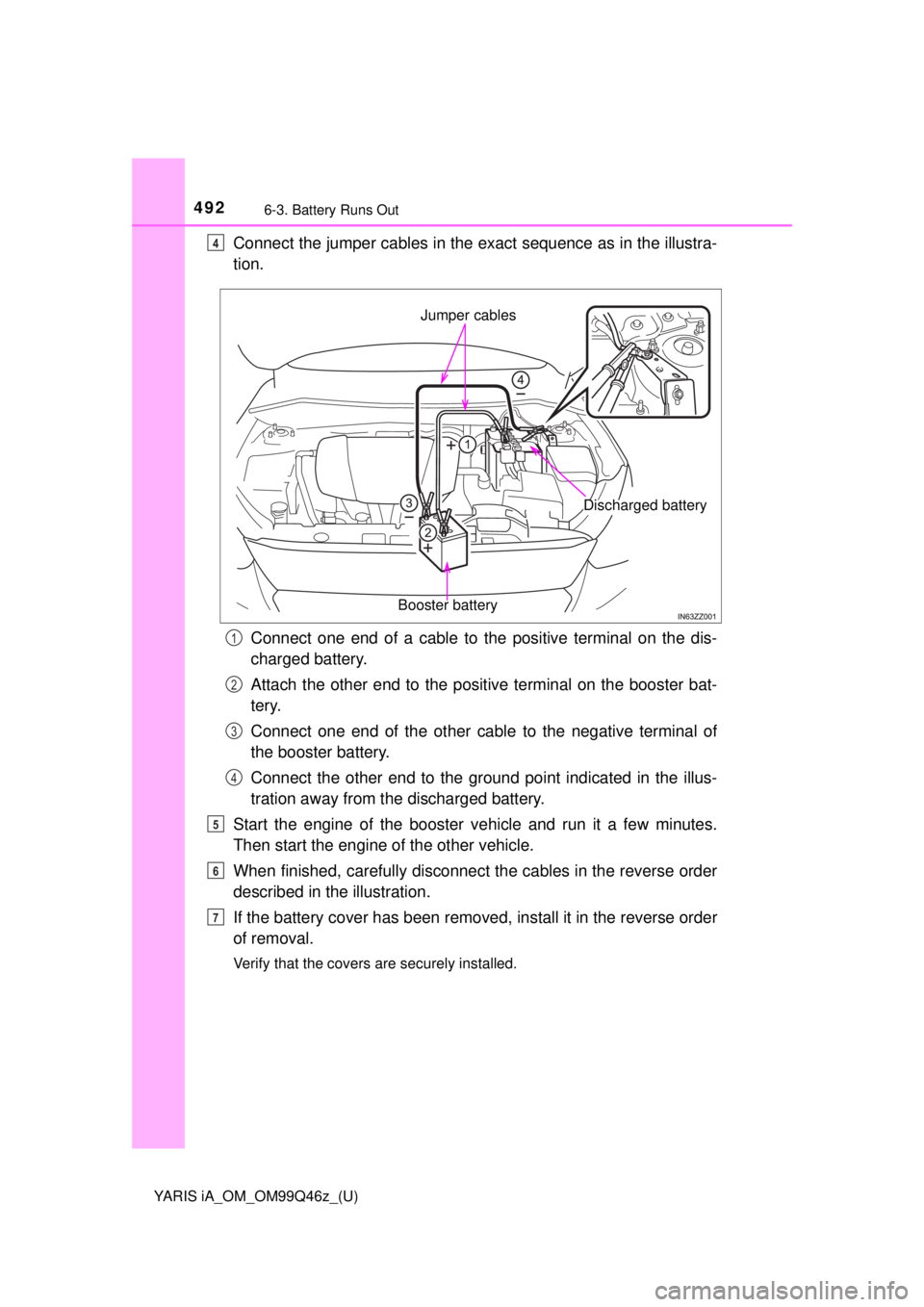
Connect the jumper cables in the exact sequence as in the illustra-
tion.
Connect one end of a cable to the positive terminal on the dis-
charged battery.
Attach the other end to the positive terminal on the booster bat-
tery.
Connect one end of the other cabl e to the negative terminal of
the booster battery.
Connect the other end to the ground point indicated in the illus-
tration away from the discharged battery.
Start the engine of the booster v ehicle and run it a few minutes.
Then start the engine of the other vehicle.
When finished, carefully disconnect the cables in the reverse order
described in the illustration.
If the battery cover has been removed, install it in the reverse order
of removal.
Verify that the covers are securely installed.
4
Jumper cables
Booster battery
Discharged battery
1
2
3
4
5
6
7
Page 493 of 576
YARIS iA_OM_OM99Q46z_(U)
4936-3. Battery Runs Out
6
If Trouble Arises
WARNING
■ Follow These Precautions Carefully
To ensure safe and correct handling of the battery, read the following pre-
cautions carefully before using the battery or inspecting it.
■ Do not allow the positive (+) term inal to contact any other metal
object that could cause sparks
Flames and sparks near open battery cells are dangerous. Hydrogen gas,
produced during normal battery operation, could ignite and cause the bat-
tery to explode. An exploding battery can cause serious burns and injuries.
When working near a battery, do not allow metal tools to contact the positive
(+) or negative (-) terminal of the battery.
■ Keep all flames, including cigarettes, and sparks away from
open battery cells
Flames and sparks near open battery cells are dangerous. Hydrogen gas,
produced during normal battery operation, could ignite and cause the bat-
tery to explode. An exploding battery can cause serious burns and injuries.
■ Do not jump-start a frozen battery or one with a low fluid level
Jump-starting a frozen battery or one with a low fluid level is dangerous. It
may rupture or explode, causing serious injury.
■ Connect the negative cable to a good ground point away from the bat-
tery
Connecting the end of the second jumper cable to the negative (-) terminal
of the discharged battery is dangerous.
A spark could cause the gas around the battery to explode and injure some-
one.
■ Route the jumper cables away fr om parts that will be moving
Connecting a jumper cable near or to moving parts (cooling fans, belts) is
dangerous. The cable could get caught when the engine starts and cause
serious injury.
NOTICE
Use only a 12 V booster system. You can damage a 12 V starter, ignition
system, and other electrical parts beyond repair with a 24 V power supply
(two 12 V batteries in series or a 24 V motor generator set).