oil TOYOTA YARIS iA 2018 Owners Manual (in English)
[x] Cancel search | Manufacturer: TOYOTA, Model Year: 2018, Model line: YARIS iA, Model: TOYOTA YARIS iA 2018Pages: 576, PDF Size: 5.5 MB
Page 5 of 576
5
1
8 7
6 4 3
2
YARIS iA_OM_OM99Q46z_(U)
5
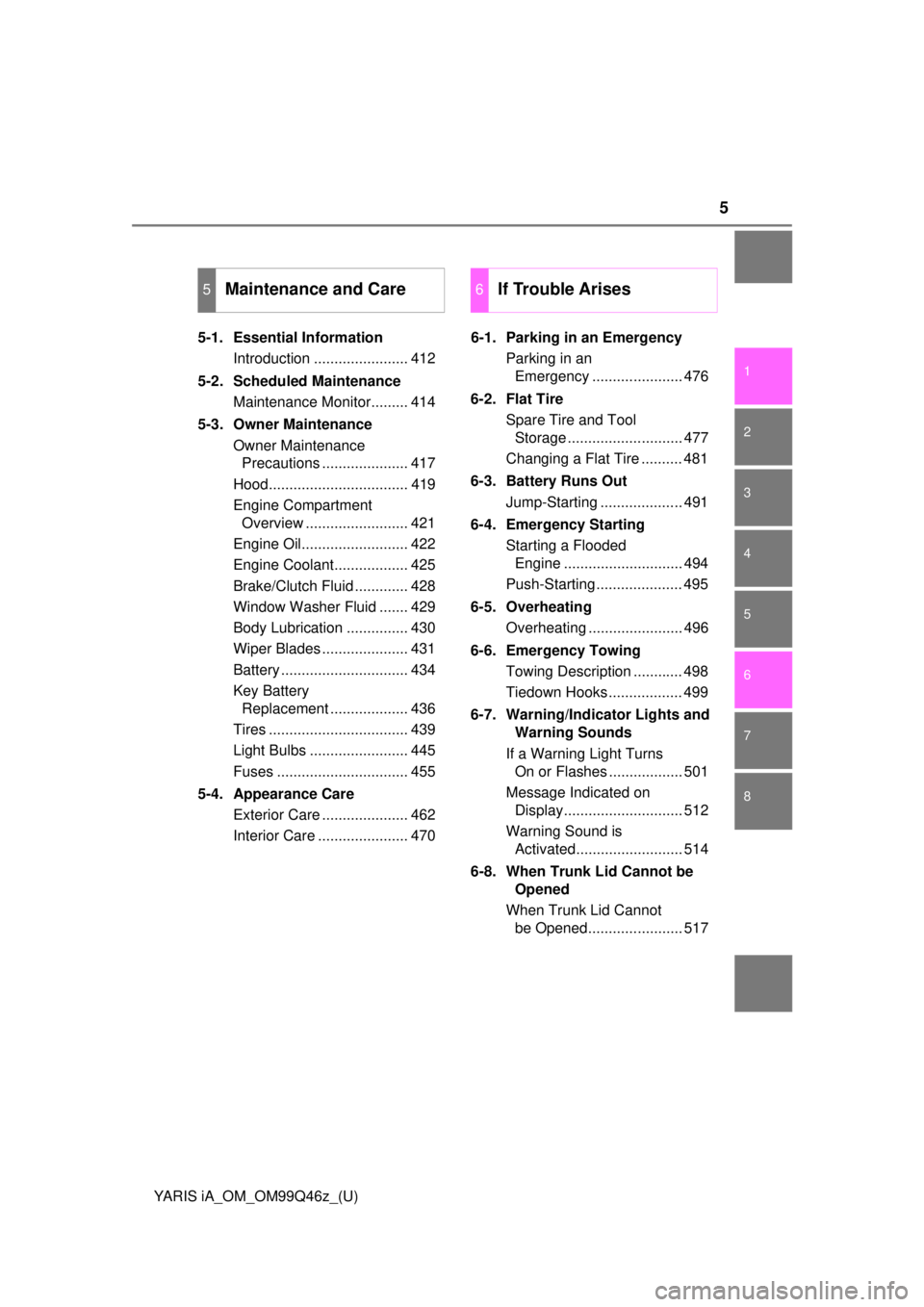
5-1. Essential InformationIntroduction ....................... 412
5-2. Scheduled Maintenance Maintenance Monitor......... 414
5-3. Owner Maintenance Owner Maintenance Precautions ..................... 417
Hood.................................. 419
Engine Compartment Overview ......................... 421
Engine Oil.......................... 422
Engine Coolant.................. 425
Brake/Clutch Fluid ............. 428
Window Washer Fluid ....... 429
Body Lubrication ............... 430
Wiper Blades ..................... 431
Battery ............................... 434
Key Battery Replacement ................... 436
Tires .................................. 439
Light Bulbs ........................ 445
Fuses ................................ 455
5-4. Appearance Care Exterior Care ..................... 462
Interior Care ...................... 470 6-1. Parking in an Emergency
Parking in an Emergency ...................... 476
6-2. Flat Tire Spare Tire and Tool Storage ............................ 477
Changing a Flat Tire .......... 481
6-3. Battery Runs Out Jump-Starting .................... 491
6-4. Emergency Starting Starting a Flooded Engine ............................. 494
Push-Starting ..................... 495
6-5. Overheating Overheating ....................... 496
6-6. Emergency Towing Towing Description ............ 498
Tiedown Hooks .................. 499
6-7. Warning/Indicator Lights and Warning Sounds
If a Warning Light Turns On or Flashes .................. 501
Message Indicated on Display............................. 512
Warning Sound is Activated.......................... 514
6-8. When Trunk Lid Cannot be Opened
When Trunk Lid Cannot be Opened....................... 517
5Maintenance and Care6If Trouble Arises
Page 32 of 576
32
YARIS iA_OM_OM99Q46z_(U)
1-2. Seat Belt Systems
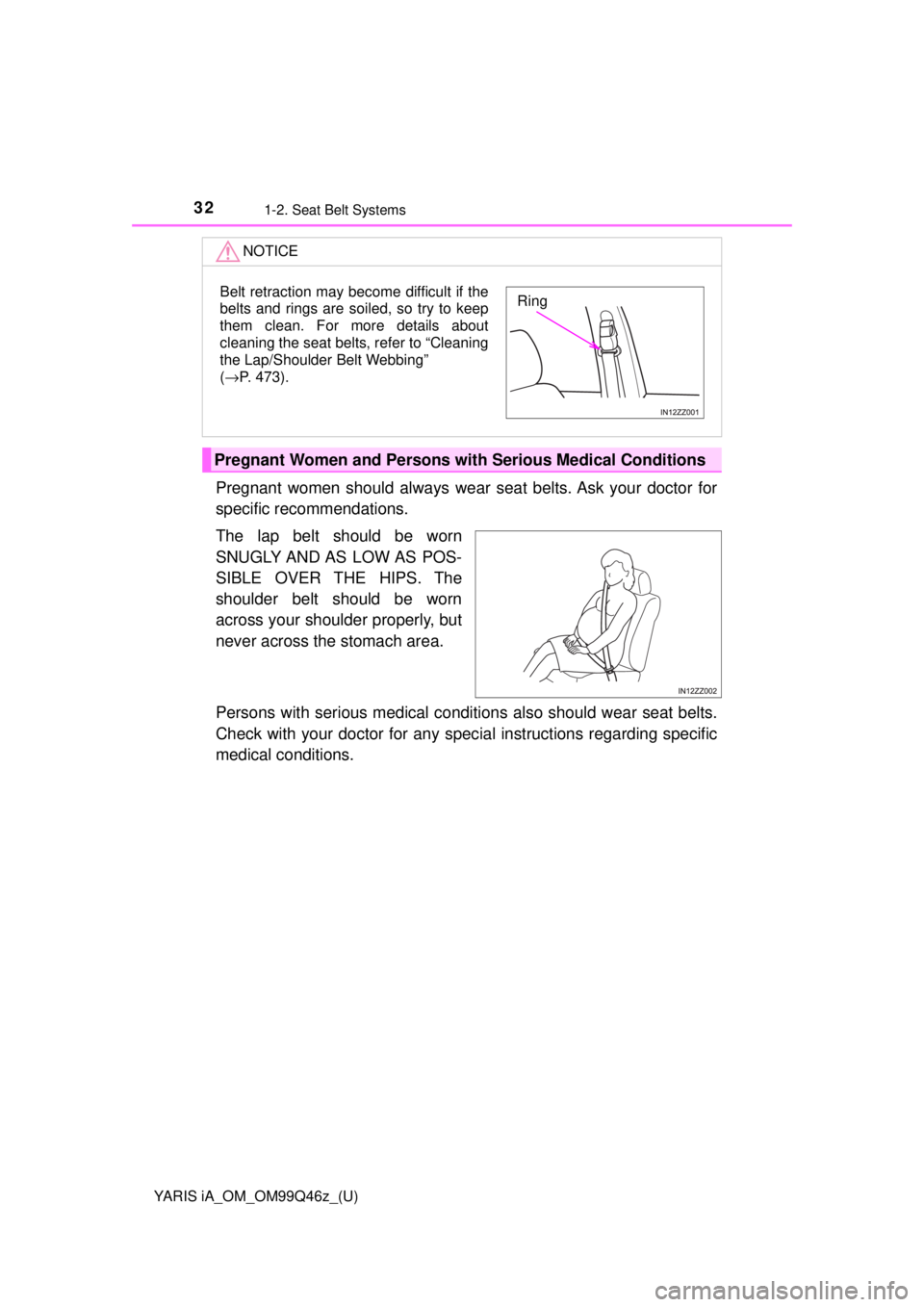
Pregnant women should always wear seat belts. Ask your doctor for
specific reco mmendations.
The lap belt should be worn
SNUGLY AND AS LOW AS POS-
SIBLE OVER THE HIPS. The
shoulder belt should be worn
across your shoulder properly, but
never across the stomach area.
Persons with serious medical conditio ns also should wear seat belts.
Check with your doctor for any spec ial instructions regarding specific
medical conditions.
NOTICE
Pregnant Women and Persons wi th Serious Medical Conditions
Belt retraction may become difficult if the
belts and rings are soiled, so try to keep
them clean. For more details about
cleaning the seat belts, refer to “Cleaning
the Lap/Shoulder Belt Webbing”
(→P. 473).Ring
Page 130 of 576
130
YARIS iA_OM_OM99Q46z_(U)
2-8. Driving Tips
Winter Driving
Carry emergency gear, including tire chains, window scraper, flares, a
small shovel, jumper cables, a nd a small bag of sand or salt.
Ask your Toyota dealer to check the following: • Have the proper ratio of antifreeze in the radiator. Refer to Engine Coolant on P. 425.
• Inspect the battery and its cables . Cold reduces battery capacity.
• Use an engine oil appropriate for the lowest ambient temperatures that the vehicle will be driven in ( →P. 422).
• Inspect the ignition sy stem for damage and loose connections.
• Use washer fluid made with antifreeze ⎯but do not use engine cool-
ant antifreeze for washer fluid ( →P. 429).
●Do not use the parking brake in freezing weather as it may freeze. Instead,
shift to 1 or R with a manual transaxle and to P with an automatic transaxle.
Block the rear wheels.
● Remove snow before driving. Snow left on the windshield is dangerous as it
could obstruct vision.
● Do not apply excessive force to a window scraper when removing ice or fro-
zen snow on the mirror glass and windshield.
● Never use warm or hot water for removing snow or ice from windows and
mirrors as it could result in the glass cracking.
● Drive slowly. Braking performance can be adversely affected if snow or ice
adheres to the brake components. If this situation occurs, drive the vehicle
slowly, releasing the accelerator pedal and lightly applying the brakes sev-
eral times until the brake performance returns to normal.
Page 157 of 576
YARIS iA_OM_OM99Q46z_(U)
1573-2. Combination Meter and Display
3
When Driving
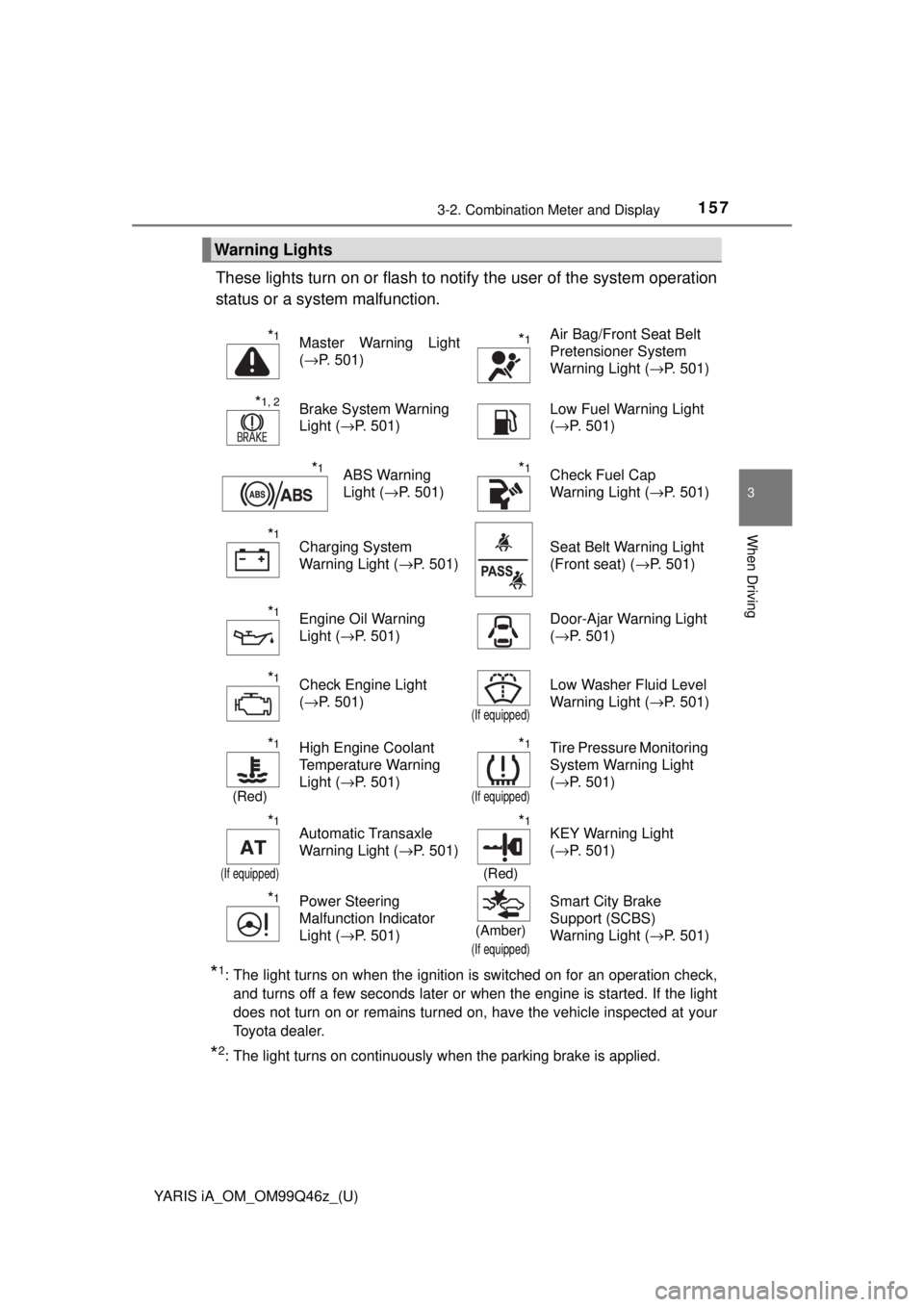
These lights turn on or flash to notify the user of the system operation
status or a system malfunction.
*1: The light turns on when the ignition is switched on for an operation chec\
k, and turns off a few seconds later or when the engine is started. If the light
does not turn on or remains turned on, have the vehicle inspected at your
Toyota dealer.
*2: The light turns on continuously when the parking brake is applied.
Warning Lights
*1Master Warning Light
(→P. 501)*1Air Bag/Front Seat Belt
Pretensioner System
Warning Light ( →P. 501)
*1, 2Brake System Warning
Light (→P. 501) Low Fuel Warning Light
(
→P. 501)
*1ABS Warning
Light ( →P. 501)*1Check Fuel Cap
Warning Light ( →P. 501)
*1Charging System
Warning Light (→P. 501) Seat Belt Warning Light
(Front seat) (
→P. 501)
*1Engine Oil Warning
Light (→P. 501) Door-Ajar Warning Light
(
→P. 501)
*1Check Engine Light
(→P. 501)
(If equipped)
Low Washer Fluid Level
Warning Light ( →P. 501)
*1
(Red)
High Engine Coolant
Temperature Warning
Light (→P. 501)*1
(If equipped)
Tire Pressure Monitoring
System Warning Light
(→P. 501)
*1
(If equipped)
Automatic Transaxle
Warning Light ( →P. 501)*1
(Red)
KEY Warning Light
(→P. 501)
*1Power Steering
Malfunction Indicator
Light ( →P. 501)
(Amber)
(If equipped)
Smart City Brake
Support (SCBS)
Warning Light ( →P. 501)
Page 208 of 576

208
YARIS iA_OM_OM99Q46z_(U)
3-10. Active Safety System
WARNING
■Do not rely on the Smart City Br ake Support System (SCBS) as a sub-
stitute for safer driving
The Smart City Brake Support (SCB S) system cannot compensate for
unsafe and reckless driving, excessive speed, tailgating (following another
vehicle too closely), and driving on slippery roads such as wet, snowy, and
icy roads (reduced tire friction and road contact because of water on the
road surface). You can still have an accident.
■ Do not rely completely on the Sm art City Brake Support (SCBS) system
● The Smart City Brake Support (SCBS) system is only designed to reduce
damage in the event of a collision. Over reliance on the system leading to
the accelerator pedal or brake pedal being mistakenly operated could
result in an accident.
● The Smart City Brake Support (SCB S) is a system which operates in
response to a vehicle ahead. The system may not be able to detect or
react to two-wheeled vehicles or pedestrians.
● The laser sensor for the Smart City Brake Support (SCBS) system is
installed near the rearview mirror. To assure the correct operation of the
Smart City Brake Support (SCBS), heed the following cautions.
• Do not apply stickers to the surface of the windshield near the laser
sensor (including transparent stickers). Otherwise, the laser sensor
may not be able to detect vehicles ahead which could result in an acci-
dent.
• Do not apply coating agent to the windshield. Otherwise, the laser sen- sor may not be able to detect vehicles or obstructions in front which
could result in an accident.
• Do not disassemble the laser sensor.
• If cracks or damage caused by flying gravel or debris is visible near
the laser sensor, stop using the Smart City Brake Support (SCBS)
system immediately and have your vehicle inspected by your Toyota
dealer. If the vehicle continues to be driven with cracks or scratch
marks left on the windshield near the laser sensor, the system may
operate unnecessarily and cause an unexpected accident.
Refer to Stopping The Smart City Brake Support (SCBS) System
Operation on P. 210.
• When replacing the windshield wipers or windshield, consult your Toyota dealer.
● The laser sensor includes a function for detecting a soiled windshield and
informing the driver, however, depending on the conditions, it may not
detect plastic shopping bags, ice or snow on the windshield. In such
cases, the system cannot accurately determine a vehicle ahead and may
not be able to operate normally. Always drive carefully and pay attention to
the road ahead.
Page 252 of 576

252
YARIS iA_OM_OM99Q46z_(U)
4-2. Audio System
• Be sure never to touch thesignal surface when handling
the CDs. Pick up a CD by
grasping the outer edge or
the edge of the hole and the
outer edge.
• Do not stick paper or tape on the CD. Avoid scratching the
reverse side (the side without a label). The disc may not eject
resulting in a malfunction.
• Dust, finger smudges, and dirt can decrease the amount of light
reflected from the signal surface, thus affecting sound quality. If
the CD should become soiled, gently wipe it with a soft cloth from
the center of the CD to the edge.
• Do not use record sprays, antist atic agents, or household spray
cleaners. Volatile chemicals such as benzine and thinner can
also damage the surface of the CD and must not be used. Any-
thing that can damage, warp, or fog plastic should never be used
to clean CDs.
• The CD player ejects the CD if the CD is inserted upside down. Also dirty and/or defe ctive CDs may be ejected.
• Do not insert cleaning discs in the CD player.
• Do not insert any disc with a peel-off seal affixed to it.
• This unit may not be able to play certain CD-R/CD-RWs made using a computer or music CD recorder due to disc characteris-
tics, scratches, smudges, dirt, et c., or due to dust or condensa-
tion on the lens inside the unit.
• Storing CDs in the vehicle exposed to direct sunlight or high tem- perature may damage the CD-R/CD-RWs, and make them
unplayable.
• CD-R/CD-RW exceeding 700 MB cannot be played.
Page 294 of 576
294
YARIS iA_OM_OM99Q46z_(U)
4-2. Audio System
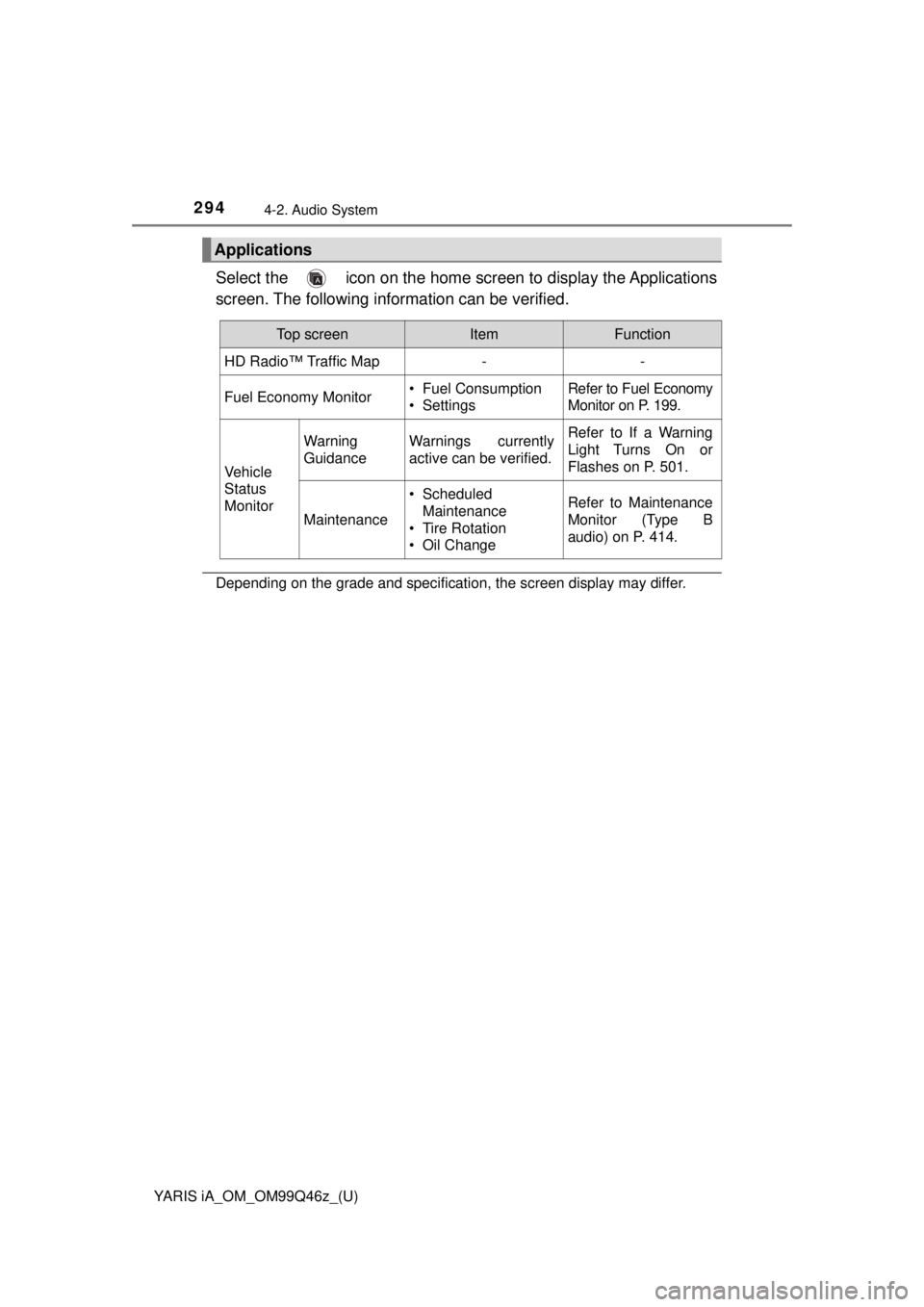
Select the icon on the home screen to display the Applications
screen. The following information can be verified.
Depending on the grade and specification, the screen display may differ.
Applications
Top screenItemFunction
HD Radio™ Traffic Map--
Fuel Economy Monitor• Fuel Consumption
• SettingsRefer to Fuel Economy
Monitor on P. 199.
Vehicle
Status
Monitor
Warning
GuidanceWarnings currently
active can be verified.Refer to If a Warning
Light Turns On or
Flashes on P. 501.
Maintenance
• Scheduled Maintenance
• Tire Rotation
• Oil ChangeRefer to Maintenance
Monitor (Type B
audio) on P. 414.
Page 411 of 576
411
YARIS iA_OM_OM99Q46z_(U)
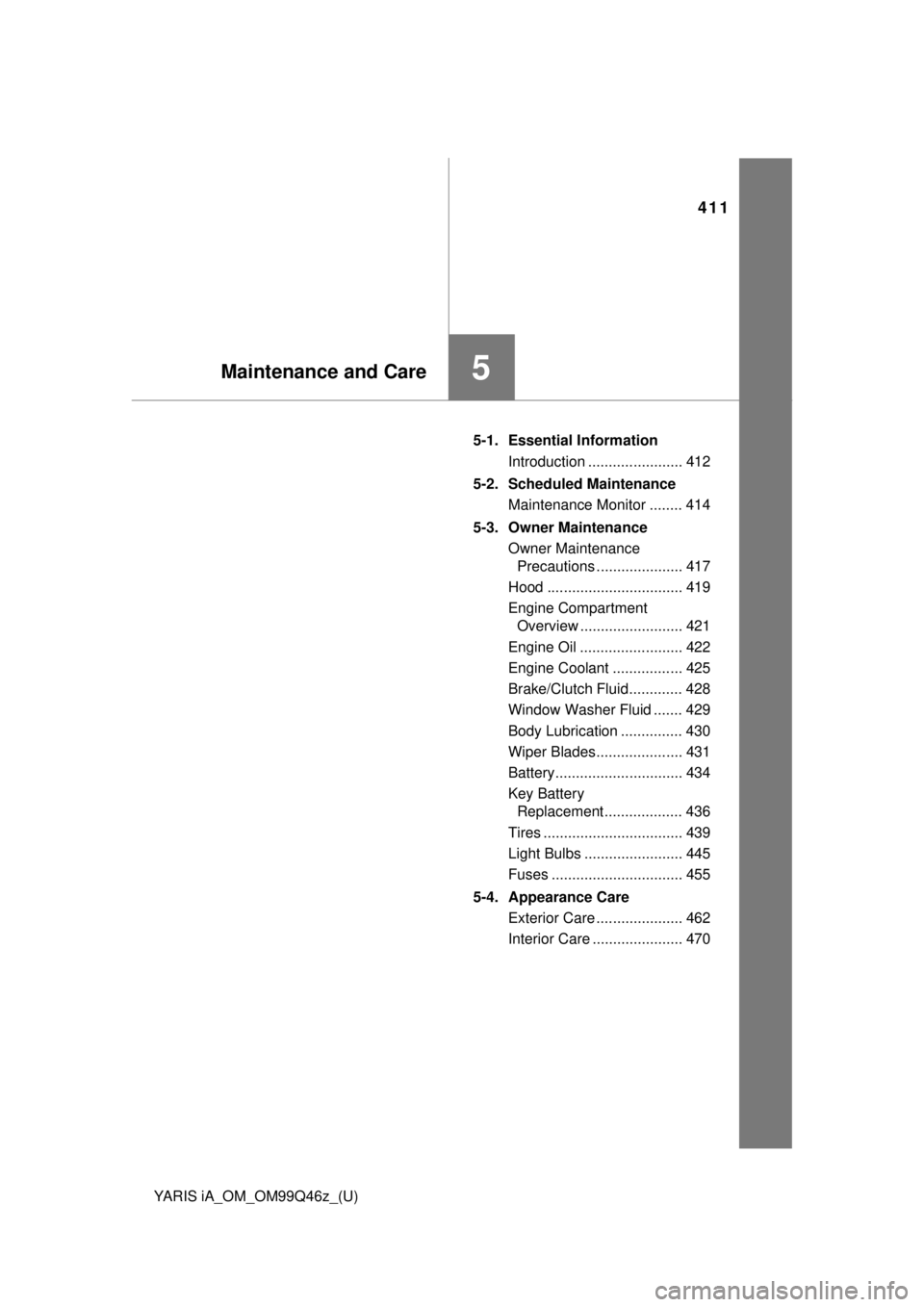
5Maintenance and Care
5-1. Essential InformationIntroduction ....................... 412
5-2. Scheduled Maintenance Maintenance Monitor ........ 414
5-3. Owner Maintenance Owner Maintenance Precautions ..................... 417
Hood ................................. 419
Engine Compartment Overview ......................... 421
Engine Oil ......................... 422
Engine Coolant ................. 425
Brake/Clutch Fluid............. 428
Window Washer Fluid ....... 429
Body Lubrication ............... 430
Wiper Blades..................... 431
Battery............................... 434
Key Battery Replacement ................... 436
Tires .................................. 439
Light Bulbs ........................ 445
Fuses ................................ 455
5-4. Appearance Care Exterior Care ..................... 462
Interior Care ...................... 470
Page 414 of 576
414
YARIS iA_OM_OM99Q46z_(U)
5-2. Scheduled Maintenance
Maintenance Monitor
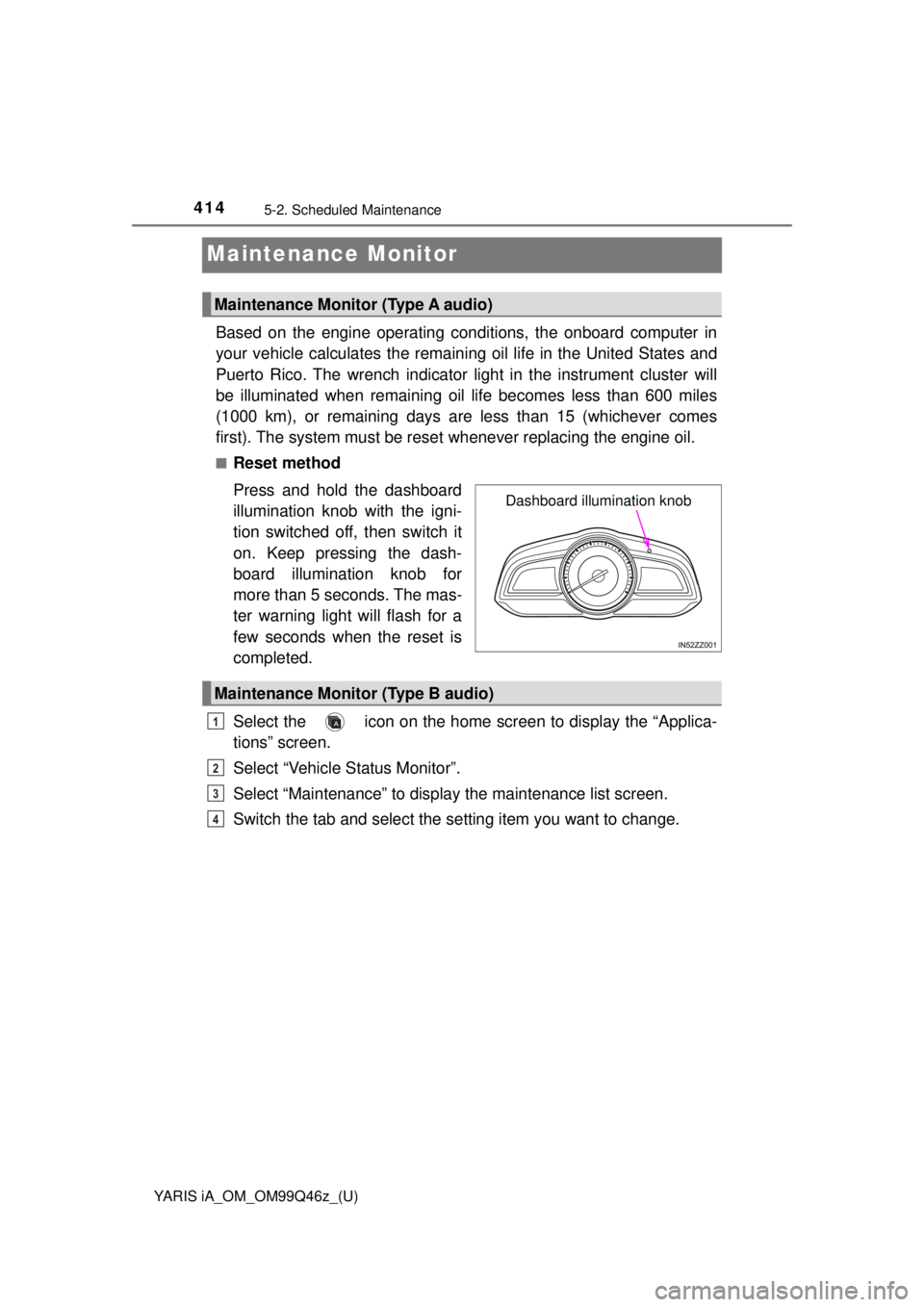
Based on the engine operating conditions, the onboard computer in
your vehicle calculates the remaining oil life in the United States and
Puerto Rico. The wrench indicator light in the instrument cluster will
be illuminated when remaining oil life becomes less than 600 miles
(1000 km), or remaining days are less than 15 (whichever comes
first). The system must be rese t whenever replacing the engine oil.
■Reset method
Press and hold the dashboard
illumination knob with the igni-
tion switched off, then switch it
on. Keep pressing the dash-
board illumination knob for
more than 5 seconds. The mas-
ter warning light will flash for a
few seconds when the reset is
completed.
Select the icon on the home screen to display the “Applica-
tions” screen.
Select “Vehicle Status Monitor”.
Select “Maintenance” to display the maintenance list screen.
Switch the tab and select the se tting item you want to change.
Maintenance Monitor (Type A audio)
Dashboard illumination knob
Maintenance Monitor (Type B audio)
1
2
3
4
Page 416 of 576
4165-2. Scheduled Maintenance
YARIS iA_OM_OM99Q46z_(U)
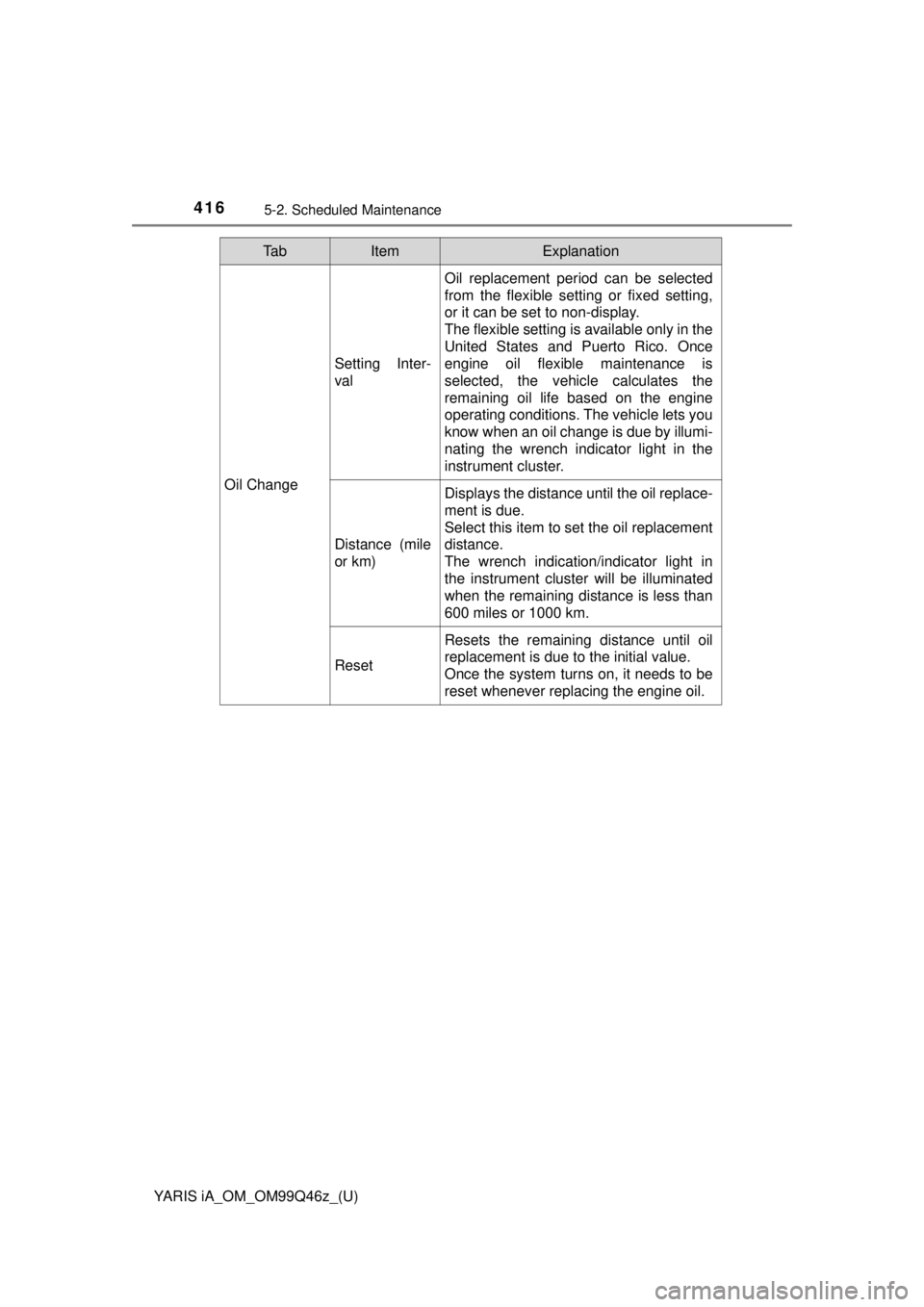
Oil Change
Setting Inter-
val
Oil replacement period can be selected
from the flexible setting or fixed setting,
or it can be set to non-display.
The flexible setting is available only in the
United States and Puerto Rico. Once
engine oil flexible maintenance is
selected, the vehicle calculates the
remaining oil life based on the engine
operating conditions. The vehicle lets you
know when an oil change is due by illumi-
nating the wrench indicator light in the
instrument cluster.
Distance (mile
or km)
Displays the distance until the oil replace-
ment is due.
Select this item to set the oil replacement
distance.
The wrench indication/indicator light in
the instrument cluster will be illuminated
when the remaining distance is less than
600 miles or 1000 km.
Reset
Resets the remaining distance until oil
replacement is due to the initial value.
Once the system turns on, it needs to be
reset whenever replacing the engine oil.
Ta bItemExplanation