TOYOTA YARIS SEDAN 2009 Owners Manual
YARIS SEDAN 2009
TOYOTA
TOYOTA
https://www.carmanualsonline.info/img/14/59281/w960_59281-0.png
TOYOTA YARIS SEDAN 2009 Owners Manual
Page 5 of 388
3
OVERVIEW
FEAT URES/OPER AT IONS
SAFETY AND EMERGENCY FEAT URES
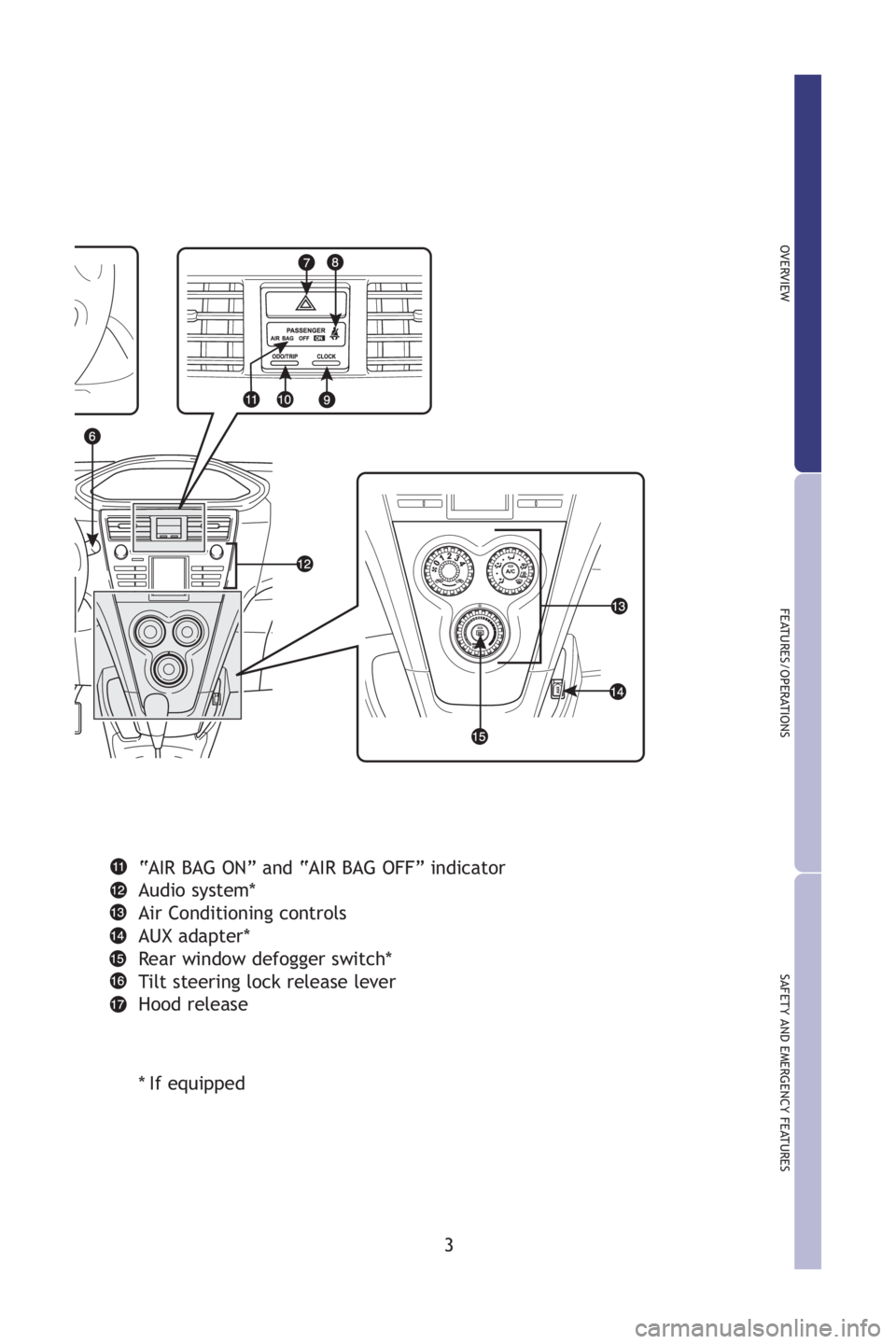
“AIR BAG ON” and “AI R BAG OFF” indicator
Audio system*
Air Conditioning controls
AUX adapter*
R ear window defogger switch*
Tilt steering lock release lever
Hood release
* If equipped
M2.qxd 7/28/08 3:45 PM Page 3
Page 15 of 388
13
OVERVIEW
FEAT URES/OPER AT IONS
SAFETY AND EMERGENCY FEAT URES
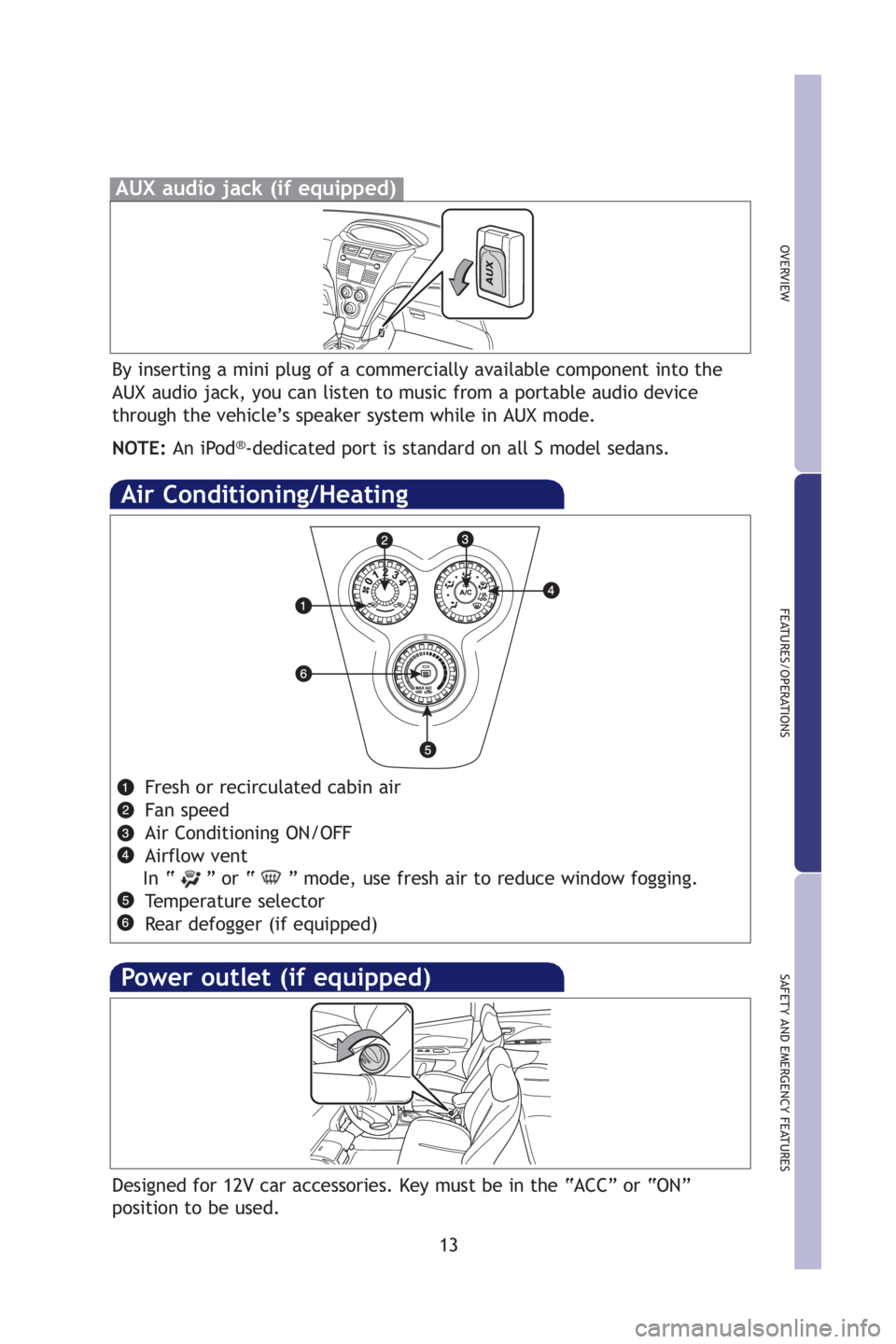
Fresh or recirculated cabin air
Fan speed
Air Conditioning ON/OFF
Airflow vent
In “ ” or “ ” mode, use fresh air to reduce window fogging. Temperature selector
R ear defogger (if equipped )
Air Conditioning/Heating
By inserting a mini plug of a commercially available component into the
AUX audio jack, you can listen to music from a portable audio device
through the vehicle’s speaker system while in AUX mode.
NOTE: An iPod
®-dedicated port is standard on all S model sedans.
AUX audio jack (if equipped)
Power outlet (if equipped)
Designed for 12V car accessories. Key must be in the “A CC” or “ON”
position to be used.
M2.qxd 7/28/08 3:45 PM Page 13
Page 34 of 388
12
Pictorial indexInstrument panel
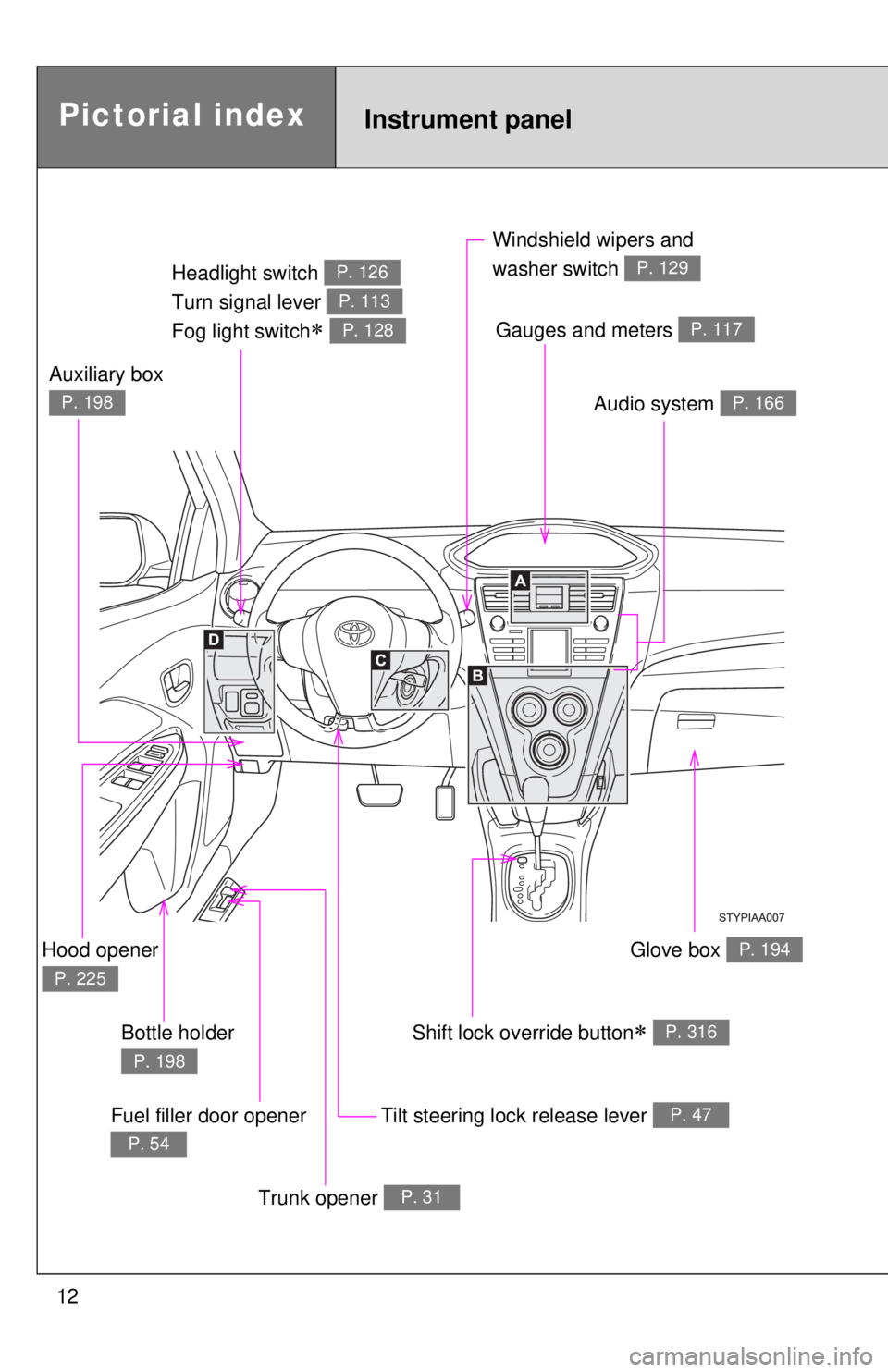
Headlight switch
Turn signal lever
Fog light switch
∗
P. 126
P. 113
P. 128
Windshield wipers and
washer switch
P. 129
Tilt steering lock release lever P. 47
Hood opener
P. 225
Gauges and meters P. 117
Audio system P. 166
Shift lock override button∗ P. 316
Trunk opener P. 31
Glove box P. 194
Fuel filler door opener
P. 54
Auxiliary box
P. 198
Bottle holder
P. 198
Page 36 of 388
14
Pictorial indexInstrument panel
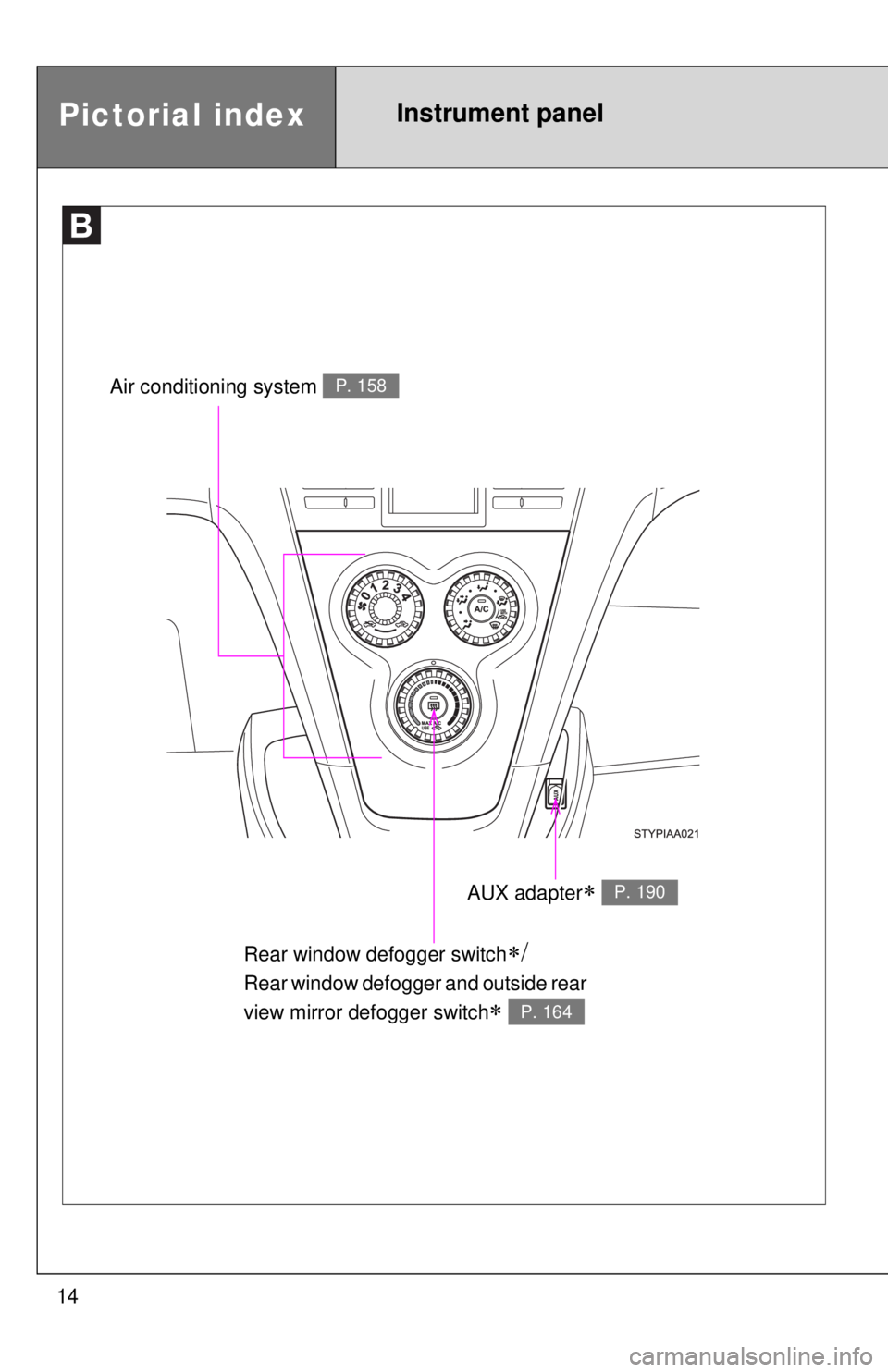
Rear window defogger switch∗/
Rear window defogger and outside rear
view mirror defogger switch
∗ P. 164
Air conditioning system P. 158
AUX adapter∗ P. 190
Page 154 of 388

139
2-5. Driving information
2
When driving
CAUTION
nThings that must not be carried in the trunk
The following things may cause a fire if loaded in the trunk.
lReceptacles containing gasoline
lAerosol cans
nStorage precautions
lDo not place cargo or luggage in or on the following locations as the
item may get under the clutch, brake or accelerator pedal and prevent
the pedals from being depressed properly, block the driver’s vision, or
hit the driver or passengers, causing an accident.
• Driver’s feet
• Front passenger or rear seats (when stacking items)
• Package tray
• Instrument panel
• Dashboard
• Auxiliary box or tray that has no lid
lSecure all items in the occupant compartment, as they may shift and
injure someone during an accident or sudden braking.
lNever allow anyone to ride in the enlarged trunk. It is not designed for
passengers. They should ride in their seats with their seat belts prop-
erly fastened. Otherwise, they are much more likely to suffer death or
serious bodily injury, in the even
t of sudden braking or a collision.
nCapacity and distribution
lDo not exceed the maximum axle weight rating or the total vehicle
weight rating.
lEven if the total load of occupant’s weight and the cargo load is less
than the total load capacity, do no t apply the load unevenly. Improper
loading may cause deterioration of st eering or braking control which
may cause death or serious injury.
Page 181 of 388
167
3-2. Using the audio system
3
Interior features
n
Using cellular phones
Interference may be heard through the audio system’s speakers if a cellular
phone is being used inside or close to the vehicle while the audio syste\
m is
operating.
CAUTION
nFor vehicles sold in U.S.A. and Canada
lPart 15 of the FCC Rules
FCC Warning:
Any unauthorized changes or modifications to this equipment will void the
user’s authority to operate this device.
l Laser products
• Do not take this unit apart or attempt to make any changes yourself.
This is an intricate unit that uses a laser pickup to retrieve information
from the surface of compact discs. The laser is carefully shielded so
that its rays remain inside the cabinet. Therefore, never try to disas-
semble the player or alter any of its parts since you may be exposed to
laser rays and dangerous voltages.
l CAUTION
• This product utilizes a laser.
Use of controls or adjustments or performance of procedures other
than those specified herein may result in hazardous radiation expo-
sure.
TitlePage
Using the radioP. 169
Using the CD playerP. 175
Playing back MP3 and WMA discsP. 181
Optimal use of the audio systemP. 188
Using the AUX adapterP. 190
Page 204 of 388
190
3-2. Using the audio system
Using the AUX adapter (if equipped)
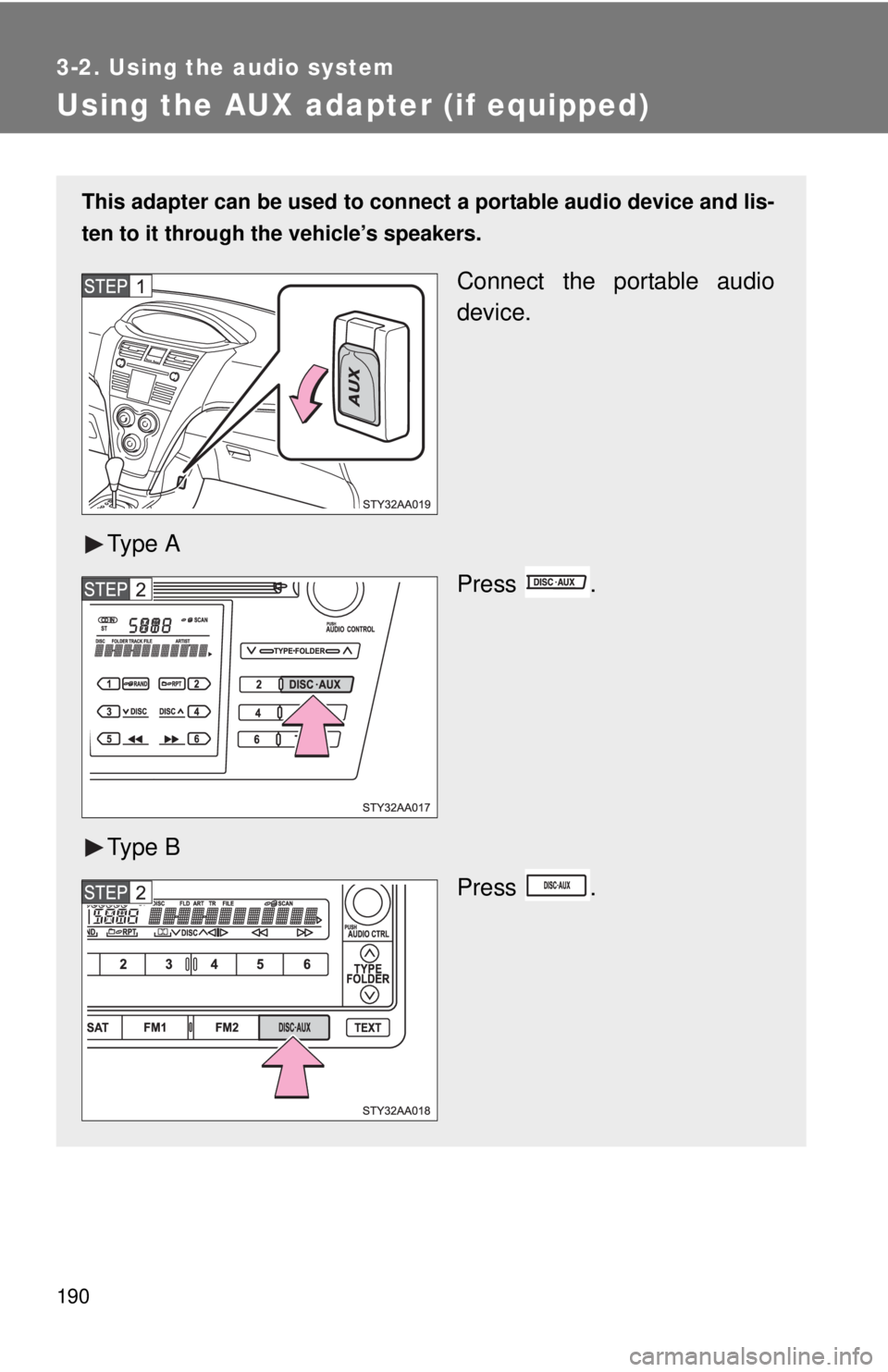
This adapter can be used to connect a portable audio device and lis-
ten to it through the vehicle’s speakers.
Connect the portable audio
device.
Ty p e A Press .
Ty p e B Press .
Page 208 of 388
194
3-4. Using the storage features
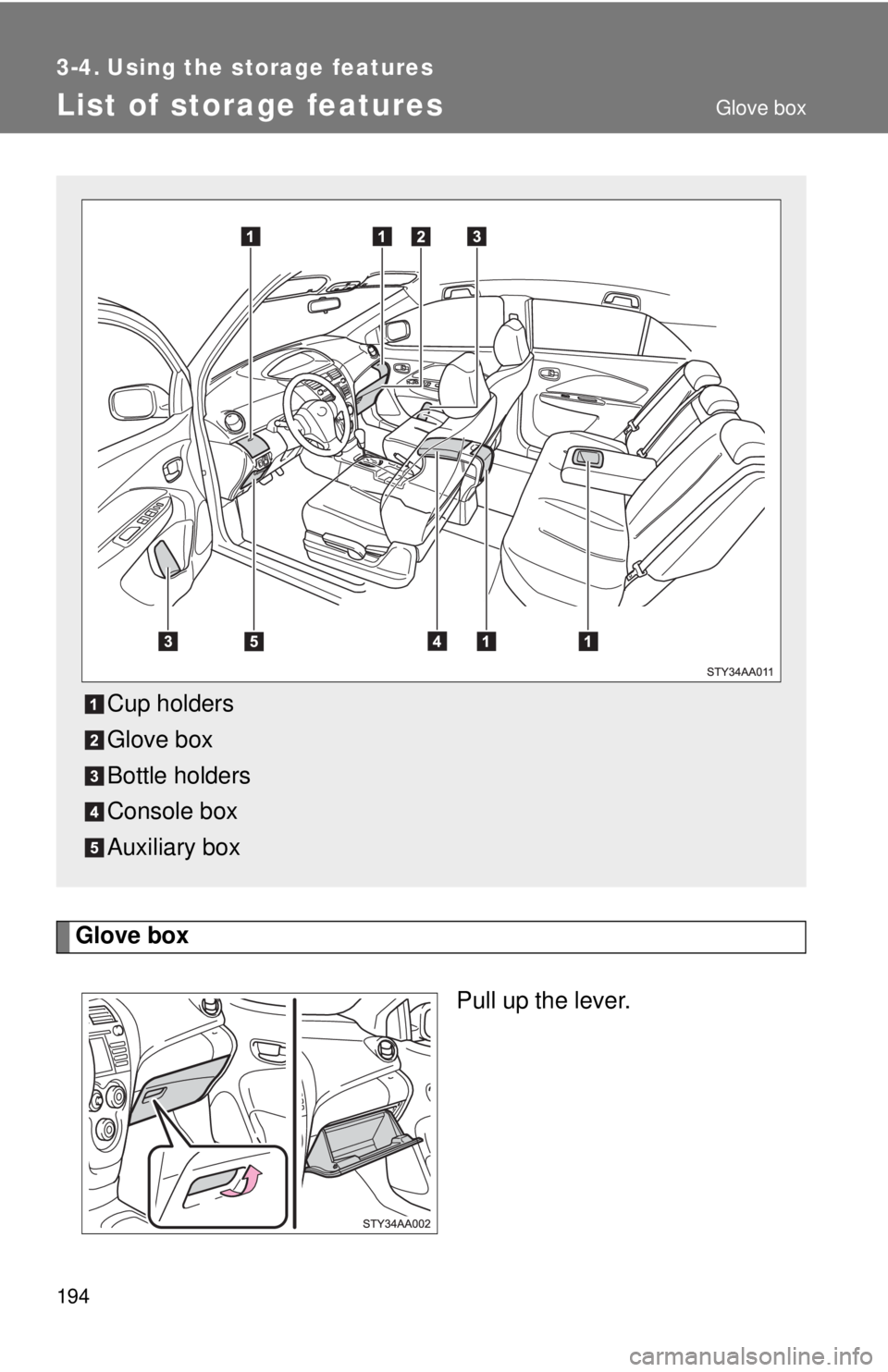
List of storage features
Glove boxPull up the lever.
Cup holders
Glove box
Bottle holders
Console box
Auxiliary box
Glove box
Page 212 of 388
198 3-4. Using the storage features
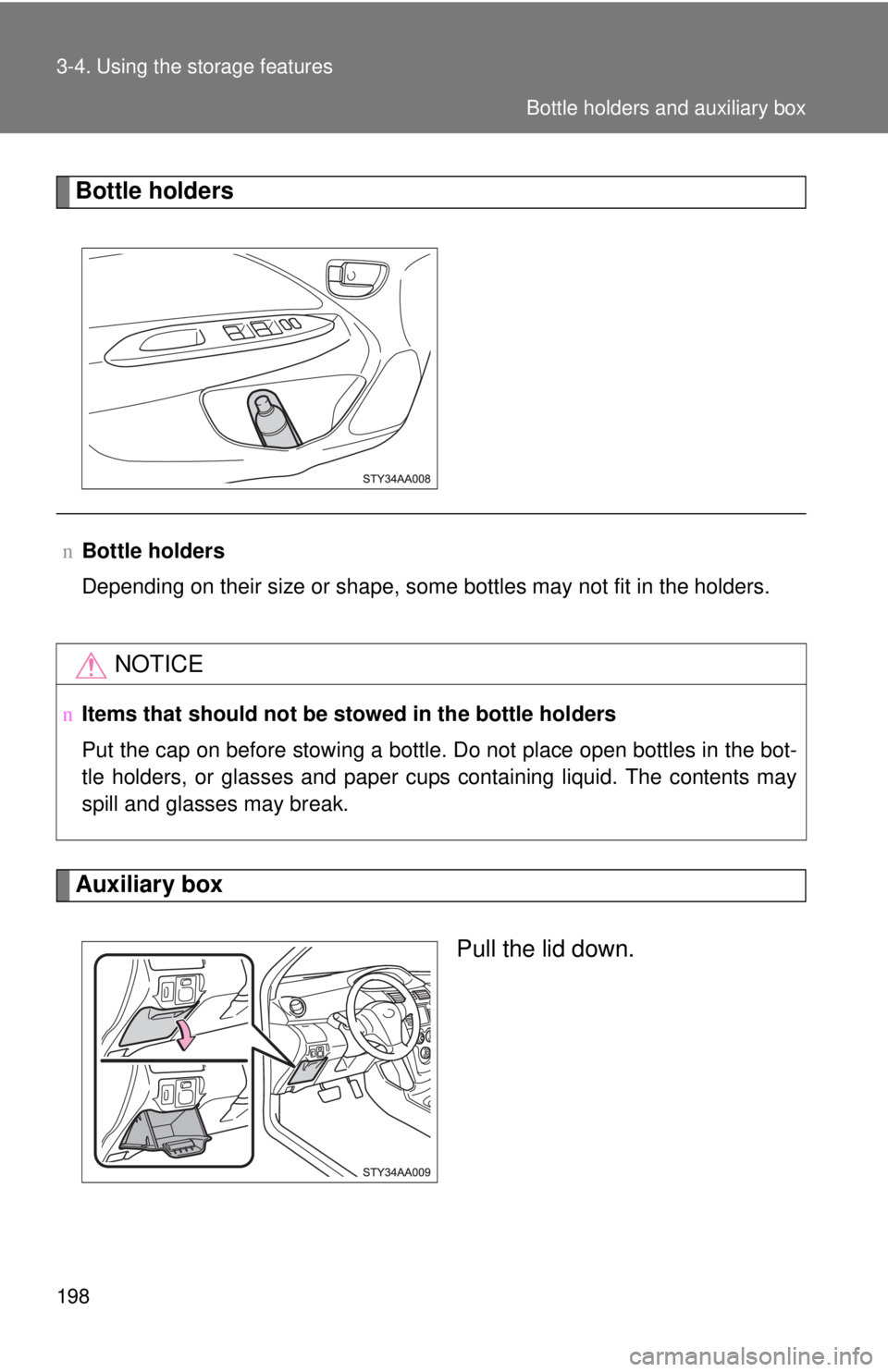
Bottle holders
Auxiliary boxPull the lid down.
nBottle holders
Depending on their size or shape, some bottles may not fit in the holders.
NOTICE
nItems that should not be stowed in the bottle holders
Put the cap on before stowing a bottle. Do not place open bottles in the bot-
tle holders, or glasses and paper cups containing liquid. The contents may
spill and glasses may break.
Bottle holders and auxiliary box
Page 213 of 388
199
3-4. Using the
storage features
3
Interior features
CAUTION
nCaution while driving
Keep the auxiliary box closed.
Injuries may result in the event of an accident or sudden braking.
n When use the auxiliary box
Do not use the auxiliary box as an ashtray.
Auxiliary box