instrument panel VAUXHALL ADAM 2014.5 User Guide
[x] Cancel search | Manufacturer: VAUXHALL, Model Year: 2014.5, Model line: ADAM, Model: VAUXHALL ADAM 2014.5Pages: 217, PDF Size: 6.68 MB
Page 110 of 217

108Lighting
Operate button with ignition switched
on:m one brief
press=on or off.T repeated
brief presses=dimming
stepwise.T long press=dimming
continuously.
The selected intensity remains the
next time the ignition is switched on.
Starlight comes on automatically
when switching off ignition and
extinguishes after opening a door.
Pressing button m after switching off
ignition; ambient light remains on for
60 minutes.
It is also activated with Entry lighting
3 108 and Exit lighting 3 108.
Lighting features
Entry lighting
Welcome lighting
The following lights are switched on
for a short time by unlocking the
vehicle with the radio remote control:
■ headlights
■ tail lights
■ number plate lights
■ instrument panel light
■ interior lights
Some functions are only operable
when it is dark outside to facilitate
locating the vehicle.
The lighting switches off immediately
when the ignition key is turned to
position 1 3 120.
Activation or deactivation of this
function can be changed in the
Info-Display.
Vehicle personalisation 3 98.
The settings can be saved for the key being used 3 20.The following lights will additionally
switch on when the driver's door is opened:
■ all switches
■ Driver Information Centre
■ ambient light
■ starlight panel
Exit lighting The following lights switch on if the
key is removed from the ignition
switch:
■ interior lights
■ instrument panel light (only when it is dark)
■ ambient light
■ starlight panel
They will switch off automatically after
a delay and will be activated again if
the driver's door is opened.
Path lightingHeadlights, tail lights and number
plate lights illuminate the surrounding
area for an adjustable time after
leaving the vehicle.
Page 166 of 217
164Vehicle care
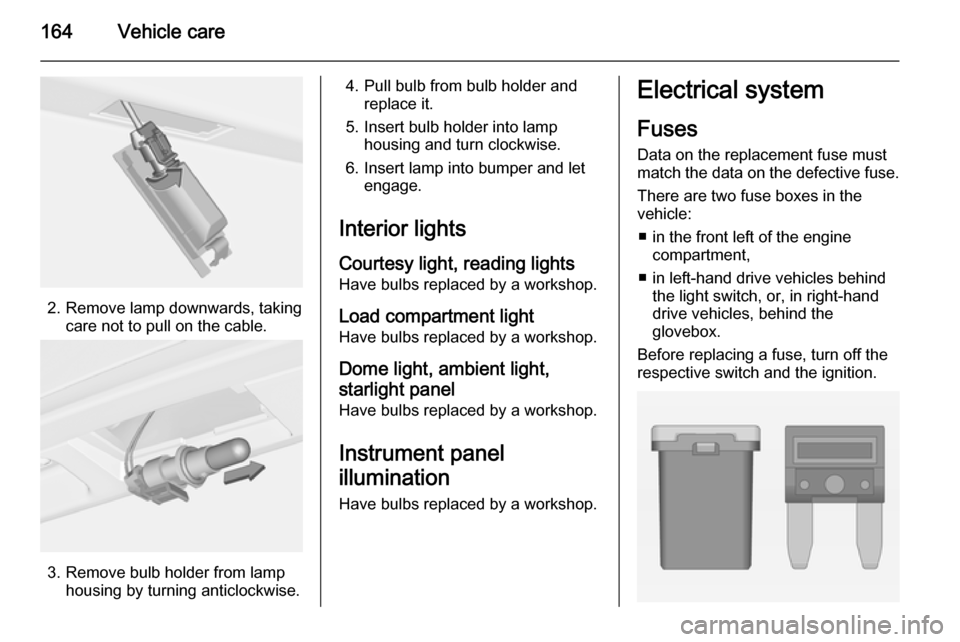
2. Remove lamp downwards, takingcare not to pull on the cable.
3. Remove bulb holder from lamphousing by turning anticlockwise.
4. Pull bulb from bulb holder andreplace it.
5. Insert bulb holder into lamp housing and turn clockwise.
6. Insert lamp into bumper and let engage.
Interior lights Courtesy light, reading lights
Have bulbs replaced by a workshop.
Load compartment light Have bulbs replaced by a workshop.
Dome light, ambient light,starlight panel
Have bulbs replaced by a workshop.
Instrument panel
illumination
Have bulbs replaced by a workshop.Electrical system
Fuses Data on the replacement fuse must
match the data on the defective fuse.
There are two fuse boxes in the
vehicle:
■ in the front left of the engine compartment,
■ in left-hand drive vehicles behind the light switch, or, in right-handdrive vehicles, behind the
glovebox.
Before replacing a fuse, turn off the
respective switch and the ignition.
Page 169 of 217
Vehicle care167
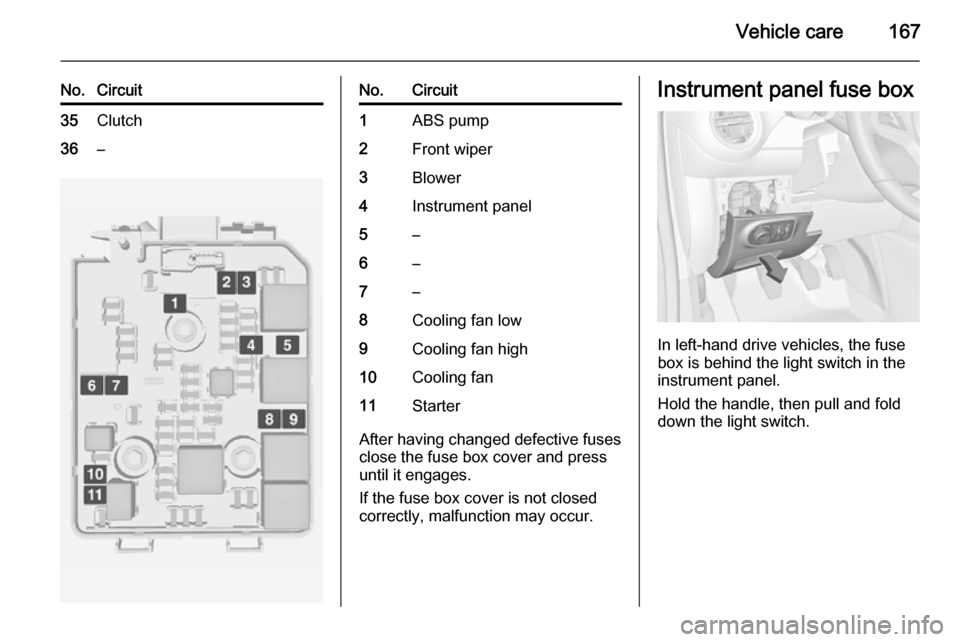
No.Circuit35Clutch36–No.Circuit1ABS pump2Front wiper3Blower4Instrument panel5–6–7–8Cooling fan low9Cooling fan high10Cooling fan11Starter
After having changed defective fuses
close the fuse box cover and press
until it engages.
If the fuse box cover is not closed
correctly, malfunction may occur.
Instrument panel fuse box
In left-hand drive vehicles, the fuse
box is behind the light switch in the
instrument panel.
Hold the handle, then pull and fold
down the light switch.
Page 171 of 217
Vehicle care169
No.Circuit18Air conditioning system19Audio amplifier20Parking assist21Brake switch22Audio system23Display24–25–26Instrument panel27Seat heating, driver28–29–30Instrument panel31Horn32Seat heating, passenger33Heated steering wheel34–No.Circuit35–36–37Rear wiper38Cigarette lighter39–40–Vehicle toolsTools
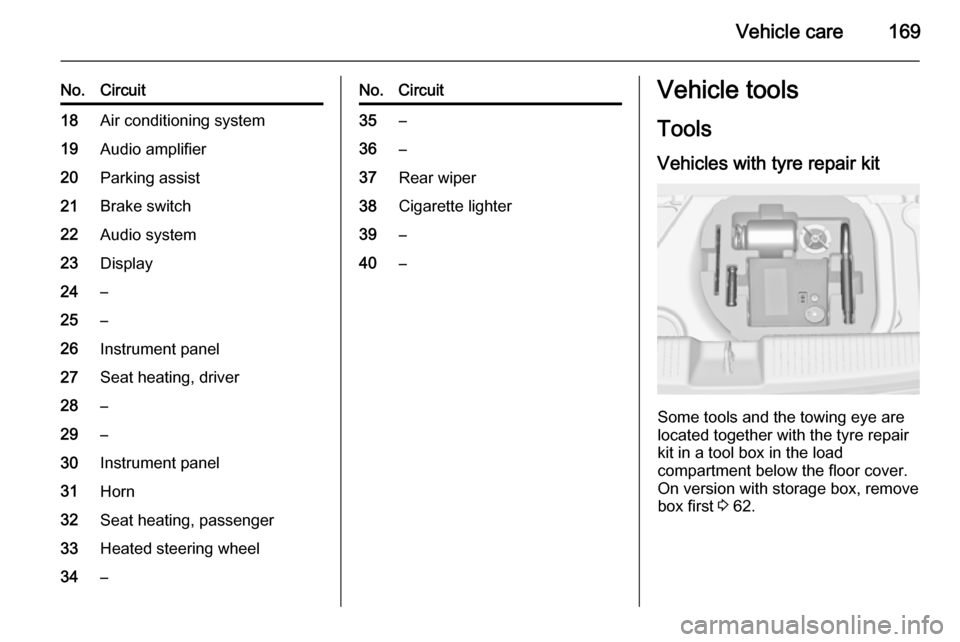
Vehicles with tyre repair kit
Some tools and the towing eye are
located together with the tyre repair
kit in a tool box in the load
compartment below the floor cover.
On version with storage box, remove
box first 3 62.
Page 195 of 217

Vehicle care193
After the underbody is washed, check
the underbody and have it waxed if
necessary.
Bitumen/rubber materials could
damage the PVC coating. Have
underbody work carried out by a
workshop.
Before and after winter, wash the
underbody and have the protective
wax coating checked.
Liquid gas system9 Danger
Liquid gas is heavier than air and
can collect in sink points.
Take care when performing work
at the underbody in a pit.
For painting work and when using a
drying booth at a temperature above
60 °C, the liquid gas tank must be
removed.
Do not make any modifications to the
liquid gas system.
Rear carrier system
Clean the rear carrier system with a
steam-jet or high-pressure jet cleaner
at least once a year.
Operate the rear carrier system
periodically if not in regular use, in
particular during winter.
Interior care
Interior and upholstery Only clean the vehicle interior,
including the instrument panel fascia
and panelling, with a dry cloth or
interior cleaner.
Clean the leather upholstery with
clear water and a soft cloth. In case of heavy soiling, use leather care.
The instrument cluster and the
displays should only be cleaned using
a soft damp cloth. If necessary use a
weak soap solution.
Clean fabric upholstery with a
vacuum cleaner and brush. Remove
stains with an upholstery cleaner.Clothing fabrics may not be
colourfast. This could cause visible
discolourations, especially on light- coloured upholstery. Removable
stains and discolourations should be
cleaned as soon as possible.
Clean seat belts with lukewarm water or interior cleaner.Caution
Close Velcro fasteners as open
Velcro fasteners on clothing could damage seat upholstery.
The same applies to clothing with
sharp-edged objects, like zips or
belts or studded jeans.
Plastic and rubber parts
Plastic and rubber parts can be
cleaned with the same cleaner as
used to clean the body. Use interior cleaner if necessary. Do not use any
other agent. Avoid solvents and petrol in particular. Do not use high-
pressure jet cleaners.
Page 214 of 217

212
Indicators...................................... 77
Information displays...................... 87
Instrument cluster ........................77
Instrument panel fuse box .........167
Instrument panel illumination .....164
Instrument panel illumination control .................................... 106
Instrument panel overview ........... 10
Interior care ............................... 193
Interior lighting ............................ 106
Interior lights ...................... 106, 164
Interior mirrors .............................. 26
Introduction .................................... 3
ISOFIX child restraint systems ....49
J
Jump starting ............................. 187
K Key, memorised settings ..............20
Keys ............................................. 18
Keys, locks ................................... 18
L
Lashing eyes ............................... 65
Light switch ................................ 102
Load compartment ................22, 61
Load compartment cover .............63
Loading information .....................67
Low fuel ....................................... 86M
Malfunction indicator light ............83
Manual anti-dazzle ......................26
Manual transmission .................. 124
Memorised settings ......................20
Mirror adjustment ........................... 8
Misted light covers .....................106
N New vehicle running-in ..............119
Number plate light .....................163
O
Object detection systems ...........133
Odometer ..................................... 77
Oil, engine .......................... 195, 199
Operate pedal ............................... 84
Outside temperature ....................73
Overrun cut-off ........................... 121
P Parking ................................ 17, 123
Parking assist ............................ 133
Parking brake ............................ 126
Parking lights ............................. 105
Performance .............................. 203
Performing work ........................151
Pollen filter ................................. 118
Power outlets ............................... 76
Power steering.............................. 84Power windows ............................ 27
Puncture ..................................... 180
R Radio Frequency Identification (RFID) ..................................... 209
Radio remote control ...................19
Rear carrier system ......................52
Rear floor storage cover ..............64
Rear fog light ............................... 86
Rear fog lights ........................... 105
Rear storage ................................. 62
Rear window wiper/washer .......... 72
Recommended fluids and lubricants ........................ 195, 199
Refuelling ................................... 146
Retained power off .....................120
Reversing lights .........................106
Ride control systems ..................127
Roof load ...................................... 67
Roof rack ..................................... 67
S
Safety belts ................................... 34
Seat adjustment ....................... 7, 32 Seat belt ........................................ 8
Seat belt reminder .......................82
Seat belts ..................................... 34
Seat folding .................................. 33
Seat position ................................ 31