park assist VAUXHALL ADAM 2015.5 Owner's Manual
[x] Cancel search | Manufacturer: VAUXHALL, Model Year: 2015.5, Model line: ADAM, Model: VAUXHALL ADAM 2015.5Pages: 233, PDF Size: 6.98 MB
Page 13 of 233

In brief11
1Power windows .....................29
2 Exterior mirrors .....................28
3 Cruise control .....................138
Speed limiter ....................... 140
4 Side air vents ...................... 120
5 Turn and lane-change
signals, headlight flash,
low beam and high beam ....107
Exit lighting ......................... 110
Parking lights ...................... 107
Buttons for Driver
Information Centre ................90
6 Instruments .......................... 80
7 Steering wheel controls .......72
8 Driver Information Centre ...... 90
9 Windscreen wiper,
windscreen washer
system, headlight washer
system, rear wiper, rear
washer system ......................74
10 Central locking system ..........22
City mode ............................ 136
Fuel selector ......................... 81Eco button for stop-start
system ................................. 124
Traction Control system .....134
Electronic Stability Control . 135
Parking assist ..................... 141
Seat heating .......................... 38
Heated steering wheel ..........73
11 Colour-Info-Display ..............95
Graphic-Info-Display .............96
12 Hazard warning flashers ....106
Control indicator for airbag
deactivation .......................... 86
Control indicator for front
passenger seat belt .............85
13 Anti-theft alarm system
status LED ........................... 26
14 Centre air vents .................. 120
15 Side air vents passenger
side ..................................... 120
16 Glovebox .............................. 53
Fuse box ............................ 177
17 Climate control system ........ 112
18 Power outlet .......................... 7919AUX input, USB input ...........10
20 Selector lever,
transmission ....................... 128
21 Parking brake ......................133
22 Ignition switch with
steering wheel lock ............123
23 Horn ..................................... 73
Driver airbag ........................ 44
24 Bonnet release lever ..........160
25 Steering wheel adjustment ..72
26 Light switch ........................ 104
Headlight range
adjustment ......................... 106
Rear fog light ...................... 107
Brightness of instrument
panel illumination ................108
Brightness of ambient light 108
Page 89 of 233

Instruments and controls87
Flashes when the engine is
running Fault that could lead to catalyticconverter damage. Ease up on the
accelerator until the flashing stops.
Seek the assistance of a workshop
immediately.
Service vehicle soon g illuminates yellow.
Additionally a warning message is
displayed in the Driver Information
Centre.
The vehicle needs a service.
Seek the assistance of a workshop. Vehicle messages 3 97.
Brake and clutch system R illuminates red.
The brake and clutch fluid level is too low 3 162.9 Warning
Stop. Do not continue your
journey. Consult a workshop.
Illuminates after the ignition is
switched on if the manual parking
brake is applied 3 133.
Operate pedal - illuminates or flashes yellow.
Illuminates
Clutch pedal needs to be depressed
to start the engine in Autostop mode.
Stop-start system 3 124.
Flashes
Clutch pedal needs to be depressed
for a main start of the engine 3 17,
3 123.
On some versions, the operate pedal message is indicated in the Driver
Information Display 3 97.
Antilock brake system
(ABS) u illuminates yellow.
Illuminates for a few seconds after the
ignition is switched on. The system is ready for operation when the control
indicator extinguishes.
If the control indicator does not go out after a few seconds, or if it illuminates while driving, there is a fault in the
ABS. The brake system remains
operational but without ABS
regulation.
Antilock brake system 3 132.
Upshift
[ illuminates green as control
indicator or is shown as a symbol in
the Driver Information Centre with
Uplevel-Display, when upshifting is
recommended for fuel saving
reasons.
Eco information menu
The gear shift indication is popped-up
as a full page in the Driver Information Centre.
Page 90 of 233

88Instruments and controls
EcoFlex drive assistant 3 90.
Power steering c illuminates yellow.
Illuminates with power steering
reduced Power steering is reduced due to
overheating of the system. Control
indicator extinguishes when the
system has cooled down.
Stop-start system 3 124.
Illuminates with power steering
disabled Failure in the power steering system.
Consult a workshop.
Illumination of c and b
simultaneously Power steering system must be
calibrated, system calibration 3 136.
Ultrasonic parking assist
r illuminates yellow.
Fault in systemor
Fault due to sensors that are dirty or covered by ice or snow
or
Interference due to external sources of ultrasound. Once the source ofinterference is removed, the system
will operate normally.
Have the cause of the fault in the
system remedied by a workshop.
Ultrasonic parking assist 3 141.
Electronic Stability Control
off t illuminates yellow.
The system is deactivated.
Electronic Stability Control
and Traction Control
system b flashes or illuminates yellow.Flashes
The system is actively engaged.Engine output may be reduced and the vehicle may be braked
automatically to a small degree.
Illuminates A fault in the system is present. A
warning message appears in the
Driver Information Centre. Continued
driving is possible. The system is not
operational. Driving stability,
however, may deteriorate depending on road surface conditions.
Have the cause of the fault remedied
by a workshop.
Electronic Stability Control 3 135,
Traction Control system 3 134.
Tyre pressure monitoring
system
w illuminates or flashes yellow.
Illuminates
Tyre pressure loss. Stop immediately
and check tyre pressure.
Page 97 of 233
Instruments and controls95
keep the filled segments within the
Eco area. The more segments are
filled, the higher the fuel
consumption. Simultaneously the current consumption value is
indicated.
■ Top Consumers : List of top comfort
consumers currently switched on is displayed in descending order. Fuel
saving potential is indicated. A
switched-off consumer disappears
from the list and the consumption
value will be updated.
■ Economy Trend : Displays the
average consumption development
over a distance of 50 miles. Filled
segments display the consumption
in 5 mile steps and shows the effect of topography or driving behaviour
on fuel consumption.
Colour-Info-Display Depending on the vehicle
configuration, the vehicle has a
Colour-Info-Display with touchscreen
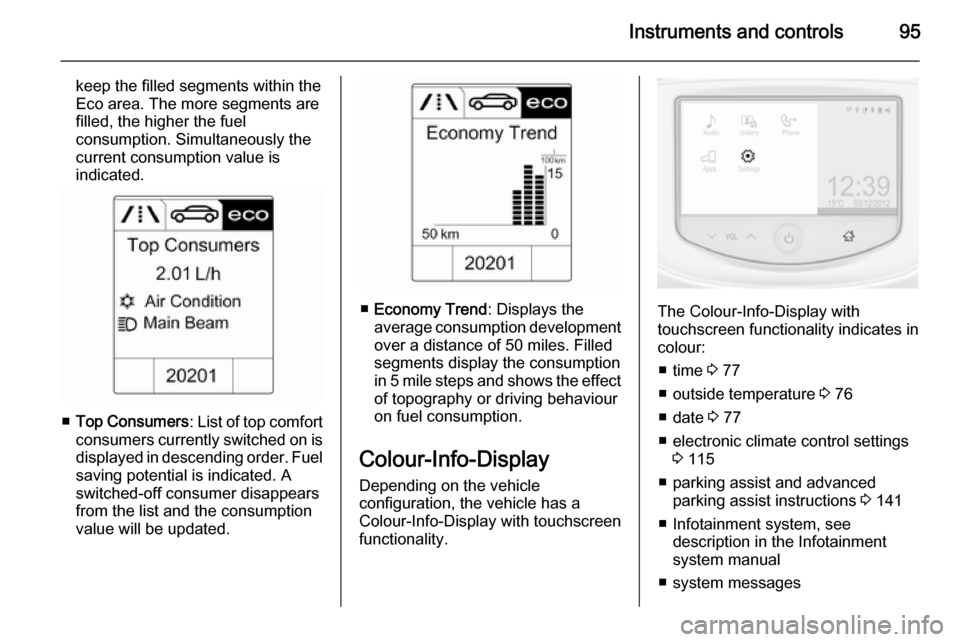
functionality.The Colour-Info-Display with
touchscreen functionality indicates in
colour:
■ time 3 77
■ outside temperature 3 76
■ date 3 77
■ electronic climate control settings 3 115
■ parking assist and advanced parking assist instructions 3 141
■ Infotainment system, see description in the Infotainment
system manual
■ system messages
Page 100 of 233

98Instruments and controls
No.Vehicle message9Turn steering wheel, start
engine again12Vehicle overloaded13Compressor overheated15Centre high-mounted brake
light failure16Brake light failure17Headlight levelling malfunction18Left low beam failure19Rear fog light failure20Right low beam failure21Left sidelight failure22Right sidelight failure23Reversing light failure24Number plate light failure25Left front turn signal failure26Left rear turn signal failureNo.Vehicle message27Right front turn signal failure28Right rear turn signal failure35Replace battery in radio remote
control48Clean side blind spot alert
system53Tighten gas cap56Tyre pressure imbalance on
front axle57Tyre pressure imbalance on
rear axle58Winter tyres detection59Open and then close driver
window60Open and then close front
passenger window66Service theft alarm system67Service steering wheel lock68Service power steeringNo.Vehicle message75Service air conditioning76Service side blind spot alert
system79Top up engine oil82Change engine oil soon84Engine power reduced89Service vehicle soon95Service airbag128Bonnet open134Park assist fault, clean bumper136Service parking assist174Low vehicle battery258Park assist off
Page 101 of 233

Instruments and controls99
Vehicle messages on the
Uplevel-Display
The vehicle messages are displayed
as text. Follow the instructions given
in the messages.
The system displays messages
regarding the following topics:
■ fluid levels
■ anti-theft alarm system
■ brakes
■ ride control systems
■ cruise control, speed limiter
■ parking assist systems
■ lighting, bulb replacement
■ wiper/washer system
■ doors, windows
■ radio remote control
■ seat belts
■ airbag systems
■ engine and transmission
■ tyre pressure
■ vehicle battery
Vehicle messages on the
Colour-Info-Display Some important messages appear
additionally in the
Colour-Info-Display. Some
messages only pop-up for a few
seconds.
Warning chimes When starting the engine or
whilst driving
Only one warning chime will sound at a time.The warning chime regarding
unfastened seat belts has priority
over any other warning chime.
■ If seat belt is not fastened.
■ If a door or the tailgate is not fully closed when starting off.
■ If a certain speed is exceeded with parking brake applied.
■ If a programmed speed is exceeded.
■ If a warning message appears in the Driver Information Centre orInfo-Display.
■ If the parking assist detects an object.
■ If the reverse gear is engaged and the rear end carrier extended.
When the vehicle is parked and/ or the driver's door is opened ■ When the key is in the ignition switch.
■ With exterior lights on.
During an Autostop ■ If the driver's door is opened.
Page 103 of 233

Instruments and controls101
In the corresponding submenus the
following settings can be changed:
Languages
Selection of the desired language.
Time Date
See Clock 3 77.
Radio settings
See Infotainment system manual for further information.
Phone settings
See Infotainment system manual for further information.
Vehicle settings ■ Climate and air quality
Auto fan speed : Modifies the level
of the cabin airflow of the climate
control in automatic mode.
Air conditioning mode : Controls the
state of the cooling compressor
when the vehicle is started. Last
setting (recommended) or at
vehicle start is either always ON or
always OFF.Auto rear demist : Activates
automatically rear heated window.
■ Comfort settings
Chime volume : Changes the
volume of warning chimes.
Personalization by driver : Activates
or deactivates the personalisation
function.
Rear auto wipe in reverse :
Activates or deactivates automatic
switching on of the rear window
wiper when reverse gear is
engaged.
■ Park assist / Collision detection
Park assist : Activates or
deactivates the ultrasonic sensors.
Side blind zone alert : Changes the
settings for the side blind spot alert
system.
■ Exterior ambient lighting
Exterior lighting by unlocking :
Activates or deactivates the entry
lighting.
Duration upon exit of vehicle :Activates or deactivates and
changes the duration of exit
lighting.
■ Power door locks
Auto door lock : Activates or
deactivates the automatic door
locking function after switching on ignition.
Stop door lock if door open :
Activates or deactivates the door
locking function while a door is
open.
Delayed door lock : Activates or
deactivates the delayed door
locking function. This menu option
is displayed with Stop door lock if
door open deactivated. Central
locking system 3 22.
■ Remote locking, unlocking, starting
Remote unlock feedback :
Activates or deactivates the hazard warning flasher feedback whilst
unlocking.
Passive door unlock : Changes the
configuration to unlock only the
driver's door or the whole vehicle
whilst unlocking.
Page 105 of 233

Instruments and controls103
Personalization by driver: Activates
or deactivates the personalisation
function.
Auto wipe in reverse gear :
Activates or deactivates automatic switching on of the rear window
wiper when reverse gear is
engaged.
■ Collision / detection
Park assist : Activates or
deactivates the ultrasonic sensors.
Side blind zone alert : Changes the
settings for the side blind spot alert
system.
■ Lighting
Exit lighting : Activates or
deactivates and changes the
duration of exit lighting.
Vehicle locator lights : Activates or
deactivates the welcome lighting.
■ Power door locks
Auto door lock : Activates or
deactivates the automatic door
locking function after switching on
ignition.Unlocked door anti lock out :
Activates or deactivates the door
locking function while a door is open.
Delayed door lock : Activates or
deactivates the delayed door
locking function. This menu option
is displayed with Unlocked door
anti lock out deactivated. Central
locking system 3 22.
■ Lock, unlock settings
Remote unlock light feedback :
Activates or deactivates the hazard warning flasher feedback whilst
unlocking.
Remote door unlock : Changes the
configuration to unlock only the
driver's door or the whole vehicle
whilst unlocking.
Relock remotely unlocked doors :
Activates or deactivates the
automatic relock function after
unlocking without opening the
vehicle.
■ Vehicle factory settings : Restores
the setting values back to the
factory default settings.Language
Selection of the desired language.
Text scroll
See Infotainment system manual for
further information.
Touch beep volume
See Infotainment system manual for
further information.
Max startup volume
See Infotainment system manual for
further information.
System version
See Infotainment system manual for
further information.
DivX(R) VOD
See Infotainment system manual for
further information.
Page 124 of 233

122Driving and operatingDriving and operatingDriving hints............................... 122
Starting and operating ...............122
Engine exhaust .......................... 127
Manual transmission ..................128
Manual transmission automa‐
ted .............................................. 129
Brakes ........................................ 132
Ride control systems .................134
Driver assistance systems .........138
Fuel ............................................ 151Driving hints
Control of the vehicleNever coast with engine not
running
Many systems will not function in this
situation ( e.g. brake servo unit, power
steering). Driving in this manner is a
danger to yourself and others.
All systems function during an
Autostop.
Stop-start system 3 124.
Idle boost
If charging of the vehicle battery is
required due to battery condition, the
power output of the generator must be increased. This will be achieved by
an idle boost which may be audible.
A message appears on the Uplevel-
Display.
Pedals To ensure the pedal travel is
uninhibited, there must be no mats in
the area of the pedals.Starting and operating
New vehicle running-in Do not brake unnecessarily hard for
the first few journeys.
During the first drive, smoke may
occur because of wax and oil
evaporating off the exhaust system. Park the vehicle in the open for a
while after the first drive and avoid
inhaling the fumes.
During the running-in period fuel and engine oil consumption may be
higher.
Autostop may be inhibited to allow for charging the vehicle battery.
Page 135 of 233
Driving and operating133
Fault9Warning
If there is a fault in the ABS, the
wheels may be liable to lock due
to braking that is heavier than
normal. The advantages of ABS are no longer available. During
hard braking, the vehicle can no longer be steered and may
swerve.
Have the cause of the fault remedied
by a workshop.
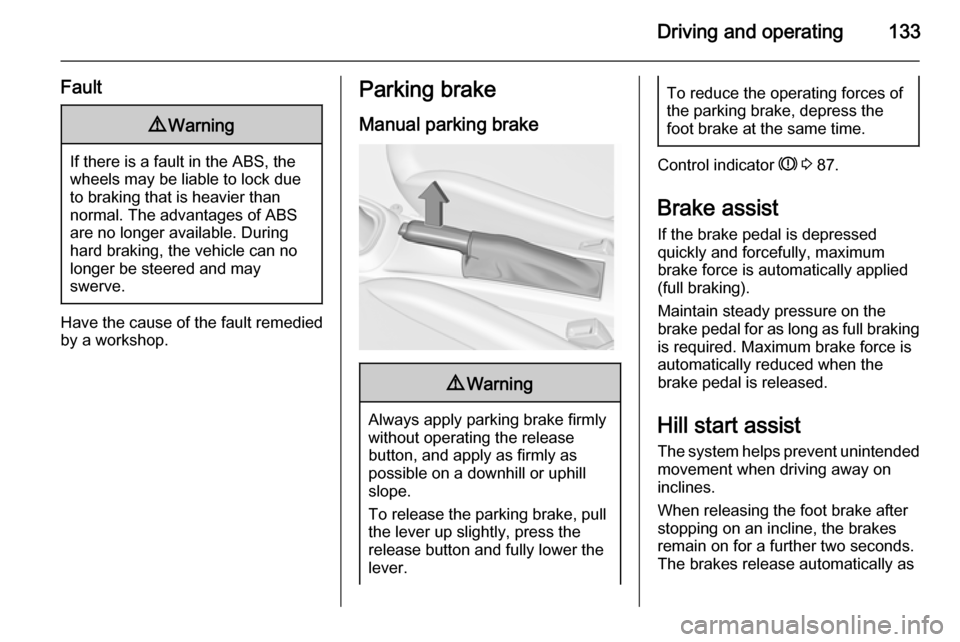
Parking brake
Manual parking brake9 Warning
Always apply parking brake firmly
without operating the release
button, and apply as firmly as
possible on a downhill or uphill
slope.
To release the parking brake, pull
the lever up slightly, press the
release button and fully lower the
lever.
To reduce the operating forces of
the parking brake, depress the
foot brake at the same time.
Control indicator R 3 87.
Brake assist
If the brake pedal is depressed
quickly and forcefully, maximum
brake force is automatically applied
(full braking).
Maintain steady pressure on the brake pedal for as long as full braking is required. Maximum brake force is
automatically reduced when the
brake pedal is released.
Hill start assist The system helps prevent unintendedmovement when driving away on
inclines.
When releasing the foot brake after
stopping on an incline, the brakes
remain on for a further two seconds.
The brakes release automatically as