brake VAUXHALL ADAM 2015 User Guide
[x] Cancel search | Manufacturer: VAUXHALL, Model Year: 2015, Model line: ADAM, Model: VAUXHALL ADAM 2015Pages: 225, PDF Size: 6.81 MB
Page 100 of 225

98Instruments and controls
■ lighting, bulb replacement
■ wiper/washer system
■ doors, windows
■ radio remote control
■ seat belts
■ airbag systems
■ engine and transmission
■ tyre pressure
■ vehicle battery
Vehicle messages on the
Colour-Info-Display Some important messages appear
additionally in the
Colour-Info-Display. Some
messages only pop-up for a few
seconds.
Warning chimes When starting the engine orwhilst driving
Only one warning chime will sound at a time.The warning chime regarding
unfastened seat belts has priority
over any other warning chime.
■ If seat belt is not fastened.
■ If a door or the tailgate is not fully closed when starting off.
■ If a certain speed is exceeded with parking brake applied.
■ If a programmed speed is exceeded.
■ If a warning message appears in the Driver Information Centre orInfo-Display.
■ If the parking assist detects an object.
■ If the reverse gear is engaged and the rear end carrier extended.
When the vehicle is parked and/ or the driver's door is opened ■ When the key is in the ignition switch.
■ With exterior lights on.
During an Autostop ■ If the driver's door is opened.Battery voltage
Uplevel-Display
When the vehicle battery voltage is running low, a warning message will
appear in the Driver Information
Centre.
Midlevel-Display
When the vehicle battery voltage is
running low, a warning code 174 will appear in the Driver Information
Centre.
1. Switch off immediately electrical consumers which are not requiredfor a safe ride, e.g. seat heating,
heated rear window or other main consumers.
2. Charge the vehicle battery by driving continuously for a while or
by using a charging device.
The warning message or warning
code will disappear after the engine
has been started twice consecutively
without a voltage drop.
If the vehicle battery cannot be
recharged, have the cause of the fault
remedied by a workshop.
Page 123 of 225

Driving and operating121Driving and operatingDriving hints............................... 121
Starting and operating ...............121
Engine exhaust .......................... 126
Manual transmission ..................127
Brakes ........................................ 127
Ride control systems .................129
Driver assistance systems .........132
Fuel ............................................ 146Driving hints
Control of the vehicleNever coast with engine not
running
Many systems will not function in this
situation ( e.g. brake servo unit, power
steering). Driving in this manner is a
danger to yourself and others.
All systems function during an
Autostop.
Stop-start system 3 123.
Idle boost
If charging of the vehicle battery is
required due to battery condition, the
power output of the generator must be increased. This will be achieved by
an idle boost which may be audible.
A message appears in the Driver
Information Centre.
Pedals To ensure the pedal travel is
uninhibited, there must be no mats in
the area of the pedals.Starting and operating
New vehicle running-in Do not brake unnecessarily hard for
the first few journeys.
During the first drive, smoke may
occur because of wax and oil
evaporating off the exhaust system. Park the vehicle in the open for a
while after the first drive and avoid
inhaling the fumes.
During the running-in period fuel and engine oil consumption may be
higher.
Autostop may be inhibited to allow for charging the vehicle battery.
Page 126 of 225

124Driving and operating
An Autostop is indicated by the
needle at the AUTOSTOP position in
the tachometer.
During an Autostop, the heating and
brake performance will be
maintained.
Conditions for an Autostop
The stop-start system checks if each
of the following conditions is fulfilled:
■ The stop-start system is not manually deactivated.
■ The bonnet is fully closed.
■ The driver's door is closed or the driver's seat belt is fastened.
■ The vehicle battery is sufficiently charged and in good condition.
■ The engine is warmed up.
■ The engine coolant temperature is not too high.
■ The engine exhaust temperature is
not too high, e.g. after driving with
high engine load.
■ The ambient temperature is above -5 °C.
■ The climate control system allows an Autostop.
■ The brake vacuum is sufficient.
■ The vehicle was driven at least at walking speed since the last
Autostop.
Otherwise an Autostop will be
inhibited.
Certain settings of the climate control
system may inhibit an Autostop. See
Climate control chapter for more
details 3 114.
Immediately after motorway driving
an Autostop may be inhibited.
New vehicle running-in 3 121.Vehicle battery discharge protection
To ensure reliable engine restarts, several vehicle battery discharge
protection features are implemented
as part of the stop-start system.
Power saving measures
During an Autostop, several electrical
features, e.g. the rear window
heating, are disabled or switched into
a power saving mode. The fan speed of the climate control system is
reduced to save power.
Restart of the engine by the
driver
Depress the clutch pedal to restart the
engine.
The engine start is indicated by the
needle at the idle speed position in
the tachometer.
If the selector lever is shifted out of
neutral before depressing the clutch
first, control indicator - illuminates
or is shown as a symbol in the Driver
Information Centre.
Control indicator - 3 86.
Page 127 of 225

Driving and operating125
Restart of the engine by the
stop-start system
The selector lever must be in neutral
to enable an automatic restart.
If one of the following conditions
occurs during an Autostop, the
engine will be restarted automatically by the stop-start system:
■ The stop-start system is manually deactivated.
■ The bonnet is opened.
■ The driver's seat belt is unfastened
and the driver's door is opened.
■ The engine temperature is too low.
■ The charging level of the vehicle battery is below a defined level.
■ The brake vacuum is not sufficient.
■ The vehicle is driven at least at walking speed.
■ The climate control system requests an engine start.
■ The air conditioning is manually switched on.
If the bonnet is not fully closed, a warning message is displayed in the
Driver Information Centre.If an electrical accessory, e.g. a
portable CD player, is connected to
the power outlet, a brief power drop
during restart might be noticeable.
Parking9 Warning
■ Do not park the vehicle on an
easily ignitable surface. The
high temperature of the exhaust
system could ignite the surface.
■ Always apply the parking brake.
Activate the parking brake
without pressing the release
button. Apply as firmly as
possible on a downhill slope or
uphill slope. Depress foot brake
at the same time to reduce
operating force.
■ Switch off the engine.
■ If the vehicle is on a level surface or uphill slope, engage
first gear before removing the ignition key. On an uphill slope,
turn the front wheels away from
the kerb.
If the vehicle is on a downhill
slope, engage reverse gear
before removing the ignition
key. Turn the front wheels
towards the kerb.
■ Close the windows.
■ Remove the ignition key. Turn the steering wheel until the
steering wheel lock is felt to
engage.
■ Lock the vehicle.
■ Activate the anti-theft alarm system.
■ The engine cooling fans may run after the engine has been switchedoff 3 153.
■ After running at high engine speeds
or with high engine loads, operate
the engine briefly at a low load or
run in neutral for
approx. 30 seconds before
switching off, in order to protect the turbocharger.
Page 129 of 225
Driving and operating127Manual transmission
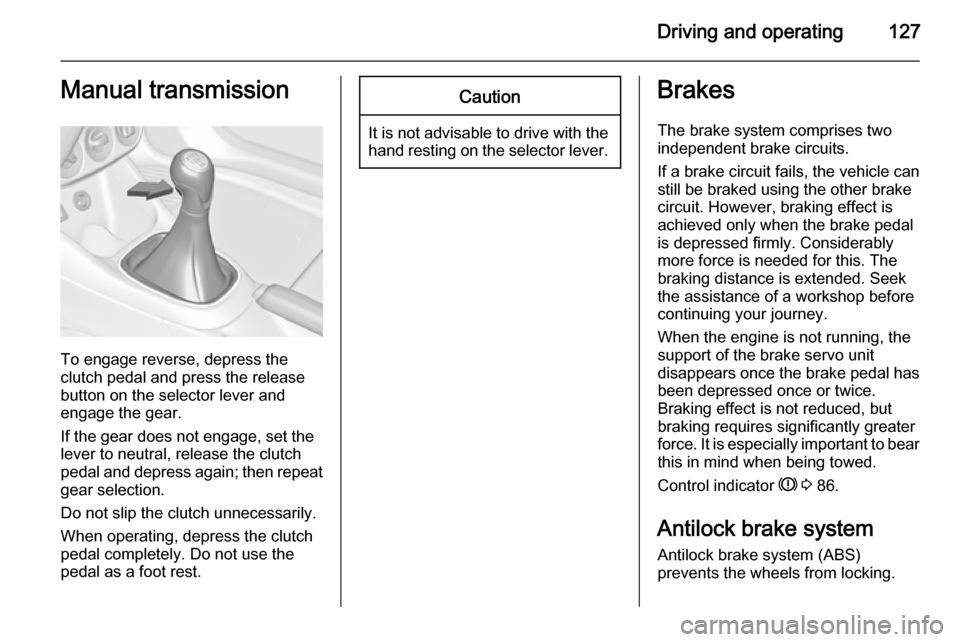
To engage reverse, depress the
clutch pedal and press the release button on the selector lever and
engage the gear.
If the gear does not engage, set the
lever to neutral, release the clutch
pedal and depress again; then repeat
gear selection.
Do not slip the clutch unnecessarily.
When operating, depress the clutch
pedal completely. Do not use the
pedal as a foot rest.
Caution
It is not advisable to drive with the hand resting on the selector lever.
Brakes
The brake system comprises two independent brake circuits.
If a brake circuit fails, the vehicle can
still be braked using the other brake
circuit. However, braking effect is
achieved only when the brake pedal
is depressed firmly. Considerably
more force is needed for this. The
braking distance is extended. Seek the assistance of a workshop before
continuing your journey.
When the engine is not running, the
support of the brake servo unit
disappears once the brake pedal has been depressed once or twice.
Braking effect is not reduced, but
braking requires significantly greater
force. It is especially important to bear
this in mind when being towed.
Control indicator R 3 86.
Antilock brake system
Antilock brake system (ABS)
prevents the wheels from locking.
Page 130 of 225
128Driving and operating
ABS starts to regulate brake pressureas soon as a wheel shows a tendency to lock. The vehicle remains
steerable, even during hard braking.
ABS control is made apparent
through a pulse in the brake pedal
and the noise of the regulation
process.
For optimum braking, keep the brake
pedal fully depressed throughout the
braking process, despite the fact that
the pedal is pulsating. Do not reduce
the pressure on the pedal.
After starting off the system performs
a self-test which may be audible.
Control indicator u 3 86.
Adaptive brake light
During full braking, all three brake
lights flash for the duration of ABS
control.Fault9 Warning
If there is a fault in the ABS, the
wheels may be liable to lock due
to braking that is heavier than
normal. The advantages of ABS are no longer available. During
hard braking, the vehicle can no longer be steered and may
swerve.
Have the cause of the fault remedied
by a workshop.
Parking brake
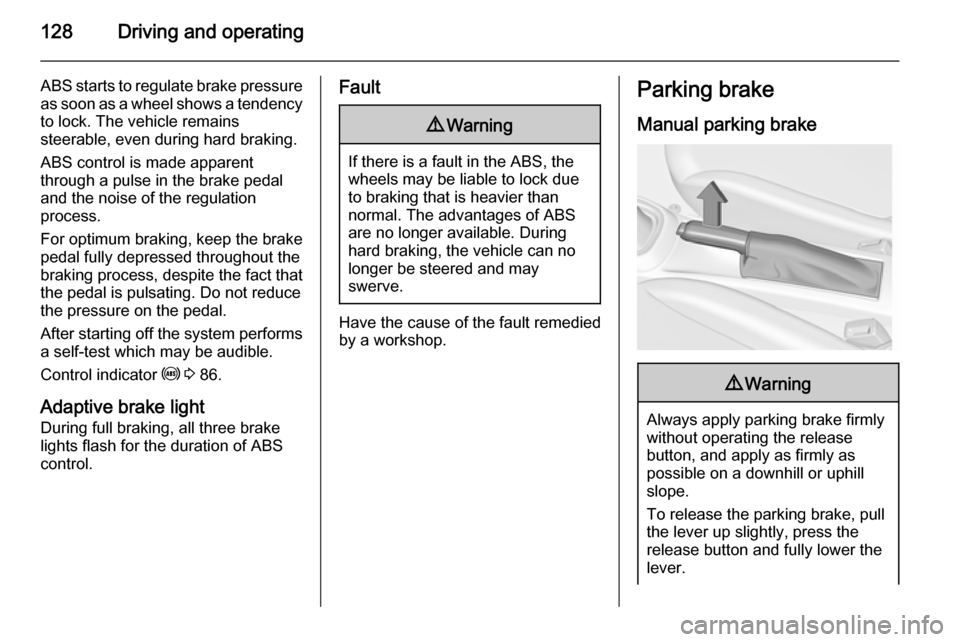
Manual parking brake9 Warning
Always apply parking brake firmly
without operating the release
button, and apply as firmly as
possible on a downhill or uphill
slope.
To release the parking brake, pull
the lever up slightly, press the
release button and fully lower the
lever.
Page 131 of 225

Driving and operating129To reduce the operating forces of
the parking brake, depress the
foot brake at the same time.
Control indicator R 3 86.
Brake assist
If the brake pedal is depressed
quickly and forcefully, maximum
brake force is automatically applied
(full braking).
Maintain steady pressure on the brake pedal for as long as full braking is required. Maximum brake force is
automatically reduced when the
brake pedal is released.
Hill start assist The system helps prevent unintendedmovement when driving away on
inclines.
When releasing the foot brake after
stopping on an incline, the brakes
remain on for a further two seconds.
The brakes release automatically as
soon as the vehicle begins to
accelerate or the two seconds holding
time is over.
The hill start assist is not active during
an Autostop.Ride control systems
Traction Control system
The Traction Control system (TC) is a
component of the Electronic Stability
Control (ESC).
TC improves driving stability when
necessary, regardless of the type of
road surface or tyre grip, by
preventing the drive wheels from
spinning.
As soon as the drive wheels starts to spin, engine output is reduced and
the wheel spinning the most is braked
individually. This considerably
improves the driving stability of the
vehicle on slippery road surfaces.
Page 132 of 225

130Driving and operating
TC is operational after each engine
start as soon as the control indicator
b extinguishes.
When TC operates b flashes.
9 Warning
Do not let this special safety
feature tempt you into taking risks
when driving.
Adapt speed to the road
conditions.
Fault
If there is a fault in the system the
control indicator b illuminates
continuously and a message or a
warning code appears in the Driver
Information Centre. The system is not
operational.
Have the cause of the fault remedied by a workshop.
Electronic Stability Control Electronic Stability Control (ESC)
improves driving stability when
necessary, regardless of the type of
road surface or tyre grip. It also
prevents the drive wheels from
spinning. ESC operates in
combination with the Traction Control system (TC).
As soon as the vehicle starts to
swerve (understeer/oversteer),
engine output is reduced and the
wheels are braked individually. This
considerably improves the driving
stability of the vehicle on slippery road
surfaces.
ESC is operational after each engine
start as soon as the control indicator
b extinguishes.
When ESC operates b flashes.
9 Warning
Do not let this special safety
feature tempt you into taking risks
when driving.
Adapt speed to the road
conditions.
Page 135 of 225
Driving and operating133
For safety reasons the cruise control
cannot be activated until the foot
brake has been operated once.
Activating in first gear is not possible.
Do not use the cruise control if it is not advisable to maintain a constant
speed.
Control indicator m 3 88.
Switching on
Press button m, control indicator m in
instrument cluster illuminates white.
Activation
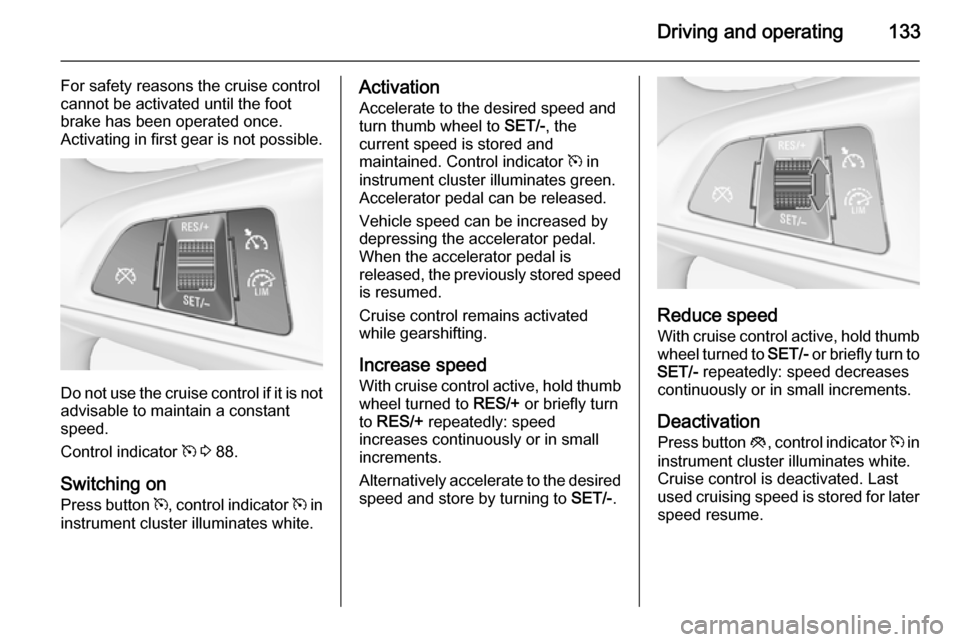
Accelerate to the desired speed and
turn thumb wheel to SET/-, the
current speed is stored and
maintained. Control indicator m in
instrument cluster illuminates green.
Accelerator pedal can be released.
Vehicle speed can be increased by
depressing the accelerator pedal.
When the accelerator pedal is
released, the previously stored speed
is resumed.
Cruise control remains activated
while gearshifting.
Increase speed With cruise control active, hold thumb
wheel turned to RES/+ or briefly turn
to RES/+ repeatedly: speed
increases continuously or in small
increments.
Alternatively accelerate to the desired speed and store by turning to SET/-.
Reduce speed
With cruise control active, hold thumb wheel turned to SET/- or briefly turn to
SET/- repeatedly: speed decreases
continuously or in small increments.
Deactivation
Press button y, control indicator m in
instrument cluster illuminates white.
Cruise control is deactivated. Last
used cruising speed is stored for later speed resume.
Page 136 of 225
134Driving and operating
Automatic deactivation:■ Vehicle speed is below approx. 20 mph.
■ Vehicle speed is above approx. 125 mph.
■ The brake pedal is depressed.
■ The clutch pedal is depressed for a
few seconds.
■ Engine speed is in a very low range.
■ The Traction Control system or Electronic Stability Control is
operating.
Resume stored speed
Turn thumb wheel to RES/+ at a
speed above 20 mph. The stored
speed will be obtained.
Switching off
Press button m, control indicator m in
instrument cluster extinguishes. The
stored speed is deleted.
Switching off the ignition also
switches off cruise control and
deletes the stored speed.Speed limiter
The speed limiter prevents thevehicle exceeding a preset maximum speed.
The maximum speed can be set at a
speed above 15 mph.
The driver can only accelerate up to
the preset speed. Deviations from the
limited speed may occur when driving
downhill.
The preset speed limit is displayed in
the top line of the Driver Information
Centre when the system is active.
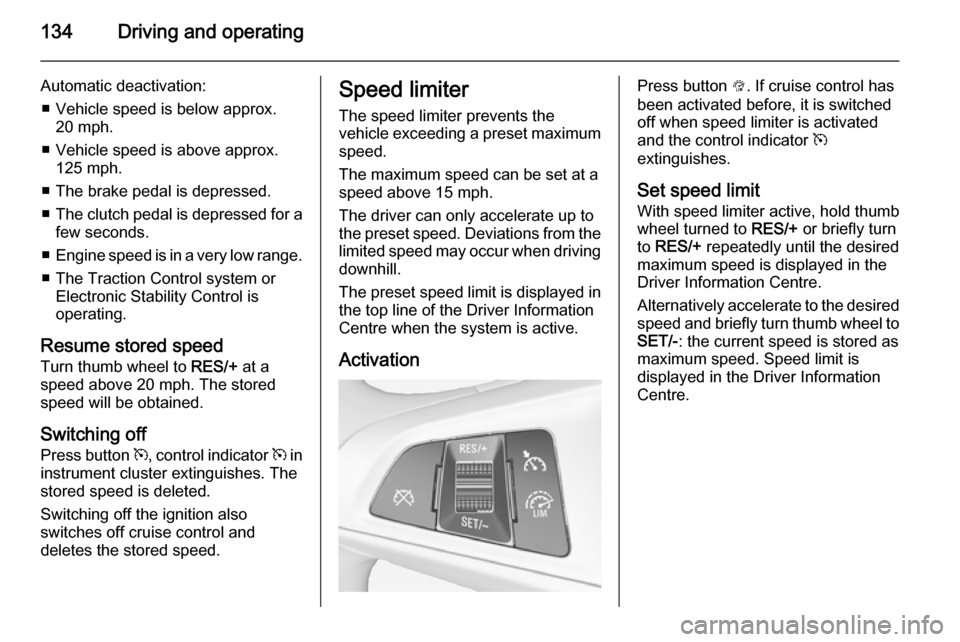
ActivationPress button L. If cruise control has
been activated before, it is switched
off when speed limiter is activated
and the control indicator m
extinguishes.
Set speed limit
With speed limiter active, hold thumb
wheel turned to RES/+ or briefly turn
to RES/+ repeatedly until the desired
maximum speed is displayed in the
Driver Information Centre.
Alternatively accelerate to the desired speed and briefly turn thumb wheel to
SET/- : the current speed is stored as
maximum speed. Speed limit is
displayed in the Driver Information
Centre.