cover VAUXHALL ADAM 2015 User Guide
[x] Cancel search | Manufacturer: VAUXHALL, Model Year: 2015, Model line: ADAM, Model: VAUXHALL ADAM 2015Pages: 225, PDF Size: 6.81 MB
Page 71 of 225
Storage69Roof rack system
Roof rack For safety reasons and to avoiddamage to the roof, the vehicle
approved roof rack system is
recommended. For further
information contact your workshop.
Follow the installation instructions and remove the roof rack when not in
use.
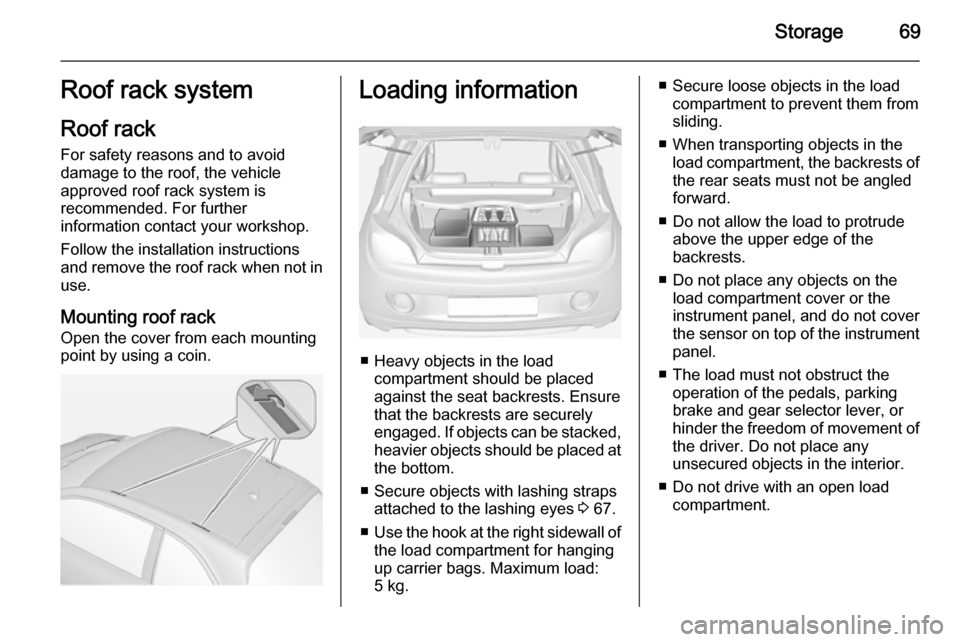
Mounting roof rack Open the cover from each mounting
point by using a coin.Loading information
■ Heavy objects in the load compartment should be placedagainst the seat backrests. Ensure
that the backrests are securely
engaged. If objects can be stacked, heavier objects should be placed at
the bottom.
■ Secure objects with lashing straps attached to the lashing eyes 3 67.
■ Use the hook at the right sidewall of
the load compartment for hanging
up carrier bags. Maximum load: 5 kg.
■ Secure loose objects in the load compartment to prevent them from
sliding.
■ When transporting objects in the load compartment, the backrests ofthe rear seats must not be angled
forward.
■ Do not allow the load to protrude above the upper edge of the
backrests.
■ Do not place any objects on the load compartment cover or theinstrument panel, and do not cover
the sensor on top of the instrument
panel.
■ The load must not obstruct the operation of the pedals, parking
brake and gear selector lever, or
hinder the freedom of movement of the driver. Do not place any
unsecured objects in the interior.
■ Do not drive with an open load compartment.
Page 89 of 225

Instruments and controls87
EcoFlex drive assistant 3 89.
Power steering c illuminates yellow.
Illuminates with power steering reduced Power steering is reduced due to
overheating of the system. Control
indicator extinguishes when the
system has cooled down.
Stop-start system 3 123.
Illuminates with power steering disabled Failure in the power steering system.
Consult a workshop.
Illumination of c and b
simultaneously Power steering system must be
calibrated, system calibration 3 131.
Ultrasonic parking assist
r illuminates yellow.
Fault in systemor
Fault due to sensors that are dirty or
covered by ice or snow
or
Interference due to external sources
of ultrasound. Once the source of interference is removed, the system
will operate normally.
Have the cause of the fault in the
system remedied by a workshop.
Ultrasonic parking assist 3 135.
Electronic Stability Control
and Traction Control
system
b flashes or illuminates yellow.
Flashes
The system is actively engaged.
Engine output may be reduced and
the vehicle may be braked
automatically to a small degree.Illuminates
A fault in the system is present. A
warning message appears in the
Driver Information Centre. Continued
driving is possible. The system is not
operational. Driving stability,
however, may deteriorate depending
on road surface conditions.
Have the cause of the fault remedied
by a workshop.
Electronic Stability Control 3 130,
Traction Control system 3 129.
Tyre pressure monitoring
system
w illuminates or flashes yellow.
Illuminates
Tyre pressure loss. Stop immediately and check tyre pressure.
Flashes
Fault in system or tyre without
pressure sensor mounted (e.g. spare wheel). After 60-90 seconds the
control indicator illuminates
continuously. Consult a workshop.
Page 109 of 225

Lighting107Reversing lightsThe reversing light comes on when
the ignition is on and reverse gear is
selected.
Misted light covers The inside of the light housing may
mist up briefly in poor, wet and cold weather conditions, in heavy rain or
after washing. The mist disappears
quickly by itself; to help switch on the
headlights.Interior lighting
Instrument panel
illumination control
Brightness of the following lights can
be adjusted when the exterior lights
are on:
■ instrument panel illumination
■ ambient light
■ dome light
■ Info-Display
■ illuminated switches and operation elements
Turn thumb wheel A and hold until
the desired brightness is obtained.
Interior lights Front courtesy lightDuring entry and exit of the vehicle,
the courtesy light automatically
switches on and then off after a delay.
Operate rocker switch:
w=automatic switching on
and offpress u=onpress v=off
Page 145 of 225

Driving and operating143
■ exceeding number of maximumgear changes: 8 parking cycles
when parallel parking or 5 cycles
when perpendicular parking,
■ switching off the ignition.
Deactivation by the driver or by the
system during manoeuvring will be indicated by Parking Deactivated on
the display. Additionally an acoustic
signal sounds.
Fault
A message appears when:
■ there is a fault in the system; control
indicator r illuminates in the
instrument cluster,
■ the driver did not successfully complete the parking manoeuvre,
■ the system is not operational,
■ any of the deactivation reasons described above apply.
If an object is detected during parking instructions, Stop is indicated on the
display. Removing the object will
resume the parking manoeuvre. If the
object is not removed, the system willbe deactivated. A long press of button
D will activate the system and
search for a new parking slot.
Basic notes on parking assistsystems9 Warning
Under certain circumstances,
various reflective surfaces on
objects or clothing as well as
external noise sources may cause the system to fail to detect
obstacles.
Special attention must be paid to
low obstacles which can damage
the lower part of the bumper.
Caution
Performance of the system can be reduced when sensors are
covered, e.g. by ice or snow.
Performance of the parking assist
system can be reduced due to
heavy loading.
Special conditions apply if there
are taller vehicles in the vicinity
(e.g. off-road vehicles, mini vans,
vans). Object identification and correct distance indication in the
upper part of these vehicles
cannot be guaranteed.
Objects with a very small reflection
cross-section, e.g. objects of
narrow size or soft materials, may
not be detected by the system.
Parking assist systems do not
detect objects outside the
detection range.
Notice
It is possible that the sensor detects a non-existing object caused by
echo disturbance from external
acoustic noise or mechanical
misalignments (sporadic false
warnings may occur).
Make sure that the front number
plate is properly mounted (not bent
and no gaps to the bumper on the left
or right side) and the sensors are
firmly in place.
Page 147 of 225

Driving and operating145
Side blind spot alert is active from
speeds of 6 mph up to 87 mph.
Driving faster than 87 mph
deactivates the system, indicated by
low lighting warning symbols B in
both exterior mirrors. Reducing the speed again will extinguish the
warning symbols. If a vehicle is then
detected in the blind zone, the
warning symbols B will illuminate as
normal on the relevant side.
When the vehicle is started, both exterior mirror displays will briefly
come on to indicate that the system is operating.
The system can be activated or
deactivated in the Info-Display,
vehicle personalisation 3 99.
Deactivation is indicated by a
message in the Driver Information
Centre.
Detection zones
The detection zones start at the rear
bumper and extend approx.
3 metres rearwards and to the sides.
The height of the zone is approx.
between 0.5 metres and 2 metres off
the ground.
Side blind spot alert is designed to ignore stationary objects, e.g.
guardrails, posts, curbs, walls and
beams. Parked vehicles or oncoming
vehicles are not detected.
Fault
Occasional missed alerts can occur
under normal circumstances and will
increase in wet conditions.
Side blind spot alert does not operate when the left or right corners of the
rear bumper are covered with mud,dirt, snow, ice, slush, or in heavy
rainstorms. Cleaning instructions
3 197.
In the event of a fault in the system or if the system does not work due to
temporary conditions, a message is
displayed in the Driver Information
Centre. Seek the assistance of a
workshop.
Page 154 of 225
152Vehicle careVehicle careGeneral Information...................152
Vehicle checks ........................... 153
Bulb replacement .......................159
Electrical system ........................168
Vehicle tools .............................. 173
Wheels and tyres .......................175
Jump starting ............................. 193
Towing ....................................... 194
Appearance care .......................197General Information
Accessories and vehicle
modifications
We recommend the use of genuine parts and accessories and factory
approved parts specific for your
vehicle type. We cannot assess or
guarantee reliability of other products
- even if they have a regulatory or
otherwise granted approval.
Do not make any modifications to the electrical system, e.g. changes of
electronic control units (chip tuning).Caution
When transporting the vehicle on
a train or on a recovery vehicle, the
mud flaps might be damaged.
Vehicle storage
Storage for a long period of time
If the vehicle is to be stored for several months:
■ Wash and wax the vehicle.
■ Have the wax in the engine compartment and underbody
checked.
■ Clean and preserve the rubber seals.
■ Fill up fuel tank completely.
■ Change the engine oil.
■ Drain the washer fluid reservoir.
■ Check the coolant antifreeze and corrosion protection.
■ Adjust tyre pressure to the value specified for full load.
■ Park the vehicle in a dry, well ventilated place. Engage first orreverse gear. Prevent the vehiclefrom rolling.
■ Do not apply the parking brake.
Page 155 of 225
Vehicle care153
■ Open the bonnet, close all doorsand lock the vehicle.
■ Disconnect the clamp from the negative terminal of the vehicle
battery. Beware that all systems are
not functional, e.g. anti-theft alarm
system.
Putting back into operation
When the vehicle is to be put back into
operation:
■ Connect the clamp to the negative terminal of the vehicle battery.
Activate the electronics of the
power windows.
■ Check tyre pressure.
■ Fill up the washer fluid reservoir.
■ Check the engine oil level.
■ Check the coolant level.
■ Fit the number plate if necessary.End-of-life vehicle
recovery
Information on end-of-life vehicle
recovery centres and the recycling of
end-of-life vehicles is available on our website. Only entrust this work to an
authorised recycling centre.
Gas vehicles must be recycled by a
service centre authorised for gas
vehicles.Vehicle checks
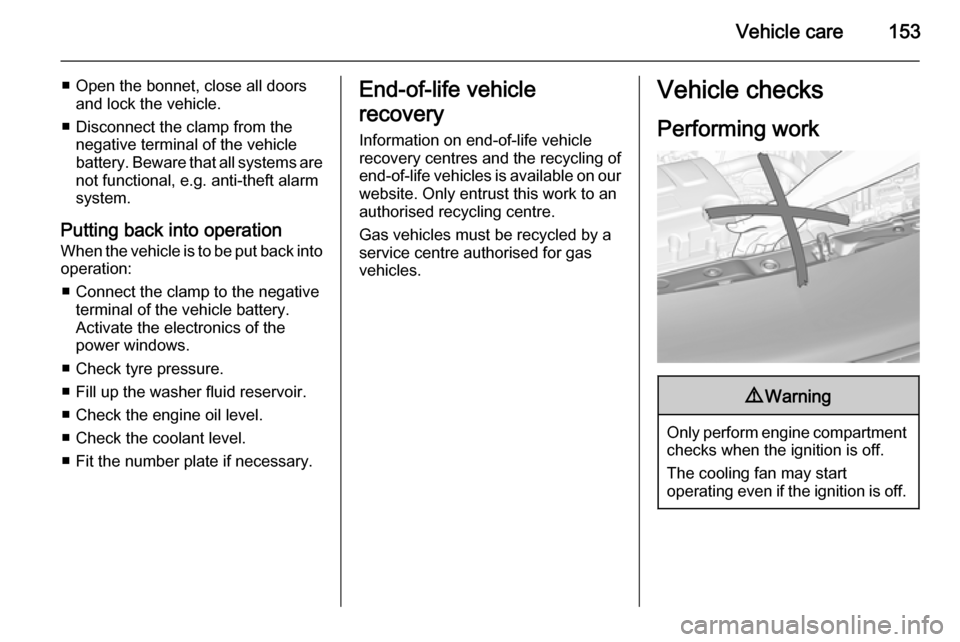
Performing work9 Warning
Only perform engine compartment
checks when the ignition is off.
The cooling fan may start
operating even if the ignition is off.
Page 164 of 225
162Vehicle careFront turn signal lights
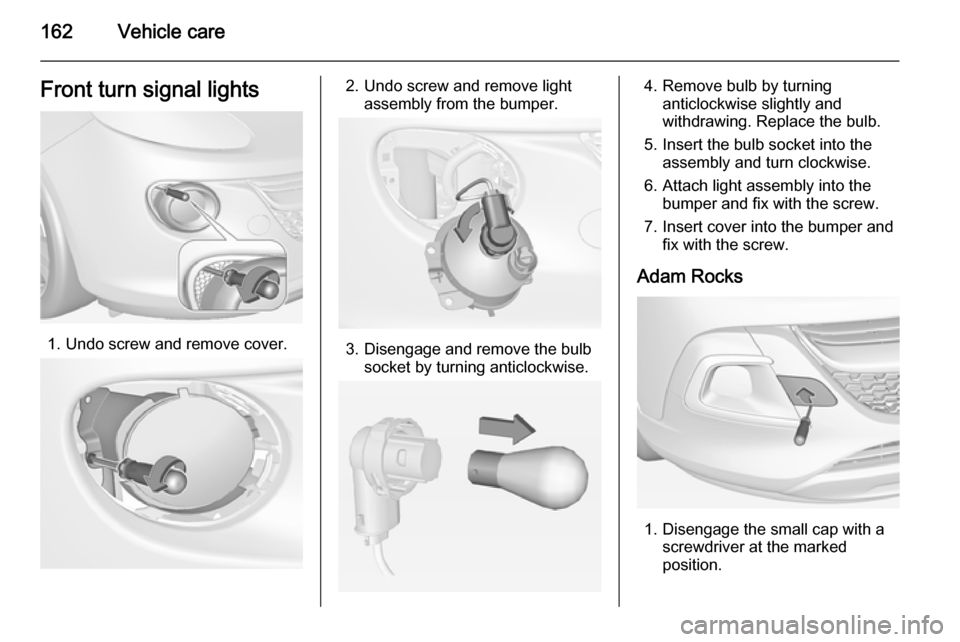
1. Undo screw and remove cover.
2. Undo screw and remove lightassembly from the bumper.
3. Disengage and remove the bulbsocket by turning anticlockwise.
4. Remove bulb by turninganticlockwise slightly and
withdrawing. Replace the bulb.
5. Insert the bulb socket into the assembly and turn clockwise.
6. Attach light assembly into the bumper and fix with the screw.
7. Insert cover into the bumper and fix with the screw.
Adam Rocks
1. Disengage the small cap with a screwdriver at the marked
position.
Page 165 of 225
Vehicle care163
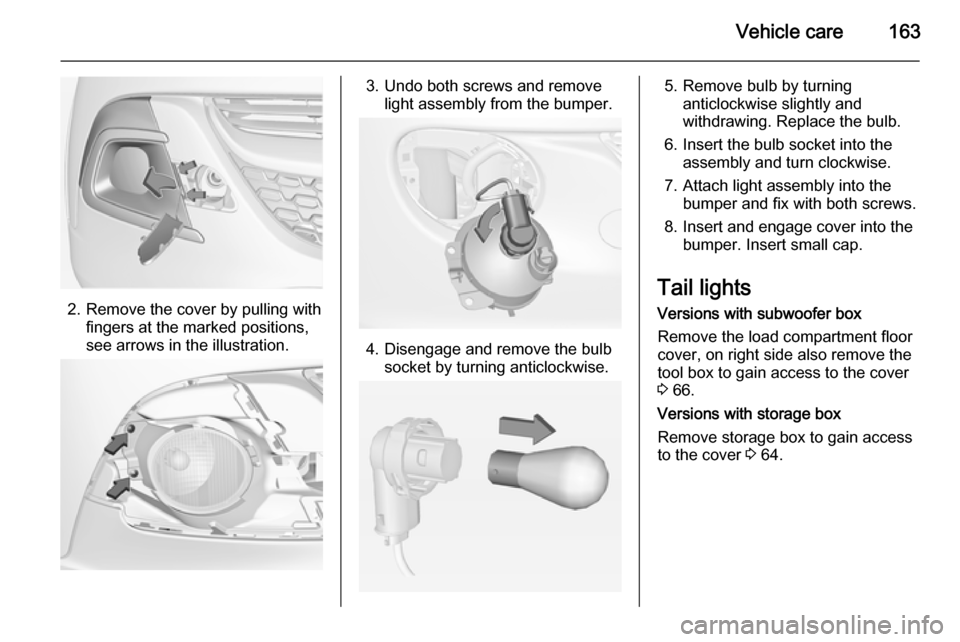
2. Remove the cover by pulling withfingers at the marked positions,
see arrows in the illustration.
3. Undo both screws and remove light assembly from the bumper.
4. Disengage and remove the bulbsocket by turning anticlockwise.
5. Remove bulb by turninganticlockwise slightly and
withdrawing. Replace the bulb.
6. Insert the bulb socket into the assembly and turn clockwise.
7. Attach light assembly into the bumper and fix with both screws.
8. Insert and engage cover into the bumper. Insert small cap.
Tail lights Versions with subwoofer box
Remove the load compartment floor
cover, on right side also remove the
tool box to gain access to the cover
3 66.
Versions with storage box
Remove storage box to gain access
to the cover 3 64.
Page 166 of 225

164Vehicle care
1. Release the cover on therespective side and remove.
2. Unscrew the plastic securing nut from the inside by hand.
3. Carefully withdraw the lightassembly from the recesses and
remove.
4. Turn bulb holder anticlockwise and remove. Replace bulb by
withdrawing:
turn signal light 1
tail light 2
tail light / brake light 3
If tail light 2 and tail light/brake
light 3 are LEDs seek the
assistance of a workshop for
replacement.
5. Insert and turn bulb holder clockwise into the tail light
assembly. Ensure the wires
remain in the cable ducts.