warning VAUXHALL ADAM 2015 Repair Manual
[x] Cancel search | Manufacturer: VAUXHALL, Model Year: 2015, Model line: ADAM, Model: VAUXHALL ADAM 2015Pages: 225, PDF Size: 6.81 MB
Page 144 of 225

142Driving and operating
slots after the Stop message is given.
The system calculates the optimal
path into the parking slot.
A brief vibration in the steering wheel
after engaging reverse gear indicates
that the steering is controlled by the
system. Then the vehicle is steered
into the slot automatically by giving
the driver detailed instructions for
braking, accelerating and gear
shifting. The driver must keep hands
away from the steering wheel.
Always pay attention to the sound of
the front-rear parking assist.
Continuous sound means that the
distance to an obstacle is less than
approx. 30 cm.
If, for any reason, the driver must take over control of the steering, hold the
steering wheel only at the outer edge. Automatic steering is cancelled in thisevent.Changing the parking side
The system is configured to detect
parking slots by default on the
passenger side. To detect parkingslots on the driver side, switch on turn
indicator to the driver side for the
durance of the search.
As soon as the turn indicator is
switched off, the system searches for
parking slots on the passenger side
again.Display indication
The instructions in the display show:
■ general hints and warning messages,
■ a hint when driving faster than 18 mph during parking slot
searching mode, or 5 mph in
guiding mode,
■ the demand to stop the vehicle, when a parking slot is detected,
■ the direction of driving during the parking manoeuvre,
■ the demand to shift rearwards or forwards,
■ the demand to accelerate or brake,
■ for some of the instructions a progress bar is shown in the DriverInformation Centre,■ the successful parking indicated by
a pop-up symbol and a chime,
■ the cancelling of a parking manoeuvre.
Display priorities
Advanced parking assist indication on
the Driver Information Centre can be
inhibited by vehicle messages with a higher priority. After approving the
message by pressing the SET/CLR
button on the turn signal lever,
advanced parking assist instructions
appear again and the parking
manoeuvre can be continued.
Deactivation
The system is deactivated by:
■ long press of button D,
■ parking manoeuvre successfully ended,
■ driving faster than 18 mph during parking slot search,
■ driving faster than 5 mph during parking guidance,
■ driver interference on steering wheel detected,
Page 145 of 225

Driving and operating143
■ exceeding number of maximumgear changes: 8 parking cycles
when parallel parking or 5 cycles
when perpendicular parking,
■ switching off the ignition.
Deactivation by the driver or by the
system during manoeuvring will be indicated by Parking Deactivated on
the display. Additionally an acoustic
signal sounds.
Fault
A message appears when:
■ there is a fault in the system; control
indicator r illuminates in the
instrument cluster,
■ the driver did not successfully complete the parking manoeuvre,
■ the system is not operational,
■ any of the deactivation reasons described above apply.
If an object is detected during parking instructions, Stop is indicated on the
display. Removing the object will
resume the parking manoeuvre. If the
object is not removed, the system willbe deactivated. A long press of button
D will activate the system and
search for a new parking slot.
Basic notes on parking assistsystems9 Warning
Under certain circumstances,
various reflective surfaces on
objects or clothing as well as
external noise sources may cause the system to fail to detect
obstacles.
Special attention must be paid to
low obstacles which can damage
the lower part of the bumper.
Caution
Performance of the system can be reduced when sensors are
covered, e.g. by ice or snow.
Performance of the parking assist
system can be reduced due to
heavy loading.
Special conditions apply if there
are taller vehicles in the vicinity
(e.g. off-road vehicles, mini vans,
vans). Object identification and correct distance indication in the
upper part of these vehicles
cannot be guaranteed.
Objects with a very small reflection
cross-section, e.g. objects of
narrow size or soft materials, may
not be detected by the system.
Parking assist systems do not
detect objects outside the
detection range.
Notice
It is possible that the sensor detects a non-existing object caused by
echo disturbance from external
acoustic noise or mechanical
misalignments (sporadic false
warnings may occur).
Make sure that the front number
plate is properly mounted (not bent
and no gaps to the bumper on the left
or right side) and the sensors are
firmly in place.
Page 146 of 225

144Driving and operating
Advanced parking assist system
may not respond to changes in the
available parking space after
initiating a parking manoeuvre. The
system may recognize an entry, a
gateway, a courtyard or even a
crossing as a parking slot. After
selecting reverse gear the system
would start a parking manoeuvre.
Take care of the availability of the
suggested parking slot.
Surface irregularities, e.g. on
construction zones, are not detected
by the system. The driver accepts
responsibility.
Notice
If engaging a forward gear and
exceeding a certain speed, the rear
parking assist will be deactivated
when the rear carrier system is
extended.
If engaging reverse at first, the
parking assist will detect the rear
carrier system and provide a buzzing
sound. Press r or D briefly to
deactivate the parking assist.Notice
After production, the system
requires a calibration. For optimal parking guidance, a driving distance of at least 6 miles, including a
number of bends, is required.
Side blind spot alert The Side blind spot alert system
detects and reports objects on either
side of the vehicle, within a specified
"blind spot" zone. The system alerts visually in each exterior mirror, when
detecting objects that may not be
visible in the interior and exterior
mirrors.
Side blind spot alert uses some of the advanced parking assist sensors
which are located in the front and rear
bumper on both sides of the vehicle.9 Warning
Side blind spot alert does not
replace driver vision.
The system does not detect:
■ Vehicles outside the side blind zones which may be rapidly
approaching.
■ Pedestrians, cyclists or animals.
Before changing a lane, always
check all mirrors, look over the
shoulder and use the turn signal.
When the system detects a vehicle in the side blind zone while driving
forward, either while passing a
vehicle or being passed, an amber warning symbol B will illuminate in
the relevant exterior mirror. If the
driver then activates the turn signal,
the warning symbol B starts flashing
amber as a warning not to change
lanes.
Page 147 of 225

Driving and operating145
Side blind spot alert is active from
speeds of 6 mph up to 87 mph.
Driving faster than 87 mph
deactivates the system, indicated by
low lighting warning symbols B in
both exterior mirrors. Reducing the speed again will extinguish the
warning symbols. If a vehicle is then
detected in the blind zone, the
warning symbols B will illuminate as
normal on the relevant side.
When the vehicle is started, both exterior mirror displays will briefly
come on to indicate that the system is operating.
The system can be activated or
deactivated in the Info-Display,
vehicle personalisation 3 99.
Deactivation is indicated by a
message in the Driver Information
Centre.
Detection zones
The detection zones start at the rear
bumper and extend approx.
3 metres rearwards and to the sides.
The height of the zone is approx.
between 0.5 metres and 2 metres off
the ground.
Side blind spot alert is designed to ignore stationary objects, e.g.
guardrails, posts, curbs, walls and
beams. Parked vehicles or oncoming
vehicles are not detected.
Fault
Occasional missed alerts can occur
under normal circumstances and will
increase in wet conditions.
Side blind spot alert does not operate when the left or right corners of the
rear bumper are covered with mud,dirt, snow, ice, slush, or in heavy
rainstorms. Cleaning instructions
3 197.
In the event of a fault in the system or if the system does not work due to
temporary conditions, a message is
displayed in the Driver Information
Centre. Seek the assistance of a
workshop.
Page 149 of 225

Driving and operating147
Pressing the LPG button switches
between petrol and liquid gas
operation as soon as the required
parameters (coolant temperature,
gas temperature and minimum
engine speed) have been reached.
The requirements are usually fulfilled
after approx. 60 seconds (depending
on exterior temperature) and the first
firm press on the accelerator. The
LED status shows the current
operating mode.LED off=petrol operationLED illuminates=liquid gas
operationLED flashes=no switching is
possible, one type
of fuel is empty
As soon as the liquid gas tanks are empty, petrol operation is
automatically engaged until the
ignition is switched off.
Every six months, run the petrol tank down until control indicator Y
illuminates, then refuel. This helps
maintain fuel quality and system
function for petrol operation.
Fill the tank completely at regular
intervals to prevent corrosion in the
tank.
Faults and remedies
If gas mode is not possible, check the following:
■ Is there enough liquid gas present?
■ Is there enough petrol present for starting?
Due to extreme temperatures in
combination with the gas
composition, it may take slightly
longer before the system switches
from petrol to gas mode.
In extreme situations, the system may
also switch back to petrol mode if the
minimum requirements are not
fulfilled.
Seek the assistance of a workshop in the event of all other faults.Caution
Repairs and adjustments may onlybe made by trained specialists in
order to maintain the safety and
warranty on the LPG system.
Liquid gas is given a particular odour
(odorised) so that any leaks can be
detected easily.
9 Warning
If you smell gas in the vehicle or in
the immediate vicinity, switch to petrol mode immediately. No
smoking. No naked flames or
ignition sources.
If the gas odour persists, do not start
the engine. Have the cause of the
fault remedied by a workshop.
When using underground car parks,
follow the instructions of the operator
and local laws.
Notice
In the event of an accident, switch off
the ignition and lights.
Page 152 of 225
150Driving and operating9Warning
Due to the system design, an
escape of liquid gas after
releasing the locking lever is
unavoidable. Avoid inhaling.
9 Warning
The liquid gas tank may only be
filled to 80 % for safety reasons.
The multivalve on the liquid gas tank
automatically limits the fill quantity. If
a larger quantity is added, we
recommend not exposing the vehicle
to the sun until the excess amount
has been used up.
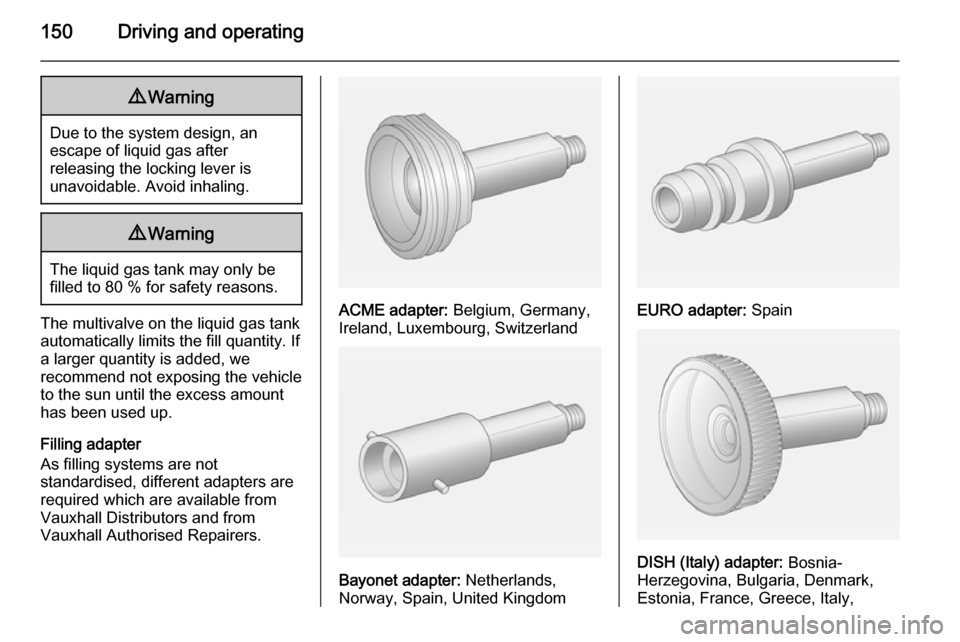
Filling adapter
As filling systems are not
standardised, different adapters are
required which are available from
Vauxhall Distributors and from
Vauxhall Authorised Repairers.ACME adapter: Belgium, Germany,
Ireland, Luxembourg, Switzerland
Bayonet adapter: Netherlands,
Norway, Spain, United Kingdom
EURO adapter: Spain
DISH (Italy) adapter: Bosnia-
Herzegovina, Bulgaria, Denmark,
Estonia, France, Greece, Italy,
Page 155 of 225

Vehicle care153
■ Open the bonnet, close all doorsand lock the vehicle.
■ Disconnect the clamp from the negative terminal of the vehicle
battery. Beware that all systems are
not functional, e.g. anti-theft alarm
system.
Putting back into operation
When the vehicle is to be put back into
operation:
■ Connect the clamp to the negative terminal of the vehicle battery.
Activate the electronics of the
power windows.
■ Check tyre pressure.
■ Fill up the washer fluid reservoir.
■ Check the engine oil level.
■ Check the coolant level.
■ Fit the number plate if necessary.End-of-life vehicle
recovery
Information on end-of-life vehicle
recovery centres and the recycling of
end-of-life vehicles is available on our website. Only entrust this work to an
authorised recycling centre.
Gas vehicles must be recycled by a
service centre authorised for gas
vehicles.Vehicle checks
Performing work9 Warning
Only perform engine compartment
checks when the ignition is off.
The cooling fan may start
operating even if the ignition is off.
Page 158 of 225
156Vehicle care
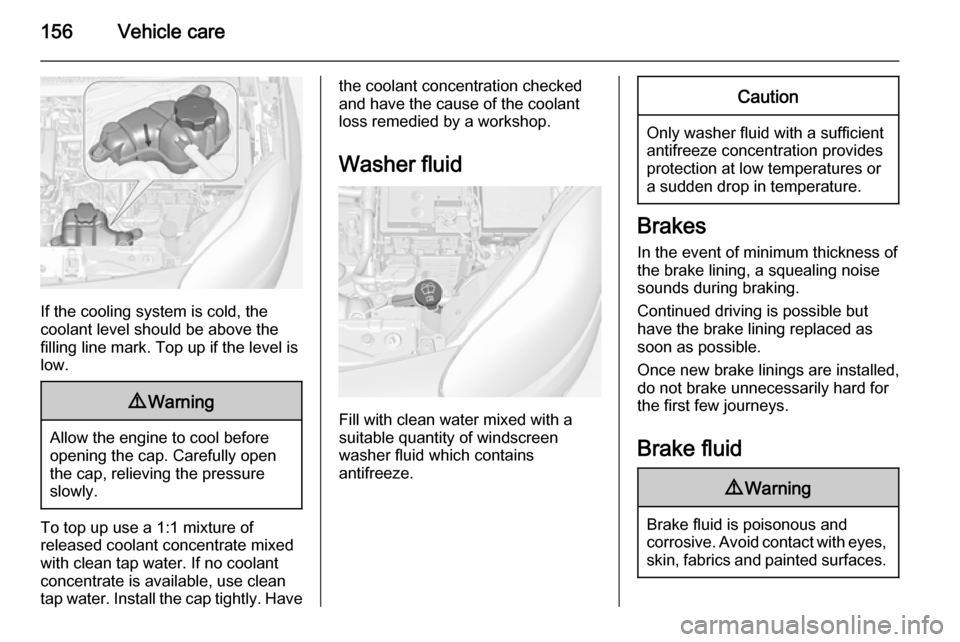
If the cooling system is cold, the
coolant level should be above the
filling line mark. Top up if the level is
low.
9 Warning
Allow the engine to cool before
opening the cap. Carefully open
the cap, relieving the pressure
slowly.
To top up use a 1:1 mixture of
released coolant concentrate mixed
with clean tap water. If no coolant
concentrate is available, use clean
tap water. Install the cap tightly. Have
the coolant concentration checked
and have the cause of the coolant
loss remedied by a workshop.
Washer fluid
Fill with clean water mixed with a
suitable quantity of windscreen
washer fluid which contains
antifreeze.
Caution
Only washer fluid with a sufficient
antifreeze concentration provides
protection at low temperatures or
a sudden drop in temperature.
Brakes
In the event of minimum thickness ofthe brake lining, a squealing noise
sounds during braking.
Continued driving is possible but
have the brake lining replaced as
soon as possible.
Once new brake linings are installed,
do not brake unnecessarily hard for
the first few journeys.
Brake fluid
9 Warning
Brake fluid is poisonous and
corrosive. Avoid contact with eyes, skin, fabrics and painted surfaces.
Page 160 of 225
158Vehicle care
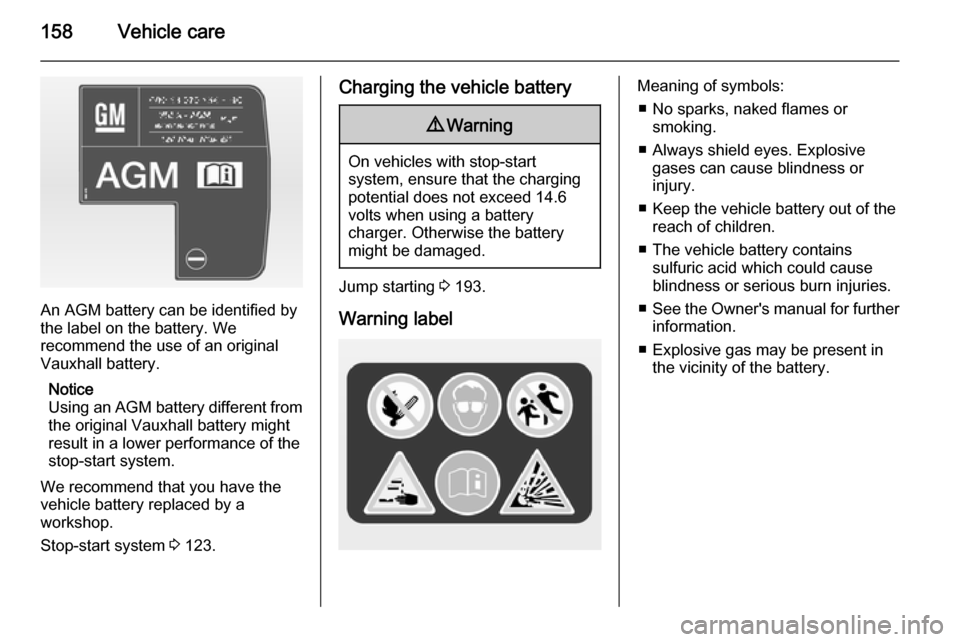
An AGM battery can be identified by
the label on the battery. We
recommend the use of an original
Vauxhall battery.
Notice
Using an AGM battery different from
the original Vauxhall battery might
result in a lower performance of the
stop-start system.
We recommend that you have the
vehicle battery replaced by a
workshop.
Stop-start system 3 123.
Charging the vehicle battery9 Warning
On vehicles with stop-start
system, ensure that the charging potential does not exceed 14.6
volts when using a battery
charger. Otherwise the battery
might be damaged.
Jump starting 3 193.
Warning label
Meaning of symbols: ■ No sparks, naked flames or smoking.
■ Always shield eyes. Explosive gases can cause blindness or
injury.
■ Keep the vehicle battery out of the reach of children.
■ The vehicle battery contains sulfuric acid which could cause
blindness or serious burn injuries.
■ See the Owner's manual for further
information.
■ Explosive gas may be present in the vicinity of the battery.
Page 176 of 225
174Vehicle care
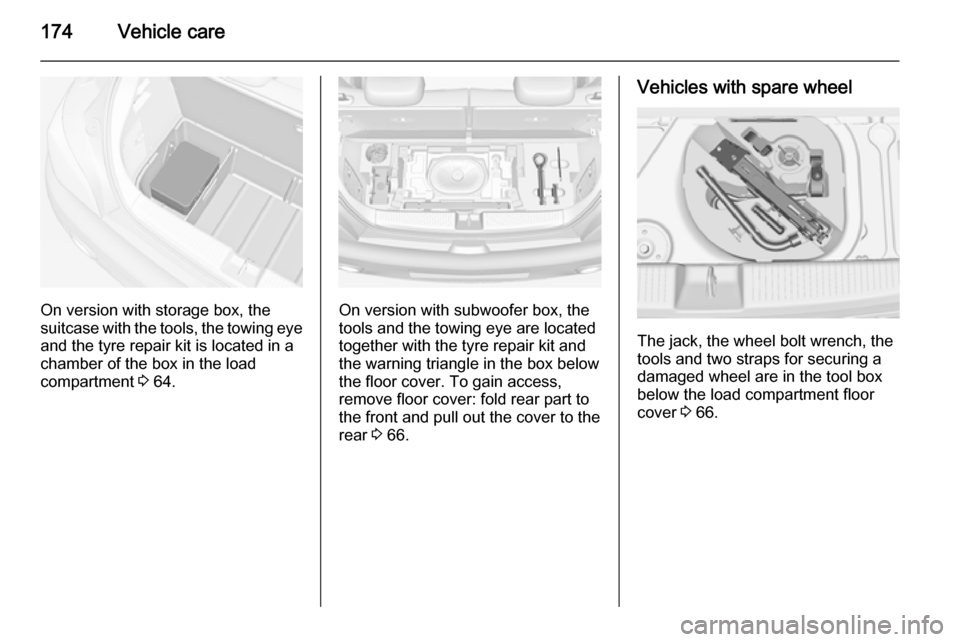
On version with storage box, the
suitcase with the tools, the towing eye
and the tyre repair kit is located in a
chamber of the box in the load
compartment 3 64.On version with subwoofer box, the
tools and the towing eye are located
together with the tyre repair kit and
the warning triangle in the box below
the floor cover. To gain access,
remove floor cover: fold rear part to
the front and pull out the cover to the
rear 3 66.
Vehicles with spare wheel
The jack, the wheel bolt wrench, the
tools and two straps for securing a
damaged wheel are in the tool box below the load compartment floor
cover 3 66.