instrument panel VAUXHALL ADAM 2016.5 User Guide
[x] Cancel search | Manufacturer: VAUXHALL, Model Year: 2016.5, Model line: ADAM, Model: VAUXHALL ADAM 2016.5Pages: 239, PDF Size: 7.2 MB
Page 113 of 239

Lighting111Operate button with ignition switched
on:m one brief
press:on or offT repeated
brief presses:dimming
stepwiseT long press:dimming
continuously
The selected intensity remains the
next time the ignition is switched on.
Starlight comes on automatically
when switching off ignition and
extinguishes after opening a door.
Pressing m after switching off ignition;
starlight remains on for 60 minutes.
Lighting features
Entry lighting
Welcome lighting The following lights are switched on
for a short time by unlocking the
vehicle with the radio remote control:
● headlights
● tail lights
● number plate lights
● instrument panel light
● interior lights
Some functions are only operable
when it is dark outside to facilitate
locating the vehicle.
The lighting switches off immediately
when the ignition key is turned to
position 1 3 124.
Activation or deactivation of this
function can be changed in the
Info-Display.
Vehicle personalisation 3 98.
The settings can be saved for the key
being used 3 21.The following lights will additionally
switch on when the driver's door is
opened:
● illumination of some switches
● Driver Information Centre
● ambient light
● starlight panel
Exit lighting The following lights switch on if the
key is removed from the ignition
switch:
● interior lights
● instrument panel light (only when
it is dark)
● ambient light
● starlight panel
They will switch off automatically after
a delay and will be activated again if
the driver's door is opened.
Path lighting
Headlights, tail lights and number plate lights illuminate the surrounding area for an adjustable time after
leaving the vehicle.
Page 162 of 239

160Vehicle careVehicle careGeneral Information...................160
Accessories and vehicle modifications .......................... 160
Vehicle storage ........................161
End-of-life vehicle recovery .....161
Vehicle checks ........................... 162
Performing work ......................162
Bonnet ..................................... 162
Engine oil ................................. 163
Engine coolant ......................... 164
Washer fluid ............................ 164
Brakes ..................................... 165
Brake fluid ............................... 165
Vehicle battery ......................... 165
Wiper blade replacement ........167
Bulb replacement .......................168
Halogen headlights ..................168
Front turn signal lights .............170
Tail lights ................................. 172
Side turn signal lights ..............175
Number plate light ...................175
Interior lights ............................ 176
Instrument panel illumination ...176
Electrical system ........................177
Fuses ....................................... 177Engine compartment fuse box . 178
Instrument panel fuse box .......180
Vehicle tools .............................. 182
Tools ........................................ 182
Wheels and tyres .......................183
Winter tyres ............................. 183
Tyre designations ....................183
Tyre pressure .......................... 184
Tyre pressure monitoring system .................................... 185
Tread depth ............................. 188
Changing tyre and wheel size . 189
Wheel covers ........................... 189
Tyre chains .............................. 189
Tyre repair kit .......................... 190
Wheel changing .......................194
Spare wheel ............................ 196
Jump starting ............................. 201
Towing ....................................... 202
Towing the vehicle ...................202
Towing another vehicle ...........204
Appearance care .......................205
Exterior care ............................ 205
Interior care ............................. 207General Information
Accessories and vehicle modifications
We recommend the use of genuine
parts and accessories and factory approved parts specific for your
vehicle type. We cannot assess or guarantee reliability of other products
- even if they have a regulatory or
otherwise granted approval.
Do not make any modifications to the
electrical system, e.g. changes of
electronic control units (chip tuning).Caution
When transporting the vehicle on
a train or on a recovery vehicle, the
mud flaps might be damaged.
Page 178 of 239
176Vehicle care
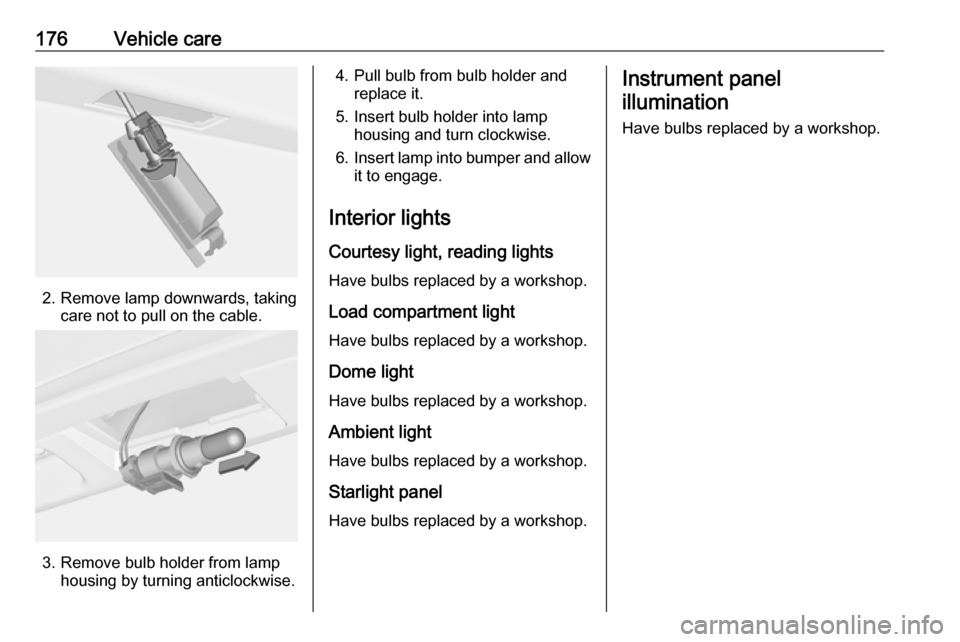
2. Remove lamp downwards, takingcare not to pull on the cable.
3. Remove bulb holder from lamphousing by turning anticlockwise.
4. Pull bulb from bulb holder andreplace it.
5. Insert bulb holder into lamp housing and turn clockwise.
6. Insert lamp into bumper and allow
it to engage.
Interior lights Courtesy light, reading lights
Have bulbs replaced by a workshop.
Load compartment light
Have bulbs replaced by a workshop.
Dome light
Have bulbs replaced by a workshop.
Ambient lightHave bulbs replaced by a workshop.
Starlight panel
Have bulbs replaced by a workshop.Instrument panel illumination
Have bulbs replaced by a workshop.
Page 182 of 239
180Vehicle careNo.Circuit1ABS pump2Front wiper3Blower4Instrument panel5–6–7Electrical vacuum pump8Cooling fan low9Cooling fan high10Cooling fan/Electrical vacuum
pump11Starter
After having changed defective fuses
close the fuse box cover and press
until it engages.
If the fuse box cover is not closed
correctly, malfunction may occur.
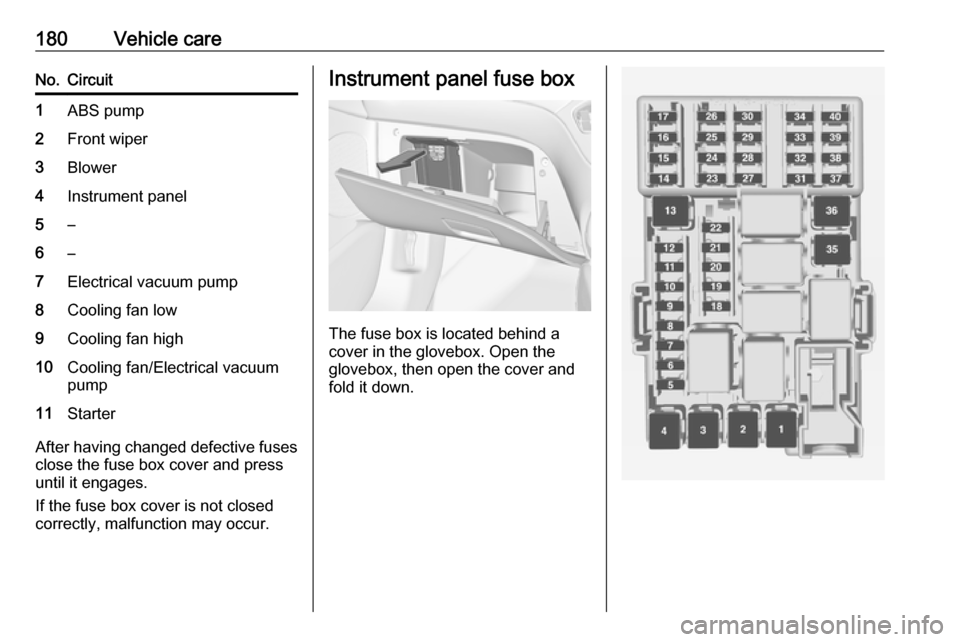
Instrument panel fuse box
The fuse box is located behind a
cover in the glovebox. Open the
glovebox, then open the cover and
fold it down.
Page 183 of 239

Vehicle care181No.Circuit1–2–3Power windows4Voltage transformer5Body control module 16Body control module 27Body control module 38Body control module 49Body control module 510Body control module 611Body control module 712Body control module 813–14Tailgate15Diagnostic connector16Data link connection17IgnitionNo.Circuit18Air conditioning system19Audio amplifier20Parking assist21Brake switch22Audio system23Display24–25Onstar26Instrument panel27Seat heating, driver28–29–30Instrument panel31Horn32Seat heating, passenger33Heated steering wheel34–No.Circuit35–36–37Rear wiper38Cigarette lighter39–40–
Page 209 of 239
Vehicle care207Glass panelNever clean with solvents or abrasive
agents, fuels, aggressive media
(e.g. paint cleaner, acetone-
containing solutions etc.), acidic or
highly alkaline media or abrasive
pads. Do not apply wax or polishing
agents to the glass panel.
Wheels and tyres Do not use high-pressure jet
cleaners.
Clean rims with a pH-neutral wheel
cleaner.
Rims are painted and can be treated
with the same agents as the body.
Paintwork damage
Rectify minor paintwork damage with
a touch-up pen before rust forms.
Have more extensive damage or rust areas repaired by a workshop.
Underbody Some areas of the vehicle underbody
have a PVC undercoating while other
critical areas have a durable
protective wax coating.After the underbody is washed, check
the underbody and have it waxed if
necessary.
Bitumen/rubber materials could
damage the PVC coating. Have
underbody work carried out by a
workshop.
Before and after winter, wash the
underbody and have the protective
wax coating checked.
Liquid gas system9 Danger
Liquid gas is heavier than air and
can collect in sink points.
Take care when performing work
at the underbody in a pit.
For painting work and when using a
drying booth at a temperature above
60 °C, the liquid gas tank must be
removed.
Do not make any modifications to the
liquid gas system.
Rear carrier system
Clean the rear carrier system with a
steam-jet or high-pressure jet cleaner
at least once a year.
Operate the rear carrier system
periodically if not in regular use, in
particular during winter.
Interior care
Interior and upholstery
Only clean the vehicle interior,
including the instrument panel fascia
and panelling, with a dry cloth or
interior cleaner.
Clean the leather upholstery with
clear water and a soft cloth. In case of heavy soiling, use leather care.
The instrument cluster and the
displays should only be cleaned using
a soft damp cloth. If necessary use a
weak soap solution.
Clean fabric upholstery with a
vacuum cleaner and brush. Remove
stains with an upholstery cleaner.
Page 214 of 239
212Technical dataTechnical dataVehicle identification..................212
Vehicle Identification Number ..212
Identification plate ...................213
Engine identification ................213
Vehicle data ............................... 214
Recommended fluids and lubricants ................................ 214
Engine data ............................. 217
Performance ............................ 219
Vehicle weight ......................... 220
Vehicle dimensions .................221
Capacities ................................ 222
Tyre pressures ........................ 223Vehicle identification
Vehicle IdentificationNumber
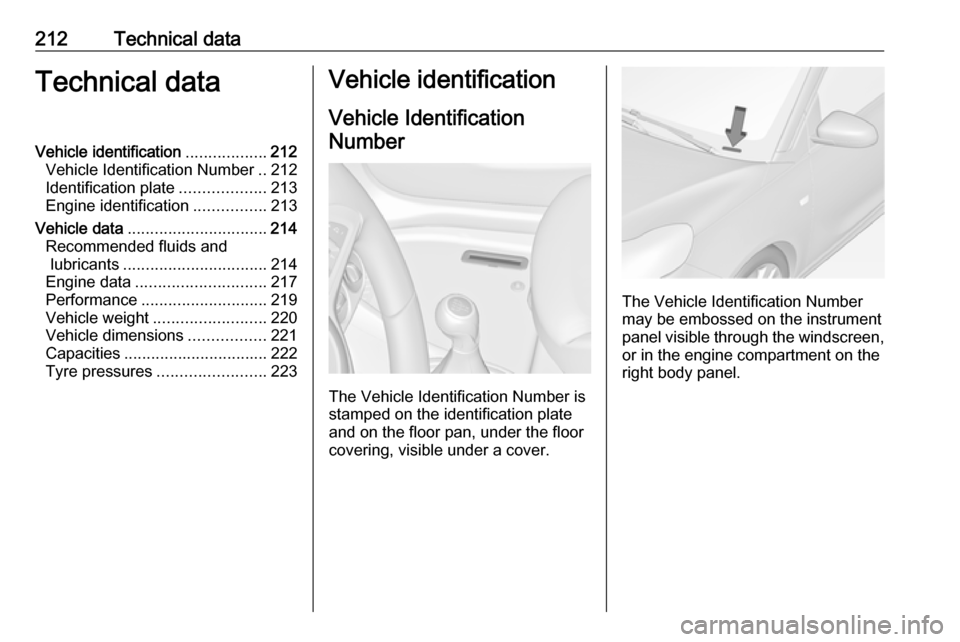
The Vehicle Identification Number is
stamped on the identification plate
and on the floor pan, under the floor
covering, visible under a cover.
The Vehicle Identification Number
may be embossed on the instrument
panel visible through the windscreen, or in the engine compartment on theright body panel.
Page 236 of 239

234Immobiliser ............................ 26, 88
Indicators ...................................... 78
Inductive charging ........................76
Information displays...................... 88
Instrument cluster ........................78
Instrument panel fuse box .........180
Instrument panel illumination .....176
Instrument panel illumination control .................................... 109
Instrument panel overview ........... 10
Interior care ............................... 207
Interior lighting ............................ 109
Interior lights ...................... 109, 176
Interior mirrors .............................. 28
Introduction .................................... 3
ISOFIX child restraint systems ....50
J Jump starting ............................. 201
K Key, memorised settings ..............21
Keys ............................................. 19
Keys, locks ................................... 19
L
Lashing eyes ............................... 66
Light switch ................................ 105
Load compartment ................24, 62
Load compartment cover .............64Loading information .....................67
Low fuel ....................................... 87
M Malfunction indicator light ............85
Manual anti-dazzle ......................28
Manual mode ............................. 133
Manual transmission .................. 130
Manual transmission automated 130
Memorised settings ......................21
Midlevel-Display ........................... 88
Mirror adjustment ........................... 8
Misted light covers .....................109
N
New vehicle running-in ..............124
Number plate light .....................175
O Object detection systems ...........142
Odometer ..................................... 78
Oil, engine .......................... 210, 214
OnStar ........................................ 101
Operate pedal ............................... 85
Outside temperature ....................73
Overrun cut-off ........................... 125
P Parking ................................ 18, 128
Parking assist ............................ 142
Parking brake ............................ 135Parking lights ............................. 108
Performance .............................. 219
Performing work ........................162
Pollen filter ................................. 121
Power outlets ............................... 76
Power steering.............................. 86
Power windows ............................ 29
Puncture ..................................... 194
R Radio Frequency Identification (RFID) ..................................... 230
Radio remote control ...................20
Rear carrier system ......................53
Rear floor storage cover ..............64
Rear fog light ............................... 88
Rear fog lights ........................... 108
Rear storage ................................. 63
Rear window wiper/washer .......... 73 Recommended fluids and lubricants ........................ 210, 214
Refuelling ................................... 155 Retained power off .....................124
Reversing lights .........................109
Ride control systems ..................136
Roof load ...................................... 67
Roof rack ..................................... 67
S Safety belts ................................... 37
Seat adjustment ....................... 7, 34