belt VAUXHALL ADAM 2016 User Guide
[x] Cancel search | Manufacturer: VAUXHALL, Model Year: 2016, Model line: ADAM, Model: VAUXHALL ADAM 2016Pages: 237, PDF Size: 7.16 MB
Page 46 of 237
44Seats, restraints9Warning
Keep the area in which the airbag
inflates clear of obstructions.
The hooks on the handles in the
roof frame are only suitable for
hanging up light articles of
clothing, without coat hangers. Do not keep any items in these
clothes.
Airbag deactivation
The front passenger airbag system must be deactivated for child restraint
system on the passenger seat
according to the instructions in the
table 3 47. The side airbag and
curtain airbag systems, the belt
pretensioners and all driver airbag
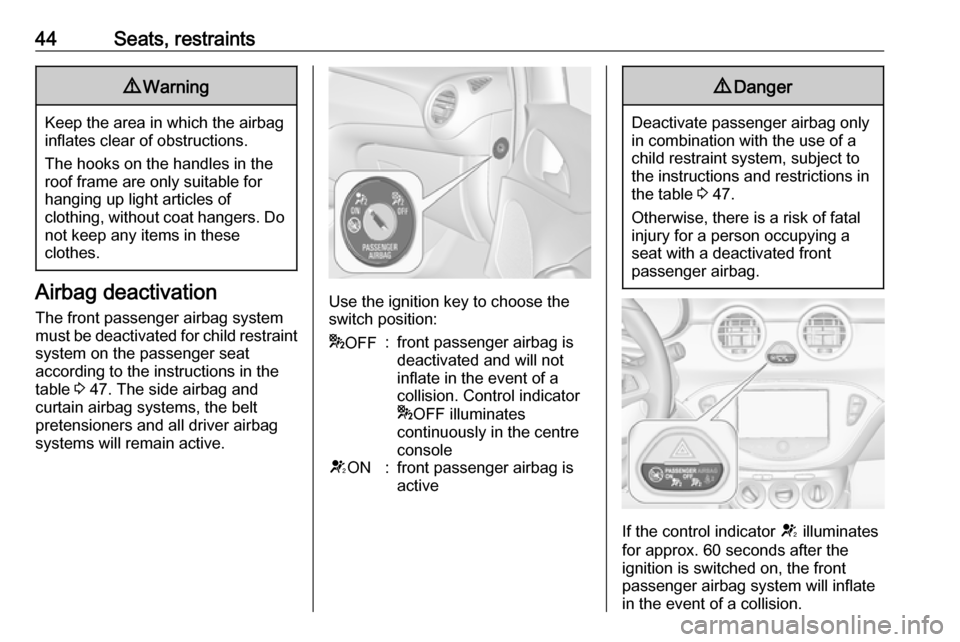
systems will remain active.Use the ignition key to choose the
switch position:
* OFF:front passenger airbag is
deactivated and will not
inflate in the event of a
collision. Control indicator
* OFF illuminates
continuously in the centre consoleV ON:front passenger airbag is
active9 Danger
Deactivate passenger airbag only
in combination with the use of a
child restraint system, subject to
the instructions and restrictions in
the table 3 47.
Otherwise, there is a risk of fatal
injury for a person occupying a
seat with a deactivated front
passenger airbag.
If the control indicator V illuminates
for approx. 60 seconds after the
ignition is switched on, the front
passenger airbag system will inflate
in the event of a collision.
Page 48 of 237

46Seats, restraintsSuitable are restraint systems that
comply with valid UN ECE
regulations. Check local laws and
regulations for mandatory use of child restraint systems.
Ensure that the child restraint system to be installed is compatible with the
vehicle type.
Ensure that the mounting location of
the child restraint system within the
vehicle is correct, see following
tables.
Allow children to enter and exit the
vehicle only on the side facing away
from the traffic.
When the child restraint system is not in use, secure the seat with a seat beltor remove it from the vehicle.
Notice
Do not affix anything on the child
restraint systems and do not cover
them with any other materials.
A child restraint system which has
been subjected to stress in an
accident must be replaced.
Page 50 of 237

48Seats, restraints1:if the child restraint system is being secured using a three-point seat belt, adjust seat backrest inclination to a vertical
position to ensure that the belt is tight on the buckle side. Move seat height adjustment in the uppermost position.2:remove rear head restraint when using child restraint systems in this group 3 32*:move the respective front seat ahead of the child restraint system to one of the foremost adjustment positions**:move the front passenger seat to the rearmost adjustment position. Move seat height adjustment to the uppermost
position and the headrest to the lowest position. Adjust seat backrest inclination as far as necessary to a verticalposition to ensure that vehicle seat belt runs forwards from the upper anchorage pointU:universal suitability in conjunction with three-point seat beltX:no child restraint system permitted in this weight class
Permissible options for fitting an ISOFIX child restraint system
Weight classSize classFixtureOn front passenger seatOn rear seatsGroup 0: up to 10 kg
or approx. 10 monthsEISO/R1XIL *Group 0+: up to 13 kg
or approx. 2 yearsEISO/R1XIL *DISO/R2XXCISO/R3XXGroup I: 9 to 18 kg
or approx. 8 months to 4 yearsDISO/R2XXCISO/R3XXBISO/F2XIL, IUF**B1ISO/F2XXIL, IUF**AISO/F3XIL, IUF**
Page 64 of 237

62Storage
Push the release lever up and hold.
Lift the system slightly and push it into the bumper until it engages.
Release lever must return to original
position.
9 Warning
If the system cannot be correctly
engaged, please seek the
assistance of a workshop.
Load compartment
The rear seat backrest is divided into
two parts. Both parts can be folded
down separately.
Load compartment extension
Remove the load compartment cover
if necessary.
Press the catch and push down the
head restraint.
Insert seat belt latch plate into side
holder to protect the belt against
damage.
Pull the strap on one or both
backrests and fold them down onto the seat cushion.
To fold up, raise the backrests into
upright position and let them engage
audibly.
The backrests are properly engaged
when the red marks on both release
straps are not visible.
9 Warning
When folding up, ensure that
backrests are securely locked in
position before driving. Failure to
Page 71 of 237

Instruments and controls69Instruments and
controlsControls ....................................... 70
Steering wheel adjustment ........70
Steering wheel controls .............70
Heated steering wheel ...............70
Horn ........................................... 71
Windscreen wiper/washer .........71
Rear window wiper/washer .......73
Outside temperature ..................73
Clock ......................................... 74
Power outlets ............................. 76
Cigarette lighter ......................... 76
Ashtrays .................................... 77
Warning lights, gauges and indi‐ cators ........................................... 77
Instrument cluster ......................77
Speedometer ............................. 77
Odometer .................................. 77
Trip odometer ............................ 77
Tachometer ............................... 78
Fuel gauge ................................ 78
Fuel selector .............................. 78
Engine coolant temperature gauge ....................................... 79
Service display .......................... 79Control indicators ......................80
Turn signal ................................. 82
Seat belt reminder .....................82
Airbag and belt tensioners .........83
Airbag deactivation ....................83
Charging system .......................83
Malfunction indicator light ..........84
Service vehicle soon .................84
Brake and clutch system ...........84
Operate pedal ............................ 84
Antilock brake system (ABS) .....85
Upshift ....................................... 85
Power steering .......................... 85
Ultrasonic parking assist ...........85
Electronic Stability Control off ...85
Electronic Stability Control and Traction Control system ...........85
Tyre pressure monitoring system ...................................... 86
Engine oil pressure ....................86
Low fuel ..................................... 86
Immobiliser ................................ 87
Exterior light .............................. 87
High beam ................................. 87
Rear fog light ............................. 87
Cruise control ............................ 87
Door open .................................. 87
Information displays .....................87
Driver Information Centre ..........87Colour-Info-Display ....................92
Graphic-Info-Display ..................93
Vehicle messages ........................94
Warning chimes .........................96
Battery voltage .......................... 97
Vehicle personalisation ................97
OnStar® system ........................101
Page 84 of 237
82Instruments and controlsControl indicators in the centre
console
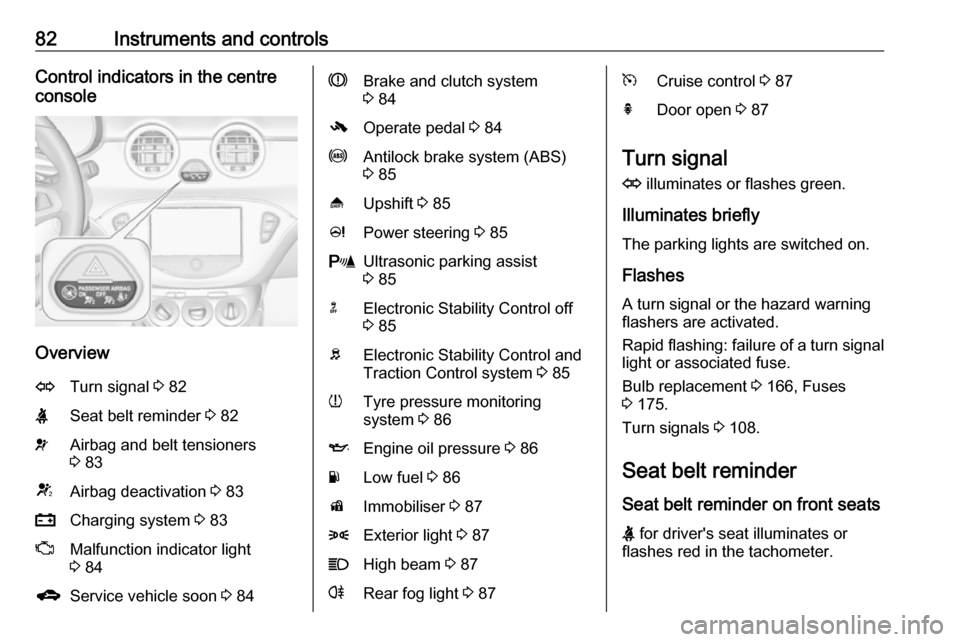
Overview
OTurn signal 3 82XSeat belt reminder 3 82vAirbag and belt tensioners
3 83VAirbag deactivation 3 83pCharging system 3 83ZMalfunction indicator light
3 84gService vehicle soon 3 84RBrake and clutch system
3 84-Operate pedal 3 84uAntilock brake system (ABS)
3 85[Upshift 3 85cPower steering 3 85rUltrasonic parking assist
3 85nElectronic Stability Control off
3 85bElectronic Stability Control and
Traction Control system 3 85wTyre pressure monitoring
system 3 86IEngine oil pressure 3 86YLow fuel 3 86dImmobiliser 3 878Exterior light 3 87CHigh beam 3 87rRear fog light 3 87mCruise control 3 87hDoor open 3 87
Turn signal
O illuminates or flashes green.
Illuminates briefly
The parking lights are switched on.
Flashes
A turn signal or the hazard warning flashers are activated.
Rapid flashing: failure of a turn signal light or associated fuse.
Bulb replacement 3 166, Fuses
3 175.
Turn signals 3 108.
Seat belt reminder
Seat belt reminder on front seats
X for driver's seat illuminates or
flashes red in the tachometer.
Page 85 of 237
Instruments and controls83k for front passenger seat illuminates
or flashes red in the centre console,
when the seat is occupied.
Illuminates
After the ignition has been switched on until the seat belt has been
fastened.
Flashes
After having started the engine for a
maximum of 100 seconds until the
seat belt has been fastened.
Fastening the seat belt 3 38.
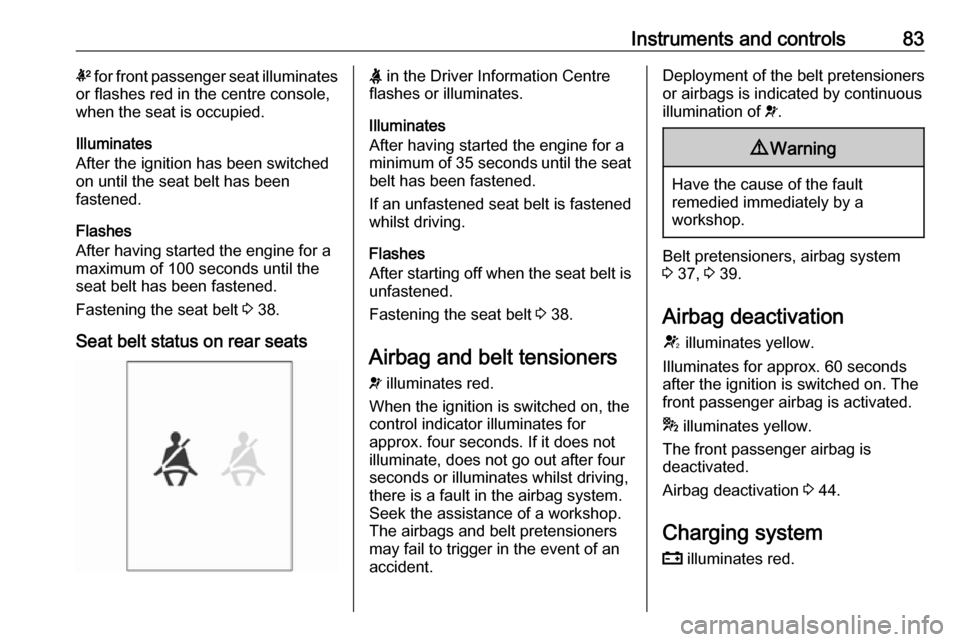
Seat belt status on rear seatsX in the Driver Information Centre
flashes or illuminates.
Illuminates
After having started the engine for a
minimum of 35 seconds until the seat
belt has been fastened.
If an unfastened seat belt is fastened
whilst driving.
Flashes
After starting off when the seat belt is unfastened.
Fastening the seat belt 3 38.
Airbag and belt tensioners
v illuminates red.
When the ignition is switched on, the control indicator illuminates for
approx. four seconds. If it does not
illuminate, does not go out after four
seconds or illuminates whilst driving,
there is a fault in the airbag system.
Seek the assistance of a workshop.
The airbags and belt pretensioners
may fail to trigger in the event of an
accident.Deployment of the belt pretensioners
or airbags is indicated by continuous
illumination of v.9 Warning
Have the cause of the fault
remedied immediately by a
workshop.
Belt pretensioners, airbag system
3 37, 3 39.
Airbag deactivation
V illuminates yellow.
Illuminates for approx. 60 seconds
after the ignition is switched on. The
front passenger airbag is activated.
* illuminates yellow.
The front passenger airbag is
deactivated.
Airbag deactivation 3 44.
Charging system p illuminates red.
Page 98 of 237
96Instruments and controlsNo.Vehicle message76Service side blind spot alert
system79Top up engine oil82Change engine oil soon84Engine power reduced89Service vehicle soon95Service airbag128Bonnet open134Parking assist fault, clean
bumper136Service parking assist174Low vehicle battery258Parking assist offVehicle messages on the
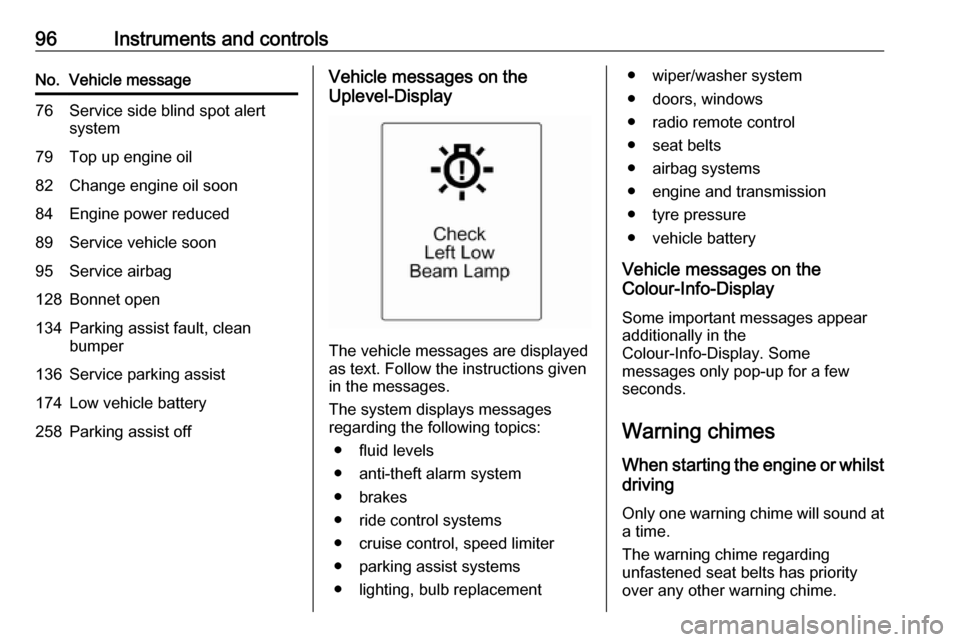
Uplevel-Display
The vehicle messages are displayed
as text. Follow the instructions given
in the messages.
The system displays messages
regarding the following topics:
● fluid levels
● anti-theft alarm system
● brakes
● ride control systems
● cruise control, speed limiter
● parking assist systems
● lighting, bulb replacement
● wiper/washer system
● doors, windows
● radio remote control
● seat belts
● airbag systems
● engine and transmission
● tyre pressure
● vehicle battery
Vehicle messages on the
Colour-Info-Display
Some important messages appear
additionally in the
Colour-Info-Display. Some
messages only pop-up for a few
seconds.
Warning chimes When starting the engine or whilstdriving
Only one warning chime will sound at a time.
The warning chime regarding
unfastened seat belts has priority
over any other warning chime.
Page 99 of 237

Instruments and controls97● If seat belt is not fastened.
● If a door or the tailgate is not fully
closed when starting off.
● If a certain speed is exceeded with parking brake applied.
● If a programmed speed is exceeded.
● If a warning message appears in the Driver Information Centre orInfo-Display.
● If the parking assist detects an object.
● If the reverse gear is engaged and the rear end carrier
extended.
When the vehicle is parked and/or the driver's door is opened
● With exterior lights on.
During an Autostop ● If the driver's door is opened.
Battery voltage
Midlevel-DisplayWhen the vehicle battery voltage is
running low, a warning code 174 will
appear in the Driver Information
Centre.
Uplevel-Display
When the vehicle battery voltage is running low, a warning message will
appear in the Driver Information
Centre.
1. Switch off immediately any electrical consumers which are
not required for a safe drive, e.g.
seat heating, heated rear window or other main consumers.
2. Charge the vehicle battery by driving continuously for a while or
by using a charging device.
The warning message or warning
code will disappear after the engine
has been started twice consecutively
without a voltage drop.
If the vehicle battery cannot be
recharged, have the cause of the fault
remedied by a workshop.Vehicle personalisation
The vehicle's behaviour can be
personalised via changing the
settings in the Info-Display.
Some of the personal settings for
different drivers can be memorised
individually for each vehicle key.
Memorised settings 3 21.
Depending on vehicle equipment and
country-specific regulations some of
the functions described below might
not be available.
Some functions are only displayed or
active when the engine is running.
Personal settings Graphic-Info-Display
Press CONFIG for the Settings menu.
Turn the MENU-TUNE knob to move
to the desired setup menu, then press
MENU-TUNE .
Page 104 of 237

102Instruments and controlsNotice
Depending on the equipment, the
OnStar buttons can also be
integrated in the rear view mirror.
Privacy button
Press and hold j until an audio
message is heard to activate or
deactivate the transmission of the
vehicle location.
Press j to answer a call or to end a
call to an OnStar advisor.
Press j to access the Wi-Fi settings.
OnStar button
Press Z to establish a connection to
an OnStar advisor.
SOS button
Press [ to establish a priority
emergency connection to a specially
trained emergency advisor.
Status light
Green: The system is ready.
Green flashing: The system is on a
call.
Red: A problem arose.
Off: System is off.Red / green flashing for a short period of time: Transmission of the vehicle
location has been deactivated.
OnStar services
OnStar emergency services
OnStar emergency provides a service with specially trained emergency
advisors for contact, assistance and
information during an emergency.
In the case of an emergency situation
including vehicle breakdown, a flat
tyre or empty fuel tank, press [ and
talk to the advisor. The advisor then
contacts emergency or assistance
service providers and directs them to
your vehicle.
In the case of an accident with
activation of airbags or belt
tensioners, an automatic emergency
call is established. The advisor is
immediately connected to your
vehicle to see whether help is
needed.
OnStar Wi-Fi hotspot
The Wi-Fi hotspot of the vehicle
provides internet connectivity through
the 4G/LTE mobile network.Notice
The Wi-Fi hotspot functionality is not available for all markets.
Up to seven devices may be
connected.
To connect a mobile device with the
OnStar Wi-Fi hotspot:
1. Press j and then select Wi-Fi
settings on the Info-Display. The
settings displayed include the Wi-
Fi hotspot name (SSID),
password and connection type.
2. Start a Wi-Fi network search on your mobile device.
3. Select your vehicle hotspot (SSID) when listed.
4. When prompted, enter the password on your mobile device.
Notice
To change the SSID or password,
select Z and talk to an OnStar
advisor or logon to your account.
To switch off the Wi-Fi hotspot
functionality, press Z to call an
OnStar advisor.