door lock VAUXHALL ADAM 2017 User Guide
[x] Cancel search | Manufacturer: VAUXHALL, Model Year: 2017, Model line: ADAM, Model: VAUXHALL ADAM 2017Pages: 241, PDF Size: 7.33 MB
Page 72 of 241

70Instruments and controlsInstruments and
controlsControls ....................................... 71
Steering wheel adjustment ........71
Steering wheel controls .............71
Heated steering wheel ...............71
Horn ........................................... 72
Windscreen wiper/washer .........72
Rear window wiper/washer .......74
Outside temperature ..................74
Clock ......................................... 75
Power outlets ............................. 77
Inductive charging .....................77
Cigarette lighter ......................... 78
Ashtrays .................................... 78
Warning lights, gauges and indi‐ cators ........................................... 79
Instrument cluster ......................79
Speedometer ............................. 79
Odometer .................................. 79
Trip odometer ............................ 79
Tachometer ............................... 79
Fuel gauge ................................ 80
Fuel selector .............................. 80
Engine coolant temperature gauge ....................................... 81Service display.......................... 81
Control indicators ......................82
Turn signal ................................. 84
Seat belt reminder .....................84
Airbag and belt tensioners .........85
Airbag deactivation ....................85
Charging system .......................85
Malfunction indicator light ..........86
Service vehicle soon .................86
Brake and clutch system ...........86
Operate pedal ............................ 86
Antilock brake system (ABS) .....87
Upshift ....................................... 87
Power steering .......................... 87
Ultrasonic parking assist ...........87
Electronic Stability Control off ...87
Electronic Stability Control and Traction Control system ...........87
Tyre pressure monitoring system ...................................... 88
Engine oil pressure ....................88
Low fuel ..................................... 88
Immobiliser ................................ 89
Exterior light .............................. 89
High beam ................................. 89
Rear fog light ............................. 89
Cruise control ............................ 89
Door open .................................. 89
Information displays .....................89
Driver Information Centre ..........89Colour-Info-Display ....................94
Graphic-Info-Display ..................95
Vehicle messages ........................96
Warning chimes .........................98
Battery voltage .......................... 98
Vehicle personalisation ................99
Telematics service .....................102
OnStar ..................................... 102
Page 86 of 241
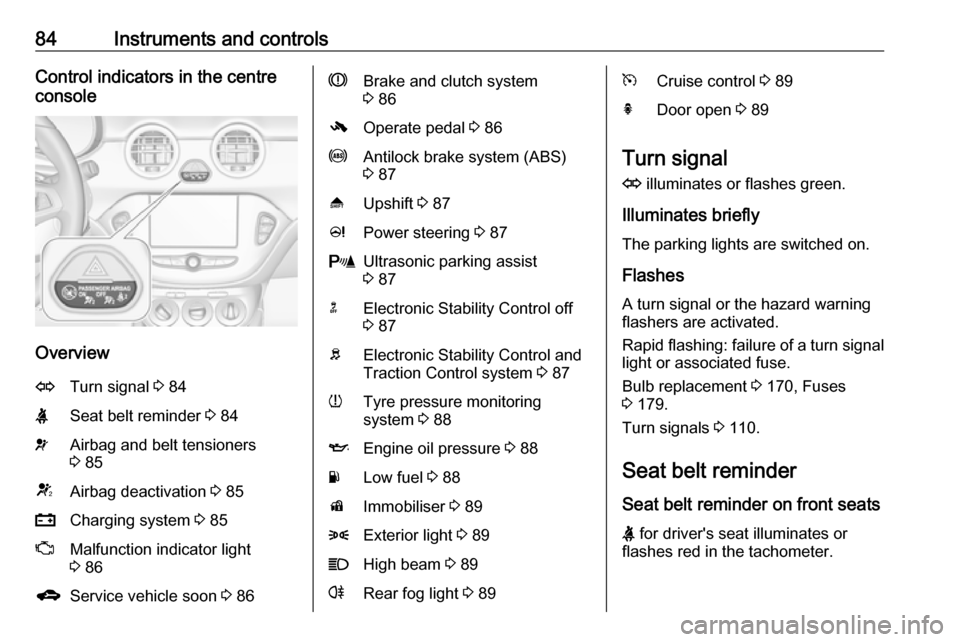
84Instruments and controlsControl indicators in the centre
console
Overview
OTurn signal 3 84XSeat belt reminder 3 84vAirbag and belt tensioners
3 85VAirbag deactivation 3 85pCharging system 3 85ZMalfunction indicator light
3 86gService vehicle soon 3 86RBrake and clutch system
3 86-Operate pedal 3 86uAntilock brake system (ABS)
3 87[Upshift 3 87cPower steering 3 87rUltrasonic parking assist
3 87nElectronic Stability Control off
3 87bElectronic Stability Control and
Traction Control system 3 87wTyre pressure monitoring
system 3 88IEngine oil pressure 3 88YLow fuel 3 88dImmobiliser 3 898Exterior light 3 89CHigh beam 3 89rRear fog light 3 89mCruise control 3 89hDoor open 3 89
Turn signal
O illuminates or flashes green.
Illuminates briefly
The parking lights are switched on.
Flashes
A turn signal or the hazard warning flashers are activated.
Rapid flashing: failure of a turn signal light or associated fuse.
Bulb replacement 3 170, Fuses
3 179.
Turn signals 3 110.
Seat belt reminder
Seat belt reminder on front seats
X for driver's seat illuminates or
flashes red in the tachometer.
Page 102 of 241

100Instruments and controlsAir conditioning mode: Controls
the state of the cooling
compressor when the vehicle is
started. Last setting
(recommended) or at vehicle
start is either always ON or
always OFF.
Auto rear demist : Activates
automatically rear heated
window.
● Comfort settings
Chime volume : Changes the
volume of warning chimes.
Personalization by driver :
Activates or deactivates the
personalisation function.
Rear auto wipe in reverse :
Activates or deactivates
automatic switching on of the
rear window wiper when reverse gear is engaged.
● Park assist / Collision detection
Park assist : Activates or
deactivates the ultrasonic
sensors.Side blind zone alert : Changes
the settings for the side blind spot
alert system.
● Exterior ambient lighting
Exterior lighting by unlocking :
Activates or deactivates the entry lighting.
Duration upon exit of vehicle :
Activates or deactivates and
changes the duration of exit
lighting.
● Power door locks
Auto door lock : Activates or
deactivates the automatic door locking function after switching
on ignition.
Stop door lock if door open :
Activates or deactivates the door
locking function while a door is open.
Delayed door lock : Activates or
deactivates the delayed door
locking function. This menu
option is displayed with Stop door
lock if door open deactivated.
Central locking system 3 22.● Remote locking, unlocking,
starting
Remote unlock feedback :
Activates or deactivates the
hazard warning flasher feedback
whilst unlocking.
Passive door unlock : Changes
the configuration to unlock only
the driver's door or the whole
vehicle whilst unlocking.
Auto relock doors : Activates or
deactivates the automatic relock
function after unlocking without
opening the vehicle.
● Restore factory settings :
Resets all settings to the default settings.
Personal settings Colour-Info-Display
When audio is switched on, press ;
on the control panel.
Page 103 of 241
Instruments and controls101
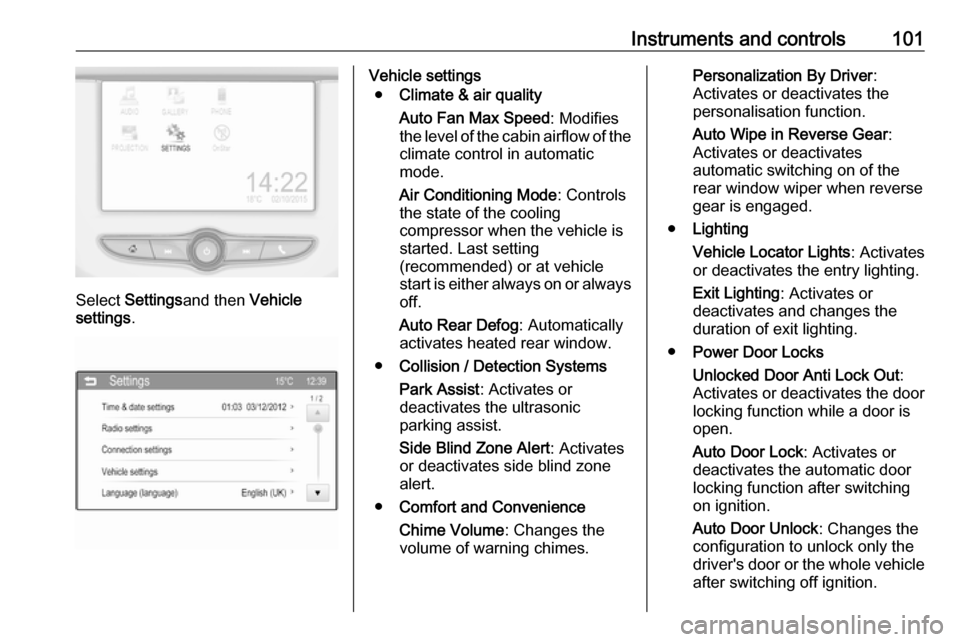
Select Settings and then Vehicle
settings .
Vehicle settings
● Climate & air quality
Auto Fan Max Speed : Modifies
the level of the cabin airflow of the climate control in automatic
mode.
Air Conditioning Mode : Controls
the state of the cooling
compressor when the vehicle is
started. Last setting
(recommended) or at vehicle
start is either always on or always
off.
Auto Rear Defog : Automatically
activates heated rear window.
● Collision / Detection Systems
Park Assist : Activates or
deactivates the ultrasonic
parking assist.
Side Blind Zone Alert : Activates
or deactivates side blind zone
alert.
● Comfort and Convenience
Chime Volume : Changes the
volume of warning chimes.Personalization By Driver :
Activates or deactivates the
personalisation function.
Auto Wipe in Reverse Gear :
Activates or deactivates
automatic switching on of the
rear window wiper when reverse gear is engaged.
● Lighting
Vehicle Locator Lights : Activates
or deactivates the entry lighting.
Exit Lighting : Activates or
deactivates and changes the
duration of exit lighting.
● Power Door Locks
Unlocked Door Anti Lock Out :
Activates or deactivates the door
locking function while a door is open.
Auto Door Lock : Activates or
deactivates the automatic door
locking function after switching on ignition.
Auto Door Unlock : Changes the
configuration to unlock only the driver's door or the whole vehicle after switching off ignition.
Page 104 of 241

102Instruments and controlsDelayed Door Lock: Activates or
deactivates the delayed door
locking function. This feature
delays the actual locking of the
doors until all doors are closed.
● Remote Lock, Unlock, Start
Remote Unlock Light Feedback :
Activates or deactivates the
hazard warning flasher feedback
whilst unlocking.
Remote Door Unlock : Changes
the configuration to unlock only
the driver's door or the whole
vehicle whilst unlocking.
Relock Remotely Unlocked
Doors : Activates or deactivates
the automatic relock function
after unlocking without opening
the vehicle.Telematics service
OnStar
OnStar is a personal connectivity and service assistant with integrated
Wi-Fi hotspot. The OnStar service is
available 24 hours a day, seven days
a week.
Notice
OnStar is not available for all
markets. For further information,
contact your workshop.
Notice
In order to be available and
operational, OnStar needs a valid
OnStar subscription, functioning
vehicle electrics, mobile service and
GPS satellite link.
To activate the OnStar services and
set up an account, press Z and speak
with an advisor.Depending on the equipment of the vehicle, the following services areavailable:
● Emergency services and support
in the case of a vehicle
breakdown
● Wi-Fi hotspot
● Smartphone application
● Remote control, e.g. location of the vehicle, activation of horn andlights, control of central locking
system
● Stolen vehicle assistance
● Vehicle diagnostics
● Destination download
Notice
The OnStar module of the vehicle is
deactivated after ten days without an
ignition cycle. Functions requiring a
data connection will be available
again after switching on the ignition.
Page 115 of 241

Lighting113Operate button with ignition switched
on:m one brief
press:on or offT repeated
brief presses:dimming
stepwiseT long press:dimming
continuously
The selected intensity remains the
next time the ignition is switched on.
Starlight comes on automatically
when switching off ignition and
extinguishes after opening a door.
Pressing m after switching off ignition;
starlight remains on for 60 minutes.
Lighting features
Entry lighting
Welcome lighting The following lights are switched on
for a short time by unlocking the
vehicle with the radio remote control:
● headlights
● tail lights
● number plate lights
● instrument panel light
● interior lights
Some functions are only operable
when it is dark outside to facilitate
locating the vehicle.
The lighting switches off immediately
when the ignition key is turned to
position 1 3 126.
Activation or deactivation of this
function can be changed in the
Info-Display.
Vehicle personalisation 3 99.
The settings can be saved for the key
being used 3 21.The following lights will additionally
switch on when the driver's door is
opened:
● illumination of some switches
● Driver Information Centre
● ambient light
● starlight panel
Exit lighting The following lights switch on if the
key is removed from the ignition
switch:
● interior lights
● instrument panel light (only when
it is dark)
● ambient light
● starlight panel
They will switch off automatically after
a delay and will be activated again if
the driver's door is opened.
Path lighting
Headlights, tail lights and number plate lights illuminate the surrounding area for an adjustable time after
leaving the vehicle.
Page 128 of 241
126Driving and operatingUse only floor mats, which fit properly
and are fixed by the retainers on the
driver side.
Steering
If power steering assist is lost
because the engine stops or due to a system malfunction, the vehicle can
be steered but may require increased
effort.
Control indicator c 3 87.Starting and operating
New vehicle running-in Do not brake unnecessarily hard for
the first few journeys.
During the first drive, smoke may
occur because of wax and oil
evaporating off the exhaust system. Park the vehicle in the open for a
while after the first drive and avoid
inhaling the fumes.
During the running-in period fuel and engine oil consumption may be
higher.
Autostop may be inhibited to allow for
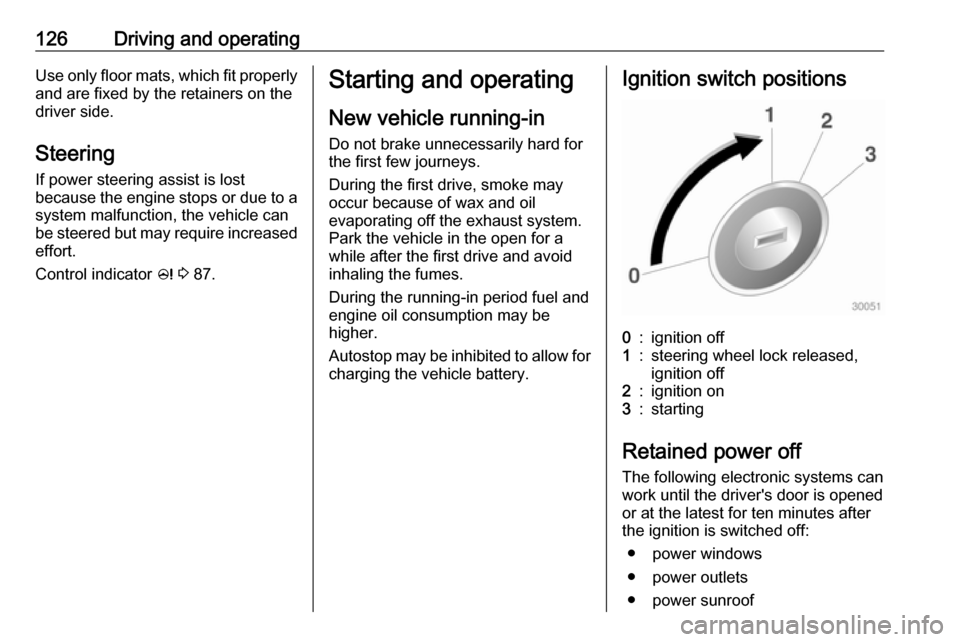
charging the vehicle battery.Ignition switch positions0:ignition off1:steering wheel lock released,
ignition off2:ignition on3:starting
Retained power off
The following electronic systems can
work until the driver's door is opened
or at the latest for ten minutes after
the ignition is switched off:
● power windows
● power outlets
● power sunroof
Page 132 of 241

130Driving and operatingIf one of the following conditions
occurs during an Autostop, the
engine will be restarted automatically by the stop-start system:
● The stop-start system is manually deactivated.
● The bonnet is opened.
● The driver's seat belt is unfastened and the driver's door
is opened.
● The engine temperature is too low.
● The charging level of the vehicle battery is below a defined level.
● The brake vacuum is not sufficient.
● The vehicle is driven at least at walking speed.
● The climate control system requests an engine start.
● The air conditioning is manually switched on.
If the bonnet is not fully closed, a
warning message is displayed in the
Driver Information Centre.If an electrical accessory, e.g. a
portable CD player, is connected to
the power outlet, a brief power drop
during restart might be noticeable.
Parking9 Warning
● Do not park the vehicle on an
easily ignitable surface. The
high temperature of the
exhaust system could ignite the
surface.
● Always apply the parking brake. Activate the parking
brake without pressing the
release button. Apply as firmly
as possible on a downhill slope
or uphill slope. Depress brake
pedal at the same time to
reduce operating force.
● Switch off the engine.
● If the vehicle is on a level surface or uphill slope, engage
first gear before removing the ignition key. On an uphill slope,
turn the front wheels away from
the kerb.
If the vehicle is on a downhill
slope, engage reverse gear
before removing the ignition
key. Turn the front wheels
towards the kerb.
● Close the windows and the sunroof.
● Remove the ignition key from the ignition switch. Turn the
steering wheel until the
steering wheel lock is felt to
engage.
For vehicles with manual
transmission automated, the key can only be removed from
the ignition switch when the
parking brake is applied.
● Lock the vehicle.
● Activate the anti-theft alarm system.
● The engine cooling fans may run
after the engine has been
switched off 3 164.
Page 134 of 241
132Driving and operatingManual transmission
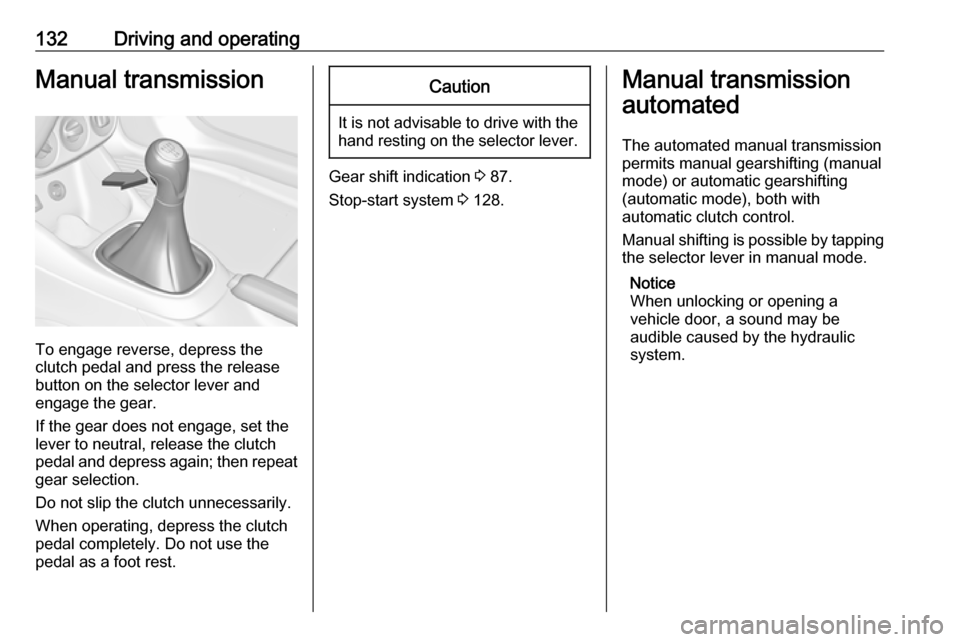
To engage reverse, depress the
clutch pedal and press the release button on the selector lever and
engage the gear.
If the gear does not engage, set the
lever to neutral, release the clutch
pedal and depress again; then repeat
gear selection.
Do not slip the clutch unnecessarily.
When operating, depress the clutch
pedal completely. Do not use the
pedal as a foot rest.
Caution
It is not advisable to drive with the hand resting on the selector lever.
Gear shift indication 3 87.
Stop-start system 3 128.
Manual transmission
automated
The automated manual transmission permits manual gearshifting (manual
mode) or automatic gearshifting
(automatic mode), both with
automatic clutch control.
Manual shifting is possible by tapping the selector lever in manual mode.
Notice
When unlocking or opening a
vehicle door, a sound may be
audible caused by the hydraulic
system.
Page 165 of 241

Vehicle care163Caution
When transporting the vehicle on
a train or on a recovery vehicle, the
mud flaps might be damaged.
Vehicle storage
Storage for a long period of time
If the vehicle is to be stored for several months:
● Wash and wax the vehicle.
● Have the wax in the engine compartment and underbody
checked.
● Clean and preserve the rubber seals.
● Fill up fuel tank completely.
● Change the engine oil.
● Drain the washer fluid reservoir.
● Check the coolant antifreeze and
corrosion protection.
● Adjust tyre pressure to the value specified for full load.
● Park the vehicle in a dry, wellventilated place. Engage first or
reverse gear. Prevent the vehicle from rolling.
● Do not apply the parking brake.
● Open the bonnet, close all doors and lock the vehicle.
● Disconnect the clamp from the negative terminal of the vehicle
battery. Beware that all systems are not functional, e.g. anti-theft
alarm system.
Putting back into operation When the vehicle is to be put back into
operation:
● Connect the clamp to the negative terminal of the vehicle
battery. Activate the electronics
of the power windows.
● Check tyre pressure.
● Fill up the washer fluid reservoir.
● Check the engine oil level.
● Check the coolant level.
● Fit the number plate if necessary.End-of-life vehicle recovery
Information on end-of-life vehicle
recovery centres and the recycling of
end-of-life vehicles is available on our
website. Only entrust this work to an
authorised recycling centre.
Gas vehicles must be recycled by a
service centre authorised for gas
vehicles.