manual transmission VAUXHALL ADAM 2017 User Guide
[x] Cancel search | Manufacturer: VAUXHALL, Model Year: 2017, Model line: ADAM, Model: VAUXHALL ADAM 2017Pages: 241, PDF Size: 7.33 MB
Page 136 of 241

134Driving and operatingAlways move the selector lever in the
appropriate direction as far as it will
go. Upon release, it automatically
returns to the centre position.
Notice
Do not hold the selector lever in an
intermediate position. Not fully
engaging a gear may lead to
malfunction and the error code 81
may be displayed in the Driver
Information Centre.
Return the selector lever to the
centre position. After a short while N
will be displayed in the Driver
Information Centre and the system
will operate normally again.
Vehicle messages 3 96.N:neutral positionD/M:switch between automatic (D)
and manual (M) shift mode.
The transmission display
shows either D or M with the
selected gear<:upshifting in manual mode]:downshifting in manual modeR:reverse gear. Engage only
when vehicle is stationaryIf selector lever is moved from R to the
left, D is directly engaged.
If selector lever is moved from D to
< or ], the manual mode M is
selected and the transmission shifts.
Starting off Depress the brake pedal and movethe selector lever to D/M or R. If D is
selected, transmission is in automatic
mode and first gear is engaged. If R
is selected, reverse gear is engaged.
The vehicle starts to move when the
brake is released.
To start-off without depressing the
foot brake, accelerate immediately
after engaging a gear as long as D or
R flashes.
If neither the accelerator nor the
brake pedal are depressed, no gear
is engaged and D or R flashes for a
brief time in the display.
Stopping the vehicle In D, first gear is engaged and the
clutch is released when the vehicle is
stopped. In R, reverse gear remains
engaged.Engine braking
Automatic mode
When driving downhill, the manual
transmission automated does not
shift into higher gears until a fairly
high engine speed has been reached. It shifts down in good time when
braking.
Manual mode
To utilise the engine braking effect, select a lower gear in good time when
driving downhill. Changing into
manual mode is only possible while
the engine is running or during an
Autostop.
Rocking the vehicle Rocking the vehicle is only
permissible if the vehicle is stuck in
sand, mud or snow. Move the selector
lever between R and D in a repeat
pattern. Do not race the engine and
avoid sudden acceleration.
Page 137 of 241

Driving and operating135ParkingThe most recently engaged gear (see
transmission display) remains
engaged when switching off ignition. With N, no gear is engaged.
Therefore always apply the parking
brake when switching off ignition. If
parking brake is not applied, P flashes
in the transmission display and the
key cannot be removed from the
ignition switch. P stops flashing in the
transmission display as soon as the
parking brake is slightly applied.
When the ignition is switched off, the
transmission no longer responds to
movement of the selector lever.
Tyre pressure monitoring system
To start the sensor matching process of the tyre pressure monitoring
system, the selector lever must be
moved and held in position N for
five seconds. P illuminates in the
transmission display to indicate that
the sensor matching process can be
started.
Tyre pressure monitoring system
3 187.Manual mode
If a higher gear is selected when theengine speed is too low, or a lower
gear when the speed is too high, the
shift is not executed. This prevents
the engine from running at too low or too high an engine speed. A warning
message is displayed in the Driver
Information Centre. Vehicle
messages 3 96.
If engine speed is too low, the
transmission automatically shifts to a
lower gear.
If engine speed is too high, the
transmission only switches to a higher gear via kickdown.
When + or - is selected in automatic
mode, the transmission switches to
manual mode and shifts accordingly.
Gear shift indication
The symbol R, with a number
alongside it, is indicated when
gearshifting is recommended for fuel
saving reasons.
Shift indication appears only in
manual mode.Electronic driving
programmes
● Following a cold start, the operating temperature
programme increases engine
speed to quickly bring the
catalytic converter to the required
temperature.
● The adaptive programme tailors gearshifting to the driving
conditions, e.g. greater load or gradients.
Kickdown If the accelerator pedal is pressed
down completely in automatic mode, the transmission shifts to a lower gear
depending on engine speed.
Fault
To prevent damage to the manual transmission automated, the clutch is
engaged automatically at high clutch
temperatures.
Page 144 of 241
142Driving and operatingDriver assistance
systems9 Warning
Driver assistance systems are
developed to support the driver
and not to replace the driver's
attention.
The driver accepts full
responsibility when driving the
vehicle.
When using driver assistance
systems, always take care
regarding the current traffic
situation.
Cruise control
The cruise control can store and
maintain speeds of approx. 20 mph to maximum vehicle speed. Deviations
from the stored speeds may occur
when driving uphill or downhill.
For safety reasons the cruise control
cannot be activated until the brake
pedal has been operated once.
Activating in first gear is not possible.
Do not use the cruise control if it is not advisable to maintain a constant
speed.
On vehicles with manual transmission
automated cruise control can be
activated in automatic mode and
manual mode.
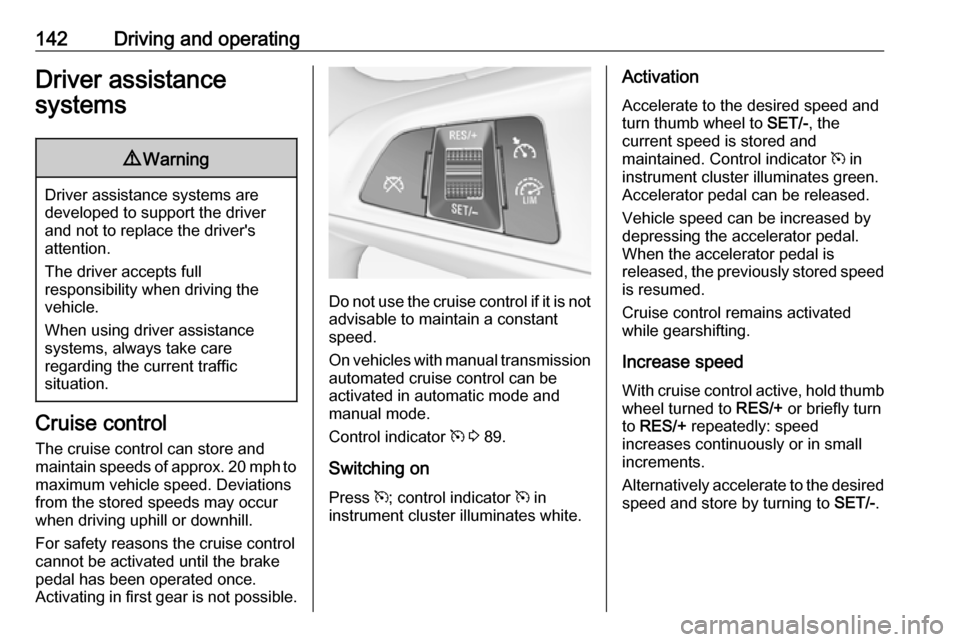
Control indicator m 3 89.
Switching on
Press m; control indicator m in
instrument cluster illuminates white.
Activation
Accelerate to the desired speed and
turn thumb wheel to SET/-, the
current speed is stored and
maintained. Control indicator m in
instrument cluster illuminates green.
Accelerator pedal can be released.
Vehicle speed can be increased by depressing the accelerator pedal.
When the accelerator pedal is
released, the previously stored speed
is resumed.
Cruise control remains activated
while gearshifting.
Increase speed
With cruise control active, hold thumb
wheel turned to RES/+ or briefly turn
to RES/+ repeatedly: speed
increases continuously or in small
increments.
Alternatively accelerate to the desired speed and store by turning to SET/-.
Page 191 of 241
Vehicle care189Each time the tyres are replaced, tyre
pressure monitoring system sensors
must be dismounted and serviced. For the screwed sensor; replace
valve core and sealing ring. For the
clipped sensor; replace complete
valve stem.
Vehicle loading status
Adjust tyre pressure to load condition according to the tyre information labelor tyre pressure chart 3 225, and
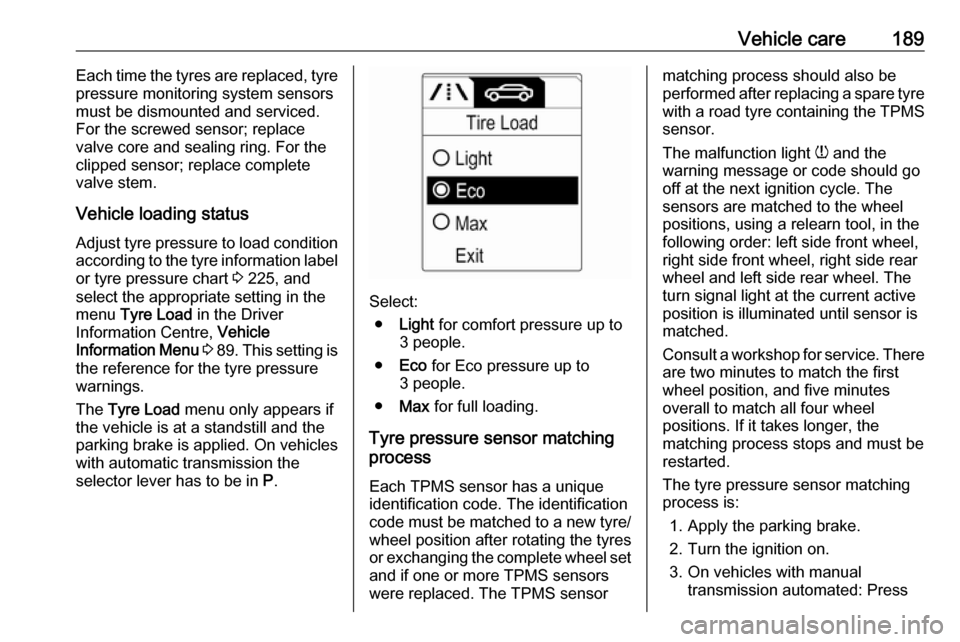
select the appropriate setting in the menu Tyre Load in the Driver
Information Centre, Vehicle
Information Menu 3 89 . This setting is
the reference for the tyre pressure
warnings.
The Tyre Load menu only appears if
the vehicle is at a standstill and the parking brake is applied. On vehicles
with automatic transmission the
selector lever has to be in P.
Select:
● Light for comfort pressure up to
3 people.
● Eco for Eco pressure up to
3 people.
● Max for full loading.
Tyre pressure sensor matching process
Each TPMS sensor has a unique
identification code. The identification
code must be matched to a new tyre/ wheel position after rotating the tyres
or exchanging the complete wheel set
and if one or more TPMS sensors
were replaced. The TPMS sensor
matching process should also be
performed after replacing a spare tyre with a road tyre containing the TPMS
sensor.
The malfunction light w and the
warning message or code should go off at the next ignition cycle. The
sensors are matched to the wheel
positions, using a relearn tool, in the following order: left side front wheel,
right side front wheel, right side rear
wheel and left side rear wheel. The
turn signal light at the current active
position is illuminated until sensor is
matched.
Consult a workshop for service. There
are two minutes to match the first
wheel position, and five minutes
overall to match all four wheel
positions. If it takes longer, the
matching process stops and must be
restarted.
The tyre pressure sensor matching
process is:
1. Apply the parking brake.
2. Turn the ignition on.
3. On vehicles with manual transmission automated: Press
Page 192 of 241

190Vehicle careand hold brake pedal. Move and
hold the selector lever for five
seconds in position N until P is
displayed in the Driver Information Centre. P indicates
that the sensor matching process
can be started.
On vehicles with manual
transmission: select neutral.
4. Use MENU on the turn signal
lever to select the Vehicle
Information Menu in the Driver
Information Centre.
5. Turn the adjuster wheel to scroll to
the tyre pressure menu.
6. Press SET/CLR to begin the
sensor matching process. A
message requesting acceptance
of the process should be
displayed.
7. Press SET/CLR again to confirm
the selection. The horn sounds
twice to indicate that the receiver
is in relearn mode.
8. Start with the left side front wheel.
9. Place the relearn tool against the tyre sidewall, near the valve stem.Then press the button to activatethe tyre pressure sensor. A horn
chirp confirms that the sensor
identification code has been
matched to this wheel position.
10. Proceed to the right side front wheel, and repeat the procedure
in Step 9.
11. Proceed to the right side rear wheel, and repeat the procedure
in Step 9.
12. Proceed to the left side rear wheel, and repeat the procedure
in Step 9. The horn sounds twice
to indicate that the sensor
identification code has been
matched to the left side rear
wheel, and the tyre pressure
sensor matching process is no
longer active.
13. Turn off the ignition.
14. Set all four tyres to the recommended air pressure level
as indicated on the tyre
information label.
15. Ensure the tyre loading status is set according to the selected
pressure 3 89.Tread depth
Check tread depth at regular
intervals.
Tyres should be replaced for safety
reasons at a tread depth of 2-3 mm (4 mm for winter tyres).
For safety reasons it is recommended
that the tread depth of the tyres on
one axle should not vary by more than 2 mm.
The legally permissible minimum
tread depth (1.6 mm) has been
reached when the tread has worn
down as far as one of the tread wear
Page 208 of 241
206Vehicle careVehicles with manual transmission
automated: the vehicle must only be
towed facing forwards with the front
axle raised off the ground.
Seek the assistance of a workshop. After towing, unscrew the towing eye.
Insert cap and engage in the front
bumper.
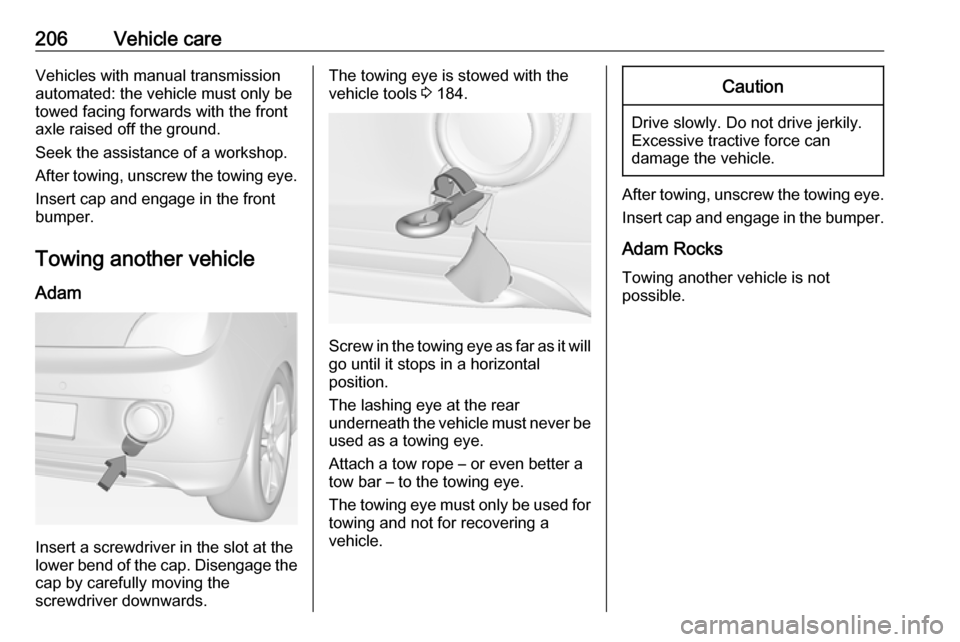
Towing another vehicle Adam
Insert a screwdriver in the slot at the
lower bend of the cap. Disengage the cap by carefully moving the
screwdriver downwards.
The towing eye is stowed with the
vehicle tools 3 184.
Screw in the towing eye as far as it will
go until it stops in a horizontal
position.
The lashing eye at the rear
underneath the vehicle must never be used as a towing eye.
Attach a tow rope – or even better a
tow bar – to the towing eye.
The towing eye must only be used for
towing and not for recovering a
vehicle.
Caution
Drive slowly. Do not drive jerkily.
Excessive tractive force can
damage the vehicle.
After towing, unscrew the towing eye.
Insert cap and engage in the bumper.
Adam Rocks
Towing another vehicle is not
possible.
Page 223 of 241
![VAUXHALL ADAM 2017 User Guide Technical data221PerformanceEngineB10XFLB10XFTB12XELB14XEL
B14XEL
LPG
B14XERB14NEH
Maximum speed [mph]Manual transmission112122103109109115130Manual transmission automated–––110–––](/img/38/19298/w960_19298-222.png "VAUXHALL ADAM 2017 User Guide Technical data221PerformanceEngineB10XFLB10XFTB12XELB14XEL
B14XEL
LPG
B14XERB14NEH
Maximum speed [mph]Manual transmission112122103109109115130Manual transmission automated–––110–––")
Technical data221PerformanceEngineB10XFLB10XFTB12XELB14XEL
B14XEL
LPG
B14XERB14NEH
Maximum speed [mph]Manual transmission112122103109109115130Manual transmission automated–––110–––
Page 224 of 241
![VAUXHALL ADAM 2017 User Guide 222Technical dataVehicle weight
Kerb weight, basic model without any optional equipmentEngineManual transmissionManual transmission automatedwithout/with air conditioning
[kg]B10XFL1141/1156–B10XFT1](/img/38/19298/w960_19298-223.png "VAUXHALL ADAM 2017 User Guide 222Technical dataVehicle weight
Kerb weight, basic model without any optional equipmentEngineManual transmissionManual transmission automatedwithout/with air conditioning
[kg]B10XFL1141/1156–B10XFT1")
222Technical dataVehicle weight
Kerb weight, basic model without any optional equipmentEngineManual transmissionManual transmission automatedwithout/with air conditioning
[kg]B10XFL1141/1156–B10XFT1141/1156–B12XEL1086/1101–B14XEL1120/11351120/1135B14XEL LPG1163/1178–B14XER1120/1135–B14NEH1163/1178–
Optional equipment and accessories increase the kerb weight.
Loading information 3 68.
Page 238 of 241

236Immobiliser ............................ 26, 89
Indicators ...................................... 79
Inductive charging ........................77
Information displays...................... 89
Instrument cluster ........................79
Instrument panel fuse box .........182
Instrument panel illumination .....178
Instrument panel illumination control .................................... 111
Instrument panel overview ........... 10
Interior care ............................... 209
Interior lighting ............................ 111
Interior lights ...................... 111, 178
Interior mirrors .............................. 28
Introduction .................................... 3
ISOFIX child restraint systems ....50
J Jump starting ............................. 203
K Key, memorised settings ..............21
Keys ............................................. 19
Keys, locks ................................... 19
L
Lashing eyes ............................... 66
Light switch ................................ 107
Load compartment ................24, 62
Load compartment cover .............64Loading information .....................68
Low fuel ....................................... 88
M Malfunction indicator light ............86
Manual anti-dazzle ......................28
Manual mode ............................. 135
Manual transmission .................. 132
Manual transmission automated 132
Memorised settings ......................21
Midlevel-Display ........................... 89
Mirror adjustment ........................... 8
Misted light covers .....................111
N
New vehicle running-in ..............126
Number plate light .....................177
O Object detection systems ...........145
Odometer ..................................... 79
Oil, engine .......................... 212, 216
OnStar ........................................ 102
Operate pedal ............................... 86
Outside temperature ....................74
Overrun cut-off ........................... 127
P Parking ................................ 18, 130
Parking assist ............................ 145
Parking brake ............................ 137Parking lights ............................. 110
Performance .............................. 221
Performing work ........................164
Pollen filter ................................. 123
Power outlets ............................... 77
Power steering.............................. 87
Power windows ............................ 29
Puncture ..................................... 196
R Radio Frequency Identification (RFID) ..................................... 232
Radio remote control ...................20
Rear carrier system ......................53
Rear floor storage cover ..............65
Rear fog light ............................... 89
Rear fog lights ........................... 110
Rear storage ................................. 63
Rear window wiper/washer .......... 74 Recommended fluids and lubricants ........................ 212, 216
Refuelling ................................... 158 Registered trademarks ...............231
Retained power off .....................126
Reversing lights .........................111
Ride control systems ..................138
Roof load ...................................... 68
Roof rack ..................................... 67
Page 239 of 241

237SSafety belts ................................... 37
Seat adjustment ....................... 7, 34 Seat belt ........................................ 8
Seat belt reminder .......................84
Seat belts ..................................... 37
Seat folding .................................. 35
Seat heating ................................. 36
Seat position ................................ 33
Selector lever ............................. 133
Service ....................................... 124
Service display ............................ 81
Service information ....................211
Service vehicle soon .................... 86
Side airbag system ......................43
Side blind spot alert ....................154
Sidelights .................................... 107
Side turn signal lights ................177
Software acknowledgement .......229
Spare wheel ............................... 198
Speed limiter............................... 143
Speedometer ............................... 79
Starting and operating ................126
Starting off ................................... 16
Starting the engine ............127, 133
Steering ...................................... 126
Steering wheel adjustment ......9, 71
Steering wheel controls ...............71
Stop-start system........................ 128
Storage ......................................... 51Storage compartments.................51
Sunroof ........................................ 31
Sun visors .................................... 30
Symbols ......................................... 4
T
Tachometer ................................. 79
Tail lights ................................... 174
Three-point seat belt .................... 38
Tools .......................................... 184
Top-tether fastening eyes ............50
Towing ........................................ 204
Towing another vehicle .............206
Towing the vehicle .....................204
Traction Control system ............. 138
Transmission ............................... 16
Transmission display .................133
Tread depth ............................... 190
Trip odometer .............................. 79
Turn and lane-change signals ...110
Turn signal ................................... 84
Tyre chains ................................ 191
Tyre designations ......................185
Tyre pressure ............................ 186
Tyre pressure monitoring system ............................... 88, 187
Tyre pressures ........................... 225
Tyre repair kit ............................. 192U
Ultrasonic parking assist ...... 87, 145
Upholstery .................................. 209
Uplevel-Display............................. 89
Upshift .......................................... 87
Using this manual ..........................3
V Vehicle battery ........................... 167
Vehicle checks............................ 164
Vehicle data ................................ 216
Vehicle data recording and privacy ..................................... 231
Vehicle dimensions .................... 223
Vehicle Identification Number ....214
Vehicle jack ................................ 184
Vehicle messages .......................96
Vehicle personalisation ...............99
Vehicle security ............................ 25
Vehicle specific data ......................3
Vehicle storage ........................... 163
Vehicle tools ............................... 184
Vehicle unlocking ........................... 6
Vehicle weight ........................... 222
Ventilation ................................... 115
W
Warning chimes ........................... 98
Warning lights ............................... 79
Warning triangle .......................... 66
Washer and wiper systems .........14