lights VAUXHALL ADAM 2018.5 Owner's Guide
[x] Cancel search | Manufacturer: VAUXHALL, Model Year: 2018.5, Model line: ADAM, Model: VAUXHALL ADAM 2018.5Pages: 245, PDF Size: 7.4 MB
Page 115 of 245
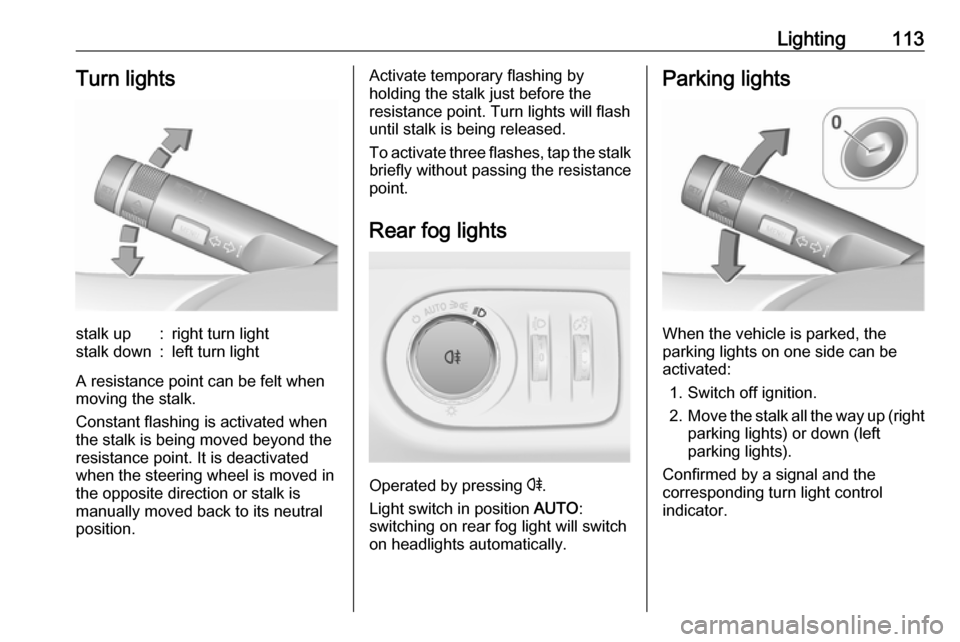
Lighting113Turn lightsstalk up:right turn lightstalk down:left turn light
A resistance point can be felt when
moving the stalk.
Constant flashing is activated when
the stalk is being moved beyond the
resistance point. It is deactivated
when the steering wheel is moved in
the opposite direction or stalk is
manually moved back to its neutral
position.
Activate temporary flashing by
holding the stalk just before the
resistance point. Turn lights will flash
until stalk is being released.
To activate three flashes, tap the stalk
briefly without passing the resistance
point.
Rear fog lights
Operated by pressing r
.
Light switch in position AUTO:
switching on rear fog light will switch
on headlights automatically.
Parking lights
When the vehicle is parked, the
parking lights on one side can be
activated:
1. Switch off ignition.
2. Move the stalk all the way up (right
parking lights) or down (left
parking lights).
Confirmed by a signal and the
corresponding turn light control
indicator.
Page 116 of 245
114LightingReversing lights
The reversing light comes on when
the ignition is on and reverse gear is
selected.
Misted light covers
The inside of the light housing may
mist up briefly in poor, wet and cold weather conditions, in heavy rain or
after washing. The mist disappears
quickly by itself. To help, switch on the headlights.Interior lighting
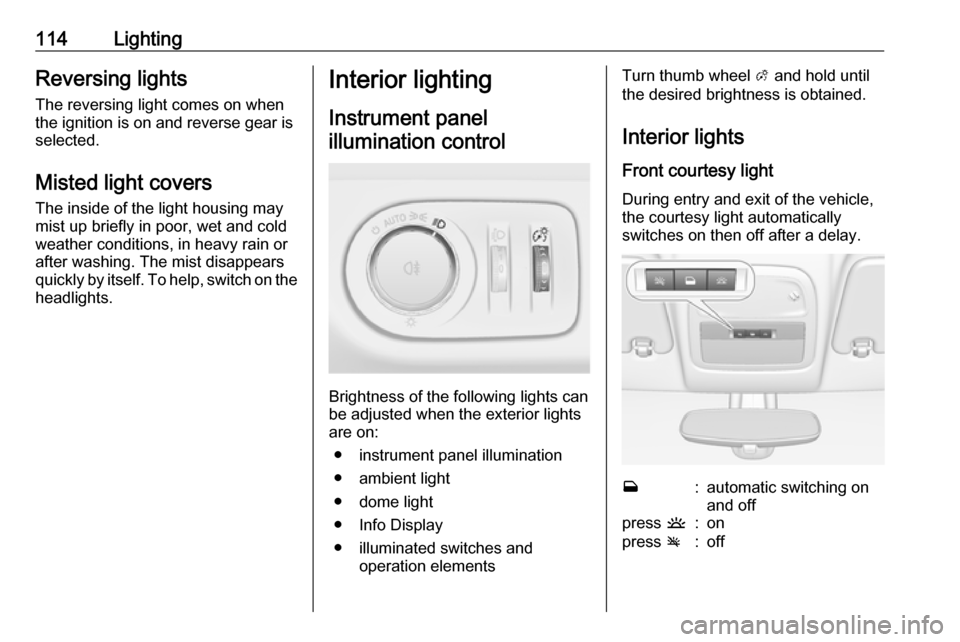
Instrument panel illumination control
Brightness of the following lights can
be adjusted when the exterior lights
are on:
● instrument panel illumination
● ambient light
● dome light
● Info Display
● illuminated switches and operation elements
Turn thumb wheel A and hold until
the desired brightness is obtained.
Interior lights Front courtesy light
During entry and exit of the vehicle,
the courtesy light automatically
switches on then off after a delay.w:automatic switching on
and offpress u:onpress v:off
Page 117 of 245
Lighting115Notice
In the event of an accident with
airbag deployment the courtesy
lights are turned on automatically.
Dome light
Spotlight incorporated in the interior
lighting comes on when headlights are switched on.
Dome light illuminates gear shifting
console indirectly.
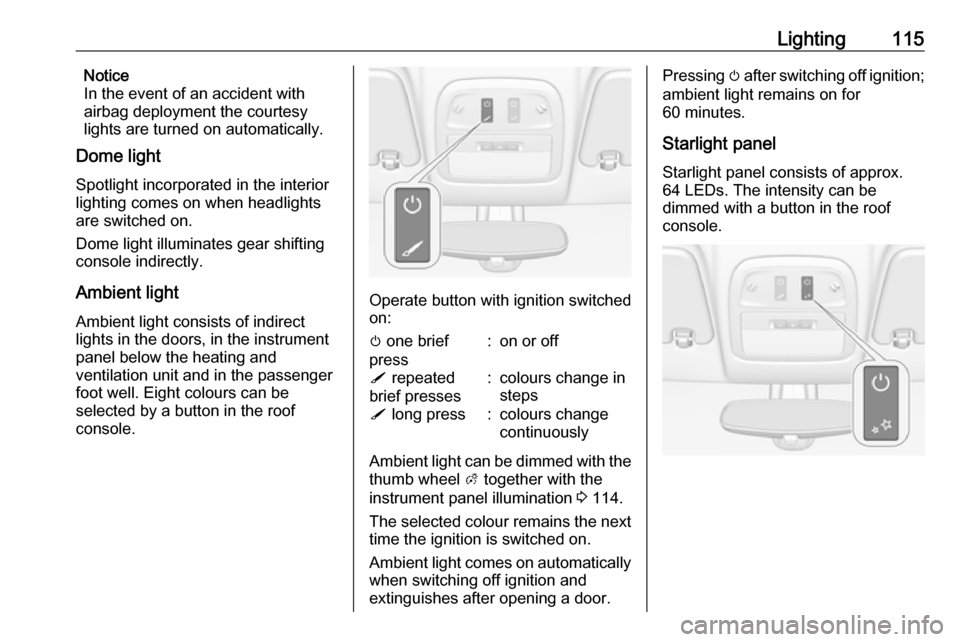
Ambient light Ambient light consists of indirect
lights in the doors, in the instrument
panel below the heating and
ventilation unit and in the passenger
foot well. Eight colours can be
selected by a button in the roof
console.
Operate button with ignition switched
on:
m one brief
press:on or offS repeated
brief presses:colours change in
stepsS long press:colours change
continuously
Ambient light can be dimmed with the thumb wheel A together with the
instrument panel illumination 3 114.
The selected colour remains the next
time the ignition is switched on.
Ambient light comes on automatically when switching off ignition and
extinguishes after opening a door.
Pressing m after switching off ignition;
ambient light remains on for
60 minutes.
Starlight panel
Starlight panel consists of approx. 64 LEDs. The intensity can be
dimmed with a button in the roof console.
Page 118 of 245

116LightingOperate button with ignition switched
on:m one brief
press:on or offT repeated
brief presses:dimming
stepwiseT long press:dimming
continuously
The selected intensity remains the next time the ignition is switched on.
Starlight comes on automatically
when switching off ignition and
extinguishes after opening a door.
Pressing m after switching off ignition;
starlight remains on for 60 minutes.
Lighting features
Entry lighting
Welcome lighting
The following lights are switched on
for a short time by unlocking the
vehicle with the radio remote control:
● headlights
● tail lights
● number plate lights
● instrument panel light
● interior lights
Some functions are only operable
when it is dark outside to facilitate
locating the vehicle.
The lighting switches off immediately
when the ignition key is turned to
position 1 3 129.
Activation or deactivation of this
function can be changed in the
Info Display.
Vehicle personalisation 3 101.
The settings can be saved for the key
being used 3 21.The following lights will additionally
switch on when the driver's door is
opened:
● illumination of some switches
● Driver Information Centre
● ambient light
● starlight panel
Exit lighting The following lights switch on if the
key is removed from the ignition
switch:
● interior lights
● instrument panel light (only when
it is dark)
● ambient light
● starlight panel
They will switch off automatically after
a delay and will be activated again if
the driver's door is opened.
Path lighting
Headlights, tail lights and number
plate lights illuminate the surrounding area for an adjustable time after
leaving the vehicle.
Page 119 of 245
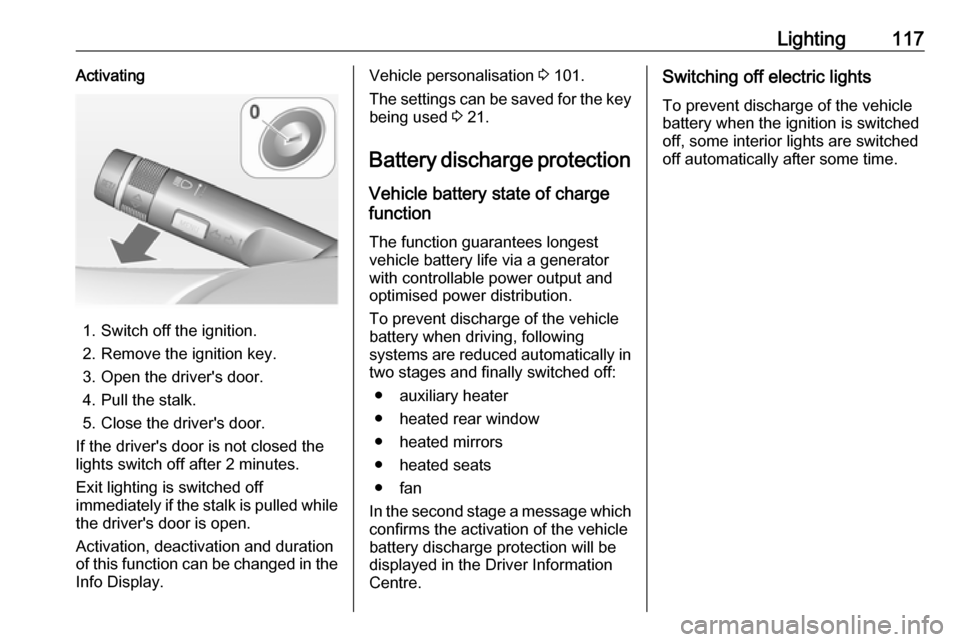
Lighting117Activating
1. Switch off the ignition.
2. Remove the ignition key.
3. Open the driver's door.
4. Pull the stalk.
5. Close the driver's door.
If the driver's door is not closed the
lights switch off after 2 minutes.
Exit lighting is switched off
immediately if the stalk is pulled while
the driver's door is open.
Activation, deactivation and duration
of this function can be changed in the Info Display.
Vehicle personalisation 3 101.
The settings can be saved for the key
being used 3 21.
Battery discharge protection Vehicle battery state of charge
function
The function guarantees longest
vehicle battery life via a generator with controllable power output and
optimised power distribution.
To prevent discharge of the vehicle
battery when driving, following
systems are reduced automatically in two stages and finally switched off:
● auxiliary heater
● heated rear window
● heated mirrors
● heated seats
● fan
In the second stage a message which
confirms the activation of the vehicle
battery discharge protection will be
displayed in the Driver Information
Centre.Switching off electric lights
To prevent discharge of the vehicle
battery when the ignition is switched
off, some interior lights are switched
off automatically after some time.
Page 139 of 245
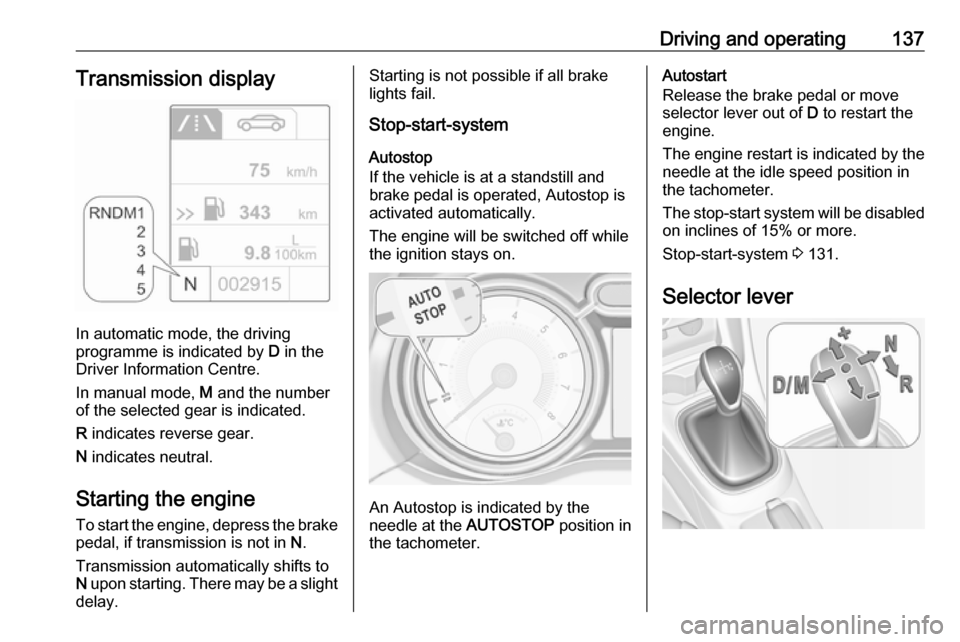
Driving and operating137Transmission display
In automatic mode, the driving
programme is indicated by D in the
Driver Information Centre.
In manual mode, M and the number
of the selected gear is indicated.
R indicates reverse gear.
N indicates neutral.
Starting the engine
To start the engine, depress the brake
pedal, if transmission is not in N.
Transmission automatically shifts to
N upon starting. There may be a slight
delay.
Starting is not possible if all brake
lights fail.
Stop-start-system
Autostop
If the vehicle is at a standstill and
brake pedal is operated, Autostop is
activated automatically.
The engine will be switched off while
the ignition stays on.
An Autostop is indicated by the
needle at the AUTOSTOP position in
the tachometer.
Autostart
Release the brake pedal or move selector lever out of D to restart the
engine.
The engine restart is indicated by the needle at the idle speed position in
the tachometer.
The stop-start system will be disabled
on inclines of 15% or more.
Stop-start-system 3 131.
Selector lever
Page 142 of 245

140Driving and operatingIn the event of a fault, control indicatorg illuminates. Additionally, a
warning message is displayed in the
Driver Information Centre.
Vehicle messages 3 98.
Continued driving is restricted or not
possible, depending on the fault.
Have the cause of the fault remedied
by a workshop.Brakes
The brake system comprises two
independent brake circuits.
If a brake circuit fails, the vehicle can
still be braked using the other brake
circuit. However, braking effect is
achieved only when the brake pedal
is depressed firmly. Considerably
more force is needed for this. The braking distance is extended. Seek
the assistance of a workshop before
continuing the journey.
When the engine is not running, the
support of the brake servo unit
disappears once the brake pedal has been depressed once or twice.
Braking effect is not reduced, but
braking requires significantly greater
force. It is especially important to bear this in mind when being towed.
Control indicator R 3 88.
Antilock brake system
Antilock brake system (ABS)
prevents the wheels from locking.ABS starts to regulate brake pressure as soon as a wheel shows a tendency to lock. The vehicle remains
steerable, even during hard braking.
ABS control is made apparent
through a pulse in the brake pedal
and the noise of the regulation
process.
For optimum braking, keep the brake
pedal fully depressed throughout the
braking process, despite the fact that
the pedal is pulsating. Do not reduce
the pressure on the pedal.
After starting off the system performs
a self-test which may be audible.
Control indicator u 3 89.
Adaptive brake light
During full braking, all three brake
lights flash for the duration of ABS
control.
Page 160 of 245
158Driving and operatinggateway, a courtyard or even a
crossing as a parking slot. After selecting reverse gear the system
will start a parking manoeuvre. Take care regarding the availability of the
suggested parking slot.
Surface irregularities, e.g. on construction zones, are not detected
by the system. The driver accepts
responsibility.
Notice
If engaging a forward gear and
exceeding a certain speed, the
parking assist will be deactivated
when the rear carrier system is
extended.
If engaging reverse for the first time,
the parking assist will detect the rear carrier system and provide an
acoustic signal. Press r or D
briefly to deactivate the parking assist.
Notice
After production, the system
requires a calibration. For optimal
parking guidance, a driving distance
of at least 6 miles, including a
number of bends, is required.Side blind spot alert
The Side blind spot alert system
detects and reports objects on either
side of the vehicle, within a specified
"blind spot" zone. The system
displays a visual alert in each exterior
mirror, when detecting objects that
may not be visible in the interior and
exterior mirrors.
Side blind spot alert uses some of the advanced parking assist sensors
which are located in the front and rear
bumper on both sides of the vehicle.9 Warning
Side blind spot alert does not
replace driver vision.
The system does not detect:
● vehicles outside the side blind zones which may be rapidly
approaching
● pedestrians, cyclists or animals
Before changing a lane, always
check all mirrors, look over the
shoulder and use the turn light.
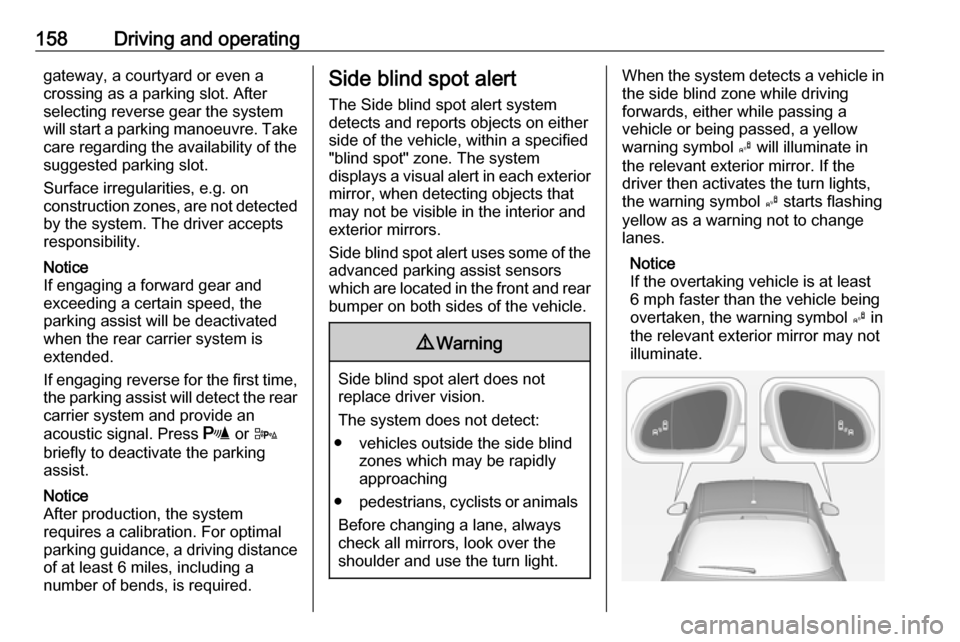
When the system detects a vehicle in the side blind zone while driving
forwards, either while passing a
vehicle or being passed, a yellow
warning symbol B will illuminate in
the relevant exterior mirror. If the
driver then activates the turn lights,
the warning symbol B starts flashing
yellow as a warning not to change
lanes.
Notice
If the overtaking vehicle is at least
6 mph faster than the vehicle being
overtaken, the warning symbol B in
the relevant exterior mirror may not
illuminate.
Page 167 of 245

Vehicle care165Vehicle careGeneral Information...................165
Accessories and vehicle modifications .......................... 165
Vehicle storage ........................166
End-of-life vehicle recovery .....166
Vehicle checks ........................... 167
Performing work ......................167
Bonnet ..................................... 167
Engine oil ................................. 168
Engine coolant ......................... 169
Washer fluid ............................ 169
Brakes ..................................... 170
Brake fluid ............................... 170
Vehicle battery ......................... 170
Wiper blade replacement ........172
Bulb replacement .......................172
Halogen headlights ..................172
Front turn lights .......................175
Tail lights ................................. 176
Side turn lights ......................... 179
Number plate light ...................180
Interior lights ............................ 181
Electrical system ........................181
Fuses ....................................... 181Engine compartment fuse box . 182
Instrument panel fuse box .......184
Vehicle tools .............................. 186
Tools ........................................ 186
Wheels and tyres .......................187
Winter tyres ............................. 187
Tyre designations ....................188
Tyre pressure .......................... 188
Tyre pressure monitoring system .................................... 189
Tread depth ............................. 192
Changing tyre and wheel size . 193
Wheel covers ........................... 193
Tyre chains .............................. 194
Tyre repair kit .......................... 194
Wheel changing .......................198
Spare wheel ............................ 201
Jump starting ............................. 205
Towing ....................................... 206
Towing the vehicle ...................206
Towing another vehicle ...........208
Appearance care .......................209
Exterior care ............................ 209
Interior care ............................. 212General Information
Accessories and vehicle modifications
We recommend the use of genuine
parts and accessories and factory approved parts specific for your
vehicle type. We cannot assess or guarantee reliability of other products
- even if they have a regulatory or
otherwise granted approval.
Any modification, conversion or other changes made to standard vehicle
specifications (including, without
limitation, software modifications,
modifications of the electronic control
units) may invalidate the warranty
offered by Vauxhall. Furthermore,
such changes may affect driver
assistance systems, fuel
consumption, CO 2 emissions and
other emissions of the vehicle. They
may also invalidate the vehicle
operating permit.
Page 174 of 245
172Vehicle careWiper blade replacementWindscreen
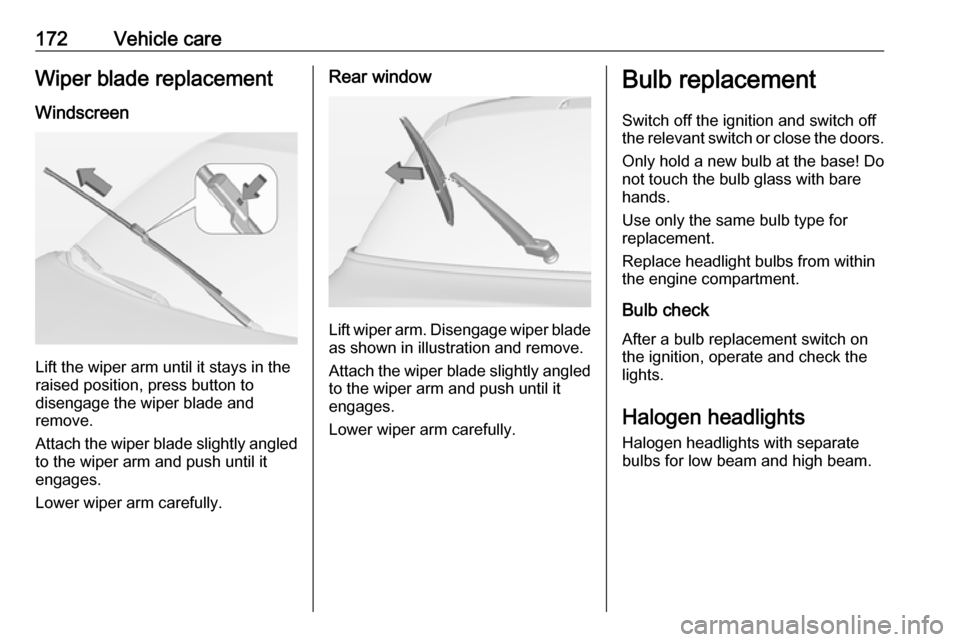
Lift the wiper arm until it stays in the
raised position, press button to
disengage the wiper blade and
remove.
Attach the wiper blade slightly angled
to the wiper arm and push until it
engages.
Lower wiper arm carefully.
Rear window
Lift wiper arm. Disengage wiper blade as shown in illustration and remove.
Attach the wiper blade slightly angled
to the wiper arm and push until it
engages.
Lower wiper arm carefully.
Bulb replacement
Switch off the ignition and switch off
the relevant switch or close the doors.
Only hold a new bulb at the base! Do not touch the bulb glass with bare
hands.
Use only the same bulb type for
replacement.
Replace headlight bulbs from within
the engine compartment.
Bulb check
After a bulb replacement switch on
the ignition, operate and check the
lights.
Halogen headlights Halogen headlights with separate
bulbs for low beam and high beam.