lock VAUXHALL ADAM 2018.5 Owner's Guide
[x] Cancel search | Manufacturer: VAUXHALL, Model Year: 2018.5, Model line: ADAM, Model: VAUXHALL ADAM 2018.5Pages: 245, PDF Size: 7.4 MB
Page 60 of 245
58Storage
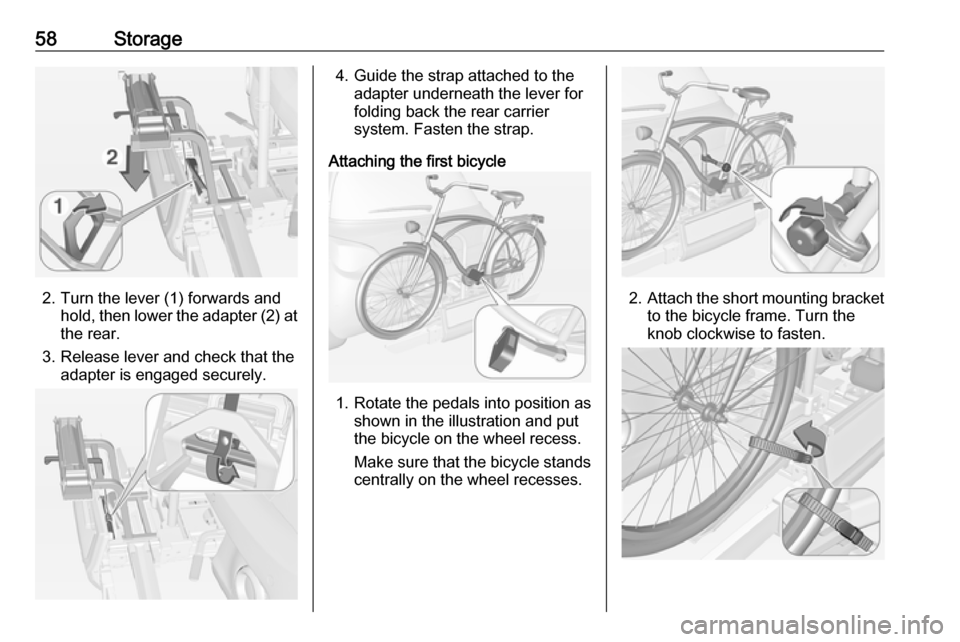
2. Turn the lever (1) forwards andhold, then lower the adapter (2) at
the rear.
3. Release lever and check that the adapter is engaged securely.
4. Guide the strap attached to theadapter underneath the lever for
folding back the rear carrier system. Fasten the strap.
Attaching the first bicycle
1. Rotate the pedals into position as shown in the illustration and put
the bicycle on the wheel recess.
Make sure that the bicycle stands centrally on the wheel recesses.
2. Attach the short mounting bracket
to the bicycle frame. Turn the
knob clockwise to fasten.
Page 62 of 245
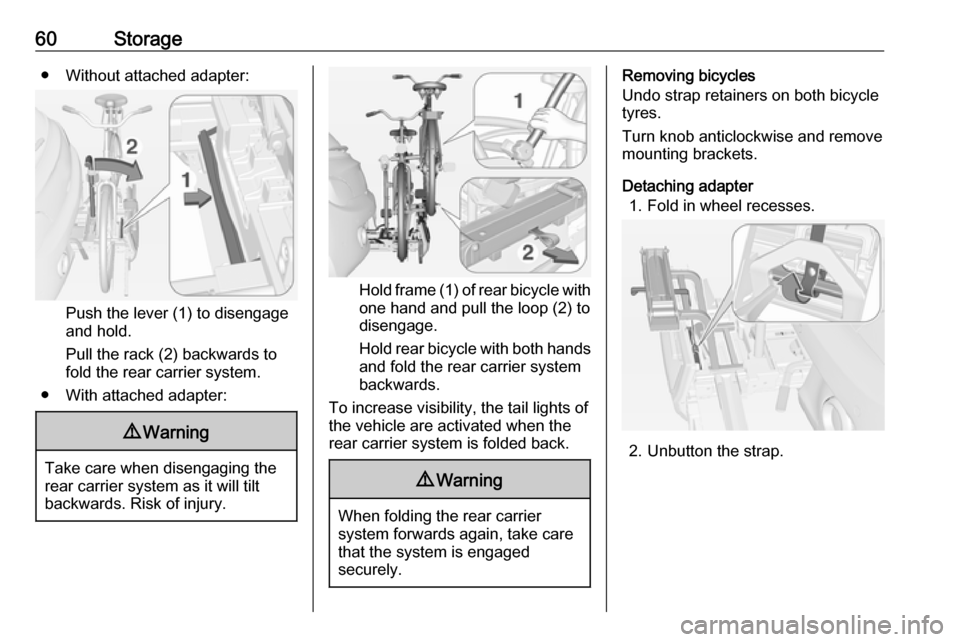
60Storage● Without attached adapter:
Push the lever (1) to disengage
and hold.
Pull the rack (2) backwards to
fold the rear carrier system.
● With attached adapter:
9 Warning
Take care when disengaging the
rear carrier system as it will tilt
backwards. Risk of injury.
Hold frame (1) of rear bicycle with
one hand and pull the loop (2) to
disengage.
Hold rear bicycle with both hands and fold the rear carrier system
backwards.
To increase visibility, the tail lights of the vehicle are activated when the
rear carrier system is folded back.
9 Warning
When folding the rear carrier
system forwards again, take care
that the system is engaged
securely.
Removing bicycles
Undo strap retainers on both bicycle
tyres.
Turn knob anticlockwise and remove
mounting brackets.
Detaching adapter 1. Fold in wheel recesses.
2. Unbutton the strap.
Page 64 of 245
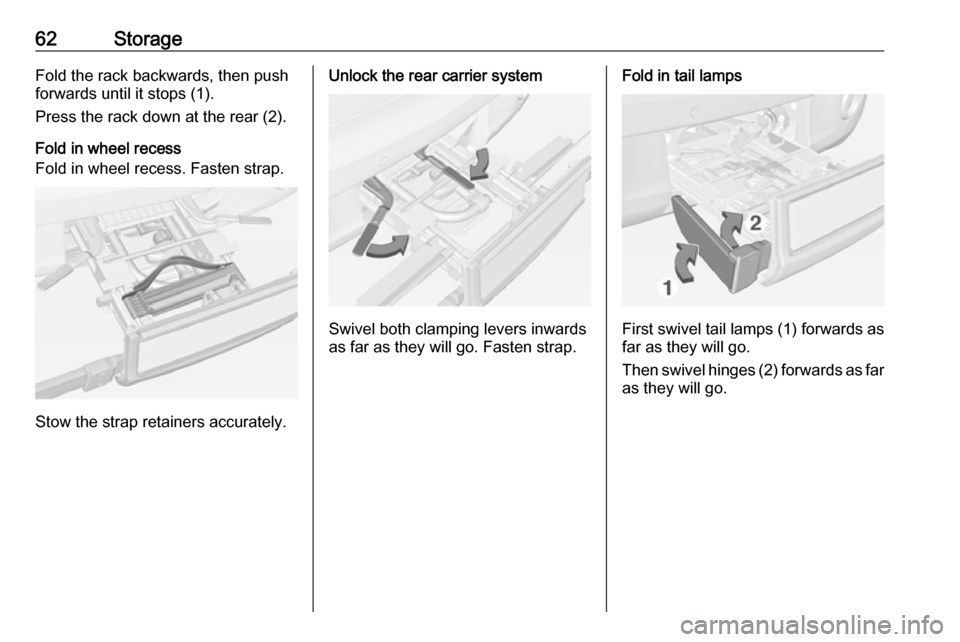
62StorageFold the rack backwards, then push
forwards until it stops (1).
Press the rack down at the rear (2).
Fold in wheel recess
Fold in wheel recess. Fasten strap.
Stow the strap retainers accurately.
Unlock the rear carrier system
Swivel both clamping levers inwards
as far as they will go. Fasten strap.
Fold in tail lamps
First swivel tail lamps (1) forwards as
far as they will go.
Then swivel hinges (2) forwards as far as they will go.
Page 66 of 245
64Storage
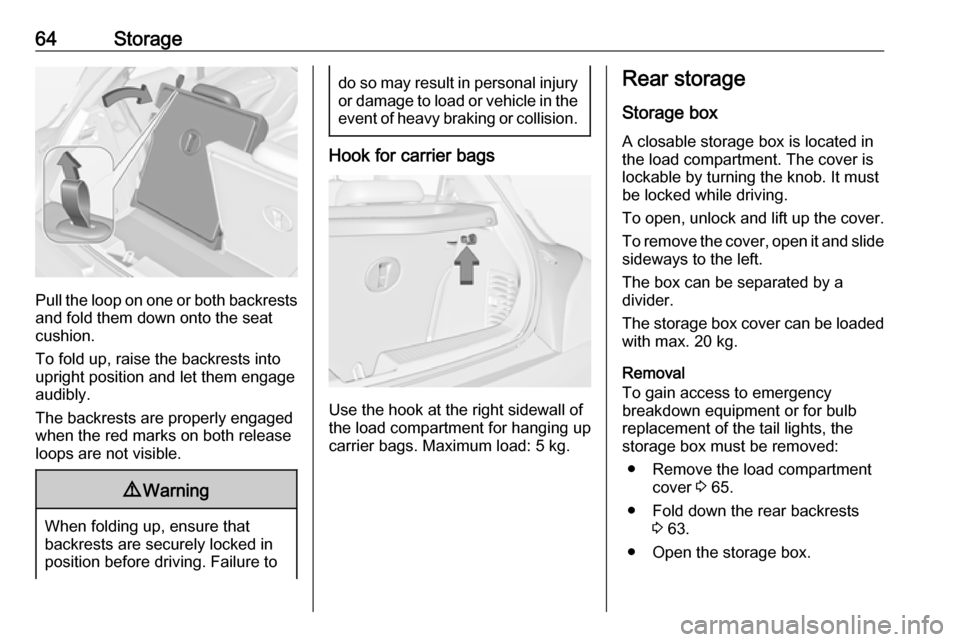
Pull the loop on one or both backrestsand fold them down onto the seat
cushion.
To fold up, raise the backrests into
upright position and let them engage
audibly.
The backrests are properly engaged
when the red marks on both release
loops are not visible.
9 Warning
When folding up, ensure that
backrests are securely locked in
position before driving. Failure to
do so may result in personal injury or damage to load or vehicle in the event of heavy braking or collision.
Hook for carrier bags
Use the hook at the right sidewall of
the load compartment for hanging up carrier bags. Maximum load: 5 kg.
Rear storage
Storage box A closable storage box is located in
the load compartment. The cover is lockable by turning the knob. It must
be locked while driving.
To open, unlock and lift up the cover.
To remove the cover, open it and slide sideways to the left.
The box can be separated by a
divider.
The storage box cover can be loaded
with max. 20 kg.
Removal
To gain access to emergency breakdown equipment or for bulb
replacement of the tail lights, the
storage box must be removed:
● Remove the load compartment cover 3 65.
● Fold down the rear backrests 3 63.
● Open the storage box.
Page 67 of 245
Storage65
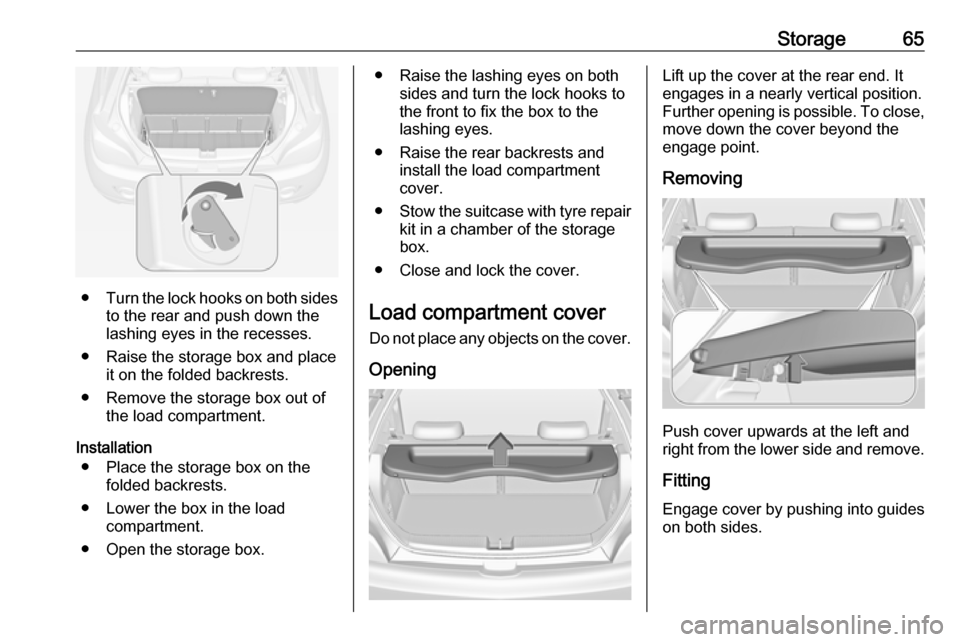
●Turn the lock hooks on both sides
to the rear and push down thelashing eyes in the recesses.
● Raise the storage box and place it on the folded backrests.
● Remove the storage box out of the load compartment.
Installation ● Place the storage box on the folded backrests.
● Lower the box in the load compartment.
● Open the storage box.
● Raise the lashing eyes on both sides and turn the lock hooks to
the front to fix the box to the
lashing eyes.
● Raise the rear backrests and install the load compartment
cover.
● Stow the suitcase with tyre repair
kit in a chamber of the storage
box.
● Close and lock the cover.
Load compartment cover
Do not place any objects on the cover.
OpeningLift up the cover at the rear end. It
engages in a nearly vertical position.
Further opening is possible. To close, move down the cover beyond the
engage point.
Removing
Push cover upwards at the left and
right from the lower side and remove.
Fitting Engage cover by pushing into guides
on both sides.
Page 73 of 245

Instruments and controls71Instruments and
controlsControls ....................................... 72
Steering wheel adjustment ........72
Steering wheel controls .............72
Heated steering wheel ...............72
Horn ........................................... 73
Windscreen wiper and washer ..73
Rear window wiper and washer ...................................... 74
Outside temperature ..................75
Clock ......................................... 76
Power outlets ............................. 77
Inductive charging .....................78
Cigarette lighter ......................... 79
Ashtrays .................................... 79
Warning lights, gauges and indi‐ cators ........................................... 80
Instrument cluster ......................80
Speedometer ............................. 80
Odometer .................................. 80
Trip odometer ............................ 80
Tachometer ............................... 80
Fuel gauge ................................ 81
Fuel selector .............................. 81Engine coolant temperature
gauge ....................................... 82
Service display .......................... 83
Control indicators ......................84
Turn lights .................................. 86
Seat belt reminder .....................86
Airbag and belt tensioners .........87
Airbag deactivation ....................87
Charging system .......................87
Malfunction indicator light ..........88
Service vehicle soon .................88
Brake and clutch system ...........88
Operate pedal ............................ 88
Antilock brake system (ABS) .....89
Gear shifting .............................. 89
Power steering .......................... 89
Parking assist ............................ 89
Electronic Stability Control off ...89
Electronic Stability Control and Traction Control system ...........89
Exhaust filter .............................. 90
Tyre pressure monitoring system ...................................... 90
Engine oil pressure ....................90
Low fuel ..................................... 91
Immobiliser ................................ 91
Exterior light .............................. 91
High beam ................................. 91
Rear fog light ............................. 91Cruise control............................ 91
Door open .................................. 91
Displays ....................................... 92
Driver Information Centre ..........92
Info Display ................................ 96
Vehicle messages ........................98
Warning chimes .......................100
Battery voltage ........................ 101
Vehicle personalisation ..............101
Telematics service .....................105
OnStar ..................................... 105
Page 74 of 245
72Instruments and controlsControlsSteering wheel adjustment
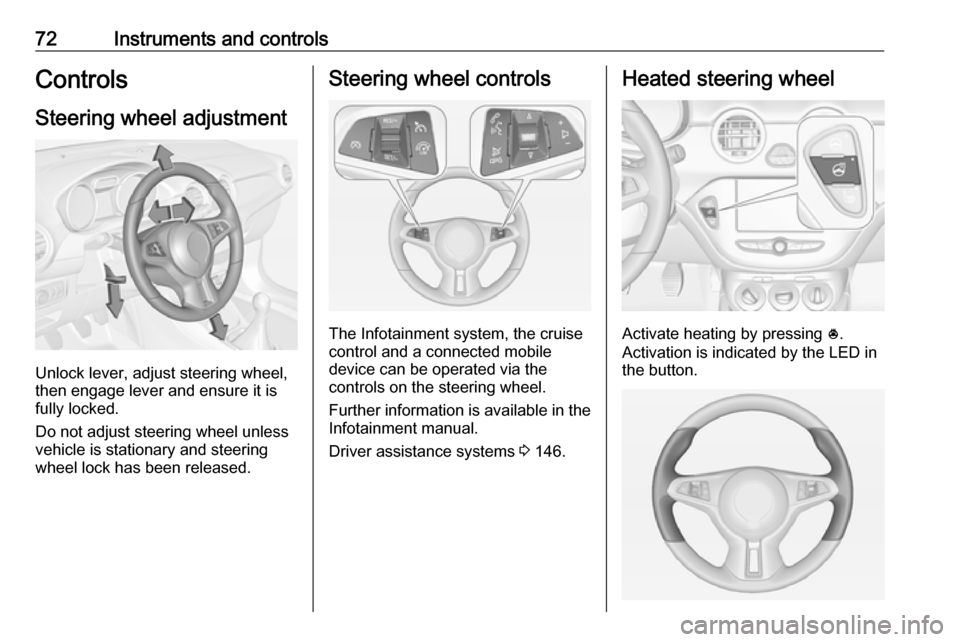
Unlock lever, adjust steering wheel,
then engage lever and ensure it is
fully locked.
Do not adjust steering wheel unless
vehicle is stationary and steering
wheel lock has been released.
Steering wheel controls
The Infotainment system, the cruise
control and a connected mobile
device can be operated via the
controls on the steering wheel.
Further information is available in the
Infotainment manual.
Driver assistance systems 3 146.
Heated steering wheel
Activate heating by pressing *.
Activation is indicated by the LED in
the button.
Page 78 of 245
76Instruments and controlsIf outside temperature drops to 3 °C,
a warning message is displayed in the
Driver Information Centre.9 Warning
The road surface may already be
icy even though the display
indicates a few degrees above 0
°C.
Clock
Graphic Info Display
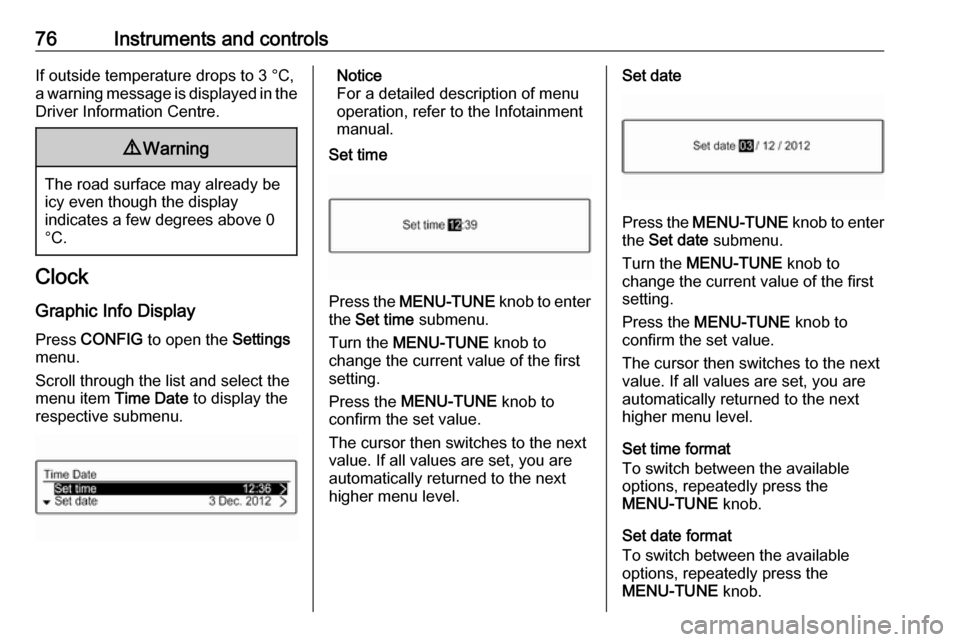
Press CONFIG to open the Settings
menu.
Scroll through the list and select the
menu item Time Date to display the
respective submenu.
Notice
For a detailed description of menu
operation, refer to the Infotainment
manual.
Set time
Press the MENU-TUNE knob to enter
the Set time submenu.
Turn the MENU-TUNE knob to
change the current value of the first setting.
Press the MENU-TUNE knob to
confirm the set value.
The cursor then switches to the next
value. If all values are set, you are
automatically returned to the next
higher menu level.
Set date
Press the MENU-TUNE knob to enter
the Set date submenu.
Turn the MENU-TUNE knob to
change the current value of the first setting.
Press the MENU-TUNE knob to
confirm the set value.
The cursor then switches to the next
value. If all values are set, you are
automatically returned to the next
higher menu level.
Set time format
To switch between the available
options, repeatedly press the
MENU-TUNE knob.
Set date format
To switch between the available
options, repeatedly press the
MENU-TUNE knob.
Page 79 of 245
Instruments and controls77RDS clock synchronization
The RDS signal of most VHF
transmitters automatically sets the
time. RDS time synchronisation can take a few minutes. Some
transmitters do not send a correct
time signal. In such cases, it is
recommended to switch off the
automatic time synchronisation.
To switch between the options On
and Off, repeatedly press the
MENU-TUNE knob.
Colour Info Display
Press ; then select Settings screen.
Select Time and Date to display the
respective submenu.
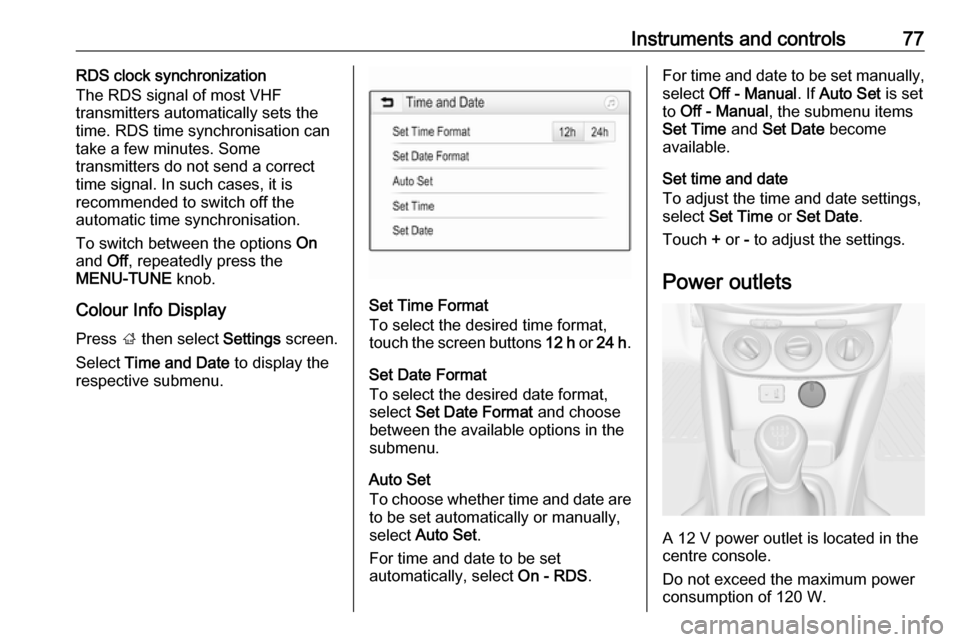
Set Time Format
To select the desired time format,
touch the screen buttons 12 h or 24 h .
Set Date Format To select the desired date format,
select Set Date Format and choose
between the available options in the
submenu.
Auto Set
To choose whether time and date are to be set automatically or manually,
select Auto Set .
For time and date to be set
automatically, select On - RDS.
For time and date to be set manually,
select Off - Manual . If Auto Set is set
to Off - Manual , the submenu items
Set Time and Set Date become
available.
Set time and date
To adjust the time and date settings, select Set Time or Set Date .
Touch + or - to adjust the settings.
Power outlets
A 12 V power outlet is located in the
centre console.
Do not exceed the maximum power
consumption of 120 W.
Page 88 of 245
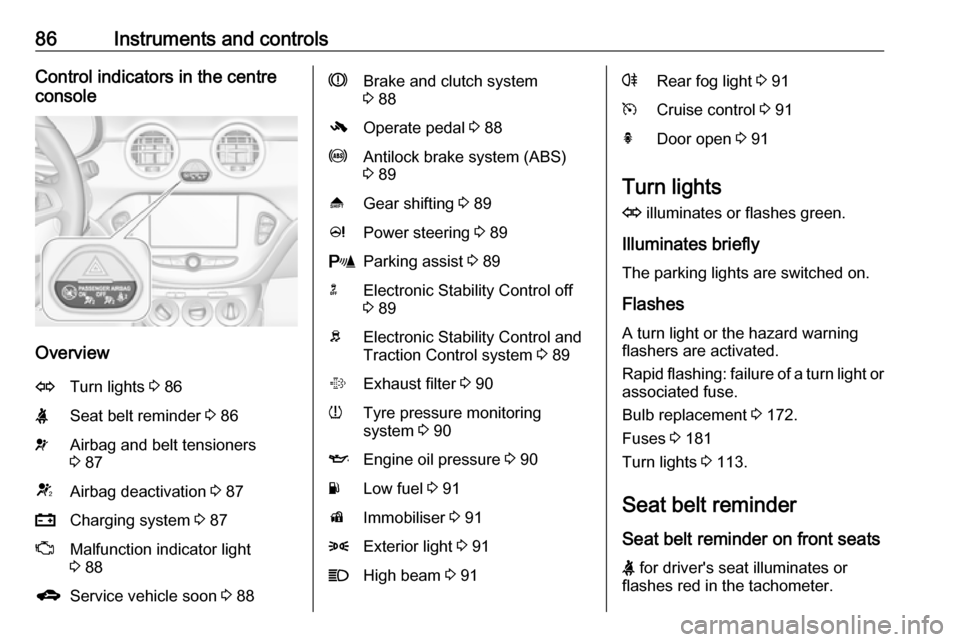
86Instruments and controlsControl indicators in the centre
console
Overview
OTurn lights 3 86XSeat belt reminder 3 86vAirbag and belt tensioners
3 87VAirbag deactivation 3 87pCharging system 3 87ZMalfunction indicator light
3 88gService vehicle soon 3 88RBrake and clutch system
3 88-Operate pedal 3 88uAntilock brake system (ABS)
3 89[Gear shifting 3 89cPower steering 3 89rParking assist 3 89nElectronic Stability Control off
3 89bElectronic Stability Control and
Traction Control system 3 89%Exhaust filter 3 90wTyre pressure monitoring
system 3 90IEngine oil pressure 3 90YLow fuel 3 91dImmobiliser 3 918Exterior light 3 91CHigh beam 3 91rRear fog light 3 91mCruise control 3 91hDoor open 3 91
Turn lights
O illuminates or flashes green.
Illuminates briefly The parking lights are switched on.
Flashes
A turn light or the hazard warning
flashers are activated.
Rapid flashing: failure of a turn light or associated fuse.
Bulb replacement 3 172.
Fuses 3 181
Turn lights 3 113.
Seat belt reminder
Seat belt reminder on front seats
X for driver's seat illuminates or
flashes red in the tachometer.