tyre pressure VAUXHALL ADAM 2018.5 Owner's Manual
[x] Cancel search | Manufacturer: VAUXHALL, Model Year: 2018.5, Model line: ADAM, Model: VAUXHALL ADAM 2018.5Pages: 245, PDF Size: 7.4 MB
Page 18 of 245
16In briefTransmission
Manual transmission
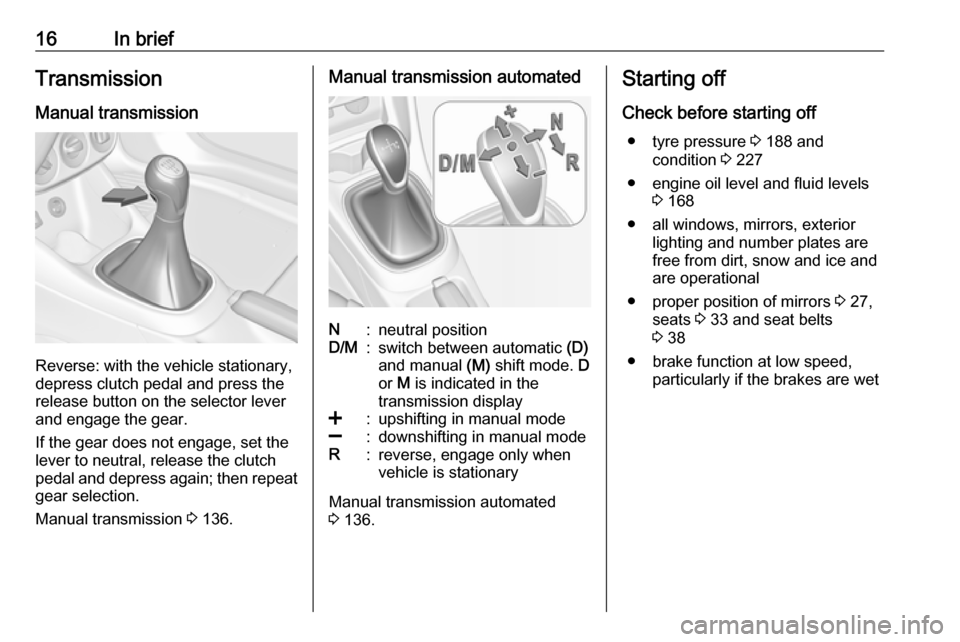
Reverse: with the vehicle stationary,
depress clutch pedal and press the release button on the selector lever
and engage the gear.
If the gear does not engage, set the
lever to neutral, release the clutch
pedal and depress again; then repeat
gear selection.
Manual transmission 3 136.
Manual transmission automatedN:neutral positionD/M:switch between automatic (D)
and manual (M) shift mode. D
or M is indicated in the
transmission display<:upshifting in manual mode]:downshifting in manual modeR:reverse, engage only when
vehicle is stationary
Manual transmission automated
3 136.
Starting off
Check before starting off ● tyre pressure 3 188 and
condition 3 227
● engine oil level and fluid levels 3 168
● all windows, mirrors, exterior lighting and number plates are
free from dirt, snow and ice and
are operational
● proper position of mirrors 3 27,
seats 3 33 and seat belts
3 38
● brake function at low speed, particularly if the brakes are wet
Page 72 of 245

70Storagedetrimental effect on vehicle
handling due to the vehicle's
higher centre of gravity.
Distribute the load evenly and secure it properly with retaining
straps. Adjust the tyre pressure
and vehicle speed according to
the load conditions. Check and
retighten the straps frequently.
Do not drive faster than 75 mph.
The permissible roof load is
50 kg. The roof load is the
combined weight of the roof rack
and the load.
Page 73 of 245

Instruments and controls71Instruments and
controlsControls ....................................... 72
Steering wheel adjustment ........72
Steering wheel controls .............72
Heated steering wheel ...............72
Horn ........................................... 73
Windscreen wiper and washer ..73
Rear window wiper and washer ...................................... 74
Outside temperature ..................75
Clock ......................................... 76
Power outlets ............................. 77
Inductive charging .....................78
Cigarette lighter ......................... 79
Ashtrays .................................... 79
Warning lights, gauges and indi‐ cators ........................................... 80
Instrument cluster ......................80
Speedometer ............................. 80
Odometer .................................. 80
Trip odometer ............................ 80
Tachometer ............................... 80
Fuel gauge ................................ 81
Fuel selector .............................. 81Engine coolant temperature
gauge ....................................... 82
Service display .......................... 83
Control indicators ......................84
Turn lights .................................. 86
Seat belt reminder .....................86
Airbag and belt tensioners .........87
Airbag deactivation ....................87
Charging system .......................87
Malfunction indicator light ..........88
Service vehicle soon .................88
Brake and clutch system ...........88
Operate pedal ............................ 88
Antilock brake system (ABS) .....89
Gear shifting .............................. 89
Power steering .......................... 89
Parking assist ............................ 89
Electronic Stability Control off ...89
Electronic Stability Control and Traction Control system ...........89
Exhaust filter .............................. 90
Tyre pressure monitoring system ...................................... 90
Engine oil pressure ....................90
Low fuel ..................................... 91
Immobiliser ................................ 91
Exterior light .............................. 91
High beam ................................. 91
Rear fog light ............................. 91Cruise control............................ 91
Door open .................................. 91
Displays ....................................... 92
Driver Information Centre ..........92
Info Display ................................ 96
Vehicle messages ........................98
Warning chimes .......................100
Battery voltage ........................ 101
Vehicle personalisation ..............101
Telematics service .....................105
OnStar ..................................... 105
Page 88 of 245
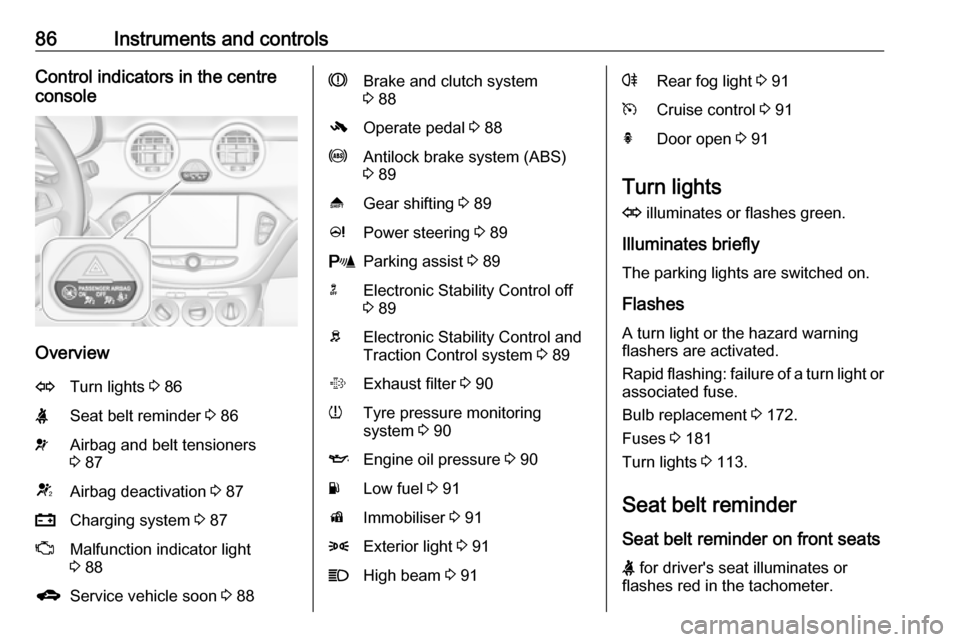
86Instruments and controlsControl indicators in the centre
console
Overview
OTurn lights 3 86XSeat belt reminder 3 86vAirbag and belt tensioners
3 87VAirbag deactivation 3 87pCharging system 3 87ZMalfunction indicator light
3 88gService vehicle soon 3 88RBrake and clutch system
3 88-Operate pedal 3 88uAntilock brake system (ABS)
3 89[Gear shifting 3 89cPower steering 3 89rParking assist 3 89nElectronic Stability Control off
3 89bElectronic Stability Control and
Traction Control system 3 89%Exhaust filter 3 90wTyre pressure monitoring
system 3 90IEngine oil pressure 3 90YLow fuel 3 91dImmobiliser 3 918Exterior light 3 91CHigh beam 3 91rRear fog light 3 91mCruise control 3 91hDoor open 3 91
Turn lights
O illuminates or flashes green.
Illuminates briefly The parking lights are switched on.
Flashes
A turn light or the hazard warning
flashers are activated.
Rapid flashing: failure of a turn light or associated fuse.
Bulb replacement 3 172.
Fuses 3 181
Turn lights 3 113.
Seat belt reminder
Seat belt reminder on front seats
X for driver's seat illuminates or
flashes red in the tachometer.
Page 92 of 245
90Instruments and controlsoperational. Driving stability,
however, may deteriorate depending
on road surface conditions.
Have the cause of the fault remedied
by a workshop.
Electronic Stability Control 3 143.
Traction Control system 3 142.
Exhaust filter % illuminates or flashes yellow.
The exhaust filter requires cleaning.
Continue driving until %
extinguishes. If possible, do not allow engine speed to drop below
2000 rpm.
Illuminates
The exhaust filter is full. Start cleaning
process as soon as possible.
Flashes
The maximum filling level of the filter
is reached. Start cleaning process
immediately to avoid damage to the
engine.
Exhaust filter 3 134.Stop-start system 3 131.
Tyre pressure monitoring system
w illuminates or flashes yellow.
Illuminates
Tyre pressure loss. Stop immediately
and check tyre pressure.
Flashes
Fault in system or tyre without
pressure sensor mounted (e.g. spare
wheel). After 60-90 seconds the
control indicator illuminates
continuously. Consult a workshop.
Tyre pressure monitoring system3 189.
Engine oil pressure
I illuminates red.
Illuminates when the ignition is
switched on and extinguishes shortly
after the engine starts.Illuminates when the engine is
runningCaution
Engine lubrication may be
interrupted. This may result in
damage to the engine and / or
locking of the drive wheels.
1. Depress the clutch.
2. Select neutral gear.
3. Move out of the flow of traffic as quickly as possible without
impeding other vehicles.
4. Switch off ignition.
9 Warning
When the engine is off,
considerably more force is needed
to brake and steer.
During an Autostop the brake
servo unit will still be operational.
Page 97 of 245
Instruments and controls95Low fuel Y 3 91.
Fuel range LPG version
Display of approximate fuel range
available with the remaining fuel in
each respective fuel tank of petrol and
LPG fuel, along with a total range of
both fuel types together. Switch
between the mode by pressing
SET/CLR .
Instantaneous consumption
Display of the instantaneous
consumption.
On vehicles with LPG engines:
Instantaneous consumption is
indicated for the currently selected mode; LPG or petrol.
Vehicle Information Menu X
Press MENU to select the Vehicle
Information page.
Turn the adjuster wheel to select a
submenu.
Follow the instructions given in the
submenus.● Unit
Press SET/CLR while page is
displayed. Select imperial
(unit 1) or metric (unit 3) by
turning the adjuster wheel. Press
SET/CLR to set the unit.
● Tyre Pressure
Tyre pressure of all wheels is
displayed on this page during
driving 3 189.
● Tyre Load
The tyre pressure category
according to the actually inflated
tyre pressure can be selected
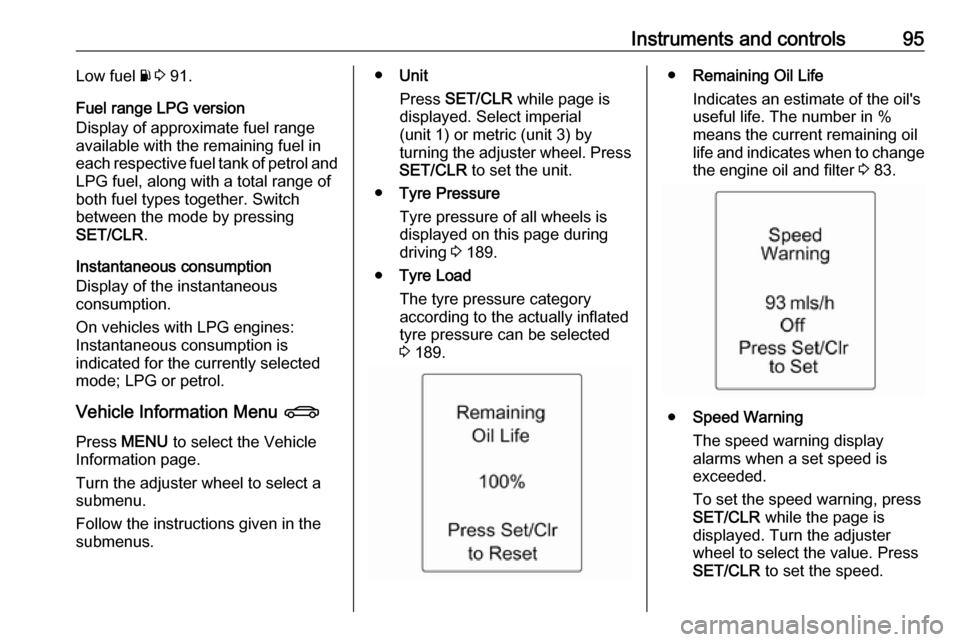
3 189.● Remaining Oil Life
Indicates an estimate of the oil's
useful life. The number in %
means the current remaining oil
life and indicates when to change the engine oil and filter 3 83.
● Speed Warning
The speed warning display
alarms when a set speed is
exceeded.
To set the speed warning, press SET/CLR while the page is
displayed. Turn the adjuster
wheel to select the value. Press
SET/CLR to set the speed.
Page 101 of 245
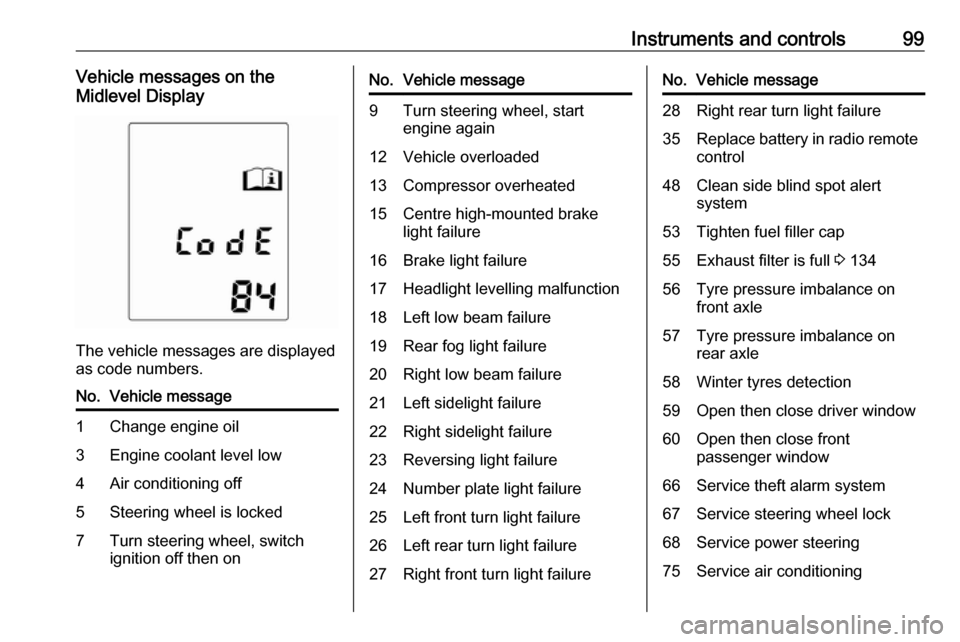
Instruments and controls99Vehicle messages on the
Midlevel Display
The vehicle messages are displayed
as code numbers.
No.Vehicle message1Change engine oil3Engine coolant level low4Air conditioning off5Steering wheel is locked7Turn steering wheel, switch
ignition off then onNo.Vehicle message9Turn steering wheel, start
engine again12Vehicle overloaded13Compressor overheated15Centre high-mounted brake
light failure16Brake light failure17Headlight levelling malfunction18Left low beam failure19Rear fog light failure20Right low beam failure21Left sidelight failure22Right sidelight failure23Reversing light failure24Number plate light failure25Left front turn light failure26Left rear turn light failure27Right front turn light failureNo.Vehicle message28Right rear turn light failure35Replace battery in radio remote
control48Clean side blind spot alert
system53Tighten fuel filler cap55Exhaust filter is full 3 13456Tyre pressure imbalance on
front axle57Tyre pressure imbalance on
rear axle58Winter tyres detection59Open then close driver window60Open then close front
passenger window66Service theft alarm system67Service steering wheel lock68Service power steering75Service air conditioning
Page 109 of 245

Instruments and controls107background, even if they are not in
use. This includes automatic
updates, downloads, as well as
programme or app synchronisation
traffic. The data volume purchased
via OnStar might be consumed
rapidly. Turn off automatic
synchronisations in the settings of
your device.
Up to seven devices may be
connected.
To connect a mobile device with the
Wi-Fi hotspot:
1. Press j and then select Wi-Fi
settings on the Info Display. The
settings displayed include the Wi- Fi hotspot name (SSID),
password and connection type.
2. Start a Wi-Fi network search on your mobile device.
3. Select your vehicle hotspot (SSID) when listed.
4. When prompted, enter the password on your mobile device.
Notice
To change the SSID or password,
press Z and talk to an advisor or log
in to your account.To switch off the Wi-Fi hotspot
functionality, press Z to call an
advisor.
Smartphone app
With the My Vauxhall smartphone
app, some vehicle functions can be
operated remotely.
The following functions are available: ● Lock or unlock vehicle.
● Honk horn or flash lights.
● Check fuel level, engine oil life and tyre pressure (only with tyre
pressure monitoring system).
● Send navigation destination to the vehicle, if equipped with a
built-in navigation system.
● Locate vehicle on a map.
● Manage Wi-Fi settings.
To operate these functions, download the app from App Store ®
or
Google Play™ Store.Remote control
If desired, use any phone to call an
advisor, who can remotely operate
specific vehicle functions. Find the respective OnStar phone number on
our country-specific website.
The following functions are available: ● Lock or unlock vehicle.
● Provide information on the vehicle location.
● Honk horn or flash lights.
Stolen vehicle assistance
If the vehicle is stolen, report the theft to the authorities and request OnStar
stolen vehicle assistance. Use any
phone to call an advisor. Find the
respective OnStar phone number on
our country-specific website.
OnStar can provide support in
locating and recovering the vehicle.Theft alert
When the anti-theft alarm system is
triggered, a notification is sent to
OnStar. You are then informed about
this event by text message or email.
Page 110 of 245

108Instruments and controlsRestart prevention
By sending remote signals, OnStar can prevent the vehicle from
restarting once it has been turned off.
On-demand diagnostics
At any time e.g. if the vehicle displays a vehicle message, press Z to
contact an advisor and ask to
complete a real-time diagnostic check
to directly determine the issue.
Depending on the results, the advisor
will provide further support.
Diagnostic report
The vehicle automatically transmits
diagnostic data to OnStar which
sends a monthly email report to you
and your preferred workshop.
Notice
The workshop notification function
can be disabled in your account.
The report contains the status of key
operating systems of the vehicle like
engine, transmission, airbags, ABS,
and other major systems. It also
provides information on possiblemaintenance items and tyre pressure (only with tyre pressure monitoring
system).
To look at the information in greater detail, select the link within the email and log in to your account.
Destination download
A desired destination can be directly
downloaded to the navigation system.
Press Z to call an advisor and
describe the destination or point of interest.
The advisor can look up any address
or point of interest and directly send
the destination to the built-in
navigation system.
OnStar settings
OnStar PIN
To have full access to all OnStar
services, a four-digit PIN is required. The PIN has to be personalised when first talking to an advisor.
To change the PIN, press Z to call an
advisor.Account data
An OnStar subscriber has an account
where all the data is stored. To
request a change of the account
information, press Z and talk to an
advisor or log in to your account.
If the OnStar service is used on
another vehicle, press Z and request
that the account be transferred to the
new vehicle.
Notice
In any case, if the vehicle is disposed of, sold or otherwise transferred,
immediately inform OnStar about
the changes and terminate the
OnStar service on this vehicle.
Vehicle location
The vehicle location is transmitted to
OnStar when service is requested or
triggered. A message on the Info Display informs about this
transmission.
To activate or deactivate the
transmission of the vehicle location,
press and hold j until an audio
message is heard.
Page 141 of 245

Driving and operating139ParkingThe most recently engaged gear (see
transmission display) remains
engaged when switching off ignition. With N, no gear is engaged.
Therefore always apply the parking
brake when switching off ignition. If
parking brake is not applied, P flashes
in the transmission display and the
key cannot be removed from the
ignition switch. P stops flashing in the
transmission display as soon as the
parking brake is slightly applied.
When the ignition is switched off, the
transmission no longer responds to
movement of the selector lever.
Tyre pressure monitoring system
To start the sensor matching process of the tyre pressure monitoring
system, the selector lever must be
moved and held in position N for
5 seconds. P illuminates in the
transmission display to indicate that
the sensor matching process can be
started.
Tyre pressure monitoring system 3 189.Manual mode
If a higher gear is selected when the
engine speed is too low, or a lower
gear when the speed is too high, the
shift is not executed. This prevents
the engine from running at too low or too high an engine speed. A warning
message is displayed in the Driver
Information Centre.
Vehicle messages 3 98.
If engine speed is too low, the
transmission automatically shifts to a
lower gear.
If engine speed is too high, the
transmission only switches to a higher gear via kickdown.
When + or - is selected in automatic
mode, the transmission switches to
manual mode and shifts accordingly.
Gear shift indication
The symbol R, with a number
alongside it, is indicated when
gearshifting is recommended for fuel
saving reasons.
Shift indication appears only in
manual mode.Electronic driving
programmes
● Following a cold start, the operating temperature
programme increases engine
speed to quickly bring the
catalytic converter to the required
temperature.
● The adaptive programme tailors gearshifting to the driving
conditions, e.g. greater load or gradients.
Kickdown If the accelerator pedal is pressed
down completely in automatic mode, the transmission shifts to a lower gear
depending on engine speed.
Fault
To prevent damage to the manual transmission automated, the clutch is
engaged automatically at high clutch
temperatures.