wheel VAUXHALL ADAM 2018 Workshop Manual
[x] Cancel search | Manufacturer: VAUXHALL, Model Year: 2018, Model line: ADAM, Model: VAUXHALL ADAM 2018Pages: 241, PDF Size: 7.34 MB
Page 146 of 241
144Driving and operating
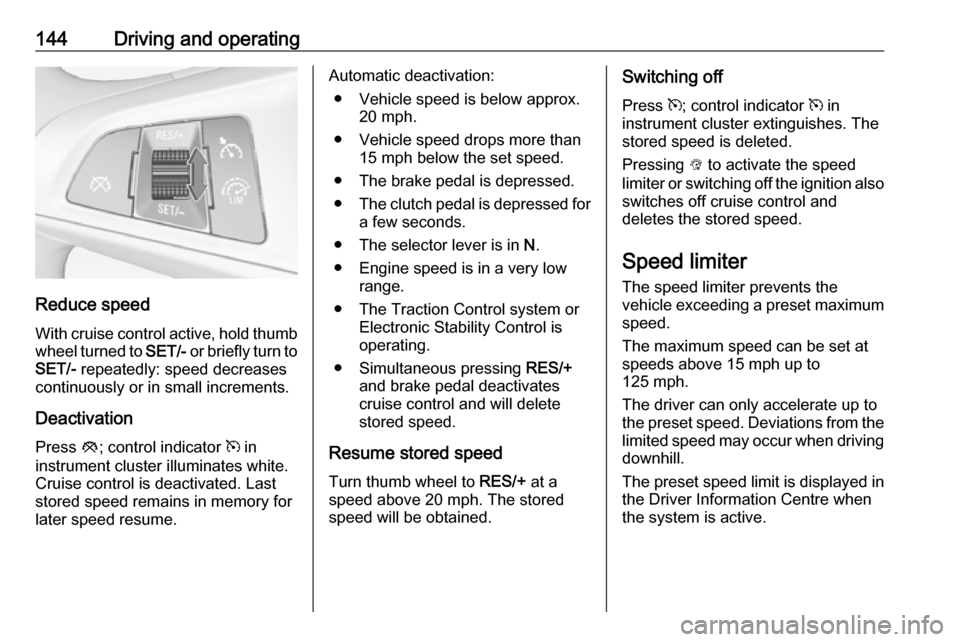
Reduce speedWith cruise control active, hold thumb
wheel turned to SET/- or briefly turn to
SET/- repeatedly: speed decreases
continuously or in small increments.
Deactivation Press y; control indicator m in
instrument cluster illuminates white. Cruise control is deactivated. Last
stored speed remains in memory for
later speed resume.
Automatic deactivation:
● Vehicle speed is below approx. 20 mph.
● Vehicle speed drops more than 15 mph below the set speed.
● The brake pedal is depressed.
● The clutch pedal is depressed for
a few seconds.
● The selector lever is in N.
● Engine speed is in a very low range.
● The Traction Control system or Electronic Stability Control is
operating.
● Simultaneous pressing RES/+
and brake pedal deactivates
cruise control and will delete
stored speed.
Resume stored speed
Turn thumb wheel to RES/+ at a
speed above 20 mph. The stored
speed will be obtained.Switching off
Press m; control indicator m in
instrument cluster extinguishes. The
stored speed is deleted.
Pressing L to activate the speed
limiter or switching off the ignition also switches off cruise control and
deletes the stored speed.
Speed limiter
The speed limiter prevents the
vehicle exceeding a preset maximum
speed.
The maximum speed can be set at
speeds above 15 mph up to
125 mph.
The driver can only accelerate up to
the preset speed. Deviations from the
limited speed may occur when driving
downhill.
The preset speed limit is displayed in
the Driver Information Centre when
the system is active.
Page 147 of 241
Driving and operating145Activation
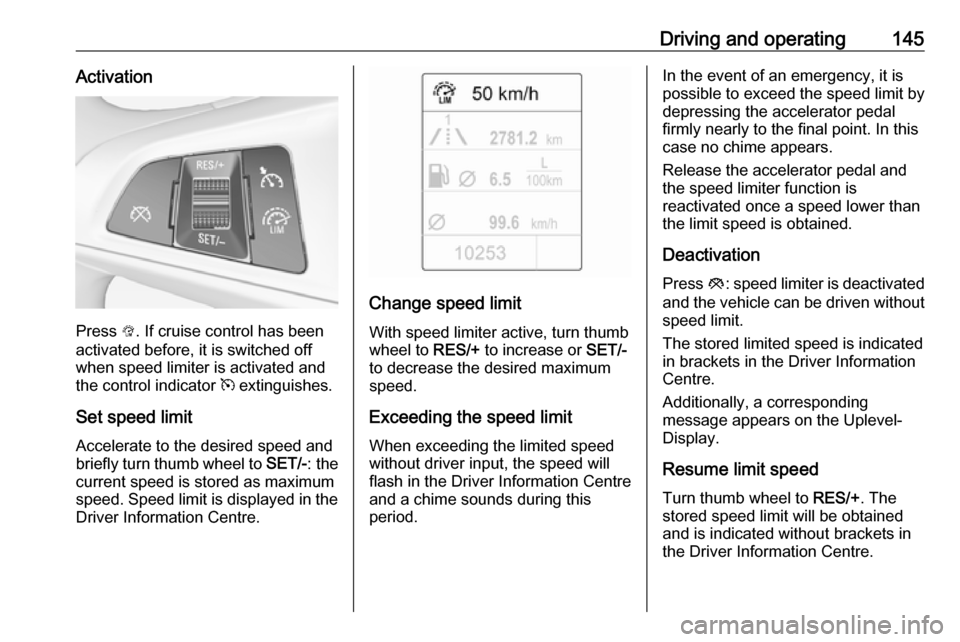
Press L. If cruise control has been
activated before, it is switched off when speed limiter is activated and
the control indicator m extinguishes.
Set speed limit Accelerate to the desired speed and
briefly turn thumb wheel to SET/-: the
current speed is stored as maximum
speed. Speed limit is displayed in the Driver Information Centre.
Change speed limit
With speed limiter active, turn thumb
wheel to RES/+ to increase or SET/-
to decrease the desired maximum
speed.
Exceeding the speed limit
When exceeding the limited speed
without driver input, the speed will
flash in the Driver Information Centre
and a chime sounds during this
period.
In the event of an emergency, it is possible to exceed the speed limit by
depressing the accelerator pedal
firmly nearly to the final point. In this case no chime appears.
Release the accelerator pedal and the speed limiter function is
reactivated once a speed lower than
the limit speed is obtained.
Deactivation Press y: speed limiter is deactivated
and the vehicle can be driven without
speed limit.
The stored limited speed is indicated
in brackets in the Driver Information
Centre.
Additionally, a corresponding
message appears on the Uplevel-
Display.
Resume limit speed
Turn thumb wheel to RES/+. The
stored speed limit will be obtained
and is indicated without brackets in
the Driver Information Centre.
Page 155 of 241

Driving and operating153metres for parallel parking slots or six
metres for perpendicular parking slots
after the Stop message is given. The
system calculates the optimal path
into the parking slot.
A brief vibration in the steering wheel
after engaging reverse gear indicates that the steering is controlled by the
system. Then the vehicle is steered
into the slot automatically by giving
the driver detailed instructions for
braking, accelerating and
gearshifting. The driver must keep
hands away from the steering wheel.
Always pay attention to the sound of
the front-rear parking assist.
Continuous sound indicates that the
distance to an obstacle is less than
approx. 30 cm.
If, for any reason, the driver must take
over control of the steering, hold the
steering wheel only at the outer edge. Automatic steering is cancelled in thisevent.Display indication
The instructions in the display show:
● general hints and warning messages
● a hint when driving faster than 18 mph during parking slot
searching mode, or 5 mph in guiding mode
● the demand to stop the vehicle, when a parking slot is detected
● the direction of driving during the
parking manoeuvre
● the demand to gearshift rearwards or forwards
● the demand to accelerate or brake
● for some of the instructions a progress bar is shown in the
Driver Information Centre
● successful parking manoeuvre indicated by a pop-up symbol
and a chime
● the cancelling of a parking manoeuvreDisplay priorities
Advanced parking assist indication on
the Driver Information Centre can be
inhibited by vehicle messages with a higher priority. After approving the
message by pressing SET/CLR on
the turn signal lever, advanced
parking assist instructions appear
again and the parking manoeuvre can be continued.
Deactivation
The system is deactivated by:
● a long press of D
● parking manoeuvre successfully ended
● driving faster than 18 mph during
parking slot search
● driving faster than 5 mph during parking guidance
● driver interference on steering wheel detected
● exceeding the maximum number
of gear changes: eight parking
cycles when parallel parking or
five cycles when perpendicular
parking
● switching off the ignition
Page 164 of 241

162Vehicle careVehicle careGeneral Information...................162
Accessories and vehicle modifications .......................... 162
Vehicle storage ........................163
End-of-life vehicle recovery .....163
Vehicle checks ........................... 164
Performing work ......................164
Bonnet ..................................... 164
Engine oil ................................. 165
Engine coolant ......................... 166
Washer fluid ............................ 166
Brakes ..................................... 167
Brake fluid ............................... 167
Vehicle battery ......................... 167
Wiper blade replacement ........169
Bulb replacement .......................169
Halogen headlights ..................169
Front turn signal lights .............172
Tail lights ................................. 173
Side turn signal lights ..............176
Number plate light ...................177
Interior lights ............................ 178
Instrument panel illumination ...178
Electrical system ........................178
Fuses ....................................... 178Engine compartment fuse box . 179
Instrument panel fuse box .......182
Vehicle tools .............................. 183
Tools ........................................ 183
Wheels and tyres .......................185
Winter tyres ............................. 185
Tyre designations ....................185
Tyre pressure .......................... 185
Tyre pressure monitoring system .................................... 187
Tread depth ............................. 190
Changing tyre and wheel size . 190
Wheel covers ........................... 191
Tyre chains .............................. 191
Tyre repair kit .......................... 191
Wheel changing .......................195
Spare wheel ............................ 198
Jump starting ............................. 202
Towing ....................................... 204
Towing the vehicle ...................204
Towing another vehicle ...........205
Appearance care .......................206
Exterior care ............................ 206
Interior care ............................. 209General Information
Accessories and vehicle modifications
We recommend the use of genuine
parts and accessories and factory approved parts specific for your
vehicle type. We cannot assess or guarantee reliability of other products
- even if they have a regulatory or
otherwise granted approval.
Any modification, conversion or other changes made to standard vehicle
specifications (including, without
limitation, software modifications,
modifications of the electronic control
units) may invalidate the warranty
offered by Vauxhall. Furthermore,
such changes may affect driver
assistance systems, fuel
consumption, CO 2 emissions and
other emissions of the vehicle. They
may also invalidate the vehicle
operating permit.
Page 185 of 241

Vehicle care183No.Circuit18Air conditioning system19Audio amplifier20Parking assist21Brake switch22Audio system23Display24–25Onstar26Instrument panel27Seat heating, driver28–29–30Instrument panel31Horn32Seat heating, passenger33Heated steering wheel34–No.Circuit35–36–37Rear wiper38Cigarette lighter39–40–Vehicle tools
Tools
Vehicles without spare wheel
Some tools and the towing eye are
located in a tool box in the load
compartment below the floor cover.
On version with storage box, remove
box first 3 63.
Page 186 of 241
184Vehicle care
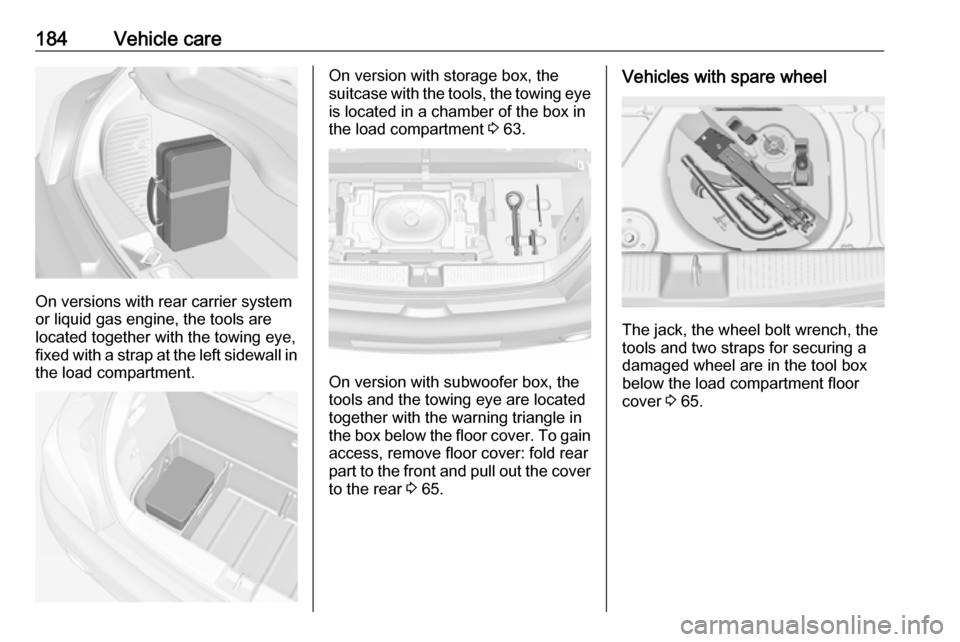
On versions with rear carrier system
or liquid gas engine, the tools are
located together with the towing eye,
fixed with a strap at the left sidewall in
the load compartment.
On version with storage box, the
suitcase with the tools, the towing eye
is located in a chamber of the box in
the load compartment 3 63.
On version with subwoofer box, the
tools and the towing eye are located
together with the warning triangle in
the box below the floor cover. To gain
access, remove floor cover: fold rear
part to the front and pull out the cover to the rear 3 65.
Vehicles with spare wheel
The jack, the wheel bolt wrench, the
tools and two straps for securing a
damaged wheel are in the tool box below the load compartment floor
cover 3 65.
Page 187 of 241

Vehicle care185Wheels and tyres
Tyre condition, wheel condition
Drive over edges slowly and at right
angles if possible. Driving over sharp
edges can cause tyre and wheel
damage. Do not trap tyres on the kerb when parking.
Regularly check the wheels for
damage. Seek the assistance of a
workshop in the event of damage or
unusual wear.
We recommend not swapping the
front wheels with the rear wheels and vice versa, as this can affect vehicle
stability. Always use less worn tyres
on the rear axle.
Winter tyres Winter tyres improve driving safety at
temperatures below 7 °C and should
therefore be fitted on all wheels.
All tyre sizes are permitted as winter
tyres 3 225.
Tyre size 185/60 R 15 is only
permitted as winter tyre.In accordance with country-specific
regulations, affix the speed sticker in
the driver's field of view.
Tyre designations
E.g. 195/55 R 16 95 H195:tyre width, mm55:cross-section ratio (tyre height
to tyre width), %R:belt type: RadialRF:type: RunFlat16:wheel diameter, inches95:load index e.g. 95 is equivalent to 690 kgH:speed code letter
Speed code letter:
Q:up to 100 mphS:up to 112 mphT:up to 118 mphH:up to 130 mphV:up to 150 mphW:up to 168 mph
Choose a tyre appropriate for the
maximum speed of your vehicle.
The maximum speed is achievable at
kerb weight with driver (75 kg) plus
125 kg payload. Optional equipment
could reduce the maximum speed of
the vehicle.
Performance 3 221.
Directional tyres Directional tyres must be mounted so
that they rotate in the correct
direction. The proper rotation
direction is indicated by a symbol
(e.g. an arrow) on the sidewall.
Tyre pressure
Check the pressure of cold tyres at
least every 14 days and before any
long journey. Do not forget the spare
wheel.
This also applies to vehicles with tyre pressure monitoring system.
Page 189 of 241
Vehicle care187Tyre pressure monitoringsystem
The tyre pressure monitoring system checks the pressure of all four tyres
once a minute when vehicle speed
exceeds a certain limit.Caution
Tyre pressure monitoring system
warns only about low tyre pressure condition and does not replace
regular tyre maintenance by the
driver.
All wheels must be equipped with pressure sensors and the tyres must
have the prescribed pressure.
Notice
In countries where the tyre pressure
monitoring system is legally
required, the use of wheels without
pressure sensors will invalidate the
vehicle operating permit.
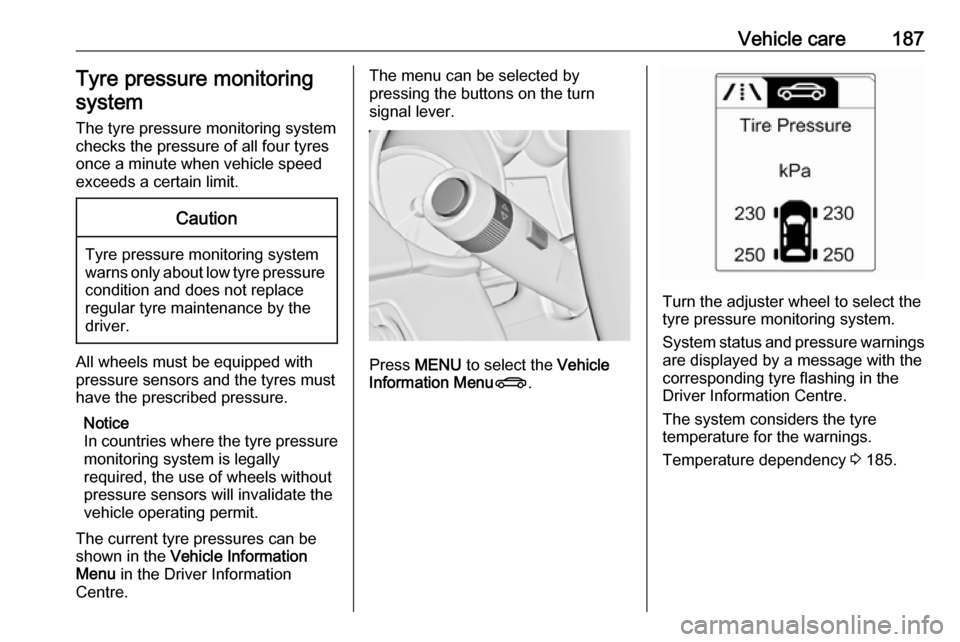
The current tyre pressures can be
shown in the Vehicle Information
Menu in the Driver Information
Centre.
The menu can be selected by
pressing the buttons on the turn
signal lever.
Press MENU to select the Vehicle
Information Menu X.
Turn the adjuster wheel to select the
tyre pressure monitoring system.
System status and pressure warnings
are displayed by a message with the
corresponding tyre flashing in the
Driver Information Centre.
The system considers the tyre
temperature for the warnings.
Temperature dependency 3 185.
Page 190 of 241

188Vehicle care
A detected low tyre pressure
condition is indicated by the control
indicator w 3 89.
If w illuminates, stop as soon as
possible and inflate the tyres as
recommended 3 225.
If w flashes for 60-90 seconds then
illuminates continuously, there is a
fault in the system. Consult a
workshop.
After inflating, some driving may be
required to update the tyre pressure
values in the Driver Information
Centre. During this time w may
illuminate.
If w illuminates at lower temperatures
and extinguishes after some driving,
this could be an indicator for
approaching a low tyre pressure
condition. Check tyre pressure.
Vehicle messages 3 97.
If the tyre pressure must be reduced
or increased, switch off ignition.
Only mount wheels with pressure
sensors, otherwise the tyre pressure
will not be displayed and w
illuminates continuously.
A spare wheel or temporary spare
wheel is not equipped with pressure
sensors. The tyre pressure
monitoring system is not operational
for these tyres. Control indicator w
illuminates. For the further three
tyres, the system remains
operational.
The use of commercially-available liquid tyre repair kits can impair the
function of the system. Factory-
approved repair kits can be used.
Operating electronic devices or being close to facilities using similar wave
frequencies could disrupt the tyre
pressure monitoring system.Each time the tyres are replaced, tyre
pressure monitoring system sensors
must be dismounted and serviced.
For the screwed sensor; replace
valve core and sealing ring. For the
clipped sensor; replace complete
valve stem.
Vehicle loading status
Adjust tyre pressure to load condition according to the tyre information labelor tyre pressure chart 3 225, and
select the appropriate setting in the menu Tyre Load in the Driver
Information Centre, Vehicle
Information Menu 3 90 . This setting is
the reference for the tyre pressure
warnings.
The Tyre Load menu only appears if
the vehicle is at a standstill and the parking brake is applied. On vehicles
with automatic transmission the
selector lever has to be in P.
Page 191 of 241

Vehicle care189
Select:● Light for comfort pressure up to
3 people.
● Eco for Eco pressure up to
3 people.
● Max for full loading.
Tyre pressure sensor matching
process
Each TPMS sensor has a unique
identification code. The identification
code must be matched to a new tyre/ wheel position after rotating the tyres
or exchanging the complete wheel set
and if one or more TPMS sensors
were replaced. The TPMS sensor
matching process should also be
performed after replacing a spare tyre
with a road tyre containing the TPMS
sensor.
The malfunction light w and the
warning message or code should go off at the next ignition cycle. The
sensors are matched to the wheel
positions, using a relearn tool, in the
following order: left side front wheel,
right side front wheel, right side rear
wheel and left side rear wheel. The
turn signal light at the current active
position is illuminated until sensor is
matched.
Consult a workshop for service. There are two minutes to match the first
wheel position, and five minutes
overall to match all four wheel
positions. If it takes longer, the
matching process stops and must be
restarted.
The tyre pressure sensor matching process is:
1. Apply the parking brake.
2. Turn the ignition on.
3. On vehicles with manual transmission automated: Pressand hold brake pedal. Move and
hold the selector lever for five
seconds in position N until P is
displayed in the Driver Information Centre. P indicates
that the sensor matching process
can be started.
On vehicles with manual
transmission: select neutral.
4. Use MENU on the turn signal
lever to select the Vehicle
Information Menu in the Driver
Information Centre.
5. Turn the adjuster wheel to scroll to
the tyre pressure menu.
6. Press SET/CLR to begin the
sensor matching process. A
message requesting acceptance
of the process should be
displayed.
7. Press SET/CLR again to confirm
the selection. The horn sounds
twice to indicate that the receiver
is in relearn mode.
8. Start with the left side front wheel.
9. Place the relearn tool against the tyre sidewall, near the valve stem.Then press the button to activate