parking brake VAUXHALL ADAM 2019 User Guide
[x] Cancel search | Manufacturer: VAUXHALL, Model Year: 2019, Model line: ADAM, Model: VAUXHALL ADAM 2019Pages: 223, PDF Size: 6.54 MB
Page 117 of 223

Driving and operating115Driving and
operatingDriving hints ............................... 115
Control of the vehicle ...............115
Steering ................................... 116
Starting and operating ...............116
New vehicle running-in ............116
Ignition switch positions ...........116
Retained power off ..................117
Starting the engine ..................117
Overrun cut-off ........................ 118
Stop-start system ....................118
Parking .................................... 120
Engine exhaust .......................... 121
Exhaust filter ............................ 121
Catalytic converter ...................122
Manual transmission ..................123
Brakes ........................................ 123
Antilock brake system .............123
Parking brake .......................... 124
Brake assist ............................. 125
Hill start assist ......................... 125
Ride control systems .................125
Traction Control system ..........125Electronic Stability Control ......126
City mode ................................ 128
Driver assistance systems .........129
Cruise control .......................... 129
Speed limiter ........................... 130
Parking assist .......................... 132
Side blind spot alert .................141
Fuel ............................................ 142
Fuel for petrol engines .............142
Fuel for liquid gas operation ....144
Refuelling ................................ 144Driving hints
Control of the vehicle Never coast with engine not
running
Many systems will not function in this
situation (e.g. brake servo unit, power steering). Driving in this manner is a
danger to yourself and others.
All systems function during an
Autostop.
Stop-start system 3 118.
Idle boost
If charging of the vehicle battery is
required due to battery condition, the
power output of the generator must be increased. This will be achieved by
an idle boost which may be audible.
A message appears on the Uplevel
Display.
Pedals
To ensure the pedal travel is
uninhibited, there must be no mats in the area of the pedals.
Page 122 of 223

120Driving and operatingRestart of the engine by the stop-
start system
The selector lever must be in neutralto enable an automatic restart.
If one of the following conditions
occurs during an Autostop, the
engine will be restarted automatically
by the stop-start system:
● The stop-start system is manually deactivated.
● The bonnet is opened.
● The driver's seat belt is unfastened and the driver's door
is opened.
● The engine temperature is too low.
● The charging level of the vehicle battery is below a defined level.
● The brake vacuum is not sufficient.
● The vehicle is driven at least at walking speed.
● The climate control system requests an engine start.
● The air conditioning is manually switched on.If the bonnet is not fully closed, awarning message is displayed in the
Driver Information Centre.
If an electrical accessory, e.g. a
portable CD player, is connected to
the power outlet, a brief power drop during restart might be noticeable.
Parking9 Warning
● Do not park the vehicle on an
easily ignitable surface. The
high temperature of the
exhaust system could ignite the
surface.
● Always apply the parking brake. Activate the parking
brake without pressing the
release button. Apply as firmly
as possible on a downhill slope
or uphill slope. Depress brake
pedal at the same time to
reduce operating force.
● Switch off the engine.
● If the vehicle is on a level surface or uphill slope, engage
first gear before removing the ignition key. On an uphill slope, turn the front wheels away from
the kerb.
If the vehicle is on a downhill
slope, engage reverse gear
before removing the ignition
key. Turn the front wheels
towards the kerb.
● Close the windows and the sunroof.
● Remove the ignition key from the ignition switch. Turn the
steering wheel until the
steering wheel lock is felt to
engage.
● Lock the vehicle.
● The engine cooling fans may run
after the engine has been
switched off 3 150.
Page 126 of 223

124Driving and operatingABS starts to regulate brake pressureas soon as a wheel shows a tendency to lock. The vehicle remains
steerable, even during hard braking.
ABS control is made apparent
through a pulse in the brake pedal
and the noise of the regulation
process.
For optimum braking, keep the brake
pedal fully depressed throughout the
braking process, despite the fact that
the pedal is pulsating. Do not reduce
the pressure on the pedal.
After starting off the system performs
a self-test which may be audible.
Control indicator u 3 77.
Adaptive brake light
During full braking, all three brake
lights flash for the duration of ABS
control.Fault9 Warning
If there is a fault in the ABS, the
wheels may be liable to lock due
to braking that is heavier than
normal. The advantages of ABS are no longer available. During
hard braking, the vehicle can no longer be steered and may
swerve.
Have the cause of the fault remedied
by a workshop.
Parking brake
Manual parking brake9 Warning
Always apply parking brake firmly
without operating the release
button, and apply as firmly as
possible on a downhill or uphill
slope.
To release the parking brake, pull
the lever up slightly, press the
release button and fully lower the
lever.
Page 127 of 223

Driving and operating125To reduce the operating forces ofthe parking brake, depress the
brake pedal at the same time.
Control indicator R 3 76.
Brake assist If the brake pedal is depressed
quickly and forcefully, maximum
brake force is automatically applied
(full braking).
Maintain steady pressure on the
brake pedal for as long as full braking
is required. Maximum brake force is
automatically reduced when the
brake pedal is released.
Hill start assist The system helps prevent unintendedmovement when driving away on
inclines.
When releasing the brake pedal after
stopping on an incline, the brakes
remain on for a further 2 seconds. The brakes release automatically as soon
as the vehicle begins to accelerate or the 2 seconds holding time is over.
The hill start assist is not active during
an Autostop.Ride control systems
Traction Control system
The Traction Control system (TC) is a component of the Electronic Stability
Control (ESC).
TC improves driving stability when
necessary, regardless of the type of
road surface or tyre grip, by
preventing the drive wheels from
spinning.
As soon as the drive wheels starts to
spin, engine output is reduced and
the wheel spinning the most is braked
individually. This considerably
improves the driving stability of the
vehicle on slippery road surfaces.
Page 141 of 223

Driving and operating139for parallel parking slots or 6 m forperpendicular parking slots after the
Stop message is given. The system
calculates the optimal path into the
parking slot.
A brief vibration in the steering wheel
after engaging reverse gear indicates
that the steering is controlled by the
system. Then the vehicle is steered into the slot automatically by givingthe driver detailed instructions for
braking, accelerating and
gearshifting. The driver must keep
hands away from the steering wheel.
Always pay attention to the sound of
the front-rear parking assist.
Continuous sound indicates that the
distance to an obstacle is less than approx. 30 cm.
If, for any reason, the driver must take over control of the steering, hold the
steering wheel only at the outer edge. Automatic steering is cancelled in thisevent.Display indication
The instructions in the display show:
● general hints and warning messages
● a hint when driving faster than 18 mph during parking slot
searching mode, or 5 mph in
guiding mode
● the demand to stop the vehicle, when a parking slot is detected
● the direction of driving during the
parking manoeuvre
● the demand to gearshift rearwards or forwards
● the demand to accelerate or brake
● for some of the instructions a progress bar is shown in the
Driver Information Centre
● successful parking manoeuvre indicated by a pop-up symbol
and a chime
● the cancelling of a parking manoeuvreDisplay priorities
Advanced parking assist indication on the Driver Information Centre can beinhibited by vehicle messages with ahigher priority. After approving the
message by pressing SET/CLR on
the stalk, advanced parking assist
instructions appear again and the parking manoeuvre can be continued.
Deactivation
The system is deactivated by:
● a long press of D
● parking manoeuvre successfully ended
● driving faster than 18 mph during
parking slot search
● driving faster than 5 mph during parking guidance
● driver interference on steering wheel detected
● exceeding the maximum number
of gear changes: eight parking
cycles when parallel parking or
five cycles when perpendicular
parking
● switching off the ignition
Page 151 of 223

Vehicle care149Caution
When transporting the vehicle on
a train or on a recovery vehicle, the
mud flaps might be damaged.
Vehicle storage
Storage for a long period of time
If the vehicle is to be stored for several months:
● Wash and wax the vehicle.
● Have the wax in the engine compartment and underbody
checked.
● Clean and preserve the rubber seals.
● Fill up fuel tank completely.
● Change the engine oil.
● Drain the washer fluid reservoir.
● Check the coolant antifreeze and
corrosion protection.
● Adjust tyre pressure to the value specified for full load.
● Park the vehicle in a dry, wellventilated place. Engage first or
reverse gear. Prevent the vehicle from rolling.
● Do not apply the parking brake.
● Open the bonnet, close all doors and lock the vehicle.
● Disconnect the clamp from the negative terminal of the vehicle
battery. Beware that all systems are not functional.
Putting back into operation
When the vehicle is to be put back into
operation:
● Connect the clamp to the negative terminal of the vehicle
battery. Activate the electronics
of the power windows.
● Check tyre pressure.
● Fill up the washer fluid reservoir. ● Check the engine oil level.
● Check the coolant level.
● Fit the number plate if necessary.End-of-life vehicle recovery
Information on end-of-life vehicle
recovery centres and the recycling of
end-of-life vehicles is available on our website. Only entrust this work to an
authorised recycling centre.
Gas vehicles must be recycled by a
service centre authorised for gas
vehicles.
Page 170 of 223

168Vehicle careNo.Circuit1–2–3Power windows4Voltage transformer5Body control module 16Body control module 27Body control module 38Body control module 49Body control module 510Body control module 611Body control module 712Body control module 813–14Tailgate15Airbag module16Diagnose connector17Ignition switchNo.Circuit18Air conditioning system19Audio amplifier20Parking assist21Brake switch22Infotainment system23USB charging port24Infotainment system25OnStar26Instrument panel27Seat heating, driver28–29–30Ignition31Antitheft alarm system32Seat heating, passenger33Heated steering wheel34–
Page 176 of 223
174Vehicle careilluminates. For the further three
tyres, the system remains
operational.
The use of commercially-available liquid tyre repair kits can impair the
function of the system. Factory-
approved repair kits can be used.
Operating electronic devices or being close to facilities using similar wave
frequencies could disrupt the tyre
pressure monitoring system.
Each time the tyres are replaced, tyre
pressure monitoring system sensors
must be dismounted and serviced. For the screwed sensor; replace
valve core and sealing ring. For the
clipped sensor; replace complete
valve stem.
Vehicle loading status
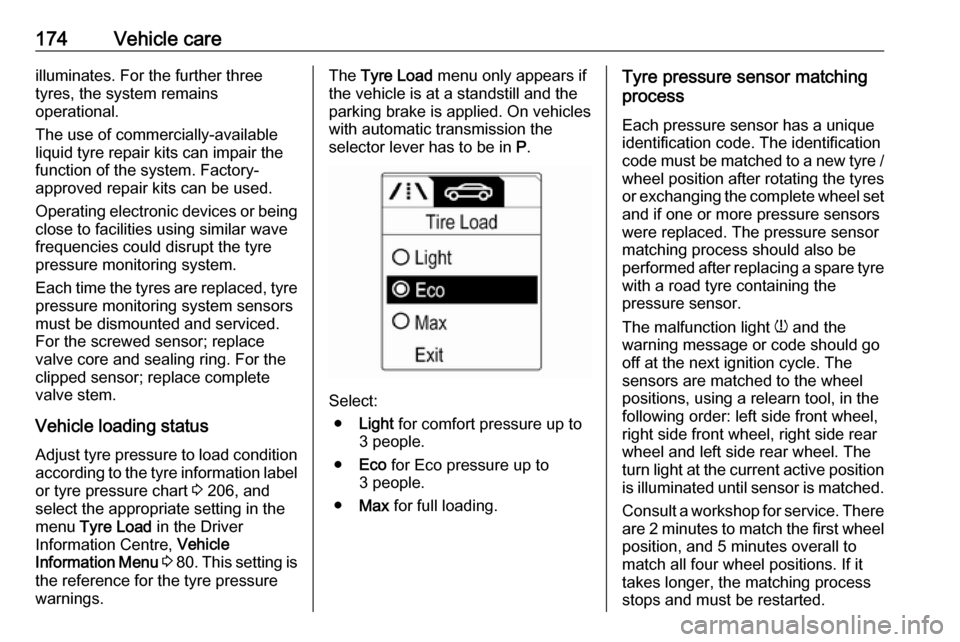
Adjust tyre pressure to load condition according to the tyre information labelor tyre pressure chart 3 206, and
select the appropriate setting in the menu Tyre Load in the Driver
Information Centre, Vehicle
Information Menu 3 80 . This setting is
the reference for the tyre pressure
warnings.The Tyre Load menu only appears if
the vehicle is at a standstill and the parking brake is applied. On vehicles
with automatic transmission the
selector lever has to be in P.
Select:
● Light for comfort pressure up to
3 people.
● Eco for Eco pressure up to
3 people.
● Max for full loading.
Tyre pressure sensor matching
process
Each pressure sensor has a unique
identification code. The identification
code must be matched to a new tyre /
wheel position after rotating the tyres
or exchanging the complete wheel set and if one or more pressure sensors
were replaced. The pressure sensor
matching process should also be
performed after replacing a spare tyre
with a road tyre containing the
pressure sensor.
The malfunction light w and the
warning message or code should go
off at the next ignition cycle. The
sensors are matched to the wheel
positions, using a relearn tool, in the following order: left side front wheel,
right side front wheel, right side rear
wheel and left side rear wheel. The
turn light at the current active position
is illuminated until sensor is matched.
Consult a workshop for service. There are 2 minutes to match the first wheelposition, and 5 minutes overall to
match all four wheel positions. If it
takes longer, the matching process
stops and must be restarted.
Page 177 of 223

Vehicle care175The tyre pressure sensor matching
process is:
1. Apply the parking brake.
2. Turn the ignition on.
3. On vehicles with manual transmission: select neutral.
4. Use MENU on the stalk to select
the Vehicle Information Menu in
the Driver Information Centre.
5. Turn the adjuster wheel to scroll to
the tyre pressure menu.
6. Press SET/CLR to begin the
sensor matching process. A
message requesting acceptance
of the process should be
displayed.
7. Press SET/CLR again to confirm
the selection. The horn sounds
twice to indicate that the receiver
is in relearn mode.
8. Start with the left side front wheel.
9. Place the relearn tool against the tyre sidewall, near the valve stem.Then press the button to activate
the tyre pressure sensor. A hornchirp confirms that the sensor
identification code has been
matched to this wheel position.
10. Proceed to the right side front wheel, and repeat the procedure
in Step 9.
11. Proceed to the right side rear wheel, and repeat the procedure
in Step 9.
12. Proceed to the left side rear wheel, and repeat the procedure
in Step 9. The horn sounds twice
to indicate that the sensor
identification code has been
matched to the left side rear
wheel, and the tyre pressure
sensor matching process is no
longer active.
13. Turn off the ignition.
14. Set all four tyres to the recommended air pressure level
as indicated on the tyre
information label.
15. Ensure the tyre loading status is set according to the selected
pressure 3 80.Tread depth
Check tread depth at regular
intervals.
Tyres should be replaced for safety
reasons at a tread depth of 2-3 mm
(4 mm for winter tyres).
For safety reasons it is recommended
that the tread depth of the tyres on
one axle should not vary by more than 2 mm.
The legally permissible minimum
tread depth (1.6 mm) has been
reached when the tread has worn
down as far as one of the tread wear
Page 179 of 223

Vehicle care177Tyre chains are only permitted on
tyres of size 175/70 R 14,
185/70 R 14, 185/60 R 15, 185/65 R 15 and 195/55 R 16.
Tyre chains are not permitted on tyres
of size 215/45 R 17 and 225/35 R 18 .
The use of tyre chains is not permitted on the temporary spare wheel.
Tyre repair kit Minor damage to the tyre tread can be
repaired with the tyre repair kit.
Do not remove foreign bodies from
the tyres.
Tyre damage exceeding 4 mm or that
is at the tyre's sidewall cannot be
repaired with the tyre repair kit.9 Warning
Do not drive faster than 50 mph.
Do not use for a lengthy period.
Steering and handling may be
affected.
If you have a flat tyre:
Apply the parking brake and engage
first gear.
The tyre repair kit is in the tool box
under the floor cover in the load
compartment.
On versions with rear carrier system
or liquid gas engine, the tyre repair kit is located in a suitcase and fixed with a strap at the left sidewall in the load
compartment.