AUX VAUXHALL ANTARA 2015 Infotainment system
[x] Cancel search | Manufacturer: VAUXHALL, Model Year: 2015, Model line: ANTARA, Model: VAUXHALL ANTARA 2015Pages: 151, PDF Size: 2.82 MB
Page 133 of 151
Introduction133Connection
A connection can be created between a mobile telephone and the
Infotainment system via:
■ a telephone-specific adapter
■ a Bluetooth™ connection as long as the mobile telephone and the
Mobile telephone portal support
this function
In order for a connection to be
created, the Mobile telephone portal
must be switched on and the mobile
telephone logged in. The Mobile telephone portal switches itself on
and off via the battery. If the battery is switched off, you can switch the
mobile telephone on and off via the
Infotainment system. When the
battery is switched off, the operating
time is limited to one hour.
On many mobile telephones, the
adapter is only used as a charging
station. In this case, the connection
must be created via Bluetooth™
3 134.You can obtain information on
available telephone-specific adapters
for your mobile telephone from your
Vauxhall Authorised Repairer.
For information on the Bluetooth™
function for your mobile telephone,
see the operating instructions for the
mobile telephone.
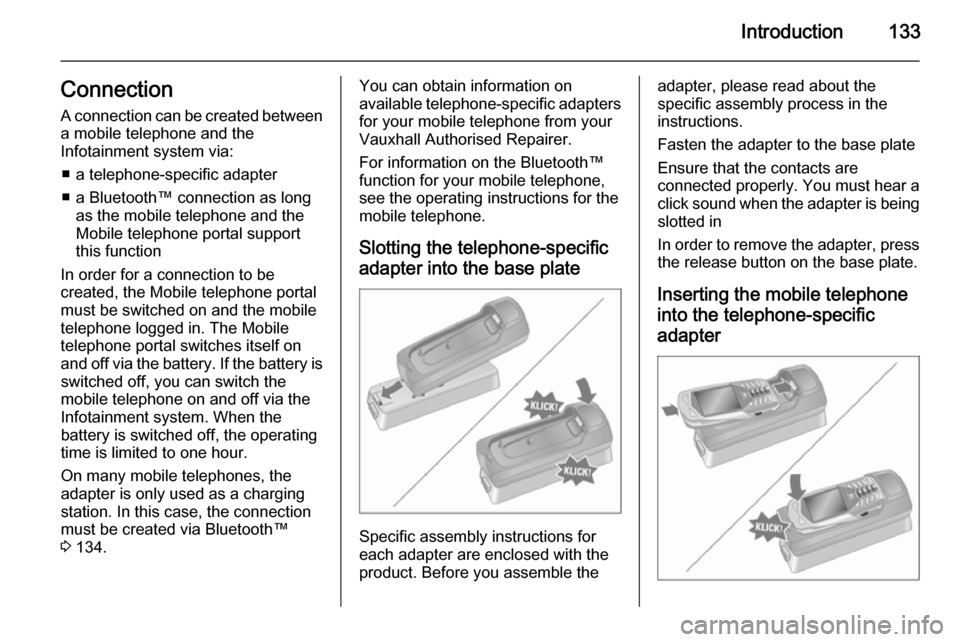
Slotting the telephone-specific adapter into the base plate
Specific assembly instructions for
each adapter are enclosed with the
product. Before you assemble the
adapter, please read about the
specific assembly process in the
instructions.
Fasten the adapter to the base plate
Ensure that the contacts are
connected properly. You must hear a click sound when the adapter is being
slotted in
In order to remove the adapter, press the release button on the base plate.
Inserting the mobile telephone
into the telephone-specific adapter
Page 147 of 151

Voice recognition147
User:
Voice output:" The number, please! ".
User: " Plus Four Nine "
Voice output:" Plus Four Nine "
User: " Seven Three One ".
Voice output:" Seven Three One "
User:" One One Nine One "
Voice output:" One One Nine One "
User:" Save"
Instead of " Save" you can also use
the command " Accept".
"Delete"
Using the " Delete" command, you can
delete a previously saved voice tag.
"Phonebook"
Using the command " Phonebook",
you can dial a previously saved voice
tag which you have included in the
phonebook. You can also delete a
voice tag. After inputting the
" Phonebook " command, you will be
asked to input a name.After the recognised name has been
output, you can input the following
commands:
■ " Call ": The connection to the saved
number is created.
■ " Delete ": The voice tag is deleted.
■ " Cancel ": The dialogue is ended.
■ " Help ": The dialogue is ended and
all commands available in this
context are listed.
Example of how to dial a telephone
number saved in the directory:
User: " Phonebook ".
Voice output:
Voice output:
Voice output:
User: " Call"
Instead of " Call" you can also use the
command " Accept".
Voice output: " The number is being
dialled "
"Help"
Using the " Help" command, all of the
commands available in this particular
context are listed."Cancel"
Using the " Cancel" command, the
speech recognition system can be switched off.
Changing language Change the language shown
The Infotainment system supports 12
pre-set languages to be shown on the display. Contact your Vauxhall
Authorised Repairer to activate a
different language from that preset.
Change the language spoken
The speech recognition system
supports the following 6 languages:
■ German
■ (British) English
■ French (EU)
■ Italian
■ Spanish (EU)
■ Dutch
Contact your Vauxhall Authorised
Repairer to activate a different
language from that preset.