roof VAUXHALL ANTARA 2015 User Guide
[x] Cancel search | Manufacturer: VAUXHALL, Model Year: 2015, Model line: ANTARA, Model: VAUXHALL ANTARA 2015Pages: 223, PDF Size: 6.07 MB
Page 73 of 223

Storage71Roof rack system
Roof rack For safety reasons and to avoiddamage to the roof, the vehicle
approved roof rack system is
recommended. For further
information contact a workshop.
Fasten the roof rack to the roof rails following the instructions that
accompany the system, ensuring that
the roof load is evenly distributed over the side or cross rails.
Loads must not be placed on the roof
surface. To prevent damage or loss,
check frequently that roof loads are
securely fastened.
Driving with a roof load affects the
vehicle centre of gravity; drive
carefully in crosswinds and do not
drive at high speeds.
Remove the roof rack when not in use.Loading information
■ Heavy objects in the load compartment should be evenly
distributed and placed as far
forward as possible. Ensure the
backrests are securely engaged. If
objects can be stacked, the heavier
objects should be placed at the bottom.
With rear seats in the folded
position, objects must not be
stacked higher than the seat
backrests.
■ Secure objects with lashing straps attached to lashing eyes 3 70.
■ Secure loose objects in the load compartment, e.g. with a luggage
floor net, to prevent sliding.
■ When transporting objects in the load compartment, the backrests ofthe rear seats must not be angled
forward.
■ Do not allow the load to protrude above the upper edge of the
backrests.■ Do not place any objects on the load compartment cover or the
instrument panel, and do not cover
the sensor on top of the instrument
panel.
■ The load must not obstruct the operation of the pedals, electrical
parking brake and gear selector, or hinder the freedom of movement ofthe driver. Do not place any
unsecured objects in the interior.
■ Do not drive with an open load compartment.9 Warning
Always make sure that the load in
the vehicle is securely stowed.
Otherwise objects can be thrown
around inside the vehicle and
cause personal injury or damage
to the load or vehicle.
■ The payload is the difference between the permitted gross
vehicle weight (see identification
plate 3 201) and the EC kerb
weight.
Page 74 of 223

72Storage
To calculate the EC kerb weight,
enter the data for your vehicle in the
Weights table at the front of this
manual.
The EC kerb weight includes
weights for the driver (68 kg),
luggage (7 kg) and all fluids (tank
90 % full).
Optional equipment and
accessories increase the kerb
weight.
■ Driving with a roof load increases the sensitivity of the vehicle to
cross-winds and has a detrimental
effect on vehicle handling due to the vehicle's higher centre of
gravity. Distribute the load evenly
and secure it properly with retaining
straps. Adjust the tyre pressure and
vehicle speed according to the load conditions. Check and retighten the
straps frequently.
Do not drive faster than 75 mph.
The permissible roof load is
100 kg. The roof load is the
combined weight of the roof rack
and the load.
Page 94 of 223
92Instruments and controlsAnti-theft alarm system
a illuminates yellow.
Illuminates when alarm system
monitoring of the passenger
compartment and vehicle inclination
has been switched off with button
a in the roof lining.
Anti-theft alarm system 3 25.Information displays
Board-Info-Display
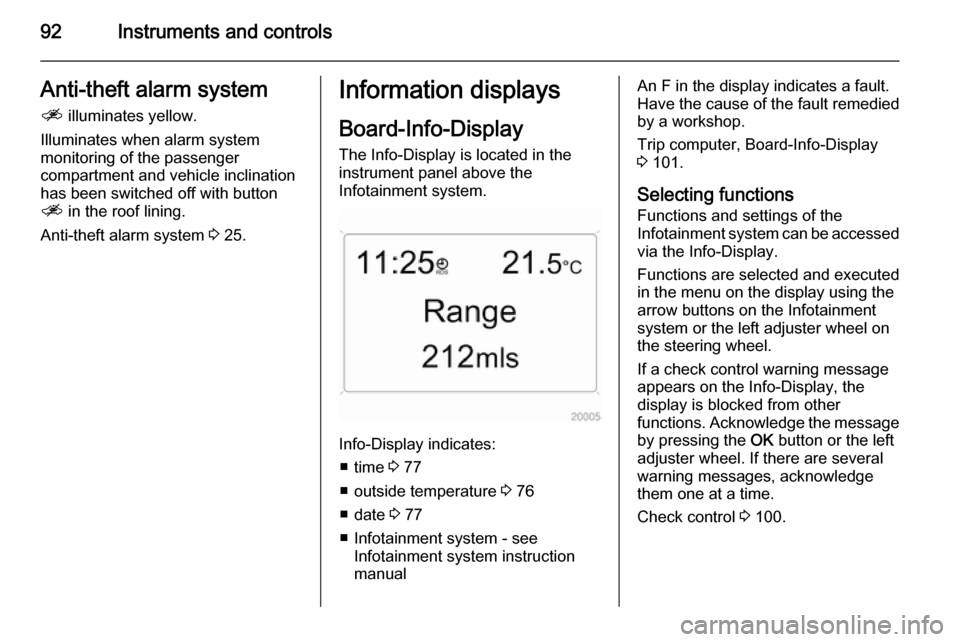
The Info-Display is located in the
instrument panel above the
Infotainment system.
Info-Display indicates:
■ time 3 77
■ outside temperature 3 76
■ date 3 77
■ Infotainment system - see Infotainment system instruction
manual
An F in the display indicates a fault.
Have the cause of the fault remedied by a workshop.
Trip computer, Board-Info-Display
3 101.
Selecting functions
Functions and settings of the
Infotainment system can be accessed via the Info-Display.
Functions are selected and executed
in the menu on the display using the
arrow buttons on the Infotainment
system or the left adjuster wheel on
the steering wheel.
If a check control warning message
appears on the Info-Display, the
display is blocked from other
functions. Acknowledge the message
by pressing the OK button or the left
adjuster wheel. If there are several
warning messages, acknowledge
them one at a time.
Check control 3 100.
Page 113 of 223

Lighting111Interior lighting
Instrument panel
illumination control
Brightness of the following lights can
be adjusted when the exterior lights
are on:
■ Instrument panel illumination
■ Info-Display
■ Illuminated switches and operation elements.
Turn thumb wheel k to the right or left
until the desired brightness is
obtained.
If driver's door is opened or q is
pressed on the remote control,
instrument panel illuminates
automatically for 30 seconds until
ignition switch is turned to position ACC .
Display mode 3 95.
Interior lights
During entry and exit of the vehicle,
the front and rear courtesy lights
automatically switch on and then off
after a delay.
Notice
In the event of an accident with airbag deployment the courtesy
lights are turned on automatically.Front courtesy light
Front and rear reading lights and the
load compartment lights function as
courtesy lights and illuminate when
the doors or the tailgate are opened.
If the doors or tailgate remain open, the lights stay illuminated for
10 minutes. Once all doors and the tailgate are closed, the courtesy lights dim gradually after 10 seconds.
By pressing button d in the roof
lining, both the front and rear reading lights illuminate. Press again to turn
off.
Page 114 of 223
112Lighting
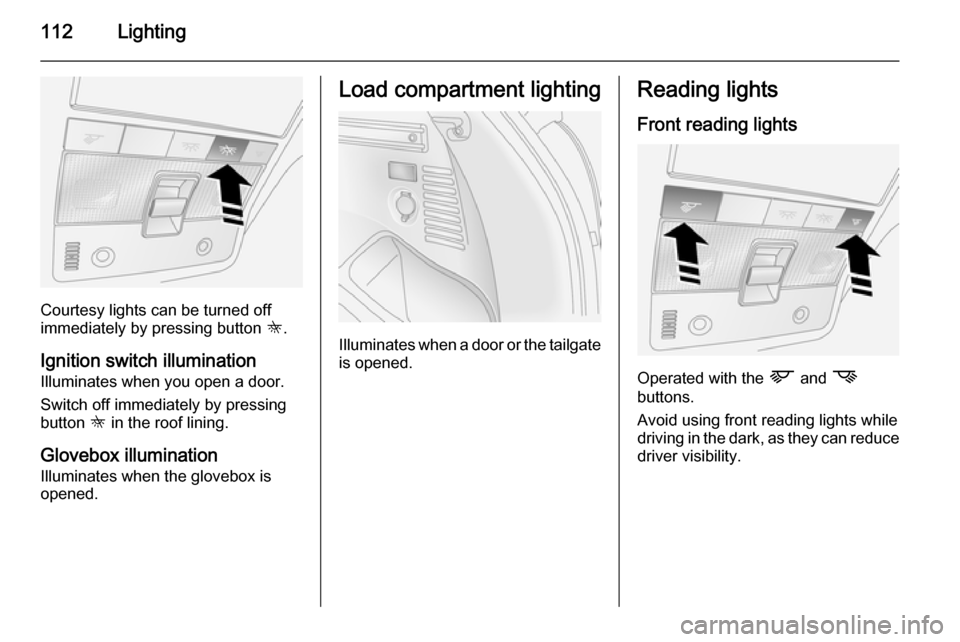
Courtesy lights can be turned off
immediately by pressing button K.
Ignition switch illumination
Illuminates when you open a door.
Switch off immediately by pressing button K in the roof lining.
Glovebox illumination
Illuminates when the glovebox is
opened.
Load compartment lighting
Illuminates when a door or the tailgate
is opened.
Reading lights
Front reading lights
Operated with the L and M
buttons.
Avoid using front reading lights while
driving in the dark, as they can reduce driver visibility.
Page 119 of 223

Climate control117
directed to it. If windscreen mists up
from outside, activate windscreen
wiper and deactivate l.
Maximum cooling Briefly open the windows and sunroof
so that hot air can disperse quickly.
■ Press button n to activate air
conditioning.
■ Press button 4 to activate air
recirculation.
■ Set air distribution switch to M.
■ Set temperature control to coldest level.
■ Set fan to highest level.
■ Open all vents.Demisting and defrosting
■ Set the air distribution switch to l
or J.
■ Set temperature control to warmest
level.
■ Set fan to highest level.
■ Close centre air vents.
■ Open side air vents and direct them
towards the door windows.
■ Switch on heated rear window Ü
3 32.
Air conditioning n and air
recirculation 4 are switched on
automatically to improve defrosting
efficiency when position l or J is
selected.
Electronic climate control system The dual zone climate control allows
different climatisation temperatures
for driver and front passenger side.
Controls for:
■ Temperature on driver side
■ Air distribution
Page 130 of 223
128Driving and operating■ Switch off the engine and turnthe ignition key to position
LOCK , push key into ignition
switch and remove.
Turn the steering wheel until the steering wheel lock is felt to
engage.
For vehicles with automatic
transmission, depress foot
brake and shift into P before
pushing key into ignition switch
and removing.
■ If the vehicle is on a level surface or uphill slope, engage
first gear or move the selector
lever to P before switching off
the ignition. On an uphill slope,
turn the front wheels away from
the kerb.
If the vehicle is on a downhill
slope, engage reverse gear or
move the selector lever to P
before switching off the ignition.
Turn the front wheels towards
the kerb.■ Close windows and sunroof.
■ Lock the vehicle with button p on
the radio remote control 3 21.
Activate the anti-theft alarm system
3 25.Engine exhaust9 Danger
Engine exhaust gases contain
poisonous carbon monoxide,
which is colourless and odourless and could be fatal if inhaled.
If exhaust gases enter the interior
of the vehicle, open the windows.
Have the cause of the fault
rectified by a workshop.
Avoid driving with an open load
compartment, otherwise exhaust
gases could enter the vehicle.
Malfunction indicator light 3 85.
Diesel particle filter
The diesel particle filter system filters
harmful soot particles out of the
exhaust gases. The system includes
a self-cleaning function that runs
automatically during driving without
any notification.
Page 137 of 223

Driving and operating135
Ensure tyres (including the spare) areinflated to the correct pressure
3 210 and are suitable for the
prevailing road conditions. For
optimum system performance, the
vehicle's tyres should not have
varying degrees of wear.
If control indicator B flashes in the
instrument cluster during driving, All-
wheel drive is temporarily disabled. If
B flashes continuously, there is a fault
in the system; seek the assistance of
a workshop.
All-wheel drive control indicator B
3 86.
On-road driving
The increased traction of All-wheel
drive vehicles offers greater driving
control in adverse road conditions,
particularly heavy snow and ice.
However, All-wheel drive vehicles are not "skid-proof" and do not decrease
stopping distances.
All-wheel drive vehicles have a higher
centre of gravity than conventional vehicles. Always approach curves at
an appropriate driving speed. Do notattempt to go as fast through turns as
you might in a conventional vehicle.
Strong crosswinds can affect the normal steering of the vehicle. Drive
slower under strong crosswind
conditions.
Off-road driving ■ Avoid protruding objects (such as rocks or tree stumps) that may
damage the underbody and tyres of your vehicle.
■ Test the brakes after operating in mud, to clear excess mud from the
braking surfaces.
■ Grip the steering wheel when travelling over rough terrain.
Terrain conditions can cause rapid
and unexpected movement in the
steering.
The ground clearance, ramp angle,
angle of approach and departure and
wading depth need to be considered, especially in hilly conditions and
when wading, to prevent the vehicle
becoming stuck and possibly
damaged.
Vehicle dimensions 3 207.Towing the vehicle 3 192.
Driving through water
Do not exceed the maximum wading
depth 3 207.
Check the depth of water: choose the
lowest entry and departure angles
before entering. Maintain a steady
engine speed, to help prevent water
from entering the exhaust system, but
do not exceed 3 mph, to avoid
splashing the water.
Drive with the flow wherever possible,
not against it. If you have to drive
against the flow, try to drive at an
angle to it, so that the leading corner
of the vehicle will help deflect water
from the engine compartment. Avoid
splashing the water - if the ignition
system becomes wet, the engine may
stall.
Avoid water entering the air intake
system. If water enters the air intake
system, engine seizure with severe
costly damage may result.
Test the brakes after leaving the
water - wet brakes are less effective
than dry ones. Perform the service
Page 161 of 223

Vehicle care159
Retrofitted electrical or electronic
accessories can place an additional load on the vehicle battery or
discharge the battery. Seek the
assistance of a workshop regarding technical possibilities, such as fitting
a more powerful battery.
Ensure the ignition is switched off
before reconnecting the vehicle
battery. Then perform the following actions:
1. Set date and time in the information display 3 77.
2. If necessary, activate the power windows and sun roof 3 30, 3 32.
In order to prevent the vehicle battery
from discharging, some consumers
such as the courtesy lights
automatically switch off after a delay.
Charge a disconnected vehicle
battery every 6 weeks.
Vehicle battery discharge protection
3 114.Replacing the vehicle battery
Notice
Any deviation from the instructions
given in this paragraph may lead to
a temporary deactivation of the stop-
start system.
When the vehicle battery is being
replaced, please ensure that there
are no open ventilation holes in the
vicinity of the positive terminal. If a
ventilation hole is open in this area, it
must be closed off with a dummy cap, and the ventilation in the vicinity of the
negative terminal must be opened.
Only use batteries that allow the fuse
box to be mounted above the vehicle
battery.
In vehicles with stop-start system,
ensure to have the AGM (Absorptive
Glass Mat) vehicle battery replaced
with an AGM battery again.
An AGM battery can be identified by
the label on the battery. We
recommend the use of an original
Vauxhall battery.
Notice
Using an AGM vehicle battery
different from the original Vauxhall
vehicle battery may result in a lower performance of the stop-start
system.
We recommend that you have the
vehicle battery replaced by a
workshop.
Stop-start system 3 125.
Page 168 of 223
166Vehicle careSide turn signal lights
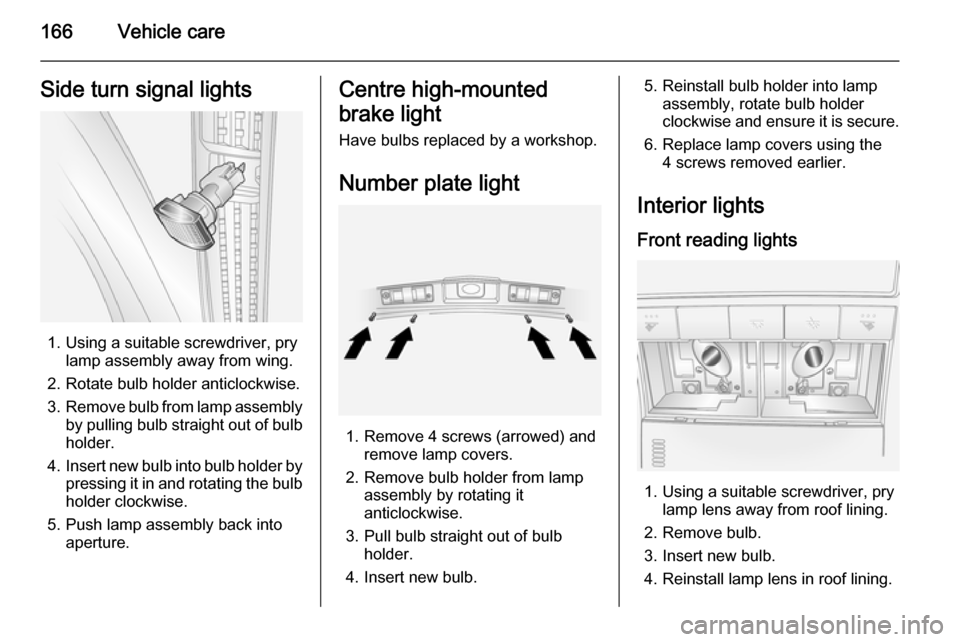
1. Using a suitable screwdriver, prylamp assembly away from wing.
2. Rotate bulb holder anticlockwise.
3. Remove bulb from lamp assembly
by pulling bulb straight out of bulb holder.
4. Insert new bulb into bulb holder by
pressing it in and rotating the bulb holder clockwise.
5. Push lamp assembly back into aperture.
Centre high-mounted
brake light Have bulbs replaced by a workshop.
Number plate light
1. Remove 4 screws (arrowed) and remove lamp covers.
2. Remove bulb holder from lamp assembly by rotating it
anticlockwise.
3. Pull bulb straight out of bulb holder.
4. Insert new bulb.
5. Reinstall bulb holder into lamp assembly, rotate bulb holder
clockwise and ensure it is secure.
6. Replace lamp covers using the 4 screws removed earlier.
Interior lights
Front reading lights
1. Using a suitable screwdriver, pry lamp lens away from roof lining.
2. Remove bulb.
3. Insert new bulb.
4. Reinstall lamp lens in roof lining.