brake VAUXHALL ANTARA 2015 Owner's Guide
[x] Cancel search | Manufacturer: VAUXHALL, Model Year: 2015, Model line: ANTARA, Model: VAUXHALL ANTARA 2015Pages: 223, PDF Size: 6.07 MB
Page 130 of 223

128Driving and operating■ Switch off the engine and turnthe ignition key to position
LOCK , push key into ignition
switch and remove.
Turn the steering wheel until the steering wheel lock is felt to
engage.
For vehicles with automatic
transmission, depress foot
brake and shift into P before
pushing key into ignition switch
and removing.
■ If the vehicle is on a level surface or uphill slope, engage
first gear or move the selector
lever to P before switching off
the ignition. On an uphill slope,
turn the front wheels away from
the kerb.
If the vehicle is on a downhill
slope, engage reverse gear or
move the selector lever to P
before switching off the ignition.
Turn the front wheels towards
the kerb.■ Close windows and sunroof.
■ Lock the vehicle with button p on
the radio remote control 3 21.
Activate the anti-theft alarm system
3 25.Engine exhaust9 Danger
Engine exhaust gases contain
poisonous carbon monoxide,
which is colourless and odourless and could be fatal if inhaled.
If exhaust gases enter the interior
of the vehicle, open the windows.
Have the cause of the fault
rectified by a workshop.
Avoid driving with an open load
compartment, otherwise exhaust
gases could enter the vehicle.
Malfunction indicator light 3 85.
Diesel particle filter
The diesel particle filter system filters
harmful soot particles out of the
exhaust gases. The system includes
a self-cleaning function that runs
automatically during driving without
any notification.
Page 132 of 223
130Driving and operatingCaution
Fuel grades other than those listedon pages 3 144, 3 205 could
damage the catalytic converter or
electronic components.
Unburnt petrol will overheat and
damage the catalytic converter.
Therefore avoid excessive use of the starter, running the fuel tank
dry and starting the engine by
pushing or towing.
In the event of misfiring, uneven
engine running, a reduction in engine performance or other unusual
problems, have the cause of the fault
rectified by a workshop as soon as
possible. In an emergency, driving
can be continued for a short period,
keeping vehicle speed and engine
speed low.
Malfunction indicator light 3 85.
Automatic transmission
The automatic transmission permits
automatic gearshifting (automatic
mode) or manual gearshifting
(manual mode).
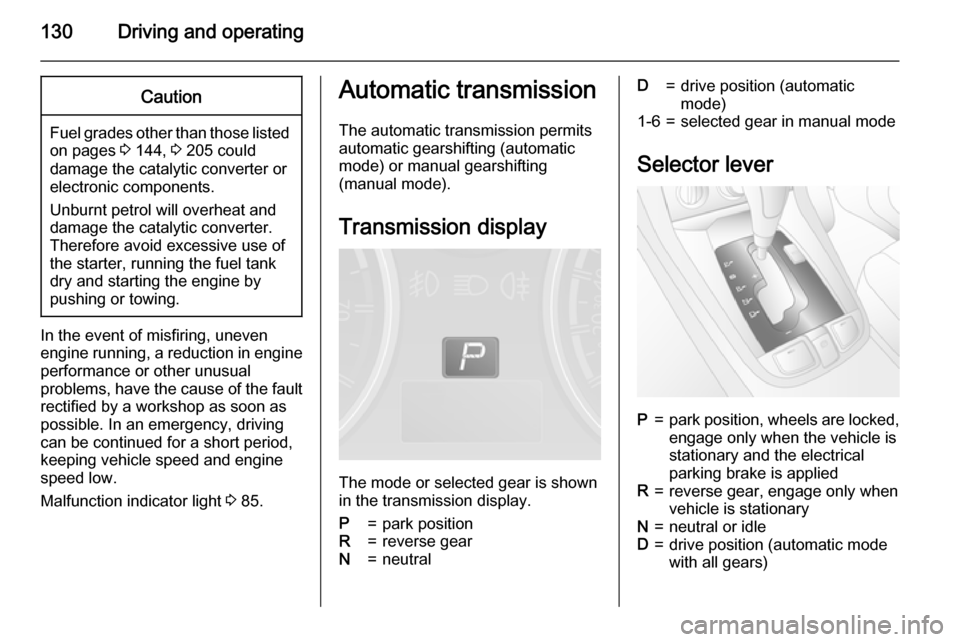
Transmission display
The mode or selected gear is shown
in the transmission display.
P=park positionR=reverse gearN=neutralD=drive position (automatic
mode)1-6=selected gear in manual mode
Selector lever
P=park position, wheels are locked, engage only when the vehicle is
stationary and the electrical
parking brake is appliedR=reverse gear, engage only when
vehicle is stationaryN=neutral or idleD=drive position (automatic mode
with all gears)
Page 133 of 223

Driving and operating131
The selector lever is locked in position
P and N and can only be moved when
the ignition is on and the foot brake is applied.
To engage P or R, push the release
button.
Never shift to P or R while the vehicle
is moving.
The engine can only be started with
lever in position P or N. Depress foot
brake or apply electrical parking
brake before starting.
Do not accelerate while engaging a
gear. Never depress the accelerator
pedal and brake pedal at the same
time.
When a gear is engaged, the vehicle
slowly begins to creep when the foot
brake is released.
Engine braking To utilise the engine braking effect,
select a lower gear in good time when
driving downhill - see Manual mode.
Use of the engine braking effect, as
opposed to the use of the foot brake
when driving downhill, can extend the
life of the brakes.Rocking the vehicle
Rocking the vehicle is only
permissible if the vehicle is stuck in
water, ice, sand, mud, snow or a dip.
Move the selector lever between D
and R in a repeat pattern while
applying light pressure to the
accelerator pedal when the vehicle is in gear. Do not race the engine and
avoid sudden acceleration.
If the vehicle cannot be released after
rocking the vehicle several times,
your vehicle may need to be towed
3 192.
Parking
Apply the electrical parking brake and engage P.
The ignition key can only be removed
when the selector lever is in position
P .Manual mode
Move selector lever out of position D
towards the left and then forwards or backwards.
<=Shift to a higher gear.]=Shift to a lower gear.
Tip selector lever in the appropriate
direction. It then returns to the centre
position.
Gearshifting in manual mode can be
achieved whilst accelerating. If the
engine speed is too low, the
Page 135 of 223
Driving and operating133
Deactivation
Fuel economy mode is switched off
by pressing button s again;
control indicator s extinguishes in
the instrument cluster.
Fault
In the event of a fault in the automatic
transmission, control indicator Z
illuminates in the instrument cluster 3 85 . Automatic shifting may be much
harsher than normal or, in the case of
a serious fault, cancelled altogether.
Have the cause of the fault remedied
by a workshop.
If control indicator g illuminates in
the instrument cluster when the
engine is running, this may indicate a
fault in the transmission electronics
3 85. The electronics switch to the
emergency running programme, fuel
consumption may increase and the
driveability of the vehicle may be
affected. Seek the assistance of a
workshop.Interruption of power
supply
The clutch is not disengaged if the
vehicle battery is discharged and a
gear has been selected. The vehicle
cannot move. The selector lever
cannot be moved out of position P or
N .
If the battery is discharged, start the
vehicle using jump leads 3 190.
If the battery is not the cause of the
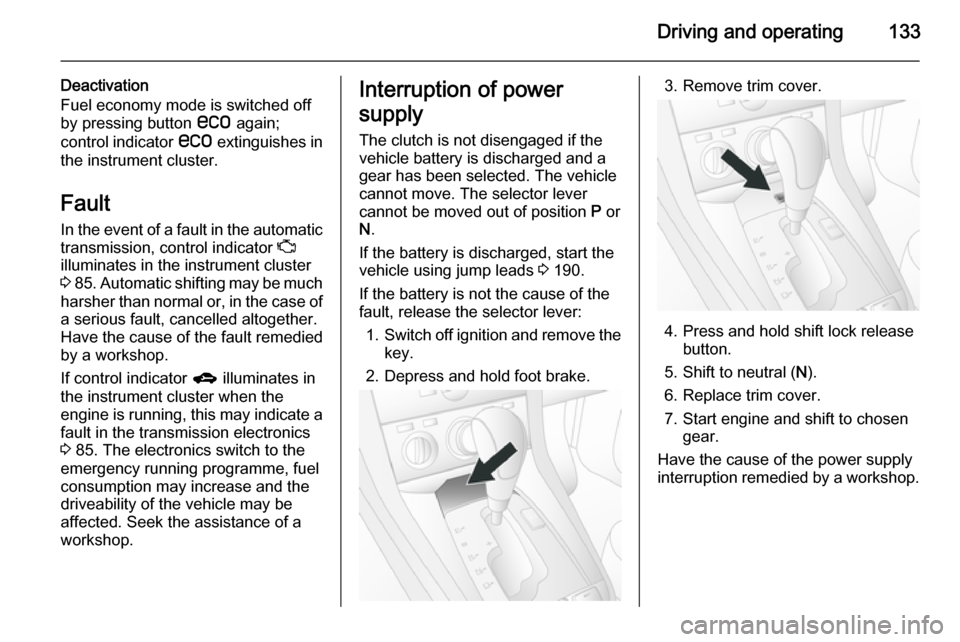
fault, release the selector lever:
1. Switch off ignition and remove the
key.
2. Depress and hold foot brake.3. Remove trim cover.
4. Press and hold shift lock release button.
5. Shift to neutral ( N).
6. Replace trim cover.
7. Start engine and shift to chosen gear.
Have the cause of the power supply
interruption remedied by a workshop.
Page 137 of 223

Driving and operating135
Ensure tyres (including the spare) areinflated to the correct pressure
3 210 and are suitable for the
prevailing road conditions. For
optimum system performance, the
vehicle's tyres should not have
varying degrees of wear.
If control indicator B flashes in the
instrument cluster during driving, All-
wheel drive is temporarily disabled. If
B flashes continuously, there is a fault
in the system; seek the assistance of
a workshop.
All-wheel drive control indicator B
3 86.
On-road driving
The increased traction of All-wheel
drive vehicles offers greater driving
control in adverse road conditions,
particularly heavy snow and ice.
However, All-wheel drive vehicles are not "skid-proof" and do not decrease
stopping distances.
All-wheel drive vehicles have a higher
centre of gravity than conventional vehicles. Always approach curves at
an appropriate driving speed. Do notattempt to go as fast through turns as
you might in a conventional vehicle.
Strong crosswinds can affect the normal steering of the vehicle. Drive
slower under strong crosswind
conditions.
Off-road driving ■ Avoid protruding objects (such as rocks or tree stumps) that may
damage the underbody and tyres of your vehicle.
■ Test the brakes after operating in mud, to clear excess mud from the
braking surfaces.
■ Grip the steering wheel when travelling over rough terrain.
Terrain conditions can cause rapid
and unexpected movement in the
steering.
The ground clearance, ramp angle,
angle of approach and departure and
wading depth need to be considered, especially in hilly conditions and
when wading, to prevent the vehicle
becoming stuck and possibly
damaged.
Vehicle dimensions 3 207.Towing the vehicle 3 192.
Driving through water
Do not exceed the maximum wading
depth 3 207.
Check the depth of water: choose the
lowest entry and departure angles
before entering. Maintain a steady
engine speed, to help prevent water
from entering the exhaust system, but
do not exceed 3 mph, to avoid
splashing the water.
Drive with the flow wherever possible,
not against it. If you have to drive
against the flow, try to drive at an
angle to it, so that the leading corner
of the vehicle will help deflect water
from the engine compartment. Avoid
splashing the water - if the ignition
system becomes wet, the engine may
stall.
Avoid water entering the air intake
system. If water enters the air intake
system, engine seizure with severe
costly damage may result.
Test the brakes after leaving the
water - wet brakes are less effective
than dry ones. Perform the service
Page 138 of 223

136Driving and operating
operations for wading , involving
checks for water contamination, at
the earliest opportunity.
Service checks after wading
Check for the ingress of water into the following:
■ Brake fluid reservoir
■ Air cleaner element
■ Engine
■ Transmission
■ Axles
■ Interior of vehicle
Renew any lubricating oil or hydraulic
fluid that has a milky appearance,
indicating contamination with water.
Cleaning
Clean the vehicle thoroughly and as
soon as possible after driving off-
road.
Do not let mud remain dry on any part
of the vehicle as it becomes abrasive and can damage paint, glass, seals,
bearings and brake components. If
left to build up, mud can seriously
affect the airflow through and overmechanical components and cause
localised overheating and failure of
parts, especially in the engine
compartment.
Ensure the radiator core and the area
between the radiator and intercooler/
oil cooler (where installed) is cleaned, to maintain proper cooling air flow.
Check the radiator and cooler cores
for blockage (sand, silt etc.).
Check the tyre treads.
Clean and check the mechanical
parts of the vehicle, particularly the
following areas:
■ Driveshafts, including sealing bellows
■ Front brake calipers, pads and discs
■ Front suspension
■ Clutch fork sealing bellows
■ Rear brake calipers, pads and discs
■ Rear suspension
■ Fuel tank and underguard
■ Breathers, axles and fuel tank
■ Load sensing valve■ Transfer box and underguard
■ Engine oil pan and underguard
Observe the following: ■ Do not spray high-pressure water directly at the vehicle seals
■ The wheels must be removed to clean all mud and stones from the
brake calipers and to check brake
pad wear
■ The areas on the upper side of the underguards must be cleared of
stones, to prevent damage to the
engine oil pan and the fuel tank
Page 139 of 223

Driving and operating137Brakes
The brake system comprises two
independent brake circuits.
If a brake circuit fails, the vehicle can
still be braked using the other brake
circuit. However, braking effect is
achieved only when the brake pedal
is depressed firmly. Considerably
more force is needed for this. The
braking distance is extended. Seek the assistance of a workshop before
continuing your journey.
When the engine is not running, the
support of the brake servo unit
disappears once the brake pedal has
been depressed once or twice.
Braking effect is not reduced, but
braking requires significantly greater
force. It is especially important to bear this in mind when being towed.
Control indicator R 3 85.
Antilock brake system
Antilock brake system (ABS)
prevents the wheels from locking.ABS starts to regulate brake pressure as soon as a wheel shows a tendency to lock. The vehicle remains
steerable, even during hard braking.
ABS control is made apparent
through a pulse in the brake pedal
and the noise of the regulation
process.
For optimum braking, keep the brake
pedal fully depressed throughout the
braking process, despite the fact that
the pedal is pulsating. Do not reduce
the pressure on the pedal.
After starting off, the system performs a self-test which may be audible.
Control indicator u 3 86.
Fault9 Warning
If there is a fault in the ABS, the
wheels may be liable to lock due
to braking that is heavier than
normal. The advantages of ABS are no longer available. During
hard braking, the vehicle can nolonger be steered and may
swerve.
You can continue driving, provided
you drive with care and anticipation.
Have the cause of the fault remedied
by a workshop.
Parking brake Electrical parking brake
Page 140 of 223

138Driving and operating
Applying when vehicle is stationary
Pull switch m, the electrical parking
brake operates automatically with
adequate force. For maximum force,
e.g. parking with a trailer or on
inclines, pull switch m twice.
The electrical parking brake can
always be activated, even if the
ignition is off.
Do not operate electrical parking
brake system too often without
engine running as this will discharge
the battery.
Before leaving the vehicle, check the
electrical parking brake status.
Control indicator m 3 86.
Releasing
Switch on ignition. Keep foot brake
depressed and then push switch m.
If the foot brake is not depressed
when attempting to release electrical
parking brake, a warning chime will
sound and control indicator -
illuminates in the instrument cluster
3 90.Drive away function
With the engine running, selecting a
forward gear (manual transmission)
or engaging D (automatic
transmission) and then depressing the accelerator pedal automatically
releases the electrical parking brake.
This is not possible when the switch
m is pulled at the same time.
This function also helps driving away
on inclines.
Aggressive drive away may reduce
life time of wear parts.
Dynamic braking when vehicle is
moving
When the vehicle is moving and the
switch m is kept pulled, a warning
chime will sound and the electrical
parking brake system will decelerate
the vehicle, but will not apply
statically.
As soon as the switch m is released,
dynamic braking will be stopped.Fault
Failure mode of electrical parking
brake is indicated by control indicator
j 3 86.
In the event of a fault, to apply
electrical parking brake: pull and hold the switch m for a few seconds. If
control indicator m illuminates,
electrical parking brake has been applied successfully.
To release electrical parking brake:
push and hold the switch m for a few
seconds. If control indicator m
extinguishes, electrical parking brake
has been released successfully.
If control indicator m flashes:
electrical parking brake is not fully
applied or released. When m is
continuously flashing, with ignition switched on depress brake pedal,
release electrical parking brake and
retry applying.
If m continues to flash, do not drive
the vehicle. If necessary, place
wedge blocks or equivalent in front of and behind wheels to prevent vehicle
Page 141 of 223

Driving and operating139
movement. Seek the assistance of a
workshop to have the cause of the
fault remedied.
Brake assist
If the brake pedal is depressed
quickly and forcefully, maximum
brake force is automatically applied
(full braking).
Maintain steady pressure on the
brake pedal for as long as full braking
is required. Maximum brake force is
automatically reduced when the
brake pedal is released.
Hill start assist
The system helps prevent unintended movement when driving away on
inclines.
When releasing the foot brake after
stopping on an incline, the brakes
remain on for a further 2 seconds. The brakes release automatically as soon
as the vehicle begins to accelerate.Ride control systems
Electronic Stability Control
Electronic Stability Control (ESC)
improves driving stability when
necessary, regardless of the type of
road surface or tyre grip. It also
prevents the drive wheels from
spinning.
As soon as the vehicle starts to
swerve (understeer/oversteer),
engine output is reduced and the
wheels are braked individually. This
considerably improves the driving
stability of the vehicle on slippery road
surfaces.
ESC is operational as soon as control indicators b and t extinguish in the
instrument cluster after switching on the ignition.
When ESC is active b flashes 3 87.9 Warning
Do not let this special safety
feature tempt you into taking risks
when driving.
Adapt speed to the road
conditions.
Deactivation
With ESC active, if wheels are
slipping on wet, snowy or icy roads,
engine speed may not increase when
accelerator pedal is depressed. The
vehicle may not move.
Page 142 of 223

140Driving and operating
Switch off ESC function, to allow
engine rpm to increase, by pressing
button t briefly. Control indicator t
illuminates in the instrument cluster.
ESC is reactivated by pressing button
t again. The control indicator
extinguishes.
Control indicator t 3 88.
Hydraulic brake assist
When the ESC function comes into
action and recognises any
emergency situation requiring hard
braking, it automatically delivers
increased braking pressure to the
wheels.
Active rollover protection If the vehicle moves in an unstable
manner, this function helps the
vehicle maintain normal stability.
Trailer stability assist
If the system detects snaking
movements, engine power is reduced
and the vehicle/trailer combination is
selectively braked until the snaking
ceases. While system is working keep steering wheel as still as possible.Descent control system
The Descent control system (DCS)
allows the vehicle to travel at a low
speed without depressing the foot
brake. The vehicle will automatically
decelerate to a low speed and remain
at that speed when the system is
activated. Some noise or vibration
from the brake system may be
apparent when the system is active.Caution
Use only when descending steep
grades while driving off-road. Do
not use when driving on normal
road surfaces. Unnecessary
usage of the DCS function, such
as while driving on normal roads,
may damage the brake system
and the ESC function.
Activation
At speeds below approx. 30 mph,
press button u. The green control
indicator u flashes in the instrument
cluster, to show DCS is in operation.
DCS will not activate at speeds above 30 mph, even if the button is pressed.
Deactivation
Press button u again. The green
control indicator u extinguishes.
Depressing the foot brake or
accelerator will also cause the system to be deactivated.