automatic transmission VAUXHALL ASTRA J 2014 User Guide
[x] Cancel search | Manufacturer: VAUXHALL, Model Year: 2014, Model line: ASTRA J, Model: VAUXHALL ASTRA J 2014Pages: 329, PDF Size: 10.07 MB
Page 175 of 329

Driving and operating173
Electric parking brake
Applying when vehicle is stationary
Pull switch m for approx.
one second, the electric parking
brake operates automatically with an adequate force. For maximum force,
e.g. parking with trailer or on inclines,
pull switch m twice.
The electric parking brake is applied
when control indicator m illuminates
3 115.
The electric parking brake can always
be activated, even if the ignition is off.
Do not operate electric parking brake
system too often without engine
running because this will discharge
the vehicle battery.
Before leaving the vehicle, check the
electric parking brake status. Control
indicator m 3 115.
Releasing
Switch on ignition. Keep brake pedal
depressed and then push switch m.
Drive away function
Depressing clutch pedal (manual
transmission) or engaging drive gear
(automatic transmission) and then
depressing the accelerator pedal
releases the electric parking brake
automatically. This is not possible
when the switch is pulled at the same
time.
This function also helps driving away
on inclines.
Aggressive drive away may reduce life time of wear parts.Dynamic braking when vehicle is
moving
When the vehicle is moving and the
switch m is kept pulled, the electric
parking brake system will decelerate
the vehicle, but will not apply
statically.
As soon as the switch m is released,
dynamic braking will be stopped.
Fault
Failure mode of electric parking brake
is indicated by control indicator j and
by a code number or a vehicle message which is displayed in the
Driver Information Centre. Vehicle
messages 3 126.
Apply electric parking brake: pull and
hold the switch m for more than
5 seconds. If control indicator m
illuminates, electric parking brake is
applied.
Release electric parking brake: push
and hold the switch m for more than
2 seconds. If control indicator m
extinguishes, electric parking brake is released.
Page 179 of 329
Driving and operating177Interactive driving system
Flex Ride Flex Ride driving system allows the
driver to select between three driving
modes:
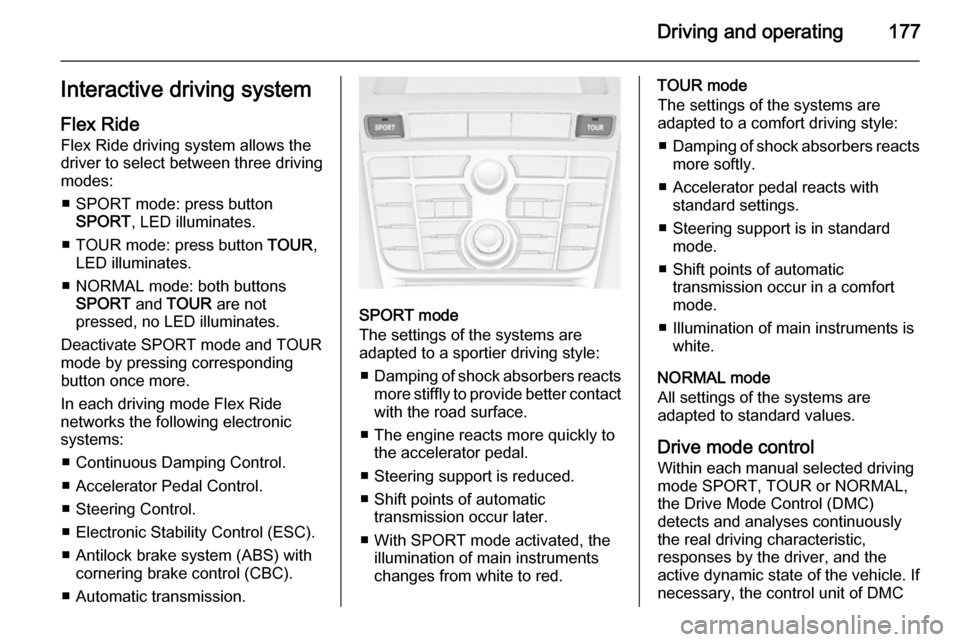
■ SPORT mode: press button SPORT , LED illuminates.
■ TOUR mode: press button TOUR,
LED illuminates.
■ NORMAL mode: both buttons SPORT and TOUR are not
pressed, no LED illuminates.
Deactivate SPORT mode and TOUR
mode by pressing corresponding
button once more.
In each driving mode Flex Ride
networks the following electronic systems:
■ Continuous Damping Control.
■ Accelerator Pedal Control.
■ Steering Control.
■ Electronic Stability Control (ESC).
■ Antilock brake system (ABS) with cornering brake control (CBC).
■ Automatic transmission.
SPORT mode
The settings of the systems are
adapted to a sportier driving style:
■ Damping of shock absorbers reacts
more stiffly to provide better contact
with the road surface.
■ The engine reacts more quickly to the accelerator pedal.
■ Steering support is reduced.
■ Shift points of automatic transmission occur later.
■ With SPORT mode activated, the illumination of main instruments
changes from white to red.
TOUR mode
The settings of the systems are
adapted to a comfort driving style:
■ Damping of shock absorbers reacts
more softly.
■ Accelerator pedal reacts with standard settings.
■ Steering support is in standard mode.
■ Shift points of automatic transmission occur in a comfort
mode.
■ Illumination of main instruments is white.
NORMAL mode
All settings of the systems are
adapted to standard values.
Drive mode control
Within each manual selected driving
mode SPORT, TOUR or NORMAL,
the Drive Mode Control (DMC)
detects and analyses continuously
the real driving characteristic,
responses by the driver, and the
active dynamic state of the vehicle. If
necessary, the control unit of DMC
Page 181 of 329
Driving and operating179
NORMAL mode
In NORMAL mode, when neither
SPORT nor VXR button is pressed,
all settings of the systems are
adapted to standard values.
SPORT mode
The settings of the systems are
adapted to a sportier driving style.
VXR mode
The drive dynamic characteristics are adapted to high performance
settings.
In this mode the illumination of main
instruments is switched to red.
Personalised settings in the VXR
mode
The driver can select the functions of
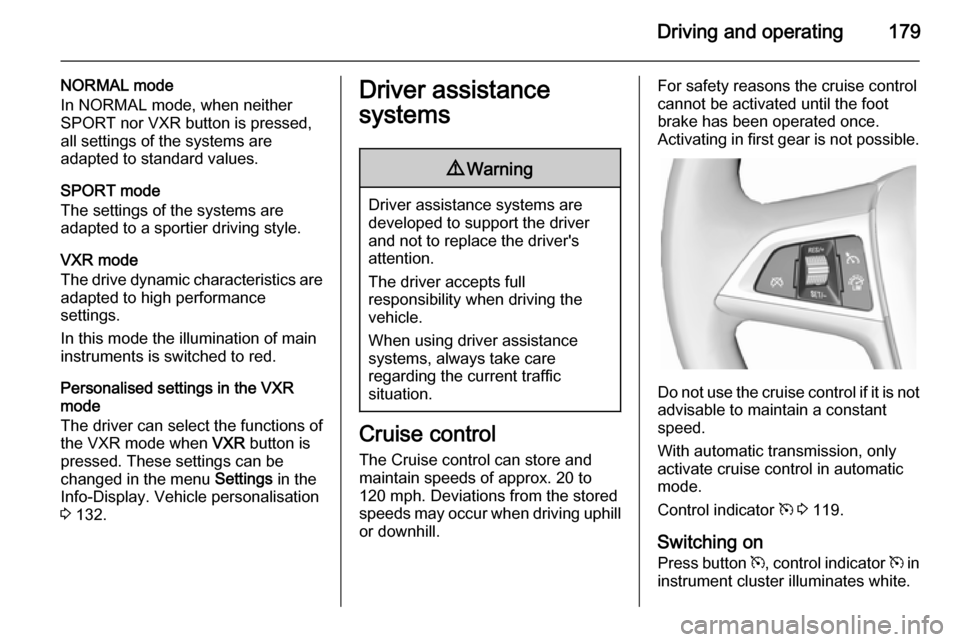
the VXR mode when VXR button is
pressed. These settings can be changed in the menu Settings in the
Info-Display. Vehicle personalisation 3 132.Driver assistance
systems9 Warning
Driver assistance systems are
developed to support the driver
and not to replace the driver's
attention.
The driver accepts full
responsibility when driving the
vehicle.
When using driver assistance
systems, always take care
regarding the current traffic
situation.
Cruise control
The Cruise control can store and
maintain speeds of approx. 20 to
120 mph. Deviations from the stored
speeds may occur when driving uphill or downhill.
For safety reasons the cruise controlcannot be activated until the foot
brake has been operated once.
Activating in first gear is not possible.
Do not use the cruise control if it is not advisable to maintain a constant
speed.
With automatic transmission, only
activate cruise control in automatic
mode.
Control indicator m 3 119.
Switching on Press button m, control indicator m in
instrument cluster illuminates white.
Page 187 of 329

Driving and operating185
The selected following distance is
indicated by filled distance bars in the
adaptive cruise control page.
Note that the following distance
setting is shared with the sensitivity
setting of forward collision alert.
Example: If setting 3 (far) is selected,
then the driver is warned sooner
before a possible collision, also if
adaptive cruise control is inactive or
switched off.
9 Warning
The driver accepts full
responsibility for the appropriate
following distance based on traffic, weather and visibility conditions.
Following distance must be
adjusted or the system switched
off when required by the prevailing
conditions.
Detecting the vehicle ahead
The green illuminated vehicle ahead
control indicator A is displayed in the
speedometer when the system
detects a vehicle in the driving path.
If this symbol does not display, or
displays briefly, adaptive cruise
control will not respond to vehicles
ahead.
Deactivation Adaptive cruise control is deactivated
by the driver when:
■ button y is pressed,
■ brake pedal is applied,
■ clutch pedal is depressed for more than four seconds,
■ gear selector lever of automatic transmission is moved to N.
The system is also automatically
deactivated when:
■ vehicle speed slows down below 28 mph or accelerates above
120 mph,
■ Traction Control system is operating for more than
20 seconds,
Page 276 of 329
274Vehicle careJump startingDo not start with quick charger.
A vehicle with a discharged vehicle
battery can be started using jump
leads and the vehicle battery of
another vehicle.9 Warning
Be extremely careful when starting
with jump leads. Any deviation
from the following instructions can
lead to injuries or damage caused
by battery explosion or damage to the electrical systems of both
vehicles.
9 Warning
Avoid contact of the battery with
eyes, skin, fabrics and painted
surfaces. The fluid contains
sulphuric acid which can cause
injuries and damage in the event
of direct contact.
■ Never expose the vehicle battery to
naked flames or sparks.
■ A discharged vehicle battery can already freeze at a temperature of
0 °C. Defrost the frozen vehicle
battery before connecting jump
leads.
■ Wear eye protection and protective
clothing when handling a vehicle
battery.
■ Use a booster vehicle battery with the same voltage (12 Volts). Its
capacity (Ah) must not be much less than that of the discharged
vehicle battery.
■ Use jump leads with insulated terminals and a cross section of at
least 16 mm 2
(25 mm 2
for diesel
engines).
■ Do not disconnect the discharged vehicle battery from the vehicle.
■ Switch off all unnecessary electrical
consumers.
■ Do not lean over the vehicle battery
during jump starting.■ Do not allow the terminals of one lead to touch those of the other
lead.
■ The vehicles must not come into contact with each other during the
jump starting process.
■ Apply the parking brake, transmission in neutral, automatic
transmission in P.
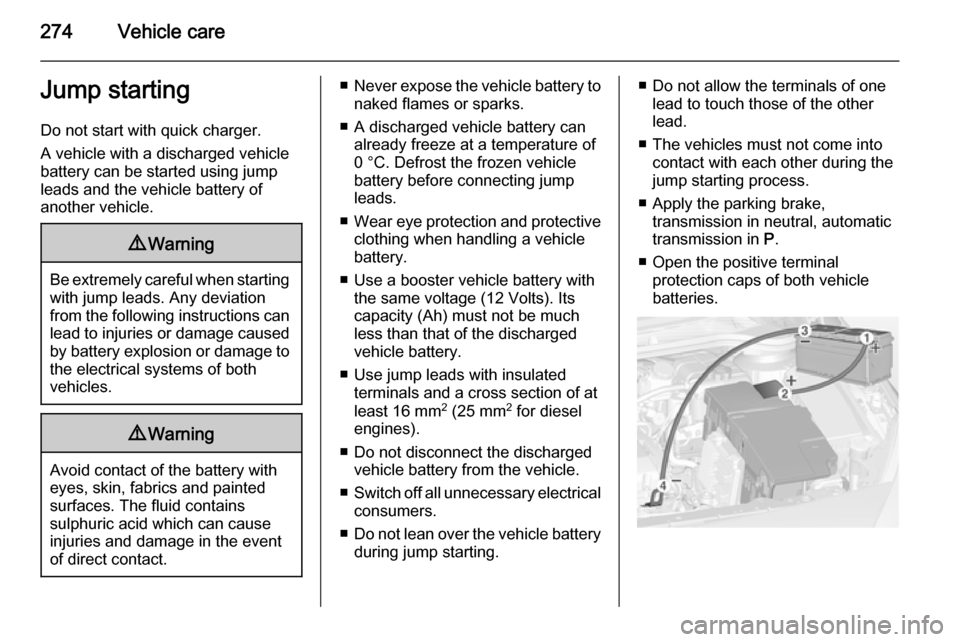
■ Open the positive terminal protection caps of both vehicle
batteries.
Page 278 of 329

276Vehicle care
Screw in the towing eye as far as it will
go until it stops in a horizontal
position.
Attach a tow rope – or better still a tow
rod – to the towing eye.
The towing eye must only be used for towing and not for recovering the
vehicle.
Switch on ignition to release steering
wheel lock and to permit operation of
brake lights, horn and windscreen
wiper.
Transmission in neutral.
Caution
Drive slowly. Do not drive jerkily.
Excessive tractive force can
damage the vehicle.
When the engine is not running,
considerably more force is needed to
brake and steer.
To prevent the entry of exhaust gases from the towing vehicle, switch on the
air recirculation and close the
windows.
Vehicles with automatic transmission: The vehicle must be towed facing
forwards, not faster than 50 mph nor further than 60 miles. In all other
cases and when the transmission is
defective, the front axle must be
raised off the ground.
Seek the assistance of a workshop. After towing, unscrew the towing eye.
Insert cap at the top and engage
downwards.
Towing another vehicle
Insert a screwdriver in the slot at the
lower bend of the cap. Release the
cap by carefully moving the
screwdriver downwards.
The towing eye is stowed with the
vehicle tools 3 255.
Page 294 of 329
![VAUXHALL ASTRA J 2014 User Guide 292Technical dataPerformance3-door hatchbackEngineA14XERA14NELA14NETA16LETA16XHTA16SHTMaximum speed 4)
[mph]Manual transmission111 5)120125137136143Automatic transmission––124–130–4)
The maxi](/img/38/19336/w960_19336-293.png "VAUXHALL ASTRA J 2014 User Guide 292Technical dataPerformance3-door hatchbackEngineA14XERA14NELA14NETA16LETA16XHTA16SHTMaximum speed 4)
[mph]Manual transmission111 5)120125137136143Automatic transmission––124–130–4)
The maxi")
292Technical dataPerformance3-door hatchbackEngineA14XERA14NELA14NETA16LETA16XHTA16SHTMaximum speed 4)
[mph]Manual transmission111 5)120125137136143Automatic transmission––124–130–4)
The maximum speed indicated is achievable at kerb weight (without driver) plus 200 kg payload. Optional equipment could reduce the specified maximum
speed of the vehicle.
5) 4th gear.EngineA18XERA20NFTA17DTEA17DTCA17DTFMaximum speed 4)
[mph]Manual transmission124155114113122Automatic transmission–––––4) The maximum speed indicated is achievable at kerb weight (without driver) plus 200 kg payload. Optional equipment could reduce the specified maximum
speed of the vehicle.
Page 295 of 329
![VAUXHALL ASTRA J 2014 User Guide Technical data293
EngineA17DTSA20DTHA20DTRMaximum speed4)
[mph]Manual transmission122134140Automatic transmission–131–4) The maximum speed indicated is achievable at kerb weight (without driver)](/img/38/19336/w960_19336-294.png "VAUXHALL ASTRA J 2014 User Guide Technical data293
EngineA17DTSA20DTHA20DTRMaximum speed4)
[mph]Manual transmission122134140Automatic transmission–131–4) The maximum speed indicated is achievable at kerb weight (without driver)")
Technical data293
EngineA17DTSA20DTHA20DTRMaximum speed4)
[mph]Manual transmission122134140Automatic transmission–131–4) The maximum speed indicated is achievable at kerb weight (without driver) plus 200 kg payload. Optional equipment could reduce the specified maximum
speed of the vehicle.
5-door hatchback
EngineA14XELA14XERA14NELA14NETA16LETA16XERMaximum speed 4)
[mph]Manual transmission105 5)1115)120126138118Automatic transmission–––1251311144)
The maximum speed indicated is achievable at kerb weight (without driver) plus 200 kg payload. Optional equipment could reduce the specified maximum
speed of the vehicle.
5) 4th gear.
Page 296 of 329
![VAUXHALL ASTRA J 2014 User Guide 294Technical data
EngineA16XHTA13DTEB16DTHA17DTEA17DTCA17DTFMaximum speed4)
[mph]Manual transmission137109124117116125Automatic transmission132–––––4) The maximum speed indicated is achieva](/img/38/19336/w960_19336-295.png "VAUXHALL ASTRA J 2014 User Guide 294Technical data
EngineA16XHTA13DTEB16DTHA17DTEA17DTCA17DTFMaximum speed4)
[mph]Manual transmission137109124117116125Automatic transmission132–––––4) The maximum speed indicated is achieva")
294Technical data
EngineA16XHTA13DTEB16DTHA17DTEA17DTCA17DTFMaximum speed4)
[mph]Manual transmission137109124117116125Automatic transmission132–––––4) The maximum speed indicated is achievable at kerb weight (without driver) plus 200 kg payload. Optional equipment could reduce the specified maximum
speed of the vehicle.EngineA17DTSA20DTHA20DTRMaximum speed 4)
[mph]Manual transmission123134140Automatic transmission–131–4) The maximum speed indicated is achievable at kerb weight (without driver) plus 200 kg payload. Optional equipment could reduce the specified maximum
speed of the vehicle.
Page 297 of 329
![VAUXHALL ASTRA J 2014 User Guide Technical data295
4-door saloonEngineA14XERA14NETA16LETA16XERA16XHTMaximum speed4)
[mph]Manual transmission114 5)129139120138Automatic transmission–1271321151334)
The maximum speed indicated is ach](/img/38/19336/w960_19336-296.png "VAUXHALL ASTRA J 2014 User Guide Technical data295
4-door saloonEngineA14XERA14NETA16LETA16XERA16XHTMaximum speed4)
[mph]Manual transmission114 5)129139120138Automatic transmission–1271321151334)
The maximum speed indicated is ach")
Technical data295
4-door saloonEngineA14XERA14NETA16LETA16XERA16XHTMaximum speed4)
[mph]Manual transmission114 5)129139120138Automatic transmission–1271321151334)
The maximum speed indicated is achievable at kerb weight (without driver) plus 200 kg payload. Optional equipment could reduce the specified maximum
speed of the vehicle.
5) 4th gear.EngineA13DTEB16DTHA17DTEA17DTCA17DTFMaximum speed 4)
[mph]Manual transmission112127119117128Automatic transmission–––––4) The maximum speed indicated is achievable at kerb weight (without driver) plus 200 kg payload. Optional equipment could reduce the specified maximum
speed of the vehicle.