change wheel VAUXHALL ASTRA J 2014 Owner's Manual
[x] Cancel search | Manufacturer: VAUXHALL, Model Year: 2014, Model line: ASTRA J, Model: VAUXHALL ASTRA J 2014Pages: 329, PDF Size: 10.07 MB
Page 15 of 329

In brief13
1Power windows .....................33
2 Exterior mirrors .....................31
3 Cruise control .....................179
Speed limiter ....................... 181
Adaptive cruise control .......182
Forward collision alert .........189
4 Side air vents ...................... 158
5 Windscreen wiper,
windscreen washer
system, headlight washer
system, rear wiper, rear
washer system ....................102
6 Instruments ........................ 108
7 Steering wheel controls .....100
8 Driver Information Centre .... 119
9 Turn and lane-change
signals, headlight flash,
low beam and high beam,
high beam assist .................145
Exit lighting ......................... 149
Parking lights ...................... 146
Buttons for Driver
Information Centre ..............11910Sport mode ........................ 177
Central locking system ..........23
Hazard warning flashers ....145
Fuel selector ....................... 109
Control indicator for airbag
deactivation ........................ 113
Control indicator for front
passenger seat belt ...........113
Tour mode .......................... 177
11 Info-Display ........................ 124
12 Anti-theft alarm system
status LED ........................... 29
13 Centre air vents .................. 158
14 Glovebox .............................. 60
15 Sport mode ........................ 177
Tour mode .......................... 177
Traction Control system .....174
Electronic Stability Control . 175
Parking assist ..................... 195Lane departure warning .....207
Eco button for stop-start
system ................................. 163
16 Climate control system ........ 151
17 AUX input, USB input ..........12
18 Power outlet ........................ 106
19 Selector lever, manual
transmission ....................... 171
Automatic transmission ......167
20 Electric parking brake .........172
21 Ignition switch with
steering wheel lock ............161
22 Horn ................................... 101
Driver airbag ........................ 50
23 Bonnet release lever ..........223
24 Storage compartment,
fuse box ............................. 252
25 Steering wheel adjustment 100
26 Light switch ........................ 138
Headlight range
adjustment ......................... 140
Front fog lights ...................145
Page 62 of 329

60StorageStorageStorage compartments................60
Load compartment .......................82
Roof rack system .........................97
Loading information .....................98Storage compartments9Warning
Do not store heavy or sharp
objects in the storage
compartments. Otherwise, the
storage compartment lid could
open and vehicle occupants could be injured by objects being thrown
around in the event of hard
braking, a sudden change in
direction or an accident.
Glovebox
The glovebox features a pen holder,
a credit card holder, a coin holder and
an adapter for the locking wheel nuts.
The glovebox should be closed whilst
driving.
Cupholders
Cupholders are located in the centre
console.
Page 112 of 329
110Instruments and controls
Displays the coolant temperature.left area=engine operating
temperature not yet
reachedcentral
area=normal operating
temperatureright area=temperature too highCaution
If engine coolant temperature is
too high, stop vehicle, switch off
engine. Danger to engine. Check
coolant level.
Service display
The engine oil life system lets you
know when to change the engine oil
and filter. Based on driving
conditions, the interval at which an
engine oil and filter change will be
indicated can vary considerably.
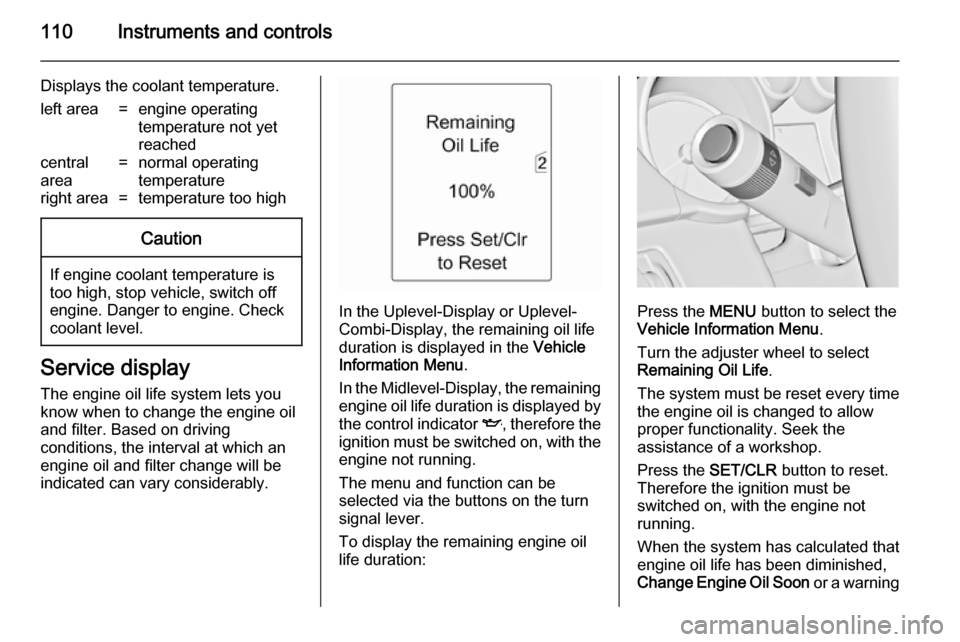
In the Uplevel-Display or Uplevel-
Combi-Display, the remaining oil life
duration is displayed in the Vehicle
Information Menu .
In the Midlevel-Display, the remaining
engine oil life duration is displayed by
the control indicator I, therefore the
ignition must be switched on, with the engine not running.
The menu and function can be
selected via the buttons on the turn
signal lever.
To display the remaining engine oil
life duration:Press the MENU button to select the
Vehicle Information Menu .
Turn the adjuster wheel to select Remaining Oil Life .
The system must be reset every time
the engine oil is changed to allow proper functionality. Seek the
assistance of a workshop.
Press the SET/CLR button to reset.
Therefore the ignition must be
switched on, with the engine not
running.
When the system has calculated that
engine oil life has been diminished,
Change Engine Oil Soon or a warning
Page 123 of 329
Instruments and controls121
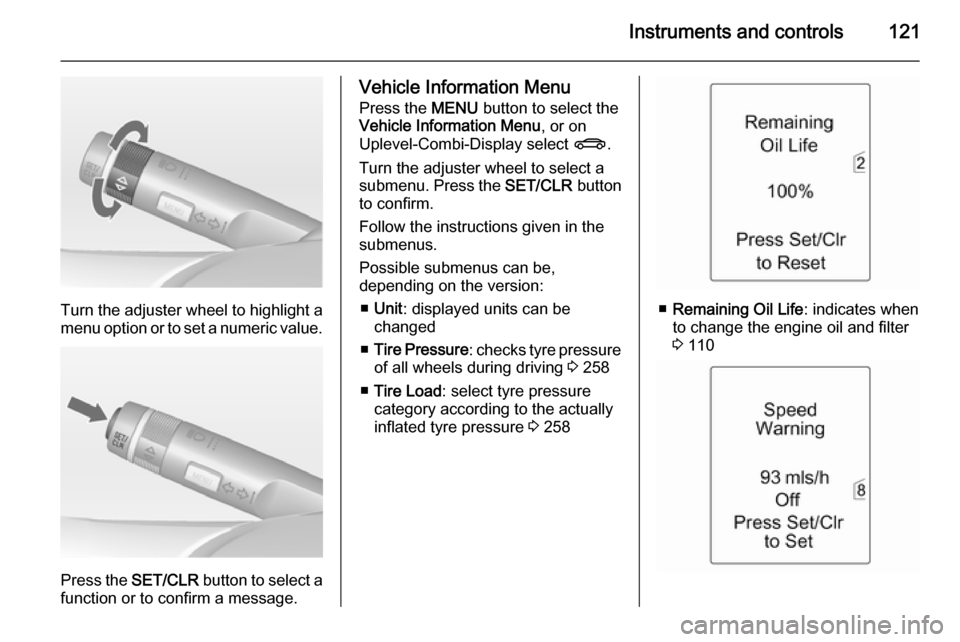
Turn the adjuster wheel to highlight a
menu option or to set a numeric value.
Press the SET/CLR button to select a
function or to confirm a message.
Vehicle Information Menu
Press the MENU button to select the
Vehicle Information Menu , or on
Uplevel-Combi-Display select X.
Turn the adjuster wheel to select a
submenu. Press the SET/CLR button
to confirm.
Follow the instructions given in the submenus.
Possible submenus can be,
depending on the version:
■ Unit : displayed units can be
changed
■ Tire Pressure : checks tyre pressure
of all wheels during driving 3 258
■ Tire Load : select tyre pressure
category according to the actually
inflated tyre pressure 3 258
■ Remaining Oil Life : indicates when
to change the engine oil and filter
3 110
Page 147 of 329
Lighting145
Fault in adaptive forward lightingsystem
When the system detects a failure in
the Adaptive forward lighting system,
the system moves to a preset position to avoid dazzling of oncoming traffic.
If this is not possible the affected
headlight will be automatically
switched off. In any case one
headlight will stay on. A warning is
displayed in the Driver Information
Centre.
Hazard warning flashers
Operated with the ¨ button.
In the event of an accident with airbag
deployment the hazard warning
flashers are activated automatically.
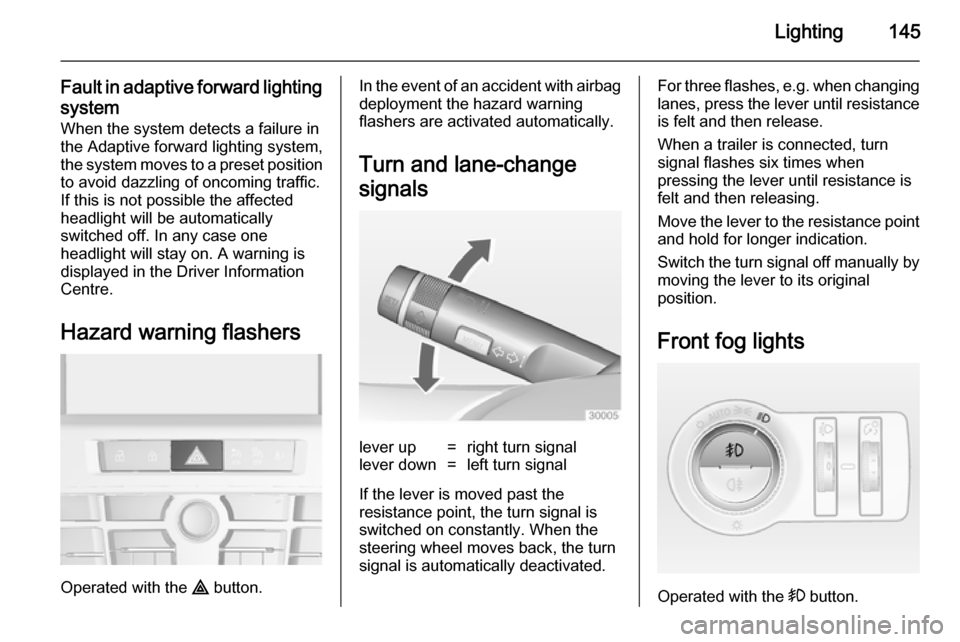
Turn and lane-change
signalslever up=right turn signallever down=left turn signal
If the lever is moved past the
resistance point, the turn signal is
switched on constantly. When the
steering wheel moves back, the turn
signal is automatically deactivated.
For three flashes, e.g. when changing lanes, press the lever until resistance
is felt and then release.
When a trailer is connected, turn
signal flashes six times when
pressing the lever until resistance is
felt and then releasing.
Move the lever to the resistance point
and hold for longer indication.
Switch the turn signal off manually by moving the lever to its original
position.
Front fog lights
Operated with the > button.
Page 160 of 329

158Climate control
Air recirculation mode 4
Press button
4 to activate the air
recirculation mode. Activation is
indicated by the LED in the button.
Press button 4 again to deactivate
recirculation mode.
9 Warning
The exchange of fresh air is
reduced in air recirculation mode.
In operation without cooling the air humidity increases, so the
windows may mist up from inside.
The quality of the passenger
compartment air deteriorates,
which may cause the vehicle
occupants to feel drowsy.
In warm and very humid ambient air conditions, the windscreen might mist up from outside, when cold air is
directed to it. If windscreen mists up
from outside, activate windscreen
wiper and deactivate s.
Basic settings Some settings can be changed in the
menu Settings in the Info-Display.
Vehicle personalisation 3 132.
Auxiliary heater
Air heater Quickheat is an electric auxiliary air
heater which automatically warms up
the passenger compartment more
quickly.
Air vents
Adjustable air vents
At least one air vent must be open
while the cooling is on.
To open the vent, turn the adjuster
wheel towards the bigger W symbol.
Adjust the air amount at the vent
outlet by turning the adjuster wheel.
Page 183 of 329

Driving and operating181Speed limiterThe speed limiter prevents the
vehicle exceeding a preset maximum
speed.
The maximum speed can be set at a
speed above 15 mph.
The driver can only accelerate up to
the preset speed. Deviations from the
limited speed may occur when driving downhill.
The preset speed limit is displayed in
the top line of the Driver Information
Centre when the system is active.
ActivationPress button L. If cruise control or
adaptive cruise control has been
activated before, it is switched off
when speed limiter is activated and
the control indicator m extinguishes.
Set speed limit
With speed limiter active, hold thumb
wheel turned to RES/+ or briefly turn
to RES/+ repeatedly until the desired
maximum speed is displayed in the
Driver Information Centre.
Alternatively accelerate to the desired speed and briefly turn thumb wheel to SET/- : the current speed is stored as
maximum speed. Speed limit is
displayed in the Driver Information
Centre.
Change speed limit
With speed limiter active, turn thumb
wheel to RES/+ to increase or SET/-
to decrease the desired maximum
speed.
Exceeding the speed limit
In the event of an emergency it is possible to exceed the speed limit by
depressing the accelerator pedal
firmly beyond the point of resistance.
Page 186 of 329

184Driving and operating
Increase speedWith adaptive cruise control active,
hold thumb wheel turned to RES/+:
speed increases continuously in large increments, or activate repeatedly
RES/+ : speed increases in small
increments.
If the vehicle is driven with adaptive cruise control active much faster than
the desired speed, e.g. after
depressing the accelerator pedal,
then the current speed can be stored
and maintained by turning the thumb
wheel to SET/-.
Reduce speed With adaptive cruise control active,
hold thumb wheel turned to SET/-:
speed decreases continuously in
large increments, or activate
repeatedly SET/-: speed decreases in
small increments.
If the vehicle is driven with adaptive
cruise control active much slower
than the desired speed, e.g. because
of a slower vehicle ahead, then thecurrent speed can be stored and
maintained by turning the thumb
wheel to SET/-.
Resume stored speed
If the system is switched on but
inactive, then turn thumb wheel to
RES/+ at a speed above 31 mph to
resume the stored speed.
Setting the following distance
When adaptive cruise control detects a slower moving vehicle in the drivingpath, it will adjust the vehicle speed to
maintain the following distance
selected by the driver.
The following distance can be set to
near, medium or far.
Press button E; the current setting is
shown on the Driver Information
Centre. Press button E again to
change the following distance. The setting is also displayed in the top line
of the Driver Information Centre.
Page 188 of 329

186Driving and operating
■ Electronic Stability Control isoperating,
■ there is no traffic and nothing detected on the road sides for
several minutes. In this case there are no radar echoes and the sensor may report that it is blocked,
■ collision imminent braking is applying the brakes,
■ radar sensor is blocked by an ice or
water film,
■ fault is detected in the radar, engine
or brake system.
When adaptive cruise control is
deactivated automatically, the control
indicator m illuminates white and a
warning symbol is displayed as a pop- up in the Driver Information Centre.
The stored speed is maintained.
9 Warning
When adaptive cruise control is
deactivated, the driver must take
over full brake and engine control.
Switching off
Press button C to switch off adaptive
cruise control. The control indicator
m extinguishes. The stored speed is
deleted.
Switching off the ignition also
switches off adaptive cruise control
and deletes the stored speed.
Driver's attention
■ Use adaptive cruise control carefully on bends or mountain
roads, as it can lose the vehicle
ahead and need time to detect it
again.
■ Do not use the system on slippery roads as it can create rapid
changes in tyre traction (wheel
spinning), so that you could lose
control.
■ Do not use adaptive cruise control during rain, snow or heavy dirt, as
the radar sensor can be covered by a water film, dust, ice or snow. This
reduces or suppresses completely
the visibility. In case of sensor
blockage, clean the sensor cover.
System limits ■ The system's automatic brake force
does not permit hard braking and
the braking level may not be
sufficient to avoid a collision.
■ After a sudden lane change, the system needs a certain time todetect the next preceding vehicle.
Page 223 of 329
Vehicle care221Vehicle careGeneral Information...................221
Vehicle checks ........................... 222
Bulb replacement .......................229
Electrical system ........................249
Vehicle tools .............................. 255
Wheels and tyres .......................257
Jump starting ............................. 274
Towing ....................................... 275
Appearance care .......................277General Information
Accessories and vehicle
modifications
We recommend the use of genuine parts and accessories and factory
approved parts specific for your
vehicle type. We cannot assess or
guarantee reliability of other products
- even if they have a regulatory or
otherwise granted approval.
Do not make any modifications to the electrical system, e.g. changes of
electronic control units (chip tuning).Caution
When transporting the vehicle on
a train or on a recovery vehicle, the
mud flaps might be damaged.
Vehicle storage
Storage for a long period of time
If the vehicle is to be stored for several months:
■ Wash and wax the vehicle.
■ Have the wax in the engine compartment and underbody
checked.
■ Clean and preserve the rubber seals.
■ Fill up fuel tank completely.
■ Change the engine oil.
■ Drain the washer fluid reservoir.
■ Check the coolant antifreeze and corrosion protection.
■ Adjust tyre pressure to the value specified for full load.
■ Park the vehicle in a dry, well ventilated place. Engage first orreverse gear or set selector lever to P . Prevent the vehicle from rolling.
■ Do not apply the parking brake.