AUX VAUXHALL ASTRA J 2015 Infotainment system
[x] Cancel search | Manufacturer: VAUXHALL, Model Year: 2015, Model line: ASTRA J, Model: VAUXHALL ASTRA J 2015Pages: 179, PDF Size: 2.77 MB
Page 138 of 179
138Introduction
18 AUX..................................... 157
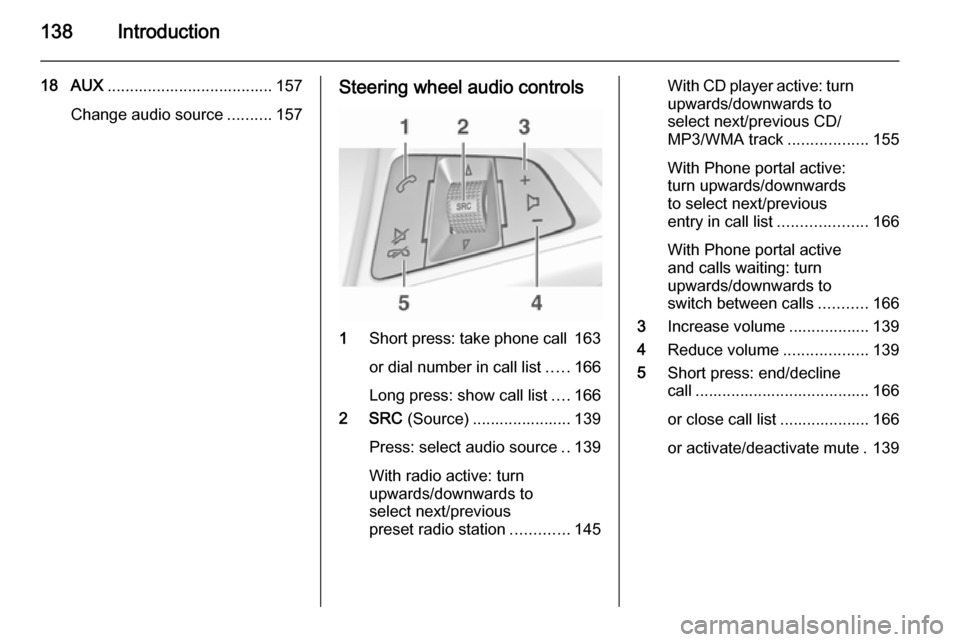
Change audio source ..........157Steering wheel audio controls
1Short press: take phone call 163
or dial number in call list .....166
Long press: show call list ....166
2 SRC (Source) ...................... 139
Press: select audio source ..139
With radio active: turn
upwards/downwards to
select next/previous
preset radio station .............145
With CD player active: turn
upwards/downwards to
select next/previous CD/
MP3/WMA track ..................155
With Phone portal active:
turn upwards/downwards
to select next/previous
entry in call list ....................166
With Phone portal active
and calls waiting: turn
upwards/downwards to
switch between calls ...........166
3 Increase volume .................. 139
4 Reduce volume ...................139
5 Short press: end/decline
call ....................................... 166
or close call list .................... 166
or activate/deactivate mute . 139
Page 140 of 179

140Introduction
Audio players
Press the CD or AUX button once or
several times to open the USB, iPod
or AUX main menu (if available) or to
switch between these menus.
Press the multifunction knob to open
the relevant menus with options for
the track selection.
For a detailed description of CD
player functions 3 154, AUX
functions 3 157, USB port functions
3 158 and Bluetooth music functions
3 161.
Phone
Press the PHONE button briefly to
open the telephone menu.
Press the multifunction knob to open
the phone menu with options for the
input and selection of numbers.
For a detailed description of the
Phone portal 3 163.System settings
Adjusting the language
The menu texts on the Infotainment
system's display can be displayed in
various languages.
Press the CONFIG button to open the
Settings menu.
Select the Languages menu item in
the Settings menu to display the
respective menu.
Choose the desired language for the
menu texts.
Notice
For a detailed description of menu
operation 3 140.
Time and date settings
For a detailed description, refer to
your Owner's Manual.
Basic operation Multifunction knobThe multifunction knob is the central
control element for the menus.Turn the multifunction knob:
■ to mark a menu option
■ to set a numeric value.
Press the multifunction knob: ■ to select or activate the marked option
■ to confirm a set value
■ to switch a system function on/off.
BACK button Press the BACK button briefly to:
■ exit a menu
■ return from a submenu to the next higher menu level
■ delete the last character in a character sequence.
Press and hold the BACK button for a
few seconds to delete the entire entry.
Page 157 of 179

AUX input157AUX inputGeneral information...................157
Usage ........................................ 157General information
On the control panel of the
Infotainment system 3 136, there is
an AUX input for the connection of
external audio sources.
It is possible, for example, to connect a portable CD player with a 3.5 mm
jack plug to the AUX input.
Notice
The socket must always be kept
clean and dry.
Usage
Press the AUX button once or several
times to activate the AUX mode.Turn the m knob of the Infotainment
system to adjust the volume.
All other functions can be operated
only via the control elements of the
audio source.
Page 159 of 179

USB port159
24 kHz, 22.05 kHz, 16kHz (for
MPEG-2).
■ The following restrictions apply to the data stored on external devices
connected to the USB port:
Number of tracks: max. 999.
Number of tracks per folder level:
max. 512.
Folder structure depth: max.
10 levels.
WMA files with Digital Rights
Management (DRM) from online music shops cannot be played.
WMA files can only be played
safely, if they were created with Windows Media Player version 9 or later.
Applicable playlist
extensions: .m3u, .pls, .wpl.
Playlist entries must be in the form
of relative paths.
The system attribute for folders/
files that contain audio data must
not be set.Playing saved audio files
Press the AUX button once or several
times to activate the MP3 or iPod
mode.
Playback of the audio data stored on
the device is started automatically.
Using the device-specific menu
Press the multifunction knob to open
the menu of the device currently
connected.
Shuffle songs
To play all tracks in a random order: set this function to On.
Notice
If this function is activated, 2 is
shown in the respective main menu.
Repeat
To repeatedly listen to a track: set this function to On.
Notice
If this function is activated, 1 is
shown in the respective main menu.
Page 162 of 179

162Bluetooth music
Activating the Bluetooth musicmode
Press the AUX button once or several
times to activate the Bluetooth music
mode.
Bluetooth music playback has to be
started and paused/stopped via the
Bluetooth device.
Operation via Infotainment
system
Adjusting the volume
The volume can be adjusted via the
Infotainment system 3 139.
Skipping to previous or next track Briefly press the buttons s or u
on the control panel of the
Infotainment system.
Page 172 of 179

172IndexAActivating Bluetooth music .........161
Activating CD player ...................155
Activating the AUX function ........157
Activating the handsfree Phone mode ....................................... 166
Activating the radio .....................145
Activating the USB function ........159
Autostore lists ............................. 146
Retrieving stations................... 146
Storing stations .......................146
Auto volume control ....................143
AUX input Activating................................. 157
Adjusting the volume ...............157
General information ................157
Operation ................................ 157
B Basic operation ........................... 140
Blocking out traffic announcements ......................150
Bluetooth Bluetooth connection ..............164
Bluetooth music....................... 161
Phone ...................................... 166
Bluetooth connection ..................164Bluetooth music
Activating................................. 161General information ................161
Operation ................................ 161
Prerequisites ........................... 161
C Call Functions during a call ............166
Incoming call ........................... 166
Initiating a phone call ..............166
Ring tone ................................. 166
Call lists ...................................... 166
Category list................................ 147
CD menu .................................... 155
CD player Activating................................. 155
CD menu ................................. 155
General information ................154
Inserting a CD ......................... 155
Removing a CD .......................155
Starting CD playback ..............155
Usage ...................................... 155
Control elements Infotainment system ................136
Phone ...................................... 163
Steering wheel ........................ 136
Control elements overview .........136
Page 173 of 179

173
DDAB ............................................ 151
Date settings............................... 139
Digital audio broadcasting ..........151
Dynamic audio adaption .............151
E Emergency call ........................... 166
F Favourite lists ..................... 146, 147
Retrieving stations................... 146
Storing stations .......................146
G
General information ...................
................ 154, 157, 158, 161, 163
AUX input ................................ 157
Bluetooth music....................... 161
CD player ................................ 154
Infotainment system ................134
Phone ...................................... 163
USB port.................................. 158
I
Infotainment control panel ..........136
L
Language settings ......................139M
Maximum start-up volume ..........143
Menu operation .......................... 140
Mobile phones and CB radio equipment .............................. 170
Multifunction knob....................... 140
Mute............................................ 139
O Operation ............................ 161, 166
AUX input ................................ 157
Bluetooth music....................... 161
CD player ................................ 155
Menu ....................................... 140
Phone ...................................... 166
Radio ....................................... 145
USB port.................................. 159
P Phone Activating................................. 166
Bluetooth ................................. 163
Bluetooth connection ..............164
Call lists ................................... 166
Control elements .....................163
Dialling a number ....................166
Emergency calls ......................166
Functions during a call ............166
General information ................163
Important information ..............163Incoming call ........................... 166
Phone book ............................. 166
Prerequisites ........................... 166
Redialling a phone number .....166
Selecting the ring tone ............166
Phone book ................................ 166
Playing saved audio files ............159
R Radio Activating................................. 145Autostore lists.......................... 146
Band selection ........................ 151
Category list ............................ 147
Configuring DAB .....................151
Configuring RDS .....................150
DAB announcements ..............147
Digital audio broadcasting
(DAB) ...................................... 151
Dynamic audio adaption .........151
Favourite lists ..................146, 147
Radio data system (RDS) .......150
Radio traffic service................. 150
Regionalisation ....................... 150
Retrieving stations................... 146
Selecting the waveband ..........145
Station lists .............................. 147
Station search ......................... 145
Station tuning .......................... 145
Storing stations .......................146
Page 174 of 179

174
Traffic announcements...........150
Updating station lists ...............147
Usage ...................................... 145
Waveband menus ...................147
Radio data system (RDS) ..........150
Radio traffic service ....................150
RDS ............................................ 150
Redial function ............................ 166
Regionalisation ........................... 150
Retrieving stations ......................146
Ring tone Ring tone volume ....................143
Selecting the ring tone ............166
S Selecting the waveband .............145
Starting CD playback ..................155
Station lists ................................. 147
Station search............................. 145
Steering wheel audio controls ....136
Storing stations ........................... 146
Switching the Infotainment system on ................................ 139
Switching the radio on ................145
System settings Language ................................ 139
Restore factory settings ..........139
Time and date ......................... 139
Vehicle settings .......................139T
TA volume .................................. 143
Theft-deterrent feature ..............135
Time settings .............................. 139
Tone settings .............................. 143
Traffic announcements ...............150
U
Updating station lists ..................147
Usage ................. 139, 145, 155, 157
AUX input ................................ 157
Bluetooth music....................... 161
CD player ................................ 155
Menu ....................................... 140
Phone ...................................... 166
Radio ....................................... 145
USB port.................................. 159
USB menu .................................. 159
USB port Activation................................. 159
Connecting the USB device ....158
General information ................158
Important information ..............158
Operation ................................ 159
Removing the USB device ......159
USB menu ............................... 159V
Volume Auto volume control ................143
Maximum start-up volume .......143
Mute function........................... 139
Ring tone volume ....................143
Setting the volume ..................139
Speed compensated volume ..143
TA volume ............................... 143
Volume limitation at high
temperatures ........................... 139
Volume settings .......................... 143
W
Waveband menus....................... 147