lighting VAUXHALL ASTRA J 2015 Owner's Guide
[x] Cancel search | Manufacturer: VAUXHALL, Model Year: 2015, Model line: ASTRA J, Model: VAUXHALL ASTRA J 2015Pages: 343, PDF Size: 10.16 MB
Page 147 of 343

Lighting145Interior lighting
Instrument panel
illumination control
Brightness of the following lights can
be adjusted when the exterior lights
are on:
■ Instrument panel illumination
■ Info-Display
■ Illuminated switches and operation elements.
Turn thumb wheel A and hold until
the desired brightness is obtained.
On vehicles with light sensor, the
brightness can only be adjusted when
the exterior lights are on and the light sensor detects night conditions.
Interior lights
During entry and exit of the vehicle,
the front and rear courtesy lights
automatically switch on and then off
after a delay.
Notice
In the event of an accident with airbag deployment the courtesy
lights are turned on automatically.
Front courtesy lightOperate rocker switch:w=automatic switching on
and off.press u=on.press v=off.
Courtesy light on version with
panorama roof
Left and right lamps are separately
switchable.
Page 148 of 343

146Lighting
Operate rocker switches:centre position=automatic
switching on and
off.press I=on.press 0=off.
Rear courtesy lights
Illuminates in conjunction with the
front courtesy light depending on
rocker switch position.
Press s or t to switch on manually.
Reading lights
Operated with s and t buttons in
front and rear courtesy lights.
Sunvisor lights
Illuminates when the cover is opened.
Lighting features
Centre console lighting Spotlight incorporated in the interior
lighting comes on when headlights
are switched on.
Entry lighting
Welcome lighting
The following lights are switched on
for a short time by unlocking the
vehicle with the radio remote control:
■ headlights,
■ tail lights,
■ number plate lights,
■ instrument panel light,
■ interior lights,
■ door and console lights,
■ puddle lights.
Some functions work only in the dark
and facilitates locating the vehicle.
The lighting switches off immediately
when the ignition key is turned to
position 1 3 160.
Page 149 of 343
Lighting147
Activation or deactivation of this
function can be changed in the
Settings menu in the Info-Display.
Vehicle personalisation 3 131.
The settings can be saved for the key being used 3 22.
The following lights will additionally switch on when the driver's door is
opened:
■ all switches
■ Driver Information Centre
■ door pocket lights
■ console lights
Exit lighting
The following lights switch on if the
key is removed from the ignition
switch:
■ Interior lights
■ Instrument panel light (only when it
is dark)
■ Door and console lights
■ Puddle lightsThey will switch off automatically after
a delay and will be activated again if
the driver's door is opened.
Headlights, tail lights and number
plate lights illuminate the surrounding area for an adjustable time after
leaving the vehicle.
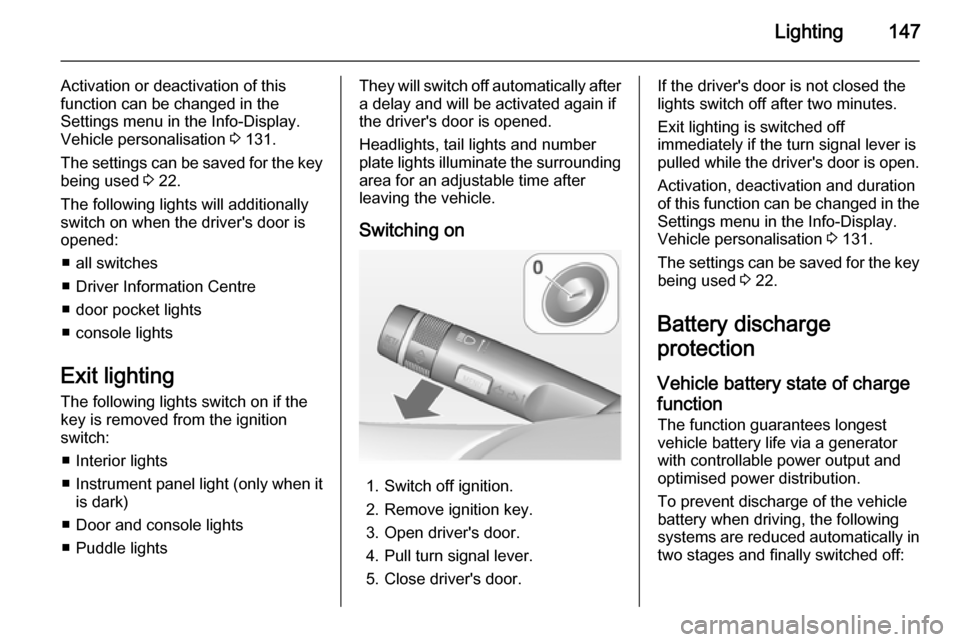
Switching on
1. Switch off ignition.
2. Remove ignition key.
3. Open driver's door.
4. Pull turn signal lever.
5. Close driver's door.
If the driver's door is not closed the
lights switch off after two minutes.
Exit lighting is switched off
immediately if the turn signal lever is pulled while the driver's door is open.
Activation, deactivation and duration
of this function can be changed in the Settings menu in the Info-Display.
Vehicle personalisation 3 131.
The settings can be saved for the key being used 3 22.
Battery discharge
protection
Vehicle battery state of charge
function
The function guarantees longest
vehicle battery life via a generator with controllable power output and
optimised power distribution.
To prevent discharge of the vehicle
battery when driving, the following
systems are reduced automatically in two stages and finally switched off:
Page 150 of 343

148Lighting
■ Auxiliary heater
■ Heated rear window and mirrors
■ Heated seats
■ Fan
In the second stage a message which
confirms the activation of the vehicle
battery discharge protection will be
displayed in the Driver Information
Centre.
Switching off electric lights
To prevent discharge of the vehicle
battery when the ignition is switched
off, some interior lights are switched
off automatically after some time.
Page 204 of 343

202Driving and operatingSide blind spot alertThe Side blind spot alert system
detects and reports objects on either
side of the vehicle, within a specified
"blind spot" zone. The system alerts
visually in each exterior mirror, when
detecting objects that may not be
visible in the interior and exterior
mirrors.
The system's sensors are located in
the bumper on the left and right side
of the vehicle.9 Warning
Side blind spot alert does not
replace driver vision.
The system does not detect: ■ Vehicles outside the side blind zones which may be rapidly
approaching.
■ Pedestrians, cyclists or animals.
Before changing a lane, always
check all mirrors, look over the
shoulder and use the turn signal.
When the system detects a vehicle in the side blind zone while driving
forward, either while passing a
vehicle or being passed, an amber warning symbol B will illuminate in
the relevant exterior mirror. If the
driver then activates the turn signal,
the warning symbol B starts flashing
amber as a warning not to change
lanes.
Notice
If the passing vehicle is at least 6
mph faster than the passed vehicle,
the warning symbol B in the relevant
exterior mirror will not illuminate.Side blind spot alert is active from
speeds of 6 mph up to 87 mph.
Driving faster than 87 mph
deactivates the system, indicated by
low lighting warning symbols B in
both exterior mirrors. Reducing the speed again will extinguish the
warning symbols. If a vehicle is then
detected in the blind zone, the
warning symbols B will illuminate as
normal on the relevant side.
When the vehicle is started, both exterior mirror displays will briefly
come on to indicate that the system is operating.
The system can be activated or
deactivated in the menu Settings in
the Info-Display, vehicle
personalisation 3 131.
Deactivation is indicated by a
message in the Driver Information
Centre.
Detection zones
The system sensor covers a zone of
approx. 3 metres on both sides of the
vehicle. This zone starts at each
exterior mirror and extends rearwards
Page 208 of 343

206Driving and operating
An exclamation mark in a frame
indicates that there is an add on sign
detected which cannot be recognised
by the system.
The system is active up to a speed of 124 mph depending on the lighting
conditions. At night the system is
active up to a speed of 99 mph.
As soon as the speed becomes
slower than 34 mph the display will be
reset and the content of the traffic sign
page will be cleared. The next
recognized speed indication will be displayed.
Display indication
Traffic signs are displayed on the
page Traffic sign detection on the
Driver Information Centre, chosen via the adjuster wheel on the turn signal
lever 3 118.
When another function on the Driver
Information Centre menu was
selected and then Traffic sign
detection page is chosen again, the
last recognised traffic sign will be displayed.
After the traffic sign page is cleared
by the system, the following symbol is
indicated:
The content of the traffic sign page is
also cleared during driving by pushing
the SET/CLR button on the turn signal
lever for a longer time.
Page 235 of 343
Vehicle care233
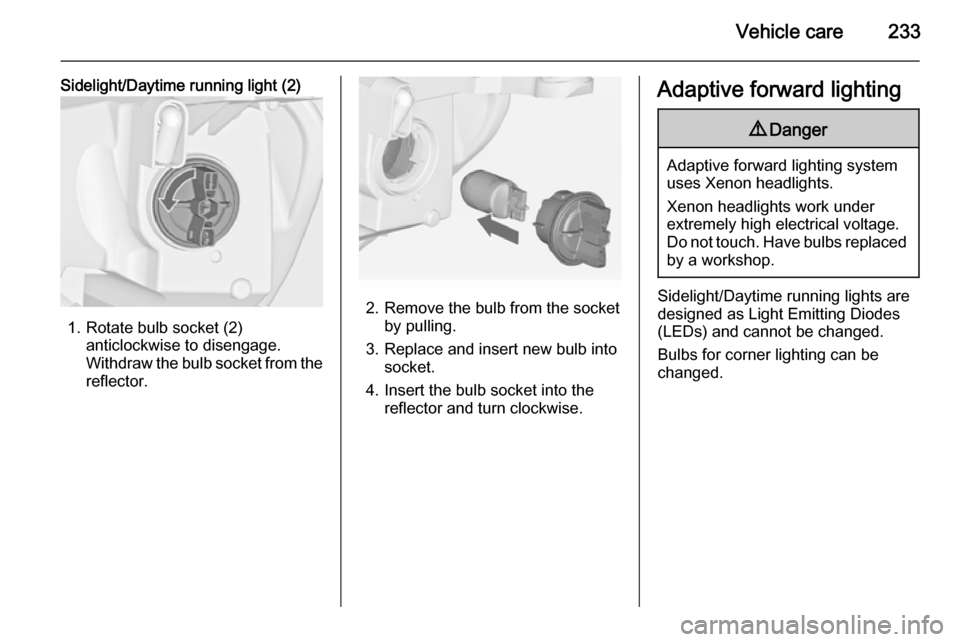
Sidelight/Daytime running light (2)
1. Rotate bulb socket (2)anticlockwise to disengage.
Withdraw the bulb socket from the
reflector.
2. Remove the bulb from the socket by pulling.
3. Replace and insert new bulb into socket.
4. Insert the bulb socket into the reflector and turn clockwise.
Adaptive forward lighting9 Danger
Adaptive forward lighting system
uses Xenon headlights.
Xenon headlights work under
extremely high electrical voltage.
Do not touch. Have bulbs replaced by a workshop.
Sidelight/Daytime running lights are
designed as Light Emitting Diodes
(LEDs) and cannot be changed.
Bulbs for corner lighting can be
changed.
Page 236 of 343
234Vehicle care
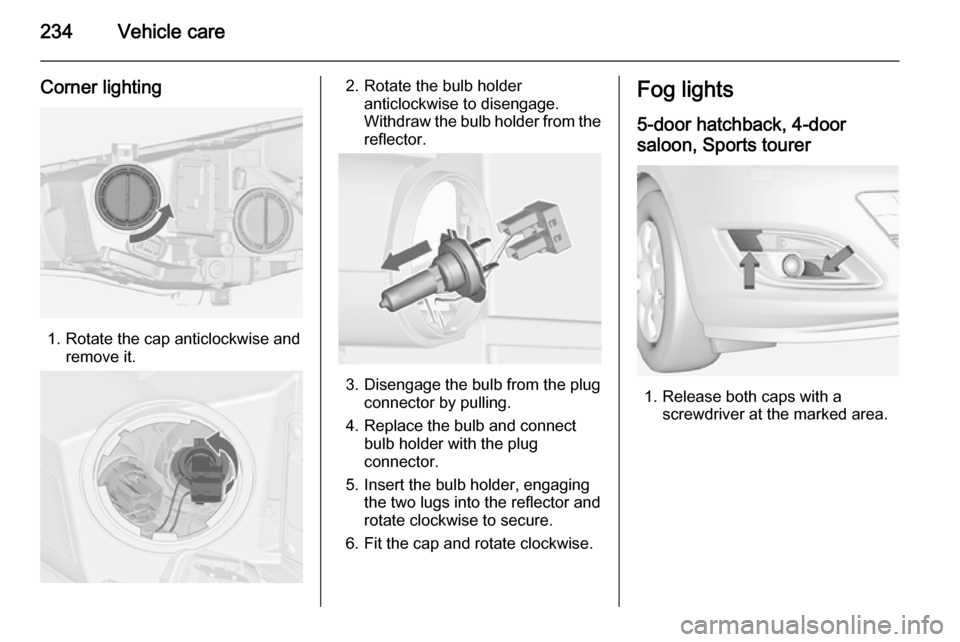
Corner lighting
1. Rotate the cap anticlockwise andremove it.
2. Rotate the bulb holderanticlockwise to disengage.
Withdraw the bulb holder from the
reflector.
3. Disengage the bulb from the plug connector by pulling.
4. Replace the bulb and connect bulb holder with the plug
connector.
5. Insert the bulb holder, engaging the two lugs into the reflector and
rotate clockwise to secure.
6. Fit the cap and rotate clockwise.
Fog lights
5-door hatchback, 4-door
saloon, Sports tourer
1. Release both caps with a screwdriver at the marked area.
Page 252 of 343
250Vehicle careEngine compartment fuse
box
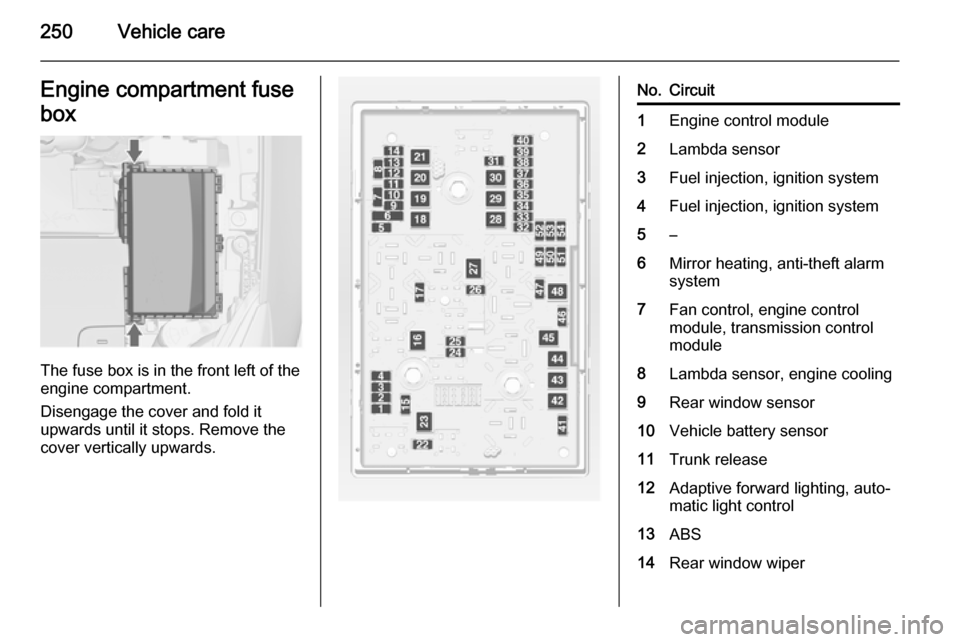
The fuse box is in the front left of the
engine compartment.
Disengage the cover and fold it
upwards until it stops. Remove the
cover vertically upwards.
No.Circuit1Engine control module2Lambda sensor3Fuel injection, ignition system4Fuel injection, ignition system5–6Mirror heating, anti-theft alarm
system7Fan control, engine control
module, transmission control
module8Lambda sensor, engine cooling9Rear window sensor10Vehicle battery sensor11Trunk release12Adaptive forward lighting, auto‐
matic light control13ABS14Rear window wiper
Page 253 of 343

Vehicle care251
No.Circuit15Engine control module16Starter17Transmission control module18Heated rear window19Front power windows20Rear power windows21Rear electrical centre22Left high beam (Halogen)23Headlamp washer system24Right low beam (Xenon)25Left low beam (Xenon)26Front fog lights27Diesel fuel heating28Start stop system29Electric parking brake30ABS31Adaptive cruise controlNo.Circuit32Airbag33Adaptive forward lighting, auto‐
matic light control34Exhaust gas recirculation35Exterior mirror, rain sensor36Climate control37Canister vent solenoid38Vacuum pump39Central control module40Windscreen washer, rear
window washer system41Right high beam (Halogen)42Radiator fan43Windscreen wiper44Windscreen wiper45Radiator fan46–No.Circuit47Horn48Radiator fan49Fuel pump50Headlamp levelling, adaptive
forward lighting51Air shutter52Auxiliary heater, diesel engine53Transmission control module,
engine control module54Vacuum pump, instrument
panel cluster, heating ventila‐
tion, air conditioning system
After having changed defective fuses,
close the fuse box cover and press
until it engages.
If the fuse box cover is not closed
correctly, malfunction may occur.