USB VAUXHALL ASTRA J 2016.25 Infotainment system
[x] Cancel search | Manufacturer: VAUXHALL, Model Year: 2016.25, Model line: ASTRA J, Model: VAUXHALL ASTRA J 2016.25Pages: 161, PDF Size: 2.95 MB
Page 50 of 161

50NavigationOrganising the POI data in several
subfolders
Optionally you can organise the text
files in several randomly named
subfolders (max. depth of subfolder
structure: 2).
Examples: F:\myPOIs\AnnsPOIs or
F:\myPOIs\MyJourney\London,
where F:\ is the root directory of the USB drive.
Notice
In a folder only subfolders or only POI files may be stored. A mixture of both will not be imported correctly to
the system.
After downloading individual POI data organised in that way to the
Infotainment system (see download description further below), the My
POIs menu will show a list of
selectable submenus.
After selecting a submenu, further
submenus or the related list of
imported POI categories will be
displayed.Downloading the POI data to the
Infotainment system
Connect the USB device with your
user defined POI data to the USB port
3 38 of the Infotainment system.
A message is displayed that prompts
you to confirm the download.
After confirmation, the POI data will
be downloaded to the Infotainment system.
The downloaded POIs are then
selectable as destinations via the My
POIs menu, see "Selecting a point of
interest" in chapter "Destination input" 3 50.
Destination input The navigation application provides
different options to set a destination
for route guidance.
Press HOME and then select NAV to
display the navigation map.
Select DESTINATION in the
interaction selector bar and then
select one of the different address entry options.
One-shot destination entry
Touch the entry field in the top line of
the menu. A keyboard is displayed.
For a detailed description on the
keyboards 3 16.
Enter an address or search term and
confirm your input.
Two lists with possible destinations
are created. To switch between the
list tabs, touch Address or POI in the
top line of the screen.
Address list:
Page 67 of 161

Phone67interference is caused by the
mobile phone or if dangerous
situations can occur.
Bluetooth
The Phone portal is certified by the
Bluetooth Special Interest Group
(SIG).
You will find further information about the specification on the Internet at
http://www.bluetooth.com
Bluetooth connection
Bluetooth is a radio standard for the
wireless connection of e.g. mobile
phones, iPod/iPhone models, or other devices.
To be able to set up a Bluetooth
connection to the Infotainment
system, the Bluetooth function of the
Bluetooth device must be activated.
For further information, please
consult the user guide of the
Bluetooth device.
Via the Bluetooth settings menu,
pairing (PIN code exchange between
Bluetooth device and Infotainment
system) and connecting of the
Bluetooth devices to the Infotainment
system are carried out.
Bluetooth settings menu
Press HOME and then select the
SETTINGS icon.
Select Bluetooth to display the
respective submenu.
Pairing a device
Important information ● Up to five devices can be paired to the system.
● Only one paired device can be connected to the Infotainment
system at a time.
● Pairing normally only needs to be
carried out once, unless the
device is deleted from the list of
paired devices. If the device has
been connected previously, theInfotainment system
automatically establishes a
connection.
● Bluetooth operation considerably
drains the device's battery.
Therefore, connect the device to
the USB port for charging.
Pairing via the Settings application 1. Press HOME and then select the
SETTINGS icon.
Select Bluetooth to display the
respective submenu.
2. Select Pair Device .
Alternatively, select Device
Management to display the
device list and then select Pair
Device .
3. A message is displayed on the Infotainment system indicating
the name and PIN code of the
Infotainment system.
4. Start Bluetooth searching on the Bluetooth device to be paired.
5. Confirm the pairing procedure: ● If SSP (secure simple pairing) is supported:
Page 78 of 161

78Frequently asked questions?Where are the favourites stored
and how can I recall them?
! The favourites are stored in the
favourites list. To recall a favourite, select the respective screen button
on the favourites row displayed.
On certain screens, the favourites list is hidden to extend the main
content view. On these screens,
select n on the lower right of the
screen or drag the interaction
selector bar upwards with a finger.
Detailed description 3 17.
Navigation? After entering a destination
address, an error message is
shown. What am I doing wrong?
! For full address entry, the
navigation system expects a
certain input order. Depending on
the country in which the entered
address is located, a different input
order might be required. Add the
country name at the end of the
entry, if a destination in another
country has been entered.
Detailed description 3 50.? How can I cancel active route
guidance?
! To cancel route guidance, select
MENU in the interaction selector
bar and then select Cancel Route.
Detailed description 3 56.
Audio? How can I change the audio
source?
! By pressing
RADIO repeatedly,
you can toggle through all
available radio sources (AM/FM/
DAB). By pressing MEDIA
repeatedly, you can toggle through all available media sources (USB,
iPod, Bluetooth audio, CD, AUX).
Detailed description for radio 3 30,
CD 3 35, external devices 3 38.? How can I browse radio stations or
media music?
! To browse radio stations or media
music, such as playlists or albums, select BROWSE on the audio
screen.
Detailed description for radio 3 30,
CD 3 36, external devices 3 39.Other? How can I improve the
performance of the voice
recognition?
! The voice recognition is designed
to understand naturally
pronounced voice commands.
Wait for the beep tone and speak
afterwards. Try to speak naturally,
not too fast or too loud.
Detailed description 3 61.? How can I improve the touch
screen's performance?
! The touch screen is pressure-
sensitive. Especially when doing
drag gestures, try to apply more
pressure with the finger.
Detailed description 3 13.
Page 80 of 161

80IndexAActivating AUX.............................. 39
Activating Bluetooth music ...........39
Activating CD player .....................36
Activating phone projection ..........41
Activating radio ............................. 30
Activating the Infotainment system 11
Activating the navigation system ..44
Activating the phone portal ...........69
Activating USB........................ 39, 41
Address book................................ 50
Application tray ............................. 15
Audio files ..................................... 38
Automatic volume adjustment Auto volume .............................. 26
Auto Set ........................................ 26
Auto volume.................................. 26
AUX .............................................. 38
B
Balance......................................... 25
Basic operation ............................. 13
Application tray.......................... 15
Character recognition pane .......16
Contacts .................................... 21
Favourites ................................. 17
Home screen ............................. 15
Interaction selector bar .............15
Keyboard ................................... 16
Keypad ...................................... 16Bass.............................................. 25
Bluetooth connection ....................67
Bluetooth music ............................ 38
C
Category list.................................. 30
CD player...................................... 35
Character modifiers ......................16
Character recognition pane ..........16
Clock display ................................ 26
Contacts ................................. 21, 50
Modifying ................................... 21
Retrieving .................................. 21
Storing ....................................... 21
Control elements Infotainment system ....................8
Steering wheel ............................ 8
Control elements overview .............8
D DAB .............................................. 33
DAB linking ................................... 33
Date .............................................. 26
Destination input ..........................50
Digital audio broadcasting ............33
Displaying favourites ....................17
Display mode ................................ 26
Page 81 of 161

81EEmergency call ............................. 69
EQ ................................................ 25
Equaliser....................................... 25
F Fader ............................................ 25
Favourites ..................................... 17
Cluster display........................... 17
Deleting ..................................... 17
Displaying.................................. 17
Renaming .................................. 17
Retrieving .................................. 17
Storing ....................................... 17
File formats Audio files.................................. 38
Movie files ................................. 38
Forgotten PIN ............................... 26
Frequency list ............................... 30
Frequently asked questions .........77
G
General information 35, 38 , 43 , 61 , 66
AUX ........................................... 38
Bluetooth music......................... 38
CD ............................................. 35
Infotainment system ....................6
Navigation ................................. 43
Phone portal .............................. 66Radio......................................... 30
USB ........................................... 38
Guidance ..................................... 56
H Home button ................................. 15
Home screen ................................ 15
I
Individual POIs ............................. 44
Infotainment control panel ..............8
Intellitext ....................................... 33
Interaction selector bar .................15
K Keyboard Letter keyboard ......................... 16
Symbol keyboard ......................16
Keyboards .................................... 16
Keypad ......................................... 16
L
Language ..................................... 26
L-Band .......................................... 33
M
Maps ............................................. 44
Maximum startup volume .............26
Menu operation............................. 15
Messages ..................................... 15
Midrange....................................... 25Mobile phones and CB radio equipment ................................ 75
Movie files..................................... 38
Movies .......................................... 41
Mute.............................................. 11
N
Navigation..................................... 56 Contacts .............................. 21, 50
Current location ......................... 44
Destination input .......................50
Favourites ................................. 17
Individual POIs .......................... 44
Map display ............................... 44
Map manipulation ......................44
Map update ............................... 43
OVERVIEW screen button ........44
Recent destinations ..................50
Route guidance ......................... 56
Route guidance menu ...............56
TMC stations ....................... 43, 56
Traffic incidents ......................... 56
Turn list ..................................... 56
Voice prompts ........................... 56
Waypoint list .............................. 56
Waypoint trip ............................. 50
O
Operation ...................................... 69
AUX ........................................... 39
Bluetooth music......................... 39
Page 82 of 161

82CD............................................. 36
Contacts .................................... 21
Favourites ................................. 17
Infotainment system ..................11
Keyboards ................................. 16
Navigation system .....................44
Phone ........................................ 69
Radio ......................................... 30
Touch screen ............................ 13
USB ..................................... 39, 41
OVERVIEW screen button ...........44
P Pairing .......................................... 67
Phone Bluetooth ................................... 66
Bluetooth connection ................67
Contacts .................................... 21
Emergency calls ........................69
Favourites ................................. 17
Handsfree mode........................ 69
Phone book ......................... 21, 69
Recent calls............................... 69
Ringtone .................................... 69
Text messages .......................... 73
Phone book ............................ 21, 69
Phone call Initiating ..................................... 69
Rejecting ................................... 69
Taking ....................................... 69Phone projection.......................... 41
Playing audio ................................ 39
Playing movies ............................. 41
POIs.............................................. 50
R Radio Category list .............................. 30
DAB ........................................... 33
DAB announcements ................33
DAB menu ................................. 33
Digital audio broadcasting .........33
Favourites ................................. 17
FM menu ................................... 31
Frequency list ............................ 30
Intellitext .................................... 33
L-Band....................................... 33 Radio Data System ...................31
RDS........................................... 31
Region ....................................... 31
Regionalisation ......................... 31
Station list.................................. 30
Station search ........................... 30
TP.............................................. 31 Traffic Programme ....................31
Waveband ................................. 30
Radio data system (RDS) ............31
Region .......................................... 31
Regionalisation ............................. 31
RESET screen button ...................44Retrieving favourites .....................17
Return to factory settings.............. 26
Ringtone ....................................... 69
Route guidance ............................ 56
Route style.................................... 56
S
Smartphone Phone projection .......................41
Speech recognition .......................61
Station list ..................................... 30
Station search............................... 30
Storing favourites.......................... 17
Surround ....................................... 25
Surround system .......................... 25
Switching the Infotainment system on .................................. 11
System settings ............................ 26
Display ...................................... 26
Language .................................. 26
Return to factory settings ..........26
Time and Date........................... 26
Valet mode ................................ 26
T
TA ................................................. 31
Text messages ............................. 73
Theft-deterrent feature ................... 7
Time.............................................. 26
TMC stations ................................ 43
Tone settings ................................ 25
Page 83 of 161

83Touch screen................................ 13
Touch screen calibration ..............26
Touch screen operation ................13
TP ................................................. 31
Traffic incidents ............................ 56
Traffic Programme ........................31
Treble ........................................... 25
Turn list ......................................... 56
U Usage ................... 11, 30, 36, 44, 63
AUX ........................................... 39
Bluetooth music......................... 39
CD ............................................. 36
Infotainment system ..................11
Navigation system .....................44
Phone ........................................ 69
Touch screen ............................ 13
USB ..................................... 39, 41
USB .............................................. 38
Using smartphone applications ....41
V Valet mode Locking ...................................... 26
Unlocking .................................. 26
Voice recognition ..........................61
Volume Auto Volume.............................. 26
Maximum startup volume ..........26Mute function............................. 11
Setting the volume ....................11
Volume settings ............................ 26
W
Waveband selection .....................30
Waypoint list ................................. 56
Waypoint trip................................. 50
Wrong scrolling direction ..............26
Page 86 of 161

86IntroductionIntroductionGeneral information.....................86
Theft-deterrent feature .................87
Control elements overview ..........88
Usage .......................................... 91
Basic operation ............................ 93
Tone settings ............................... 95
Volume settings ........................... 96
System settings ........................... 97General information
The Infotainment system provides
you with state-of-the-art in-car
infotainment.
Using radio tuner functions, you may
register up to 25 stations on five
favourites pages.
You can connect external data
storage devices, e.g. iPod, USB
devices, or other auxiliary devices to
the Infotainment system as further
audio sources; either via cable or via
Bluetooth.
In addition, the Infotainment system is equipped with a phone portal that
allows for comfortable and safe use of
your mobile phone in the vehicle.
Using the phone projection function,
you can operate specific applications
on your smartphone via the
Infotainment system.
Optionally, the Infotainment system
can be operated using the touch
screen and buttons on the control panel, the controls on the steering
wheel, or - if provided by your mobile
phone - via speech recognition.The well-thought-out design of the
control elements, the touch screen
and the clear displays enable you to
control the system easily and
intuitively.
Notice
This manual describes all options
and features available for the
various Infotainment systems.
Certain descriptions, including those for display and menu functions, may
not apply to your vehicle due to
model variant, country
specifications, special equipment or
accessories.
Important information on
operation and traffic safety9 Warning
The Infotainment system must be
used so that the vehicle can be
driven safely at all times. If in
doubt, stop the vehicle and
operate the Infotainment system
while the vehicle is stationary.
Page 92 of 161
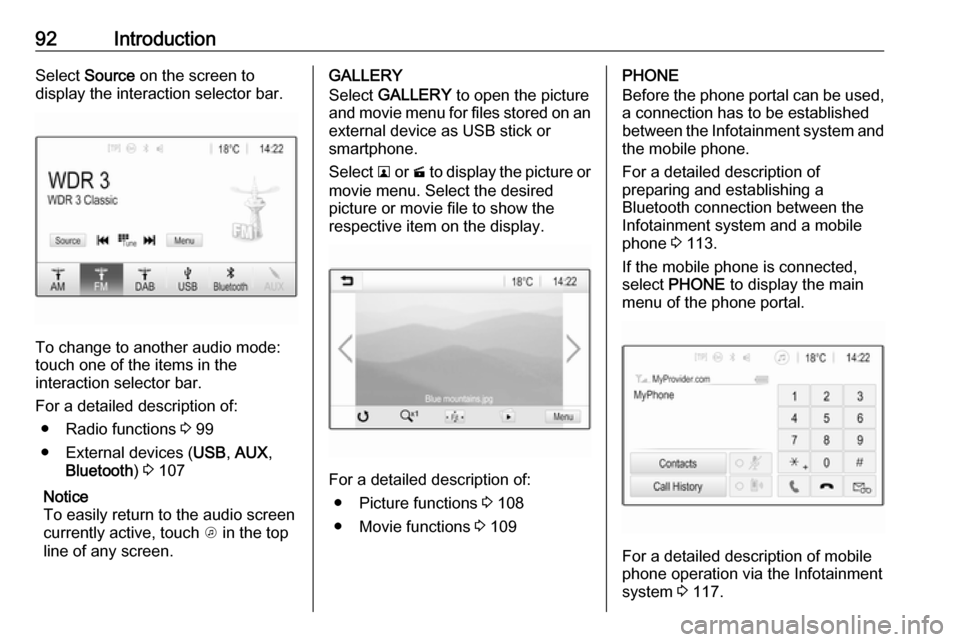
92IntroductionSelect Source on the screen to
display the interaction selector bar.
To change to another audio mode:
touch one of the items in the
interaction selector bar.
For a detailed description of: ● Radio functions 3 99
● External devices ( USB, AUX ,
Bluetooth ) 3 107
Notice
To easily return to the audio screen
currently active, touch A in the top
line of any screen.
GALLERY
Select GALLERY to open the picture
and movie menu for files stored on an external device as USB stick or
smartphone.
Select l or m to display the picture or
movie menu. Select the desired
picture or movie file to show the
respective item on the display.
For a detailed description of:
● Picture functions 3 108
● Movie functions 3 109
PHONE
Before the phone portal can be used, a connection has to be established
between the Infotainment system and
the mobile phone.
For a detailed description of
preparing and establishing a
Bluetooth connection between the Infotainment system and a mobile
phone 3 113.
If the mobile phone is connected,
select PHONE to display the main
menu of the phone portal.
For a detailed description of mobile
phone operation via the Infotainment
system 3 117.
Page 98 of 161

98IntroductionFor time and date to be set manually,select Off - Manual . If Auto Set is set
to Off - Manual , the submenu items
Set Time and Set Date become
available.
Set time and date
To adjust the time and date settings, select Set Time or Set Date .
Touch + and - to adjust the settings.
Language settings
Press ; and then select Settings.
Select Language to display the
respective menu.
To adjust the language for the menu texts: touch the desired language.
Text scroll function If long text is displayed on the screen
e.g. song titles or station names, the
text may either be scrolled continually or it may be scrolled once and
displayed in truncated form.
Press ; and then select Settings.
Select Radio.
If you wish the text to be scrolled
continually, activate Text Scroll.
If you wish the text to be scrolled in
blocks, deactivate the setting.
Factory defaults
Press ; and then select Settings.
Scroll through the list and select
Return to Factory Settings .
To restore all vehicle personalisation
settings, select Restore Vehicle
Settings .
To delete the paired Bluetooth
devices, the contacts list and the
voice mail numbers stored, select Clear All Private Data .
To reset tone and volume settings,
delete all favourites, and erase the
ringtone selection, select Restore
Radio Settings .
In each case, a warning message is
displayed. Select Continue to reset
the settings.
System version
Press ; and then select Settings.
Scroll through the list and select
Software Information .
If a USB device is connected, you
may save the vehicle information to
this USB device.
Select System Update and then Save
Vehicle Info to USB .
For a system update, contact your
workshop.
Vehicle settingsVehicle settings are described in the
Owner's Manual.