audio VAUXHALL ASTRA J 2016.25 Infotainment system
[x] Cancel search | Manufacturer: VAUXHALL, Model Year: 2016.25, Model line: ASTRA J, Model: VAUXHALL ASTRA J 2016.25Pages: 161, PDF Size: 2.95 MB
Page 86 of 161

86IntroductionIntroductionGeneral information.....................86
Theft-deterrent feature .................87
Control elements overview ..........88
Usage .......................................... 91
Basic operation ............................ 93
Tone settings ............................... 95
Volume settings ........................... 96
System settings ........................... 97General information
The Infotainment system provides
you with state-of-the-art in-car
infotainment.
Using radio tuner functions, you may
register up to 25 stations on five
favourites pages.
You can connect external data
storage devices, e.g. iPod, USB
devices, or other auxiliary devices to
the Infotainment system as further
audio sources; either via cable or via
Bluetooth.
In addition, the Infotainment system is equipped with a phone portal that
allows for comfortable and safe use of
your mobile phone in the vehicle.
Using the phone projection function,
you can operate specific applications
on your smartphone via the
Infotainment system.
Optionally, the Infotainment system
can be operated using the touch
screen and buttons on the control panel, the controls on the steering
wheel, or - if provided by your mobile
phone - via speech recognition.The well-thought-out design of the
control elements, the touch screen
and the clear displays enable you to
control the system easily and
intuitively.
Notice
This manual describes all options
and features available for the
various Infotainment systems.
Certain descriptions, including those for display and menu functions, may
not apply to your vehicle due to
model variant, country
specifications, special equipment or
accessories.
Important information on
operation and traffic safety9 Warning
The Infotainment system must be
used so that the vehicle can be
driven safely at all times. If in
doubt, stop the vehicle and
operate the Infotainment system
while the vehicle is stationary.
Page 89 of 161

Introduction891Display / Touch screen .........93
2 Home menu .......................... 93
Screen buttons for access to:
AUDIO : audio functions
GALLERY : picture and
movie functions
PHONE : mobile phone functions
PROJECTION : phone projection
SETTINGS : system settings
OnStar : OnStar Wi-Fi
settings .................................. 91
3 Time, date and
temperature indicators ..........97
4 g
Short press: open phone
menu ................................... 117
or open phone projection
function (if activated) ...........110
Long press: activate
speech recognition ..............1125v
Radio: short press: skip to
next station; long press:
seek up ................................. 99
External devices: short
press: skip to next track;
long press: fast forward ......107
6 m
If turned off: short press:
switch on Infotainment
system ................................... 91
If turned on: short press:
mute system; long press:
switch off Infotainment
system ................................... 91
Turn: adjust volume ..............91
7 t
Radio: short press: skip to
previous station; long
press: seek down ..................99
External devices: short press: skip to previous
track; long press: fast
rewind ................................. 1078;
Short press: open Home
menu ..................................... 91
Long press: open phone
projection function (if
activated) ............................ 110
Page 90 of 161

90IntroductionSteering wheel audio controls
17w
Short press: take phone call 113
or dial last number in call
list when the phone menu
is displayed ......................... 117
Long press: activate
speech recognition ..............112
2 SRC (Source) ........................ 91
Press: select audio source ....91
With radio active: turn
upwards/downwards to
select next/previous
preset radio station ...............99
With external device
active: turn upwards/
downwards to select next/
previous track/chapter/
picture ................................. 107
With Phone portal active
and call list open: turn
upwards/downwards to
select next/previous entry
in call list ............................. 117
With Phone portal active
and calls waiting: turn
upwards/downwards to
switch between calls ...........117
3 +
Increase volume
4 -
Reduce volume
5 xn
Press: end/decline call ........117or deactivate speech
recognition .......................... 112
or activate/deactivate
mute function ........................ 91
Page 91 of 161

Introduction91Usage
Control elements
The Infotainment system is operated
via function buttons, a touch screen
and menus that are shown on the
display.
Inputs are made optionally via: ● the central control unit in the control panel 3 88
● the touch screen 3 93
● audio controls on the steering wheel 3 88
● the speech recognition 3 112
Switching the Infotainment
system on or off
Press X. After switching on, the last
selected Infotainment source
becomes active.
Automatic switch-off
If the Infotainment system has been
switched on pressing X while the
ignition is switched off, it will switch off
again automatically 10 minutes after
the last user input.Setting the volume
Turn X. The current setting is shown
on the display.
When the Infotainment system is
switched on, the last selected volume is set, provided that it is lower than themaximum start-up volume. For a
detailed description 3 96.
Speed compensated volume
When the speed compensated
volume is activated 3 96, the
volume is adapted automatically to
make up for the road and wind noise
as you drive.
Mute
Press X to mute the Infotainment
system.
To cancel the mute function: press
X again. The last selected volume is
set again.Volume limitation at high
temperatures
At very high temperatures inside the
vehicle, the Infotainment system
limits the maximum adjustable
volume. If necessary, the volume is
decreased automatically.
Modes of operation Press ; to display the Home menu.
Notice
For a detailed description of menu
operation via touch screen 3 93.
AUDIO
Select AUDIO to open the main menu
of the last selected audio mode.
Page 92 of 161
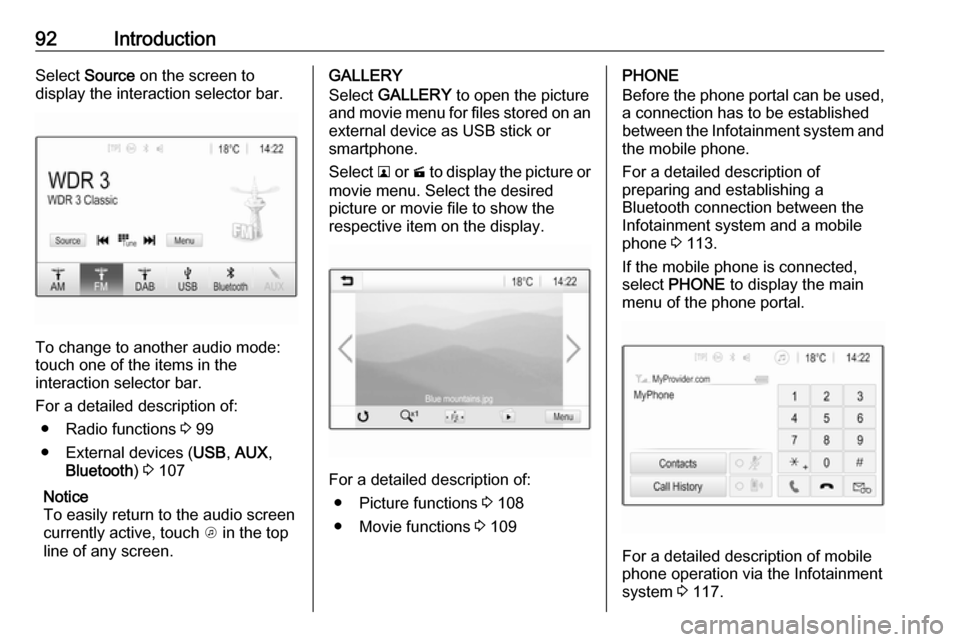
92IntroductionSelect Source on the screen to
display the interaction selector bar.
To change to another audio mode:
touch one of the items in the
interaction selector bar.
For a detailed description of: ● Radio functions 3 99
● External devices ( USB, AUX ,
Bluetooth ) 3 107
Notice
To easily return to the audio screen
currently active, touch A in the top
line of any screen.
GALLERY
Select GALLERY to open the picture
and movie menu for files stored on an external device as USB stick or
smartphone.
Select l or m to display the picture or
movie menu. Select the desired
picture or movie file to show the
respective item on the display.
For a detailed description of:
● Picture functions 3 108
● Movie functions 3 109
PHONE
Before the phone portal can be used, a connection has to be established
between the Infotainment system and
the mobile phone.
For a detailed description of
preparing and establishing a
Bluetooth connection between the Infotainment system and a mobile
phone 3 113.
If the mobile phone is connected,
select PHONE to display the main
menu of the phone portal.
For a detailed description of mobile
phone operation via the Infotainment
system 3 117.
Page 95 of 161
Introduction95To scroll through a list of menu items,
you may optionally:
● Place your finger anywhere on the screen and move it upwards
or downwards.
Notice
Constant pressure must be applied
and the finger must be moved at
constant speed.
● Touch S or R at the top and at
the bottom of the scroll bar.
● Move the slider of the scroll bar up and down with your finger.
To return to the top of the list, touch
the list title.
Notice
In subsequent chapters, the
operating steps for scrolling to a list
item via the touch screen will be
described as "...scroll to
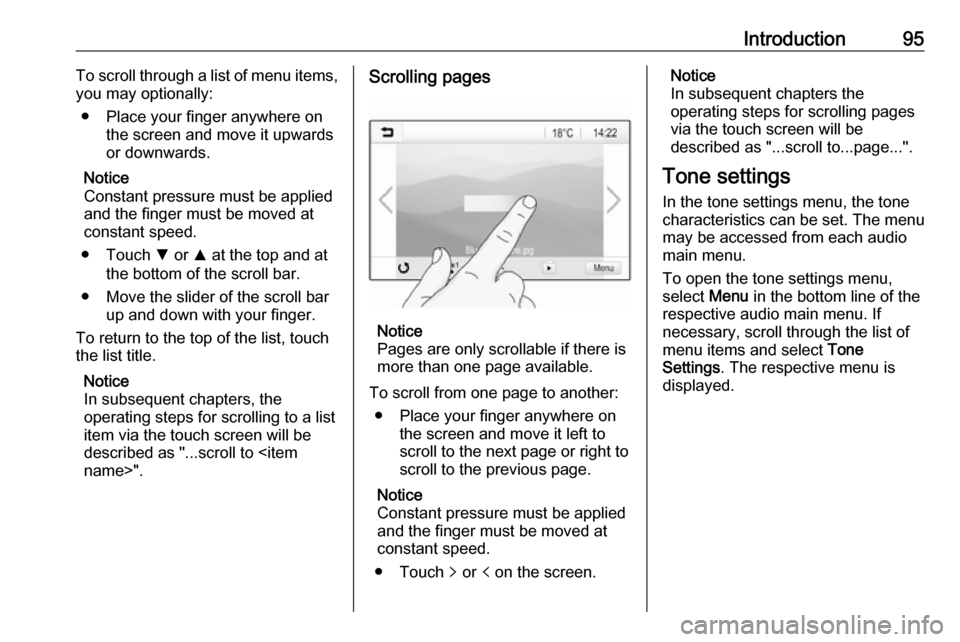
Notice
Pages are only scrollable if there is
more than one page available.
To scroll from one page to another: ● Place your finger anywhere on the screen and move it left to
scroll to the next page or right to
scroll to the previous page.
Notice
Constant pressure must be applied
and the finger must be moved at
constant speed.
● Touch q or p on the screen.
Notice
In subsequent chapters the
operating steps for scrolling pages
via the touch screen will be
described as "...scroll to...page...".
Tone settings In the tone settings menu, the tone
characteristics can be set. The menu
may be accessed from each audio
main menu.
To open the tone settings menu,
select Menu in the bottom line of the
respective audio main menu. If
necessary, scroll through the list of
menu items and select Tone
Settings . The respective menu is
displayed.
Page 96 of 161
96Introduction
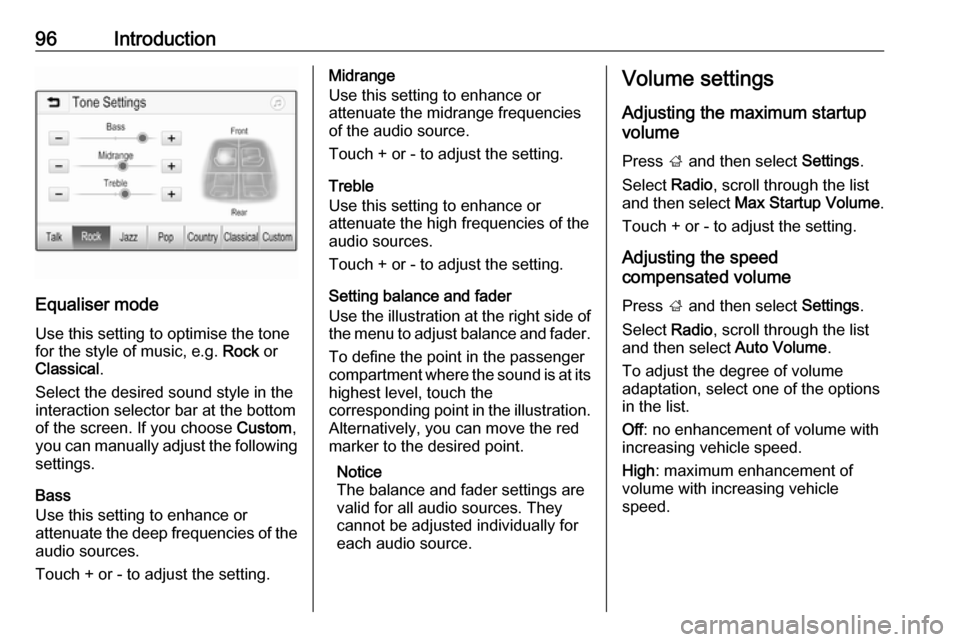
Equaliser mode
Use this setting to optimise the tone for the style of music, e.g. Rock or
Classical .
Select the desired sound style in the
interaction selector bar at the bottom of the screen. If you choose Custom,
you can manually adjust the following settings.
Bass
Use this setting to enhance or
attenuate the deep frequencies of the
audio sources.
Touch + or - to adjust the setting.
Midrange
Use this setting to enhance or
attenuate the midrange frequencies
of the audio source.
Touch + or - to adjust the setting.
Treble
Use this setting to enhance or
attenuate the high frequencies of the
audio sources.
Touch + or - to adjust the setting.
Setting balance and fader
Use the illustration at the right side of
the menu to adjust balance and fader.
To define the point in the passenger
compartment where the sound is at its
highest level, touch the
corresponding point in the illustration.
Alternatively, you can move the red
marker to the desired point.
Notice
The balance and fader settings are
valid for all audio sources. They
cannot be adjusted individually for
each audio source.Volume settings
Adjusting the maximum startup
volume
Press ; and then select Settings.
Select Radio, scroll through the list
and then select Max Startup Volume .
Touch + or - to adjust the setting.
Adjusting the speed
compensated volume
Press ; and then select Settings.
Select Radio, scroll through the list
and then select Auto Volume.
To adjust the degree of volume
adaptation, select one of the options
in the list.
Off : no enhancement of volume with
increasing vehicle speed.
High : maximum enhancement of
volume with increasing vehicle
speed.
Page 99 of 161
Radio99RadioUsage.......................................... 99
Station search .............................. 99
Favourite lists ............................. 101
Radio data system (RDS) ..........102
Digital audio broadcasting .........103Usage
Activating radio
Press ; and then select AUDIO. The
audio main menu last selected is
displayed.
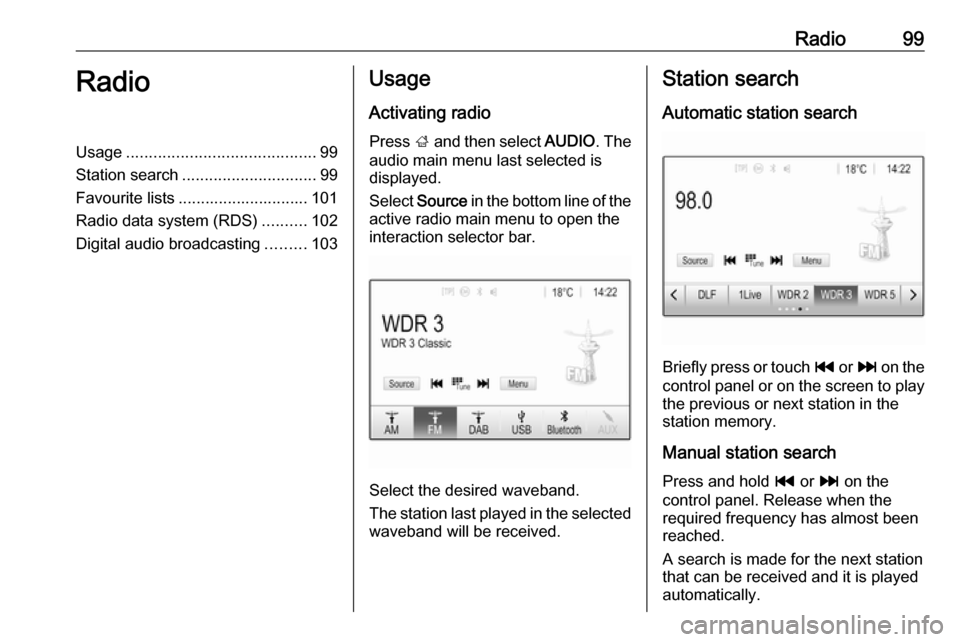
Select Source in the bottom line of the
active radio main menu to open the
interaction selector bar.
Select the desired waveband.
The station last played in the selected waveband will be received.
Station search
Automatic station search
Briefly press or touch t or v on the
control panel or on the screen to play the previous or next station in the
station memory.
Manual station search
Press and hold t or v on the
control panel. Release when the
required frequency has almost been
reached.
A search is made for the next station that can be received and it is played
automatically.
Page 102 of 161

102RadioRadio data system (RDS)
RDS is a service of FM stations that considerably facilitates the finding of
the desired station and its fault-free
reception.
Advantages of RDS ● On the display, the programme name of the station appears
instead of its frequency.
● During a station search, the Infotainment system tunes in to
RDS stations only.
● The Infotainment system always tunes into the best receivable
broadcasting frequency of the set station by means of AF
(alternative frequency).
● Depending on the station that is received, the Infotainment
system displays radio text that
can contain e.g. information on
the current programme.RDS configuration
Touch Menu in the bottom line of the
FM radio main menu to open the
corresponding waveband-specific
submenu.
Scroll to RDS.
Activate or deactivate RDS.
Traffic Programme
Radio traffic service stations are RDS stations that broadcast traffic news. If
the traffic service is switched on, the
currently playing audio source is
interrupted for the duration of the
traffic announcement.
Activating the traffic programme
function
Select Menu in the bottom line of the
FM radio main menu to open the corresponding waveband-specific
submenu.
Touch the screen button next to
Traffic Programme to activate or
deactivate the function.Notice
In the station list, TP is displayed
next to the stations providing a traffic programme.
If the radio traffic service is activated,
[TP] is shown in the top line of all main
menus. If the current station is not a
radio traffic service station, TP is
greyed-out and a search is started
automatically for the next radio traffic
service station. As soon as a radio
traffic service station is found, TP is
highlighted. If no radio traffic service
station is found, TP remains greyed-
out.
If a traffic announcement is
broadcasted on the respective
station, a message is displayed.
To interrupt the announcement and
return to the function previously
activated, touch the screen or press
m .
Regionalisation Sometimes RDS stations broadcast
regionally different programmes on
different frequencies.
Page 103 of 161

Radio103Select Menu in the bottom line of the
FM radio main menu to open the corresponding waveband-specific
submenu and scroll to Region
Activate or deactivate Region.
If regionalisation is activated,
alternative frequencies with the same
regional programmes are selected
where necessary. If regionalisation is
switched off, alternative frequencies
of the stations are selected without
regard to regional programmes.
Digital audio broadcasting
Digital audio broadcasting (DAB) is
an innovative and universal
broadcasting system.
DAB stations are indicated by the
programme name instead of the
broadcasting frequency.
General information ● With DAB, several radio programmes (services) can bebroadcasted on a single
ensemble.● Besides high-quality digital audio
services, DAB is also able to
transmit programme-associated
data and a multitude of other data services including travel andtraffic information.
● As long as a given DAB receiver can pick up the signal sent out bya broadcasting station (even if
the signal is very weak), sound
reproduction is ensured.
● There is no fading (weakening of
the sound that is typical of AM or
FM reception). The DAB signal is reproduced at a constant volume.
If the DAB signal is too weak to
be picked up by the receiver,
reception is interrupted
completely. This incident can be
avoided by activating DAB-DAB
Linking and/or DAB-FM Linking
in the DAB menu (see below).
● Interference caused by stations that are on nearby frequencies (a
phenomenon that is typical of AM and FM reception) does not
occur with DAB.● If the DAB signal is reflected by natural obstacles or buildings,
the reception quality of DAB is
improved, whereas AM or FM
reception is considerably
impaired in such cases.
● When DAB reception is enabled, the FM tuner of the Infotainmentsystem remains active in the
background and continually
searches for the best receivable
FM stations. If TP 3 102 is
activated, traffic announcements
of the FM station which is
currently best receivable are
issued. Deactivate TP if DAB
reception should not be
interrupted by FM traffic
announcements.
DAB Announcements
Besides their music programmes, a
lot of DAB stations also broadcast
announcements of various
categories. If you activate some or all categories, the currently received
DAB service is interrupted when an
announcement of these categories is
made.