phone VAUXHALL ASTRA J 2017.5 Infotainment system
[x] Cancel search | Manufacturer: VAUXHALL, Model Year: 2017.5, Model line: ASTRA J, Model: VAUXHALL ASTRA J 2017.5Pages: 167, PDF Size: 3.08 MB
Page 76 of 167

76PhoneEnding a phone call
Select End to end the call.
Deactivating the microphone
Select Mute to temporarily deactivate
the microphone.
The screen button changes to
Unmute .
To reactivate the microphone, select
Unmute .
Deactivating the hands-free function
To continue the conversation on your mobile phone, select Handset.
The screen button changes to
Handsfree .
To reactivate the hands-free function,
select Handsfree .
Second phone call
Initiating a second phone call
To initiate a second phone call, select Add in the in-call view. The phone
menu is displayed.
Initiate a second phone call. For a
detailed description, see above.To cancel the initiation of the second
call and return to the in-call view,
select Current Call .
Both calls are displayed in the in-call
view.
Second incoming phone call
A message with the caller's name or
number is displayed at the bottom of
the in-call view.
Select Answer or Ignore in the
message.
Ending the phone calls
To end both calls, select End at the
bottom of the screen.
To end just one of the calls, select
A next to the respective call.
Conference call
Select B to merge the two calls. Both
calls become active.
The B screen button changes to C.
To unmerge the calls, select
C.
Phones
Select PHONES in the interaction
selector bar to display the device list.
Page 77 of 167
Phone77
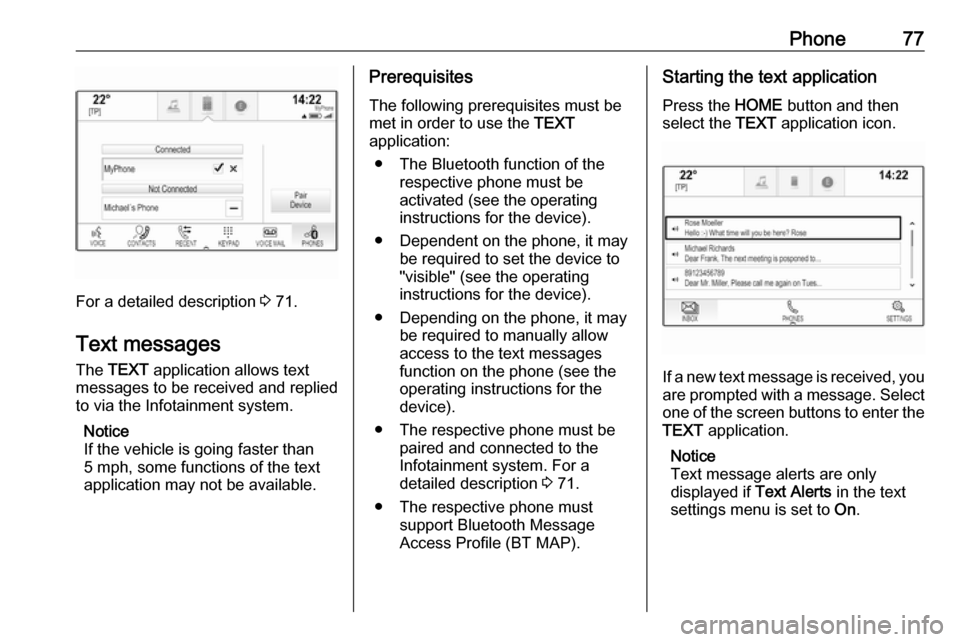
For a detailed description 3 71.
Text messages
The TEXT application allows text
messages to be received and replied
to via the Infotainment system.
Notice
If the vehicle is going faster than
5 mph, some functions of the text
application may not be available.
Prerequisites
The following prerequisites must be
met in order to use the TEXT
application:
● The Bluetooth function of the respective phone must be
activated (see the operating
instructions for the device).
● Dependent on the phone, it may be required to set the device to
"visible" (see the operating
instructions for the device).
● Depending on the phone, it may be required to manually allow
access to the text messages
function on the phone (see the
operating instructions for the device).
● The respective phone must be paired and connected to the
Infotainment system. For a
detailed description 3 71.
● The respective phone must support Bluetooth Message
Access Profile (BT MAP).Starting the text application
Press the HOME button and then
select the TEXT application icon.
If a new text message is received, you
are prompted with a message. Select
one of the screen buttons to enter the TEXT application.
Notice
Text message alerts are only
displayed if Text Alerts in the text
settings menu is set to On.
Page 78 of 167

78PhoneListening to a message
Select INBOX in the interaction
selector bar. The text messages
stored on the respective phone are
displayed in a list.
Notice
Depending on the phone, not all text messages stored on the phone are
displayed in the inbox.
To listen to a message, select 3
beside the respective message.
Alternatively, select the desired
message to display the message
view. Select LISTEN in the interaction
selector bar.
Viewing a message
Select INBOX in the interaction
selector bar. The text messages
stored on the respective phone are
displayed in a list.
Select the desired message to
display the complete message text.
Calling the sender
Select INBOX in the interaction
selector bar. The text messages
stored on the respective phone are
displayed in a list.
Select the desired message to
display the message view.
Select Call in the interaction selector
bar. The sender of the message is
called.
Replying to a message Notice
Depending on the phone, the reply function may not be supported.
Select INBOX in the interaction
selector bar. The text messages
stored on the respective phone are
displayed in a list.
Select the desired message to
display the message view.
Select REPLY in the interaction
selector bar. A list of predefined
messages is displayed.
Select the desired predefined text
message.
If none of the predefined messages
serves your purpose, you can write a
new message, see "Manage
Predefined Messages" below.
Deleting a message
Select INBOX in the interaction
selector bar. The text messages
stored on the respective phone are
displayed in a list.
Select the desired message to
display the message view.
To delete the text message, select
Delete in the interaction selector bar.
Page 79 of 167

Phone79Device listSelect PHONES to display the device
list.
For a detailed description 3 71.
Text settings
Select Settings to enter the settings
menu.
Text Alerts
If you wish an alert to pop-up when a
new text message is received, set
Text Alerts - On .
Manage Predefined Messages
Select Manage Predefined
Messages to display a list of all
predefined messages.Adding a new message
Notice
Predefined messages can only be entered when the vehicle is
stationary.
Select Add New Predefined
Message . A keyboard is displayed.
Enter the desired message text and confirm your input. The new message
is added to the list of predefined
messages.Deleting a predefined message
To delete a predefined message,
select ‒ beside the message you wish
to delete.Mobile phones and CB radio
equipment
Installation instructions and
operating guidelines
The vehicle specific installation
instructions and the operating
guidelines of the mobile phone and
hands-free manufacturer must be
observed when installing and
operating a mobile telephone. Failure to do so could invalidate the vehicle
type approval (EU directive 95/54/
EC).
Recommendations for fault-free
operation:
● The exterior antenna must be professionally installed to obtain
the maximum range possible.
● Maximum transmission power: 10 watts.
● The mobile phone must be installed in a suitable spot.
Consider relevant note in the
Owner's Manual, chapter Airbag
system .
Page 80 of 167

80PhoneSeek advice on predetermined
installation points for the external
antenna or equipment holder and
ways of using devices with a
transmission power exceeding
10 watts.
Use of a hands-free attachment without external antenna with mobile
telephone standards GSM
900/1800/1900 and UMTS is only
permitted if the maximum
transmission power of the mobile
telephone is 2 watts for GSM 900 or
1 watt for the other types.
For reasons of safety, do not use the
phone while driving. Even use of a hands-free set can be a distraction
while driving.9 Warning
Operation of radio equipment and
mobile telephones which fail to
meet above mentioned mobile
telephone standards is only
permitted using an antenna
located outside of the vehicle.
Caution
Mobile telephones and radio
equipment may lead to
malfunctions in the vehicle
electronics when operated inside
the vehicle with no exterior
antenna, unless the above
mentioned regulations are
observed.
Page 81 of 167

Frequently asked questions81Frequently asked
questionsFrequently asked questions .........81Frequently asked
questions
Phone? How can I pair my phone with the
Infotainment system?
! In order to pair a phone, press
HOME , select the PHONE icon
and then select Pair Device.
Follow the instructions on your
device and make sure Bluetooth is enabled.
Detailed description 3 71.? How can I access my phone book
contacts and recent calls?
! In order to access the contacts or
calls list, press HOME, select the
PHONE icon and then select
CONTACTS or RECENT . Make
sure access to the phone book and recent calls list is allowed on the
phone. Depending on the phone,
loading the phone book and recent
calls list might take a few minutes.
Detailed description 3 73.Favourites? What can be stored as a favourite?
! Up to 60 favourites of almost all
elements can be stored, e.g.
destinations, phone contacts,
playlists, radio stations, etc.
Detailed description 3 19.? How can I store a new favourite?
! Activate the respective application
and touch and hold a favourite
screen button to store a new
favourite in this location. A short
beep sound confirms storing. In
some cases, it is required to select a specific item.
Detailed description 3 19.? How can I rename, delete or move
my favourites?
! Press
HOME , select the
SETTINGS icon on the home
screen, Radio in the settings list
and then Manage Favourites in
order to rename, delete or move
the favourites.
Detailed description 3 19.
Page 84 of 167

84IndexAActivating Bluetooth music ...........41
Activating CD player .....................38
Activating phone projection ..........43
Activating radio ............................. 32
Activating the Infotainment system 12
Activating the navigation system ..47
Activating the phone portal ...........73
Activating USB........................ 41, 42
Address book................................ 53
Application tray ............................. 17
Audio files ..................................... 40
Automatic volume adjustment Auto volume .............................. 27
Auto Set ........................................ 28
Auto volume.................................. 27
B Balance......................................... 27
Basic operation ............................. 15
Application tray.......................... 17
Character recognition pane .......18
Contacts .................................... 23
Favourites ................................. 19
Home screen ............................. 17
Interaction selector bar .............17
Keyboard ................................... 18
Keypad ...................................... 18
Bass.............................................. 27Bluetooth connection ....................71
Bluetooth music ............................ 40
C Category list.................................. 32
CD player...................................... 37
Character modifiers ......................18
Character recognition pane ..........18
Clock display ................................ 28
Contacts ................................. 23, 53
Modifying ................................... 23
Retrieving .................................. 23
Storing ....................................... 23
Control elements Infotainment system ....................8
Steering wheel ............................ 8
Control elements overview .............8
D DAB .............................................. 35
DAB linking ................................... 35
Date .............................................. 28
Destination input ..........................53
Digital audio broadcasting ............35
Displaying favourites ....................19
Display mode ................................ 28
E Emergency call ............................. 73
EQ ................................................ 27
Equaliser....................................... 27
Page 85 of 167

85F
Fader ............................................ 27
Favourites ..................................... 19
Cluster display........................... 19
Deleting ..................................... 19
Displaying.................................. 19
Renaming .................................. 19
Retrieving .................................. 19
Storing ....................................... 19
File formats Audio files.................................. 40Movie files ................................. 40
Forgotten PIN ............................... 28
Frequency list ............................... 32
Frequently asked questions .........81
G General information 37, 40 , 46 , 65 , 70
Bluetooth music......................... 40
CD ............................................. 37
Infotainment system ....................6
Navigation ................................. 46
Phone portal .............................. 70
Radio ......................................... 32
USB ........................................... 40
Guidance ..................................... 59
H Home button ................................. 17
Home screen ................................ 17I
Individual POIs ............................. 47
Infotainment control panel ..............8
Intellitext ....................................... 35
Interaction selector bar .................17
K Keyboard Letter keyboard ......................... 18
Symbol keyboard ......................18
Keyboards .................................... 18
Keypad ......................................... 18
L
Language ..................................... 28
L-Band .......................................... 35
M
Maps ............................................. 47
Maximum startup volume .............27
Menu operation............................. 17
Messages ..................................... 17
Midrange....................................... 27 Mobile phones and CB radio equipment ................................ 79
Movie files..................................... 40
Movies .......................................... 42
Mute.............................................. 12N
Navigation..................................... 59 Contacts .............................. 23, 53
Current location ......................... 47
Destination input .......................53
Favourites ................................. 19
Individual POIs .......................... 47
Map display ............................... 47
Map manipulation ......................47
Map update ............................... 46
OVERVIEW screen button ........47
Recent destinations ..................53
Route guidance ......................... 59
Route guidance menu ...............59
TMC stations ....................... 46, 59
Traffic incidents ......................... 59
Turn list ..................................... 59
Voice prompts ........................... 59
Waypoint list .............................. 59
Waypoint trip ............................. 53
O
Operation ...................................... 73
Bluetooth music......................... 41
CD ............................................. 38
Contacts .................................... 23
Favourites ................................. 19
Infotainment system ..................12
Keyboards ................................. 18
Navigation system .....................47
Page 86 of 167

86Phone........................................ 73
Radio ......................................... 32
Touch screen ............................ 15
USB ..................................... 41, 42
OVERVIEW screen button ...........47
P Pairing .......................................... 71
Phone Bluetooth ................................... 70
Bluetooth connection ................71
Contacts .................................... 23
Emergency calls ........................73
Favourites ................................. 19
Hands-free mode ......................73
Phone book ......................... 23, 73
Recent calls............................... 73
Ringtone .................................... 73
Text messages .......................... 77
Phone book ............................ 23, 73
Phone call Initiating ..................................... 73
Rejecting ................................... 73
Taking ....................................... 73
Phone projection .......................... 43
Playing audio ................................ 41
Playing movies ............................. 42
POIs.............................................. 53R
Radio Category list .............................. 32
DAB ........................................... 35
DAB announcements ................35
DAB menu ................................. 35
Digital audio broadcasting .........35
Favourites ................................. 19
FM menu ................................... 33
Frequency list ............................ 32
Intellitext .................................... 35
L-Band....................................... 35 Radio Data System ...................33
RDS........................................... 33
Region ....................................... 33
Regionalisation ......................... 33
Station list.................................. 32
Station search ........................... 32
TP.............................................. 33
Traffic Programme ....................33
Waveband ................................. 32
Radio data system (RDS) ............33
Region .......................................... 33
Regionalisation ............................. 33
RESET screen button ...................47
Retrieving favourites .....................19
Return to factory settings.............. 28
Ringtone ....................................... 73
Route guidance ............................ 59
Route style.................................... 59S
Shop ............................................. 43
Smartphone Phone projection .......................43
Speech recognition .......................65
Station list ..................................... 32
Station search............................... 32
Storing favourites.......................... 19
Switching the Infotainment system on .................................. 12
System settings ............................ 28
Display ...................................... 28
Language .................................. 28
Return to factory settings ..........28
Time and Date........................... 28
Valet mode ................................ 28
T TA ................................................. 33
Text messages ............................. 77
Theft-deterrent feature ................... 7
Time.............................................. 28
TMC stations ................................ 46
Tone settings ................................ 27
Touch screen ................................ 15
Touch screen calibration ..............28
Touch screen operation ................15
TP ................................................. 33
Traffic incidents ............................ 59
Traffic Programme ........................33
Page 87 of 167

87Treble........................................... 27
Turn list ......................................... 59
U
Usage ................... 12, 32, 38, 47, 67
Bluetooth music......................... 41
CD ............................................. 38
Infotainment system ..................12
Navigation system .....................47
Phone ........................................ 73
Touch screen ............................ 15
USB ..................................... 41, 42
USB .............................................. 40
Using apps.................................... 43
Using smartphone applications ....43
V
Valet mode Locking ...................................... 28
Unlocking .................................. 28
Voice recognition ..........................65
Volume Auto Volume.............................. 27
Maximum startup volume ..........27
Mute function............................. 12
Setting the volume ....................12
Volume settings ............................ 27
W
Waveband selection .....................32
Waypoint list ................................. 59Waypoint trip................................. 53
Wrong scrolling direction ..............28