fuel VAUXHALL ASTRA J 2018.5 User Guide
[x] Cancel search | Manufacturer: VAUXHALL, Model Year: 2018.5, Model line: ASTRA J, Model: VAUXHALL ASTRA J 2018.5Pages: 317, PDF Size: 9.66 MB
Page 108 of 317
106Instruments and controlsThe LED status shows the current
operating mode.LED off:petrol operationLED illu‐
minates:natural gas operationLED
flashes for
approx.
five
seconds:fuel mode transition is
selected but switching
is not possibleLED
flashes:fuel mode transition in
process, flashing stops
if transition is completed
Switching is not possible at high loads
(e.g. powerful acceleration, driving at
full throttle).
If the selector switch is operated
several times within a short time, a
switchover inhibitor is activated. The
engine remains in the current
operating mode. The inhibitor
remains active until the ignition is
switched off.
A slight loss of power and torque can
be expected during petrol operation.
You must therefore adapt your driving style, e.g. during overtaking
manoeuvres and high vehicle loads
(e.g. towing loads) accordingly.
The vehicle consumes petrol when
starting the engine and even when in certain natural gas operating modes.The petrol consumption in natural gas
operating mode can vary depending
on driving behaviour (e.g. high load or towing). In case of a low fuel level, a
corresponding message is displayed as a reminder to refuel.
Notice
Always ensure that there is enough
petrol in the tank.
Fuel for natural gas operation 3 222.
Forced fuel mode transitionNatural gas tank is running low
As soon as the natural gas tank is
empty, petrol operation is
automatically engaged. Manually
engaging natural gas operation mode is not possible until natural gas
refuelling is detected.
Before the petrol fuel system runs empty, a warning message will be
displayed and cannot be dismissed.Petrol tank is running low while
natural gas is available
If the remaining petrol level in the tank falls below a certain level, natural gas
operation is automatically engaged
provided there is a sufficient natural
gas level in the tank. Manually
engaging petrol operation mode is not
possible.
Before both fuel systems run empty,
a warning message will be displayed
and cannot be dismissed.
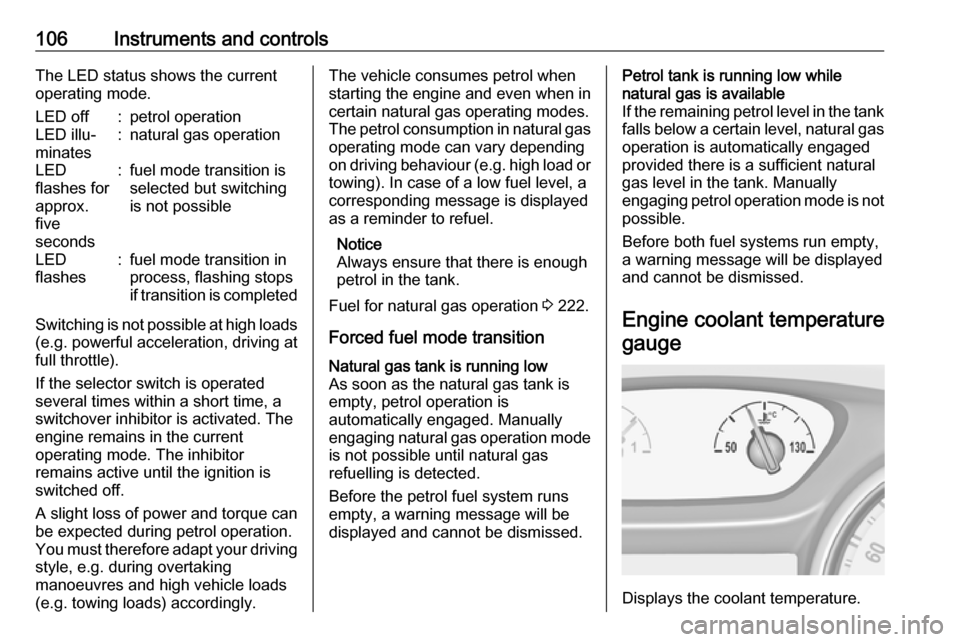
Engine coolant temperaturegauge
Displays the coolant temperature.
Page 113 of 317

Instruments and controls111Illuminates
Electric parking brake is operating
with degraded performance 3 179.
Flashes
Electric parking brake is in service
mode. Stop vehicle, apply and
release the electric parking brake to
reset.9 Warning
Have the cause of the fault
remedied immediately by a
workshop.
Antilock brake system
(ABS)
u illuminates yellow.
Illuminates for a few seconds after the ignition is switched on. The system is
ready for operation when the control
indicator extinguishes.
If the control indicator does not go out after a few seconds, or if it illuminates while driving, there is a fault in the
ABS. The brake system remains
operational but without ABS
regulation.
Antilock brake system 3 178.
Gear shifting R or S with the number of a higher or
lower gear is indicated, when up- or
downshifting is recommended for fuel
saving reasons.
Following distance
E indicates the following distance
setting of the alert timing sensitivity
for the forward collision alert using
filled distance bars.
Forward collision alert 3 195.
Lane keep assist
a illuminates green or yellow, or
flashes yellow.
Illuminates green
The system is switched on and ready
to operate.Illuminates yellow
The system approaches a detected
lane marking without using the turn
signal in that direction.
Flashes yellow The system recognizes that the lane
is departed significantly.
Lane keep assist 3 217
Electronic Stability Control off
n illuminates yellow.
The system is deactivated.
Electronic Stability Controland Traction Control system
b illuminates or flashes yellow.
Illuminates
A fault in the system is present.
Continued driving is possible. Driving
stability, however, may deterioratedepending on road surface
conditions.
Page 115 of 317

Instruments and controls113Do not remove key until vehicle is
stationary, otherwise the steering wheel lock could engage
unexpectedly.
Check oil level before seeking
assistance of a workshop 3 233.
Low fuel Y illuminates or flashes yellow.
Illuminates
Level in fuel tank is too low.
Flashes
Fuel used up. Refuel immediately.
Never run the tank dry.
Refuelling 3 222.
Catalytic converter 3 168.
Bleeding the diesel fuel system
3 237.
Immobiliser
d flashes yellow.
Fault in the immobiliser system. The
engine cannot be started.
Exterior light
8 illuminates green.
The exterior lights are on 3 135.
High beam
C illuminates blue.
Illuminated when high beam is on or
during headlight flash 3 136.
High beam assist
f illuminates green.
The high beam assist is activated,
see LED headlights 3 137.
LED headlights f illuminates or flashes yellow.
Illuminates
Fault in the system.
Seek the assistance of a workshop.
Flashes
System is switched to symmetrical
low beam.Control indicator f flashes for approx.
four seconds after the ignition is
switched on as a reminder for
symmetrical headlight 3 137.
Fog light
> illuminates green.
The front fog lights are on 3 141.
Rear fog light ø illuminates yellow.
The rear fog light is on 3 142.
Cruise control
m illuminates white or green.
Illuminates white The system is on.
Illuminates green
Cruise control is active. Set speed is
indicated in the Driver Information
Centre.
Cruise control 3 184.
Page 117 of 317
Instruments and controls115Displays
Driver Information Centre
The Driver Information Centre is
located in the instrument cluster.
Depending on the version and the
instrument cluster, the Driver
Information Centre is available as
Midlevel display or Uplevel display.
Driver Information Centre indicates
depending on the equipment:
● overall and trip odometer
● vehicle information
● trip/fuel information
● driving economy information ● vehicle and warning messages
● audio and infotainment information
● phone information
● navigation information
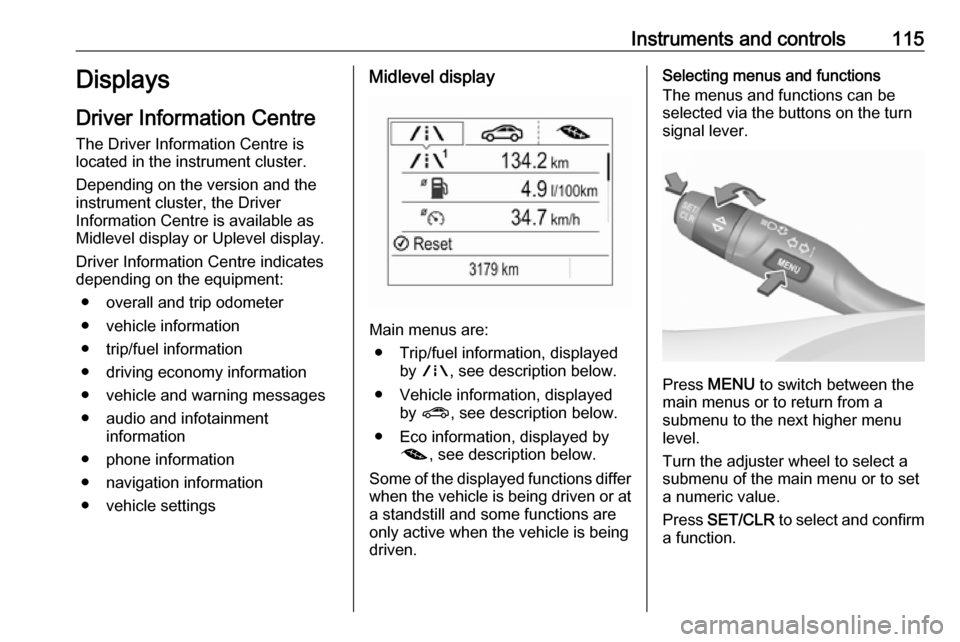
● vehicle settingsMidlevel display
Main menus are: ● Trip/fuel information, displayed by ; , see description below.
● Vehicle information, displayed by ? , see description below.
● Eco information, displayed by @ , see description below.
Some of the displayed functions differ
when the vehicle is being driven or at a standstill and some functions are
only active when the vehicle is being
driven.
Selecting menus and functions
The menus and functions can be
selected via the buttons on the turn
signal lever.
Press MENU to switch between the
main menus or to return from a
submenu to the next higher menu
level.
Turn the adjuster wheel to select a
submenu of the main menu or to set
a numeric value.
Press SET/CLR to select and confirm
a function.
Page 118 of 317
116Instruments and controlsVehicle and service messages are
popped up in the Driver Information
Centre if required. Confirm messages by pressing SET/CLR. Vehicle
messages 3 123.
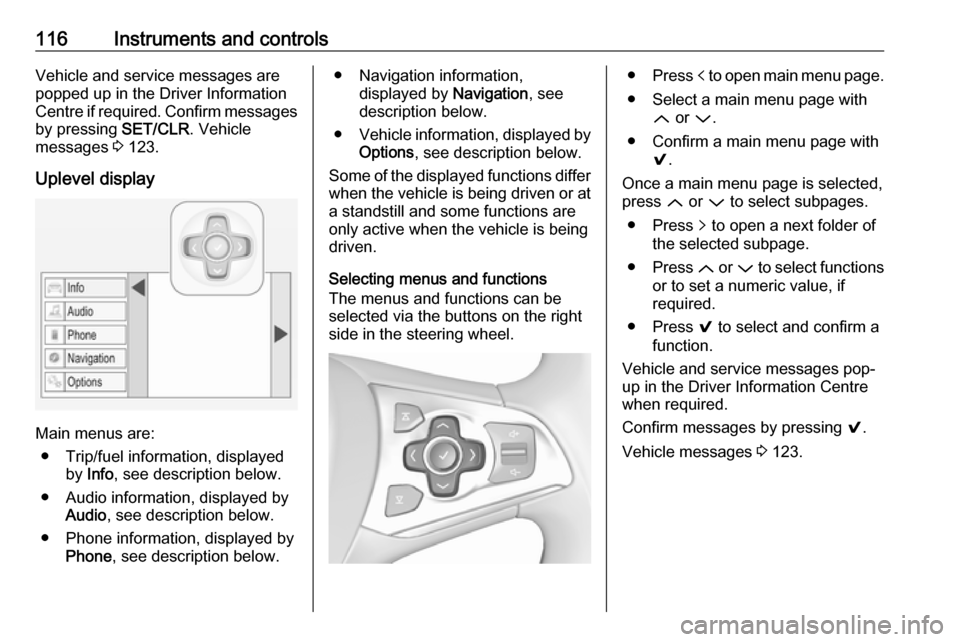
Uplevel display
Main menus are: ● Trip/fuel information, displayed by Info , see description below.
● Audio information, displayed by Audio , see description below.
● Phone information, displayed by Phone , see description below.
● Navigation information,
displayed by Navigation, see
description below.
● Vehicle information, displayed by
Options , see description below.
Some of the displayed functions differ
when the vehicle is being driven or at a standstill and some functions are
only active when the vehicle is being
driven.
Selecting menus and functions
The menus and functions can be
selected via the buttons on the right
side in the steering wheel.● Press p to open main menu page.
● Select a main menu page with Q or P.
● Confirm a main menu page with 9.
Once a main menu page is selected,
press Q or P to select subpages.
● Press q to open a next folder of
the selected subpage.
● Press Q or P to select functions
or to set a numeric value, if
required.
● Press 9 to select and confirm a
function.
Vehicle and service messages pop-
up in the Driver Information Centre
when required.
Confirm messages by pressing 9.
Vehicle messages 3 123.
Page 119 of 317

Instruments and controls117Trip / fuel information menu, ;
or Info
The following list contains all possible Info Menu pages. Some may not be
available for your particular vehicle.
Depending on the display, some
functions are symbolised.
Turn the adjuster wheel or press Q
or P to select a page:
● Trip odometer 1/2 or A/B
● Average fuel consumption
● Average speed
● Digital speed
● Fuel range
● Instantaneous fuel consumption
● Remaining oil life
● Tyre pressure
● Traffic sign assistant
● Following distance
● Timer
● Outside temperature ● AdBlue levelOn Midlevel display the pages
Remaining Oil Life, Tyre Pressure,
Traffic Sign Assistant and Following
Distance are displayed in the Vehicle information menu, select ?.
Trip odometer 1/2 or A/B
Trip odometer displays the current distance since a certain reset.
Trip odometer counts up to a distance
of 9,999 miles then restarts at 0.
To reset on Midlevel display, press
SET/CLR for a few seconds.
To reset on Uplevel display, press >
and confirm with 9.
The information of trip odometer page
1/A and 2/B can be reset separately
while the respective display is active.
Average Fuel Consumption
Display of average consumption. The measurement can be reset at any
time and starts with a default value.
To reset on Midlevel display, press
SET/CLR for a few seconds, on
Uplevel display, press > and confirm
with 9.On vehicles with bi-fuel engines:
Average consumption is indicated for
the currently selected mode, CNG or
petrol.
Average speed
Display of average speed. The
measurement can be reset at any
time.
To reset on Midlevel display, press
SET/CLR for a few seconds, on
Uplevel display, press > and confirm
with 9.
Digital speed
Digital display of the instantaneous
speed.
Fuel range
Range is calculated from current fuel
level and current consumption. The
display shows average values.
After refuelling, the range is updated
automatically after a brief delay.
When the level in the fuel tank is low,
a message appears on the display
and the control indicator Y in the fuel
gauge illuminates.
Page 120 of 317
118Instruments and controlsWhen the fuel tank must be refuelled
immediately, a warning message
appears and remains on the display.
Additionally, control indicator Y in the
fuel gauge flashes 3 113.
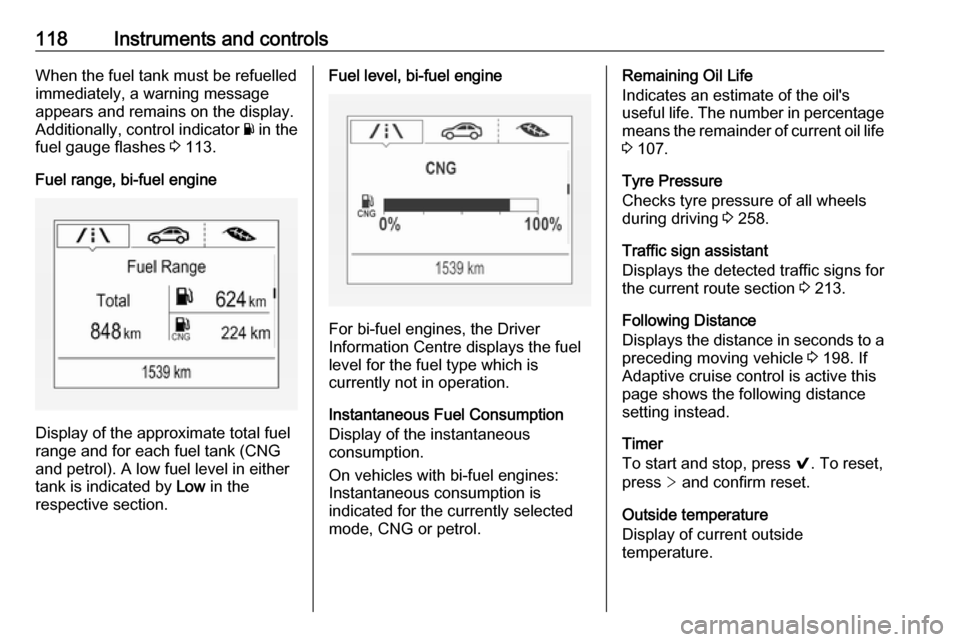
Fuel range, bi-fuel engine
Display of the approximate total fuel
range and for each fuel tank (CNG
and petrol). A low fuel level in either
tank is indicated by Low in the
respective section.
Fuel level, bi-fuel engine
For bi-fuel engines, the Driver
Information Centre displays the fuel level for the fuel type which is
currently not in operation.
Instantaneous Fuel Consumption
Display of the instantaneous
consumption.
On vehicles with bi-fuel engines:
Instantaneous consumption is
indicated for the currently selected
mode, CNG or petrol.
Remaining Oil Life
Indicates an estimate of the oil's
useful life. The number in percentage means the remainder of current oil life 3 107.
Tyre Pressure
Checks tyre pressure of all wheels
during driving 3 258.
Traffic sign assistant
Displays the detected traffic signs for
the current route section 3 213.
Following Distance
Displays the distance in seconds to a
preceding moving vehicle 3 198. If
Adaptive cruise control is active this
page shows the following distance
setting instead.
Timer
To start and stop, press 9. To reset,
press > and confirm reset.
Outside temperature
Display of current outside
temperature.
Page 121 of 317
Instruments and controls119AdBlue
Indicates an estimate of the AdBlue
level. The number of percentage
means the remainder of AdBlue.
Additionally, it is indicated whether
the level is sufficient or low.
Eco information menu, @
● Top consumers
● Economy trend
● Eco index
On Uplevel display the pages Top Consumers, Economy Trend and Eco
index, are displayed in the Trip/fuel
information menu, select Info.
Top Consumers
List of top comfort consumers
currently switched on is displayed in
descending order. Fuel saving
potential is indicated.
During sporadic driving conditions,
the engine will activate the heated
rear window automatically to increase
the engine load. In this event, the
heated rear window is indicated as
one of the top consumers, without
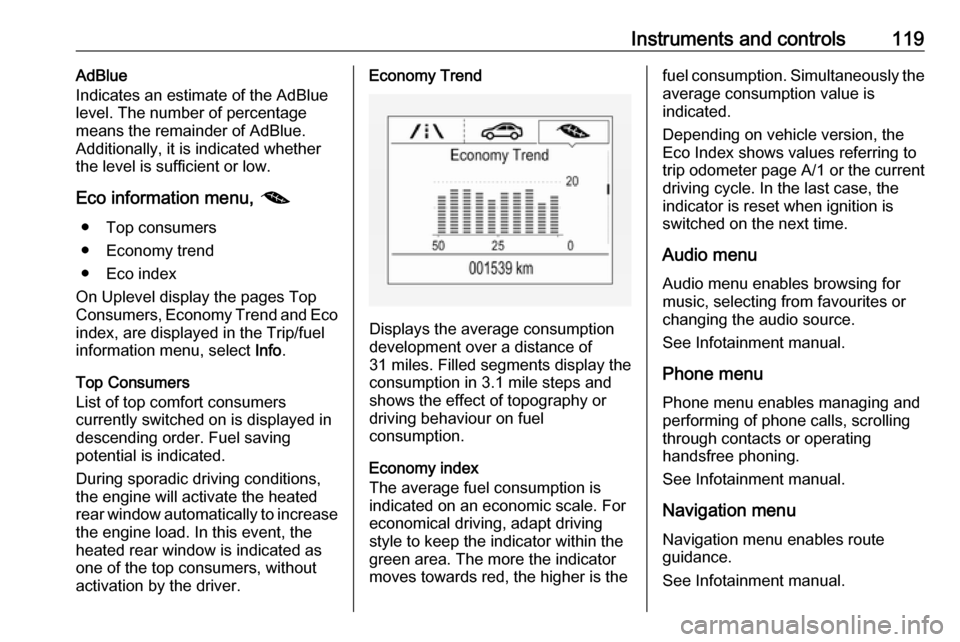
activation by the driver.Economy Trend
Displays the average consumption
development over a distance of
31 miles. Filled segments display the
consumption in 3.1 mile steps and
shows the effect of topography or
driving behaviour on fuel
consumption.
Economy index
The average fuel consumption is indicated on an economic scale. For
economical driving, adapt driving
style to keep the indicator within the
green area. The more the indicator
moves towards red, the higher is the
fuel consumption. Simultaneously the
average consumption value is
indicated.
Depending on vehicle version, the
Eco Index shows values referring to
trip odometer page A/1 or the current
driving cycle. In the last case, the
indicator is reset when ignition is
switched on the next time.
Audio menu
Audio menu enables browsing for
music, selecting from favourites or
changing the audio source.
See Infotainment manual.
Phone menu
Phone menu enables managing and performing of phone calls, scrolling
through contacts or operating
handsfree phoning.
See Infotainment manual.
Navigation menu
Navigation menu enables route
guidance.
See Infotainment manual.
Page 134 of 317

132Instruments and controlsbreakdown, a flat tyre and empty fuel
tank, press Z to establish a
connection to an advisor.
Emergency services
In the case of an emergency situation,
press [ and talk to an advisor. The
advisor then contacts emergency or
assistance service providers and
directs them to your vehicle.
In the case of an accident with
activation of airbags or belt
tensioners, an automatic emergency
call is established. The advisor is
immediately connected to your
vehicle to see whether help is
needed.
Wi-Fi hotspot
The Wi-Fi hotspot of the vehicle
provides internet connectivity with a
maximum speed of 4G/LTE.
Notice
The Wi-Fi hotspot functionality is not available for all markets.
Up to seven devices may be
connected.To connect a mobile device with the
Wi-Fi hotspot:
1. Press j and then select Wi-Fi
settings on the Info-Display. The settings displayed include the Wi- Fi hotspot name (SSID),
password and connection type.
2. Start a Wi-Fi network search on your mobile device.
3. Select your vehicle hotspot (SSID) when listed.
4. When prompted, enter the password on your mobile device.
Notice
To change the SSID or password,
press Z and talk to an advisor or log
in to your account.
To switch off the Wi-Fi hotspot
functionality, press Z to call an
advisor.
Smartphone app
With the My Vauxhall smartphone
app, some vehicle functions can be
operated remotely.The following functions are available:
● Lock or unlock vehicle.
● Honk horn or flash lights.
● Check fuel level, engine oil life and tyre pressure (only with tyre
pressure monitoring system).
● Send navigation destination to the vehicle, if equipped with a
built-in navigation system.
● Locate vehicle on a map.
● Manage Wi-Fi settings.
To operate these functions, download the app from App Store ®
or
Google Play™ Store.
Remote control
If desired, use any phone to call an
advisor, who can remotely operate
specific vehicle functions. Find the respective OnStar phone number on
our country-specific website.
The following functions are available: ● Lock or unlock vehicle.
● Provide information on the vehicle location.
● Honk horn or flash lights.
Page 150 of 317

148Climate controlIf no cooling or drying is required,
switch off the cooling system for fuel
saving reasons.
Activated cooling may inhibit
Autostops. Stop-start system 3 162.
Air recirculation system 4
Press 4 to activate air recirculation
mode. The LED in the button
illuminates to indicate activation.
Press 4 again to deactivate air
recirculation mode.
9 Warning
The exchange of fresh air is
reduced in air recirculation mode.
In operation without cooling the air humidity increases, so the
windows may mist up from inside.
The quality of the passenger
compartment air deteriorates,
which may cause the vehicle
occupants to feel drowsy.
In warm and very humid ambient air conditions, the windscreen may mist
up from outside when cold air is
directed towards it. If windscreen
mists up from outside, activate
windscreen wiper and deactivate l.
Maximum cooling
Briefly open the windows so that hot
air can disperse quickly.
● Switch on cooling A/C.
● Air circulation system 4 on.
● Press air distribution switch M.
● Set temperature control to coldest level.
● Set fan speed to highest level.
● Open all vents.