ECO mode VAUXHALL ASTRA J 2018 Owner's Guide
[x] Cancel search | Manufacturer: VAUXHALL, Model Year: 2018, Model line: ASTRA J, Model: VAUXHALL ASTRA J 2018Pages: 311, PDF Size: 9.37 MB
Page 180 of 311

178Driving and operatingFunctionality check
When the vehicle is not moving, the
electric parking brake might be
applied automatically. This is done to
check the system.
Fault
Failure mode of electric parking brake
is indicated by a control indicator j
and by a vehicle message which is
displayed in the Driver Information
Centre. Vehicle messages 3 122.
Apply electric parking brake: pull and
hold the switch m for more than
five seconds. If control indicator m
illuminates, electric parking brake is
applied.
Release electric parking brake: push
and hold the switch m for more than
two seconds. If control indicator m
extinguishes, electric parking brake is
released.
Control indicator m flashes: electric
parking brake is not fully applied or
released. When continuously
flashing, release electric parking
brake and retry applying.Brake assist
If brake pedal is depressed quickly
and forcefully, maximum brake force
is automatically applied.
Operation of brake assist might
become apparent by a pulse in the
brake pedal and a greater resistance when depressing the brake pedal.
Maintain steady pressure on the
brake pedal as long as full braking is
required. Maximum brake force is
automatically reduced when brake
pedal is released.
Hill start assist The system helps prevent unintendedmovement when driving away on
inclines.
When releasing the brake pedal after
stopping on an incline, brakes remain on for further two seconds. The
brakes release automatically as soon
as the vehicle begins to accelerate.Ride control systems
Traction Control system The Traction Control system (TC) is a component of the Electronic Stability
Control (ESC).
TC improves driving stability when
necessary, regardless of the type of
road surface or tyre grip, by
preventing the drive wheels from
spinning.
As soon as the drive wheels starts to
spin, engine output is reduced and
the wheel spinning the most is braked
individually. This considerably
improves the driving stability of the
vehicle on slippery road surfaces.
TC is operational after each engine
start as soon as the control indicator
b extinguishes.
When TC operates b flashes.
Page 198 of 311

196Driving and operatingActive emergency braking
Active emergency braking can help to reduce the damage and injury from
crashes with vehicles and obstacles
directly ahead, when a collision can
no longer be avoided either by
manual braking or by steering. Before the active emergency braking
applies, the driver is warned by the forward collision alert 3 192.
The feature uses various inputs (e.g.
camera sensor, radar sensor, brake
pressure, vehicle speed) to calculate
the probability of a frontal collision.9 Warning
This system is not intended to
replace the driver responsibility for driving the vehicle and looking
ahead. Its function is limited to
supplemental use only to reduce
the vehicle speed before a
collision.
The system may not react for
pedestrians or animals. After a
sudden lane change, the system
needs a certain time to detect the
next preceding vehicle.
The driver shall always be ready to take action and apply the brakes
and steer to avoid collisions.
Functionality
If equipped only with front camera the active emergency braking operates in
forward gear above walking speed up to 53 mph.
With radar sensor active emergency
braking operates in forward gear
above walking speed at all speeds.
A precondition is that forward collision
alert with front camera system is not
deactivated by pressing V on the
steering wheel 3 192or, with radar
sensor, that it is not deactivated in the
vehicle personalisation menu 3 124.
The system includes: ● brake preparation system
● emergency automatic braking
● forward looking brake assist
● intelligent brake assist (only with radar sensor)
Brake preparation system
When approaching a vehicle ahead
so quickly that a collision is likely, the brake preparation system slightlypressurizes the brakes. This reduces
the response time, when a manual or automatic braking is requested.
The brake system is prepared so that
braking can occur more rapidly.
If equipped only with front camera the system operates up to a speed of 50
mph.
Emergency automatic braking
After activation of brake preparation
system and just before the imminent
collision, this function automatically
applies limited braking to reduce the
impact speed of the collision or
prohibit a crash. Depending on the
situation, the vehicle may
automatically brake moderately or
hard. This front automatic braking can
Page 205 of 311
Driving and operating203
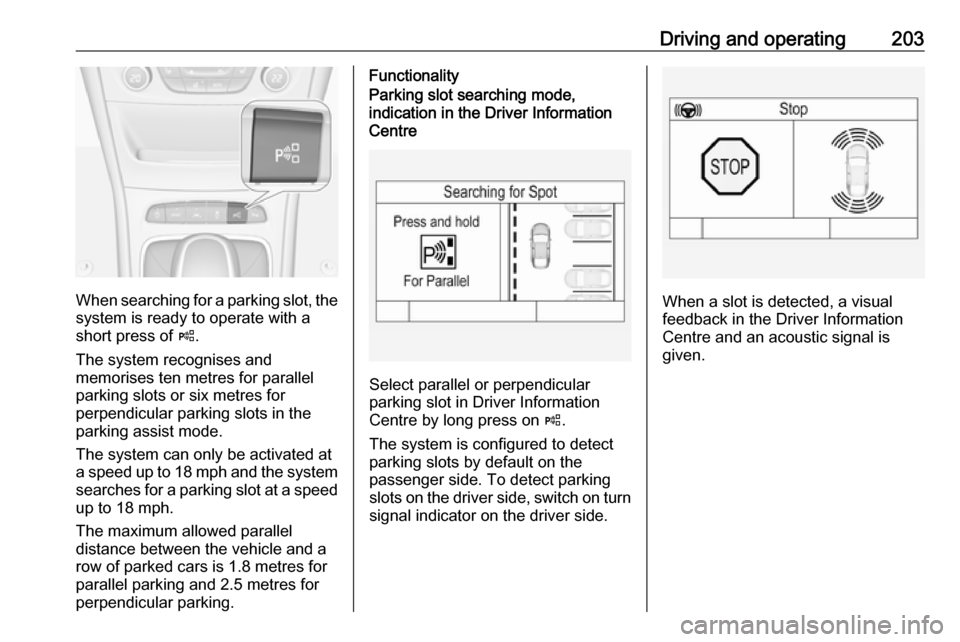
When searching for a parking slot, the
system is ready to operate with a
short press of (.
The system recognises and
memorises ten metres for parallel
parking slots or six metres for
perpendicular parking slots in the
parking assist mode.
The system can only be activated at
a speed up to 18 mph and the system searches for a parking slot at a speed up to 18 mph.
The maximum allowed parallel
distance between the vehicle and a
row of parked cars is 1.8 metres for
parallel parking and 2.5 metres for
perpendicular parking.
FunctionalityParking slot searching mode,
indication in the Driver Information
Centre
Select parallel or perpendicular
parking slot in Driver Information
Centre by long press on (.
The system is configured to detect parking slots by default on the
passenger side. To detect parking
slots on the driver side, switch on turn
signal indicator on the driver side.
When a slot is detected, a visual
feedback in the Driver Information
Centre and an acoustic signal is
given.
Page 260 of 311

258Vehicle care
6. Midlevel display:Press SET/CLR to begin the
sensor matching process. A
message requesting acceptance
of the process should be
displayed.
Press SET/CLR again to confirm
the selection. The horn sounds
twice to indicate that the receiver
is in relearn mode.
Uplevel display:
Press 9 to begin the sensor
matching process. The horn
sounds twice to indicate that the receiver is in relearn mode.
7. Start with the left side front wheel.
8. Place the relearn tool against the
tyre sidewall, near the valve stem.Then press the button to activate
the tyre pressure sensor. A horn
chirp confirms that the sensor
identification code has been
matched to this wheel position.
9. Proceed to the right side front wheel, and repeat the procedure
in Step 8.
10. Proceed to the right side rear wheel, and repeat the procedure
in Step 8.
11. Proceed to the left side rear wheel, and repeat the procedure
in Step 8. The horn sounds twice
to indicate that the sensor
identification code has been
matched to the left side rear
wheel, and the tyre pressure
sensor matching process is no
longer active.
12. Turn off the ignition.13. Set all four tyres to the recommended air pressure level
as indicated on the tyre pressure
information label.
14. Ensure the tyre loading status is set according to the selected
pressure 3 114.
Tread depth Check tread depth at regular
intervals.
Tyres should be replaced for safety
reasons at a tread depth of 2-3 mm
(4 mm for winter tyres).
For safety reasons it is recommended
that the tread depth of the tyres on
one axle should not vary by more than 2 mm.
Page 309 of 311

307Power button.............................. 158
Power connector........................... 97
Power outlets ............................... 96
Power seat adjustment ................49
Power windows ............................ 40
Preheating ................................. 112
Puncture ..................................... 263
Q Quickheat ................................... 154
R Radio Frequency Identification (RFID) ..................................... 302
Radio remote control ...................20
REACH ....................................... 298
Reading lights ............................ 143
Rear floor storage cover ..............80
Rear fog light .....................113, 142
Rear seats .................................... 54
Rear storage ................................. 78
Rear view camera ...................... 208
Rear window wiper/washer .......... 93
Recommended fluids and lubricants ........................ 276, 281
Refuelling ................................... 218 Registered trademarks ...............300
Retained power off .....................159
Reversing lights .........................142
Ride control systems ..................178
Roof .............................................. 43Roof load...................................... 87
Roof rack ..................................... 87
S Safety belts ................................... 55
Safety net .................................... 83
Seat adjustment ............................. 7 Seat belt ........................................ 8
Seat belt reminder .....................108
Seat belts ..................................... 55
Seat heating Seat heating, front .....................53
Seat heating, rear .....................55
Seat position ................................ 46
Selector lever ..................... 169, 173
Service ............................... 155, 275
Service display .......................... 107
Service information ....................275
Side airbag system ......................61
Side blind spot alert ....................206
Sidelights .................................... 135
Side turn signal lights ................243
Software acknowledgement .......298
Software update ......................... 300
Spare wheel ............................... 265
Speed limiter....................... 114, 183
Speedometer ............................. 103
Sport mode ................................ 181
Starting and operating ................157
Starting off ................................... 16Starting the engine ....................160
Steering ...................................... 157
Steering wheel adjustment ......9, 90
Steering wheel controls ...............90
Stop-start system........................ 162
Storage ......................................... 70
Storage compartments .................70
Sunroof ........................................ 43
Sunvisor lights ........................... 144
Sun visors .................................... 42
Symbols ......................................... 4
T
Tachometer ............................... 105
Tail lights ................................... 237
Three-point seat belt .................... 56
Tools .......................................... 251
Tow bar....................................... 221
Towing ................................ 221, 270
Towing another vehicle .............271
Towing equipment .....................222
Towing the vehicle .....................270
Traction Control system ............. 178
Traction Control system off......... 112
Traffic sign assistant ...........114, 210
Trailer coupling ........................... 221
Trailer stability assist .................225
Trailer towing ............................. 222
Transmission ............................... 15
Transmission display .........168, 173
Page 310 of 311

308Tread depth ............................... 258
Trip odometer ............................ 104
Turn and lane-change signals ...141
Turn signal ................................. 108
Tyre chains ................................ 259
Tyre designations ......................253
Tyre pressure ............................ 253
Tyre pressure monitoring system ............................. 112, 254
Tyre pressures ........................... 292
Tyre repair kit ............................. 260
U
Ultrasonic parking assist............. 199
Upholstery .................................. 273
Uplevel display ........................... 114
Using this manual ..........................3
V Valet mode ................................. 120
Vehicle battery ........................... 232
Vehicle checks............................ 228
Vehicle data ................................ 281
Vehicle data recording and privacy ..................................... 301
Vehicle detected ahead ..............114
Vehicle dimensions .................... 290
Vehicle Identification Number ....279
Vehicle jack ................................ 251
Vehicle messages .....................122
Vehicle personalisation .............124Vehicle security ............................ 35
Vehicle specific data ......................3
Vehicle storage ........................... 227
Vehicle tools ............................... 251
Vehicle unlocking ........................... 6 Vehicle weight ........................... 288
Ventilating ..................................... 53
Ventilation ................................... 146
W
Warning chimes .........................123
Warning lights ............................. 103
Warning triangle .......................... 85
Washer and wiper systems .........13
Washer fluid ............................... 231
Wheel changing .........................263
Wheel covers ............................. 259
Wheels and tyres .......................253
Windows ....................................... 40
Windscreen................................... 40
Windscreen wiper/washer ...........91
Winter tyres ............................... 253
Wiper blade replacement ..........233