lane assist VAUXHALL ASTRA J 2018 Owner's Manual
[x] Cancel search | Manufacturer: VAUXHALL, Model Year: 2018, Model line: ASTRA J, Model: VAUXHALL ASTRA J 2018Pages: 311, PDF Size: 9.37 MB
Page 13 of 311

In brief111Power windows .....................40
2 Exterior mirrors .....................38
3 Central locking system ..........23
4 Side air vents ...................... 154
5 Cruise control .....................181
Speed limiter ....................... 183
Adaptive cruise control .......185
Forward collision alert .........192
6 Turn and lane-change
signals, headlight flash,
low/high beam, high beam
assist ................................... 141
Exit lighting ......................... 144
Parking lights ...................... 142
Buttons for Driver
Information Centre ..............114
7 Instruments ........................ 103
Driver Information Centre .... 114
8 Buttons for Driver
Information Centre ..............114
9 Forward collision alert
indicator ............................. 19210Windscreen wiper and
washer, rear wiper and
washer ................................. 91
11 Centre air vents .................. 154
12 Info-Display ........................ 120
13 Anti-theft alarm system
status LED ........................... 35
14 Hazard warning flashers ....140
15 Glovebox .............................. 70
16 CD player
17 Controls for Info-Display
operation ............................. 120
18 Climate control system ........ 147
19 Fuse box ............................ 247
Power connector ..................97
20 Traction Control system .....178
Electronic Stability Control . 179
Sport mode ........................ 181
Parking assist/Advanced
parking assist .....................199
Lane keep assist ................214
Eco button for stop-start
system ................................. 162
21 Manual transmission ..........172Automatic transmission ......168
Manual transmission
automated ........................... 172
22 Power outlet .......................... 96
23 Parking brake ......................176
24 Power button ....................... 158
25 Ignition switch with
steering wheel lock ............157
26 Steering wheel adjustment ..90
27 Horn ..................................... 91
28 Bonnet release lever ..........228
29 Storage compartment ...........71
30 Light switch ........................ 135
Headlight range
adjustment ......................... 136
Front/rear fog lights ............141
Instrument illumination .......143
Page 14 of 311
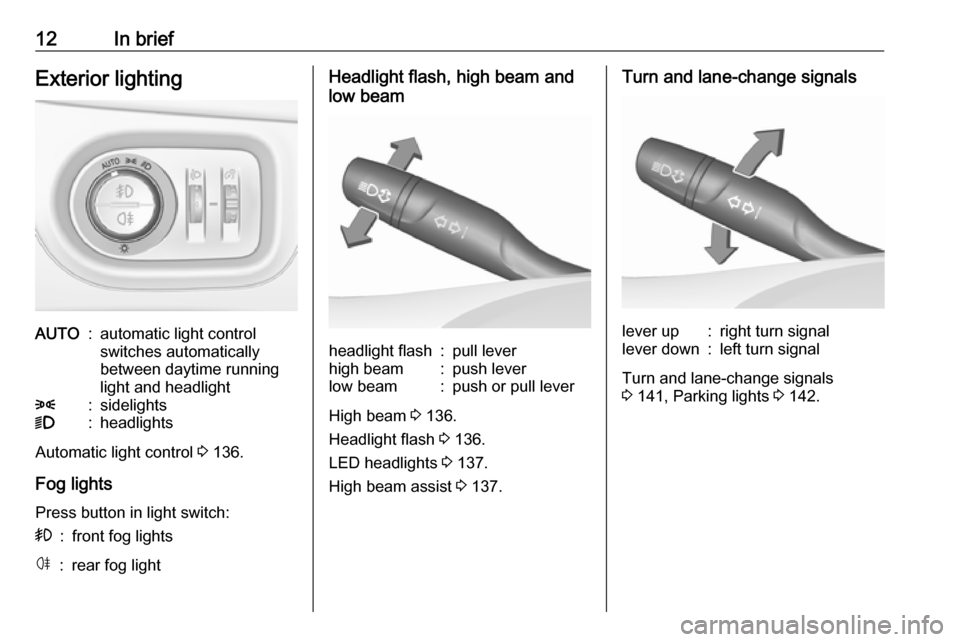
12In briefExterior lightingAUTO:automatic light control
switches automatically
between daytime running
light and headlight8:sidelights9:headlights
Automatic light control 3 136.
Fog lights
Press button in light switch:
>:front fog lightsø:rear fog lightHeadlight flash, high beam and
low beamheadlight flash:pull leverhigh beam:push leverlow beam:push or pull lever
High beam 3 136.
Headlight flash 3 136.
LED headlights 3 137.
High beam assist 3 137.
Turn and lane-change signalslever up:right turn signallever down:left turn signal
Turn and lane-change signals
3 141, Parking lights 3 142.
Page 91 of 311

Instruments and controls89Instruments and
controlsControls ....................................... 90
Steering wheel adjustment ........90
Steering wheel controls .............90
Heated steering wheel ...............91
Horn ........................................... 91
Windscreen wiper/washer .........91
Rear window wiper/washer .......93
Outside temperature ..................94
Clock ......................................... 94
Power outlets ............................. 96
Power connector .......................97
Ashtrays .................................... 98
Warning lights, gauges and indi‐ cators ......................................... 100
Instrument cluster ....................100
Speedometer ........................... 103
Odometer ................................ 104
Trip odometer .......................... 104
Tachometer ............................. 105
Fuel gauge .............................. 105
Fuel selector ............................ 105
Engine coolant temperature gauge ..................................... 106
Service display ........................ 107Control indicators ....................108
Turn signal ............................... 108
Seat belt reminder ...................108
Airbag and belt tensioners .......109
Airbag deactivation ..................109
Charging system .....................110
Malfunction indicator light ........110
Brake and clutch system .........110
Electric parking brake ..............110
Electric parking brake fault ......110
Antilock brake system (ABS) ...111
Gear shifting ............................ 111
Following distance ...................111
Lane keep assist .....................111
Electronic Stability Control off . 111
Electronic Stability Control and Traction Control system .........111
Traction Control system off .....112
Preheating ............................... 112
Tyre pressure monitoring system .................................... 112
Engine oil pressure ..................112
Low fuel ................................... 112
Immobiliser .............................. 113
Exterior light ............................ 113
High beam ............................... 113
High beam assist .....................113
LED headlights ........................ 113
Fog light ................................... 113
Rear fog light ........................... 113Cruise control.......................... 113
Adaptive cruise control ............113
Vehicle detected ahead ...........114
Speed limiter ........................... 114
Traffic sign assistant ................114
Door open ................................ 114
Information displays ...................114
Driver Information Centre ........114
Info display .............................. 120
Vehicle messages ......................122
Warning chimes .......................123
Battery voltage ........................ 123
Vehicle personalisation ..............124
Telematics service .....................130
OnStar ..................................... 130
Page 105 of 311

Instruments and controls103OverviewOTurn signal 3 108XSeat belt reminder 3 108vAirbag and belt tensioners
3 109VAirbag deactivation 3 109pCharging system 3 110ZMalfunction indicator light
3 110RBrake and clutch system 3 110mElectric parking brake 3 110jElectric parking brake fault
3 110uAntilock brake system (ABS)
3 111RGear shifting 3 111EFollowing distance 3 111aLane keep assist 3 111aElectronic Stability Control off
3 111bElectronic Stability Control and
Traction Control system 3 111kTraction Control system off
3 112!Preheating 3 112wTyre pressure monitoring
system 3 112IEngine oil pressure 3 112YLow fuel 3 112dImmobiliser 3 1138Exterior light 3 113CHigh beam 3 113fHigh beam assist 3 113fLED headlights 3 113>Fog light 3 113øRear fog light 3 113mCruise control 3 113 / Adaptive
cruise control 3 113CAdaptive cruise control 3 113AVehicle detected ahead 3 114LSpeed limiter 3 114LTraffic sign assistant 3 114hDoor open 3 114
Speedometer
Indicates vehicle speed.
Page 113 of 311

Instruments and controls111Illuminates
Electric parking brake is operating
with degraded performance 3 176.
Flashes
Electric parking brake is in service
mode. Stop vehicle, apply and
release the electric parking brake to
reset.9 Warning
Have the cause of the fault
remedied immediately by a
workshop.
Antilock brake system
(ABS)
u illuminates yellow.
Illuminates for a few seconds after the ignition is switched on. The system is
ready for operation when the control
indicator extinguishes.
If the control indicator does not go out after a few seconds, or if it illuminates while driving, there is a fault in the
ABS. The brake system remains
operational but without ABS
regulation.
Antilock brake system 3 175.
Gear shifting R or S with the number of a higher or
lower gear is indicated, when up- or
downshifting is recommended for fuel
saving reasons.
Following distance
E indicates the following distance
setting of the alert timing sensitivity
for the forward collision alert using
filled distance bars.
Forward collision alert 3 192.
Lane keep assist
a illuminates green or yellow, or
flashes yellow.
Illuminates green
The system is switched on and ready
to operate.Illuminates yellow
The system approaches a detected
lane marking without using the turn
signal in that direction.
Flashes yellow The system recognizes that the lane
is departed significantly.
Lane keep assist 3 214
Electronic Stability Control off
n illuminates yellow.
The system is deactivated.
Electronic Stability Controland Traction Control system
b illuminates or flashes yellow.
Illuminates
A fault in the system is present.
Continued driving is possible. Driving
stability, however, may deterioratedepending on road surface
conditions.
Page 116 of 311

114Instruments and controlsAdaptive cruise control 3 185.
Vehicle detected ahead
A illuminates green or yellow.
Illuminates green
A vehicle ahead is detected in the
same lane.
Illuminates yellow The distance to a preceding moving
vehicle gets too small or when
approaching another vehicle too
rapidly.
Adaptive cruise control 3 185,
Forward collision alert 3 192.
Speed limiter
L illuminates white or green.
Illuminates white The system is on.
Illuminates green
Speed limiter is active. Set speed is
indicated near L symbol.Speed limiter 3 183.
Traffic sign assistant
L displays detected traffic signs as
control indicator.
Traffic sign assistant 3 210.
Door open h illuminates red.
A door or the tailgate is open.Information displays
Driver Information Centre The Driver Information Centre is
located in the instrument cluster.
Depending on the version and the
instrument cluster, the Driver
Information Centre is available as
Midlevel display or Uplevel display.
Driver Information Centre indicates
depending on the equipment:
● overall and trip odometer
● vehicle information
● trip/fuel information
● driving economy information ● vehicle and warning messages
● audio and infotainment information
● phone information
● navigation information
● vehicle settings
Page 125 of 311
Instruments and controls123
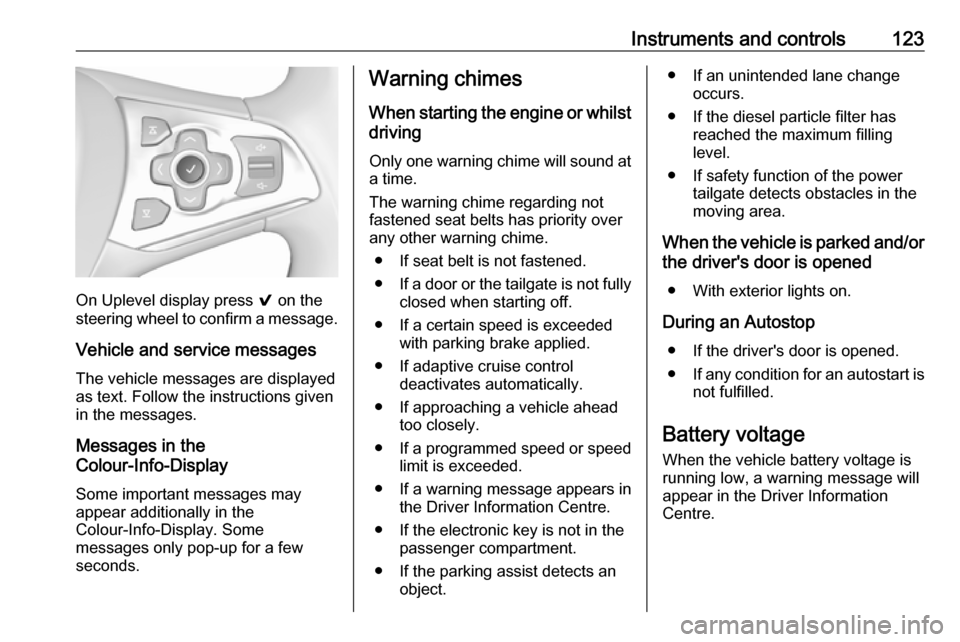
On Uplevel display press 9 on the
steering wheel to confirm a message.
Vehicle and service messages
The vehicle messages are displayed
as text. Follow the instructions given
in the messages.
Messages in the
Colour-Info-Display
Some important messages may
appear additionally in the
Colour-Info-Display. Some
messages only pop-up for a few
seconds.
Warning chimes
When starting the engine or whilstdriving
Only one warning chime will sound at a time.
The warning chime regarding not
fastened seat belts has priority over
any other warning chime.
● If seat belt is not fastened.
● If a door or the tailgate is not fully
closed when starting off.
● If a certain speed is exceeded with parking brake applied.
● If adaptive cruise control deactivates automatically.
● If approaching a vehicle ahead too closely.
● If a programmed speed or speed
limit is exceeded.
● If a warning message appears in the Driver Information Centre.
● If the electronic key is not in the passenger compartment.
● If the parking assist detects an object.● If an unintended lane changeoccurs.
● If the diesel particle filter has reached the maximum filling
level.
● If safety function of the power tailgate detects obstacles in the
moving area.
When the vehicle is parked and/or the driver's door is opened
● With exterior lights on.
During an Autostop ● If the driver's door is opened.
● If any condition for an autostart is
not fulfilled.
Battery voltage When the vehicle battery voltage is
running low, a warning message will
appear in the Driver Information
Centre.
Page 140 of 311
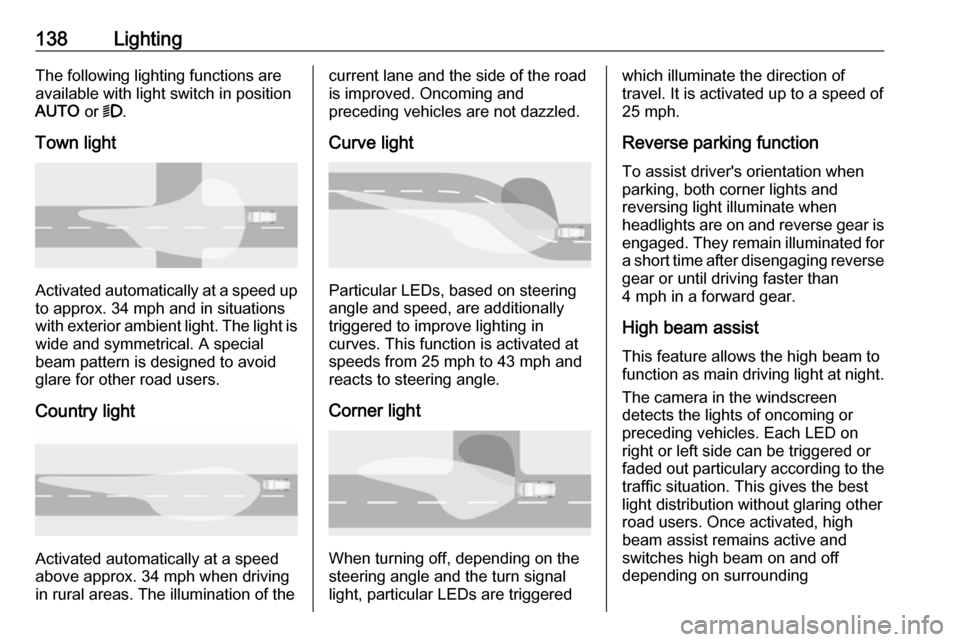
138LightingThe following lighting functions are
available with light switch in position
AUTO or 9.
Town light
Activated automatically at a speed up to approx. 34 mph and in situations
with exterior ambient light. The light is
wide and symmetrical. A special
beam pattern is designed to avoid
glare for other road users.
Country light
Activated automatically at a speed
above approx. 34 mph when driving
in rural areas. The illumination of the
current lane and the side of the road is improved. Oncoming and
preceding vehicles are not dazzled.
Curve light
Particular LEDs, based on steering
angle and speed, are additionally
triggered to improve lighting in
curves. This function is activated at
speeds from 25 mph to 43 mph and
reacts to steering angle.
Corner light
When turning off, depending on the
steering angle and the turn signal light, particular LEDs are triggered
which illuminate the direction of
travel. It is activated up to a speed of
25 mph.
Reverse parking function
To assist driver's orientation when
parking, both corner lights and
reversing light illuminate when
headlights are on and reverse gear is engaged. They remain illuminated for
a short time after disengaging reverse gear or until driving faster than
4 mph in a forward gear.
High beam assistThis feature allows the high beam to
function as main driving light at night.
The camera in the windscreen
detects the lights of oncoming or
preceding vehicles. Each LED on
right or left side can be triggered or
faded out particulary according to the traffic situation. This gives the best
light distribution without glaring other
road users. Once activated, high
beam assist remains active and
switches high beam on and off
depending on surrounding
Page 158 of 311

156Driving and operatingDriving and
operatingDriving hints ............................... 157
Control of the vehicle ...............157
Steering ................................... 157
Starting and operating ...............157
New vehicle running-in ............157
Ignition switch positions ...........157
Power button ........................... 158
Retained power off ..................159
Starting the engine ..................160
Overrun cut-off ........................ 162
Stop-start system ....................162
Parking .................................... 165
Engine exhaust .......................... 167
Diesel particle filter ..................167
Catalytic converter ...................168
Automatic transmission ..............168
Transmission display ...............168
Selector lever .......................... 169
Manual mode ........................... 170
Electronic driving programmes 170
Fault ........................................ 170
Interruption of power supply ....171
Manual transmission ..................172Manual transmission automa‐
ted .............................................. 172
Transmission display ...............173
Selector lever .......................... 173
Manual mode ........................... 174
Electronic driving programmes 175
Fault ........................................ 175
Brakes ........................................ 175
Antilock brake system .............175
Parking brake .......................... 176
Brake assist ............................. 178
Hill start assist ......................... 178
Ride control systems .................178
Traction Control system ..........178
Electronic Stability Control ......179
Sport mode .............................. 181
Driver assistance systems .........181
Cruise control .......................... 181
Speed limiter ........................... 183
Adaptive cruise control ............185
Forward collision alert .............192
Following distance indication ...195
Active emergency braking .......196
Parking assist .......................... 199
Side blind spot alert .................206
Rear view camera ...................208
Traffic sign assistant ................210
Lane keep assist .....................214Fuel............................................ 216
Fuel for petrol engines .............216
Fuel for diesel engines ............217
Fuel for natural gas operation . 218
Refuelling ................................ 218
Fuel consumption - CO 2-
Emissions .............................. 220
Trailer hitch ................................ 221
General information .................221
Driving characteristics and towing tips .............................. 221
Trailer towing ........................... 222
Towing equipment ...................222
Trailer stability assist ...............225
Page 198 of 311

196Driving and operatingActive emergency braking
Active emergency braking can help to reduce the damage and injury from
crashes with vehicles and obstacles
directly ahead, when a collision can
no longer be avoided either by
manual braking or by steering. Before the active emergency braking
applies, the driver is warned by the forward collision alert 3 192.
The feature uses various inputs (e.g.
camera sensor, radar sensor, brake
pressure, vehicle speed) to calculate
the probability of a frontal collision.9 Warning
This system is not intended to
replace the driver responsibility for driving the vehicle and looking
ahead. Its function is limited to
supplemental use only to reduce
the vehicle speed before a
collision.
The system may not react for
pedestrians or animals. After a
sudden lane change, the system
needs a certain time to detect the
next preceding vehicle.
The driver shall always be ready to take action and apply the brakes
and steer to avoid collisions.
Functionality
If equipped only with front camera the active emergency braking operates in
forward gear above walking speed up to 53 mph.
With radar sensor active emergency
braking operates in forward gear
above walking speed at all speeds.
A precondition is that forward collision
alert with front camera system is not
deactivated by pressing V on the
steering wheel 3 192or, with radar
sensor, that it is not deactivated in the
vehicle personalisation menu 3 124.
The system includes: ● brake preparation system
● emergency automatic braking
● forward looking brake assist
● intelligent brake assist (only with radar sensor)
Brake preparation system
When approaching a vehicle ahead
so quickly that a collision is likely, the brake preparation system slightlypressurizes the brakes. This reduces
the response time, when a manual or automatic braking is requested.
The brake system is prepared so that
braking can occur more rapidly.
If equipped only with front camera the system operates up to a speed of 50
mph.
Emergency automatic braking
After activation of brake preparation
system and just before the imminent
collision, this function automatically
applies limited braking to reduce the
impact speed of the collision or
prohibit a crash. Depending on the
situation, the vehicle may
automatically brake moderately or
hard. This front automatic braking can