Pedal VAUXHALL ASTRA K 2017 Owner's Guide
[x] Cancel search | Manufacturer: VAUXHALL, Model Year: 2017, Model line: ASTRA K, Model: VAUXHALL ASTRA K 2017Pages: 293, PDF Size: 8.27 MB
Page 164 of 293
162Driving and operatingOnce the system is activated,
adaptive cruise control decelerates or
brakes if it detects a vehicle ahead,
which is slower or closer than the
desired following distance.9 Warning
Accelerating by the driver
deactivates automatic braking by
the system. This is indicated as a
pop-up warning in the Driver
Information Centre.
Increase speed
With adaptive cruise control active,
hold thumb wheel turned to RES/+:
speed increases continuously in large
increments, or activate repeatedly
RES/+ : speed increases in small
increments.
If the vehicle is driven with adaptive cruise control active much faster than
the desired speed, e.g. after
depressing the accelerator pedal,
then the current speed can be stored
and maintained by turning the thumb
wheel to SET/-.
Reduce speed
With adaptive cruise control active,
hold thumb wheel turned to SET/-:
speed decreases continuously in
large increments, or activate
repeatedly SET/-: speed decreases in
small increments.
If the vehicle is driven with adaptive
cruise control active much slower
than the desired speed, e.g. because of a slower vehicle ahead, then the
current speed can be stored and
maintained by turning the thumb
wheel to SET/-.
Resume stored speed If the system is switched on but
inactive, then turn thumb wheel to
RES/+ at a speed above 31 mph to
resume the stored speed.
Setting the following distance
When adaptive cruise control detects a slower moving vehicle in the drivingpath, it will adjust the vehicle speed to
maintain the following distance
selected by the driver.The following distance can be set to
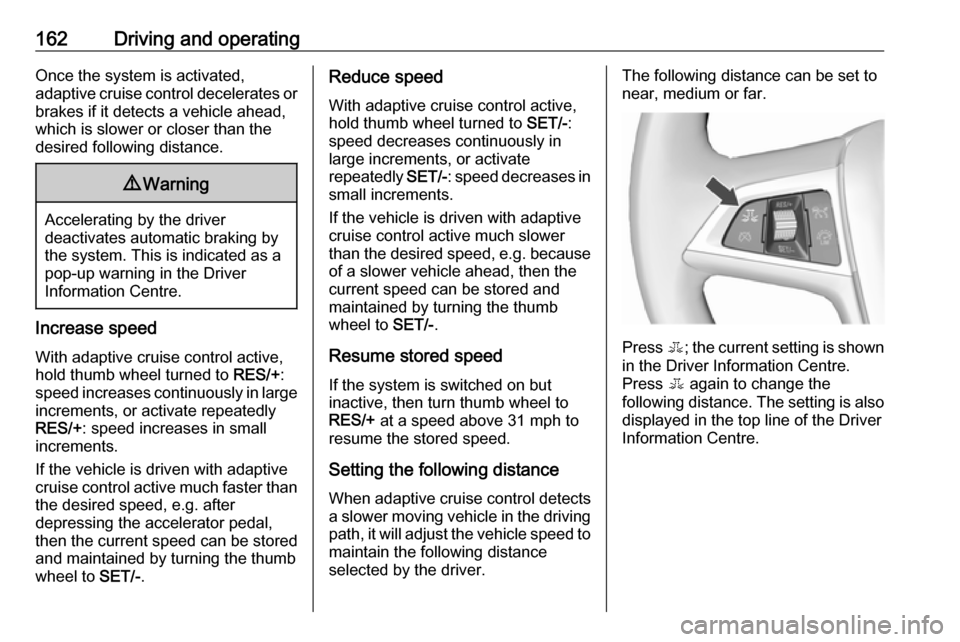
near, medium or far.
Press E; the current setting is shown
in the Driver Information Centre.
Press E again to change the
following distance. The setting is also displayed in the top line of the Driver
Information Centre.
Page 165 of 293

Driving and operating163
The selected following distance is
indicated by filled distance bars in the
adaptive cruise control page.
Note that the following distance
setting is shared with the sensitivity
setting of forward collision alert.
Example: If setting 3 (far) is selected,
then the driver is warned sooner
before a possible collision, also if
adaptive cruise control is inactive or
switched off.
9 Warning
The driver accepts full
responsibility for the appropriate
following distance based on traffic, weather and visibility conditions.
Following distance must be
adjusted or the system switched
off when required by the prevailing
conditions.
Detecting the vehicle ahead
The green illuminated vehicle ahead
control indicator A is displayed in the
speedometer when the system
detects a vehicle in the driving path.
If this symbol does not display, or
displays briefly, adaptive cruise
control will not respond to vehicles
ahead.
Deactivation Adaptive cruise control is deactivatedby the driver when:
● y is pressed.
● The brake pedal is depressed.
● The clutch pedal is depressed for
more than four seconds.
● The gear selector lever of automatic transmission is moved
to N.
The system is also automatically
deactivated when:
● Vehicle speed slows down below
28 mph or accelerates above
120 mph.
● The Traction Control system (TC)
is operating for more than
20 seconds.
● The Electronic Stability Control (ESC) is operating.
Page 167 of 293
Driving and operating165● After a sudden lane change, thesystem needs a certain time to
detect the next preceding
vehicle. So if a new vehicle is
detected, the system may
accelerate instead of braking.
● Adaptive cruise control does ignore the oncoming traffic.
● Adaptive cruise control does not brake for stopped vehicles,
pedestrians or animals.
Bends
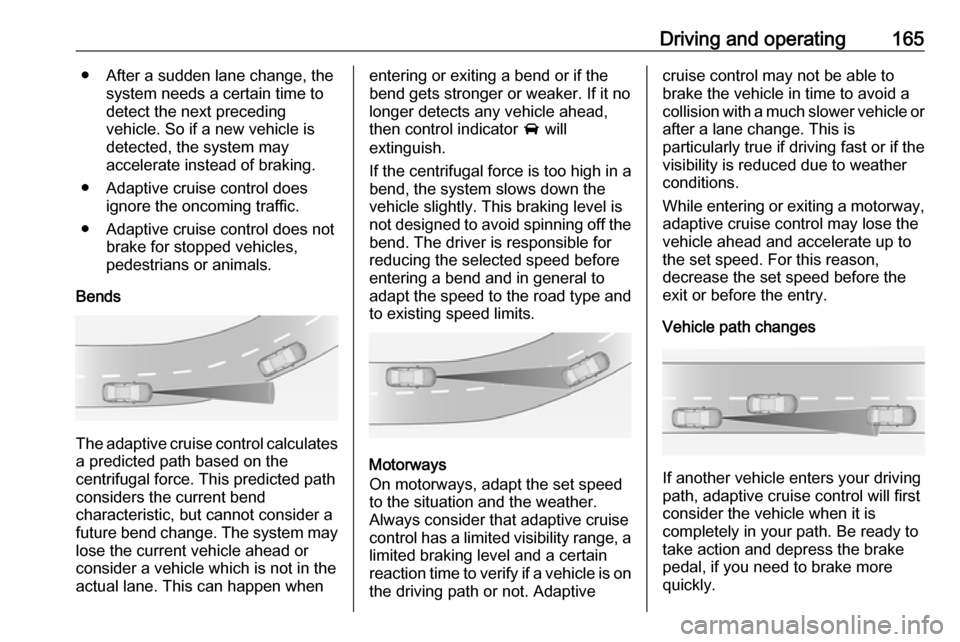
The adaptive cruise control calculates
a predicted path based on the
centrifugal force. This predicted path
considers the current bend
characteristic, but cannot consider a
future bend change. The system may lose the current vehicle ahead or
consider a vehicle which is not in the
actual lane. This can happen when
entering or exiting a bend or if the
bend gets stronger or weaker. If it no
longer detects any vehicle ahead,
then control indicator A will
extinguish.
If the centrifugal force is too high in a bend, the system slows down the vehicle slightly. This braking level is
not designed to avoid spinning off the bend. The driver is responsible for
reducing the selected speed before
entering a bend and in general to
adapt the speed to the road type and
to existing speed limits.
Motorways
On motorways, adapt the set speed
to the situation and the weather.
Always consider that adaptive cruise
control has a limited visibility range, a
limited braking level and a certain
reaction time to verify if a vehicle is on
the driving path or not. Adaptive
cruise control may not be able to
brake the vehicle in time to avoid a
collision with a much slower vehicle or after a lane change. This is
particularly true if driving fast or if the
visibility is reduced due to weather
conditions.
While entering or exiting a motorway,
adaptive cruise control may lose the
vehicle ahead and accelerate up to
the set speed. For this reason,
decrease the set speed before the
exit or before the entry.
Vehicle path changes
If another vehicle enters your driving
path, adaptive cruise control will first
consider the vehicle when it is
completely in your path. Be ready to
take action and depress the brake
pedal, if you need to brake more
quickly.
Page 168 of 293

166Driving and operatingHill and trailer considerations
System performance on hills and
when towing a trailer depends on your
vehicle speed, vehicle load, traffic
conditions and the road gradient. It
may not detect a vehicle in your path
while driving on hills. On steep hills,
you may have to use the accelerator
pedal to maintain your vehicle speed. When going downhill, especially
when towing a trailer, you may have
to brake to maintain or reduce your
speed.
Note that applying the brake
deactivates the system. It is not
recommended to use adaptive cruise
control on steep hills especially when towing a trailer.
Radar unit
The radar unit is mounted behind the
radiator grille below the brand
emblem.
9 Warning
The radar unit was aligned
carefully during manufacture.
Therefore, after a frontal accident, do not use the system. The front
bumper may appear to be intact,
however the sensor behind can be
out of position and react
incorrectly. After an accident,
consult a workshop to verify and
correct the adaptive cruise control
sensor position.
Settings
Settings can be changed in the Auto
collision preparation menu in the
vehicle personalisation, 3 103.
Fault
If the adaptive cruise control does not
work due to temporary conditions
(e.g. blockage by ice) or if there is a
permanent system error, then a
message is displayed in the Driver
Information Centre.
Page 170 of 293

168Driving and operating
Press E; the current setting is shown
in the Driver Information Centre.
Press E again to change the alert
sensitivity. The setting is also displayed in the top line of the Driver
Information Centre.Note that the alert timing sensitivity
setting is shared with the following
distance setting of the adaptive cruise control. So changing the alert timing
sensitivity changes the adaptive
cruise control following distance
setting.
Alerting the driver
A green illuminated vehicle ahead
control indicator A illuminates in the
instrument cluster when the system has detected a vehicle in the driving
path. When the distance to a
preceding moving vehicle gets too
small or when approaching another
vehicle too rapidly and a collision is
imminent, the collision alert symbol
pops-up in the Driver Information
Centre. Simultaneously a warning
chime sounds.
Depress the brake pedal, if it is
required by the situation.
Page 171 of 293
Driving and operating169SettingsSettings can be changed in the Auto
collision preparation menu in the
vehicle personalisation 3 103.
Forward collision alert based on
front camera system
Forward collision alert uses the front
camera system in the windscreen to
detect a vehicle directly ahead, in
your path, within a distance of approx. 60 metres.
Activation
Forward collision alert operates
automatically above 25 mph, if it is not
deactivated by pressing V, see
below.
Selecting the alert sensitivity
The alert sensitivity can be set to
near, medium or far.
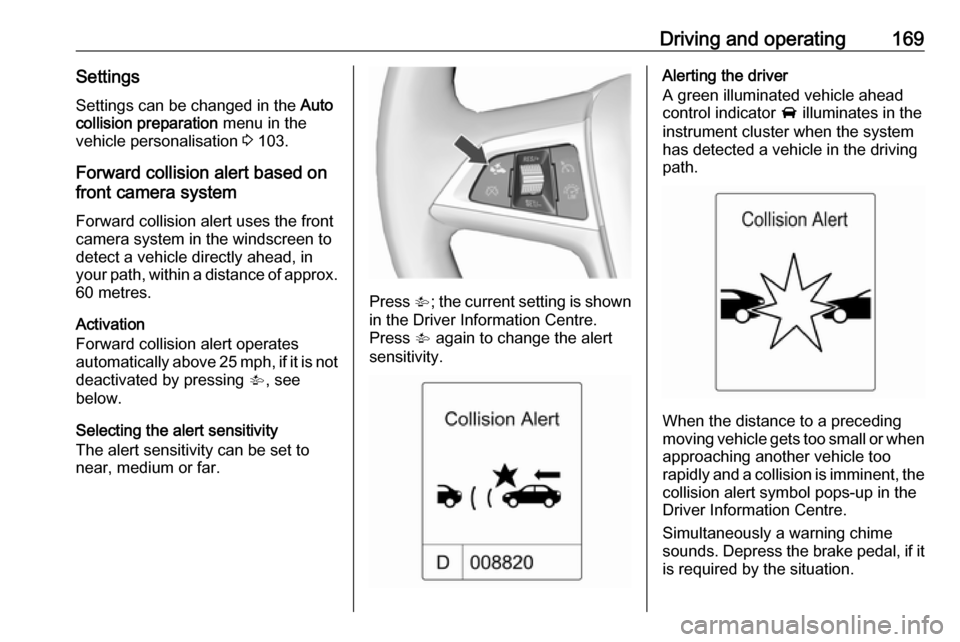
Press V; the current setting is shown
in the Driver Information Centre.
Press V again to change the alert
sensitivity.
Alerting the driver
A green illuminated vehicle ahead
control indicator A illuminates in the
instrument cluster when the system has detected a vehicle in the driving
path.
When the distance to a preceding
moving vehicle gets too small or when
approaching another vehicle too
rapidly and a collision is imminent, the
collision alert symbol pops-up in the
Driver Information Centre.
Simultaneously a warning chime
sounds. Depress the brake pedal, if it is required by the situation.
Page 173 of 293

Driving and operating171
The minimum indicated distance is
0.5 s.
If there is no vehicle ahead or the vehicle ahead is out of range, two
dashes will be displayed: -.- s.
Active Emergency Braking
Active emergency braking can help to reduce the damage from crashes with vehicles and obstacles directly
ahead, when a collision can no longer be avoided either by manual braking
or by steering. Before the active
emergency braking applies, the driver
is warned by the forward collision
alert 3 167.
The feature uses various inputs (e.g.
radar sensor, brake pressure, vehicle speed) to calculate the probability of
a frontal collision.
Active emergency braking operates automatically above walking speed,
provided that Auto collision
preparation setting is not deactivated
in the vehicle personalisation menu
3 103.
The system includes: ● brake preparation system
● emergency automatic braking
● forward looking brake assist9Warning
This system is not intended to
replace the driver responsibility of driving the vehicle and looking
ahead. Its function is limited to
supplemental use only. The driver shall continue to apply the brake
pedal as the driving situation
dictates.
Brake preparation system
When approaching a vehicle ahead
so quickly that a collision is likely, the
brake preparation system slightly
pressurises the brakes. This reduces
the response time, when a manual or automatic braking is requested.
The brake system is prepared so that braking can occur more rapidly.
Emergency automatic braking
After the brake preparation and just
before the imminent collision, this
function automatically applies limited
braking to reduce the impact speed of the collision.
Forward looking brake assist
In addition to brake preparation
system and emergency automatic
braking, the forward looking brake
assist function makes the brake assist more sensitive. In this way,
depressing the brake pedal slightly
results immediately in a strong
braking. This function helps the driver
brake quicker and stronger before the imminent collision.
Page 174 of 293

172Driving and operating9Warning
Active emergency braking is not
designed to apply strong
autonomous braking or to avoid automatically a collision. It is
designed to reduce the vehicle
speed before collision. It may not
react on stopped vehicles,
pedestrians or animals. After a
sudden lane change, the system
needs a certain time to detect the
next preceding vehicle.
The complete attention of the
driver is always required while
driving. The driver shall always be ready to take action and apply the brakes and steer to avoid
collisions. The system is designed
to work with all occupants wearing their seat belts.
System limitations
The active emergency braking has
limited or no function during rain,
snow or heavy dirt, as the radar
sensor can be covered by a water
film, dust, ice or snow. In case of
sensor blockage, clean the sensor
cover.
In some seldom cases the active
emergency braking system may
provide a short automatic braking in
situations that seem to be
unnecessary, for instance due to
traffic signs in a curve or due to
vehicles in another lane. This is
acceptable operation, the vehicle
does not need service. Firmly apply
the accelerator pedal to override the
automatic braking.
Settings
Settings can be changed in the Auto
collision preparation menu in the
vehicle personalisation, 3 103.
Fault
In the event of a system service
requirement, a message is displayed
in the Driver Information Centre.
If the system does not work as it
should do, vehicle messages are
displayed in the Driver Information
Centre.
Vehicle messages 3 97.
Page 187 of 293
Driving and operating185The driver assistance systems donot relieve the driver from full
responsibility for vehicle
operation.
Lane departure warning
The lane departure warning system
observes the lane markings between
which the vehicle is driving via a front camera. The system detects lane
changes and warns the driver in the
event of an unintended lane change
via visual and acoustic signals.
Criteria for the detection of an
unintended lane change are:
● No operation of turn signals.
● No brake pedal operation.
● No active accelerator operation or speeding-up.
● No active steering.
If the driver is active, no warning will
be issued.
Activation
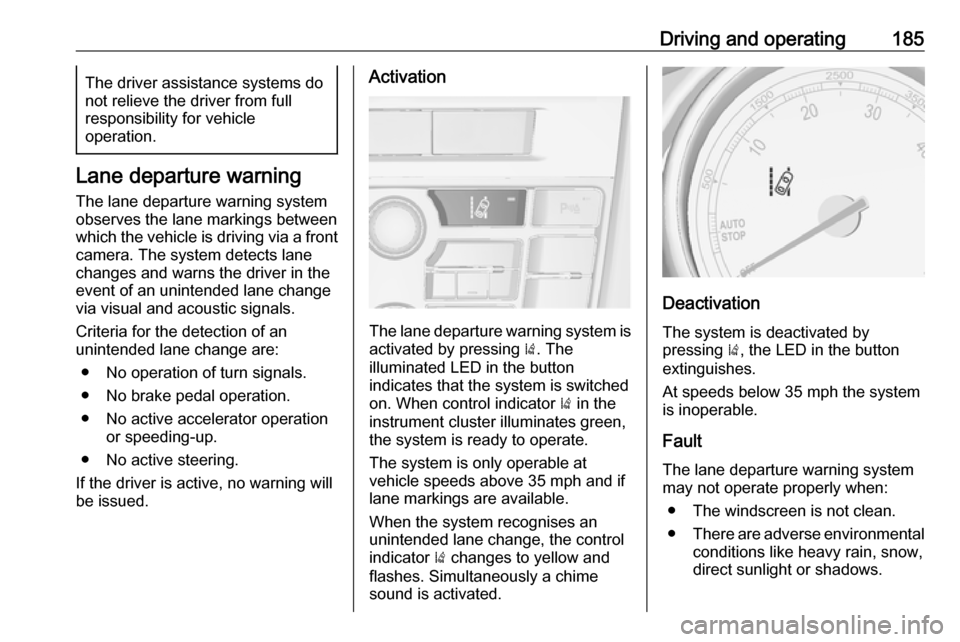
The lane departure warning system is activated by pressing ). The
illuminated LED in the button
indicates that the system is switched
on. When control indicator ) in the
instrument cluster illuminates green, the system is ready to operate.
The system is only operable at
vehicle speeds above 35 mph and if lane markings are available.
When the system recognises an
unintended lane change, the control
indicator ) changes to yellow and
flashes. Simultaneously a chime
sound is activated.
Deactivation
The system is deactivated by
pressing ), the LED in the button
extinguishes.
At speeds below 35 mph the system
is inoperable.
Fault The lane departure warning system
may not operate properly when:
● The windscreen is not clean.
● There are adverse environmental
conditions like heavy rain, snow,
direct sunlight or shadows.
Page 290 of 293

288Glovebox ..................................... 59
Graphic-Info-Display, Colour- Info-Display .............................. 95
H Halogen headlights ....................207
Hand brake ......................... 149, 150
Hazard warning flashers ............121
Headlight flash ........................... 116
Headlight range adjustment ......117
Headlights................................... 114 Headlights when driving abroad 117
Head restraint adjustment .............8
Head restraints ............................ 37
Heated mirrors ............................. 31
Heated rear window ..................... 34
Heated steering wheel .................72
Heating ........................................ 45
Heating and ventilation system . 127
Height adjustable rear floor cover 66
High beam ........................... 90, 116
High beam assist ..................90, 116
Hill start assist ........................... 152
Horn ....................................... 15, 73
I
Identification plate .....................255
Ignition switch positions .............139
Immobiliser ............................ 29, 90
Indicators ...................................... 79
Information displays...................... 91Instrument cluster ........................79
Instrument panel fuse box .........224
Instrument panel illumination .....220
Instrument panel illumination control .................................... 123
Instrument panel overview ........... 11
Interactive driving system ...........154
Interior care ............................... 251
Interior lighting ............................ 123
Interior lights ...................... 123, 220
Interior mirrors .............................. 31
Interruption of power supply ......148
Introduction .................................... 3
ISOFIX child restraint systems ....58
J Jump starting ............................. 245
K Key, memorised settings ..............22
Keys ............................................. 20
Keys, locks ................................... 20
L Lane departure warning .......87, 185
Lashing eyes ............................... 67
Lighting features .........................125
Light switch ................................ 114
Load compartment ................25, 63
Load compartment cover .............65
Load compartment fuse box ......225Loading information .....................69
Low fuel ....................................... 89
Low washer fluid ..........................90
M
Malfunction indicator light ............86
Manual anti-dazzle ......................31
Manual mode ............................. 147
Manual seat adjustment ...............40
Manual transmission .................. 149
Manual windows ..........................32
Memorised settings ......................22
Midlevel-Display ........................... 91
Mirror adjustment ........................... 9
Misted light covers .....................123
N New vehicle running-in ..............138
Number plate light .....................220
O
Object detection systems ...........173
Odometer ..................................... 79
Oil, engine .......................... 253, 257
OnStar ........................................ 108
Operate pedal ............................... 86
Outside temperature ....................75
Overrun cut-off ........................... 140