Snow VAUXHALL ASTRA K 2017 Owner's Manual
[x] Cancel search | Manufacturer: VAUXHALL, Model Year: 2017, Model line: ASTRA K, Model: VAUXHALL ASTRA K 2017Pages: 293, PDF Size: 8.27 MB
Page 20 of 293
18In briefStarting off
Check before starting off ● Tyre pressure and condition 3 228, 3 269.
● Engine oil level and fluid levels 3 201.
● All windows, mirrors, exterior lighting and number plates are
free from dirt, snow and ice and
are operational.
● Proper position of mirrors, seats, and seat belts 3 30, 3 39,
3 47.
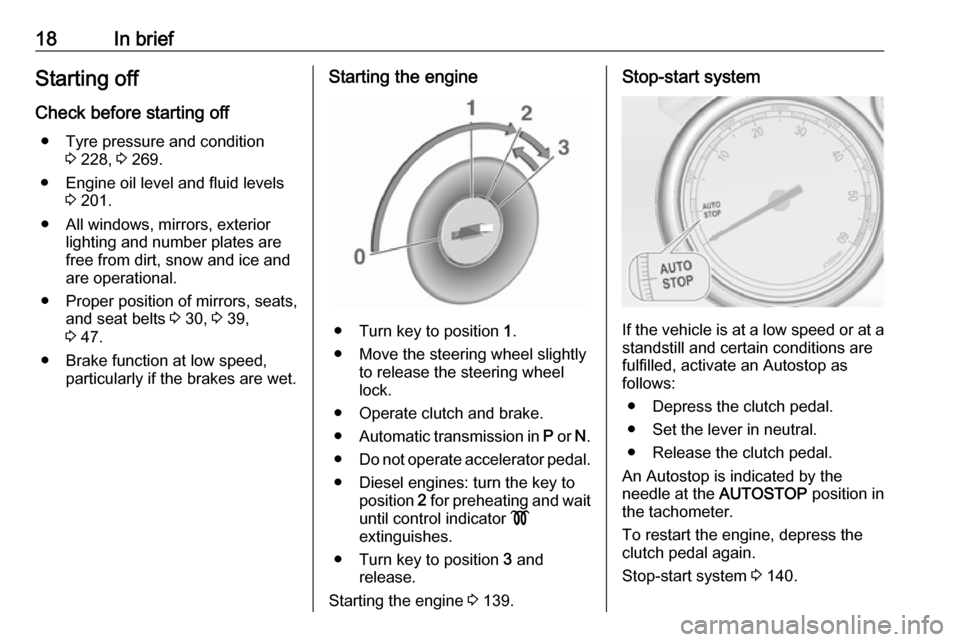
● Brake function at low speed, particularly if the brakes are wet.Starting the engine
● Turn key to position 1.
● Move the steering wheel slightly to release the steering wheel
lock.
● Operate clutch and brake.
● Automatic transmission in P or N.
● Do not operate accelerator pedal.
● Diesel engines: turn the key to position 2 for preheating and wait
until control indicator !
extinguishes.
● Turn key to position 3 and
release.
Starting the engine 3 139.
Stop-start system
If the vehicle is at a low speed or at a
standstill and certain conditions are
fulfilled, activate an Autostop as
follows:
● Depress the clutch pedal.
● Set the lever in neutral.
● Release the clutch pedal.
An Autostop is indicated by the
needle at the AUTOSTOP position in
the tachometer.
To restart the engine, depress the
clutch pedal again.
Stop-start system 3 140.
Page 90 of 293

88Instruments and controlsIlluminates green
System is switched on and ready to
operate.
Flashes yellow
System recognises an unintended
lane change.
Ultrasonic parking assist
r illuminates yellow.
Fault in system
or
Fault due to sensors that are dirty or covered by ice or snow
or
Interference due to external sources of ultrasound. Once the source of
interference is removed, the system
will operate normally.
Have the cause of the fault in the
system remedied by a workshop.
Ultrasonic parking assist 3 173.Electronic Stability Control
off
n illuminates yellow.
The system is deactivated.
Electronic Stability Controland Traction Control system
b illuminates or flashes yellow.
Illuminates
A fault in the system is present.
Continued driving is possible. Driving
stability, however, may deteriorate depending on road surface
conditions.
Have the cause of the fault remedied
by a workshop.
Flashes
The system is actively engaged.
Engine output may be reduced and the vehicle may be braked
automatically to a small degree.
Electronic Stability Control (ESC)
3 153, Traction Control system (TC)
3 152.Traction Control system off
k illuminates yellow.
The system is deactivated.
Preheating
! illuminates yellow.
Preheating is activated. Only
activates when outside temperature
is low.
Diesel particle filter
% illuminates or flashes yellow.
The diesel particle filter requires
cleaning.
Continue driving until %
extinguishes. If possible, do not allow engine speed to drop below
2000 rpm.
Illuminates
The diesel particle filter is full. Start
cleaning process as soon as
possible.
Page 118 of 293

116LightingHigh beam
To switch from low to high beam,
push lever.
To switch to low beam, push lever
again or pull.
High beam assist Description for version with halogen
headlights. High beam assist with
adaptive forward lighting 3 118.
This feature allows high beam to
function as the main driving light at
night and when vehicle speed is
faster than 25 mph.
It switches to low beam when:
● A sensor detects the lights of oncoming or preceding vehicles.
● The vehicle speed is slower than
12 mph.
● It is foggy or snowy.
● Driving in urban areas.
If there are no restrictions detected, the system switches back to high
beam.
Activation
The high beam assist is activated by
pushing the indicator lever twice with
a speed above 25 mph.
The green control indicator l
illuminates continuously when the
assist is activated, the blue one 7
illuminates when high beam is on.
Control indicator l 3 90.
Deactivation Push indicator lever once. It is also
deactivated when front fog lights are
switched on.
If a headlight flash is activated when
the high beam is on, the high beam
assist will be deactivated.
If a headlight flash is activated when
the high beam is off, the high beam
assist will stay activated.
The latest setting of the high beam
assist will remain after the ignition is
switched on again.
Headlight flash To activate the headlight flash, pull
lever.
Page 121 of 293

Lighting119Dynamic curve lighting
The light beam pivots based on
steering wheel angle and speed,
improving lighting in curves.
Control indicator f 3 90.
Corner lighting
On tight bends or when turning off,
depending on the steering angle or
the turn signal light, an additional left
or right reflector is switched on which illuminates the road at a right angle to
the direction of travel. It is activated
up to a speed of 25 mph.
Control indicator f 3 90.
Reversing function
If the headlights are on and reverse
gear is engaged, both corner lights
are switched on. They remain
illuminated for 20 seconds after
disengaging reverse gear or until
driving faster than 10 mph in a
forward gear.
High Beam Assist
This feature allows high beam as
main driving light by night and when
vehicle speed is faster than 25 mph.
It switches to low beam when: ● The camera in the windscreen detects the lights of oncoming or
preceding vehicles.
● The vehicle speed is slower than
12 mph.
● It is foggy or snowy.
● Driving in urban areas.
If there are no restrictions detected, the system switches back to high
beam.Activation
The high beam assist is activated by
pushing the indicator lever twice with
a speed above 25 mph.
The green control indicator l
illuminates continuously when the
assist is activated, the blue one 7
illuminates when high beam is on.
Control indicator l 3 90.
Deactivation
Push indicator lever once. It is also
deactivated when front fog lights are
switched on.
Page 122 of 293

120LightingIf a headlight flash is activated when
the high beam is on, the high beam
assist will be deactivated.
If a headlight flash is activated when
the high beam is off, the high beam
assist will stay activated.
High beam assist is always active
after the ignition is switched on.
Intelligent light ranging with
automatic high beam activation
Intelligent light ranging uses the
properties of Bi-Xenon headlights to
extend the light range of the low beam by up to 400 metres and additionally
activates automatic high beam
without dazzling or disturbing
oncoming or preceding traffic.
High beam is deactivated and the low
beam light range is reduced to avoid
dazzling when the following
restrictions are detected by the front
camera in the windscreen:
● A preceding vehicle is recognised.
● An oncoming vehicle is recognised.● Urban areas are entered.
● It is foggy or snowy.
If there are no restrictions detected,
the system switches back to high
beam.
When the system is active, the front
camera monitors the area ahead of
the vehicle and ensures an optimum
light distribution for maximum driver
vision during almost all conditions.
Intelligent light ranging with automatic high beam activation therefore
reduces the difference between
conventional low and high beam
without drastic changes in light-
range, distribution and intensity.A special topographical evaluation
function detects preceding vehicles
on hills or slopes by recognising the
rear light moving ahead. The system
adjusts the height of the light range to
ensure optimum illumination on the
road ahead without dazzling.
Activation
Intelligent light ranging and automatic
high beam activation are switched on together by pushing the indicator
lever twice. They can be switched on
with ignition on.
Page 137 of 293
Climate control135Air vents
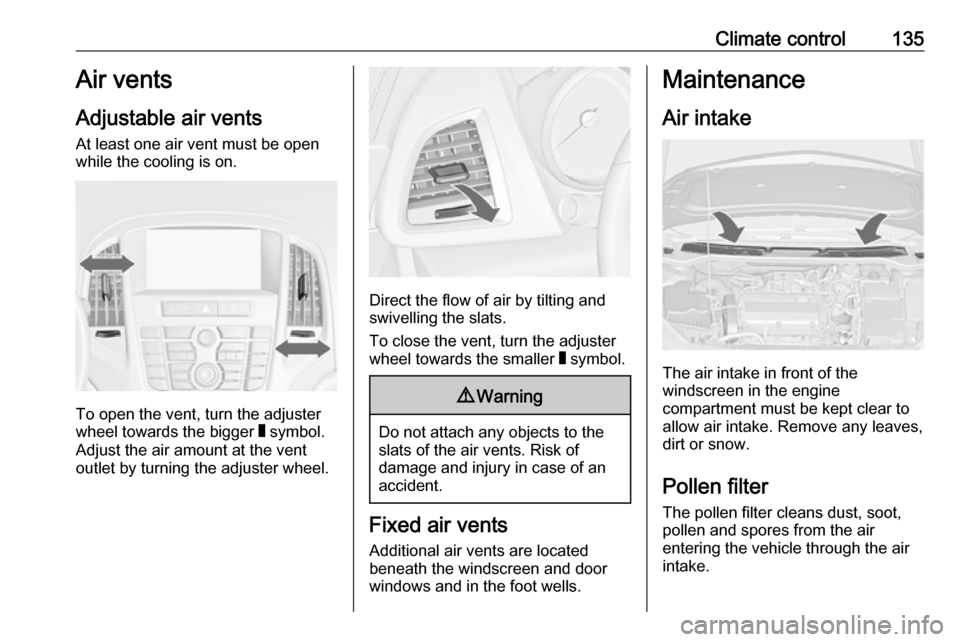
Adjustable air vents At least one air vent must be open
while the cooling is on.
To open the vent, turn the adjuster
wheel towards the bigger W symbol.
Adjust the air amount at the vent
outlet by turning the adjuster wheel.
Direct the flow of air by tilting and
swivelling the slats.
To close the vent, turn the adjuster
wheel towards the smaller W symbol.
9 Warning
Do not attach any objects to the
slats of the air vents. Risk of
damage and injury in case of an
accident.
Fixed air vents
Additional air vents are located
beneath the windscreen and door windows and in the foot wells.
Maintenance
Air intake
The air intake in front of the
windscreen in the engine
compartment must be kept clear to
allow air intake. Remove any leaves,
dirt or snow.
Pollen filter The pollen filter cleans dust, soot,
pollen and spores from the air
entering the vehicle through the air
intake.
Page 148 of 293
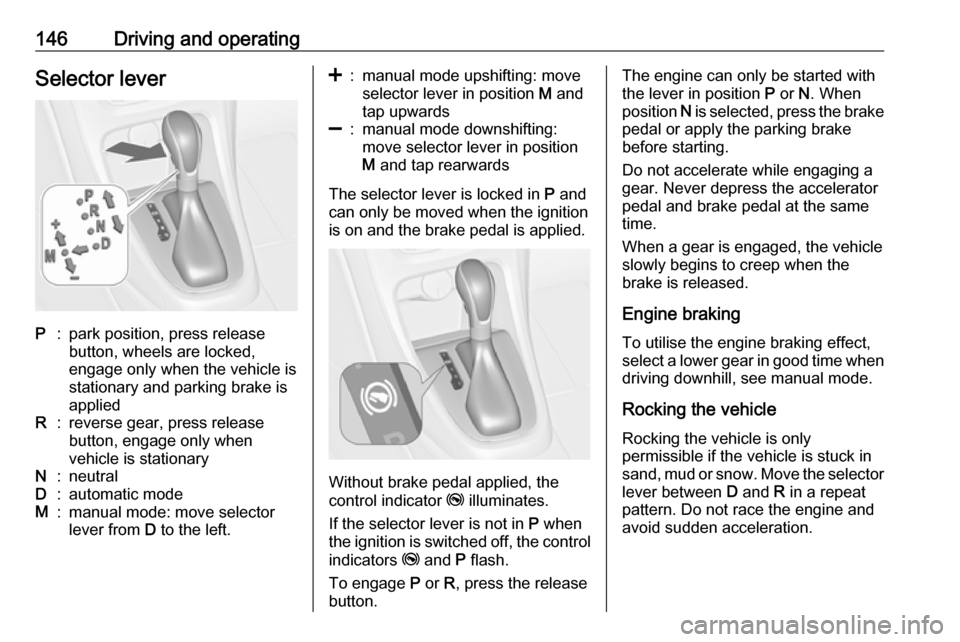
146Driving and operatingSelector leverP:park position, press release
button, wheels are locked,
engage only when the vehicle is
stationary and parking brake is
appliedR:reverse gear, press release
button, engage only when
vehicle is stationaryN:neutralD:automatic modeM:manual mode: move selector
lever from D to the left.<:manual mode upshifting: move
selector lever in position M and
tap upwards]:manual mode downshifting:
move selector lever in position
M and tap rearwards
The selector lever is locked in P and
can only be moved when the ignition
is on and the brake pedal is applied.
Without brake pedal applied, the
control indicator j illuminates.
If the selector lever is not in P when
the ignition is switched off, the control
indicators j and P flash.
To engage P or R, press the release
button.
The engine can only be started with the lever in position P or N. When
position N is selected, press the brake
pedal or apply the parking brake
before starting.
Do not accelerate while engaging a
gear. Never depress the accelerator
pedal and brake pedal at the same
time.
When a gear is engaged, the vehicle
slowly begins to creep when the
brake is released.
Engine braking To utilise the engine braking effect,select a lower gear in good time when
driving downhill, see manual mode.
Rocking the vehicle
Rocking the vehicle is only
permissible if the vehicle is stuck in
sand, mud or snow. Move the selector
lever between D and R in a repeat
pattern. Do not race the engine and
avoid sudden acceleration.
Page 149 of 293

Driving and operating147ParkingApply the parking brake and engage
P .
The ignition key can only be removed
when the selector lever is in position
P .
Manual mode
Move selector lever out of position D
towards the left to select manual
mode M.
Tap selector lever
forwards <:shift to a higher gearbackwards ]:shift to a lower gearThe selected gear is indicated in the
instrument cluster.
If a higher gear is selected when
vehicle speed is too low, or a lower
gear when vehicle speed is too high,
the shift is not executed. This can
cause a message in the Driver
Information Centre.
In manual mode, no automatic
shifting to a higher gear takes place
at high engine revolutions.
Electronic driving programmes
● Following a cold start, the operating temperature
programme increases engine
speed to quickly bring the
catalytic converter to the required
temperature.
● The automatic neutral shift function automatically shifts to
idling when the vehicle is stopped with a forward gear engaged andthe brake pedal is pressed.● When SPORT mode is engaged,
the vehicle shifts at higher engine
speeds (unless cruise control is
on). SPORT mode 3 154.
● Special programmes automatically adapt the shifting
points when driving up inclines or
down hills.
● When starting off in snowy or icy conditions or on other slippery
surfaces, the electronic
transmission control selects a
higher gear automatically.
Kickdown
If the accelerator pedal is pressed down completely in automatic mode, the transmission shifts to a lower gear
depending on engine speed.
Fault
In the event of a fault, control indicator g illuminates. Additionally, a code
number or a vehicle message is
displayed in the Driver Information
Centre. Vehicle messages 3 97.
Page 166 of 293

164Driving and operating● There is no traffic and nothingdetected on the road sides forseveral minutes. In this case,
there are no radar echoes and
the sensor may report that it is
blocked.
● The collision imminent braking system is applying the brakes.
● The radar sensor is blocked by an ice or water film.
● A fault is detected in the radar, engine or brake system.
When adaptive cruise control is
deactivated automatically, the control indicator m illuminates white and a
warning symbol is displayed as a pop-
up in the Driver Information Centre.
The stored speed is maintained.
9 Warning
When adaptive cruise control is
deactivated, the driver must take
over full brake and engine control.
Switching off
Press C to switch off adaptive cruise
control. The control indicator m
extinguishes. The stored speed is
deleted.
Switching off the ignition also
switches off adaptive cruise control
and deletes the stored speed.
Driver's attention
● Use adaptive cruise control carefully on bends or mountain
roads, as it can lose the vehicle
ahead and need time to detect it
again.
● Do not use the system on slippery roads as it can create
rapid changes in tyre traction
(wheel spinning), so that you
could lose control.
● Do not use adaptive cruise control during rain, snow or
heavy dirt, as the radar sensor
can be covered by a water film,
dust, ice or snow. This reduces or suppresses completely the
visibility. In case of sensor
blockage, clean the sensor
cover.
System limits ● The system's automatic brake force does not permit hard
braking and the braking level
may not be sufficient to avoid a
collision.
Page 172 of 293

170Driving and operatingDeactivation
The system can be deactivated.
Press V repeatedly until the following
message appears in the Driver
Information Centre.
General information for both
variants of forward collision alert
9 Warning
Forward collision alert is just a
warning system and does not
apply the brakes. When
approaching a vehicle ahead too
rapidly, it may not provide you
enough time to avoid a collision.
The driver accepts full
responsibility for the appropriate
following distance based on traffic, weather and visibility conditions.
The complete attention of the
driver is always required while
driving. The driver must always be
ready to take action and apply the
brakes.
System limitations
The system is designed to warn only for vehicles, but may react also to
other metallic objects.
In the following cases, forward
collision alert may not detect a vehicle ahead or sensor performance is
limited:
● on winding roads
● when weather limits visibility, e.g.
fog, rain, or snow
● when the sensor is blocked by snow, ice, slush, mud, dirt, or
windscreen damage
Following distance
indication
The following distance indication
displays the distance to a preceding
moving vehicle. The system uses,
depending on the vehicle equipment,
either the radar behind the radiator
grille or the front camera in the
windscreen to detect the distance of
a vehicle directly ahead in your lane.
It is active at speeds above 25 mph.
When a preceding vehicle is detected
ahead, the distance is indicated in
seconds, displayed on a page in the
Driver Information Centre 3 91 . Press
MENU on the turn signal lever to
select Vehicle Information Menu
X and turn the adjuster wheel to
choose following distance indication
page.