buttons VAUXHALL ASTRA K 2017 Owner's Manual
[x] Cancel search | Manufacturer: VAUXHALL, Model Year: 2017, Model line: ASTRA K, Model: VAUXHALL ASTRA K 2017Pages: 293, PDF Size: 8.27 MB
Page 14 of 293

12In brief1Power windows .....................32
2 Exterior mirrors .....................30
3 Cruise control .....................157
Speed limiter ....................... 159
Adaptive cruise control .......160
Forward collision alert .........167
4 Side air vents ...................... 135
5 Windscreen wiper,
windscreen washer
system, headlight washer
system, rear window
wiper, rear window washer system ................................... 73
6 Instruments .......................... 79
7 Steering wheel controls .......72
8 Driver Information Centre ...... 91
9 Turn and lane-change
signals, headlight flash,
low beam and high beam,
high beam assist .................121
Exit lighting ......................... 125
Parking lights ...................... 122
Buttons for Driver
Information Centre ................9110Sport mode ........................ 154
Central locking system ..........23
Hazard warning flashers ....121
Fuel selector ......................... 80
Control indicator for airbag
deactivation .......................... 85
Control indicator for front
passenger seat belt .............85
Tour mode .......................... 154
11 Info-Display .......................... 95
12 Anti-theft alarm system
status LED ........................... 27
13 Centre air vents .................. 135
14 Glovebox .............................. 59
15 Sport mode ........................ 154
Tour mode .......................... 154
Traction Control system
(TC) ..................................... 152
Electronic Stability Control (ESC) .................................. 153
Parking assist systems .......173Lane departure warning .....185
Eco button for stop-start
system ................................. 140
16 Climate control system ........ 127
17 AUX input, USB input ..........11
18 Power outlet .......................... 77
19 Selector lever, manual
transmission ....................... 149
Automatic transmission ......145
20 Electric parking brake .........150
21 Ignition switch with
steering wheel lock ............139
22 Horn ..................................... 73
Driver airbag ........................ 49
23 Bonnet release lever ..........200
24 Storage compartment,
fuse box ............................. 224
25 Steering wheel adjustment ..72
26 Light switch ........................ 114
Headlight range
adjustment ......................... 117
Front fog lights ...................122
Page 26 of 293
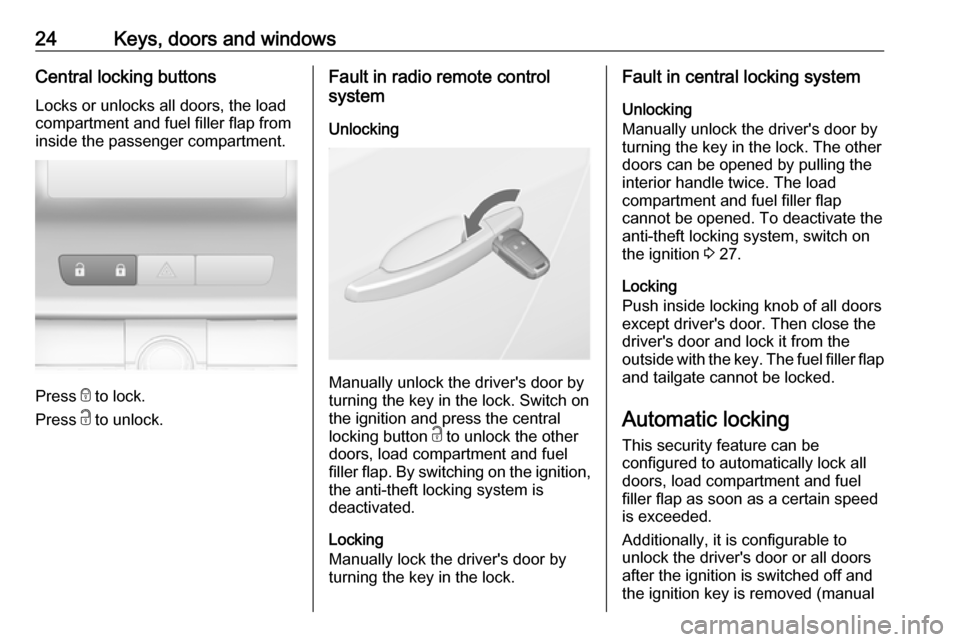
24Keys, doors and windowsCentral locking buttonsLocks or unlocks all doors, the load
compartment and fuel filler flap from
inside the passenger compartment.
Press e to lock.
Press c to unlock.
Fault in radio remote control
system
Unlocking
Manually unlock the driver's door by
turning the key in the lock. Switch on
the ignition and press the central
locking button c to unlock the other
doors, load compartment and fuel
filler flap. By switching on the ignition, the anti-theft locking system is
deactivated.
Locking
Manually lock the driver's door by
turning the key in the lock.
Fault in central locking system
Unlocking
Manually unlock the driver's door by
turning the key in the lock. The other
doors can be opened by pulling the
interior handle twice. The load
compartment and fuel filler flap
cannot be opened. To deactivate the
anti-theft locking system, switch on
the ignition 3 27.
Locking
Push inside locking knob of all doors
except driver's door. Then close the
driver's door and lock it from the
outside with the key. The fuel filler flap and tailgate cannot be locked.
Automatic locking
This security feature can be
configured to automatically lock all
doors, load compartment and fuel
filler flap as soon as a certain speed
is exceeded.
Additionally, it is configurable to
unlock the driver's door or all doors
after the ignition is switched off and
the ignition key is removed (manual
Page 67 of 293

Storage65Rear storage
3-door hatchback
Press both buttons and fold down
cover.
Maximum load: 0.5 kg.
Load compartment cover
Do not place any objects on the cover.
3-door hatchback
Removing
Unhook retaining straps from tailgate.
Lift cover at the rear and push it
upwards at the front.
Remove the cover.
If the height adjustable cover is
mounted in the middle or upper
position, the load compartment cover can be stowed below it.
Height adjustable cover 3 66.
Fitting
Engage cover in side guides and fold
downwards. Attach retaining straps to
tailgate.
Page 83 of 293

Instruments and controls81Displays the coolant temperature.left area:engine operating
temperature not yet
reachedcentral
area:normal operating
temperatureright area:temperature too highCaution
If engine coolant temperature is
too high, stop vehicle, switch off
engine. Danger to engine. Check
coolant level.
Service display
The engine oil life system lets you
know when to change the engine oil
and filter. Based on driving
conditions, the interval at which an
engine oil and filter change will be
indicated can vary considerably.
To display the remaining engine oil
life duration use turn signal lever
buttons:
Press MENU to select the Vehicle
Information Menu X .
Turn the adjuster wheel to select
Remaining Oil Life .
The remaining engine oil life duration
is displayed in percent in the Driver
Information Centre.
Reset Press SET/CLR on turn signal lever
for several seconds to reset. The
remaining engine oil life duration
page must be active. Switch on
ignition, but not the engine.
The system must be reset every time
the engine oil is changed, to ensure
proper functionality. Seek the
assistance of a workshop.
Next service When the system has calculated that
engine oil life has diminished, a
warning message appears in the
Driver Information Centre. Have
engine oil and filter changed by a
workshop within one week or
300 miles (whichever occurs first).
Driver Information Centre 3 91.
Service information 3 252.
Page 94 of 293
92Instruments and controlsSome of the displayed functions differ
when the vehicle is being driven or at
a standstill. Some functions are only
available when the vehicle is being
driven.
Vehicle personalisation 3 103.
Memorised settings 3 22.
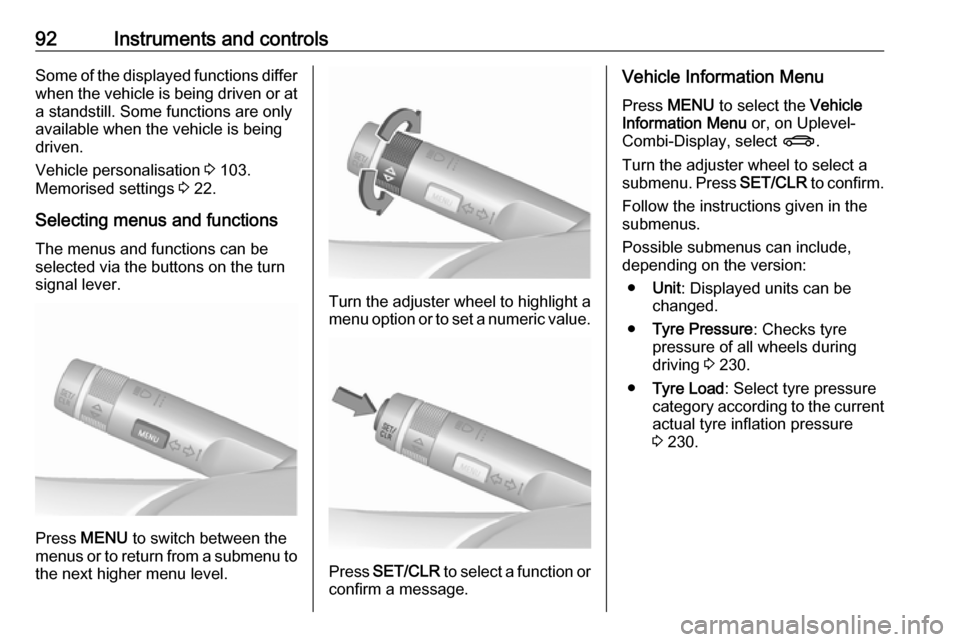
Selecting menus and functions The menus and functions can be
selected via the buttons on the turn signal lever.
Press MENU to switch between the
menus or to return from a submenu to the next higher menu level.
Turn the adjuster wheel to highlight a
menu option or to set a numeric value.
Press SET/CLR to select a function or
confirm a message.
Vehicle Information Menu
Press MENU to select the Vehicle
Information Menu or, on Uplevel-
Combi-Display, select X.
Turn the adjuster wheel to select a submenu. Press SET/CLR to confirm.
Follow the instructions given in the
submenus.
Possible submenus can include,
depending on the version:
● Unit : Displayed units can be
changed.
● Tyre Pressure : Checks tyre
pressure of all wheels during
driving 3 230.
● Tyre Load : Select tyre pressure
category according to the current actual tyre inflation pressure
3 230.
Page 98 of 293
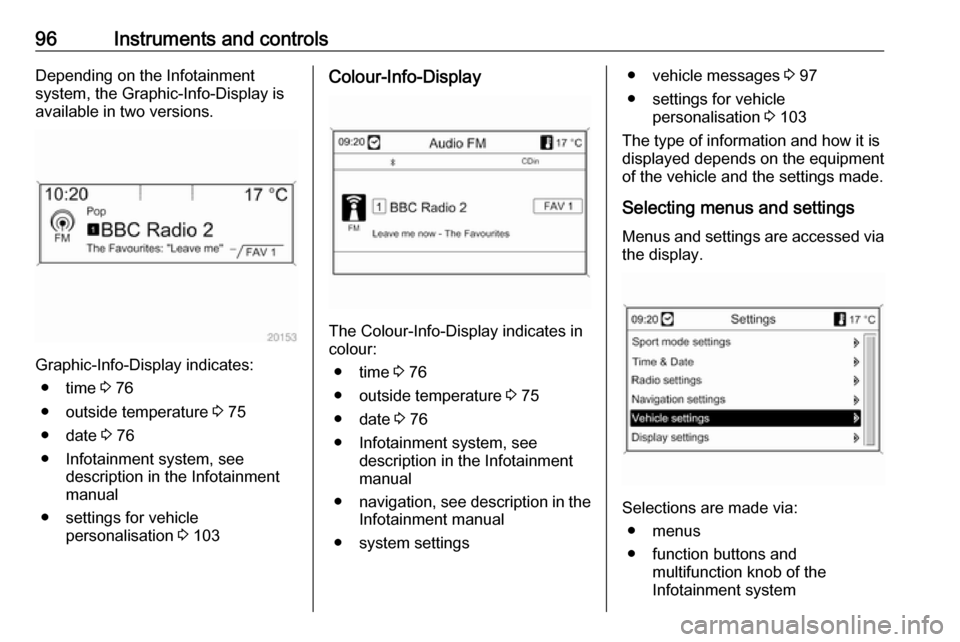
96Instruments and controlsDepending on the Infotainment
system, the Graphic-Info-Display is
available in two versions.
Graphic-Info-Display indicates:
● time 3 76
● outside temperature 3 75
● date 3 76
● Infotainment system, see description in the Infotainment
manual
● settings for vehicle personalisation 3 103
Colour-Info-Display
The Colour-Info-Display indicates in
colour:
● time 3 76
● outside temperature 3 75
● date 3 76
● Infotainment system, see description in the Infotainment
manual
● navigation, see description in the
Infotainment manual
● system settings
● vehicle messages 3 97
● settings for vehicle personalisation 3 103
The type of information and how it is
displayed depends on the equipment
of the vehicle and the settings made.
Selecting menus and settings
Menus and settings are accessed via the display.
Selections are made via:
● menus
● function buttons and multifunction knob of the
Infotainment system
Page 99 of 293
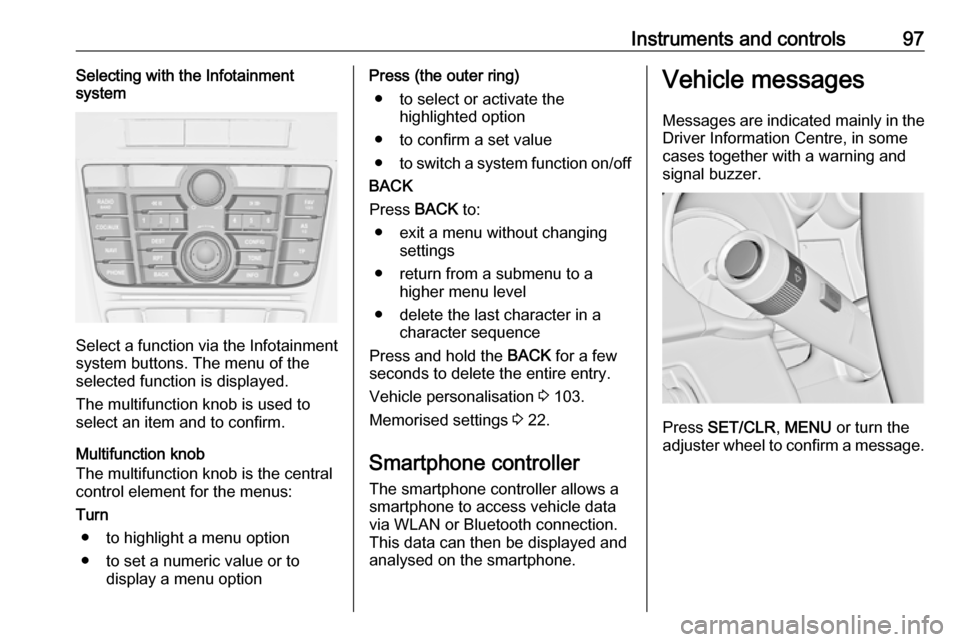
Instruments and controls97Selecting with the Infotainment
system
Select a function via the Infotainment
system buttons. The menu of the
selected function is displayed.
The multifunction knob is used to
select an item and to confirm.
Multifunction knob
The multifunction knob is the central control element for the menus:
Turn
● to highlight a menu option
● to set a numeric value or to display a menu option
Press (the outer ring)
● to select or activate the highlighted option
● to confirm a set value
● to switch a system function on/off
BACK
Press BACK to:
● exit a menu without changing settings
● return from a submenu to a higher menu level
● delete the last character in a character sequence
Press and hold the BACK for a few
seconds to delete the entire entry.
Vehicle personalisation 3 103.
Memorised settings 3 22.
Smartphone controller
The smartphone controller allows a
smartphone to access vehicle data
via WLAN or Bluetooth connection.
This data can then be displayed and analysed on the smartphone.Vehicle messages
Messages are indicated mainly in the
Driver Information Centre, in some
cases together with a warning and
signal buzzer.
Press SET/CLR , MENU or turn the
adjuster wheel to confirm a message.
Page 103 of 293

Instruments and controls101Trip computer
The menus and functions can be
selected via the buttons on the turn signal lever 3 91.
Press MENU to select the Trip/Fuel
Information Menu , or select W on
the Uplevel-Combi-Display.
Trip/Fuel Information Menu on
Uplevel-Combi-Display
Turn the adjuster wheel to select the
submenus:● trip odometer 1
● average consumption 1
● average speed 1
● trip odometer 2
● average consumption 2
● average speed 2
Page 110 of 293

108Instruments and controlsTelematics service
OnStar OnStar is a personal connectivity and
service assistant with integrated
Wi-Fi hotspot. The OnStar service is
available 24 hours a day, seven days
a week.
Notice
OnStar is not available for all
markets. For further information,
contact your workshop.
Notice
In order to be available and
operational, OnStar needs a valid
OnStar subscription, functioning
vehicle electrics, mobile service and
GPS satellite link.
To activate the OnStar services and
set up an account, press Z and speak
with an advisor.Depending on the equipment of the vehicle, the following services areavailable:
● Emergency services and support
in the case of a vehicle
breakdown
● Wi-Fi hotspot
● Smartphone application
● Remote control, e.g. location of the vehicle, activation of horn and
lights, control of central locking system
● Stolen vehicle assistance
● Vehicle diagnostics
● Destination download
Notice
The OnStar module of the vehicle is
deactivated after ten days without an
ignition cycle. Functions requiring a
data connection will be available
again after switching on the ignition.OnStar buttons
Notice
Depending on the equipment, the
OnStar buttons can also be
integrated in the rear view mirror.
Privacy button
Press and hold j until a message is
heard to activate or deactivate the transmission of the vehicle location.
Press j to answer a call or to end a
call to an advisor.
Press j to access the Wi-Fi settings.
Service button
Press Z to establish a connection to
an advisor.
Page 114 of 293
112Instruments and controls9Danger
The service is only available for
markets where it is legally required and activated. Furthermore, the
manual and the automatic
emergency call function depend
on the availability of the
emergency centres and the
infrastructure in the country.
Notice
In order to be available and
operational, the system requires
functioning vehicle electrics, mobile
service and GLONASS satellite link.
Depending on equipment, a backup
battery is used.
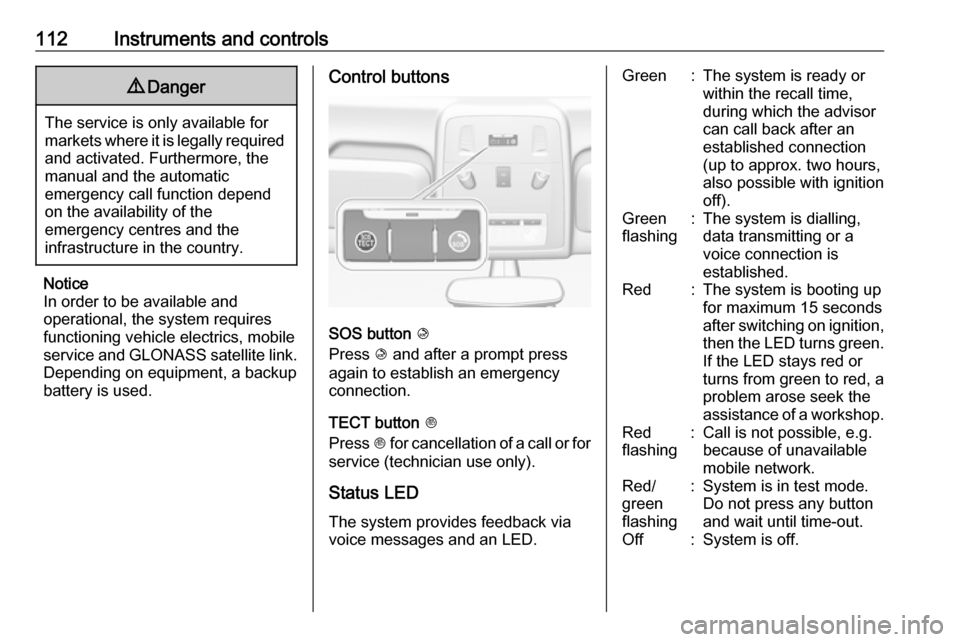
Control buttons
SOS button K
Press K and after a prompt press
again to establish an emergency
connection.
TECT button J
Press J for cancellation of a call or for
service (technician use only).
Status LED
The system provides feedback via
voice messages and an LED.
Green:The system is ready or
within the recall time,
during which the advisor
can call back after an
established connection
(up to approx. two hours,
also possible with ignition
off).Green
flashing:The system is dialling,
data transmitting or a
voice connection is
established.Red:The system is booting up
for maximum 15 seconds
after switching on ignition,
then the LED turns green. If the LED stays red or
turns from green to red, a
problem arose seek the
assistance of a workshop.Red
flashing:Call is not possible, e.g.
because of unavailable
mobile network.Red/
green
flashing:System is in test mode.
Do not press any button
and wait until time-out.Off:System is off.