radio VAUXHALL ASTRA K 2019.5 User Guide
[x] Cancel search | Manufacturer: VAUXHALL, Model Year: 2019.5, Model line: ASTRA K, Model: VAUXHALL ASTRA K 2019.5Pages: 311, PDF Size: 9.6 MB
Page 145 of 311
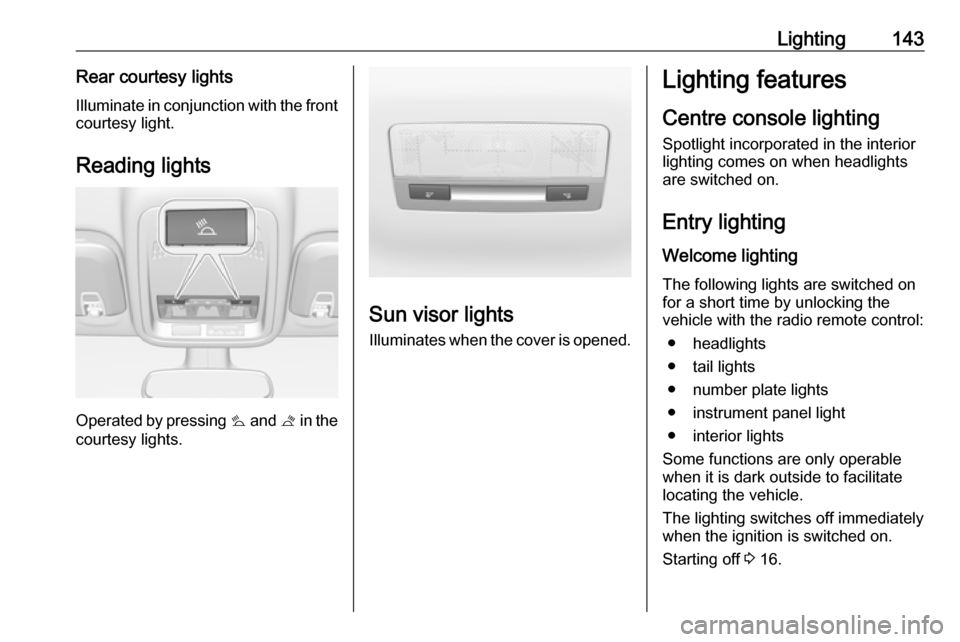
Lighting143Rear courtesy lightsIlluminate in conjunction with the front
courtesy light.
Reading lights
Operated by pressing s and t in the
courtesy lights.
Sun visor lights
Illuminates when the cover is opened.
Lighting features
Centre console lighting Spotlight incorporated in the interior
lighting comes on when headlights
are switched on.
Entry lighting Welcome lighting
The following lights are switched on
for a short time by unlocking the
vehicle with the radio remote control:
● headlights
● tail lights
● number plate lights
● instrument panel light
● interior lights
Some functions are only operable
when it is dark outside to facilitate
locating the vehicle.
The lighting switches off immediately
when the ignition is switched on.
Starting off 3 16.
Page 162 of 311
160Driving and operatingDepress the clutch pedal (manual
transmission) or the brake pedal
(automatic transmission) and press
Engine Start/Stop .
To switch off the engine, press
Engine Start/Stop again. Remove the
electronic key from the centre
console.
This option is intended for
emergencies only. Replace the
electronic key battery as soon as
possible 3 21.
For unlocking or locking the doors,
see fault in radio remote control unit
or electronic key system 3 23.
Retained power off The following electronic systems can
work until the driver's door is opened
or for ten minutes after the ignition is
switched off:
● power windows
● sunroof
● power outletsStarting the engine
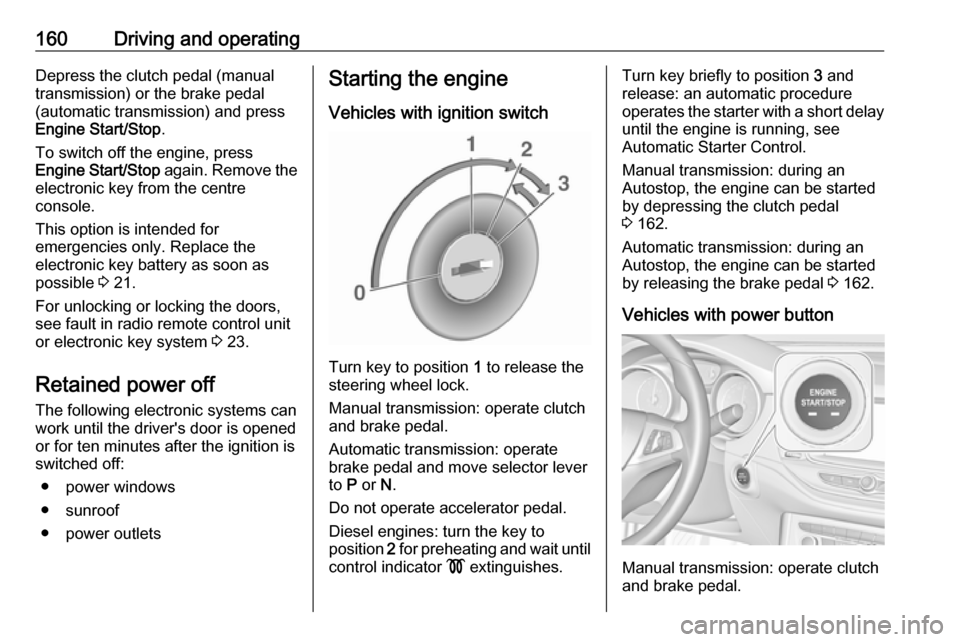
Vehicles with ignition switch
Turn key to position 1 to release the
steering wheel lock.
Manual transmission: operate clutch
and brake pedal.
Automatic transmission: operate
brake pedal and move selector lever
to P or N.
Do not operate accelerator pedal.
Diesel engines: turn the key to
position 2 for preheating and wait until
control indicator ! extinguishes.
Turn key briefly to position 3 and
release: an automatic procedure operates the starter with a short delay
until the engine is running, see
Automatic Starter Control.
Manual transmission: during an
Autostop, the engine can be started
by depressing the clutch pedal
3 162.
Automatic transmission: during an
Autostop, the engine can be started
by releasing the brake pedal 3 162.
Vehicles with power button
Manual transmission: operate clutch
and brake pedal.
Page 251 of 311
Vehicle care249No.Circuit33Anti-theft alarm system / Power
sounder34Parking assist / Side blind spot
alert / Infotainment system /
USB socket35OnStar36Info Display / Instrument
cluster / CD player37Infotainment system / radio
After having changed defective fuses,
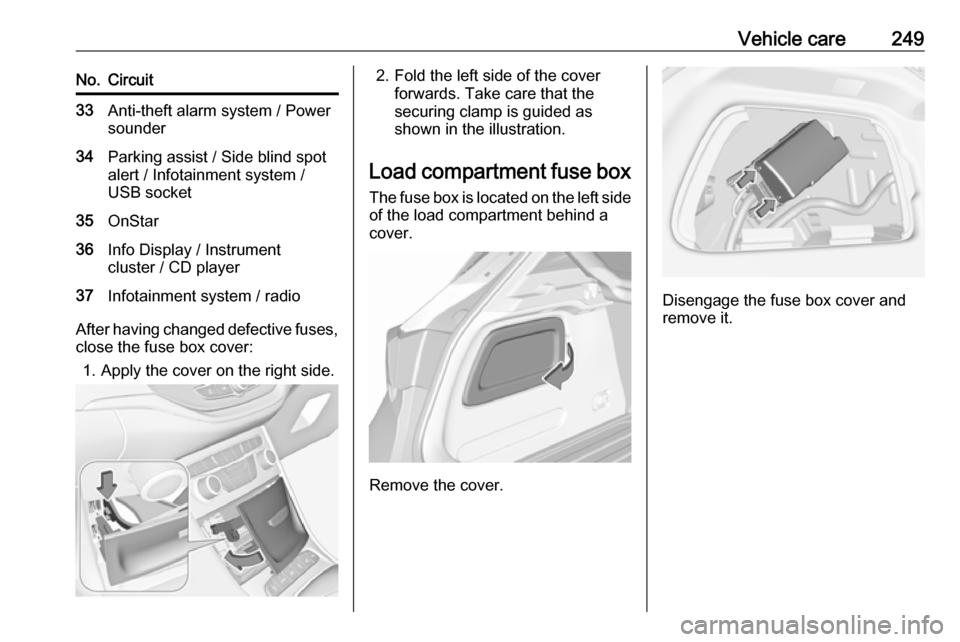
close the fuse box cover:
1. Apply the cover on the right side.
2. Fold the left side of the cover forwards. Take care that thesecuring clamp is guided as
shown in the illustration.
Load compartment fuse box The fuse box is located on the left side
of the load compartment behind a
cover.
Remove the cover.
Disengage the fuse box cover and
remove it.
Page 294 of 311

292Customer informationCustomer
informationCustomer information ................292
Declaration of conformity .........292
REACH .................................... 296
Software acknowledgement ....296
Software update ......................298
Registered trademarks ............299
Vehicle data recording and pri‐
vacy ........................................... 299
Event data recorders ...............299
Radio Frequency Identification (RFID) ..................................... 302Customer information
Declaration of conformity
Radio transmission systems
This vehicle has systems that
transmit and / or receive radio waves
subject to Directive 2014/53/EU. The
manufacturers of the systems listed
below declare conformity with
Directive 2014/53/EU. The full text of
the EU declaration of conformity for each system is available at the
following internet address:
www.vauxhall.co.uk/conformity.
Importer is
Opel / Vauxhall, Bahnhofsplatz,
65423 Ruesselsheim am Main,
Germany.
Antenna
Laird
8100 Industrial Park Drive, Grand
Blanc, MI, 48439, USA
Operation frequency: N/A
Maximum output: N/AAntenna
Kathrein Automotive North America,
Inc.
3967 W. Hamlin Rd., Rochester Hills, MI 48309, USA
Operation frequency: N/A
Maximum output: N/A
Electronic key
Denso Coperation
Waldeckerstraße 11, 64546
Mörfelden-Walldorf, Germany
Operation frequency: 433,92 MHz
Maximum output: -5,88 dBm
Electronic key module
Denso Coperation
Waldeckerstraße 11, 64546
Mörfelden-Walldorf, Germany
Operation frequency: 125 kHz
Maximum output: -0,14 dBm
Front radar unit
Continental Automotive GmbH
ADC Automotive Distance Control
Systems GmbH, Peter-Dornier-
Straße 10, 88131 Lindau, Germany
Page 296 of 311

294Customer informationParking heater remote conrtol
transmitter
Webasto Thermo & Comfort SE
Friedrichshafener Straße 9, 82205 Gilching, Germany
Operation frequency: 869,0 MHz
Maximum output: 14 dBm
Radio remote control receiver
Robert Bosch GmbH
Robert Bosch Platz 1, 70839
Gerlingen, Germany
Operation frequency: 433.92 MHz
Maximum output: N/A
Radio remote control transmitter
Robert Bosch GmbH
Robert Bosch Platz 1, 70839
Gerlingen, Germany
Operation frequency: 433.92 MHz
Maximum output: -9 dbm
Tyre pressure sensors
Schrader Electronics Ltd.
11 Technology Park, Belfast Road,
Antrim BT41 1QS, Northern Ireland,
United KingdomOperation frequency: 433.92 MHz
Maximum output: 10 dBm
Page 304 of 311

302Customer informationwhich ones, is dependent on the app
in question and your smartphone's
operating system.
Online services If your vehicle has a radio networkconnection, this allows data to be
exchanged between your vehicle and other systems. The radio network
connection is made possible by
means of a transmitter device in your
vehicle or a mobile device provided
by you (e.g. a smartphone). Online
functions can be used via this radio
network connection. These include
online services and applications /
apps provided to you by the
manufacturer or other providers.
Proprietary services
In the case of the manufacturer's
online services, the relevant functions are described by the manufacturer in
an appropriate location (e.g. Owner's
Manual, the manufacturer's website) and the associated data protection
information is provided. Personal
data may be used to provide online
services. Data exchange for thispurpose takes place via a protected
connection, e.g. using the
manufacturer's IT systems provided
for the purpose. Collection,
processing and use of personal data
for the purposes of preparation of services take place solely on the
basis of legal permission, e.g. in the
case of a legally prescribed
emergency communication system or a contractual agreement, or by virtue
of consent.
You can activate or deactivate the services and functions (which are
subject to charges to some extent)
and, in some cases, the vehicle's
entire radio network connection. This
does not include statutory functions
and services such as an emergency
communication system.
Third party services If you make use of online services
from other providers (third parties),
these services are subject to the
liability and data protection and usage conditions of the provider in question.The manufacturer frequently has no
influence over the content exchanged
in this regard.
Therefore, please note the nature,
scope and purpose of the collection
and use of personal data within the
scope of third party services provided by the service provider in question.
Radio Frequency
Identification (RFID)
RFID technology is used in some
vehicles for functions such as tyre
pressure monitoring and immobiliser.
It is also used in connection with
conveniences such as radio remote
controls for door locking / unlocking and starting. RFID technology in
Vauxhall vehicles does not use or
record personal information or link
with any other Vauxhall system
containing personal information.
Page 309 of 311

307QQuickheat ................................... 154
R
Radio Frequency Identification (RFID) ..................................... 302
Radio remote control ...................20
REACH ....................................... 296
Reading lights ............................ 143
Rear floor storage cover ..............79
Rear fog light .............111, 141, 237
Rear seats .................................... 54
Rear storage ................................. 78
Rear view camera ...................... 207
Rear window wiper and washer ..93
Recommended fluids and lubricants ........................ 277, 281
Refuelling ................................... 218 Registered trademarks ...............299
Retained power off .....................160
Reversing lights .........................142
Ride control systems ..................177
Roof .............................................. 43
Roof load ...................................... 87
Roof rack ..................................... 86
S
Safety belts ................................... 55
Safety net .................................... 83
Seat adjustment ............................. 7
Seat belt ........................................ 8Seat belt reminder .....................106
Seat belts ..................................... 55
Seat heating Seat heating, front .....................53
Seat heating, rear .....................55
Seat position ................................ 46
Selective catalytic reduction .......168
Selector lever.............................. 171
Service ............................... 155, 276
Service display .......................... 105
Service information ....................276
Side airbag system ......................61
Side blind spot alert ....................205
Sidelights .................................... 134
Side turn lights ........................... 243
Software acknowledgement .......296
Software update ......................... 298
Spare wheel ............................... 264
Speed limiter....................... 112, 182
Speedometer ............................. 101
Sport mode ................................ 180
Starting and operating ................157
Starting off ................................... 16
Starting the engine ....................160
Steering ...................................... 157
Steering wheel adjustment ......9, 90
Steering wheel controls ...............90
Stop-start system........................ 162
Storage ......................................... 70
Storage compartments .................70Sunroof ........................................ 43
Sun visor lights .......................... 143
Sun visors .................................... 42
Symbols ......................................... 4
T
Tachometer ............................... 103
Tail lights ................................... 237
Three-point seat belt .................... 56
Tools .......................................... 251
Tow bar....................................... 220 Towing ................................ 220, 270
Towing another vehicle .............271
Towing equipment .....................222
Towing the vehicle .....................270
Traction Control system ............. 177
Traction Control system off......... 110
Traffic sign assistant ...........112, 209
Trailer coupling ........................... 220
Trailer stability assist .................225
Trailer towing ............................. 221
Transmission ............................... 15
Transmission display .................171
Tread depth ............................... 258
Trip odometer ............................ 102
Turn lights .......................... 106, 140
Tyre chains ................................ 260
Tyre designations ......................253
Tyre pressure ............................ 253