lock VAUXHALL ASTRA K 2019 Owner's Guide
[x] Cancel search | Manufacturer: VAUXHALL, Model Year: 2019, Model line: ASTRA K, Model: VAUXHALL ASTRA K 2019Pages: 315, PDF Size: 9.64 MB
Page 77 of 315

Storage75
● Guide the seat belts of the outerseats through side supports to
protect them against damage.
When folding the backrests, pull
the seat belts along with them.
● Take the seat belt out of the seat
backrest guide and put it behind
the retainer as shown in the
illustration.
● To fold up, raise the backrests and guide them into an upright
position until they engage
audibly.
The backrests are properly
engaged when the red marks on
both sides near the release lever
are no longer visible.
9 Warning
When folding up, ensure that
backrests are securely locked in
position before driving. Failure to
do so may result in personal injury or damage to the load or vehicle in the event of hard braking or a
collision.
The seat belt of the centre seat could
be blocked when the backrest is
folded up too quickly. To unlock the
retractor, push in the seat belt or pull
it out by approx. 20 mm then release.
Page 78 of 315

76StorageLoad compartment extension
(two-part rear seat backrest),
Sports Tourer
● Insert latch plates of the outer seat belts into side holder to
protect the belts against damage, see illustration.
● Pull the release lever on one or both outer sides and fold down
the backrests onto the seat
cushion.
● To fold up, raise the backrests and guide them into an upright
position until they engage
audibly.The backrests are properly
engaged when the red marks on
both sides near the release lever
are no longer visible.
9 Warning
When folding up, ensure that
backrests are securely locked in
position before driving. Failure to
do so may result in personal injury or damage to the load or vehicle in the event of hard braking or a
collision.
Page 79 of 315

Storage77
The seat belt of the centre seat couldbe blocked when the backrest is
folded up too quickly. To unlock the
retractor, push in the seat belt or pull
it out by approx. 20 mm then release.
Load compartment extension
(three-part rear seat backrest),
Sports Tourer
● Fold up the rear centre armrest.● Pull the loop and fold down the backrest of the centre seat.
● Insert latch plates of the outer seat belts into side holder to
protect the belts against damage, see illustration.
● Pull the release lever on one or both outer sides and fold down
the backrests onto the seat
cushion.
9 Warning
Take care when folding down the
right outer seat backrest if the
centre seat backrest is already
folded down. Risk of injury due to bolt protruding from the inner sideof the backrest.
Page 80 of 315
78Storage
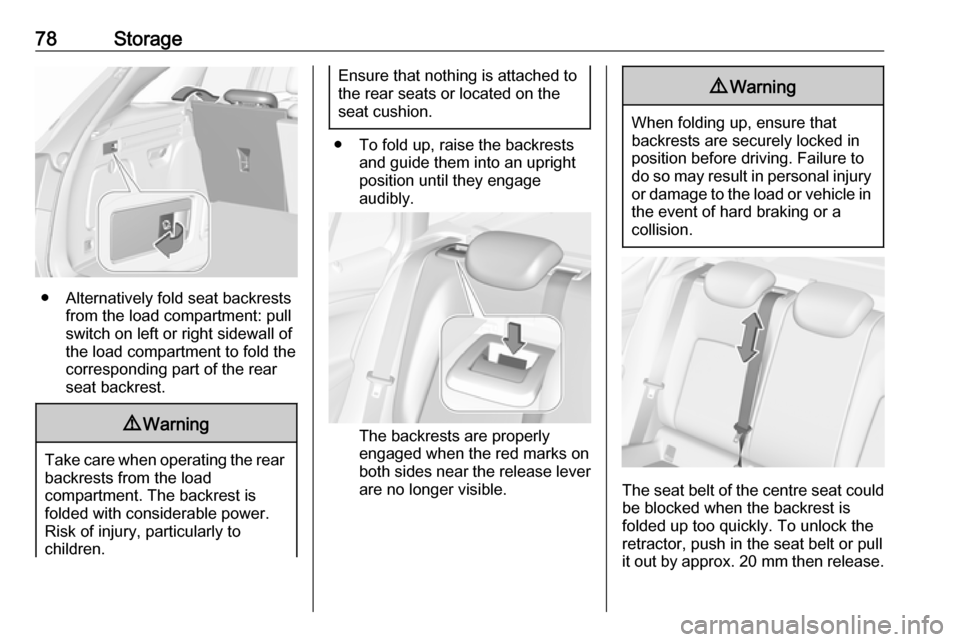
● Alternatively fold seat backrestsfrom the load compartment: pullswitch on left or right sidewall of
the load compartment to fold the
corresponding part of the rear
seat backrest.
9 Warning
Take care when operating the rear
backrests from the load
compartment. The backrest is
folded with considerable power.
Risk of injury, particularly to
children.
Ensure that nothing is attached to
the rear seats or located on the
seat cushion.
● To fold up, raise the backrests and guide them into an upright
position until they engage
audibly.
The backrests are properly
engaged when the red marks on
both sides near the release lever
are no longer visible.
9 Warning
When folding up, ensure that
backrests are securely locked in
position before driving. Failure to
do so may result in personal injury or damage to the load or vehicle in the event of hard braking or a
collision.
The seat belt of the centre seat could
be blocked when the backrest is
folded up too quickly. To unlock the
retractor, push in the seat belt or pull
it out by approx. 20 mm then release.
Page 84 of 315

82Storage
On vehicles equipped with tyre repair
kit, the front lashing eyes are located
underneath the rear floor cover
behind the rear seats. To get access
to the lashing eyes, open the
perforated parts of the cover by using
the screwdriver. Vehicle tools 3 253.
Stick the screwdriver through the cover as shown in the illustration and
fold up the perforated part of the
cover.
Fold up the lashing eyes by using the screwdriver.
Sports Tourer
Front and rear lashing eyes are
located at the sidewalls. Fold up the
lashing eyes to use and fold down
when not required.
Cargo management system The FlexOrganizer is a flexible
system for dividing up the load
compartment.
The system consists of: ● adapters
● mesh pockets
● hooks
● service box
● strap set
The components are fitted in rails on
both side panels using adapters and hooks.
Installation of adapters in the rails
Fold open the handle plate, insert the adapter into the upper and lower
groove of the rail and move to the
required position. Turn the handle
plate upwards to lock the adapter. To
remove, turn the handle plate down
and move out of the rail.
Page 86 of 315

84StorageService box
Install two hooks in the upper rail.
Insert the upper brackets of the box
from above into the hooks.
Alternatively install both hooks in the
lower rail. Plug in the lower brackets
of the box from above into the lower
hooks.
Strap set
Insert the adapters of the strap set in
a rail. Make sure that the belt is not
twisted.
The strap set has two locks to open. The belt can be tightened.
Safety net
The safety net is available on the
Sports Tourer and can be installed
behind the rear seats or, if the rear
seat backrests are folded, behind the
front seats.
Passengers must not be transported
behind the safety net.
Installation
Behind the rear seats
● There are installation openings on both sides in the roof frame
above the rear seats: suspend
Page 92 of 315

90Instruments and controlsInstruments and
controlsControls ....................................... 91
Steering wheel adjustment ........91
Steering wheel controls .............91
Heated steering wheel ...............92
Horn ........................................... 92
Windscreen wiper and washer ..92
Rear window wiper and washer ...................................... 94
Outside temperature ..................95
Clock ......................................... 95
Power outlets ............................. 97
Ashtrays .................................... 98
Warning lights, gauges and indi‐ cators ........................................... 99
Instrument cluster ......................99
Speedometer ........................... 102
Odometer ................................ 103
Trip odometer .......................... 103
Tachometer ............................. 104
Fuel gauge .............................. 104
Fuel selector ............................ 104
Engine coolant temperature gauge ..................................... 105
Service display ........................ 106Control indicators ....................107
Turn lights ................................ 107
Seat belt reminder ...................107
Airbag and belt tensioners .......108
Airbag deactivation ..................108
Charging system .....................109
Malfunction indicator light ........109
Brake and clutch system .........109
Electric parking brake ..............109
Electric parking brake fault ......109
Antilock brake system (ABS) ...110
Gear shifting ............................ 110
Following distance ...................110
Lane keep assist .....................110
Electronic Stability Control off . 110
Electronic Stability Control and Traction Control system .........110
Traction Control system off .....111
Preheating ............................... 111
Exhaust filter ............................ 111
AdBlue ..................................... 111
Tyre pressure monitoring system .................................... 111
Engine oil pressure ..................111
Low fuel ................................... 112
Immobiliser .............................. 112
Exterior light ............................ 112
High beam ............................... 112
High beam assist .....................112
LED headlights ........................ 112Front fog lights......................... 113
Rear fog light ........................... 113
Cruise control .......................... 113
Adaptive cruise control ............113
Vehicle detected ahead ...........113
Speed limiter ........................... 113
Traffic sign assistant ................113
Door open ................................ 114
Displays ..................................... 114
Driver Information Centre ........114
Info Display .............................. 120
Vehicle messages ......................122
Warning chimes .......................123
Battery voltage ........................ 123
Vehicle personalisation ..............124
Telematics service .....................130
OnStar ..................................... 130
Page 93 of 315
Instruments and controls91Controls
Steering wheel adjustment
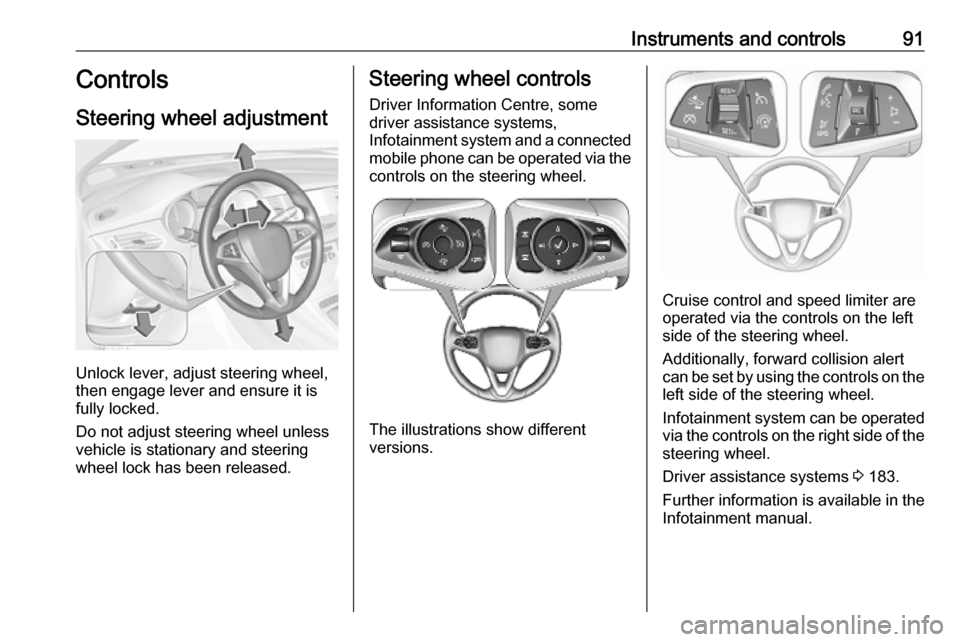
Unlock lever, adjust steering wheel,
then engage lever and ensure it is
fully locked.
Do not adjust steering wheel unless
vehicle is stationary and steering
wheel lock has been released.
Steering wheel controls
Driver Information Centre, some
driver assistance systems,
Infotainment system and a connected mobile phone can be operated via the
controls on the steering wheel.
The illustrations show different
versions.
Cruise control and speed limiter are
operated via the controls on the left
side of the steering wheel.
Additionally, forward collision alert
can be set by using the controls on the
left side of the steering wheel.
Infotainment system can be operated
via the controls on the right side of the
steering wheel.
Driver assistance systems 3 183.
Further information is available in the
Infotainment manual.
Page 97 of 315

Instruments and controls95The rear window wiper comes on
automatically when the windscreen
wiper is switched on and reverse gear
is engaged.
Activation or deactivation of this
function can be changed in the menu Settings in the Info-Display.
Vehicle personalisation 3 124.
Rear window washer
Push lever.
Washer fluid is sprayed onto the rear
window and the wiper wipes a few
times.
The rear window washer system is
deactivated when the fluid level is
low.
Washer fluid 3 233.
Outside temperature A drop in temperature is indicated
immediately and a rise in temperature
after a time delay.
Illustration shows an example.
If outside temperature drops to 3 °C,
a warning message is displayed in the Driver Information Centre.
9 Warning
The road surface may already be
icy even though the display
indicates a few degrees above 0
°C.
Clock
Date and time are shown in the
Info-Display.
Info-Display 3 120.
Page 99 of 315

Instruments and controls978'' Colour-Info-Display
Press ; and then select the
Settings icon.
Select Time and Date .
Set time
Select Set Time to enter the
respective submenu.
Select Auto Set at the bottom of the
screen. Activate either On - RDS or
Off - Manual .
If Off - Manual is selected, adjust
hours and minutes by touching n or
o .
Touch 12-24 Hr on the right side of the
screen to select a time mode.
If 12-hour mode is selected, a third
column for AM and PM setting is
displayed. Select the desired option.
Set date
Select Set Date to enter the
respective submenu.
Notice
If date information is automatically
provided, this menu item is not
available.
Select Auto Set at the bottom of the
screen. Activate either On - RDS or
Off - Manual .
If Off - Manual is selected, adjust the
date by touching n or o.
Clock display
Select Clock Display to enter the
respective submenu.
To turn off the digital clock display in
the menus, select Off.Power outlets
A 12 V power outlet is located in the
centre console. With ignition off, this
power outlet is deactivated.
Do not exceed the maximum power
consumption of 120 W.
Electrical accessories that are
connected must comply with the
electromagnetic compatibility
requirements laid down in
DIN VDE 40 839.
Do not connect any current-delivering
accessories, e.g. electrical charging
devices or batteries.