info VAUXHALL ASTRA K 2020 Workshop Manual
[x] Cancel search | Manufacturer: VAUXHALL, Model Year: 2020, Model line: ASTRA K, Model: VAUXHALL ASTRA K 2020Pages: 303, PDF Size: 27.35 MB
Page 134 of 303
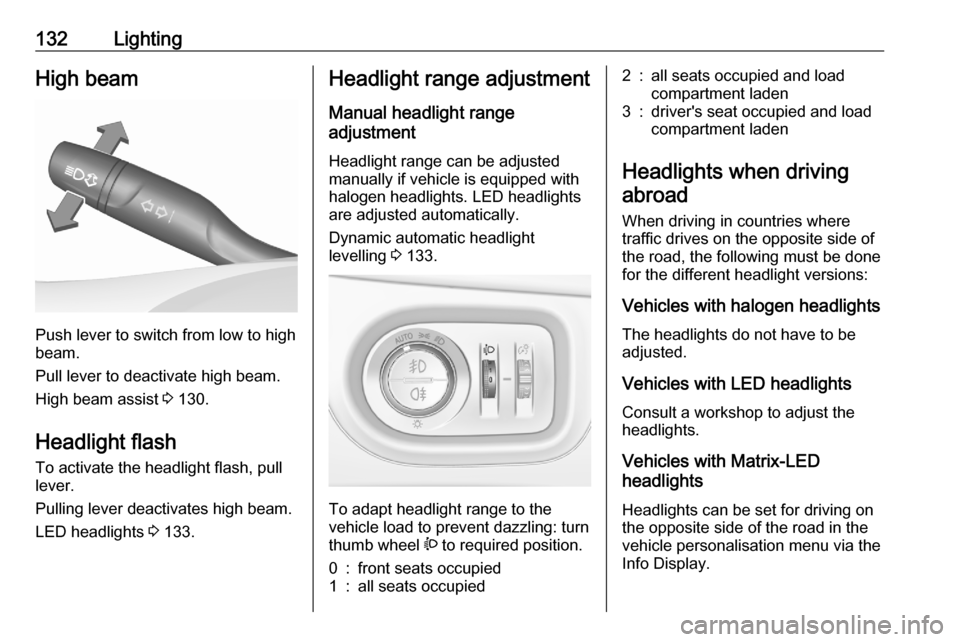
132LightingHigh beam
Push lever to switch from low to high
beam.
Pull lever to deactivate high beam.
High beam assist 3 130.
Headlight flash To activate the headlight flash, pull
lever.
Pulling lever deactivates high beam.
LED headlights 3 133.
Headlight range adjustment
Manual headlight range
adjustment
Headlight range can be adjusted
manually if vehicle is equipped with
halogen headlights. LED headlights
are adjusted automatically.
Dynamic automatic headlight
levelling 3 133.
To adapt headlight range to the
vehicle load to prevent dazzling: turn
thumb wheel ? to required position.
0:front seats occupied1:all seats occupied2:all seats occupied and load
compartment laden3:driver's seat occupied and load
compartment laden
Headlights when driving
abroad
When driving in countries where
traffic drives on the opposite side of
the road, the following must be done
for the different headlight versions:
Vehicles with halogen headlights
The headlights do not have to be
adjusted.
Vehicles with LED headlights
Consult a workshop to adjust the headlights.
Vehicles with Matrix-LED
headlights
Headlights can be set for driving on
the opposite side of the road in the
vehicle personalisation menu via the
Info Display.
Page 135 of 303

Lighting133Select the relevant setting in Settings
I Vehicle .
Info Display 3 120.
Vehicle personalisation 3 123.
Every time the ignition is switched on,
f flashes for approx. 4 seconds as a
reminder.
To deactivate, use the same
procedure as described above. f will
not flash when function is
deactivated.
Control indicator f 3 112.
Daytime running lights Daytime running lights increases
visibility of the vehicle during daylight.
They are switched on automatically
during daytime when engine is
running.
The system switches between
daytime running lights and headlights
automatically, depending on the
lighting conditions.
Automatic light control 3 130.LED headlights
LED and Matrix-LED headlights for
low and high beam ensure better
visibility under all conditions.
Matrix-LED headlight contains
beyond that a variety of particular
LEDs in each headlight which
enables the control of different
lighting programmes.
Light distribution and intensity of light
are variably triggered depending on the lighting conditions, road type and
driving situation. The vehicle adapts
the headlights automatically to the
situation to enable optimal light
performance for the driver. Some
functions of the LED headlights can
be deactivated or activated in the
vehicle personalisation menu. Select
the relevant setting in Settings I
Vehicle in the Info Display.
Vehicle personalisation 3 123.
The following lighting functions are
available with light switch in position
AUTO or 9.Town light
Activated automatically at a speed up
to approx. 34 mph and in situations
with exterior ambient light. The light is
wide and symmetrical. A special
beam pattern is designed to avoid
glare for other road users.
Country light
Activated automatically at a speed
above approx. 34 mph when driving
in rural areas. The illumination of the
current lane and the side of the roadis improved. Oncoming and
preceding vehicles are not dazzled.
Page 136 of 303

134LightingCurve light
Particular LEDs, based on steering
angle and speed, are additionally
triggered to improve lighting in
curves. This function is activated at
speeds from 25 mph to 43 mph and
reacts to steering angle.
Cornering light
When turning off, depending on the
steering angle and the turn lights, particular LEDs are triggered which
illuminate the direction of travel. It is
activated up to a speed of 25 mph.
Reverse parking function
To assist driver's orientation when
parking, both corner lights and
reversing light illuminate when
headlights are on and reverse gear is
engaged. They remain illuminated for
a short time after disengaging reverse gear or until driving faster than
4 mph in a forward gear.
Automatic headlight levelling
To prevent oncoming traffic from
being dazzled, headlight levelling is
automatically adjusted based on
inclination information measured by
front and rear axle, acceleration or
deceleration and vehicle speed.
Headlights when driving abroad 3 132.
Fault in LED headlight system
When the system detects a failure in
the LED headlight system, it selects a
preset position to avoid dazzling of
oncoming traffic. A warning is
displayed in the Driver Information
Centre.Hazard warning flashers
Operated by pressing ¨.
The illustrations show different
versions.
In the event of an accident with airbag
deployment, the hazard warning
flashers are activated automatically.
Page 138 of 303

136LightingThe vehicle rear fog light is
deactivated when towing a trailer or a
plug is connected with the socket, e.
g. when a bicycle carrier is used.
Parking lights
When the vehicle is parked, the
parking lights on one side can be
activated:
1. Switch off ignition.
2. Move the indicator lever all the way up (right parking lights) or
down (left parking lights).
Confirmed by a signal and the
corresponding turn lights control
indicator.
Reversing lights
The reversing light comes on when
the ignition is on and reverse gear is
selected.
Misted light covers
The inside of the light housing may
mist up briefly in poor, wet and cold weather conditions, in heavy rain or
after washing. The mist disappears
quickly by itself; to help switch on the
headlights.Interior lighting
Instrument panel illumination control
Brightness of the following lights can
be adjusted in position AUTO when
the light sensor detects night
conditions, or in position 8 or 9.
● instrument panel illumination
● Info Display
● illuminated switches and operation elements
Turn thumb wheel A and hold until
the desired brightness is obtained.
Page 140 of 303
138LightingLighting featuresCentre console lighting Spotlight incorporated in the interior
lighting comes on when headlights
are switched on.
Entry lighting
Welcome lighting The following lights are switched on
for a short time by unlocking the
vehicle with the radio remote control:
● headlights
● tail lights
● number plate lights
● instrument panel light
● interior lights
Some functions are only operable
when it is dark outside to facilitate locating the vehicle.
The lighting switches off immediately
when the ignition is switched on.
Starting off 3 17.This function can be activated or
deactivated in the vehicle
personalisation.
Select the relevant setting in Settings
I Vehicle in the Info Display.
Info Display 3 120.
Vehicle personalisation 3 123.
The settings can be saved for the key
being used 3 24.
The following lights will additionally
switch on when the driver's door is
opened:
● illumination of some switches
● Driver Information Centre
● door pocket lights
Exit lighting The following lights switch on if the
key is removed from the ignition
switch:
● interior lights
● instrument panel light
They will switch off automatically after
a delay. This function works only in
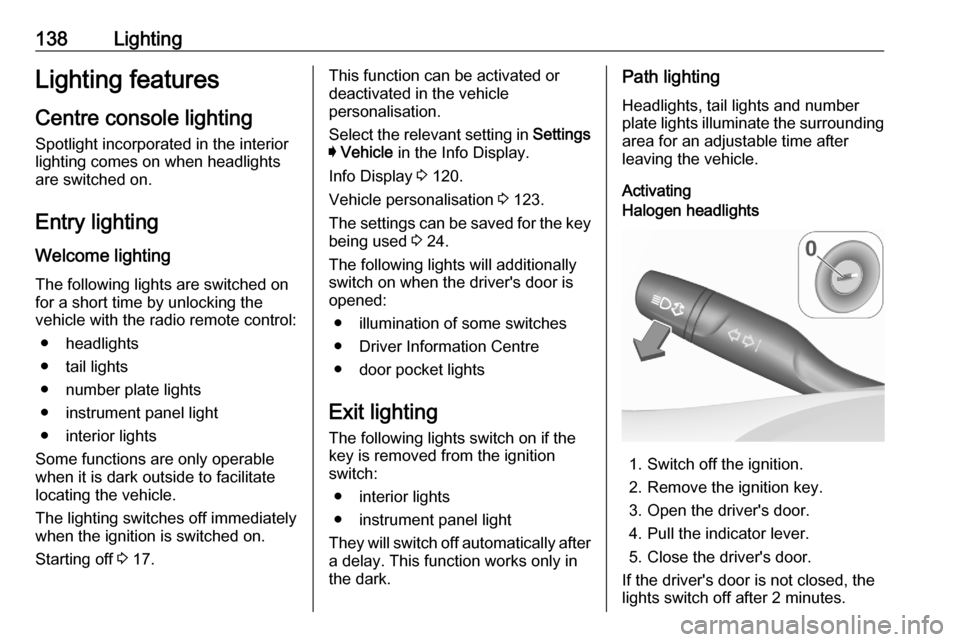
the dark.Path lighting
Headlights, tail lights and number
plate lights illuminate the surrounding
area for an adjustable time after
leaving the vehicle.
ActivatingHalogen headlights
1. Switch off the ignition.
2. Remove the ignition key.
3. Open the driver's door.
4. Pull the indicator lever.
5. Close the driver's door.
If the driver's door is not closed, the
lights switch off after 2 minutes.
Page 141 of 303

Lighting139Exit lighting is switched off
immediately if the indicator lever is
pulled while the driver's door is open.LED headlights
Path lighting is activated, when the
ignition is switched off and the driver's door is opened.
This function can be activated or
deactivated in the vehicle
personalisation.
Select the relevant setting in Settings
I Vehicle in the Info Display.
Info Display 3 120.
Vehicle personalisation 3 123.
The settings can be saved for the key being used 3 24.
Battery discharge protection
Vehicle battery state of charge
function
The function guarantees longest
vehicle battery life via a generator
with controllable power output and
optimised power distribution.
To prevent discharge of the vehicle
battery when driving, the following
systems are reduced automatically in two stages and finally switched off:
● auxiliary heater
● heated rear window and mirrors
● heated steering wheel
● heated mirrors
● heated seats
● fan
In the second stage, a message
which confirms the activation of the
vehicle battery discharge protection
will be displayed in the Driver
Information Centre.
Switching off electric lights
To prevent discharge of the vehicle
battery when the ignition is switched off, some interior lights are switched
off automatically after some time.
Page 145 of 303

Climate control143● Heated rear window and exteriormirrors f
● Dual zone temperature synchronisation SYNC
● Heated seats q
● Fan speed increase y and
decrease x
● Ventilated seats r
● Steering wheel heating Z
● Automatic mode AUTO
Heated rear window f 3 44.
Heated exterior mirrors Ü 3 40.
Heated seats q 3 55.
Ventilated seats r 3 55.
Heated steering wheel Z 3 92.
Each change of settings is shown in
the Info Display for a few seconds.
The electronic climate control system
is only fully operational when the
engine is running.
Automatic mode AUTO
Basic settings for automatic control
with maximum comfort:
● Press AUTO, the air distribution
and fan speed are regulated
automatically.
● Open all air vents to allow optimised air distribution in
automatic mode.
Page 147 of 303
Climate control145Demisting and defrosting the
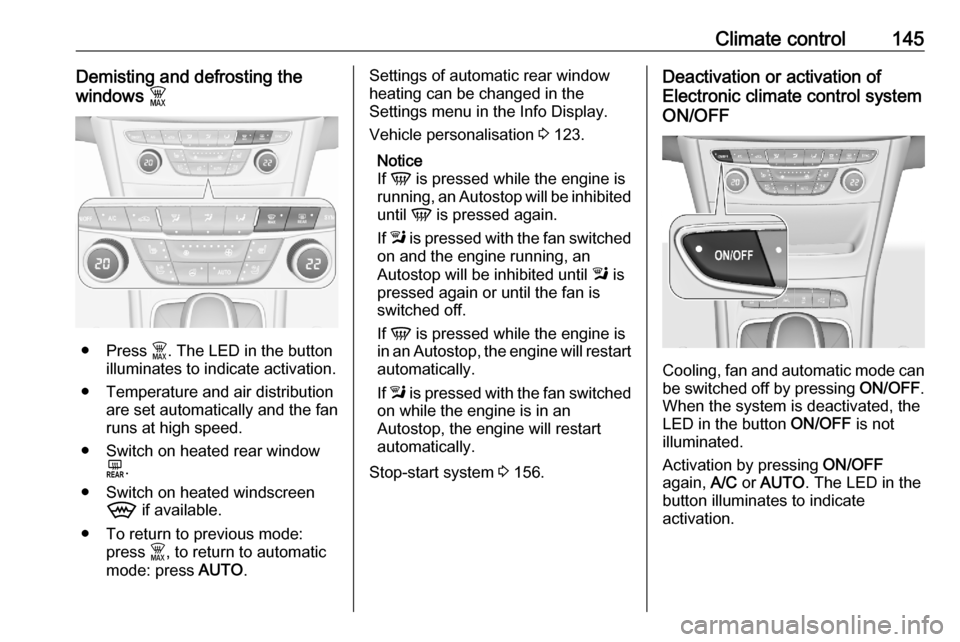
windows $
● Press $. The LED in the button
illuminates to indicate activation.
● Temperature and air distribution are set automatically and the fan
runs at high speed.
● Switch on heated rear window f.
● Switch on heated windscreen 9 if available.
● To return to previous mode: press $, to return to automatic
mode: press AUTO.
Settings of automatic rear window
heating can be changed in the
Settings menu in the Info Display.
Vehicle personalisation 3 123.
Notice
If V is pressed while the engine is
running, an Autostop will be inhibited
until V is pressed again.
If l is pressed with the fan switched
on and the engine running, an
Autostop will be inhibited until l is
pressed again or until the fan is
switched off.
If V is pressed while the engine is
in an Autostop, the engine will restart automatically.
If l is pressed with the fan switched
on while the engine is in an
Autostop, the engine will restart
automatically.
Stop-start system 3 156.Deactivation or activation of
Electronic climate control system
ON/OFF
Cooling, fan and automatic mode can
be switched off by pressing ON/OFF.
When the system is deactivated, the
LED in the button ON/OFF is not
illuminated.
Activation by pressing ON/OFF
again, A/C or AUTO . The LED in the
button illuminates to indicate
activation.
Page 150 of 303
148Climate controlAutomatic air recirculationAn air humidity sensor switches
automatically to external air if internal air humidity is too high.
Basic settings
Some settings can be changed in the Settings menu in the Info Display.
Vehicle personalisation 3 123.
Auxiliary heater
Air heater Quickheat is an electric auxiliary air
heater which automatically warms up
the passenger compartment more
quickly.Air vents
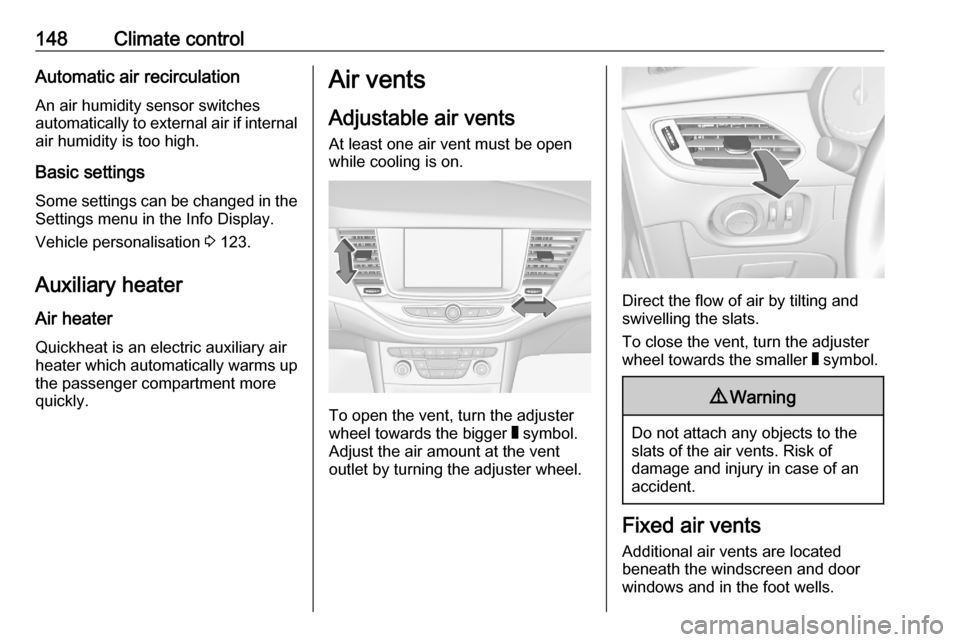
Adjustable air vents At least one air vent must be open
while cooling is on.
To open the vent, turn the adjuster
wheel towards the bigger W symbol.
Adjust the air amount at the vent
outlet by turning the adjuster wheel.
Direct the flow of air by tilting and
swivelling the slats.
To close the vent, turn the adjuster
wheel towards the smaller W symbol.
9 Warning
Do not attach any objects to the
slats of the air vents. Risk of
damage and injury in case of an
accident.
Fixed air vents
Additional air vents are located
beneath the windscreen and door windows and in the foot wells.
Page 152 of 303

150Driving and operatingDriving and
operatingDriving hints ............................... 151
Control of the vehicle ...............151
Steering ................................... 151
Starting and operating ...............151
New vehicle running-in ............151
Ignition switch positions ...........151
Power button ........................... 152
Retained power off ..................154
Starting the engine ..................154
Overrun cut-off ........................ 156
Stop-start system ....................156
Parking .................................... 159
Engine exhaust .......................... 161
Exhaust filter ............................ 161
Catalytic converter ...................162
AdBlue ..................................... 162
Automatic transmission ..............165
Transmission display ...............166
Gear selection ......................... 166
Manual mode ........................... 167
Electronic driving programmes 167
Fault ........................................ 168
Interruption of power supply ....168Manual transmission ..................169
Brakes ........................................ 169
Antilock brake system .............169
Parking brake .......................... 170
Brake assist ............................. 172
Hill start assist ......................... 172
Ride control systems .................172
Traction Control system ..........172
Electronic Stability Control ......173
Driver assistance systems .........175
Cruise control .......................... 175
Speed limiter ........................... 177
Adaptive cruise control ............178
Forward collision alert .............186
Following distance indication ...188
Active emergency braking .......189
Front pedestrian protection .....192
Parking assist .......................... 194
Side blind spot alert .................202
Rear view camera ...................203
Traffic sign assistant ................205
Lane keep assist .....................209
Fuel ............................................ 211
Fuel for petrol engines .............211
Fuel for diesel engines ............213
Refuelling ................................ 213
Trailer hitch ................................ 215
General information .................215Driving characteristics and
towing tips .............................. 216
Trailer towing ........................... 216
Towing equipment ...................217
Trailer stability assist ...............220