Bumper VAUXHALL ASTRA K 2020 Owner's Manual
[x] Cancel search | Manufacturer: VAUXHALL, Model Year: 2020, Model line: ASTRA K, Model: VAUXHALL ASTRA K 2020Pages: 303, PDF Size: 27.35 MB
Page 29 of 303
Keys, doors and windows27The system locks if any of the
following occurs:
● It has been more than 5 seconds since unlocking.
● The button on an exterior handle has been pressed twice within
3 seconds to unlock the vehicle.
● Any door has been opened and all doors are now closed.
If the driver's door is not closed
properly, the electronic key remains in
the vehicle or the ignition is not off,
locking will not be permitted.
If there have been two or more
electronic keys in the vehicle and the
ignition was on once, the doors will be locked even if just one electronic key
is taken out of the vehicle.
Unlocking and opening the tailgate
The tailgate can be unlocked and
opened hands-free via moving the
foot below the rear bumper or by
pushing the tailgate button under the
brand emblem when the electronic
key is in range. The doors remain
locked.
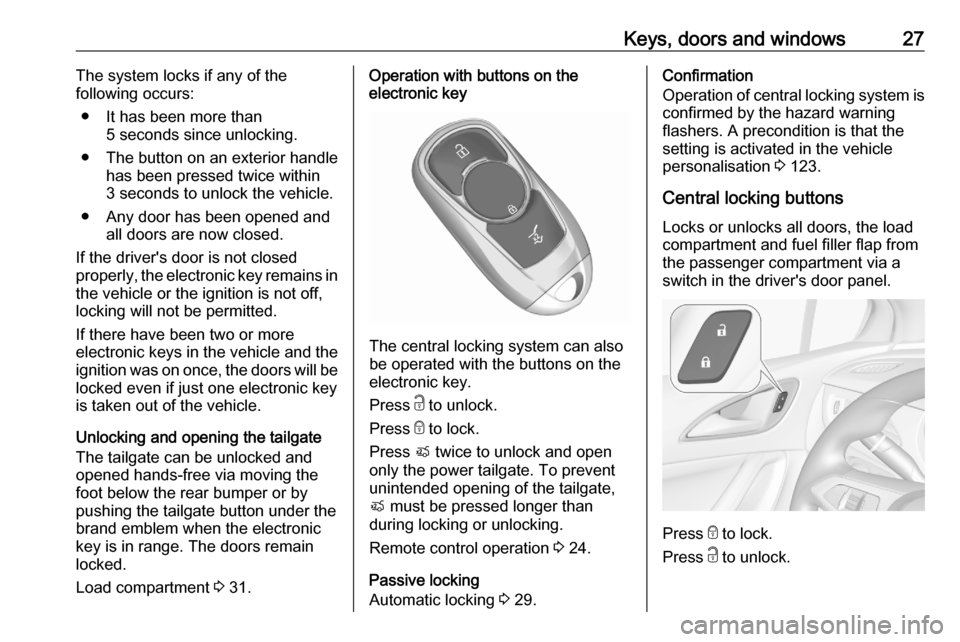
Load compartment 3 31.Operation with buttons on the
electronic key
The central locking system can also
be operated with the buttons on the
electronic key.
Press c to unlock.
Press e to lock.
Press X twice to unlock and open
only the power tailgate. To prevent
unintended opening of the tailgate,
X must be pressed longer than
during locking or unlocking.
Remote control operation 3 24.
Passive locking
Automatic locking 3 29.
Confirmation
Operation of central locking system is
confirmed by the hazard warning
flashers. A precondition is that the
setting is activated in the vehicle
personalisation 3 123.
Central locking buttons Locks or unlocks all doors, the load
compartment and fuel filler flap from
the passenger compartment via a
switch in the driver's door panel.
Press e to lock.
Press c to unlock.
Page 34 of 303
32Keys, doors and windowsPower tailgate9Warning
Take care when operating the
power tailgate. Risk of injury,
particularly to children.
Keep a close watch on the
movable tailgate when operating.
Ensure that nothing becomes
trapped during operating and no
one is standing within the moving
area.
The power tailgate can be operated
by:
● Pressing X twice on the
electronic key. To prevent
unintended opening of the
tailgate, X must be pressed
longer than during locking or unlocking.
● Hands-free operation with motion
sensor below the rear bumper.
● The tailgate button under the exterior tailgate moulding andC in the open tailgate.
● The switch C on the inside of
the driver's door.
On vehicles with automatic
transmission, the tailgate can only be operated when the vehicle is
stationary and with selector lever in P.
The turn lights flash and a chime sounds when the power tailgate is
operating.
Notice
Operating the power tailgate does not operate the central locking
system. To open the tailgate with the button on the electronic key, or with
the tailgate button or via hands-free
operation, it is not necessary to
unlock the vehicle. A precondition is
that the electronic key is outside the
vehicle, within a range of approx.
1 m of the tailgate.
Do not leave the electronic key in the
load compartment.
Lock the vehicle after closing if it was
unlocked previously.
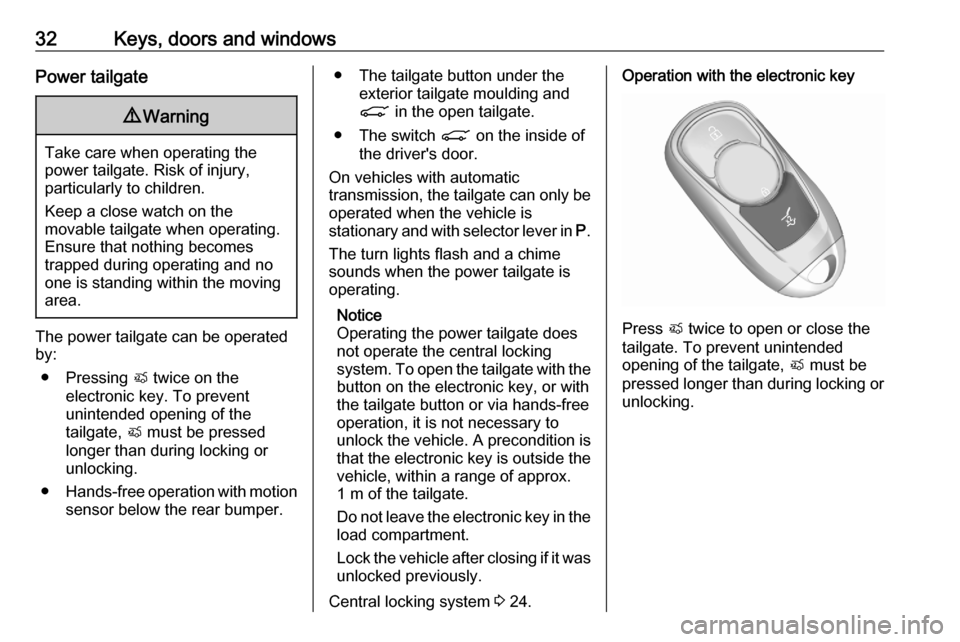
Central locking system 3 24.Operation with the electronic key
Press X twice to open or close the
tailgate. To prevent unintended
opening of the tailgate, X must be
pressed longer than during locking or unlocking.
Page 35 of 303
Keys, doors and windows33Hands-free operation with motion
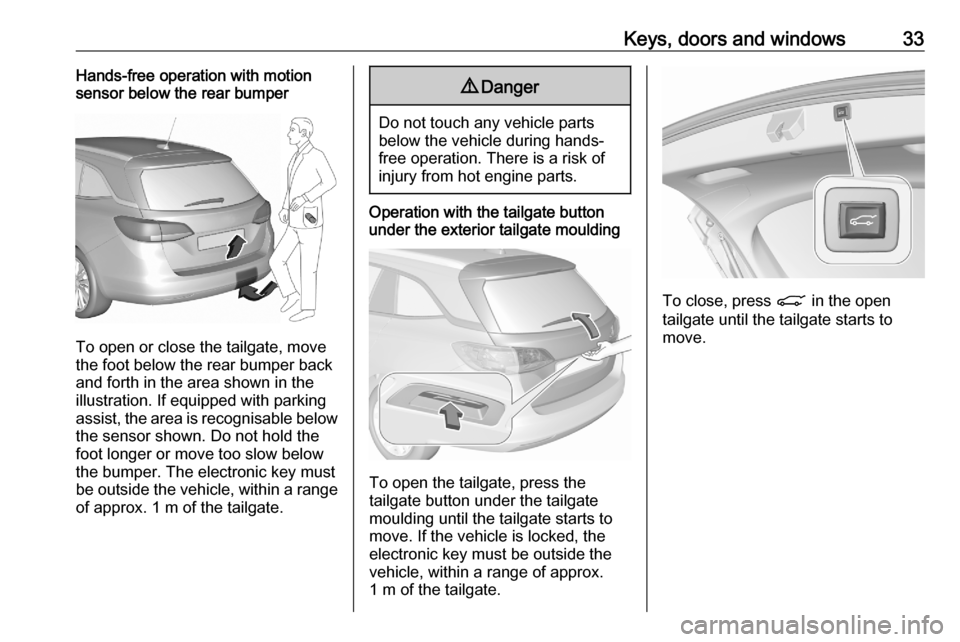
sensor below the rear bumper
To open or close the tailgate, move
the foot below the rear bumper back
and forth in the area shown in the illustration. If equipped with parking
assist, the area is recognisable below
the sensor shown. Do not hold the
foot longer or move too slow below
the bumper. The electronic key must be outside the vehicle, within a range
of approx. 1 m of the tailgate.
9 Danger
Do not touch any vehicle parts
below the vehicle during hands-
free operation. There is a risk of
injury from hot engine parts.
Operation with the tailgate button
under the exterior tailgate moulding
To open the tailgate, press the
tailgate button under the tailgate
moulding until the tailgate starts to
move. If the vehicle is locked, the
electronic key must be outside the
vehicle, within a range of approx.
1 m of the tailgate.
To close, press C in the open
tailgate until the tailgate starts to
move.
Page 61 of 303

Seats, restraints59Unfasten
To release belt, press red button on
belt buckle.
Using the seat belt while pregnant9 Warning
The lap belt must be positioned as
low as possible across the pelvis
to prevent pressure on the
abdomen.
Airbag system
The airbag system consists of a
number of individual systems
depending on the scope of
equipment.
When triggered, the airbags inflate
within milliseconds. They also deflate
so quickly that it is often unnoticeable
during the collision.9 Warning
The airbag system deploys in an
explosive manner, repairs must be performed by skilled personnel
only.
9 Warning
Adding accessories that change
the vehicle's frame, bumper
system, height, front end or side
sheet metal, may keep the airbag
system from working properly. The operation of the airbag system can
also be affected by changing any
parts of the front seats, seat belts,
Page 187 of 303

Driving and operating185Vehicle path changes
If another vehicle enters your driving
path, adaptive cruise control will first
consider the vehicle when it is
completely in your path. Be ready to
take action and depress the brake
pedal, if you need to brake more
quickly.
Hill and trailer considerations
9 Warning
Do not use adaptive cruise control
on steep hill roads.
System performance on hills depends
on vehicle speed, vehicle load, traffic
conditions and the road gradient. It
may not detect a vehicle in your path
while driving on hills. Full speed range
adaptive control is deactivated
automatically, as the vehicle is
stopping uphill on an incline greater than 10%. In this condition, be
prepared to take control of the
vehicle.
Note that applying the brake
deactivates the system.
Radar unitThe radar unit is mounted behind the
radiator grille behind or below the
brand emblem.
Number plate mounting 3 221.9 Warning
The radar unit was aligned
carefully during manufacture.
Therefore, in the event of a front-
end impact, do not use the system. The front bumper may appear to
be intact, however the sensor
behind can be out of position and
react incorrectly. After an
accident, consult a workshop to
verify and adjust the radar unit
position.
Settings
Settings can be changed in the
vehicle personalisation menu in the
Info Display.
Select the relevant setting in Settings
I Vehicle in the Info Display.
Info Display 3 120.
Vehicle personalisation 3 123.
Page 193 of 303

Driving and operating191Minor brake pedal pulsations or pedal
movement during this time is normal
and the brake pedal should continue
to be applied as needed. Intelligent
brake assist will automatically
disengage only when the brake pedal is released.9 Warning
Intelligent brake assist may
increase vehicle braking in
situations when it may not be
necessary. You could block the
flow of traffic. If this occurs, take
your foot off the brake pedal and
then apply the brakes as needed.
Deactivation
On vehicles with front camera active
emergency braking can be
deactivated by repeatedly pressing
the gap switch V to Off setting,
3 186. If deactivated a message is
displayed in the Driver Information
Centre.
On vehicles with radar sensor the
system can be disabled in the
personalisation menu in the Info
Display 3 123.
We recommend to deactivate the
system or set it to alert only in the
following cases:
● when the vehicle is being towed
● if a trailer is attached to the vehicle
● before using an automatic car wash with ignition switched on
● if the windscreen has been damaged close to the camera
● if the front bumper has been damaged
System limitations In some cases, the active emergencybraking system may provide an
automatic braking in situations that
seem to be unnecessary, for instance
in parking garages, due to traffic signs
in a curve or due to vehicles in
another lane. This is normal
operation, the vehicle does not need
service. Firmly apply the accelerator
pedal to override the automatic
braking if the situation and the
surroundings permit.
Page 196 of 303

194Driving and operating9Warning
Using the Front pedestrian braking
system while towing a trailer couldcause loss of vehicle control and
crash. Turn the system to Alert or
Off in the vehicle personalisation
when towing a trailer.
Vehicle personalisation 3 123.
System limitations
In the following cases, front
pedestrian protection may not detect
a pedestrian ahead or sensor
performance is limited:
● Vehicle speed is out of range from 5 mph to 50 mph in forward
gear.
● The distance to an pedestrian ahead is more than 40 m.
● Driving on winding or hilly roads.
● During nighttime driving.
● Weather limits visibility, such as fog, rain, or snow.
● The sensor in the windscreen is blocked by snow, ice, slush, mud,dirt, windscreen damage or
affected by foreign items, e.g.
stickers.
Parking assist General information
When the trailer hitch is attached,
change the configuration settings in
the vehicle personalisation menu in
the Info Display.
Vehicle personalisation 3 123.
When attaching a trailer or bike
carrier to the trailer hitch, the parking
assist is deactivated.
Rear parking assist9 Warning
It is the driver who bears full
responsibility for the parking
manoeuvre.
Always check the surrounding
area while reversing and using the rear parking assist system.
The rear parking assist makes
parking easier by measuring the
distance between the vehicle and
rear obstacles. It informs and warns
the driver by giving acoustic signals
and display indication.
The system has four ultrasonic
parking sensors in the rear bumper.
Activation
After ignition is switched on, the rear
parking assist is activated.
Page 198 of 303

196Driving and operating
The system has four ultrasonic
parking sensors each in the rear and
front bumper.
Activation
The system is activated automatically
at a speed up to 7 mph.An illuminated LED in the parking
assist button r indicates that the
system is ready to operate.
If r is switched off within an ignition
cycle, the parking assist is
deactivated. If vehicle speed has exceeded 15 mph beforehand,
parking assist will be reactivated when speed drops below 7 mph.
When the system is deactivated, the
LED in the button extinguishes and a
message pops up in the Driver
Information Centre.
Indication
The system warns the driver with
acoustic and visuel signals against
potentially hazardous obstacles in
front of the vehicle in a distance range up to 120 cm and against potentially
hazardous obstacles behind the
vehicle in a distance range up to
50 cm while a forward gear is
engaged, or up to 150 cm while
reverse gear is engaged.
Depending on which side of the
vehicle is closer to an obstacle, you
will hear acoustic warning signals inthe vehicle on the respective side.
The interval between the signals
becomes shorter as the vehicle gets
closer to that obstacle. When the
distance is less than approx. 40 cm, the signal is continuous.
Additionally, the distance to rear and
front obstacles is displayed by
changing distance lines in the Driver
Information Centre 3 114 or,
depending on the version, on the Info
Display 3 120.
Page 200 of 303

198Driving and operating
Advanced parking assist is always
combined with front-rear parking assist. Both systems use the same
sensors in the front and rear bumper.
The system has six ultrasonic parking sensors each in both the rear and
front bumper.
Activation of advanced parking assist
Advanced parking assist can only be
activated when driving forwards.When searching for a parking slot, the system is ready to operate with a
short press of (.
The system recognises and
memorises 10 m for parallel parking
slots or 6 m for perpendicular parking
slots in the parking assist mode.
The system can only be activated and
searches for a parking slot at a speed
up to 18 mph.
The maximum allowed parallel
distance between the vehicle and a
row of parked cars is 150 cm.
FunctionalityParking slot searching mode,
indication in the Driver Information
Centre
Select parallel or perpendicular
parking slot in Driver Information
Centre by long press on (.
The system is configured to detect parking slots by default on the
passenger side. To detect parking
slots on the driver side, switch on the
turn lights on the driver side.
Page 203 of 303

Driving and operating201If an object is detected during parking
instructions, a message to stop the
vehicle is indicated. Removing the
object will resume the parking
manoeuvre. If the object is not
removed, the system will be
deactivated. A long press of ( will
activate the system and search for a new parking slot.
Basic notes on parking assist
systems9 Warning
Under certain circumstances,
various reflective surfaces on
objects or clothing as well as
external noise sources may cause the system to fail to detect
obstacles.
Special attention must be paid to
low obstacles which can damage
the lower part of the bumper.
Caution
Performance of the system can be reduced when sensors are
covered, e.g. by ice or snow.
Performance of the parking assist
system can be reduced due to
heavy loading.
Special conditions apply if there
are taller vehicles in the vicinity
(e.g. off-road vehicles, mini vans,
vans). Object identification and correct distance indication in the
upper part of these vehicles
cannot be guaranteed.
Objects with a very small reflection
cross-section, e.g. objects of
narrow size or soft materials, may
not be detected by the system.
Parking assist systems do not
detect objects outside the
detection range.
Notice
It is possible that the sensor detects a non-existing object caused by
echo disturbance from external
acoustic noise or mechanical
misalignments (sporadic false
warnings may occur).
Make sure that the front number
plate is properly mounted (not bent
and no gaps to the bumper on the left
or right side) and the sensors are
firmly in place. The performance of
the parking assist could be reduced if a number plate holder is used.
Advanced parking assist system
may not respond to changes in the
available parking space after
initiating a parking manoeuvre. The
system may recognize an entry, a
gateway, a courtyard or even a crossing as a parking slot. After
selecting reverse gear the system
will start a parking manoeuvre.
Low curbs and surface irregularities,
e.g. on construction zones, are not
detected by the system. The driver
accepts responsibility.
Notice
After production, the system
requires a calibration. For optimal
parking guidance, a driving distance of at least 6 miles, including a
number of bends, is required.