camera VAUXHALL ASTRA K 2020 Owner's Manual
[x] Cancel search | Manufacturer: VAUXHALL, Model Year: 2020, Model line: ASTRA K, Model: VAUXHALL ASTRA K 2020Pages: 303, PDF Size: 27.35 MB
Page 43 of 303

Keys, doors and windows41Interior mirrors
Manual anti-dazzle
To reduce dazzle, adjust the lever on the underside of the mirror housing.
Automatic anti-dazzle
Dazzle from following vehicles is
automatically reduced, when driving
in the dark.
Windows
Windscreen
Windscreen stickers
Do not attach stickers such as toll
road stickers or similar on the
windscreen in the area of the interior
mirror. Otherwise the detection zone
of the sensor and the view area of the camera in the mirror housing could be
restricted.
Windscreen replacementCaution
If the vehicle has a front-looking
camera sensor for the driver
assistance systems, it is very
important that any windscreen
replacement is performed
accurately according to Vauxhall
specifications. Otherwise, these systems may not work properly
and there is a risk of unexpected
behaviour and / or messages from these systems.
Page 122 of 303
120Instruments and controlsInfo DisplayThe Info Display is located in the
instrument panel near the instrument
cluster.
Depending on the vehicle
configuration, the vehicle has one of
the following Infotainment systems:
● Multimedia
or
● Multimedia Navi
or
● Multimedia Navi Pro
The Info Display can indicate: ● time 3 96
● outside temperature 3 96
● date 3 96
● Infotainment system, see description in the Infotainment
manual
● climate control settings 3 142
● rear view camera 3 203
● parking assist instructions 3 194
● navigation, see description in the
Infotainment manual● system messages
● settings for vehicle personalisation 3 123
Multimedia Navi Selecting menus and settings
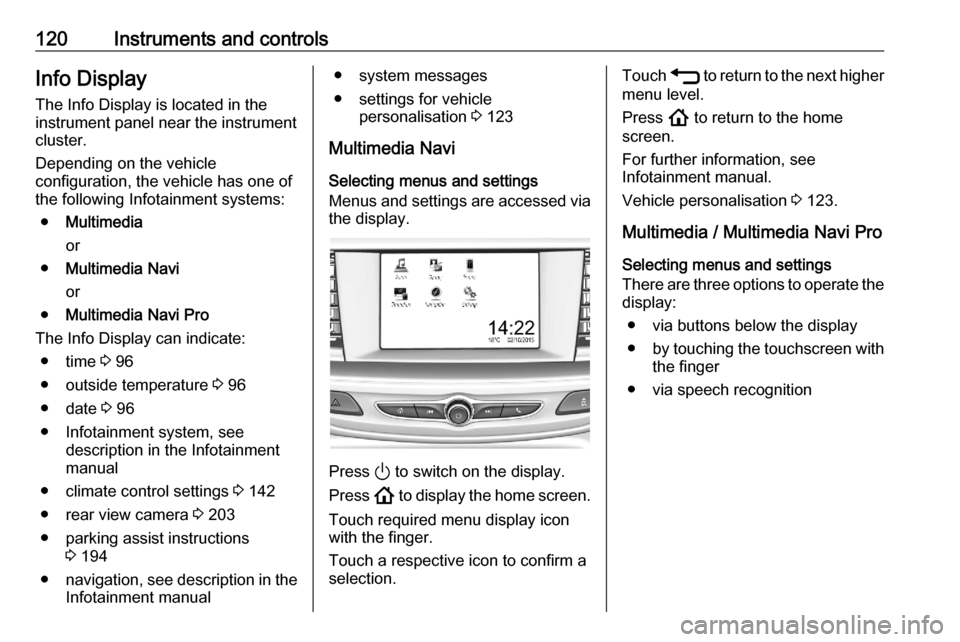
Menus and settings are accessed via
the display.
Press ) to switch on the display.
Press ! to display the home screen.
Touch required menu display icon
with the finger.
Touch a respective icon to confirm a
selection.
Touch 1 to return to the next higher
menu level.
Press ! to return to the home
screen.
For further information, see
Infotainment manual.
Vehicle personalisation 3 123.
Multimedia / Multimedia Navi Pro
Selecting menus and settings
There are three options to operate the display:
● via buttons below the display
● by touching the touchscreen with
the finger
● via speech recognition
Page 126 of 303

124Instruments and controlsAuto Rear Defog: Automatically
activates heated rear window.
● Collision / Detection Systems
Rear View Camera Guidelines :
Activates or deactivates the rear
view camera guidelines on the
Info Display.
Forward Collision Alert : Activates
or deactivates forward collision
alert.
Auto Collision Preparation :
Activates or deactivates the
automatic brake functionality of
the vehicle in the event of
imminent collision danger. The
following is selectable: the
system will take over brake
control, warn by chimes only or is
deactivated completely.
Forward Collision System :
Activates or deactivates warning
chimes or automatic brake
functionality in the event of
imminent collision danger.
Front pedestrian detection :
Activates or deactivates warning
chimes or automatic brakefunctionality of the pedestrian
detection system.
Rear Cross Traffic Alert :
Activates or deactivates rear cross traffic alert.
Park Assist : Activates or
deactivates the parking assist.
Activation is selectable with or
without attached trailer coupling.
Go Notifier : Activates or
deactivates the reminder
message to drive off when the
adaptive cruise control holds the
vehicle at standstill.
Side Blind Zone Alert : Activates
or deactivates side blind zone alert.
● Comfort and Convenience
Auto Memory Recall : Changes
the settings to the recall of
memorised settings for power
seat adjustment.
Easy Exit Driver Seat : Activates
or deactivates easy exit function of the power seat.
Chime Volume : Changes the
volume of warning chimes.Reverse Tilt Mirror : Activates or
deactivates the parking assist function of the exterior mirrors.
Auto Mirror Folding : Activates or
deactivates folding of the exterior
mirrors with the remote control.
Personalization By Driver :
Activates or deactivates the
personalisation function.
Rain Sense Wipers : Activates or
deactivates automatic wiping
with rain sensor.
Auto Wipe in Reverse Gear :
Activates or deactivates
automatic switching on of the
rear window wiper when reverse gear is engaged.
Extended Hill Start Assist :
Toggles between hill start assist
and extended hold hill start assist
● Lighting
Vehicle Locator Lights : Activates
or deactivates the entry lighting.
Exit Lighting : Activates or
deactivates and changes the
duration of exit lighting.
Page 132 of 303

130LightingTail lightsTail lights are illuminated together
with low/high beam and sidelights.
Automatic light control
When the automatic light control
function is switched on and the
engine is running, the system
switches between daytime running
lights and headlights automatically
depending on the external lighting
conditions and information given by
the rain sensor system.
Daytime running light 3 133.
Automatic headlight activation
During poor lighting conditions
headlights are switched on.
Additionally, headlights are switched
on if the windscreen wipers have
been activated for several wipes.
LED headlights 3 133.
Tunnel detection
When a tunnel is entered headlights
are switched on immediately.
High beam assist
The camera in the windscreen
detects the lights of oncoming or
preceding vehicles. Once activated,
high beam assist remains active and switches high beam on and off
automatically. The latest setting of the high beam assist will remain after theignition is switched on again.
It switches automatically to low beam
when:
● Driving in urban areas.
● It is foggy or snowy.
● Fog lights are switched on.If there are no restrictions detected, the system switches back to high
beam.
This feature allows the high beam to
function as main driving light at night.
Each LED on right or left side is
triggered or faded out particularly according to the traffic situation. This
gives the best light distribution
without dazzling other road users.
High beam is switched on
automatically at a speed above
31 mph . High beam is switched off at
a speed below 22 mph, but high beam
assist remains active.
Page 152 of 303

150Driving and operatingDriving and
operatingDriving hints ............................... 151
Control of the vehicle ...............151
Steering ................................... 151
Starting and operating ...............151
New vehicle running-in ............151
Ignition switch positions ...........151
Power button ........................... 152
Retained power off ..................154
Starting the engine ..................154
Overrun cut-off ........................ 156
Stop-start system ....................156
Parking .................................... 159
Engine exhaust .......................... 161
Exhaust filter ............................ 161
Catalytic converter ...................162
AdBlue ..................................... 162
Automatic transmission ..............165
Transmission display ...............166
Gear selection ......................... 166
Manual mode ........................... 167
Electronic driving programmes 167
Fault ........................................ 168
Interruption of power supply ....168Manual transmission ..................169
Brakes ........................................ 169
Antilock brake system .............169
Parking brake .......................... 170
Brake assist ............................. 172
Hill start assist ......................... 172
Ride control systems .................172
Traction Control system ..........172
Electronic Stability Control ......173
Driver assistance systems .........175
Cruise control .......................... 175
Speed limiter ........................... 177
Adaptive cruise control ............178
Forward collision alert .............186
Following distance indication ...188
Active emergency braking .......189
Front pedestrian protection .....192
Parking assist .......................... 194
Side blind spot alert .................202
Rear view camera ...................203
Traffic sign assistant ................205
Lane keep assist .....................209
Fuel ............................................ 211
Fuel for petrol engines .............211
Fuel for diesel engines ............213
Refuelling ................................ 213
Trailer hitch ................................ 215
General information .................215Driving characteristics and
towing tips .............................. 216
Trailer towing ........................... 216
Towing equipment ...................217
Trailer stability assist ...............220
Page 181 of 303

Driving and operating179Adaptive cruise control automatically
decelerates the vehicle when
approaching a slower moving vehicle.
It then adjusts the vehicle speed to
follow the vehicle ahead at the
selected following distance. The
vehicle speed increases or decreases to follow the vehicle in front, but willnot exceed the set speed. It may
apply limited braking with activated
brake lights.
The adaptive cruise control can store
and maintain speeds over approx.
15 mph. On vehicles with automatic
transmission, there is no lower speed limit and the system can also brake to
a stop.
Adaptive cruise control uses radar
and camera sensors to detect the
vehicles ahead. If no vehicle is
detected in the driving path, the
adaptive cruise control will behave
like a conventional cruise control.
For additional information including a
video, visit us online.
Adaptive cruise control is mainly
advised to be used on long straight
roads like motorways or country
roads with steady traffic. Do not use
the system if it is not advisable to
maintain a constant speed.
Control indicator A 3 113, m 3 113,
C 3 113.9 Warning
The complete driver attention is
always required while driving with adaptive cruise control. The driver stays fully in control of the vehicle
because the brake pedal, the
accelerator pedal and the cancel
switch have priority over any
adaptive cruise control operation.
Switching on the system
Press v to switch on adaptive cruise
control. C appears in the Driver
Information Centre.
Activation of the functionality bysetting the speed
Adaptive cruise control can be
activated at speeds above 15 mph on
vehicles with automatic transmission
or 19 mph on vehicles with manual
transmission. The upper speed limit is
112 mph.
Page 184 of 303

182Driving and operatingExample: If setting 3 (far) is selected,
then the driver is warned sooner
before a possible collision, also if
adaptive cruise control is inactive or
switched off.9 Warning
The Driver accepts full
responsibility to drive with the
appropriate following distance
based on traffic, weather, visibility
and regional regulation. Followingdistance must be adjusted or the
system switched off when required by the prevailing conditions.
Detecting the vehicle ahead
The green illuminated vehicle ahead
control indicator A is displayed when
the system detects a vehicle in the
driving path. The range of the sensors
is between 25 and 150 m depending
on vehicle speed.
Forward collision alert 3 186.
If this symbol does not display, or
displays briefly, adaptive cruise
control will not respond to vehicles
ahead.
Deactivation of the functionality
Adaptive cruise control is deactivated by the driver when:
● y is pressed.
● Brake pedal is applied.
● Clutch pedal is depressed for more than four seconds.
● Selector lever of automatic transmission is moved to N.
The system is also automatically
deactivated when:
● Vehicle speed accelerates above
120 mph or slows down below
15 mph. Vehicles with automatic
transmission slows down to a stop without deactivating within
5 minutes.● The Traction Control system is deactivated or operating.
● The Electronic Stability Control is
deactivated or operating.
● There is no traffic and nothing detected on the road sides for
approx. 1 minute. In this case
there are no radar echoes and
the sensor may report that it is
blocked.
● The active emergency braking system is applying the brakes.
● Driving on steep inclines.
● The radar sensor is blocked by an ice or water film.
● A fault is detected in the radar, camera, engine or brake system.
● The brakes need to cool down.
Additionally, the system is
automatically deactivated on vehicles with automatic transmission (full
speed range adaptive cruise control)
when:
● The incline uphill or downhill is greater than 20%.
● The electric parking brake is applied.
Page 188 of 303
186Driving and operatingFault
If the adaptive cruise control does not
work due to temporary conditions
(e.g. blockage by ice, overheated
brakes or low speed manoeuvres) or
if there is a permanent system error,
then a message is displayed in the
Driver Information Centre.
Vehicle messages 3 121.
Forward collision alert The forward collision alert may help toavoid or reduce the harm caused by
front-end crashes.
If the vehicle is equipped with
conventional cruise control, the
forward collision alert uses the front
camera in the windscreen to detect a
vehicle directly ahead, in your path.
If the vehicle is equipped with
adaptive cruise control, the forward
collision alert uses the radar sensor to detect a vehicle directly ahead, in
your path.
Number plate mounting 3 221
A vehicle ahead is indicated by the
control indicator A.
If a vehicle directly ahead is
approached too quickly, a warning
chime and alert in the Driver
Information Centre is provided.
A precondition is that forward collision
alert with front camera system or
radar sensor is not deactivated in the vehicle personalisation menu 3 123.
Activation Forward collision alert with front
camera detects vehicles to distances
and operates automatically at all
speeds above walking speed.
Forward collision alert with radar
sensor detects vehicles to distances
and operates automatically at all
speeds above walking speed.
Alerting the driver
The vehicle ahead control indicator
A illuminates green in the instrument
cluster when the system has detected
a vehicle in the driving path.
The control indicator A changes to
yellow when the distance to a
preceding moving vehicle gets too
small or when approaching another
vehicle too rapidly.Caution
The colour lighting of this control
indicator does not correspond to
local traffic laws on following
distance. The driver bears full
responsibility for maintaining safe
following distance according to
applicable traffic rules, weather
and road conditions etc. at all
times.
Page 190 of 303

188Driving and operatingThe complete attention of the
driver is always required while
driving. The driver must always be ready to take action and apply the
brakes.
System limitations
Forward collision alert is designed to
warn on vehicles only, but may react
also to other objects.
In the following cases, forward
collision alert may not detect a vehicle
ahead or sensor performance is
limited:
● driving on winding or hilly roads● during nighttime driving
● weather limits visibility, such as fog, rain, or snow
● the sensor in the windscreen is blocked by snow, ice, slush, mud,dirt, windscreen damage or
affected by foreign items, e.g.
stickers
Following distance
indication
The following distance indication
displays the distance to a preceding
moving vehicle. The front camera in
the windscreen and the Radar sensor
are used to detect the distance of a
vehicle directly ahead in the vehicle's path. It is active at speeds above
25 mph.
When a preceding vehicle is detected
ahead, the distance is indicated in
seconds, displayed on a page in the
Driver Information Centre.
On Midlevel display, choose Info
Menu ? via MENU on the indicator
lever and turn the adjuster wheel to
choose following distance indication
page 3 114
On Uplevel display, select Info menu
via steering wheel buttons and press
o to select following distance
indication 3 114.
The minimum indicated distance is 0.5 seconds.
If there is no vehicle ahead or the vehicle ahead is out of range, two
dashes will be displayed: -.- sec.
Page 191 of 303

Driving and operating189
If Adaptive cruise control is active,
this page shows the alert sensitivity
setting instead of following distance setting 3 178.
Active emergency braking Active emergency braking can help toreduce the damage and injury from
crashes with vehicles and obstacles
directly ahead, when a collision can
no longer be avoided either by
manual braking or by steering. Before
the active emergency braking
applies, the driver is warned by the forward collision alert 3 186.
The feature uses various inputs (e.g.
camera sensor, radar sensor, brake
pressure, vehicle speed) to calculate
the probability of a frontal collision.9 Warning
This system is not intended to
replace the driver responsibility for driving the vehicle and looking
ahead. Its function is limited to
supplemental use only to reduce
the vehicle speed before a
collision.
The system may not react for
animals. After a sudden lane
change, the system needs a
certain time to detect the next
preceding vehicle.
The driver shall always be ready to take action and apply the brakes
and steer to avoid collisions.
Functionality
If equipped only with front camera the active emergency braking operates in
forward gear above walking speed up to 50 mph.
With radar sensor active emergency
braking operates in forward gear
above walking speed at all speeds.
Number plate mounting 3 221.
A precondition is that forward collision
alert is not deactivated in the vehicle
personalisation menu 3 123.
The system includes: ● brake preparation system
● emergency automatic braking
● forward looking brake assist
● intelligent brake assist (only with radar sensor)
Brake preparation system When approaching a vehicle ahead
so quickly that a collision is likely, the
brake preparation system slightly
pressurises the brakes. This reduces
the response time, when a manual or automatic braking is requested.
The brake system is prepared so that braking can occur more rapidly.
If equipped only with front camera the
system operates up to a speed of
50 mph.