instrument cluster VAUXHALL CASCADA 2014.5 Owner's Manual
[x] Cancel search | Manufacturer: VAUXHALL, Model Year: 2014.5, Model line: CASCADA, Model: VAUXHALL CASCADA 2014.5Pages: 247, PDF Size: 7.42 MB
Page 85 of 247
Instruments and controls83Cigarette lighter
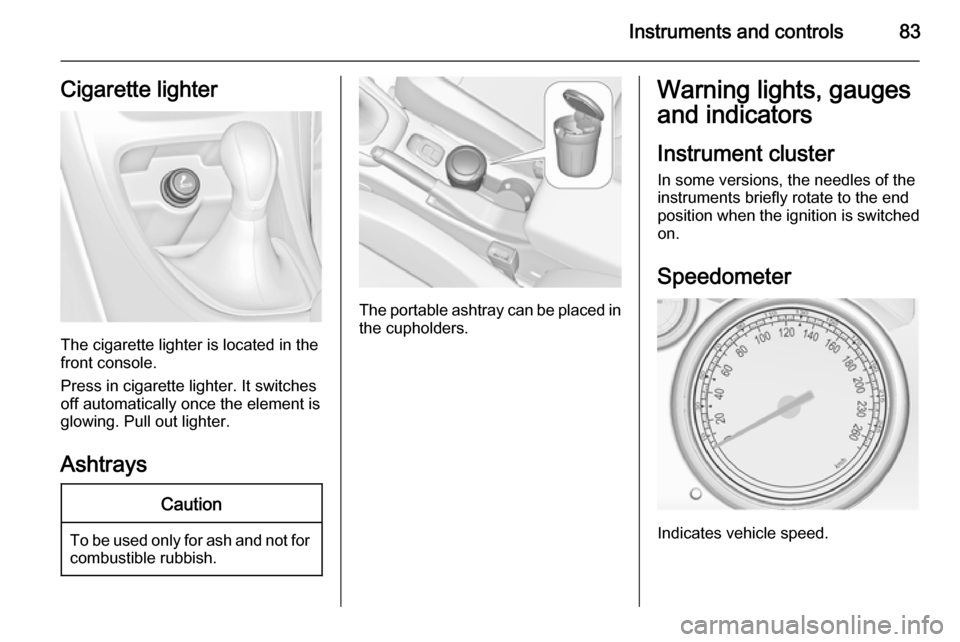
The cigarette lighter is located in the
front console.
Press in cigarette lighter. It switches off automatically once the element is
glowing. Pull out lighter.
Ashtrays
Caution
To be used only for ash and not forcombustible rubbish.
The portable ashtray can be placed inthe cupholders.
Warning lights, gauges
and indicators
Instrument cluster
In some versions, the needles of the
instruments briefly rotate to the end
position when the ignition is switched
on.
Speedometer
Indicates vehicle speed.
Page 89 of 247
Instruments and controls87
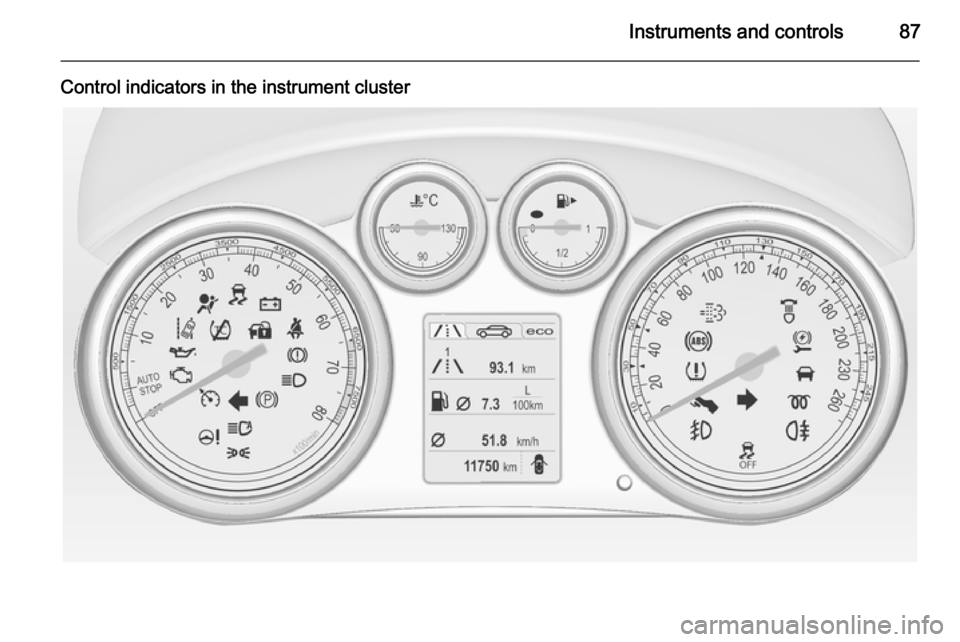
Control indicators in the instrument cluster
Page 96 of 247

94Instruments and controlsInformation displaysDriver Information Centre The Driver Information Centre (DIC)
is located in the instrument cluster
between speedometer and
tachometer.
The following main menus can be
indicated in the Display and selected by pushing the MENU button on the
turn signal lever. Menu symbols are
indicated in the top line of the display:■ Vehicle Information Menu X
■ Trip/Fuel Information Menu W
■ ECO Information Menu s
Some of the displayed functions differ
when the vehicle is being driven or at a standstill. Some functions are only
available when the vehicle is being
driven.
Vehicle personalisation 3 102.
Memorised settings 3 20.
Selecting menus and functions
The menus and functions can be selected via the buttons on the turn
signal lever.Press the MENU button to switch
between the menus or to return from
a submenu to the next higher menu
level.
Turn the adjuster wheel to highlight a
menu option or to set a numeric value.
Page 151 of 247

Driving and operating149
dynamic vehicle condition and
changes the settings for suspension
to SPORT mode to increase vehicle
stability.
When the driving characteristic or the
dynamic vehicle state returns to the
former state, DMC will change the
settings to the preselected driving
mode.
Personalised settings in the
SPORT mode The driver can select the functions of
the SPORT mode when SPORT
button is pressed. These settings can
be changed in the menu Settings in
the Info-Display. Vehicle
personalisation 3 102.Driver assistance
systems9 Warning
Driver assistance systems are
developed to support the driver
and not to replace the driver's
attention.
The driver accepts full
responsibility when driving the
vehicle.
When using driver assistance
systems, always take care
regarding the current traffic
situation.
Cruise control
The cruise control can store and
maintain speeds of approx. 20 to
120 mph. Deviations from the stored
speeds may occur when driving uphill or downhill.
For safety reasons the cruise controlcannot be activated until the foot
brake has been operated once.
Activating in first gear is not possible.
Do not use the cruise control if it is not advisable to maintain a constant
speed.
With automatic transmission, only
activate cruise control in automatic
mode.
Control indicator m 3 93.
Switching on
Press button m, control indicator m in
instrument cluster illuminates white.
Page 152 of 247

150Driving and operating
ActivationAccelerate to the desired speed and
turn thumb wheel to SET/-, the
current speed is stored and
maintained. Control indicator m in
instrument cluster illuminates green.
Accelerator pedal can be released.
Vehicle speed can be increased by depressing the accelerator pedal.
When the accelerator pedal is
released, the previously stored speed
is resumed.
Cruise control remains activated
while gearshifting.
Increase speed With cruise control active, hold thumb
wheel turned to RES/+ or briefly turn
to RES/+ repeatedly: speed
increases continuously or in small
increments.
Alternatively accelerate to the desired speed and store by turning to SET/-.
Reduce speed
With cruise control active, hold thumb wheel turned to SET/- or briefly turn to
SET/- repeatedly: speed decreases
continuously or in small increments.
Deactivation
Press button y, control indicator m in
instrument cluster illuminates white.
Cruise control is deactivated. Last
used set speed is stored in memory
for later speed resume.
Automatic deactivation:
■ vehicle speed below approx. 20 mph,
■ vehicle speed above approx. 125 mph,
■ the brake pedal is depressed,
■ the clutch pedal is depressed for a few seconds,
■ selector lever in N,
■ engine speed in a very low range,
■ the Traction Control system or Electronic Stability Control is
operating.
Resume stored speed Turn thumb wheel to RES/+ at a
speed above 20 mph. The stored
speed will be obtained.
Switching off
Press button m, control indicator m in
instrument cluster extinguishes. The
stored speed is deleted.
Pressing button L for activating
speed limiter or switching off the
ignition also switches off cruise
control and deletes the stored speed.
Page 155 of 247

Driving and operating153
Selecting the alert sensitivityThe alert sensitivity can be set to
near, medium or far.
Press button V, the current setting is
shown on the Driver Information
Centre. Press button V again to
change the alert sensitivity.
Alerting the driver
A green illuminated vehicle ahead
control indicator A lights up in the
instrument cluster when the system
has detected a vehicle in the driving
path.When the distance to a preceding
moving vehicle gets too small or when
approaching another vehicle too
rapidly and a collision is imminent, the
collision alert symbol pops up in the
Driver Information Centre.
Simultaneously a warning chime
sounds. Depress the brake pedal, if it
is required by the situation.
Deactivation
The system can be deactivated.
Press button V as often as the
following message appears in the
Driver Information Centre.
Page 170 of 247

168Driving and operatingsigns. Do not ignore traffic signs
which are not displayed by the
system.
The system does not discern any
other than the conventional traffic signs that might give or end a
speed limit.
Do not let this special feature
tempt you into taking risks when
driving.
Always adapt speed to the road
conditions.
The driver assistance systems do not relieve the driver from full
responsibility for vehicle
operation.
Lane departure warning
The lane departure warning system
observes the lane markings between
which the vehicle is driving via a front camera. The system detects lane
changes and warns the driver in the
event of an unintended lane change
via visual and acoustic signals.
Criteria for the detection of an
unintended lane change are:
■ no operation of turn signals
■ no brake pedal operation
■ no active accelerator operation or speeding-up
■ no active steering
If the driver is performing these
actions, no warning will be issued.
Activation
The lane departure warning system isactivated by pressing the ) button.
The illuminated LED in the button
indicates that the system is switched
on. When the control indicator ) in
the instrument cluster illuminates
green, the system is ready to operate.
The system is only operable at
vehicle speeds above 35 mph and if
lane markings are available.
When the system recognises an
unintended lane change, the control
indicator ) changes to yellow and
flashes. Simultaneously a chime
sound is activated.
Deactivation
The system is deactivated by
pressing ) button, the LED in the
button extinguishes.
Page 198 of 247

196Vehicle care
No.Circuit48Radiator fan49Fuel pump50Headlamp levelling, adaptive
forward lighting51–52Auxiliary heater, diesel engine53Transmission control module,
Engine control module54Vacuum pump, instrument
panel cluster, heating ventila‐
tion, air conditioning system
After having changed defective fuses,
close the fuse box cover and press
until it engages.
If the fuse box cover is not closed
correctly, malfunctions may occur.
Instrument panel fuse box
In left-hand drive vehicles, the fuse
box is behind the storage
compartment in the instrument panel.
Open the compartment and push it to the left to unlock. Fold the
compartment down and remove it.
In right-hand drive vehicles, the fuse
box is located behind a cover in the
glovebox. Open the glovebox, then
open the cover and fold it down.
Page 222 of 247

220Vehicle care
The instrument cluster and the
displays should only be cleaned using
a soft damp cloth. If necessary use a
weak soap solution.
Clean fabric upholstery with a
vacuum cleaner and brush. Remove
stains with an upholstery cleaner.
Clothing fabrics may not be
colourfast. This could cause visible
discolourations, especially on light-
coloured upholstery. Removable
stains and discolourations should be
cleaned as soon as possible.
Clean seat belts with lukewarm water or interior cleaner.Caution
Close Velcro fasteners as open
Velcro fasteners on clothing could damage seat upholstery.
The same applies to clothing with
sharp-edged objects, like zips or
belts or studded jeans.
Plastic and rubber parts
Plastic and rubber parts can be
cleaned with the same cleaner as
used to clean the body. Use interior cleaner if necessary. Do not use any
other agent. Avoid solvents and petrol in particular. Do not use high-
pressure jet cleaners.
Page 244 of 247

242
Headlight range adjustment ......111
Headlights................................... 108
Headlights when driving abroad 111
Head restraint adjustment .............8
Head restraints ............................ 44
Heated mirrors ............................. 29
Heated rear window ..................... 32
Heated steering wheel .................77
Heating ........................................ 52
Heating and ventilation system . 121
High beam ........................... 93, 109
High beam assist ..................93, 110
Hill start assist ........................... 145
Horn ....................................... 13, 77
I
Identification plate .....................224
Ignition switch positions .............132
Immobiliser ............................ 27, 93
Indicators ...................................... 83
Information displays...................... 94
Instrument cluster ........................83
Instrument panel fuse box .........196
Instrument panel illumination .....193
Instrument panel illumination control .................................... 117
Instrument panel overview ........... 10
Interactive driving system ...........147
Interior care ............................... 219
Interior lighting ............................ 117Interior lights ...................... 117, 193
Interior mirrors .............................. 29
Interruption of power supply ......141
Introduction .................................... 3
ISOFIX child restraint systems ....67
J
Jump starting ............................. 214
K
Key, memorised settings ..............20
Keys ............................................. 18
Keys, locks ................................... 18
L
Lane departure warning .......91, 168
Lashing eyes ............................... 74
Light switch ................................ 108
Load compartment ................23, 71
Load compartment fuse box ......197
Loading information .....................75
Low fuel ....................................... 92
M
Malfunction indicator light ............89
Manual anti-dazzle ......................29
Manual mode ............................. 140
Manual transmission .................. 142
Memorised settings ......................20Mirror adjustment ........................... 9
Misted light covers .....................117
N New vehicle running-in ..............132
Number plate light .....................192
O Object detection systems ...........155
Odometer ..................................... 84
Oil, engine .......................... 222, 226
Operate pedal ............................... 89
Outside temperature ....................80
Overrun cut-off ........................... 134
P Parking ................................ 17, 136
Parking assist ............................ 155
Parking brake ............................ 143
Parking lights ............................. 116
Particulate filter ........................... 137
Performance .............................. 230
Performing work ........................178
Pollen filter ................................. 129
Power outlets ............................... 82
Power seat adjustment ................50
Power steering.............................. 91
Power steering fluid ....................181
Power windows ............................ 30